
Description
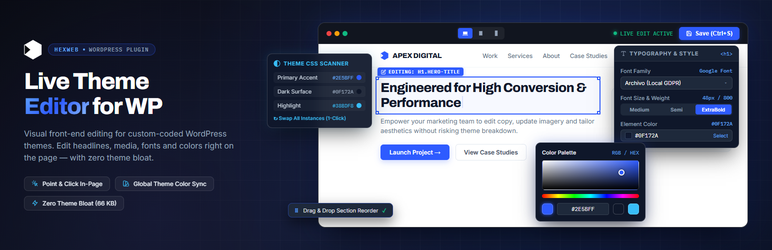
Custom themes are fast and look exactly as designed, but clients can’t change a headline without a developer. Hexweb Live Theme Editor adds a visual editing layer on top of any theme:
- Click any text on the page and type.
- Replace images and background images from the Media Library.
- Change colours, fonts, sizes and weights per element.
- Recolour the whole site: the plugin scans the theme’s CSS, lists every colour and font, and swaps them everywhere at once.
- Duplicate, move, hide and delete blocks and sections, and copy a section from one page to another.
- Preview and edit at desktop, tablet and mobile sizes; tablet/mobile style changes apply only on those screens.
- Drag and drop blocks into a new order.
- Google Fonts are hosted on your own site (GDPR-friendly).
- Header, footer and navigation edits apply on every page; everything else on the page you’re on.
Lightweight by design: visitors get no editor JavaScript or CSS at all. The editor (about 66 KB) loads only for an administrator in edit mode.
Edits are stored as a separate layer and applied when the page is rendered. Theme files are never modified. Deactivate the plugin and the site is exactly what the theme renders.
Hexweb Live Theme Editor is made by Hexweb (https://hexweb.net/), the WordPress studio of Svetoslav Kodzhamanov. Questions about the plugin: s.kodzhamanov@hexweb.net, or the support forum here on WordPress.org.
Usage
- Log in as an administrator and open any page.
- Click “Live Edit” in the admin bar.
- Click an element to edit it. Ctrl+S saves.
- Tools Live Editor shows every edited page, with undo, clear and export/import.
Add ?hxle_off=1 to any URL to see the page without edits (admins only).
External services
This plugin can connect to Google Fonts, but only when you pick a Google font in the editor or in the site-wide font remap.
- What is sent and when: when you save edits that use a Google font, your server requests the font stylesheet and font files from fonts.googleapis.com and fonts.gstatic.com once, and stores them in wp-content/uploads/hxle-fonts/. Only the font family names and weights are sent. Visitors’ browsers then load the fonts from your own site and never contact Google.
- While an administrator is editing, the editor previews fonts by loading them from fonts.googleapis.com in that administrator’s browser.
- If you turn off “Host Google Fonts on this site” in Tools > Live Editor, visitors’ browsers load the fonts from Google directly.
Google Fonts is provided by Google LLC: Terms of Service, Privacy Policy.
No other external service is used. The plugin collects no data and sends nothing about your site or visitors anywhere.
FAQ
-
Does it work with any theme?
-
It is made for custom-coded (classic PHP) themes. It edits the HTML the theme outputs, so it also works on most other themes, but page builders and block themes already have their own editors.
-
What happens if I deactivate the plugin?
-
The site shows exactly what the theme renders. Your edits stay stored and come back when you activate it again. Deleting the plugin removes all of its data.
-
What if the theme changes later?
-
Every edit remembers the element it belongs to. If the theme’s markup changes and that element can no longer be found safely, the edit is skipped (never applied to the wrong element) and listed under “Not placed” in Tools > Live Editor.
-
Some edits do not show for logged-out visitors. Why?
-
Some themes show different markup to logged-in users (for example a “My account” button instead of “Sign up”). You edit the page as an administrator, so an edit on an element that visitors never see cannot be shown to them. Colour and font changes on an element with a unique class still follow it.
Reviews
There are no reviews for this plugin.
Contributors & Developers
“Hexweb Live Theme Editor” is open source software. The following people have contributed to this plugin.
Contributors
Translate “Hexweb Live Theme Editor” into your language.
Interested in development?
Browse the code, check out the SVN repository, or subscribe to the development log by RSS.
Changelog
1.2.1
- Renamed to Hexweb Live Theme Editor (slug and text domain hexweb-live-theme-editor). Export files from earlier versions still import.
1.2.0
- The editor is now a shared core (editor-core.js) plus a small WordPress adapter (editor-wp.js). No change in behaviour; the same editor will power the HTML-site edition.
1.1.1
- Lighter on every request: the compiled colour/font CSS and the edited-pages index are no longer autoloaded, and pages with a colour or font remap no longer read the full parsed theme stylesheet cache.
- A leftover compiled CSS copy is removed when no colours or fonts are remapped.
1.1.0
- Colour and font edits now follow an element whose text differs for logged-out visitors (matched by its unique tag and class).
- Plugin styles are printed through the WordPress style API.
- Self-hosted fonts are written through the WordPress filesystem API.
- Uninstall also removes the self-hosted font files.
- Stricter input handling and escaping; translator comments.
1.0.0
- Device preview (desktop, tablet 820px, mobile 390px) with per-device style overrides and “hide on mobile/tablet”.
- Self-hosted Google Fonts, on by default (Tools > Live Editor > Fonts).
- Drag-and-drop reordering, vertical and horizontal.
- Moving a block back to its original place no longer stores an order change.
0.2.0
- Blocks and sections: duplicate (Ctrl+D), move up/down (Alt+arrows), hide/show, delete copies, copy and paste between pages.
- Floating block toolbar on the selected element; “Select the whole section” shortcut.
- Panel can dock left or right.
0.1.0
- First version: text, images, background images, per-element styles, site-wide palette and font remap, page/site-wide scopes, undo history, export/import.