

Description
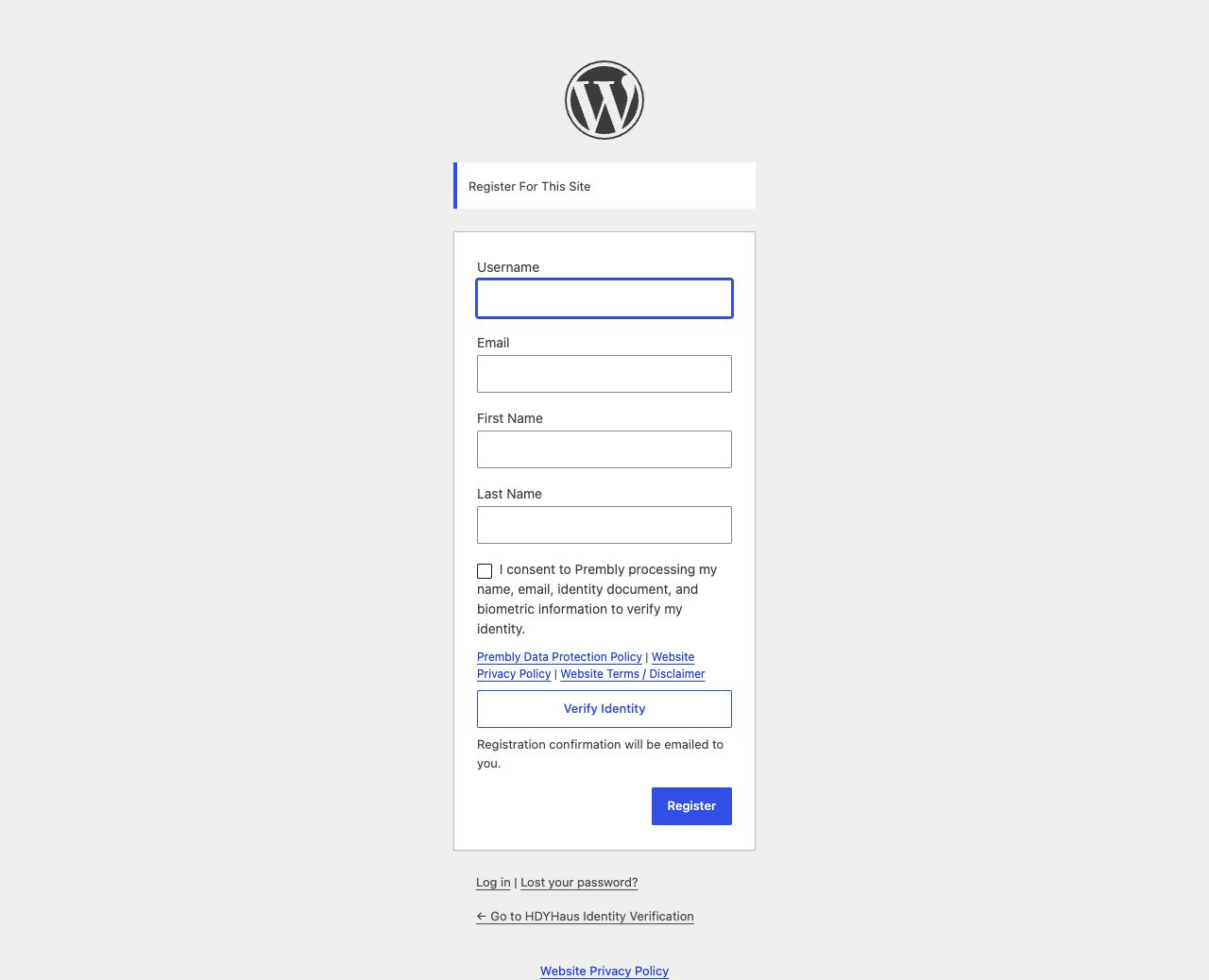
HDYHaus Identity Verification adds identity verification to the default WordPress registration page. When a provider is enabled, WordPress creates the account only after the provider confirms a successful verification.
HDYHaus Identity Verification is a verification gate, not a membership suite. It does not replace the registration form, add payment processing, restrict content, or create membership levels.
Features
- Adds identity verification to
wp-login.php?action=register. - Confirms the result server-side before allowing account creation.
- Binds each verification to the submitted email, configured widget, and one-time registration attempt.
- Prevents a completed verification session from being reused for another account.
- Prevents the same verified identity document from creating another account, even after account deletion.
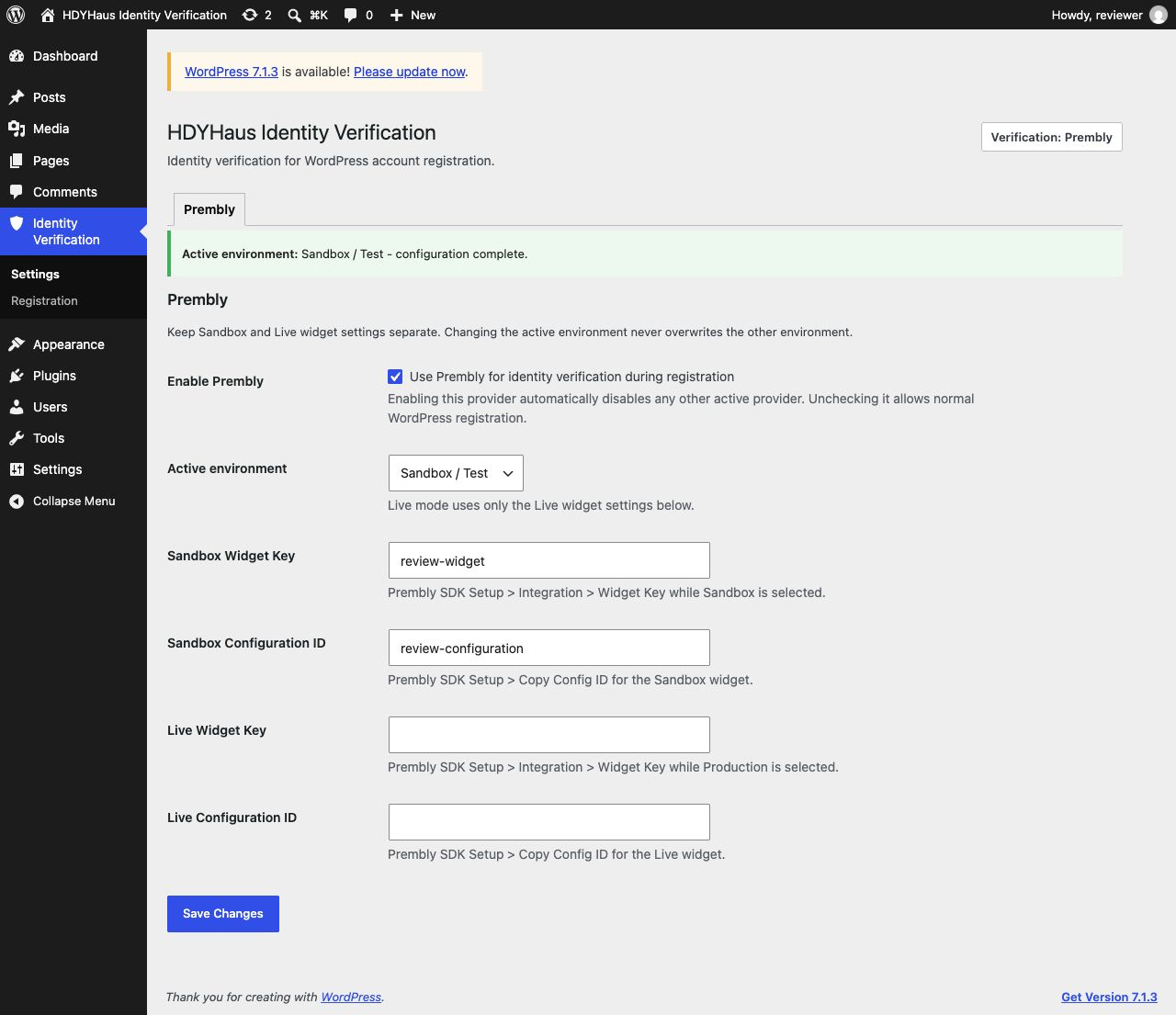
- Keeps Sandbox and Live Prembly credentials separate.
- Supports an optional same-site success redirect with email activation instructions.
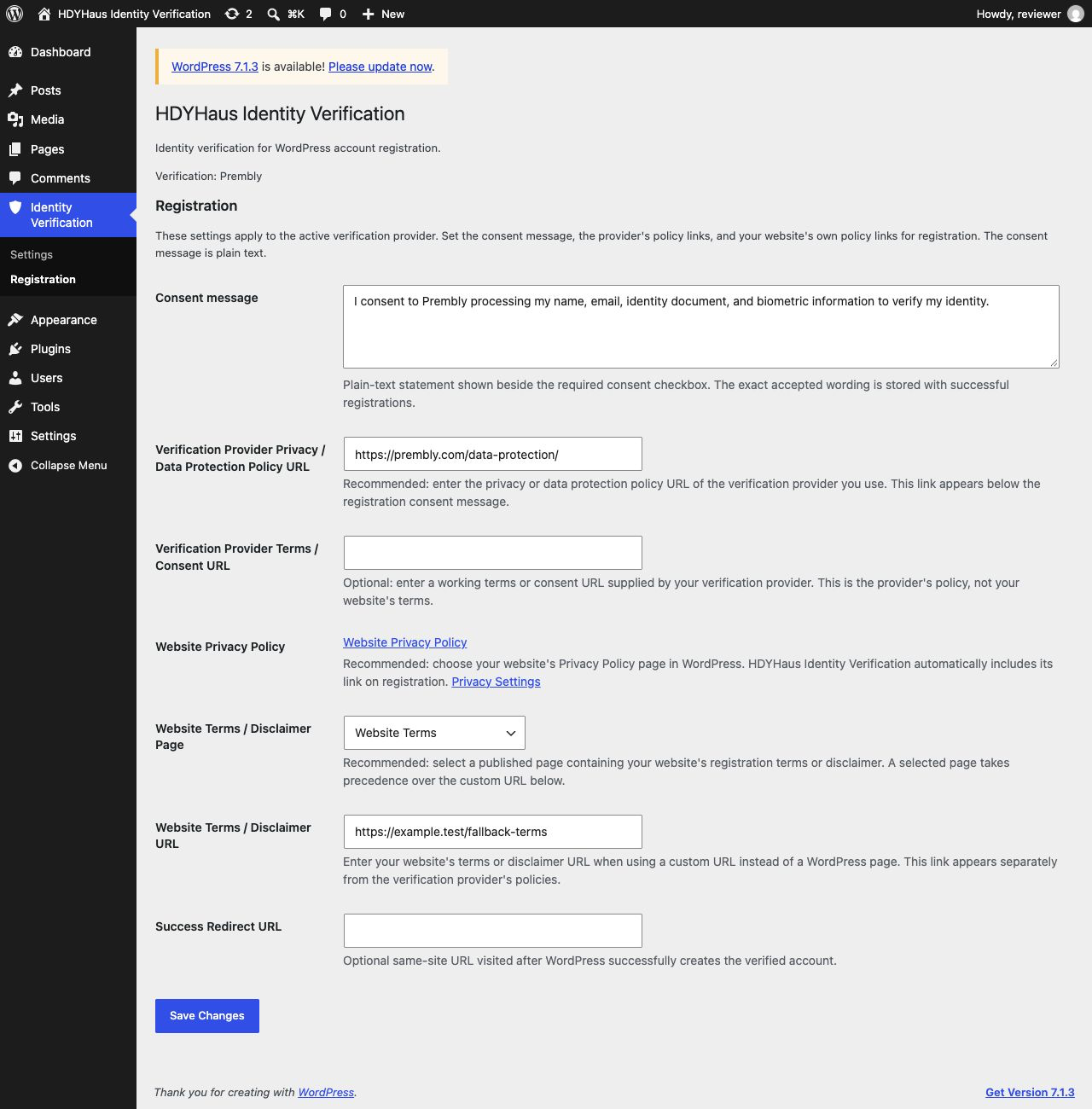
- Lets site owners customize the plain-text consent message, provider policy links, and a website terms/disclaimer page or URL.
- Stores normalized verification metadata in the WordPress user account.
- Integrates with WordPress personal data export and erasure tools.
- Uses a provider adapter architecture, with Prembly as the first provider.
HDYHaus Identity Verification supports identity verification and KYC workflows. Installing it does not by itself make a website compliant with any law or regulatory framework. Site owners remain responsible for their verification policy, lawful basis, privacy notice, retention period, and provider configuration.
External Service: Prembly
This plugin connects to Prembly, an external identity verification service, when Prembly is enabled by a site administrator.
The Prembly browser SDK is loaded from https://js.prembly.com/v1/inline/widget-v3.js on the default WordPress registration page. When a registrant selects Verify Identity, HDYHaus Identity Verification sends their first name, last name, email address, a temporary user reference, the configured Widget Key, and Configuration ID to Prembly. Prembly’s verification interface may collect identity document images, selfies, biometric information, device information, and IP-derived location information according to the checks selected by the site administrator.
After the verification interface reports completion, the site’s WordPress server requests the corresponding session from https://backend.prembly.com/api/v1/checker-widget/sdk/sessions/{session_id}/. HDYHaus Identity Verification uses that response to confirm the session status, email address, widget configuration, session ID, and verified document identity. The complete Prembly report remains available in the site owner’s Prembly dashboard; HDYHaus Identity Verification stores only normalized verification metadata and site-specific one-way fingerprints in WordPress.
This service is provided by Prembly Inc:
- Prembly: https://prembly.com/
- Prembly Data Protection Policy: https://prembly.com/data-protection/
The Data Protection Policy is the default provider policy link. Site administrators can replace it and optionally add a working provider terms or consent URL under Identity Verification > Registration. When WordPress has a website Privacy Policy configured, HDYHaus Identity Verification displays that link separately. Website terms or a disclaimer can also be linked by selecting a published WordPress page or entering a custom URL.
Screenshots
Installation
- Install and activate HDYHaus Identity Verification.
- In WordPress, enable Settings > General > Anyone can register.
- In Prembly, create separate SDK Setup widgets for Sandbox and Production as needed.
- In WordPress, open Identity Verification > Settings > Prembly.
- Add the Widget Key and Configuration ID for the appropriate environment.
- Choose Sandbox or Live and select Enable Prembly.
- Add identity verification information to the site’s privacy policy. Suggested text is available under Settings > Privacy.
- Test the full registration and password-setup email flow before opening registration to visitors.
No Prembly Secret API Key, Organisation ID, or App ID is required for the SDK session confirmation used by this plugin.
FAQ
-
Does HDYHaus Identity Verification replace the WordPress registration form?
-
No. Version 0.9.9 integrates with the default WordPress registration screen. It does not currently add verification to WooCommerce, BuddyPress, MemberPress, Ultimate Member, or other custom registration forms.
-
What happens when Prembly is disabled?
-
HDYHaus Identity Verification registers no verification hooks or Prembly scripts. Normal WordPress registration continues, and saved Prembly settings are preserved.
-
Does this plugin send data to a third party?
-
Yes, when Prembly is enabled and a registrant starts verification. See the External Service: Prembly section for the exact service, data flow, and legal links.
-
Are secret API keys required or exposed?
-
No. This integration uses Prembly’s Widget Key and Configuration ID in the browser. The session confirmation endpoint uses the session ID and does not require the Secret API Key, Organisation ID, or App ID.
-
Does HDYHaus Identity Verification store identity documents or selfies in WordPress?
-
No. For a successfully created account, HDYHaus Identity Verification stores whether verification succeeded, the normalized verification status, verification time, provider slug, Prembly session reference, site-specific one-way session and identity hashes, and the accepted consent time, wording, and version. Documents, document numbers, selfies, biometric information, raw Prembly responses, and detailed reports are processed by Prembly and are not copied into WordPress by this plugin.
-
Can the same verified person create more than one account?
-
No. HDYHaus Identity Verification derives a site-specific one-way fingerprint from the verified document country, type, and number returned by Prembly. It never stores the document number. The fingerprint is retained after privacy erasure or account deletion so the same identity cannot register again.
-
Can verification metadata be exported or erased?
-
Yes. HDYHaus Identity Verification integrates with Tools > Export Personal Data and Tools > Erase Personal Data. Erasure retains one-way session-reference and identity hashes to prevent reuse of a completed verification or identity. Site owners should establish an appropriate retention policy and confirm any separate deletion obligations in Prembly.
-
Can I change the consent wording and provider links?
-
Yes. Open Identity Verification > Registration to edit the plain-text consent message and the verification provider’s privacy/data-protection and optional terms/consent URLs. The website’s WordPress Privacy Policy is displayed separately when configured under Settings > Privacy. For your website’s own terms or disclaimer, select a published WordPress page or enter a custom URL. HDYHaus Identity Verification stores the exact accepted wording and a version fingerprint tied to the displayed disclosure for successful registrations.
-
Does HDYHaus Identity Verification support multisite?
-
This release is tested for single-site WordPress installations. Multisite and network activation have not been verified and are not currently supported.
-
Where can I get support?
-
Report plugin bugs at https://github.com/HDYHaus/identity-verification/issues/. For verification widget configuration, billing, or provider reports, contact Prembly through https://prembly.com/.
-
Does this make my site KYC compliant?
-
No plugin can guarantee legal or regulatory compliance. HDYHaus Identity Verification provides an identity-verification gate that can support a site’s KYC workflow. Obtain appropriate legal advice for the site’s countries, audience, and use case.
Reviews
There are no reviews for this plugin.
Contributors & Developers
“HDYHaus Identity Verification” is open source software. The following people have contributed to this plugin.
Contributors
Translate “HDYHaus Identity Verification” into your language.
Interested in development?
Browse the code, check out the SVN repository, or subscribe to the development log by RSS.
Changelog
0.9.9
- Link the HDY Haus author credit to the plugin landing page.
- Use Prembly’s Data Protection Policy and remove the obsolete default Terms link.
- Correct saved legacy provider policy defaults while retaining custom URLs.
- Refresh listing screenshots to match the Identity Verification menu label.
0.9.8
- Rename the plugin to HDYHaus Identity Verification.
- Use a persistent plugin secret for identity fingerprints independent of WordPress authentication salts.
- Require a valid registration-form nonce before processing verification fields.
- Update public repository and support links.
0.9.7
- Move global registration settings to HDYHaus Identity Verification > Registration.
- Clarify recommended verification provider privacy and terms links and the website Privacy Policy configuration.
- Add a published WordPress page selector or custom URL for website terms/disclaimers, included in the consent record fingerprint.
0.9.6
- Create the settings option directly on its first save so values remain stored after cache flushes and plugin deactivation.
0.9.5
- Preserve the internal settings-tab marker so fresh installations remain correct when WordPress sanitizes a new option twice.
0.9.4
- Fix the settings handler so WordPress sanitizes each submission exactly once and persists every field after reload.
0.9.3
- Fix saving provider activation and Prembly widget settings after a fresh installation.
- Route settings updates through a nonce-protected HDYHaus Identity Verification admin handler.
0.9.2
- Prevent one verified identity document from creating multiple WordPress accounts.
- Retain only a site-specific one-way identity fingerprint after privacy erasure or account deletion.
- Fail closed when a completed provider response lacks a stable document identity.
0.9.1
- Add a read-only HDYHaus Identity Verification verification and consent record to WordPress user profile screens for administrators.
- Show when privacy erasure has removed verification details while retaining replay protection.
0.9.0
- Require the Prembly session ID, widget configuration, and end-user email to match before registration.
- Add explicit registrant consent before opening identity verification.
- Allow site owners to customize consent wording and provider legal links safely.
- Add WordPress privacy policy guidance and personal data export and erasure support.
- Correct the Prembly external-service disclosure and current credential requirements.
- Add provider response and privacy integration tests with repeatable release packaging.
0.1.6
- Use Prembly’s session-ID-only status lookup and remove unused API key, Organisation ID, and App ID requirements.
0.1.5
- Apply a same-site success redirect with email activation instructions.
0.1.4
- Add exclusive provider tabs, provider resolution, and provider-specific advanced settings.
0.1.3
- Add a top-level HDYHaus Identity Verification admin area, Plugins screen settings link, and separate Sandbox and Live credentials.
0.1.2
- Use Prembly’s widget-specific key and current V3 browser SDK.
0.1.1
- Support Prembly V3 SDK session callbacks and server-side session confirmation.
0.1.0
- Initial development scaffold.