

Description
Gloty translates your WordPress site with AI machine translation, then stores every translation in your own database and serves it from there. Rendering a translated page never calls a remote service — page delivery stays local and deterministic even if the translation service is slow or unreachable.
Serving those pages is built to be cheap. Gloty compiles your translations into a PHP cache file that your server’s OPcache holds in shared memory, so once it is warm a translated page view costs no database queries for translation at all, and the translations take almost no memory in the request. That is aimed squarely at ordinary shared hosting with no object cache, which is where a translation plugin normally slows a site down most. Where the technique is unavailable, Gloty serves from the database instead and the page is still correct.
The picker offers 38 languages, each with the right hreflang code emitted for it. That list is deliberately shorter than it could be: it is the set both AI engines’ vendors say their models support, rather than every language code in existence. A translation you cannot judge the quality of is worth less than one you can, so Gloty offers the ones where the engines are known to be strong, and every translation it produces is editable by hand.
Producing a translation does require an external service, because machine translation is not something WordPress can do locally. Gloty sends the text that needs translating to the hosted Gloty translator service, which translates it and returns the result to your site in the background. The results land in your WordPress database, are editable by hand, and keep serving with no further external calls.
Key Features:
- 38 languages — the set both AI engines’ vendors list as supported, each with the right hreflang code
- Your database, your translations — stored locally in WordPress, never fetched remotely at render time
- Fast on slow hosting — translations compile into a cache your server holds in memory, so serving a translated page costs no database queries once warm; it falls back to the database safely if your host cannot do that
- Automatic page translation — captures page output, extracts translatable text, queues it for translation
- Entity-aware — posts, pages, taxonomies, and template strings are tracked as distinct sources with stale detection
- Edit any translation — review and correct translations from Gloty Translations
- Prepare a language before publishing it — translate in the background, check it over, then show it to visitors
- Let someone correct translations without making them an administrator — optionally limited to one language
- A different image per language — for screenshots, diagrams and packaging that carry words
- The language switcher in your menu — as ordinary menu items your theme styles, plus a block
- A sitemap of your translated pages — so search engines can actually find them
- Translate content that loads after the page — load-more, AJAX filters and search panels
- Manual edits are protected — machine sync never silently overwrites a human correction
- Glossary — terms that must never be translated, or that must always render a specific way per language, promotable in one click from any translation you are looking at
- SEO-friendly — hreflang tags, translated meta, clean /fr/page/ URLs, and optional translated page addresses (/de/ueber-uns/)
- Language switcher — floating widget, footer list, shortcode, or sidebar widget
- Optional browser-language redirect — off by default, crawler-safe, remembered per visitor
- WooCommerce compatible — products, cart, checkout, store AJAX fragments, and order emails sent in the language the customer shopped in
- Gettext integration — translates WordPress, theme, and plugin UI strings
- AI translation engine — OpenAI or Google Gemini, selected for you by the service on every plan
- Background processing — queued dispatch with webhook delivery and a polling fallback
- Export and import — hand a language to a translator as XLIFF or CSV, load their corrections back, or simply take a copy of your translations
- WP-CLI —
wp gloty export,wp gloty import,wp gloty languages - Developer extensible — filters and a REST API
How it works:
- Install Gloty and connect your site to the Gloty translator service
- Add your target languages
- Gloty discovers translatable content from your posts, taxonomies, and template strings
- Translation runs in the background and the results are written to your database
- Visitors get translated pages under language-prefixed URLs (/fr/, /de/, …) and can switch languages from the switcher
Translation requires an external machine-translation service. See External services below for exactly what is sent and to whom.
Documentation: https://wp-shelf.com/gloty/docs/
External services
Gloty cannot produce translations without an external machine-translation service, because machine translation is not something WordPress can do locally. This section describes every external request the plugin makes, what it sends, and when.
Nothing is sent anywhere until you have connected your site and translation has been triggered (by a scan, a Translate action, or scheduled background dispatch). Serving an already-translated page makes no external request at all.
1. The Gloty translator service
All translation work is performed by the hosted Gloty translator service. The plugin does not contact machine-translation providers directly; it sends work to the Gloty service, which selects and calls the translation engine on your behalf and delivers the results back to your site.
- Service host:
https://gloty-api.wp-shelf.com(overridable by defining theGLOTY_SERVICE_URLconstant, for example to point at a self-hosted instance of the service). - What is sent: the source text to be translated (page, post, taxonomy, and template strings from your site), the source and target language codes, your site URL, and a per-site API token and license key used to identify and authenticate your site.
- What is not sent: Gloty does not read text off your cart, checkout, order or account pages, because those are written about one customer rather than for every visitor, and it skips any string carrying an email address that is not your own. If a page of yours shows a customer’s details and you translate it, tell us — that is a gap, not a setting.
- When: on connection verification, while dispatching queued translation batches, when polling for results, and when the service delivers results back to your site over a signed webhook.
- Who: the Gloty translator service, operated by WP Shelf.
- Terms of service: https://wp-shelf.com/terms
- Privacy policy: https://wp-shelf.com/privacy
The Gloty service in turn passes your text to the AI translation engine it selects for the batch — OpenAI or Google Gemini. Their terms apply to that processing:
- OpenAI — https://openai.com/policies/terms-of-use / https://openai.com/policies/privacy-policy
- Google Gemini — https://ai.google.dev/terms / https://policies.google.com/privacy
2. WordPress.org translation packs
When you enable a language, Gloty asks WordPress.org to install the official WordPress and plugin language packs for that locale, using WordPress core’s own updater. This is the same request WordPress itself makes and sends no site content.
Gloty does not send analytics, telemetry, or usage tracking anywhere. The optional browser page-view counter described in the changelog posts to your own site’s REST API and nowhere else: it is not an external request, it carries only the language of the page, and no third party is involved.
Filters
gloty_compiled_map_enabled
Whether Gloty may compile your translations into a PHP cache file for OPcache to hold in memory. The value passed in is Gloty’s own verdict on whether the server can benefit — return false to switch the feature off entirely, in which case translations are served from the object cache, a transient, or the database, exactly as in earlier versions.
add_filter( 'gloty_compiled_map_enabled', '__return_false' );
Returning true forces it on where Gloty could not confirm OPcache is active — useful when opcache.restrict_api hides the OPcache status from plugin code. Do not force it on where OPcache is genuinely off: every request would then compile the cache file from source, which is slower than the database read it replaces.
Defining GLOTY_DISABLE_COMPILED_MAP as true in wp-config.php disables it before any filter can run, and Gloty honours WordPress’s own DISALLOW_FILE_MODS constant without any configuration.
gloty_compiled_map_max_bytes
The largest cache file Gloty will write, in bytes. Default 8 MB. A translation set that would exceed it keeps using the database.
Source code
The admin interface is compiled from JavaScript sources before release. The uncompiled, human-readable sources for everything in build/ ship inside the plugin under src/, together with the build configuration in webpack.config.js and package.json. The bundles are produced by @wordpress/scripts (webpack) via the build script in package.json; no minified or obfuscated code is included without its source.
Security
Found a security issue? Please email hello@wp-shelf.com rather than opening a
public support thread — a forum post is world-readable the moment you send it,
on a plugin installed on other people’s sites. You will get an acknowledgement
within 72 hours, and credit in the changelog unless you would rather not have it.
Screenshots
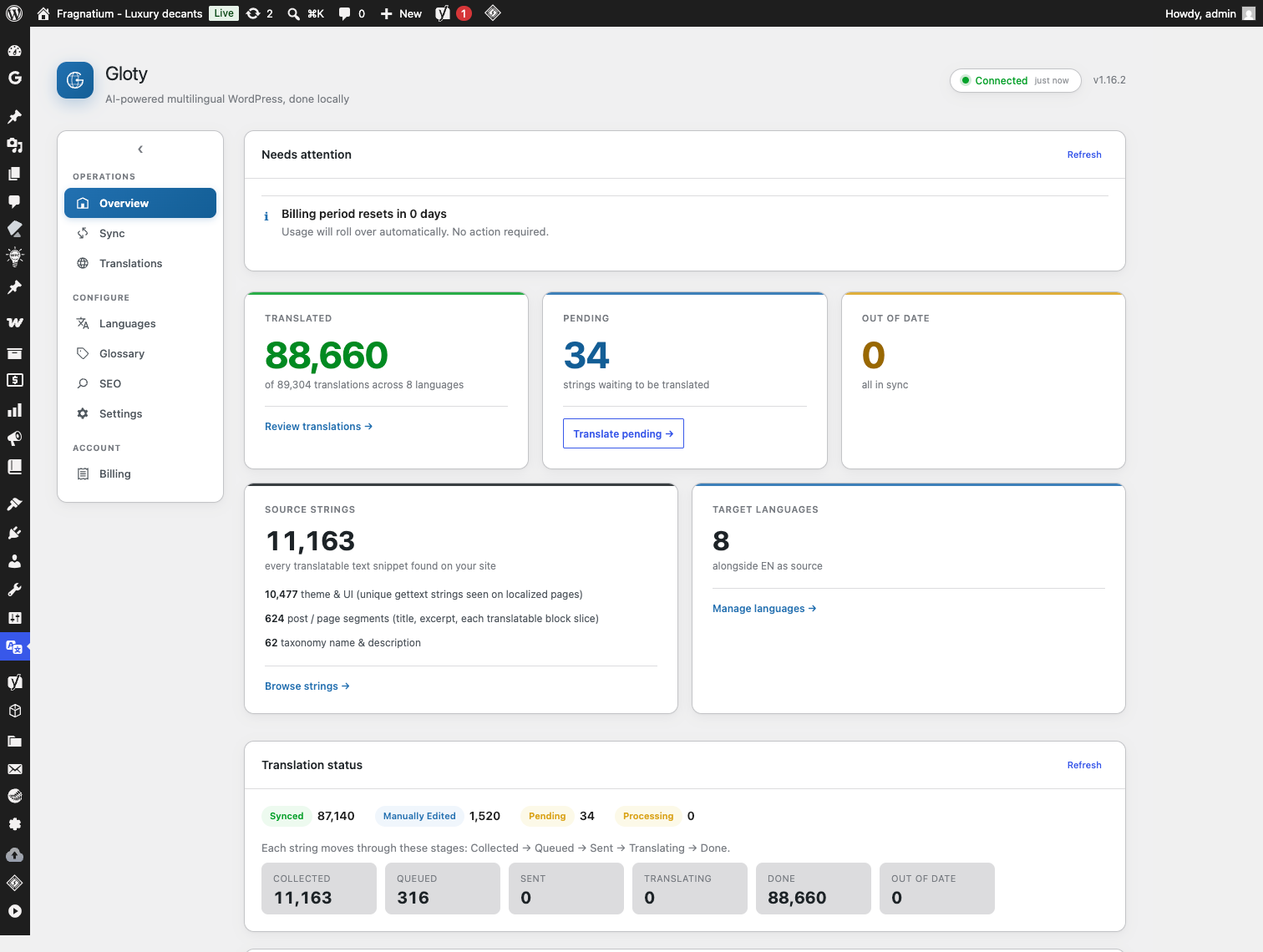
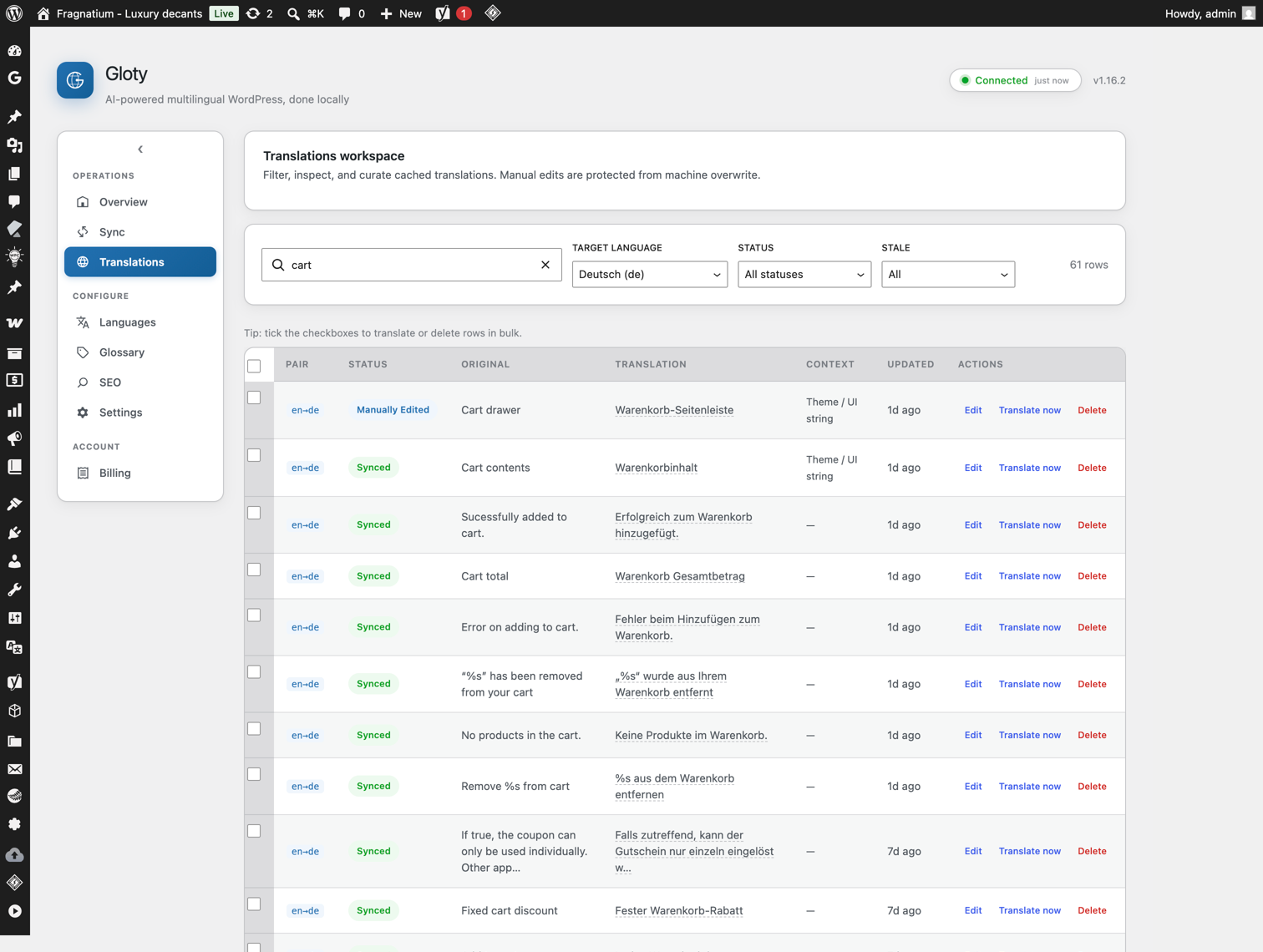
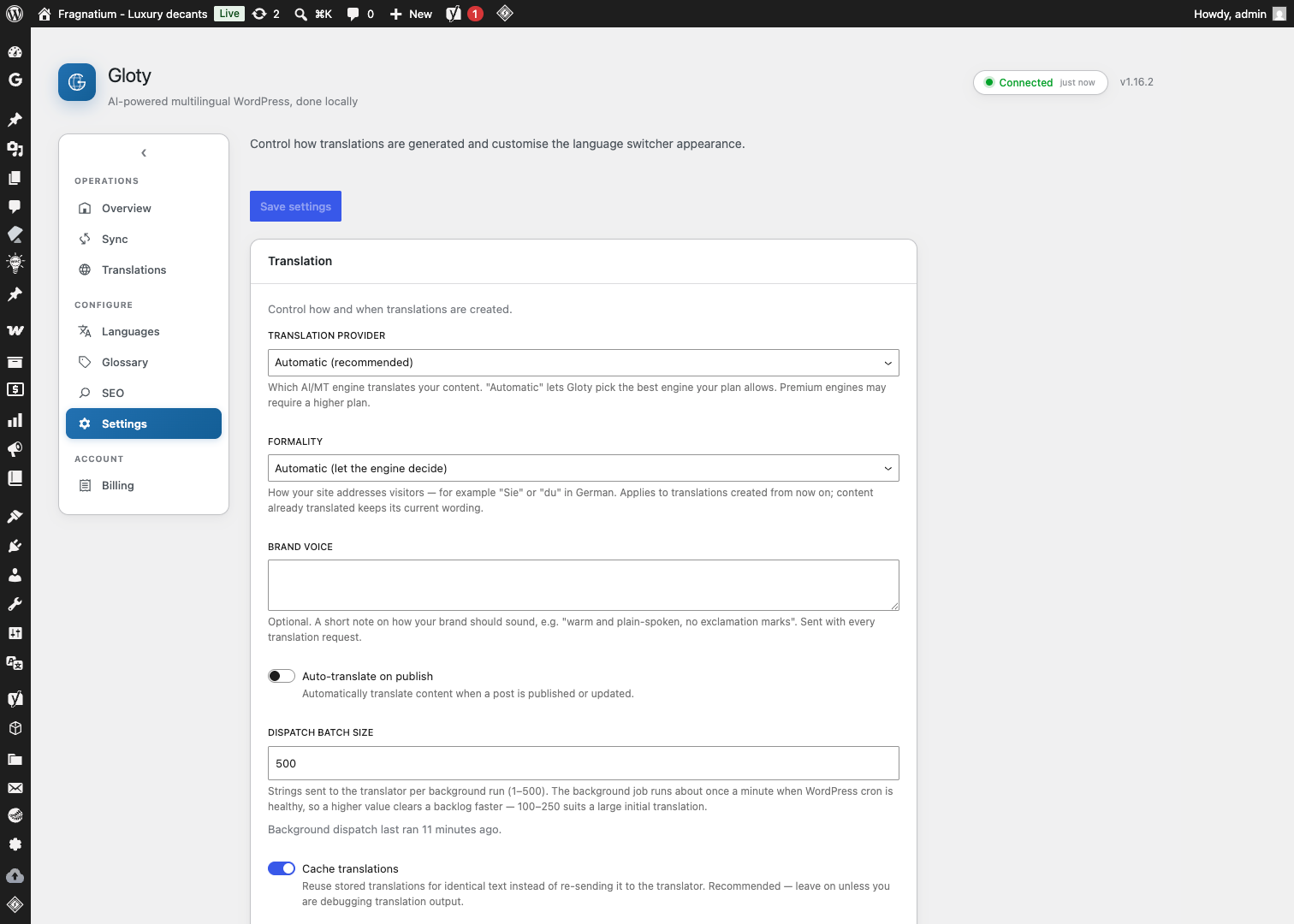
Blocks
This plugin provides 1 block.
- Language switcher
Installation
- Upload the
glotyfolder to/wp-content/plugins/ - Activate the plugin through the ‘Plugins’ menu in WordPress
- Go to Gloty > Connection and connect your site to the Gloty translator service
- Add your target languages under Gloty > Languages
- Visit your site — translations happen automatically in the background
The setup guide covers each step in more detail: https://wp-shelf.com/gloty/docs/getting-started.html
FAQ
-
Do I need an account?
-
Yes. Producing translations requires a connection to the Gloty translator service, set up under Gloty Connection. There is a free tier. Without a connection, Gloty can still store, manage, and serve translations you already have, but it cannot create new ones.
-
How much does it cost?
-
The plugin itself is free and GPL-licensed. Translation runs through the Gloty service, which gives you a one-time free allowance to try it and paid plans for higher volume and more sites. Every plan translates on the same AI engines. Your existing translations continue to serve regardless of plan or status, because they live in your own database.
-
Are translations stored on an external server?
-
Your translations are stored in your own WordPress database, and translated pages are served from there with no external call. However, producing a translation in the first place does send the source text to an external machine-translation service — see External services above for exactly what is sent and to whom.
-
My language isn’t in the list. Can you add it?
-
Ask and we will look at it. The list is the set of languages the AI engines’ own vendors say their models support, which is why it is shorter than the language list you may have seen on other plugins. Adding one means checking that the current engines actually handle it rather than just producing confident-looking output, so it is a real answer rather than an automatic yes.
-
Does it work with page builders?
-
Yes. Gloty captures translatable text from rendered output as well as from WordPress entities, so it works with Elementor, Beaver Builder, Divi, and other page builders.
-
Can I edit translations manually?
-
Yes. Go to Gloty Translations, find the string, and edit it. Manual edits are marked as such and are never overwritten by later machine sync.
-
Does it support WooCommerce?
-
Yes. Gloty translates product titles, descriptions, attributes, and the cart and checkout pages, including WooCommerce’s AJAX cart fragments.
Order emails are not translated. They are sent outside the page rendering that Gloty works through, so a customer who ordered in German still receives the confirmation in your site’s source language.
-
What happens to my translations if I deactivate Gloty?
-
Deactivating stops translated URLs from being served but leaves all data in place. Deleting the plugin runs an uninstall routine that removes Gloty’s tables and options, so export anything you want to keep first.
-
Will this slow my site down?
-
Serving a translated page is designed to cost nothing extra. Gloty compiles your translations and your glossary into a PHP cache file kept in your server’s OPcache, so once it is warm a page view runs no database queries to translate, makes no remote call, and holds the translations in shared memory rather than copying them into every request.
The cache is written in the background, never during a visitor’s page view, and rebuilds within about a minute of a translation changing. Until it exists — a fresh install, or just after an edit — pages are served from the database exactly as earlier versions did: correct, just not yet as fast.
If your host has no OPcache, if the uploads directory is not writable, or if a cache file is ever damaged, Gloty notices and serves from the database instead, and reports it under Dashboard Issues. Nothing about this can make a page render incorrectly, only more slowly.
-
Where does Gloty write files?
-
Only one place: a
gloty-cachefolder inside your uploads directory, holding the compiled translation cache described above (withwp-content/cache/glotyas a fallback if uploads is not writable). The folder carries an index.php and .htaccess so the files are not browsable, and each file refuses to output anything if requested directly. Deactivating the plugin deletes them; uninstalling removes the folder too, and only ever removes files Gloty can prove it wrote.
Reviews
There are no reviews for this plugin.
Contributors & Developers
“Gloty – AI Translation & Multilingual” is open source software. The following people have contributed to this plugin.
Contributors
Translate “Gloty – AI Translation & Multilingual” into your language.
Interested in development?
Browse the code, check out the SVN repository, or subscribe to the development log by RSS.
Changelog
1.63.3
- Fixed: a translation that came back with part of Gloty’s own request stuck to its end — text such as
','kind':'headingor','kind':'seo_title','doc':'post:1807after the translated words — is no longer stored or shown. It is a stray piece of the translation service’s instructions, not part of the translation, and it appeared in headings, menu labels, SEO titles and image captions. Gloty now refuses it and asks for that piece of text again, and no longer copies an affected entry onto other pages with the same text. Ordinary text that merely contains the word “kind” or apostrophes is unaffected. A refusal is written to the audit log with the value that was rejected. This fix first shipped as 1.61.1 to a single site and had not reached the 1.62 and 1.63 releases.
1.63.2
- No visible change: on a site with no licence key, the plugin no longer reads the licence server’s address on every admin screen that checks licence state. It was one database query per screen whose result could never be used. The shared WP Shelf code now checks for a key first.
1.63.1
- Fixed: on a phone, Gloty’s navigation took up most of the screen above every page. It was a full-width list, one row per screen — about 280 pixels of a 667-pixel phone, every visit. The links now flow as a compact wrapped row with the group headings dropped, which is the layout the rest of the WP Shelf screens have used since they stopped hiding their navigation on small screens. Nothing is unreachable, and nothing changes on a desktop.
- Fixed: Gloty’s screens faded in even when your system is set to reduce motion. Gloty switches screens without reloading the page, so that fade was the one piece of movement a motion-sensitive user met on every click. “Reduce motion” now turns it off, as it already did for the progress bar and the toasts.
1.63.0
- New: the “Add language” box now warns you when the language you picked covers more than one regional variant. Chinese and Portuguese are one tag each here, and nothing in Gloty chooses between Simplified and Traditional Chinese, or between Brazilian and European Portuguese — the translation engine decides. The warning appears the moment you pick the language, before anything is translated or charged, and says to read the first pages before making that language public. Nothing was removed: every language that was offered before is still offered.
- Fixed: that same box claimed regional variants like en-GB and pt-BR “are supported”. They have not been offered since 1.31.0, when the language list was cut back to the languages both translation engines are documented to handle. It now says so.
1.62.1
- Fixed: after paying for an upgrade, the Billing screen said your plan had been refreshed before it had. Stripe sends you back to WordPress the moment a payment succeeds and confirms it to us separately a moment later, so the screen was announcing a new plan over the old one — and then remembering the old one for up to 15 minutes. It now says the payment was received, keeps checking for about a minute, and confirms the plan only once your licence actually reports it. Closing checkout without paying is acknowledged too, instead of leaving “checkout=cancel” in the address bar with nothing said.
- Fixed: if your browser blocked the checkout tab from opening, the Upgrade button appeared to do nothing at all. It now tells you to allow pop-ups for the site and try again.
- Fixed: the “quota exceeded” notice discarded every reason an upgrade could not start — an unconfigured billing server, a licence that already has a subscription, a blocked tab — so the Upgrade link on it was silently dead. It now says what happened, which matters most at exactly the point translation has stopped.
1.62.0
- New: an optional setting counts page views from the browser, for sites behind a page cache. Cached pages are served without starting PHP, so Gloty never saw those views and the per-language split was both low and unevenly low — the languages your cache served best looked the least popular. Turn on Settings Analytics “Count views from the browser” and a small script reports the view instead, sending only which language the page was in: no IP address, no page address, no referrer, no account and no identifier of any kind, and nothing leaves your site. Server-side counting switches off at the same time, so each view is still counted exactly once. Off unless you turn it on. The trade-offs: a visitor with JavaScript disabled is not counted, and if a plugin combines your site’s JavaScript, exclude the “gloty-page-view-beacon” handle from it.
1.61.0
- New: Analytics now draws the trend as well as the totals. A chart above the table plots views per day across the range you picked, with the busiest day labelled, and each language in the table gains a small trend line of its own. Hover the chart — or focus it and use the arrow keys — to read a single day, including its split by language. Each row’s trend is scaled to its own busiest day, so the shapes compare but the heights do not; magnitude stays in the Views column. On a site with only one day on record the chart says so rather than drawing a line through a single point, and a range with nothing in it says which of the two reasons it is empty.
1.60.0
- New: the “identical to their source” warning now links to the rows it is counting. Translations Flagged “Identical to its source” lists exactly that set, read from the same scan the number was counted with, so you can see what is behind it before deleting anything — deleting a row asks for that text to be translated again and spends your allowance. Product names, codes and text already written in the target language are left out of the list exactly as they are left out of the count.
1.59.0
- Changed:
wp gloty exportnow always writes to standard output, and the--fileoption is gone. Redirect to save it:wp gloty export de > de.xliff, orwp gloty export de --format=csv > de.csv. A plugin should not write files to a path of its own choosing, and the shell already does this better.wp gloty import de.xliffis unchanged.
1.58.4
- Also stop reporting a product name followed by a single ordinary word — “Montale Intense Cafe decant” — as identical to its source. One word beside a name is a label, and it is usually the same word in every language.
1.58.3
- Stop reporting a translation as identical to its source when it is a product name, a code, or text already written in that language. Those are correctly the same in both languages, and removing them to ask again would have spent your allowance for the same words back.
- Remove exactly the rows that were reported, and no others.
1.58.2
- Stop reading text off cart, checkout, order and account pages, and stop capturing any string that carries an email address other than your own. Those pages are written about one customer, and their text was being sent to the translation service like any other. Translation of those pages is unaffected.
1.58.1
- Refuse a result the translation service sends in a shape that is not text at all, instead of storing the word “Array” as the translation.
1.58.0
- Fixed: a translation that came back as the words
[object Object]— a stray value from a translation provider, not a translation at all — is no longer stored or shown. Gloty now refuses it and asks for that piece of text again. If you have seen those words on your site, the affected entries will fill in on the next sync. - Fixed: when a provider answered with a plain list that was missing an item, every later translation could be saved against the wrong piece of text, so paragraphs appeared under the wrong heading. Gloty now only trusts a plain list when it answers every item exactly once, and re-asks otherwise.
- A refusal is written to the audit log with the value that was rejected, so you can see it happened rather than wondering why a phrase stayed in English.
1.57.0
- Fixed: text a theme writes straight into a plain container — a
<div>,<section>,<header>and so on — was invisible to Gloty. It was never picked up, so it was never translated, and it stayed in the original language on every translated page. A container counts when it holds nothing but text and inline formatting, so page layout is still ignored. - Fixed: image
alttext now shows a translation when Gloty already has one for that exact wording. Gloty still does not queuealttext for translation — that would spend your quota on per-product image descriptions — but where the same words appear in a heading you have already translated, the image now matches the page instead of staying in English.
1.56.0
- New: the names of the products you sell are protected from translation as well as your brands. A fragrance called “Royal Oud” was coming back as “Decantación Real de Oud” in Spanish search results; product names now build the do-not-translate list automatically, and follow along as you publish, rename or unpublish.
- Discovery sets, bundles, samplers and gift sets are deliberately left translatable: a name like “Sweet Addictions Set For Her” describes what is in the box, and shoppers should read it in their own language. Add a rule by hand if you want one of them frozen.
- A protected product name is still only kept where it is capitalised, so “royal oud accords” in your notes copy keeps translating normally.
1.55.1
- A protected term is now only kept inside a sentence when it is capitalised there, so a product name that is also an everyday phrase — “Side Effect” — no longer freezes “that side effect” in the middle of translated copy. Write the rule in lower case if you do want the lower-case form kept.
1.55.0
- New: brand and product names you never want translated are now protected inside a sentence, not only when they are the whole string. A page title like “Royal Oud Decant – Creed” kept the brand in the glossary and still came back translated; it no longer can.
- New: the do-not-translate list builds itself from your store. Every brand in your WooCommerce brand taxonomy, and your own site name, are protected automatically, and the list follows along when you add, rename or remove a brand. Terms you add by hand are never touched.
- Fixed: on sites with more than a few thousand translated template strings per language, some of them quietly rendered in the original language. The serve cache kept an arbitrary slice of the available translations instead of all of them.
1.54.4
- Fixed: an old link to a post or product whose slug has since changed now redirects to its current address in every language, as it already did in the default language. Under a language prefix it used to show a 404.
- Show translations with ampersands and other HTML entities decoded in the Translations table and on the dashboard, as their originals already were.
1.54.3
- Keep the existing translation cache when the server cannot finish writing its replacement.
1.54.2
- Keep WP Shelf navigation and action cards within the screen on mobile, including Gloty’s setup and dashboard.
- Match Gloty’s light-mode accent to its blue product icon.
- Correct connection-error guidance to WP Shelf Gloty Setup.
1.54.1
- Connect an existing WP Shelf account directly during setup with its license key.
- Retry an interrupted site connection without creating a second account.
- Verify the activated license when registering a translator connection, and report incomplete connections accurately.
1.54.0
- Shared JavaScript search, sorting and pagination for admin data tables.
- Preserve inline edits and selection scope while filtering loaded rows.
1.53.7
- Fixed: a sync job the translation service no longer knows — it answers “not found” — stayed at “processing” for good, asked about again every five minutes. It is now marked failed, with the reason, the first time the service says so.
1.53.6
- Fixed: the close button on a notification was labelled in English whatever language the site runs in. It is translatable now.
1.53.5
- Accessibility: the column headers of every table in the admin — translations, sync jobs, the glossary, the diagnostics log and the loading skeletons — now announce themselves as column headers to screen readers.
1.53.4
- Changed: the usage bar on the License panel now announces its percentage to screen readers, and its label is one translatable sentence rather than pieces.
1.53.3
- Fixed: the CSV export (
wp gloty export --format=csv) could carry a cell that a spreadsheet program treats as a formula. A source string or a translation beginning with a dash, a plus, an equals sign or an at sign — “- Read more” is enough — was evaluated by Excel or LibreOffice rather than shown, and a formula can open a link or call out of the program. Such cells are now written with a leading quote, which every spreadsheet reads as “this is text”, and the import removes that quote again so a translation that really begins with a dash is stored as written.
1.53.2
- Fixed: Gloty’s inner screens returned “Sorry, you are not allowed to access this page”. Introduced in the previous release by an attempt to keep the WP Shelf menu highlighted; that attempt has been withdrawn. If you are on the previous version, update.
- Known: the WP Shelf menu still shows as collapsed while you are on one of those inner screens. It is only the menu’s appearance — every screen and link works, and the plugin’s own sidebar shows where you are.
1.53.1
- Fixed: in the dropdown switcher, the flag on the row with the longest language name was squashed to a sliver — it looked like one language had a broken icon. The menu now sizes itself to its widest language instead of to the button that opens it, and flags never shrink.
1.53.0
- Added: “Footer bar” is now one of the switcher positions in Settings Language Switcher. It puts the switcher in a strip at the end of the page instead of floating it over a corner, and it renders in whichever style you have chosen — including a dropdown, which keeps a footer with several languages down to a single control.
- Changed: the footer strip follows the Style setting. If you turned it on with the
gloty_switcher_footer_listoption before this release it always rendered a flat list of links; it now shows a dropdown unless Style is set to Inline Links or Flags Only. The option still works and needs no change. - Improved: the switcher’s dropdown closes when you click elsewhere on the page or press Escape. It stays a plain list of links underneath, so it still opens, closes and reads correctly with JavaScript unavailable.
1.52.0
- Changed: Gloty now sits under a single “WP Shelf” menu in your admin sidebar, alongside any other WP Shelf plugin you have installed, instead of taking a top-level spot of its own. If Gloty is the only one you run, you will find it at WP Shelf Gloty. Every screen is exactly where it was inside the plugin, and every bookmark and link still works.
- Fixed: on a phone or a narrow window, the sidebar inside Gloty’s screens is no longer hidden — it moves above the content instead. It used to disappear, on the assumption that WordPress’s own menu carried the same links.
1.51.0
- Added: an Analytics screen showing how many page views each of your languages gets, over the last 7, 30 or 90 days, with each language’s share of the total. It answers the question the plugin could not before: is the German version worth what it costs?
- The counting is local and collects nothing about anybody. No IP addresses, no page addresses, no user agents, no cookies and no accounts are stored — the database holds a number per language per day, and nothing is sent anywhere. Counting runs after the page has been delivered, so it adds nothing to how fast your site feels.
- Two things the numbers do not include, both stated on the screen itself: views, not visitors (telling people apart needs a cookie, which this deliberately does not set), and pages served from a full-page cache such as WP Rocket or LiteSpeed, which never reach WordPress and cannot be counted. Your real totals are higher.
1.50.1
- Fixed: the Gloty admin screen showed “There has been a critical error on this website” in 1.49.10 and 1.50.0. A stray opening tag in the screen’s template file stopped it loading at all. Neither of those versions was released here, so no site running from the plugin directory was affected.
1.50.0
- Added: on a site that also runs SnippetGrove, the SEO title and description SnippetGrove generated are now translated on translated pages, instead of appearing in the language they were written in. SnippetGrove 0.49.0 or later is needed for this.
- Fixed: that same pair of plugins printed two meta descriptions on every post with generated metadata — SnippetGrove’s and Gloty’s own fallback, saying different things. Gloty now leaves the description to SnippetGrove and keeps its social and language tags, which SnippetGrove does not emit.
1.49.10
- Fixed: the translated-pages sitemap answered wrongly when it had nothing to list. On a site with no published second language — which is every site until you add one — asking for the sitemap returned a permanent redirect and then the home page, instead of a plain “not found”. Search engines cache a permanent redirect, and a copy of your home page at a sitemap address is the sort of thing they hold against a site. It now says not found, and still serves the sitemap normally once a language is published.
1.49.9
- Fixed: uninstalling left rows behind in your database. Two kinds escaped the cleanup: the settings of the language-switcher widget, and Gloty’s page cache — one pair of rows per page per language, so a thousand-page site in three languages could leave several thousand behind for good. Deleting the plugin now removes all of it, on a network as well as a single site.
1.49.8
- Fixed: disconnecting your licence, or deactivating the plugin, now actually releases the site on the licensing server. It reported success and told the server nothing unless the site had been through the connection screen, so the site stayed counted against your plan — on a one-site plan that meant you could not activate anywhere else, and only we could clear it.
- Fixed: for the same reason, licence status stopped refreshing from the server on those sites once the cached copy expired.
1.49.7
- Changed: links and link-styled buttons inside Gloty’s screens use a slightly darker blue. The palette keeps two blues on purpose — one for focus rings, borders and the selected row, and a darker one for text, because the same blue cannot do both and stay readable. A few places were using the first for text. Nothing moves; the text is a little easier to read.
1.49.6
- Fixed: a fresh install created no translations table. Gloty stores every translation in a table of its own, and since 1.46.0 the instruction that creates it was being cut in half before it ran — so on a site installing Gloty for the first time, the table was simply never there. Upgrades from an earlier version were unaffected, because the table already existed.
- Fixed: on those upgraded sites, one index has been missing since 1.46.0 for the same reason. It is the one Gloty uses to recognise its own translated text when it comes back around, so that lookup has been scanning the whole table instead. It is created on update, and larger sites should notice pages building faster.
- If you installed Gloty for the first time on 1.46.0 or later and it never seemed to translate anything, updating to this version creates the missing table and Gloty will work from there.
1.49.5
- Internal: adds one measurement to the design tokens Gloty’s admin styles are built from. Nothing looks different — nothing reads it yet. It was declared only in the copy the other WP Shelf plugins use, so a shared style rule written against it would have silently done nothing here, which is the kind of change that gets marked done without ever having worked.
1.49.4
- Internal: adds two missing rules to the stylesheet shared by every WP Shelf plugin. Nothing in Gloty looks different — Gloty already carried its own copy. WordPress serves whichever installed plugin has the newest copy of that shared file, so a site running Gloty alongside SnippetGrove could otherwise have served an older copy and undone a layout fix shipped in SnippetGrove 0.47.2.
1.49.3
- Added:
GLOTY_KEEP_DATA. Deleting the plugin removes everything it stored, including your translations — work you paid a character quota to produce. If you are deleting it to troubleshoot and mean to reinstall, define this constant in wp-config.php first and your data survives. Without it, nothing changes. - Added: a Security section saying where to report a security issue privately. There was no stated route before, which left a researcher with a public forum post or nothing.
1.49.2
- Fixed: the sitemap of translated pages returned “not found” on sites using WordPress’s default “Plain” permalink setting. Those sites have no rewritten addresses at all, so nothing routed the request — the sitemap existed and no search engine could reach it. It now recognises the address directly, so it works whichever permalink setting you use.
- Internal: the check that re-registers those addresses after an update now derives itself from the addresses rather than from a number somebody has to remember to change.
1.49.1
- Fixed: on a site updating to 1.43.0 or later, the new sitemap of translated pages returned “not found” until you re-saved your permalinks. Updating a plugin replaces its files without running the setup step that registers new addresses, so the sitemap existed and nothing could reach it. It now registers itself once, on the first page load after the update.
1.49.0
- Added: if you are moving from TranslatePress, Gloty can bring your existing translations across instead of asking you to pay for them twice. Run
wp gloty migrateto see what is on the site, thenwp gloty migrate defor each language. - Translations you reviewed by hand come across as manual, so Gloty will not overwrite them later. Machine translations come across as machine, because that is what they are.
- Anything Gloty already has a translation for is left alone — you may have corrected it since, and an import is not a reason to lose that. Running it twice imports nothing the second time.
- Note: WPML and Polylang are detected and reported, but cannot be imported. They store a translation as a separate post rather than as a pair of strings, so bringing them across is a different job that is not built. Gloty tells you it found them rather than quietly importing a fraction of your site.
1.48.0
- Added: Gloty can now translate content your theme loads after the page — a “load more” button, an AJAX product filter, a search panel that opens without a reload. Until now that content arrived in your own language on a page that was otherwise translated.
- Under Gloty Settings you name the AJAX action, one per line. You only need this if you have the problem: your theme’s documentation, or your browser’s network tab, will tell you the action name.
- It is off until you name something, on purpose. WordPress sends every plugin’s AJAX through one address and most of it is data rather than page content — translating that blindly would break a working screen instead of fixing an untranslated one.
- Even once you name an action, anything that comes back as data rather than HTML is passed through untouched, so an action that usually returns content and occasionally returns a status message stays safe.
- WooCommerce’s own cart and checkout were already handled and are unaffected.
1.47.2
- Fixed: meta descriptions were the way Gloty was translating its own output, and the checks added in 1.46.0 and 1.47.0 were guarding a different part of the plugin, so they never applied. Where your SEO plugin builds a description from a phrase Gloty has translated, that finished description is no longer collected as a new English source and re-translated into every language.
1.47.1
- Fixed: the 1.47.0 check only worked when the same page view both translated the phrase and used it. SEO plugins store the finished sentence and print it on later views, so in practice the check almost never fired and these entries kept being created. Gloty now recognises its own phrasing whenever it sees it, not only in the page view that produced it.
1.47.0
- Fixed: the most common form of Gloty translating its own output. Where a theme builds a sentence by dropping a name into a phrase — “Decode a [brand] batch code free” — the part Gloty translates is the phrase, and your theme fills the name in afterwards. The finished sentence therefore matches nothing Gloty has stored, so the check added in 1.46.0 could not recognise it and those entries were collected and translated all over again. Gloty now remembers the phrasing it handed out while building a page and recognises the finished sentence as its own.
- Changed: the cleanup finds these too, so entries created this way before the fix are removed along with the rest.
1.46.2
- Fixed: the cleanup added in 1.46.0 timed out on a large site instead of running. It now works through the table a piece at a time and reports where it got to, so a site with tens of thousands of translations finishes it over several runs rather than never.
1.46.1
- Fixed: the cleanup added in 1.46.0 could remove a legitimate English entry. Where an earlier translation had come back untranslated, the cleanup could mistake a real English source for a copy of it. Those entries are left alone now — the separate “identical to their source” cleanup is the one that handles them.
1.46.0
- Fixed: Gloty could translate its own translations. On a page in one of your languages, a theme that builds a sentence as the page renders — a meta description with the product name dropped into it, for example — can hand that finished sentence back to Gloty. Gloty had no way to tell it apart from a new English string, so it filed the Croatian version as a brand-new source and paid to translate it into every language you have enabled. Text Gloty has already produced for the language being shown is no longer collected as something to translate.
- Added: a cleanup for the entries that already happened. It removes the affected translations and the source behind them, so the next sync does not simply re-create them. Run it from the maintenance endpoint; each pass reports how many remain.
1.45.2
- Changed: the four buttons on every row of the translations screen — Edit, Translate now, Add to glossary, Delete — are now one menu at the end of the row. They were reserving a column wide enough for all four on every row, and that space came out of the two columns the screen is actually for: your source text and its translation. Nothing is harder to reach; the edit you do most often is still a single click on the translation itself.
1.45.1
- Fixed: the Overview’s “Done” figure no longer opens a list that disagrees with it. Done counts each string once per language you have enabled; the translations table holds more rows than that, so the filtered list it opened reported a larger total than the number that had just been clicked. Done is now a plain figure with an explanation, and every other number on that card still opens exactly the rows it counted.
1.45.0
- Added: the numbers on the Overview are now links. Click “Synced”, “Manually edited”, “Pending”, “Processing”, “Translating” or “Out of date” and the translations table opens showing exactly the rows that were counted, already filtered. The stages before a translation exists — Collected, Queued, Sent — open the Sync screen instead, which is where that work is. “Done” is not a link: it counts each string once per language, so it is deliberately a smaller number than the rows behind it, and sending you to a list with a different total would be worse than sending you nowhere.
- Added: a way to clear out-of-date translations. When you edit a …