

Description
People now ask ChatGPT, Gemini, Claude and Perplexity what to buy and who to hire. GenScore checks whether those AI engines, Google and AI shopping agents can read your WordPress site, and fixes what stops them in one click.
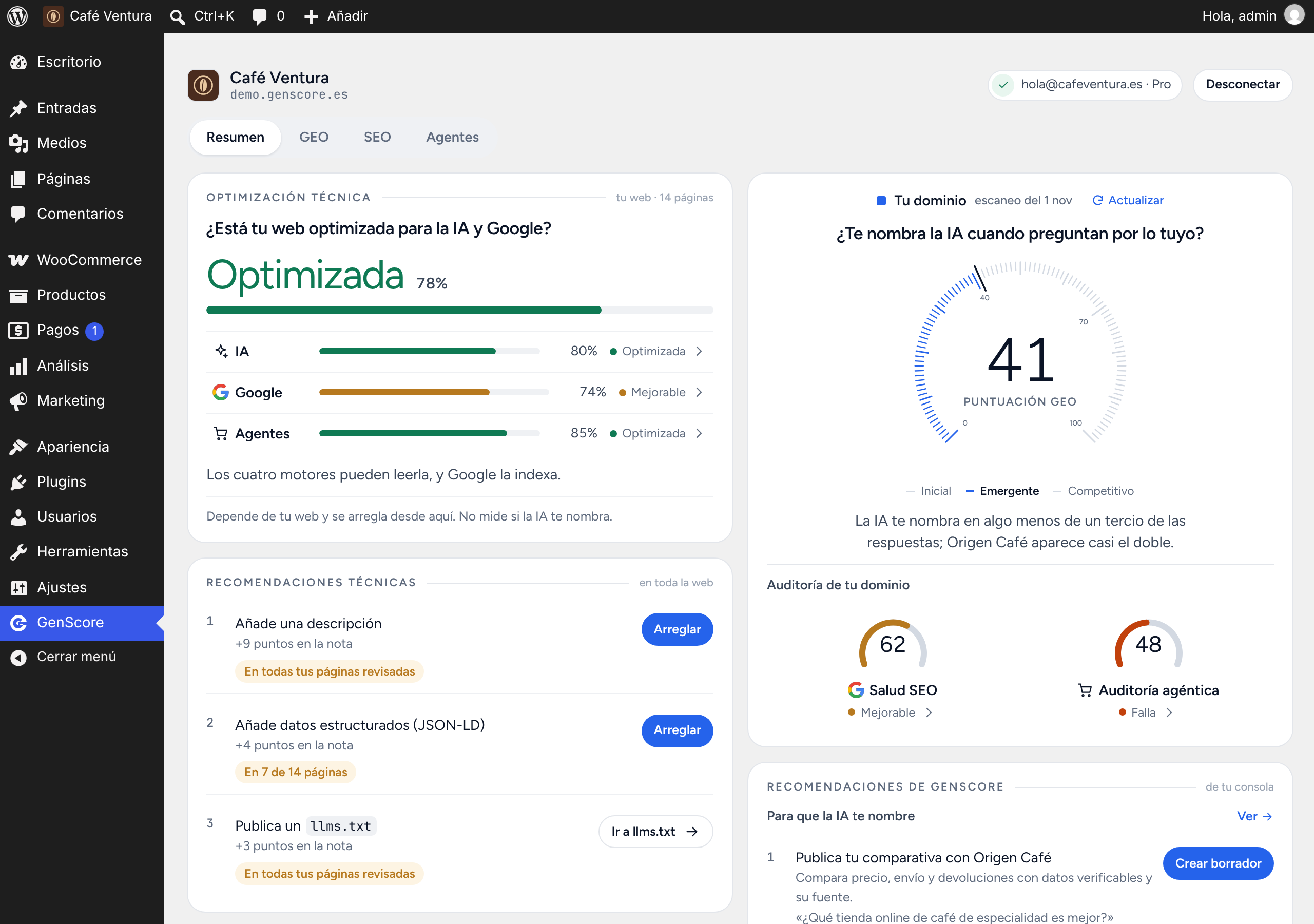
GenScore is a free AI SEO and GEO (Generative Engine Optimization) plugin. It reviews your home page and your most important pages, posts and WooCommerce products from inside wp-admin and gives your site a technical optimization score in three lanes:
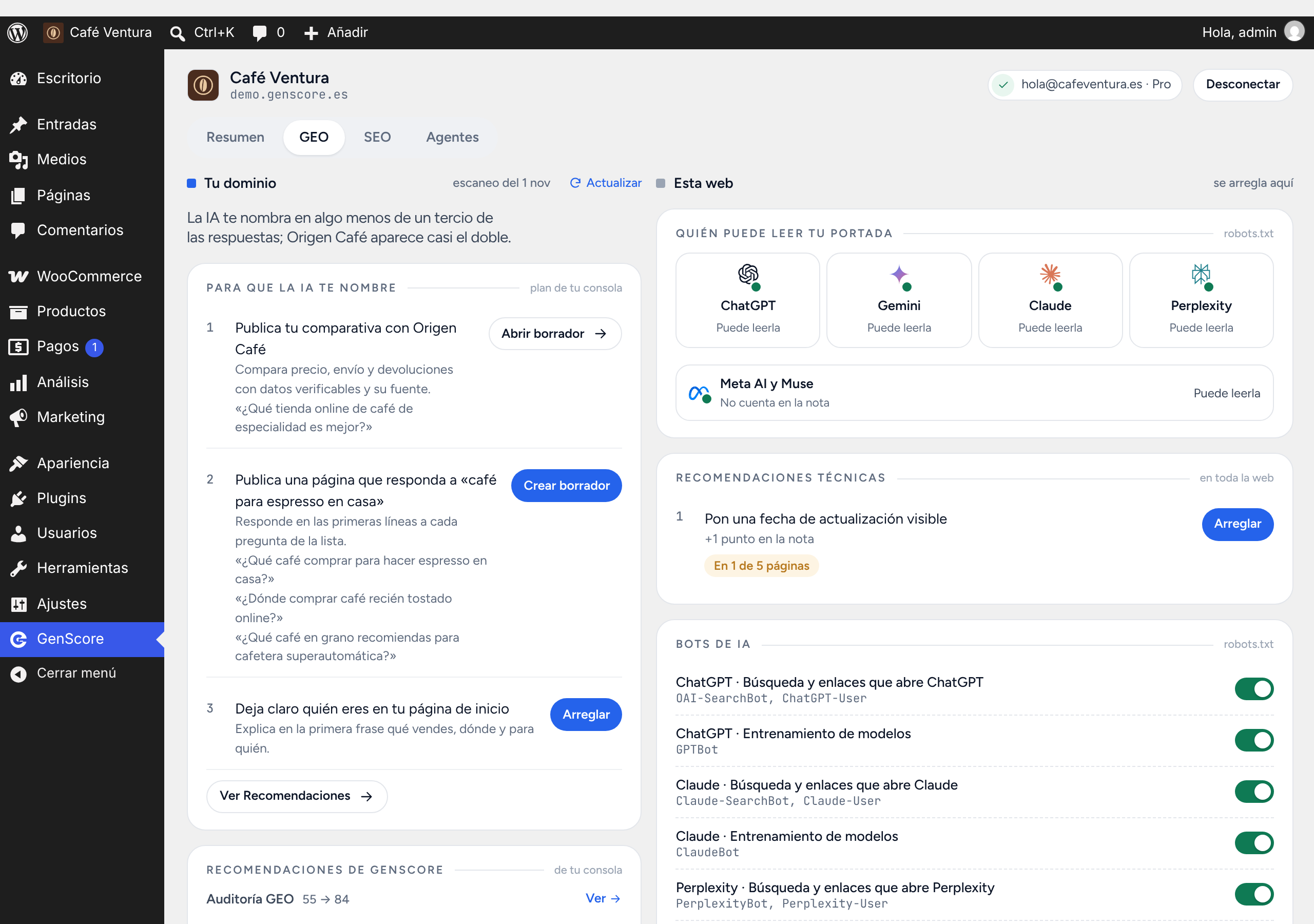
- GEO (AI search): can ChatGPT, Gemini, Claude and Perplexity read and quote your pages? Which AI crawlers does your robots.txt let in? Do you publish an llms.txt? Do your pages answer the question in the first lines?
- SEO: title, meta description, canonical URL, headings, language, Open Graph, structured data (JSON-LD schema), plus WordPress settings (search engine visibility, XML sitemap, HTTPS, permalinks).
- AI agents (agentic commerce): can a shopping agent understand what you sell, its price, stock, shipping and returns, and how to buy it?
Fix it in one click
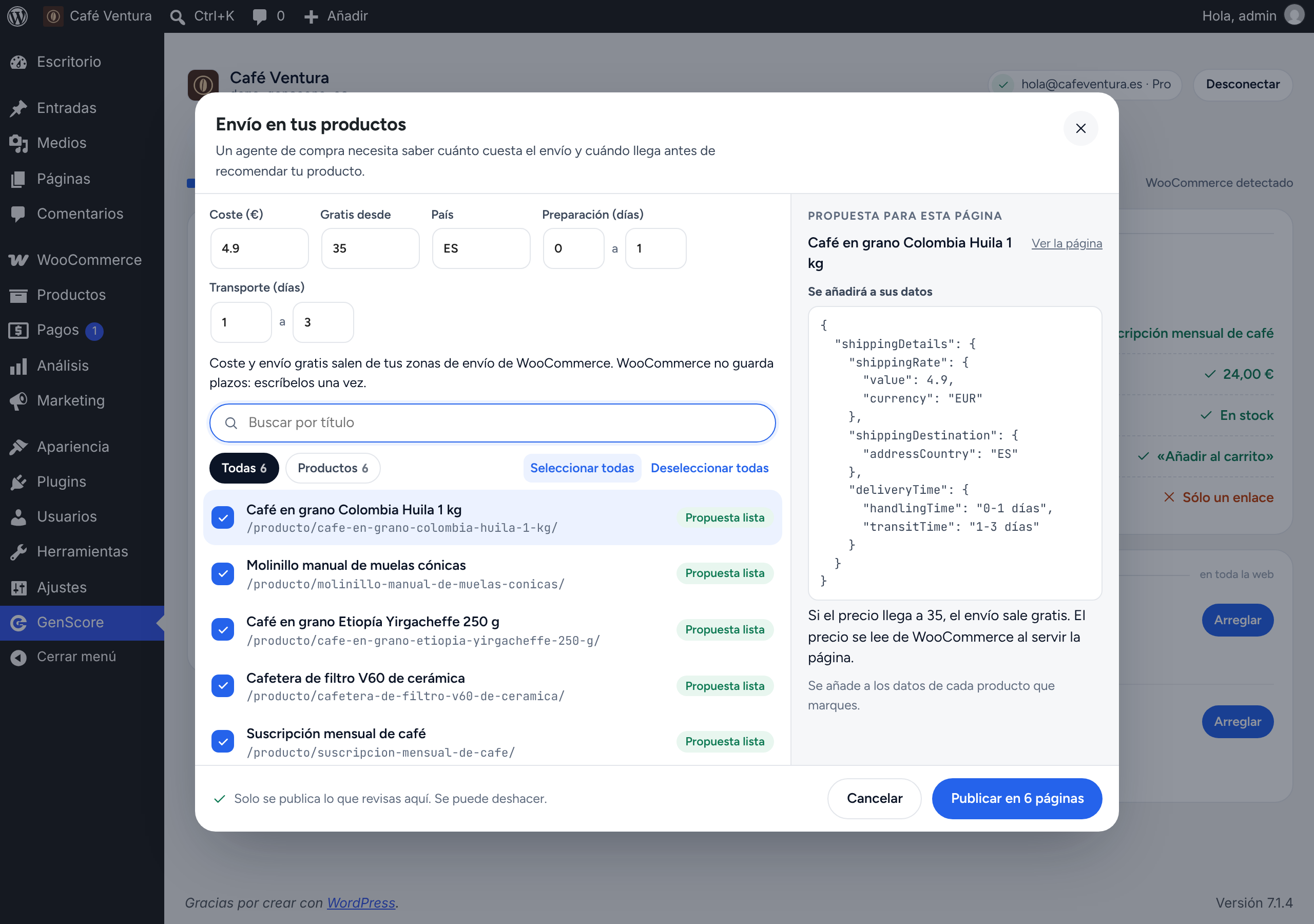
Every recommendation comes with the fix. GenScore proposes it for each page from data WordPress and WooCommerce already have (title, excerpt, permalink, last edit, price, stock, shipping zones, reviews). You tick the pages, review and edit each proposal, confirm, and it is published. Every publish can be undone.
One-click fixes include:
- Schema / structured data (JSON-LD) for pages, posts, products, Organization and LocalBusiness.
- Meta descriptions, titles and canonical URLs, written to Yoast SEO, Rank Math or SEOPress fields when you use them.
- Answer-first intro paragraph, the short answer AI engines like to quote (taken from your excerpt or written by you, never invented).
- Visible update date, headings (H1 and H2), Open Graph tags, hreflang and image alt text.
- WooCommerce product data for AI agents: price and stock always live from WooCommerce, shipping details, returns and cancellation policy, rating from real reviews, GTIN / barcode with check-digit validation and a specifications table.
- Site-wide fixes: XML sitemap, mobile viewport and who is behind the site.
Your post content is never rewritten: fixes are stored as page data and served through WordPress filters.
Control AI bots and publish llms.txt
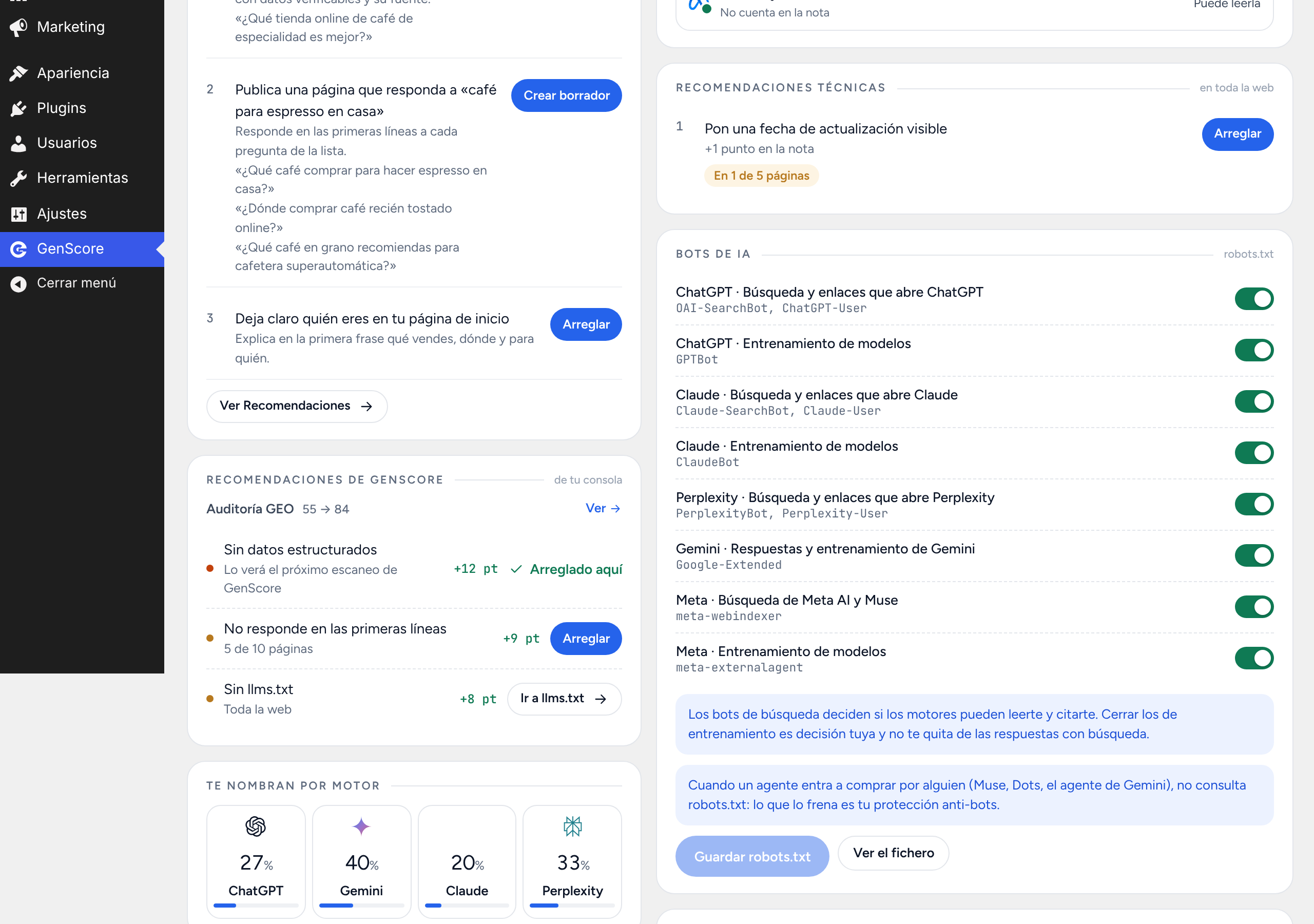
- AI crawler switches in robots.txt for OpenAI (OAI-SearchBot, GPTBot), Anthropic (ClaudeBot), Perplexity, Google-Extended and Meta, with search bots and training bots set separately. GenScore only adds its own group to the robots.txt WordPress serves. It never touches the
*group, Googlebot or Bingbot, and never writes a file. - llms.txt generator: publish /llms.txt from your pages, products and posts with their own excerpts, and edit it. If Yoast SEO, Rank Math or All in One SEO already publish one, GenScore leaves it alone.
Turn AI recommendations into drafts
With a GenScore account connected, the plugin brings GenScore’s recommendations into WordPress and acts on them:
- «Crear borrador» creates a draft page that answers the questions AI engines are asked about your business, or a comparison page with a rival (your column filled from WooCommerce, the rival’s cells left for you to source). Drafts are never published by the plugin.
- «Añadir preguntas» adds a FAQ to a page you already have (with FAQPage data when no SEO plugin prints schema).
- Each GenScore audit issue (GEO, SEO and agentic) offers «Arreglar» with the affected pages already ticked.
Measure whether AI actually names you (GenScore account)
A technically optimized site is the start, not the result. Whether the AI recommends you also depends on what other sites say about you and on whether you answer people’s questions. A GenScore account at genscore.es adds what only asking the AI engines again and again can measure:
- GEO Score: how often ChatGPT, Gemini, Claude and Perplexity name your brand.
- Competitors that appear before you, and which of your pages the engines cite.
- SEO health and agentic audit of your whole domain, and Google Search Console data.
Connect it from the plugin with «Conectar con GenScore»: read-only, approved on genscore.es, and «Desconectar» removes the access. New accounts start with a 7-day Pro trial, no card required.
Who it is for
- WordPress and WooCommerce store owners who want to appear in AI answers and AI shopping agents.
- Marketers and SEO agencies working on AI SEO, GEO, AEO (answer engine optimization) or LLM optimization.
- Anyone who wants llms.txt, AI crawler control and schema without editing code.
Privacy
The review runs in your browser, on your own site, and the scores are stored in your own WordPress. Without a connected account, nothing is sent anywhere.
Language
The plugin screens are in Spanish.
External services
The plugin works without any external service. Only if an administrator presses «Conectar con GenScore» does it connect to GenScore (https://www.genscore.es), to show the figures of that GenScore account for this domain:
- What is sent and when: when you connect, the site registers itself with GenScore’s sign-in server (Supabase Auth, operated for GenScore) with the site’s name and return address, and you approve the access on genscore.es. After that, while the site stays connected and an administrator opens the GenScore screen, the site’s server asks GenScore for this domain’s figures (at most once every 10 minutes) sending the access token and the site’s domain. Nothing about your visitors is ever sent.
- What is stored: the access and refresh tokens, in your site’s database, read only by the server. «Desconectar» deletes them, and you can also remove the access from GenScore (Ajustes, Apps conectadas).
- GenScore terms: https://www.genscore.es/terminos. Privacy policy: https://www.genscore.es/privacidad. Supabase privacy policy: https://supabase.com/privacy.
The plugin also contains links to genscore.es (sign-up, log-in, the free checker and pricing) that open only when you click them. Those links carry UTM parameters (utm_source=wordpress) and, on sign-up, your site’s domain, so the new account starts with it.
Credits
Bundled fonts: Figtree (SIL Open Font License 1.1) and JetBrains Mono (SIL Open Font License 1.1).
Screenshots




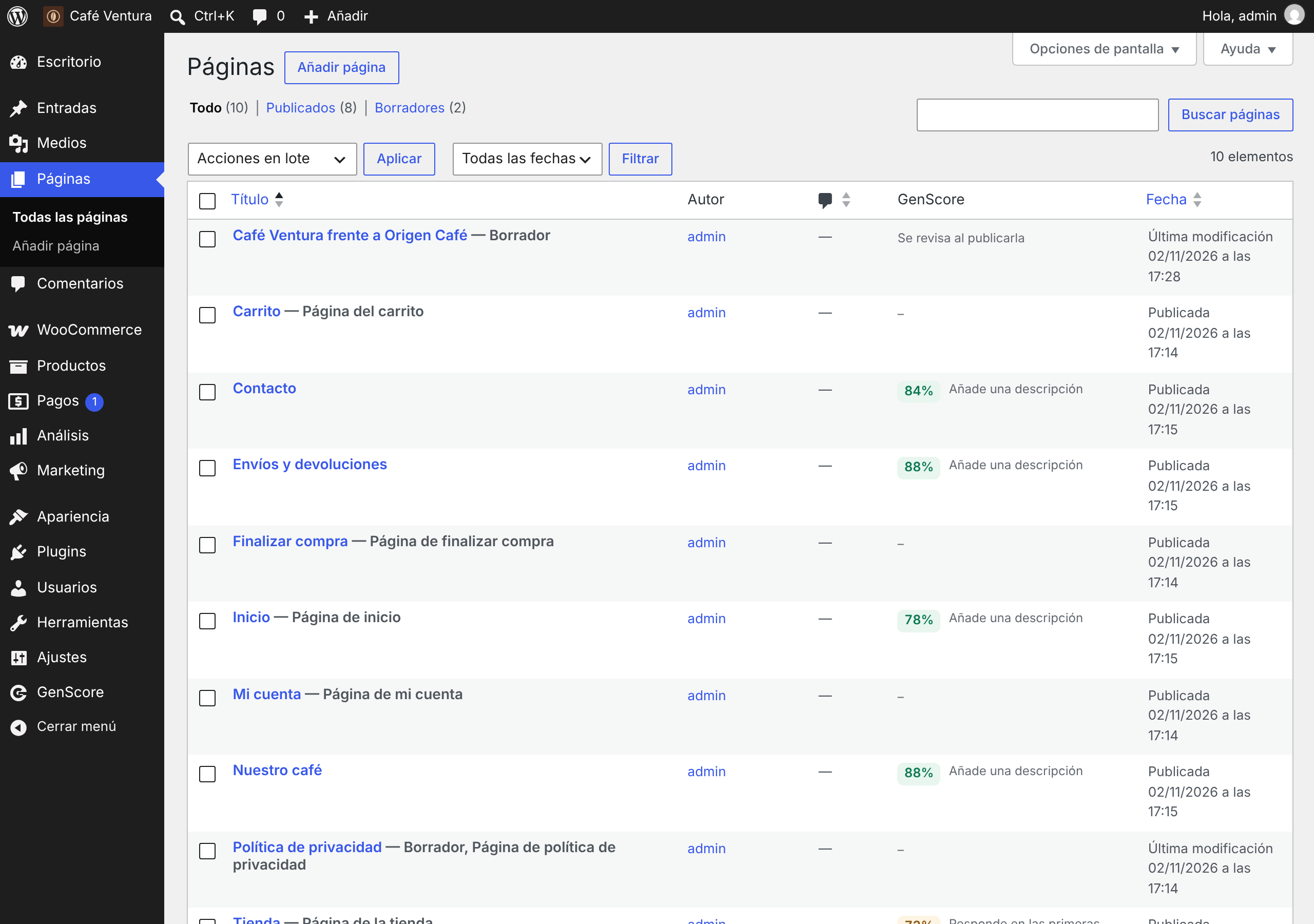
Installation
- In wp-admin, go to Plugins > Add New, search for GenScore and click Install, then Activate. Or upload the
genscorefolder to/wp-content/plugins/. - Open GenScore in the admin menu. The review of your site starts on its own.
- Press Arreglar on any recommendation to review and publish the fix.
- Optional: press Conectar con GenScore to see your GEO Score, competitors and GenScore’s recommendations.
FAQ
-
What is GEO (Generative Engine Optimization)?
-
GEO is the work of making your site easy for AI engines such as ChatGPT, Gemini, Claude and Perplexity to read, understand and cite in their answers. It builds on SEO: clean structured data, clear answers in the first lines, an llms.txt and letting AI search crawlers in.
-
Is this an AI SEO plugin? Does it use AI to write the fixes?
-
It is an SEO and GEO plugin for AI search, but it does not use AI to write anything. Every proposal is built from your own WordPress and WooCommerce data, with no external service, and you review it before it is published.
-
Does blocking AI training bots remove me from ChatGPT answers?
-
No. ChatGPT, Claude and Perplexity answer with web search using their search bots. Training bots only decide whether your pages can be used to train future models. GenScore lets you set each one separately.
-
What is llms.txt and do I need it?
-
llms.txt is a plain-text summary of your site for large language models: your main pages with a short description. GenScore generates it from your content, lets you edit it and serves it at /llms.txt. If another plugin already publishes one, GenScore leaves it alone.
-
Does it work with Yoast SEO, Rank Math, SEOPress or All in One SEO?
-
Yes. It reads their meta descriptions and sitemaps, writes descriptions and titles to their own fields, does not add a second schema graph when they print one, and does not publish an llms.txt when one of them already does.
-
Does it work with WooCommerce?
-
Yes. It reviews your product pages for AI shopping agents and adds product schema, live price and stock, shipping details, returns policy, rating from real reviews and GTIN, all from WooCommerce data.
-
Does it write anything in my pages?
-
Only what you accept in «Arreglar», after a confirmation. It is stored as page data (post meta), never in the post content: the editor shows a «Publicado por GenScore» box, and «Deshacer» puts back what was there. Uninstalling the plugin removes GenScore’s own fields; what it wrote in your SEO plugin’s fields stays, as your description or title.
-
Does the review slow down my site?
-
No. It runs only when you open the GenScore screen, in your browser, reading your important pages two at a time. The scores are stored in your site, so next time only pages that changed are read again.
-
My site has a robots.txt file in its root folder.
-
The web server serves that file before WordPress, so the switches cannot change it. GenScore tells you and shows the lines to copy into it.
-
Do I need a GenScore account?
-
No. The review, the one-click fixes, the AI bot switches and llms.txt are free and work without an account. An account adds what the plugin cannot measure from your site: how often each AI engine names you, your competitors and GenScore’s recommendations.
-
Is the interface in English?
-
Not yet: the screens are in Spanish.
Reviews
There are no reviews for this plugin.
Contributors & Developers
“GenScore: AI SEO & GEO Optimizer, llms.txt, Schema & AI Bots” is open source software. The following people have contributed to this plugin.
Contributors
Translate “GenScore: AI SEO & GEO Optimizer, llms.txt, Schema & AI Bots” into your language.
Interested in development?
Browse the code, check out the SVN repository, or subscribe to the development log by RSS.
Changelog
1.4.2
- Open Graph descriptions keep a space between blocks and no longer render blocks inside the page head, so the theme’s block styles stay as they were.
- Text taken from a page ends each heading as a sentence, so a description no longer runs the title into the next paragraph.
- Alt text never proposes a title WordPress made from the file name, and leaves product images alone (WooCommerce already gives them the product name).
- On mobile, a form error shows above the publish button.
- The cancellation policy is offered on products only, and the specifications table only where WooCommerce does not already show one.
- «Who is behind the site» no longer fills in the store’s sender email.
- The rating fix is not offered without real reviews; the recommendation says «Sin reseñas».
- Comparison drafts and the copied table use the site’s name, and the «[Pendiente…]» cells show in grey in the editor and on the page.
1.4.1
- New one-click fixes in the page sheet, undoable: alt text for images without it (from the media library or the page title, never a file name), noindex and blocked snippets (with Yoast, Rank Math or SEOPress), a specifications table from WooCommerce attributes, weight and dimensions, and a cancellation policy linked to the page that explains it.
- Site-wide fixes in their own window, undoable: the WordPress sitemap at /sitemap.xml, the mobile viewport when the theme lacks it, and who is behind the site (Organization or LocalBusiness) from WordPress and WooCommerce data you review.
- «Añadir dato» publishes a checkable fact with its source and date on the page a recommendation names.
- «Copiar tabla y abrir» copies the comparison table (the rival’s cells always pending) and opens the page in the editor.
- When WordPress fixes something in another screen (HTTPS, payments, search visibility, your SEO plugin), the recommendation takes you there.
1.4.0
- «Publica tu comparativa con…» creates a draft page with a table: your column is filled from WooCommerce (price from, shipping, returns, rating) and the rival’s cells say «[Pendiente: dato, enlace y fecha]». The editor warns while any is left.
- A recommendation about criticism creates a draft page with one heading per thing the AI repeats about you.
- «Responde esta pregunta» on a page you already have offers «Añadir preguntas»: you answer the questions and they appear at the end of that page (and as FAQPage data when no SEO plugin prints schema).
- New one-click fixes, reviewed in the page sheet and undoable: at least two
<
h2> (from your bold lines or headings you write), a single
<
h1>, Open Graph tags, hreflang, shipping details (cost from your WooCommerce zones, delivery days you write once), rating from real reviews, and the product barcode (GTIN) with check-digit validation.
* Open Graph is not offered when an SEO plugin already prints it, nor hreflang with WPML, Polylang or TranslatePress.
* The page content is never edited: every fix is served through filters and can be undone.
1.3.0
- With the account connected, GenScore’s recommendations also appear in the GEO, SEO and Agentes tabs, each next to its tab.
- A recommendation that WordPress can fix offers «Arreglar», which opens the one-click fix sheet with the audit’s pages already ticked. Bots and llms.txt take you to their switch.
- A plan step that asks for a new page offers «Crear borrador»: a draft post with the questions as headings. It is never published by the plugin.
- «Arregla primero» is now «Recomendaciones técnicas», so it is not mistaken for GenScore’s recommendations.
- The agentic card in the Agentes tab is called «Auditoría agéntica».
1.2.1
- The domain’s agentic gauge is called «Auditoría agéntica», so it is not mistaken for the page’s Agentes row.
- Every audit in «Recomendaciones de GenScore» shows where it would get to if fixed (also the GEO audit).
- Page scores in the list carry the % sign, like the widget.
1.2.0
- The page review is now «Optimización técnica»: a bar with a state (Optimizada, Mejorable, Se frena), never a dial, so it is not read as the Puntuación GEO.
- The Puntuación GEO is the only dial. Without an account it shows as not measured, with a way to measure it.
- With an account, «Recomendaciones de GenScore» brings the console’s plan and the top issues of its GEO, SEO and agentic audits.
- Actions name the competitor and show the question.
- «Fecha de actualización visible» shows the page’s date when the theme prints it.
- robots.txt and llms.txt are asked a second time after a timeout or a server error before being reported missing.
1.1.3
- «Respuesta al principio» on the shop now counts in classic themes such as Storefront: it is printed before the products, not inside the products header.
- A review that was running when you saved robots.txt or llms.txt no longer stores scores read before the change.
- After «Guardar robots.txt», the switches stay where you left them while the pages are read again.
- «Fecha»: the shop says «No aplica» when it does not need a date, and pages that have one show it.
1.1.2
- «Salud SEO» in «Tu dominio» is the SEO audit’s score, the same as in GenScore’s console.
- The agent score and the GEO Score use the console’s bands (Bien, Mejorable, Falla; Inicial, Emergente, Competitivo).
- Right after a scan, while its audit is still running, the figures refresh on their own every minute, and «Actualizar» reads them again at any time.
1.1.1
- After connecting, the message only says you can see your figures when this domain is in your GenScore account; otherwise it asks you to add it.
- GenScore’s permission screen now reads «Conectar WordPress (your-site) con GenScore», without repeating the brand.
1.1.0
- «Conectar con GenScore»: with a GenScore account, «Tu dominio» shows your account’s figures for this domain (Puntuación GEO, engines, competitors, SEO health, Search Console, agent score and next actions), the same ones as the Chrome extension. Read-only, approved on genscore.es, and «Desconectar» removes the access.
1.0.7
- «Arreglar» in one click: structured data, description, title, canonical URL, visible update date, product data and returns policy. GenScore proposes the fix for each page, you review and edit it, confirm, and it is published on the pages you chose. Every publish can be undone.
- The shop page gets a live product list (price and stock always current), and «Responde en las primeras líneas» can be fixed too: a short answer paragraph under the title, taken from the excerpt or description, or written by you.
- Product price and stock in the structured data always come from WooCommerce when the page is served. With Yoast, Rank Math or AIOSEO active, GenScore does not add a second page graph.
- «Ir a llms.txt» and «Ir a bots» take you to the card that already does that fix.
- The editor shows a «Publicado por GenScore» box on pages with published fixes.
1.0.6
- «Quién puede leer» shows Meta AI and Muse too, outside the note, and the bots card warns when robots.txt blocks Meta’s search.
- Saving the bots or llms.txt, or changing «visible to search engines», reviews every page again instead of keeping old scores. Scores from an earlier version are read again once after updating.
- A page that sells nothing no longer repeats its shop page’s fixes: «Devoluciones» shows once, and Agentes counts the pages that sell.
- The home page no longer gets the product price, stock or name fixes.
- Cart, checkout, my account and the privacy policy show «–» in the GenScore column instead of «Revisar».
- «+1 punto», not «+1 puntos».
1.0.5
- Bots de IA: two new switches for Meta, the search behind Meta AI and its shopping agent Muse (meta-webindexer) and model training (meta-externalagent).
- A line explains that agents buying for someone do not read robots.txt when they visit: your anti-bot protection decides.
1.0.4
- GenScore now reviews your site by itself: the home page, the pages in your menus, your best-selling products and your latest posts. The note is your site’s, and each fix says how many pages it affects and which ones.
- «Tus páginas»: every page reviewed, worst first, with a link to open its detail or edit it.
- New «GenScore» column in the lists of pages, posts and products. When you publish or update something, only that page is reviewed again.
- The page picker of 1.0.3 is gone: there is nothing to choose.
1.0.3
- Review any published page, post or product, not only the home page: pick it at the top of the screen, or use «Revisar con GenScore» in the lists of pages, posts and products.
- llms.txt: after «Volver al generado» or «Guardar», the box shows the current generated text straight away (new posts included).
- robots.txt: while the whole site is closed for everyone, allowing a bot another plugin had blocked no longer opens the site to it. The screen says why.
- llms.txt: descriptions taken from the content no longer glue a heading to the paragraph before it.
1.0.2
- llms.txt: the text is only saved when you edit it, so a title with an emoji or a post published meanwhile no longer freezes a copy. «Volver al generado» goes back to the generated text.
- robots.txt: closing the whole site for everyone (for example, in maintenance) also closes it to the AI bots you had turned on.
- Agents: prices shown the Spanish way (149,90 €).
- Nonce checks Plugin Check can see in every handler.
1.0.1
- robots.txt: turning a bot back on gives back the original file. GenScore only writes a group when it changes something.
- llms.txt: saving the generated text without changes no longer stores a frozen copy.
- llms.txt: leaves out the WooCommerce cart, checkout and account pages, and the privacy policy description while it is still WordPress’s template.
- Agents: with WooCommerce, reviews a product page instead of the shop window.
- Nonce checked in each AJAX handler.
1.0.0
- First release.