
Description
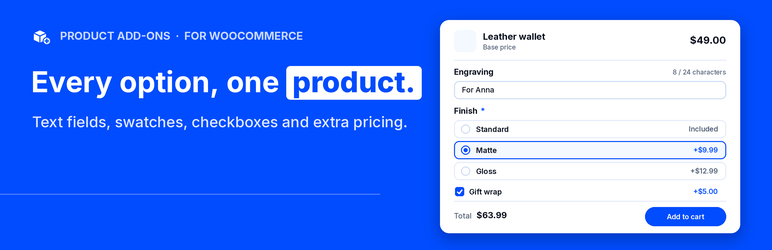
FXOapps Product Add-Ons for WooCommerce adds extra fields to your product pages. Shoppers type a name for engraving, pick a gift wrap, choose a color, or tick extras, and the price updates on the page. You build fields once in an option group and assign it to all products, selected products, categories, tags, or a product type.
This WordPress.org release is a complete add-ons plugin. There is no group cap, no field cap, and no license key. Every feature listed below works here. Product Add-Ons Pro is a separate plugin. The Product Add-Ons Pro section below is what that plugin includes.
What this free plugin includes
✓ Option groups — unlimited groups, assigned to all products, selected products, categories, tags, or a product type, with exclusions
✓ Fields — text, textarea, number, email, URL, phone, date, select, radio, checkbox, checkbox group, multi-select, toggle, heading, paragraph, divider, and color swatches
✓ Prices — none, fixed, percent, fixed deduction, and percent deduction, per field or per choice
✓ Per-product values — set the values of an assigned group on each product’s edit screen
✓ Live total — the product page shows the options total and the new product price as the shopper picks
✓ Server-side prices — add to cart validates every field and calculates the price on the server
✓ Conditions — show or hide a field based on other fields, with match all or match any
✓ Placement — stacked layout, WooCommerce placement hooks, or the [fxoapps_product_options] shortcode
✓ Cart and orders — selected options in the classic cart and checkout, the Cart and Checkout blocks, orders, and emails, with High-Performance Order Storage support
✓ Order snapshots — each order line keeps the labels, values, and prices chosen, even if you edit the group later
✓ Store rules — required fields, merge identical cart lines, and variable products
✓ Languages — per-language storefront labels with WPML or Polylang
✓ Admin — FXOapps Product Add-Ons, with Overview, Option Groups, Settings, Help & docs, and Pro features tabs
Groups you build here keep working after you install Pro. Pro is a separate plugin. It does not replace this one with a locked copy of the same screen.
Product Add-Ons Pro
Upgrade to Product Add-Ons Pro
FXOapps Product Add-Ons Pro for WooCommerce is a separate plugin. Nothing in this plugin is switched off. The list below is what the Pro plugin includes.
Fields
✓ Image swatches
✓ Slider
✓ Price summary
✓ File upload
✓ Formula prices
✓ Linked catalog products, showing the live linked price
Pricing
✓ Charge per character, per word, or per selected item
✓ Lookup tables from two field values
✓ Percent of the selected options total
✓ Fixed price per selected option
✓ Per-product overrides for extra prices
Logic and layout
✓ Wizard steps
✓ Nested conditions
✓ Audience rules for role, login, quantity, variation, and product
✓ Conditional color picker
Store
✓ Edit options from the cart
✓ Per-choice inventory
✓ Copy an add-on setup from another product, with search by name or SKU
✓ License activation and one-click updates from WordPress
Groups you save here keep working after you install Pro. You do not rebuild your option groups from scratch.
Shop owner setup
After activation, open FXOapps Product Add-Ons and:
- Option Groups — click Create a group and give it a name
- Fields — add fields from the field picker, set labels, choices, and prices
- Logic — add show or hide conditions where a field depends on another
- Assignment — choose the products, categories, tags, or product type, then save
- Help & docs — read field types, pricing examples, placement, and shortcodes inside the plugin
- Pro features — read what the separate Pro plugin includes, and upgrade to Product Add-Ons Pro if you want that plugin
External services
This plugin does not connect to any external service. It makes no remote requests, loads no remote scripts, styles, or fonts, and sends no data off your site. The only outside addresses are plain links to fxoapps.com in the admin, which open only when someone clicks them.
Shortcode
[fxoapps_product_options]
Optional product: [fxoapps_product_options id="123"]
Options also render from WooCommerce placement hooks. A field set to shortcode only is not printed by those hooks.
Installation
- Install and activate WooCommerce.
- Upload the plugin folder to
/wp-content/plugins/, or install it from the Plugins screen. - Activate FXOapps Product Add-Ons for WooCommerce through the Plugins screen in WordPress.
- Open FXOapps Product Add-Ons, create an option group, add fields, and assign it.
- Open a product on the storefront to confirm the options and the cart price.
- When you want the separate Pro plugin, upgrade to Product Add-Ons Pro. Your saved groups stay in place.
FAQ
-
Does this plugin require a license?
-
No. This release works without a license key, a trial, or an fxoapps.com account.
-
Is there a limit on groups or fields?
-
No. Add as many option groups and fields as your store needs.
-
Does this plugin require WooCommerce?
-
Yes. If WooCommerce is inactive, the plugin shows an admin notice and does not load its storefront features.
-
Can a shopper change the price in the browser?
-
No. The product page previews a total, but add to cart validates the fields and calculates the price on the server.
-
Will editing a group change old orders?
-
No. Each order line stores a snapshot of the selected labels, values, and price.
-
Does it work with the Cart and Checkout blocks?
-
Yes. Selected options show in the classic cart and checkout and in the Cart and Checkout blocks.
-
Where can I show the options?
-
They print automatically through WooCommerce placement hooks, or you can place them with the
[fxoapps_product_options]shortcode. -
What do I get if I upgrade to Product Add-Ons Pro?
-
Product Add-Ons Pro is a separate plugin. It does not turn anything in this plugin off. The Product Add-Ons Pro section on this page lists what that plugin includes: image swatches, sliders, file uploads, formula and lookup table prices, linked products, wizard steps, nested conditions, audience rules, cart editing, and per-choice inventory.
You can read a shorter list any time under FXOapps Product Add-Ons Pro features.
-
Will my groups still work after I upgrade to Pro?
-
Yes. Option groups you save in this plugin keep working after you install Product Add-Ons Pro.
-
Does uninstall delete orders?
-
No. Deactivation does not delete data. Uninstall deletes plugin settings and option-group tables only when “Delete plugin data on uninstall” is turned on. Order snapshots stay on the order.
-
Does this plugin send data to FXOapps?
-
No. It does not phone home, check a license, or download updates from FXOapps. Updates come from WordPress.org.
Reviews
There are no reviews for this plugin.
Contributors & Developers
“FXOapps Product Add-Ons for WooCommerce” is open source software. The following people have contributed to this plugin.
Contributors
Translate “FXOapps Product Add-Ons for WooCommerce” into your language.
Interested in development?
Browse the code, check out the SVN repository, or subscribe to the development log by RSS.
Changelog
1.0.2
- New: redesigned admin in the FXOapps dashboard style, with a field picker, an in-plugin Help & docs tab, and icon buttons for Duplicate and Delete.
- New: per-language storefront labels. With WPML or Polylang, pick a language on the Settings tab and enter its labels.
- Fix: a checkbox group or multi-select value posted more than once is counted and charged once.
- Fix: an array posted to a single-value field is rejected with a clear error instead of a PHP warning.
- Tweak: removed unused leftovers (per-choice stock box, linked product lookup, unused admin styles).
- Tweak: the admin menu icon CSS is loaded with wp_add_inline_style instead of a printed style tag.
- Tweak: coding standards cleanup.
1.0.1
- Fix: required add-ons can no longer be removed from the cart (no remove button, and the server rejects the request).
- Fix: the remove button for a color swatch add-on now reads the color name instead of the hex value.
- Fix: an add-on form submitted without its security token is rejected, the same as an invalid token.
- Fix: percent prices are validated on save and capped at price time (surcharge up to 1000%, deduction up to 100%).
- Tweak: the Pro tab feature list uses neutral bullets.
- Tested with WooCommerce 11.2.
1.0.0
- Initial release.