

Description
FreshRank provides powerful AI-driven content analysis to help you optimize your websites’ content for both traditional search engines and AI platforms.
Stop guessing what’s wrong with your content. Analyze your WordPress posts, and FreshRank will analyze deliver actionable insights that improve user experience, engagement, and rankings.
Features
✅ AI-Powered Analysis
* Analyze content with the hosted FreshRank Agent or OpenAI’s GPT-5.5 flagship model
* User experience focused
* Checks your content for factual errors and outdated information
* Growth opportunities assessment
* Search optimization recommendations
* AI platform visibility optimization
✒️ AI-assisted Draft Generation
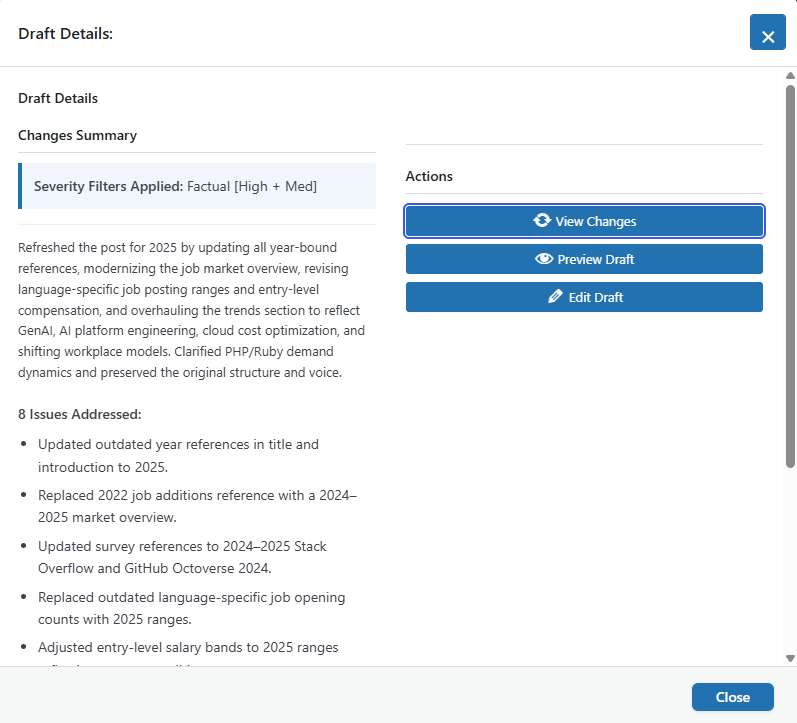
* Use AI to fix the most important factual issues
* Full approval workflow
* Review every change, make additional edits and approve only what meets your standards
🔒 Security & Privacy
* Your content stays on your server
* No data sent to third parties (except the AI service you choose for analysis)
What FreshRank Analyzes
Get detailed insights across five categories that directly impact your content’s success.
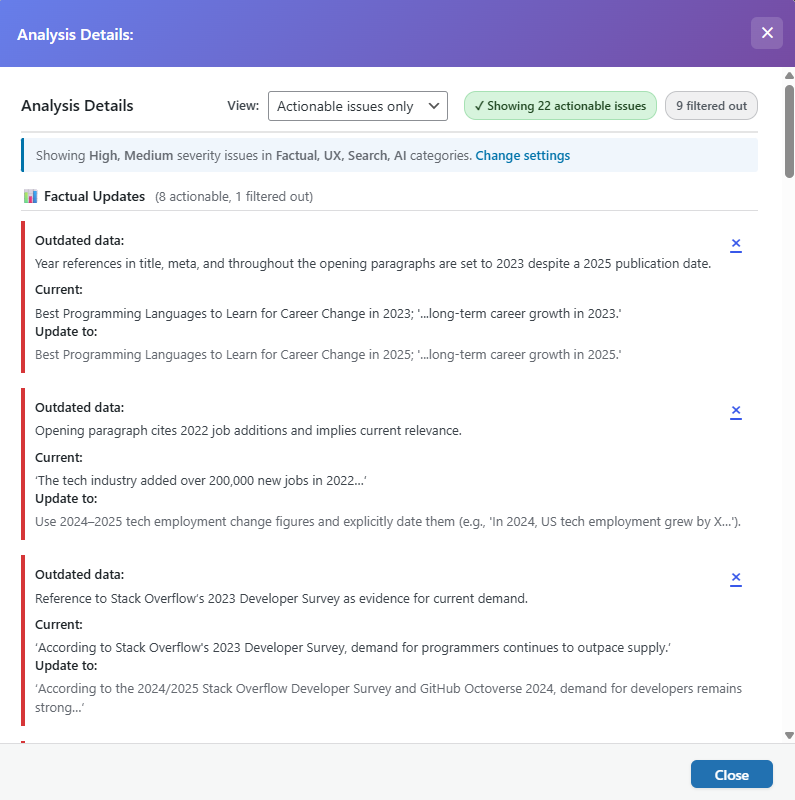
- Factual Updates – Outdated statistics, references to old software versions, information that may have changed due to recent events, and expired links.
- User Experience – Content structure problems, readability issues, missing calls-to-action, formatting that hinders comprehension, and mobile usability concerns.
- Growth Opportunities – Topics to expand, related content to add, multimedia opportunities, content gaps versus competitors, and emerging trends to cover.
- Search Optimization – Meta descriptions, title tags, keyword optimization, internal linking, image alt text, and technical SEO factors affecting your rankings.
- AI Visibility – How well AI platforms like ChatGPT and Perplexity can understand and cite your content, including structured data, clear answers, and contextual information.
All issues are categorized by priority: HIGH | MEDIUM | LOW
What’s Not Included in the Free Version
The free version includes full analysis capabilities but does not include:
– ❌ Multiple OpenAI model selection
– ❌ OpenRouter integration (450+ additional models)
– ❌ Separate models for analysis vs. writing
– ❌ Prioritization using Search Console data
– ❌ Fixes for all five issue categories
– ❌ Ability to use web search for the most accurate fact-checking
– ❌ Custom instructions to AI for analysis and draft creation
– ❌ Bulk actions
– ❌ Performance tracking
Want these features? Upgrade to FreshRank AI Pro
How It Works
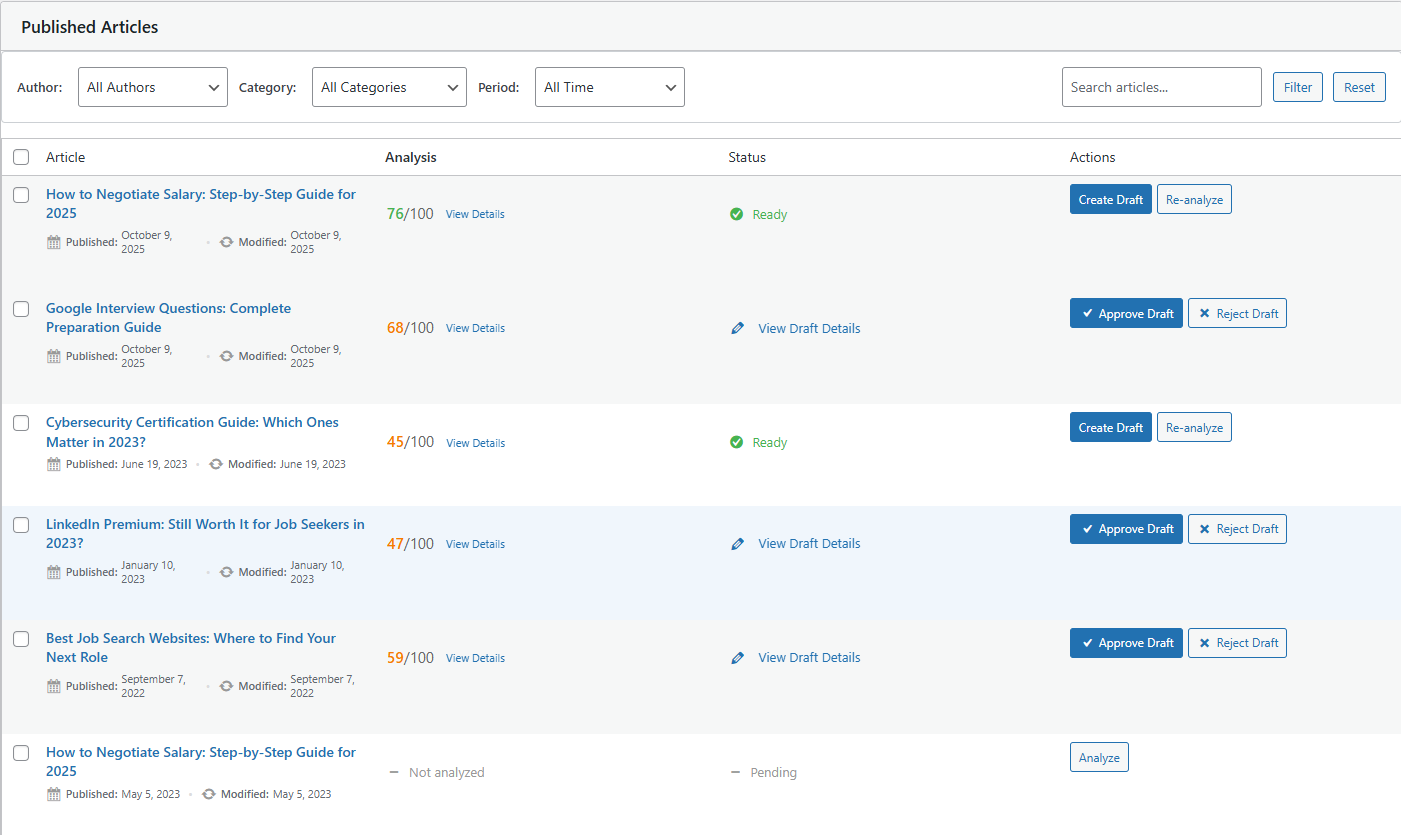
- Activate – Works out of the box with the hosted FreshRank Agent (no API key needed), or add your own OpenAI API key
- Analyze – Get comprehensive content analysis
- Review – See detailed recommendations
- Update – Fix the most critical factual issues automatically
- Review, Edit and Approve – Review updated content, make edits and replace old post
Requirements
- WordPress 6.5 or higher
- PHP 7.4 or higher
- Optional: your own OpenAI API key for unlimited use (platform.openai.com)
Thanks to Our Early Supporters
- Bogdan Sandu | Design Your Way
- Eric Ryan Jones | RenovateLeadership.com
- Steven | Quants Note
- Michaël KIHL | schoolsWP
- Pumpkin.pt
- Ahoi.dev
- Accelera | accelerawp.com
Support
- Documentation: https://docs.themeisle.com/collection/2368-freshrank
External Services
FreshRank connects to external AI services to analyze and update your content. Content is only ever sent when you explicitly run an analysis, create a draft, or accept the one-time onboarding test run.
- FreshRank Agent (default): the hosted analysis service at ai.themeisle.com, operated by Themeisle. The content of the selected post and your site URL (plus your license key on paid plans) are sent to the service, which analyzes it with a frontier AI model and enforces the monthly request quota. See the Themeisle terms of service and privacy policy.
- OpenAI (optional): when you add your own OpenAI API key, post content is sent directly to api.openai.com under OpenAI’s terms and privacy policy.
Screenshots
Installation
Activating the FreshRank plugin is just like any other plugin.
- In your WordPress admin, go to Plugins > Add New
- In the Search field type “FreshRank”
- Under “FreshRank” click the Install Now link
- Once the process is complete, click the Activate Plugin link
- Now, you’re able to use FreshRank right away with the hosted FreshRank Agent — or add your own OpenAI API key under FreshRank AI > Settings.
FAQ
-
Does it work in other languages besides English?
-
Yes! FreshRank works in any language that GPT-5.5 supports. That includes 50+ languages like Spanish, French, German, Portuguese, Italian, Japanese, Chinese, Korean, Arabic, and many more. The AI analyzes and generates drafts in your content’s original language.
-
Do I need my own API keys?
-
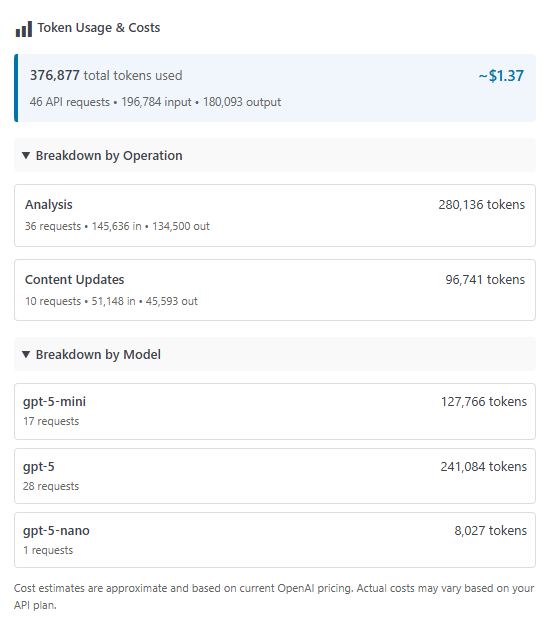
No. By default FreshRank uses the hosted FreshRank Agent, which needs no API key and includes a monthly allowance of free analyses. You can switch to your own OpenAI API key anytime for unlimited use and full control – we provide detailed setup guides and cost estimation tools in the dashboard.
-
Does the plugin store my content on external servers?
-
Your content is temporarily sent to the AI service you selected (the FreshRank Agent or OpenAI) for analysis and updates, but FreshRank doesn’t permanently store your content on external servers.
All your articles, drafts, and analysis results are stored securely in your WordPress database on your own server. When you enable Google Search Console integration, only performance metrics are retrieved—not your content.
Your API keys are also stored securely in your WordPress database and never shared with third parties.
Reviews


Contributors & Developers
“FreshRank – Instant Feedback for Better Content” is open source software. The following people have contributed to this plugin.
Contributors
Translate “FreshRank – Instant Feedback for Better Content” into your language.
Interested in development?
Browse the code, check out the SVN repository, or subscribe to the development log by RSS.
Changelog
Version 1.0.3 (2026-06-29)
- Added FreshRank Agent provider — works out of the box with no API key required, OpenAI key now optional
- Confirmation dialogs are now branded and accessible, and keep working even when another plugin breaks native dialogs or jQuery UI
- Improved admin reliability so a failure in one UI component can no longer break the others
- Improved content updates to fall back to a standalone draft when post revisions are disabled or unsupported, reducing risk of data loss
- Added a content-length check that prevents failed AI requests on very large posts
- OpenRouter model-refresh notifications now only appear for explicit user actions
- Fixed build packaging to avoid accidentally removing files from vendor
- Updated minimum required WordPress version to 6.5
Version 1.0.2 (2026-05-25)
- Improved compatibility with WP 7.0
Version 1.0.1 (2026-01-12)
- Fixed variable sanitization issues for improved data security
- Analysis Details modal now shows creation date timestamp
- Enhanced translation compatibility
- Cleaned up unused code for better performance
- Fixed crash when free and pro versions were both active
- Fixed compatibility issue with PHP 7.4
- Fixed article row display on mobile and smaller screens
- Pro version now supports GPT-5.2 model with OpenAI
Version 1.0.0 (2025-11-27)
- Initial release