

Description
Published content ages badly. Statistics go stale, links rot, and posts that once ranked quietly stop earning their place — usually without anyone noticing until a competitor overtakes them.
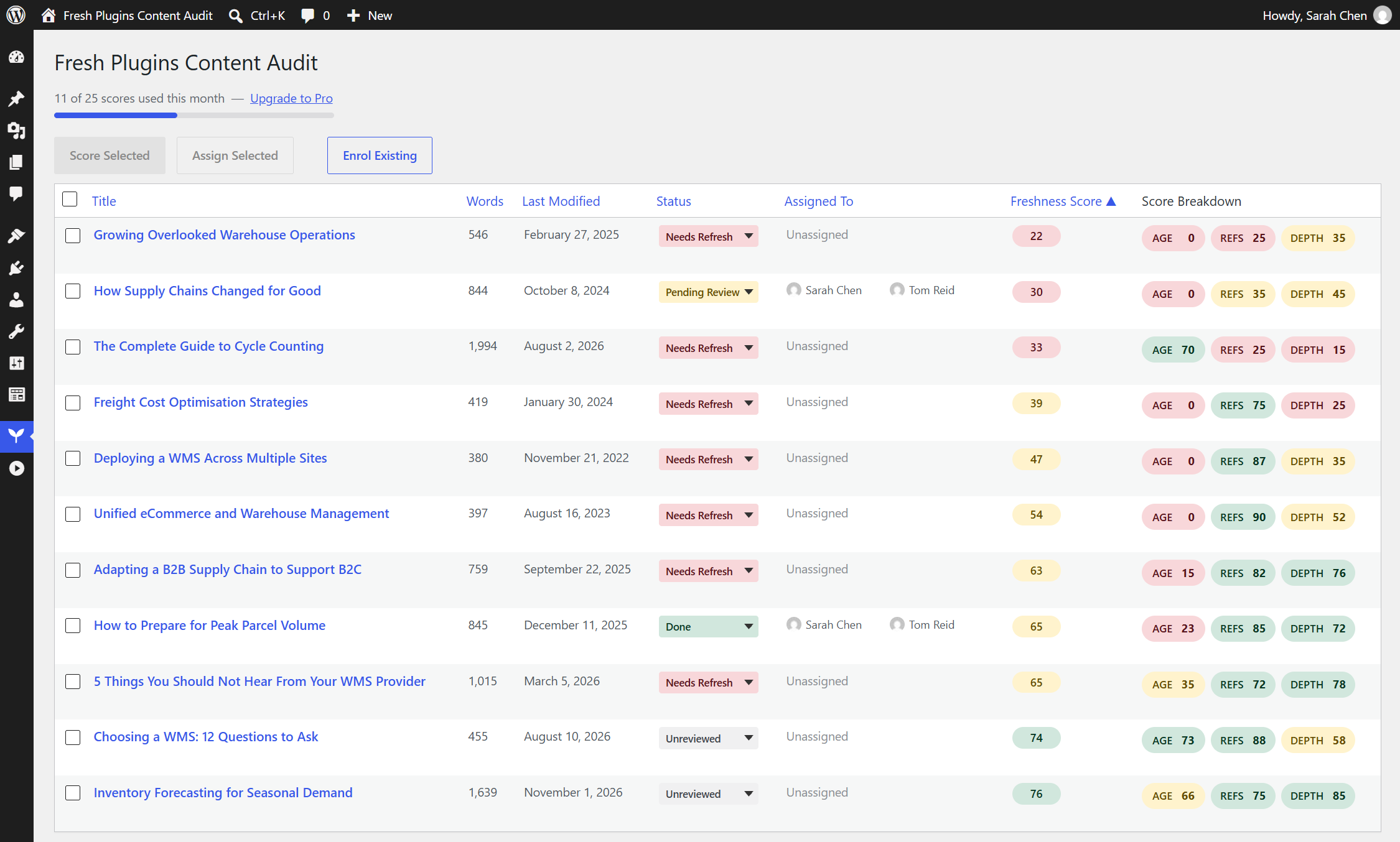
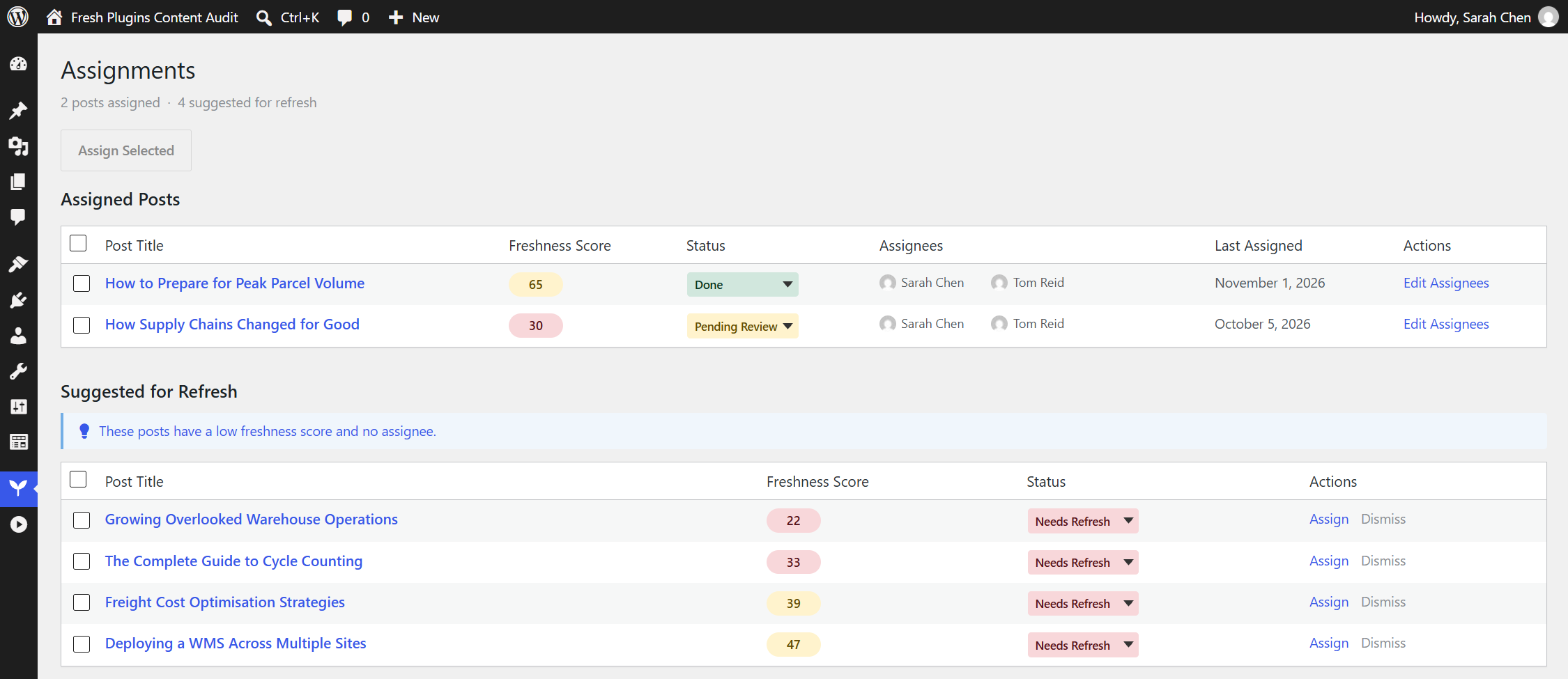
Fresh Plugins Content Audit audits your published posts and tells you which ones need attention. Each post is scored for freshness by an AI model, with a written reason for every part of the score, so you can see why a post was flagged rather than just being handed a number. From there, you assign it to a writer and track it through to done.
Built for B2B content teams maintaining a library they can no longer audit by hand.
How scoring works
Every post is scored across three dimensions, each weighted to your preference:
- Age — how long since the post was meaningfully updated
- References — whether the statistics, sources and links it depends on have gone stale
- Depth — whether the coverage still holds up against what the topic now demands
Each dimension comes back with a written explanation, not just a number.
Key features
- AI-powered freshness scoring — every post scored on age, references and depth, with a reason for each sub-score
- No API key required — scoring runs through a managed service. Nothing to sign up for, no key to store on your site, no per-token billing to monitor
- Team assignment — assign posts to team members, track status, bulk-assign across a selection
- Workflow tracking — follow refresh progress from flagged through to done
- Custom field and ACF support — reads content from Advanced Custom Fields, including flexible content and repeater layouts, so page-builder sites score accurately
- Configurable weighting — tune how much age, references and depth each contribute
- Weekly automatic rescoring — opt in, and Fresh Plugins Content Audit re-scores anything whose score has gone stale once a week. Available on every tier
- Free tier — 25 scores per month. Pro removes the cap. Every feature is available on the free tier; plans differ only in how many scores you can run each month
How this differs from WordPress core AI features
WordPress 7.0 introduced AI Connectors, which let a plugin talk to an AI provider using a key you supply. Fresh Plugins Content Audit takes a different approach: scoring runs through a managed service operated by Fresh Plugins, so you never obtain, store or rotate a provider API key, and you are never billed per token. Usage limits are applied by plan at the service, and Pro entitlement is verified server-side rather than trusted from your site. If you would rather run your own key against your own provider account, a core-connector-based tool is the better fit — Fresh Plugins Content Audit is built for teams who want the scoring to just work.
Requirements
- WordPress 6.2 or higher
- PHP 8.0 or higher
- An outbound HTTPS connection (see External services below)
External services
Fresh Plugins Content Audit relies on external services to score content. Scoring cannot work offline. This section describes every service the plugin can contact, exactly what is sent, when it is sent, and the terms and privacy policies that govern each.
1. Fresh Plugins API — the Fresh Plugins Content Audit scoring service
Service: https://api.fresh-plugins.com (operated by Fresh Plugins)
What it is and what it is used for: the managed scoring endpoint. It receives your content, requests a freshness assessment from Anthropic’s Claude API on your behalf, applies your plan’s monthly usage limit, and returns the references and depth sub-scores with a written reason for each. It exists so that you do not need your own AI provider account or API key.
Data sent: your site URL; the post title; up to the first 3,000 characters of the post’s text content (post body plus any ACF or custom fields you have configured for scoring, with HTML removed); the post’s word count; and a freshness-age score calculated on your own site from the post’s modified date. Pro sites additionally send a Freemius licence installation identifier and an anonymous site identifier, and — on paid licences — a licence key, so entitlement can be verified server-side.
When it is sent: only when scoring runs. That is, when you score a single post from the dashboard, when you score a selection of posts in bulk, 60 seconds after you mark a post “Done” (which queues an automatic rescore), and — on sites with weekly automatic rescoring switched on — once a week via WP-Cron for enrolled posts whose score is more than seven days old, stopping as soon as the monthly allowance is spent. Nothing is sent on page load, on publish, or on activation.
Terms of use: https://fresh-plugins.com/terms/
Privacy policy: https://fresh-plugins.com/privacy/
2. Anthropic — Claude API
Service: https://www.anthropic.com — Claude API at https://api.anthropic.com
What it is and what it is used for: the AI model that assesses your content. Your content is not sent to Anthropic by your site directly. The Fresh Plugins API in (1) forwards it and returns the result. Anthropic produces the references and depth sub-scores and the written reason for each; the age sub-score and the overall weighted score are calculated on your own site.
Data sent: the post title, the word count, and up to the first 3,000 characters of the post’s text content. Your site URL, the locally calculated age score and any licence identifiers are not forwarded to Anthropic, and no date or day count for the post is sent there.
When it is sent: on every scoring request, as part of the same user actions and cron runs described in (1).
Note on terms: you are not an Anthropic customer, and installing Fresh Plugins Content Audit does not create an agreement between you and Anthropic. Fresh Plugins holds the API account, and its use of the Claude API is governed by Anthropic’s terms. Anthropic’s privacy policy describes how it handles data it receives.
Privacy policy: https://www.anthropic.com/legal/privacy
Consumer terms: https://www.anthropic.com/legal/consumer-terms
Commercial terms (governing Fresh Plugins’ use of the API): https://www.anthropic.com/legal/commercial-terms
3. Google — OAuth and Search Console API
Services: https://accounts.google.com and https://oauth2.googleapis.com (sign-in and token exchange), https://www.googleapis.com/webmasters/v3/ (Search Console data)
What it is and what it is used for: an optional integration that reads your own Search Console performance figures — clicks, impressions, average position and CTR for the last 28 days — and shows them next to each post’s freshness score.
This integration is switched off in the distributed plugin. It is gated behind the FPCA_GSC_ENABLED constant, which defaults to false, and additionally requires OAuth client credentials that are not shipped with the plugin. Unless you deliberately define those constants in wp-config.php, Fresh Plugins Content Audit never contacts Google and the feature is not visible in the admin.
Data sent, when enabled: to accounts.google.com, the OAuth client ID, the requested read-only Search Console scope, and a return URL for your own WordPress admin. To oauth2.googleapis.com, the authorisation code or refresh token together with the OAuth client ID and secret, in exchange for an access token; and, on disconnect, the access token to be revoked. To googleapis.com, the access token plus the Search Console property you selected and a 28-day date range, in order to read back your own analytics rows. No post content and no post text are ever sent to Google.
When it is sent: on connect (when you click through Google’s consent screen), when you press “Sync Now” or “Sync Search Console”, when an expired access token is refreshed during one of those actions, and when you disconnect.
Terms of service: https://policies.google.com/terms
Privacy policy: https://policies.google.com/privacy
4. Freemius — licensing and checkout
Services: https://api.freemius.com, https://checkout.freemius.com, https://users.freemius.com
What it is and what it is used for: Fresh Plugins Content Audit uses the Freemius SDK to handle Pro checkout, licence activation and plan entitlement. Freemius is what makes the Pro upgrade and trial work, and what the scoring service checks entitlement against.
Data sent: your site URL and a site identifier, WordPress and PHP version information, the plugin version, and licence or installation identifiers. The SDK asks for your consent before sending anything beyond what a licence check requires; optional diagnostic and usage data is sent only if you opt in at that prompt. You can decline and still use the free tier.
When it is sent: on plugin activation (at the opt-in prompt), on licence or trial activation, during checkout, and on periodic entitlement checks thereafter.
Terms of use: https://freemius.com/terms/
Privacy policy: https://freemius.com/privacy/
5. Cloudflare — infrastructure, not a separate signup
Service: https://www.cloudflare.com
Cloudflare is not a service Fresh Plugins Content Audit signs you up to. It is the infrastructure the Fresh Plugins API in (1) runs on: that endpoint is a Cloudflare Worker, so every scoring request passes through Cloudflare’s network in transit. It is listed here so you have a complete picture of where your content travels.
Data involved: the same request described in (1), as a matter of transport. Fresh Plugins Content Audit stores no content on Cloudflare.
Privacy policy: https://www.cloudflare.com/privacypolicy/
6. Gravatar — avatar images in the admin (via WordPress core)
Service: https://secure.gravatar.com
Fresh Plugins Content Audit’s assignment interface shows user avatars using WordPress’s own get_avatar_url(). On a default WordPress configuration that resolves to a Gravatar image URL, so the browser of whoever is viewing the admin screen requests that image directly. No post content is involved, and Fresh Plugins Content Audit itself makes no server-side request to Gravatar. This is core WordPress avatar behaviour and is governed by your site’s Settings Discussion avatar options; turning avatars off in core removes it.
Privacy policy: https://automattic.com/privacy/
Screenshots
Installation
- Upload the
freshplugins-content-auditfolder to the/wp-content/plugins/directory, or install it from Plugins > Add New - Activate the plugin through the ‘Plugins’ menu in WordPress
- Open Content Audit in the admin menu — your published posts are enrolled automatically as you publish them, and you can enrol existing posts from the dashboard
- Adjust scoring weights and which post types are tracked under Content Audit > Settings
- Score a post from the dashboard to see its freshness breakdown
Pro is activated through the upgrade link under Content Audit > Settings, which opens secure checkout. There is no licence key to copy or paste — entitlement is applied to your site automatically once purchase or trial completes.
Please read the External services section above before scoring content, as scoring transmits post content to a third-party AI provider.
FAQ
-
Do I need an API key?
-
No. Scoring runs through a managed service, so there is no account to create, no key to store on your site, and no per-token bill to watch. Usage limits are applied per plan by that service.
-
What is the free tier limit?
-
The free tier includes 25 scores per month. The dashboard shows how many of those you have used. There is no limit on how many posts Fresh Plugins Content Audit tracks — only on how many scores you run each month. Pro removes the monthly limit.
-
How does the AI scoring work?
-
When you score a post, Fresh Plugins Content Audit sends the post title, the word count, up to the first 3,000 characters of its text content, and an age score it calculates locally from the post’s modified date, to the Fresh Plugins API — a Cloudflare Worker operated by Fresh Plugins. That service forwards the title, word count and content excerpt to Anthropic’s Claude API, which returns a score and a written reason for the references and depth dimensions. Your site combines those with its own age score, using your configured weights, into the overall freshness score, and stores the result.
Content is sent only when scoring runs. See the External services section for the full disclosure.
-
Does this work with Advanced Custom Fields?
-
Yes. Many sites keep their real body content in ACF fields rather than the post editor, and a plugin that only reads
post_contentwill score those posts as empty. Fresh Plugins Content Audit detects your ACF field structure and reads content from it directly, including flexible content and repeater layouts nested several containers deep. Plain post content and standard custom fields are supported as well — ACF is not required. -
How is this different from WordPress 7.0’s built-in AI connectors?
-
Core AI Connectors let a plugin talk to an AI provider using a key that you supply and pay for. Fresh Plugins Content Audit instead routes scoring through a managed service operated by Fresh Plugins, so there is no key to obtain, store or rotate, and no usage bill to reconcile. Plan limits and Pro entitlement are enforced at that service rather than trusted from your site. If you would prefer to bring your own provider account, a connector-based tool will suit you better.
-
Is my content stored by the AI provider?
-
Fresh Plugins Content Audit does not store your content on the scoring service. Handling of data by Anthropic is governed by its own privacy policy, linked in the External services section above.
-
Can I stop content being sent externally?
-
Yes. Scoring is the only feature that transmits content. If you do not score posts, and you leave weekly automatic rescoring switched off, no post content leaves your site. The assignment and workflow features run entirely locally.
-
Which posts does Fresh Plugins Content Audit track?
-
By default, published posts and pages. You can change which post types are tracked under Content Audit > Settings. Posts are enrolled automatically as you publish them, and existing posts can be enrolled in bulk from the dashboard.
Reviews
There are no reviews for this plugin.
Contributors & Developers
“Fresh Plugins Content Audit” is open source software. The following people have contributed to this plugin.
Contributors
Translate “Fresh Plugins Content Audit” into your language.
Interested in development?
Browse the code, check out the SVN repository, or subscribe to the development log by RSS.
Changelog
1.0.0
- Initial release
- AI freshness scoring across age, references and depth, with a written reason for every sub-score
- Reads content from Advanced Custom Fields, including flexible content and repeater layouts nested several containers deep
- Team assignment and workflow tracking, with bulk assignment across a selection
- Configurable scoring weights
- Free tier of 25 scores per month, with usage reported by the scoring service. Enrolment is uncapped on every tier — only scoring is metered
- A one-time data disclosure shown before the first score, with the same detail repeated under Settings > Data & Privacy
- Full External services disclosure covering the Fresh Plugins API, Anthropic, Google, Freemius, Cloudflare and Gravatar