

Description
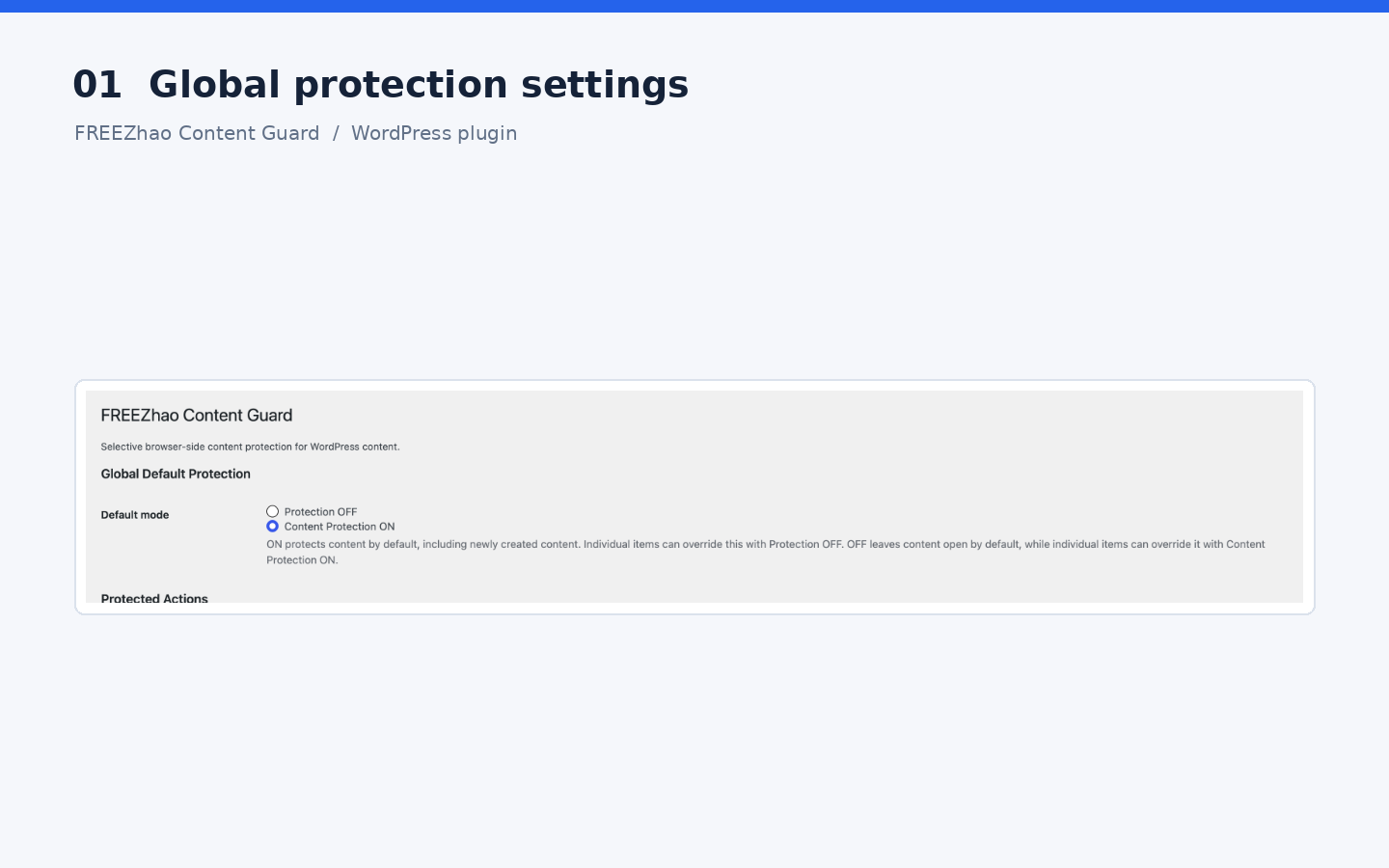
FREEZhao Content Guard helps site owners discourage casual copying and saving of protected web content without changing the stored WordPress content.
The plugin is designed around two useful defaults:
- Content Protection ON: content is protected by default, including newly created content. Individual content can be set to Protection OFF.
- Protection OFF: content is open by default. Individual content can be set to Content Protection ON.
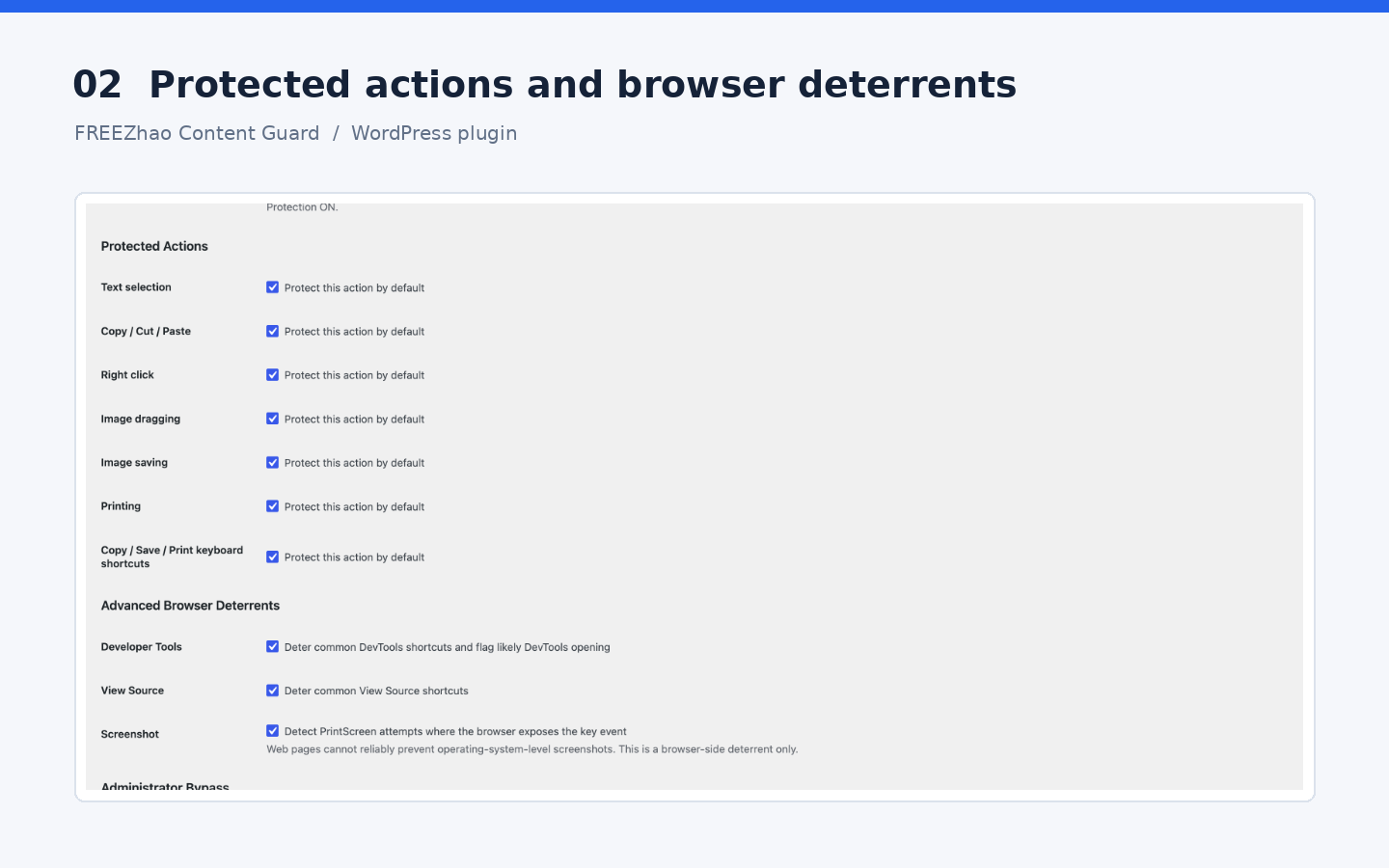
Protection can be controlled per action:
- Text selection
- Copy, cut, and paste
- Right click
- Image dragging
- Image saving
- Printing
- Common copy, save, and print keyboard shortcuts
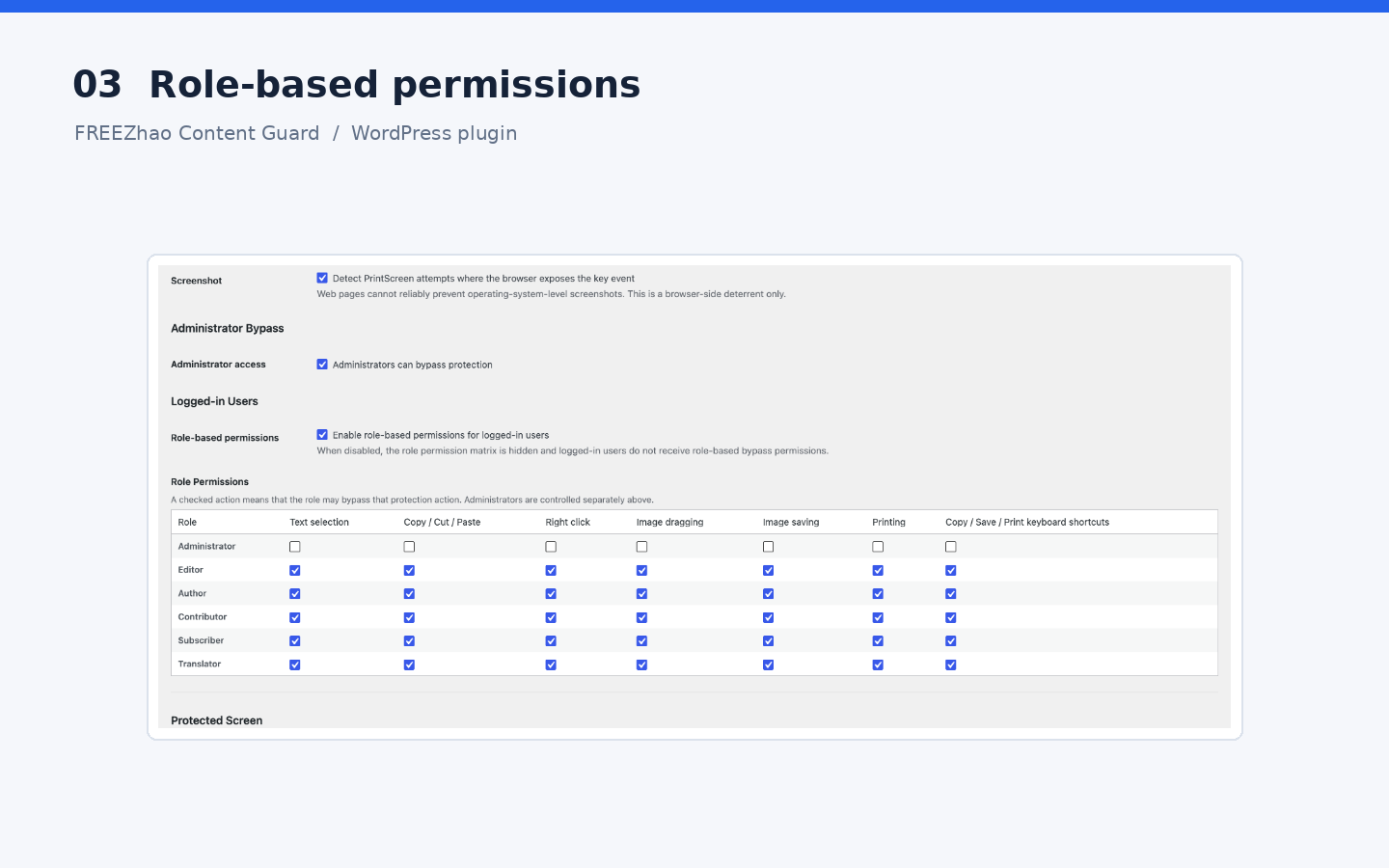
Administrators can bypass protection. Optional role-based permissions are grouped under Logged-in Users and are hidden until role-based permissions are enabled.
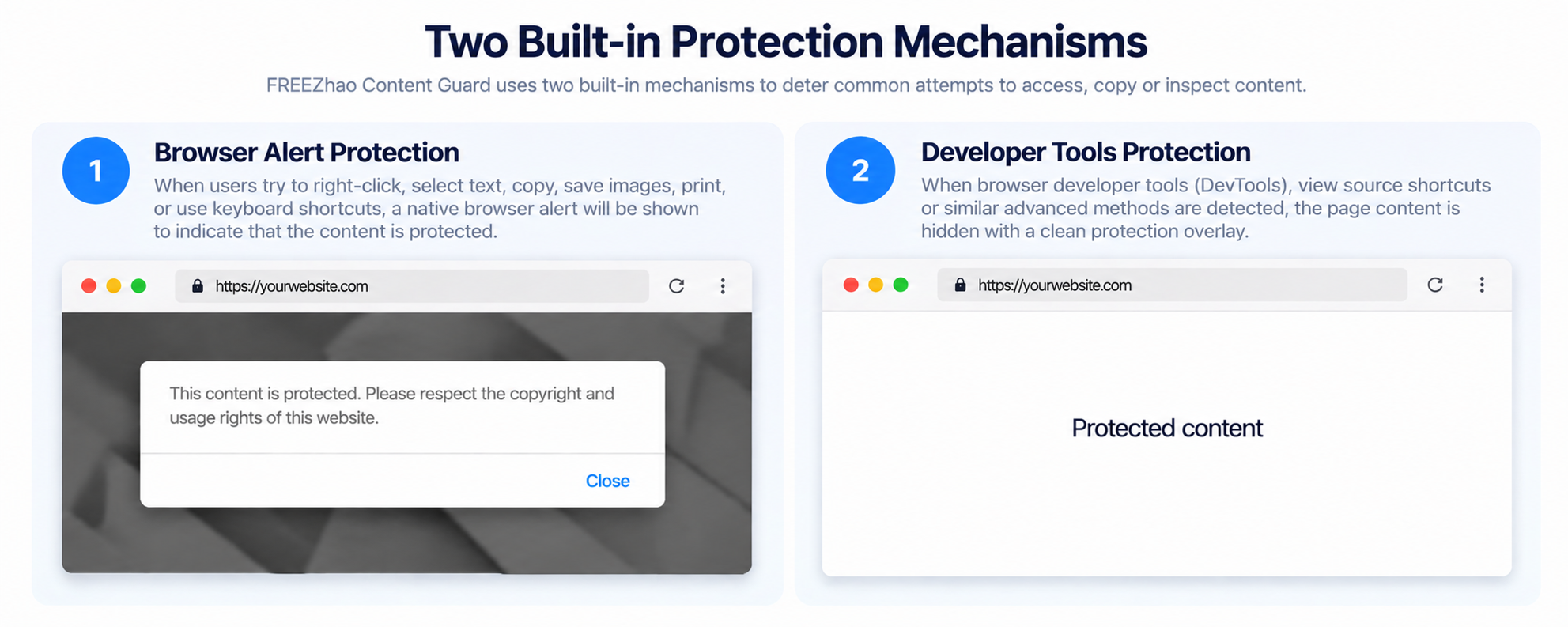
Notifications can be disabled or shown as a browser alert with a custom message.
Optional browser deterrents can also discourage common View Source and DevTools shortcuts and detect PrintScreen key events where the browser exposes them.
This plugin is a browser-side deterrent, not DRM. A website cannot reliably prevent operating-system screenshots, browser extensions, developer tools, network inspection, or a determined user from accessing data that has already been delivered to the browser.
Privacy
FREEZhao Content Guard does not send personal data or browsing activity to external services. Settings are stored locally in the WordPress database.
Screenshots
Installation
- Upload the
freezhao-content-guardfolder to/wp-content/plugins/, or upload the ZIP from Plugins > Add New > Upload Plugin. - Activate the plugin.
- Open Settings > FREEZhao Content Guard.
- Choose the global default mode and the actions you want to protect.
- Select the public post types that should use the global default.
- Configure Special Frontend Pages for the homepage, 404 page, search results, and archive pages.
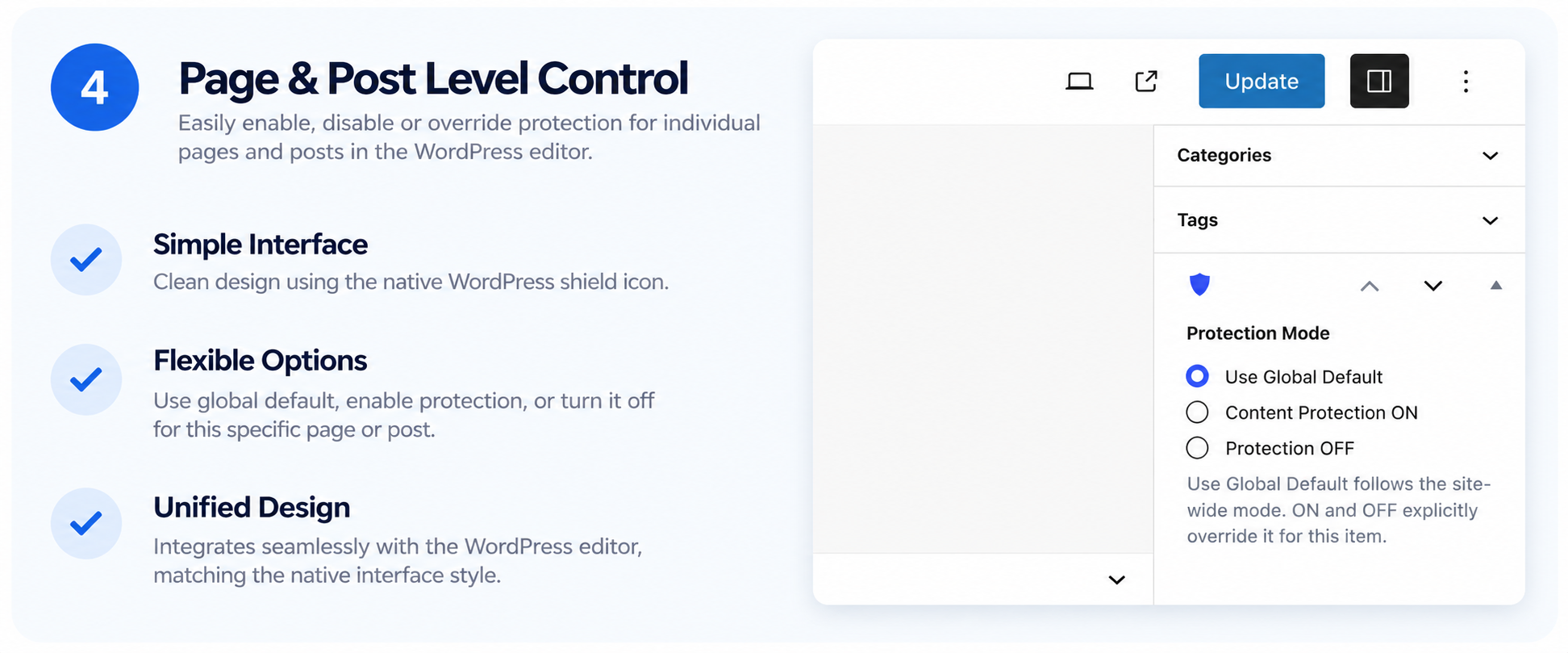
- Use the shield-icon protection box in the editor when a specific page, post, or custom post type needs an ON or OFF override.
FAQ
-
Does Content Protection ON protect new content?
-
Yes. New content with no explicit override inherits the global default.
-
Can I leave a download page open?
-
Yes. Set that content to Protection OFF.
-
Can I protect one page when the global default is OFF?
-
Yes. Set that content to Content Protection ON.
-
Can I protect the homepage, 404 page, search results, or archives?
-
Yes. Use Special Frontend Pages in Settings > FREEZhao Content Guard. Each context has the same Use Global Default, Content Protection ON, and Protection OFF choices. A static homepage follows the protection setting of its page.
-
Can administrators bypass protection?
-
Yes, when Administrator Bypass is enabled.
-
Can I configure different permissions for different roles?
-
Yes. Enable role-based permissions under Logged-in Users, then configure the Role Permissions matrix.
-
Does the plugin prevent screenshots?
-
No website can reliably prevent operating-system-level screenshots. The optional screenshot setting detects PrintScreen key events when the browser makes the event available.
-
Can the plugin really block DevTools or View Source?
-
It can deter common keyboard shortcuts and flag likely DevTools opening, but it cannot provide absolute browser security.
-
What does Reset Plugin Data remove?
-
The reset action removes FREEZhao Content Guard settings, protection metadata stored on posts and pages, and the plugin-created role capabilities. It does not delete posts, pages, media, or other WordPress content.
-
Does uninstalling the plugin remove its database data?
-
Yes. When WordPress uninstalls FREEZhao Content Guard, its uninstall routine removes the plugin settings, protection metadata, and plugin-created role capabilities.
-
Does the plugin send visitor data to an external service?
-
No. FREEZhao Content Guard does not use external tracking, analytics, or remote APIs.
Reviews
There are no reviews for this plugin.
Contributors & Developers
“FREEZhao Content Guard” is open source software. The following people have contributed to this plugin.
Contributors
Translate “FREEZhao Content Guard” into your language.
Interested in development?
Browse the code, check out the SVN repository, or subscribe to the development log by RSS.
Changelog
1.4.8
- Replaced the long editor protection meta-box heading with a compact blue WordPress Dashicons shield, retaining an accessible screen-reader name.
- Expanded the development notes using verifiable earlier release entries.
1.4.7
- Documented the two WPML third-party hooks with narrowly scoped PHPCS exemptions to avoid false-positive prefix warnings.
1.4.6
- Added editable protected-screen text for DevTools and print protection.
- Added gettext default and optional WPML/Polylang translation for custom text.
1.4.5
- Initialize role permissions before the role-based toggle is enabled, and preserve explicitly unchecked permissions.
- Avoid false DevTools detection caused by mobile browser viewport differences.
1.4.4
- Standardized the plugin identity, slug, and text domain for WordPress.org compatibility.
- Removed the post-activation dashboard redirect while retaining the direct Settings action link on the Plugins screen.
- Moved settings-page JavaScript into an enqueued admin script and removed inline script handlers.
1.4.3
- Added a Settings action link to the Plugins screen for administrators with access to plugin settings.
- Added a one-time settings redirect after normal single-plugin activation; this behavior was removed in 1.4.4 for a simpler WordPress.org-compliant admin experience.
1.4.2
- Added three-state protection controls for the homepage, 404 page, search results, and archive pages.
- Extended frontend protection beyond singular content while preserving per-content overrides for individual posts and pages.
- Clarified that a static homepage follows its own page-level protection setting.
1.4.1
- Fixed Plugin Check nonce-related false-positive warnings around the reset success query parameter by validating it with a filtered input value.
- Fixed uninstall.php global variable naming warnings for multisite cleanup.
- Avoided capability database writes on every frontend request; capabilities are synchronized when plugin settings change or when the plugin is activated.
1.4.0
- Added a protected reset action at the bottom of the settings page to remove all FREEZhao Content Guard data from the current site without deleting site content.
- Reset now removes plugin settings, per-content protection metadata, and plugin-created role capabilities.
- Hardened uninstall cleanup to remove all plugin data, including protection metadata and custom role capabilities.
- Added multisite-aware uninstall cleanup for all sites in a network.
1.3.4
- Restored the visual DevTools deterrent: when likely DevTools opening is detected, protected page content is replaced in the viewport by a “Protected content” message.
- Removed the hidden
.gitkeepfile to satisfy Plugin Check. - Fixed the Stable tag to match the plugin version.
- Prefixed uninstall.php global-scope variables with the full plugin prefix for Plugin Check compatibility.
1.3.3
- Administrator role permissions now default to all unchecked; administrator bypass remains controlled separately by the Administrator Bypass setting.
1.3.2
- Moved Advanced Browser Deterrents directly after Protected Actions.
- Refined Logged-in Users > Role Permissions hierarchy, spacing, and default selections.
- Role Permissions now starts with all actions selected for newly initialized roles; existing explicit choices remain respected.
- Added the languages directory required by the plugin text-domain path.
- Fixed Plugin Check naming warnings caused by versioned plugin folder names and uninstall variable prefixes.
1.3.1
- Updated plugin identity, text-domain consistency, and WordPress.org submission compatibility.
- Fixed text-domain consistency for internationalization.
- Removed the third-party Update URI mechanism for WordPress.org submission compatibility.
- Added conditional Role Permissions UI: the matrix is hidden unless role-based permissions are enabled.
- Hardened settings and post metadata sanitization.
- Kept the two-way global default and page-level three-state override model.
- Clarified browser deterrent limitations.
1.3.0
- Added configurable browser alert notification.
- Added optional DevTools, View Source, and PrintScreen deterrents.
- Improved Logged-in Users and Role Permissions layout.
Development before version 1.3.0 included prototyping the core content-protection controls, the global default and per-content override model, and refining the settings interface. Exact version-by-version entries for that period are not available in the supplied source and are therefore not listed as releases.