

Description
FlowSync is a WordPress CRM and email automation plugin. It helps you sync members, customers, users, and form leads to Brevo, Mailchimp, HubSpot, Klaviyo, and more based on real activity on your site.
Build contact sync workflows from three parts:
- Trigger – an event happens, such as a user registration, subscription change, order update, or form submission. (Page visit tracking is part of FlowSync Pro.)
- Conditions – choose who or what the workflow should apply to.
- Actions – send email, assign roles, update user meta, delay work, sync contacts, add contacts to CRM targets, remove contacts from CRM targets, or send an outgoing webhook.
Workflow data, run logs, settings, and tracking events are stored on your own WordPress site. External CRM services are contacted only when you configure that integration and a workflow action needs to use it.
Website | Documentation | Support
Built-in integrations
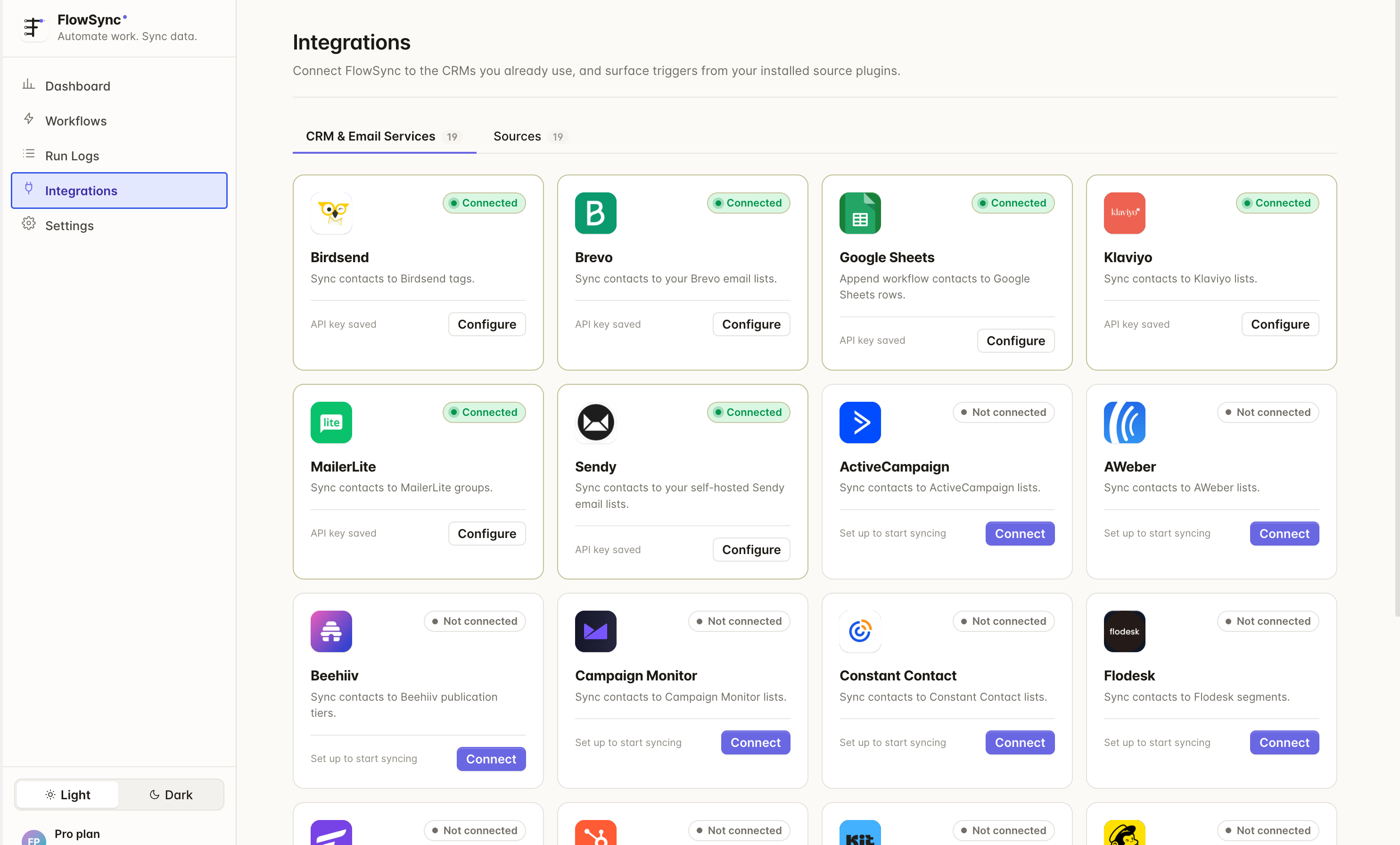
Send contacts to ActiveCampaign, AWeber, Beehiiv, Birdsend, Brevo, Campaign Monitor, Constant Contact, Drip, EmailOctopus, Flodesk, FluentCRM, GoHighLevel, Google Sheets, HubSpot, Kit, Klaviyo, listmonk, Mailchimp, MailerLite, MailPoet, Omnisend, Pipedrive, Sender, SendGrid, Sendy, SuiteCRM, TAPNET Lead Engine, Zoho Campaigns, and Zoho CRM.
Trigger workflows from WordPress user events, WooCommerce (including Subscriptions and Memberships), Easy Digital Downloads, SureCart, Freemius, ProfilePress, MemberPress, Paid Memberships Pro, Paid Member Subscriptions, LearnDash, LifterLMS, Tutor LMS, GiveWP, and every major form plugin: Contact Form 7, Divi Email Optin, Elementor Forms, Fluent Forms, Formidable Forms, Forminator, Gravity Forms, Ninja Forms, SureForms, and WPForms.
See the full integration directory
Key features
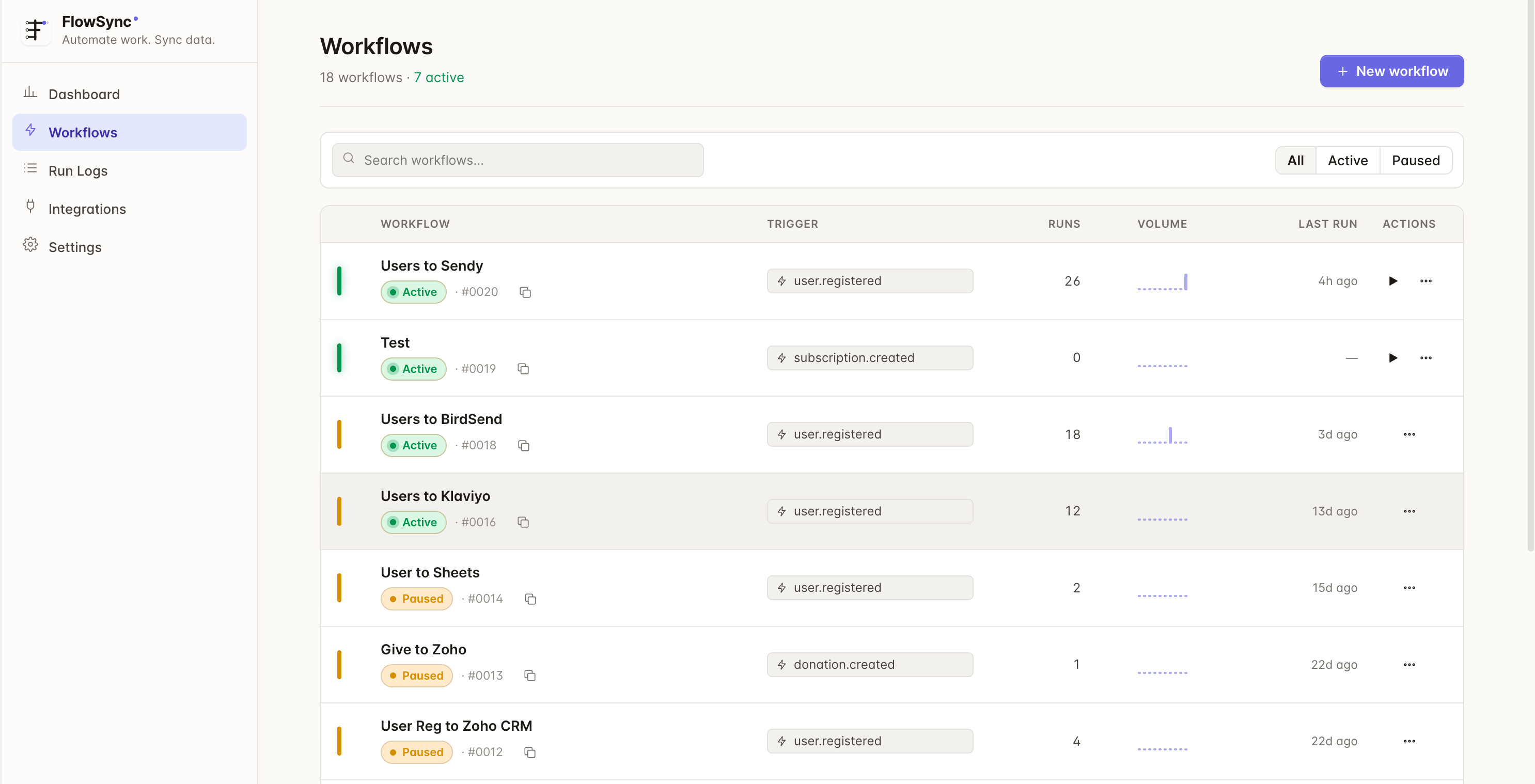
- Trigger-based workflow builder.
- AND/OR condition groups.
- Source-aware condition fields.
- Per-action field mapping.
- Action Scheduler or WP-Cron backed queues.
- Manual workflow runs.
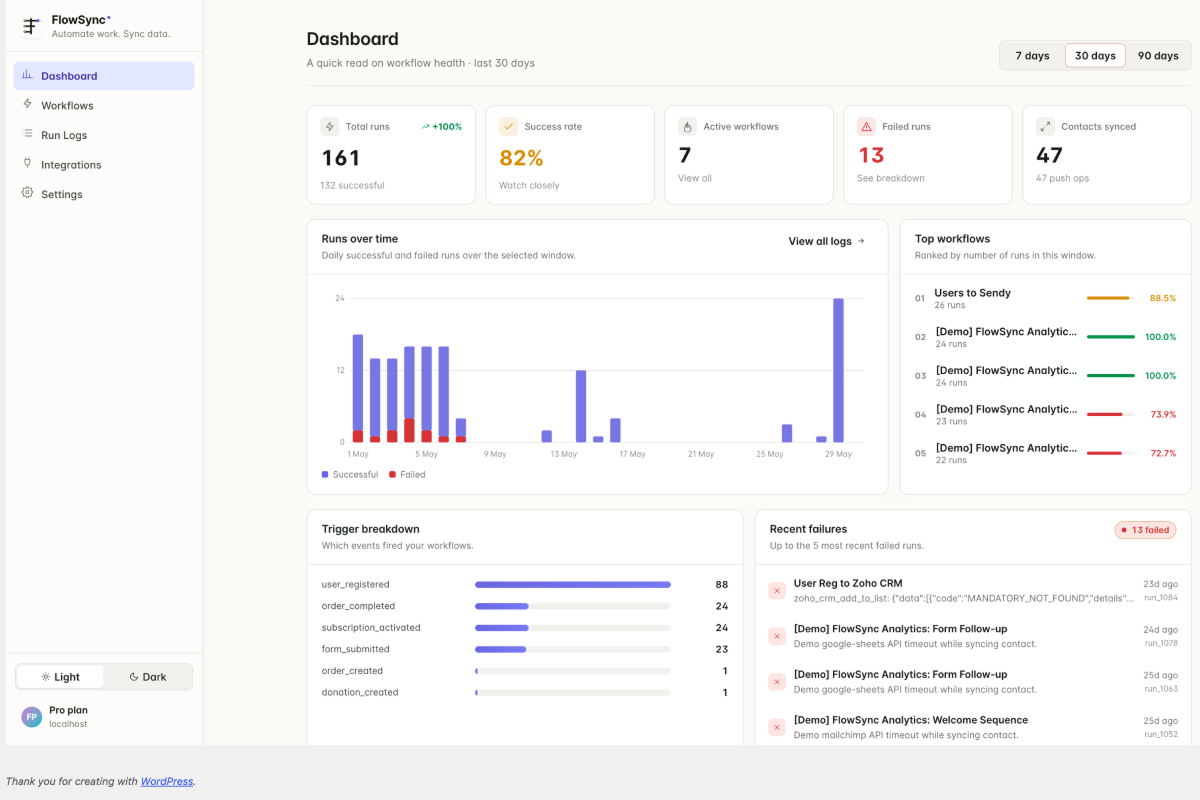
- Run logs and integration sync logs.
- External webhook action for workflow delivery to administrator-configured URLs.
FlowSync Pro
FlowSync Pro adds capabilities the free plugin does not contain:
- AffiliateWP source. Triggers for affiliate registered, approved, and status changed, plus referral earned, paid, and status changed.
- SliceWP source. The same affiliate and commission lifecycle for sites running SliceWP.
- Page visit tracking, so workflows can run against the pages someone viewed.
- Inbound and two-way contact sync. The free plugin pushes to your CRM. Pro also pulls changes back into WordPress.
- Your CRM’s own custom fields and attributes in the field mapper, on top of the core identity fields.
Compare FlowSync and FlowSync Pro
Third-Party Services
FlowSync connects to third-party services only when an administrator configures the related integration. Each service is contacted to validate the account and to read or write lists, contacts, tags, and custom fields for the actions you configure.
- ActiveCampaign: your account-specific API URL entered in the integration settings (for example
https://youraccount.api-us1.com). Terms:https://www.activecampaign.com/legal/terms. Privacy:https://www.activecampaign.com/legal/privacy-policy. - AWeber:
https://api.aweber.com/. Terms:https://www.aweber.com/legal.htm. Privacy:https://www.aweber.com/privacy.htm. - Beehiiv:
https://api.beehiiv.com/. Terms:https://www.beehiiv.com/tou. Privacy:https://www.beehiiv.com/privacy. - Birdsend:
https://api.birdsend.co/. Terms:https://birdsend.co/legal/legal-policy/. Privacy:https://birdsend.co/legal/privacy-policy/. - Brevo:
https://api.brevo.com/. Terms:https://www.brevo.com/legal/termsofuse/. Privacy:https://www.brevo.com/legal/privacypolicy/. - Campaign Monitor:
https://api.createsend.com/. Terms:https://www.campaignmonitor.com/policies/#terms-of-use. Privacy:https://www.campaignmonitor.com/policies/#privacy-policy. - Constant Contact:
https://api.cc.email/. Terms:https://www.constantcontact.com/legal/terms. Privacy:https://www.constantcontact.com/legal/privacy-notice. - Drip:
https://api.getdrip.com/. Terms:https://www.drip.com/terms. Privacy:https://www.drip.com/privacy. - EmailOctopus:
https://api.emailoctopus.com/. Terms:https://emailoctopus.com/legal/terms. Privacy:https://emailoctopus.com/legal/privacy. - Flodesk:
https://api.flodesk.com/. Terms:https://flodesk.com/terms-of-service. Privacy:https://flodesk.com/privacy-policy. - GoHighLevel:
https://services.leadconnectorhq.com/. Terms:https://www.gohighlevel.com/terms-of-service. Privacy:https://www.gohighlevel.com/privacy-policy. - Google Drive and Google Sheets:
https://www.googleapis.com/andhttps://sheets.googleapis.com/. Terms:https://policies.google.com/terms. Privacy:https://policies.google.com/privacy. - HubSpot:
https://api.hubapi.com/. Terms:https://legal.hubspot.com/terms-of-service. Privacy:https://legal.hubspot.com/privacy-policy. - Kit:
https://api.convertkit.com/. Terms:https://kit.com/terms. Privacy:https://kit.com/privacy. - Klaviyo:
https://a.klaviyo.com/. Terms:https://www.klaviyo.com/legal/terms-of-service. Privacy:https://www.klaviyo.com/legal/privacy-policy. - Mailchimp:
https://*.api.mailchimp.com/. Terms:https://mailchimp.com/legal/terms/. Privacy:https://mailchimp.com/legal/privacy/. - MailerLite:
https://connect.mailerlite.com/. Terms:https://www.mailerlite.com/legal/terms-of-service. Privacy:https://www.mailerlite.com/legal/privacy-policy. - Omnisend:
https://api.omnisend.com/. Terms:https://www.omnisend.com/terms/. Privacy:https://www.omnisend.com/privacy/. - Pipedrive: Terms:
https://www.pipedrive.com/en/terms-of-service. Privacy:https://www.pipedrive.com/en/privacy. - Sender:
https://api.sender.net/. Terms:https://www.sender.net/terms-of-service/. Privacy:https://www.sender.net/privacy-policy/. - SendGrid:
https://api.sendgrid.com/. Terms:https://www.twilio.com/en-us/legal/tos. Privacy:https://www.twilio.com/en-us/legal/privacy. - Zoho Campaigns: Terms:
https://www.zoho.com/terms.html. Privacy:https://www.zoho.com/privacy.html. - Zoho CRM: Terms:
https://www.zoho.com/terms.html. Privacy:https://www.zoho.com/privacy.html. - TAPNET Lead Engine:
https://tapnet.com/modules/addons/tapnet_lead_engine/api/landing_page_intake.php, or the intake URL you enter in the integration settings. Lead data sent includes email, name, and any fields you map. Terms: TAPNET_TERMS_URL_TO_CONFIRM. Privacy: TAPNET_PRIVACY_URL_TO_CONFIRM. -
FlowSync OAuth broker: used only for OAuth integrations to start, complete, and refresh OAuth credentials. Service:
https://oauth.flowsync.site/. Data may include provider slug, return URL, nonce, access token, refresh token, expiry values, account identifiers, and OAuth scope. Terms:https://flowsync.site/terms/. Privacy:https://flowsync.site/privacy-policy/. -
Freemius: used for the optional usage-tracking opt-in shown when FlowSync is activated, and to license and update the paid FlowSync Pro add-on. Nothing is sent unless an administrator accepts the opt-in or activates a FlowSync Pro license. Services:
https://api.freemius.com/andhttps://wp.freemius.com/. Data may include the site URL, WordPress and PHP versions, the plugin version and activation state, the administrator name and email address you consent to share, and the FlowSync Pro license key. Terms:https://freemius.com/terms/. Privacy:https://freemius.com/privacy/.
These integrations contact no central service:
- FluentCRM and MailPoet: used locally through their WordPress plugin APIs when those plugins are installed and active.
- Sendy, listmonk, and SuiteCRM: self-hosted software. FlowSync sends requests only to the installation URL you enter in the integration settings. Software:
https://sendy.co/,https://listmonk.app/,https://suitecrm.com/.
Screenshots
Installation
- Upload the plugin folder to
/wp-content/plugins/, or install it from the Plugins screen in WordPress. - Activate the plugin.
- Go to FlowSync -> Integrations and configure any CRM services you want to use.
- Go to FlowSync -> Workflows and create your first automation.
FAQ
-
Does this require a third-party service?
-
No third-party service is required to create local WordPress workflows. CRM integrations call their respective provider APIs only after an administrator configures credentials and a workflow uses that provider. OAuth-based connections use the FlowSync OAuth broker described below.
FlowSync shows an optional Freemius opt-in when you activate it. Declining it is fine: nothing is sent, and every feature works exactly the same either way.
-
Is page tracking enabled by default?
-
The free plugin does not include page-visit tracking at all. It ships with FlowSync Pro, where it is disabled by default. When enabled, FlowSync stores local event records that can include a user ID for logged-in users, event type, page URL, and sanitized event metadata.
-
What REST API permissions are used?
-
Administrative REST endpoints require a logged-in user with
manage_optionsand WordPress REST nonce authentication through theX-WP-Nonceheader. Public tracking and CRM webhook endpoints are intentionally public, rate-limited or provider-verified, and do not expose protected WordPress data.
Reviews

Contributors & Developers
“FlowSync – Sync WordPress Users to Any CRM (HubSpot, Pipedrive, Brevo, Zoho & SuiteCRM)” is open source software. The following people have contributed to this plugin.
Contributors
Interested in development?
Browse the code, check out the SVN repository, or subscribe to the development log by RSS.
Changelog
1.3.1
- New: the Add to Kit Form action can apply tags in the same step, so adding a contact and tagging them no longer takes two actions.
- Note: FlowSync now asks once whether you want to share anonymous usage data, and FlowSync Pro is licensed through Freemius. Declining the opt-in changes nothing about how the plugin works.
- Fix: Kit contacts with no first name were never added to a form, and never got tagged. Kit only accepts a contact it already holds, so FlowSync now creates the contact first.
- Fix: removing a Kit tag from someone who had unsubscribed did nothing, and was still logged as a success. FlowSync now finds unsubscribed contacts, so the tag is actually removed.
- Fix: Pipedrive contacts with no name were never synced. Pipedrive requires one, so FlowSync now falls back to the mapped full name, then the first and last name, then the email address.
- Fix: Campaign Monitor and Flodesk sync failures never reached the sync log. Both now record the reason against the integration.
- Improved: KIT error logs now contain the API response for a better understanding of the error.
- Improved: Pipedrive and TAPNET failures now record what the service actually said instead of a generic message.
1.3.0
- New: Sender integration. Add and remove subscribers in your Sender groups, with field mapping to Sender’s custom fields.
- New: Omnisend integration. Create or update a contact with mapped fields and custom properties, tag it in the same step, and remove tags in a later step. Omnisend has no lists, so you segment on the tags FlowSync applies.
- New: Paid Member Subscriptions source. Triggers for subscription created, activated, cancelled, expired, renewed, plan changed, payment completed, payment failed, and the final instalment payment.
- New: Paid Member Subscriptions conditions for subscription plan and subscription status.
- Improved: a sync that hits a provider’s rate or usage quota is now paused and resumed instead of failing. A large manual run picks up at the user it stopped on, so nothing is skipped and nothing is synced twice.
- Improved: an integration with no selectable destination no longer shows an empty list picker in the workflow builder.
1.2.3
- New: Freemius source. Freemius runs checkout on its own servers, so FlowSync now takes signed webhooks from your Freemius Developer Dashboard and turns them into triggers: sale completed, subscription renewed, refunded, subscription created or cancelled, license created or expired, plan changed, trial started, customer created, and cart abandoned or recovered.
- New: Freemius conditions for product, plan name, sale total, currency, billing cycle, and whether the payment was a renewal.
- New: the Sources tab can now configure a source whose data comes from outside WordPress. Freemius is the first: save your product secret key, copy the webhook URL it shows, paste it into your product’s webhook settings.
- Improved: a condition value list can be narrowed by a second dropdown, so picking a product can scope the next list to that product’s variations. This is what FlowSync Pro’s WooCommerce product and variation conditions run on.
- Improved: WooCommerce Subscriptions events now carry the variation ID of each subscribed item, so add-ons can filter on one variation instead of the whole product.
- Fix: a condition field contributed by FlowSync Pro or another add-on could be reset when you reopened a saved workflow. Both field-list endpoints now return the same set of fields.
1.2.2
- Improved: Shorten the Plugins screen name of FlowSync.
1.2.1
- New: Easy Digital Downloads source. Run workflows on completed orders, subscription renewals, and refunds, filtered by order total or product.
- New: LifterLMS source. Triggers for course enrolled and completed, lesson completed, quiz passed and failed, certificate earned, and membership enrolled, expired, or cancelled.
- New: manual runs can replay stored form entries, so you can back-fill leads collected before you connected a CRM. Forminator first.
- Improved: the field mapper’s picker searches as you type, and the workflow’s own source sorts to the top.
1.2.0
- Important: Pipedrive now connects with OAuth instead of an API token. If you already connected Pipedrive, open Integrations and connect the account again. Pipedrive actions will not sync until you do.
- New: TAPNET Lead Engine integration. Send WordPress users and form submitters to your TAPNET intake source as leads when they register, buy, or submit a form.
- New: optional sound feedback in the admin screens. Short sounds play on clicks, toggles, and notices. This is off by default. Turn it on with the sound toggle in the sidebar, next to the theme toggle.
- Fix: manual run progress rows showed “Invalid Date” instead of the time each user finished.
- Note: TAPNET has no lists, so the action sends every lead to the intake source your API key belongs to.
1.1.0
- New: FlowSync is now AI ready. It registers with the WordPress Abilities API (WordPress 6.9 and later), so AI assistants and MCP clients can work with FlowSync directly.
- New: Comment Posted trigger on the WordPress source.
- New: SureCart source for stores that do not run WooCommerce. Run workflows on checkouts, purchases, and subscription renewals, filtered by order status, total, product, or collection.
- Note: AI access uses the same manage_flowsync permission as the rest of the plugin.
1.0.1
- New: Divi Email Optin source.
- New: the
flowsync_divi_optin_custom_fieldsfilter adds your own fields to the Divi Email Optin module’s custom field list. - Security: API keys are now encrypted at rest, matching how OAuth tokens are already stored.
- Security: integration settings no longer return a saved password in the REST response.
- Fix: activating MailPoet no longer fatals the site.
- Fix: sync loop prevention now uses an atomic lock when a persistent object cache is available.
- Fix: the dashboard’s recent activity refreshes right after a run instead of waiting for the cache to expire.
1.0.0
- Initial release.