

Description
Flexsolutions Form Builder makes forms that look like your site and work in any language, with entries, file uploads and conditional fields included for free.
It matches your theme. New forms use your theme’s fonts, colours and spacing, read from theme.json and Global Styles, so a form looks at home in Twenty Twenty-Five or any block theme without writing CSS.
It speaks Arabic. The builder, the forms and the Entries screens are built and tested right-to-left, and a full Arabic translation comes through WordPress.org’s language packs.
Everything is free. Entries, file uploads, conditional fields, columns and templates are part of the free plugin, with no upgrade screens and no locked fields.
Free, with no limits
- Saved entries with search, tags, notes, editing and CSV export.
- File uploads, checked and stored privately.
- Conditional fields that show parts of a form only when another answer matches.
- Multi-column layouts and eight ready-made templates.
- Cloudflare Turnstile, reCAPTCHA v3, hCaptcha and Akismet spam checks.
- Free forever: nothing in the free plugin will move to a paid version. Future paid features will come as a separate add-on.
No lost messages
Every submission is saved before the notification email is sent. A failed email is retried and can be resent from the entry, and Flexsolutions Form Builder Diagnostics has a “Send test email” button that shows the mail server’s error.
All features
Build forms with the drag-and-drop builder (or plain HTML plus form tags), then embed them with a shortcode or the “Flexsolutions Form Builder form” block.
- Field types: text, email, url, tel, number, date, textarea, select (single/multiple), checkbox, radio, acceptance, submit.
- Server-side validation of every rule, whatever the browser does.
- Mail templates with placeholders, optional auto-reply.
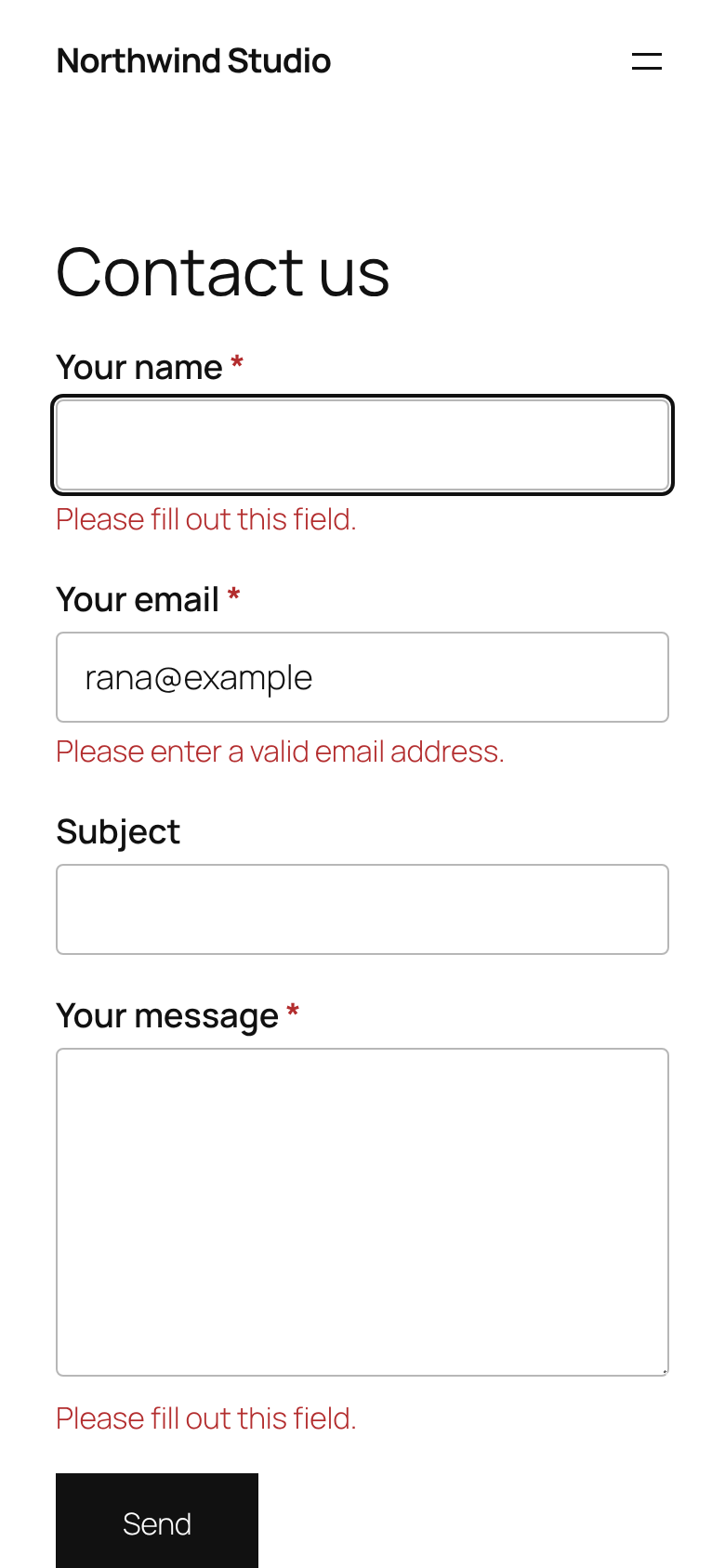
- AJAX submission with inline errors, and it still works without JavaScript (Post/Redirect/Get).
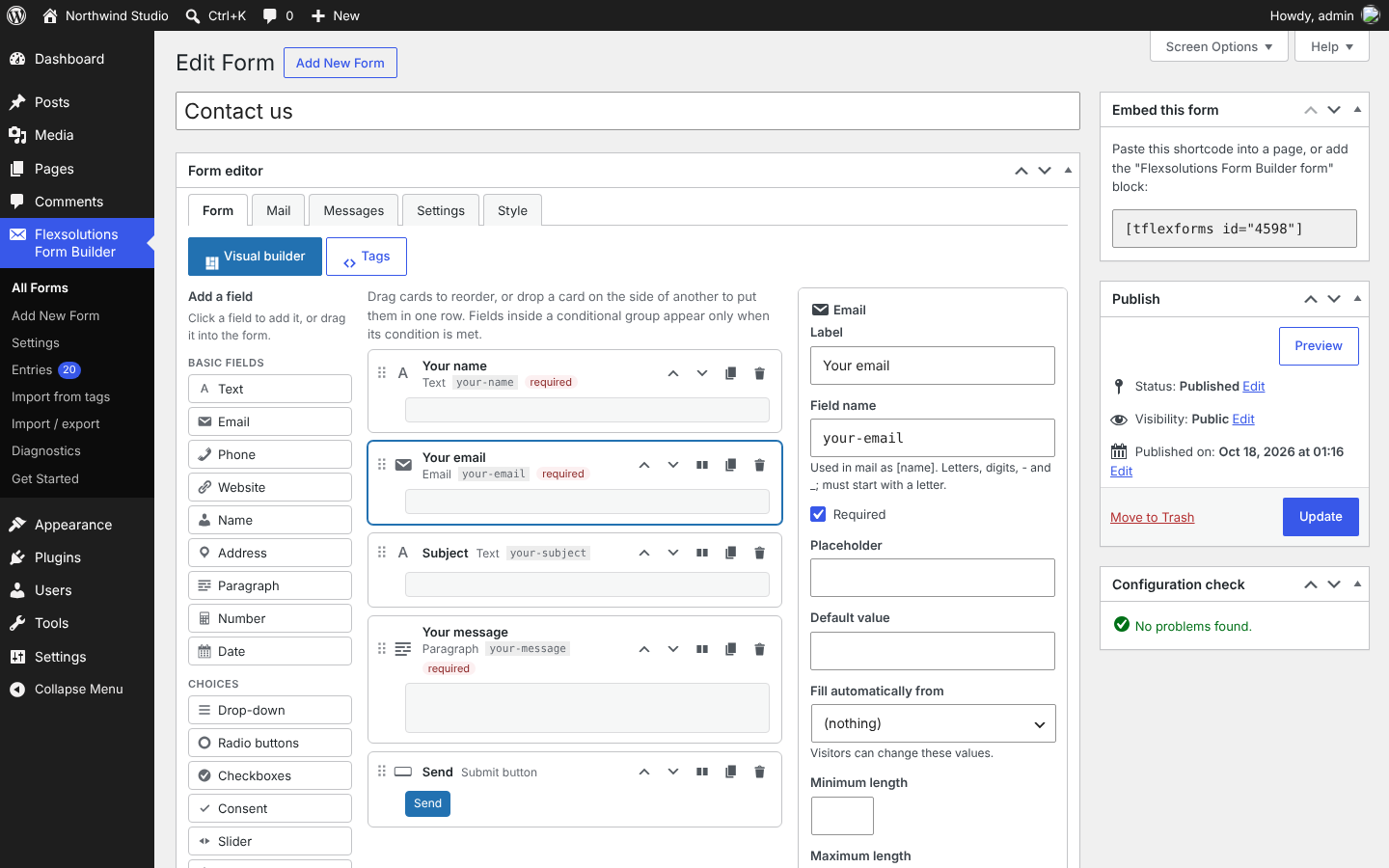
- Drag-and-drop form builder: click or drag fields from a palette, reorder cards, nest fields in conditional groups, and edit each field in a settings panel that shows only the options that field type has. Keyboard users can move cards with up/down buttons. A Tags view shows the same form as tags for full control.
- Configuration check that flags mistakes before visitors hit them.
- Per-form settings: demo mode, logged-in users only, redirect to a thank-you page after success.
- Built-in spam protection: honeypot, time trap, per-IP rate limit, nonces for logged-in users.
- CAPTCHA: Cloudflare Turnstile, Google reCAPTCHA v3 or hCaptcha, verified on the server. Other providers can be added with a filter.
- Optional Akismet checks and the WordPress disallowed-words list.
- Department routing with pipes, hidden fields, dynamic defaults, character counters.
- HTML or plain-text mail, CC/BCC, a fixed From address, and option to leave out empty lines.
- Instant validation in the browser using the same rules and messages as the server.
- File uploads with size, type and real-content checks; files attached to the email and stored privately.
- Entries: submissions saved in the database, with search, filters, tags, notes, editing with a change history, CSV export of exactly what the list shows, retention period and WordPress privacy export/erase tools.
- Conditional fields: show parts of a form only when another answer matches.
Requirements and compatibility
These combinations are tested automatically on every change:
- PHP: 8.2, 8.3 and 8.4.
- WordPress: 6.8 and the latest release (7.1 at the time of writing).
- Database: MySQL 8.0, MariaDB 10.6 and MariaDB 11.4.
- Browsers: the form and the builder are tested in Chromium. They use only standard HTML, CSS and JavaScript supported by current Chrome, Edge, Firefox and Safari; forms also work with JavaScript turned off.
- Right-to-left languages (Arabic, Hebrew, Persian and others): the form, the builder and the Entries screens mirror correctly.
- Translations: Arabic comes as a WordPress.org language pack, installed by WordPress itself. A translation template (
languages/flexsolutions-form-builder.pot) is included in every release for other languages. - Accessibility: the form and the plugin’s screens are checked with axe-core in every test run (no serious or critical issues) and can be used with the keyboard alone.
Older PHP or WordPress versions are not supported; on them the plugin stays inactive and shows a notice.
Form builder
Open a form and use the Form tab. Click a field in the palette to add it above the submit button (or after the selected card), or drag it to any position. Select a card to edit its label, name, help text and options; the field name follows the label until you change it yourself. Drag cards, or use their up/down buttons, to reorder them and to move them in and out of conditional groups. Switch to Tags at any time to see or edit the same form as tags; HTML the builder does not recognise is kept as a “Custom HTML” block.
Add New Form opens a template picker: start blank, or from one of eight templates (contact, lead capture, event registration, feedback, newsletter signup, job application, support request), each with its fields, notification email and thank-you message ready to change. Developers can add their own with the tflexforms_templates filter.
Press Preview in the Publish box to see the form with your unsaved changes, on a page of your theme, at desktop, tablet and phone widths. Nothing is saved and the form cannot be sent from the preview. The Forms list has a Preview link too. If you try to leave the editor with unsaved changes, the browser asks you to confirm first.
Shortcode
[tflexforms id="123"], or use the "Flexsolutions Form Builder form" block.
Entries
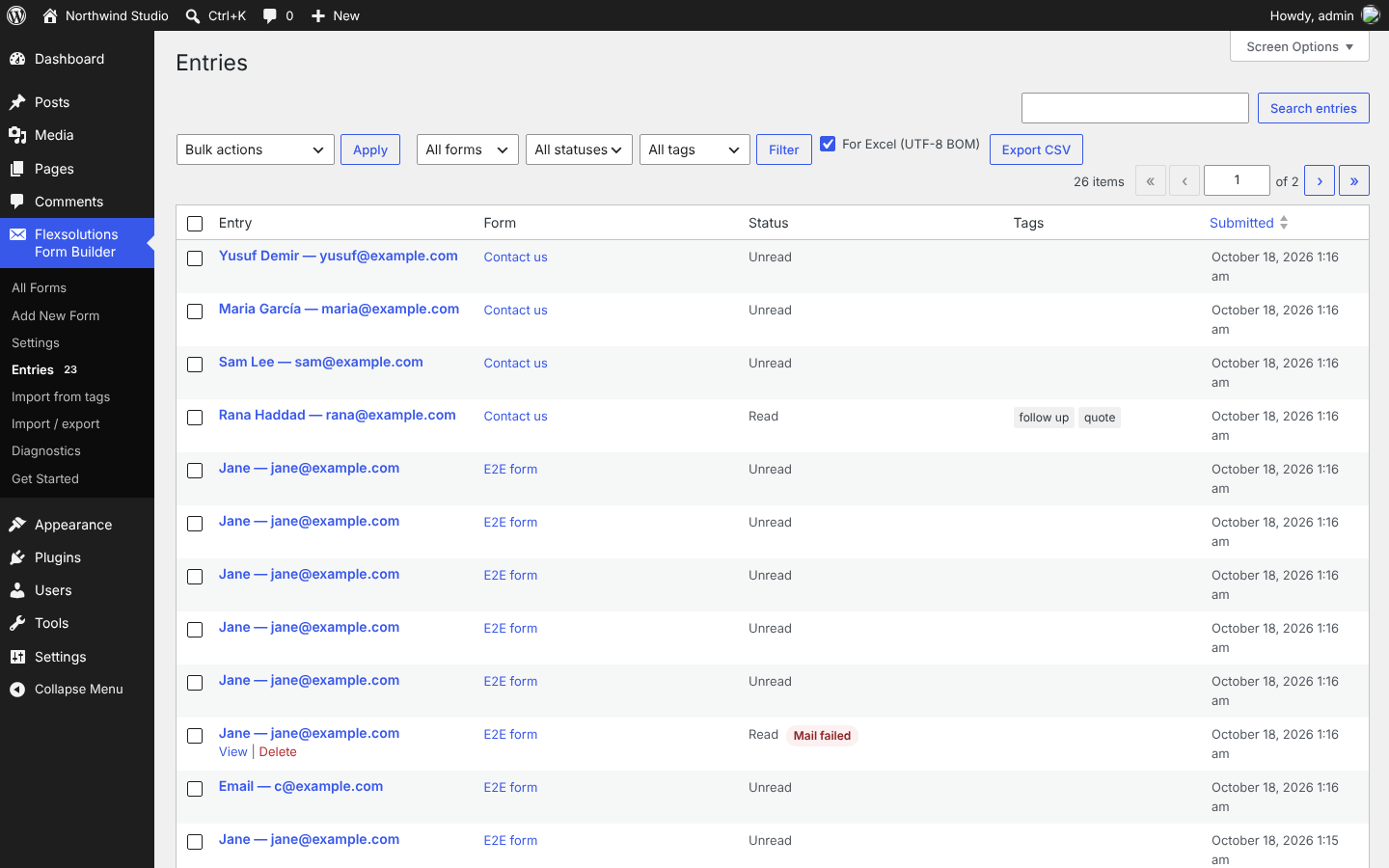
Each form can save submissions (Settings tab Entries, on by default). Find them under Flexsolutions Form Builder Entries: filter by form, status or tag, search, mark read/unread, delete and download uploaded files. “Export CSV” downloads exactly the entries the list shows with its current filters and search, across all pages; keep “For Excel (UTF-8 BOM)” ticked so Excel reads Arabic and other non-English text correctly (LibreOffice and Google Sheets read the file either way).
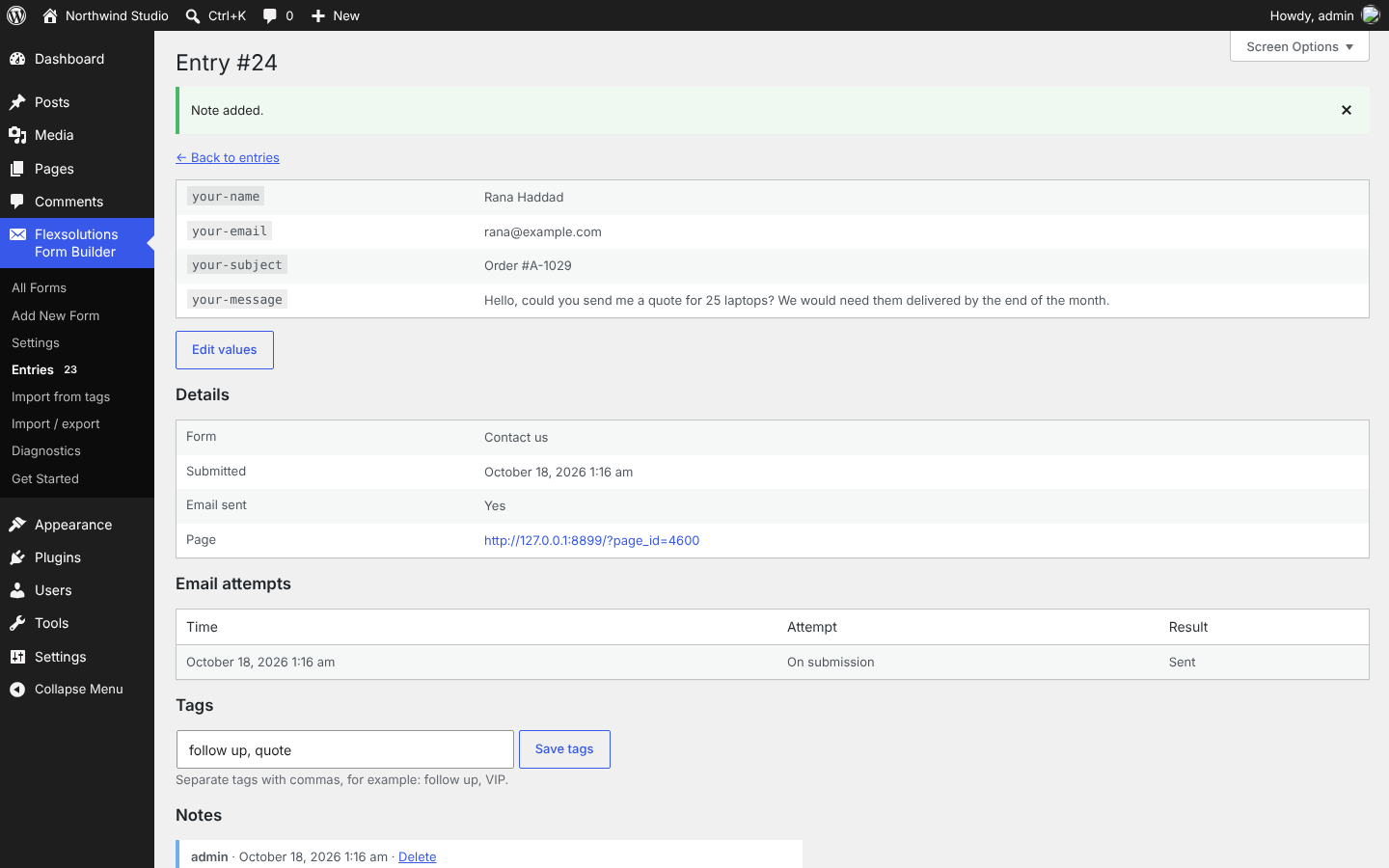
On an entry you can add tags (for example “follow up” or “VIP”) and notes for your team; each note shows who wrote it and when. “Edit values” corrects a submitted value; every change is kept in the entry’s change history with who made it, when and the old value, and no notification is sent again.
Each entry is saved before its notification email is sent, so a mail server problem never loses a message: the visitor sees your success message, and the entry shows a “Mail failed” badge with a “Resend notification” button. A failed notification is also retried automatically three times in the background (after 1, 5 and 15 minutes), and every attempt, with the mail server’s error, is listed on the entry. Submissions flagged by the disallowed-words list or Akismet are kept with the Spam status and are not emailed; choose Spam in the status filter to review them, and “Not spam” to move one back (you can then send its notification). Bot traps (honeypot, time trap) still reject submissions without storing them. If a visitor double-clicks or their browser resends the form, the repeat within 10 minutes returns the first result instead of creating a second entry and email. Viewing and exporting require the read_tflexforms_entries capability; adding notes and tags and editing values edit_tflexforms_entries; deleting entries, or other people’s notes, delete_tflexforms_entries (all three given to administrators). Anyone who can edit entries can delete their own notes.
Uploaded files are encrypted before they are saved in wp-content/uploads/tflexforms-uploads/, under random names, so they are private on every web server, nginx included: a copy fetched from the folder cannot be read. They are decrypted only for users allowed to view entries and for notification attachments. Apache and IIS also block the folder (.htaccess and web.config). To keep the files outside the web root as well, add define( 'TFLEXFORMS_UPLOAD_DIR', '/path/outside/webroot' ); to wp-config.php.
For help, open Flexsolutions Form Builder Get Started in your dashboard, read the FAQ below, or ask in this plugin’s support forum on WordPress.org.
Privacy
Submitted values are emailed to the recipients you configure and, if entries are enabled, stored in the database. IP addresses are stored only if you enable it in Flexsolutions Form Builder Settings, where you can also set how many days entries are kept. Flexsolutions Form Builder adds its entries to WordPress’s Tools Export Personal Data and Erase Personal Data (matched by email address) and suggests text for your privacy policy. When CAPTCHA is enabled, the visitor’s browser loads the provider’s script and the visitor’s IP address is sent to the provider for verification. When Akismet checking is enabled, the submission content is sent to Akismet. For rate limiting, a salted hash of the visitor’s IP address is kept in a transient for 10 minutes; the raw IP is not stored. To recognise duplicate submissions, a salted hash of each submission (not its readable values) is kept for 10 minutes. When a notification email cannot be sent, its text is kept with the entry until it is resent, and is deleted with the entry.
External services
Flexsolutions Form Builder works without any external service. Each one below is used only when a site administrator turns it on, and only on the forms where it is enabled.
- Cloudflare Turnstile (CAPTCHA). The visitor’s browser loads the widget script from challenges.cloudflare.com, and when the form is sent your server asks Cloudflare whether the visitor’s token is valid, sending the token, the secret key and the visitor’s IP address. Terms, privacy policy.
- Google reCAPTCHA v3 (CAPTCHA). The visitor’s browser loads the script from www.google.com/recaptcha, and when the form is sent your server sends the token, the secret key and the visitor’s IP address to Google for verification. Terms, privacy policy.
- hCaptcha (CAPTCHA). The visitor’s browser loads the widget from js.hcaptcha.com, and when the form is sent your server sends the token, the secret key and the visitor’s IP address to hCaptcha for verification. Terms, privacy policy.
- Akismet (spam check). When the Akismet plugin is active and checking is turned on in Flexsolutions Form Builder Settings, each submission’s name, email address, website and message, with the visitor’s IP address, browser user agent and referring page, are sent to Akismet to decide whether it is spam. Terms, privacy policy.
- The “Check the keys” button on the Diagnostics screen sends the configured secret key to the chosen CAPTCHA provider, only when an administrator presses it.
Screenshots

Blocks
This plugin provides 1 block.
- Flexsolutions Form Builder form Display a Flexsolutions Form Builder contact form.
Installation
- In your WordPress admin, go to Plugins Add New Plugin, search for “Flexsolutions Form Builder” and press Install Now, then Activate. (Or upload the plugin zip under Plugins Add New Plugin Upload Plugin.)
- The Get Started guide opens. Pick a template, check where its notification email goes on the Mail tab, and publish the form.
- Put the form on a page: add the “Flexsolutions Form Builder form” block, paste its shortcode (for example
[tflexforms id="123"]), use the Elementor widget, or let the guide create a draft page for you. - Send the form once yourself. The entry appears under Flexsolutions Form Builder Entries and the guide shows whether its email went out; if it did not, Flexsolutions Form Builder Diagnostics helps you find out why.
Requires WordPress 6.8 or later and PHP 8.2 or later.
FAQ
-
Is it really free? Will features move to a paid version later?
-
Yes, it is free, and no. Everything in the free plugin stays free. Paid features, if they come, will be new features in a separate add-on, so your site never changes because of them.
-
How do I move from Contact Form 7?
-
Open Flexsolutions Form Builder Import from tags, paste the form template from Contact Form 7 and a new draft form is created from it. Most Contact Form 7 tags work as they are. Then set the notification email in the form’s Mail tab and replace the Contact Form 7 shortcode on your page with the Flexsolutions Form Builder block or shortcode.
-
Will it match my theme?
-
New forms use the Theme style, which takes fonts, colours and spacing from your theme’s theme.json and Global Styles. Classic themes get a clean neutral style. You can change the look of each form in its Style tab.
-
Does it work in Arabic and other right-to-left languages?
-
Yes. The builder, the forms and the Entries screens mirror correctly in right-to-left languages, and the Arabic translation installs automatically from WordPress.org when your site or profile language is Arabic.
-
Where are entries stored? Is it GDPR friendly?
-
Entries are stored in your own WordPress database and nothing is sent to us. You choose whether IP addresses are stored and how many days entries are kept, and entries are included in WordPress’s personal data export and erase tools. See the Privacy section below.
-
What if my emails don’t arrive?
-
The mail server is not delivering. Press “Send test email” on Flexsolutions Form Builder Diagnostics. If it fails, install an SMTP plugin. If it arrives in spam or not at all, set a From address on your own domain in each form’s Mail tab and add SPF, DKIM and DMARC records for that domain (your host or email provider gives you the values). Failed notifications can be resent from each entry.
-
Are uploaded files private on nginx?
-
Yes. Files are encrypted when they are saved, so nobody can read them by fetching them from the uploads folder, on nginx or any other server. To also stop the server serving the folder, add
location ^~ /wp-content/uploads/tflexforms-uploads/ { deny all; }to the server config, or store files outside the web root withTFLEXFORMS_UPLOAD_DIR. -
The CAPTCHA fails every submission
-
On the Diagnostics screen, “Check the keys” asks the provider whether it accepts the secret key. The site key and secret key must belong to the same site in the provider’s dashboard, and that site must list your domain.
-
Can I use forms in Elementor, Divi or other page builders?
-
Yes. Elementor has a Flexsolutions Form Builder form widget where you pick the form from a list. In SeedProd, Divi and other builders, paste the form’s shortcode, for example
[tflexforms id="123"], into the builder’s shortcode or text element. -
Does deleting the plugin delete my forms and entries?
-
Not unless you choose it. Deactivating never deletes anything, and deleting the plugin from the Plugins screen keeps your forms, entries, uploaded files and settings. To remove everything when you delete it, tick “Delete all data when uninstalling” in Flexsolutions Form Builder Settings first.
-
How do I ask for help?
-
Copy the support report from Flexsolutions Form Builder Diagnostics into your request. Keys and email addresses are removed from it.
-
[type* name option:value flag “quoted value”]
*after the type makes the field required.- Examples:
[text* your-name maxlength:100],[email* your-email],[select topic include_blank "Sales" "Support"],[checkbox interests "News" "Offers"],[acceptance* terms "I agree"],[submit "Send"]. - Pipes:
[select* department "Sales|sales@example.com" "Support|support@example.com"]shows only the labels. Put[department]in the To, CC or BCC field to route mail;[_raw_department]gives the label in mail text. - Hidden fields:
[hidden campaign default:get](from?campaign=in the URL),[hidden source "website"]. - Dynamic defaults on text-like fields:
default:get,default:post_title,default:post_url,default:post_id,default:user_email,default:user_login,default:user_display_name. Visitors can change these values. - Character counter: add the
counterflag, e.g.[textarea message maxlength:500 counter]. - Quiz:
[quiz q "What is 3 + 4?|7|seven" "Colour of snow?|white"]. One question is shown at random; answers are checked on the server, ignoring case and spacing, and never appear in the page. - Slider:
[range rating min:1 max:10 step:1]. - Message placement: put
[response]where the success or error message should appear. - File upload:
[file* cv limit:2mb filetypes:pdf|doc|docx]. Default limit 1 MB (never above the server’s upload limit); default types jpg, jpeg, png, gif, webp, pdf, doc, docx, xls, xlsx, odt, txt. Scripts, web pages, SVG and executables are always refused, as are double extensions such as file.php.jpg. - Conditional groups:
[if contact is "Phone"] … [/if]. Operators:is,not,filled,empty. Groups can be nested. Fields in a hidden group are not required, not mailed and not stored. - More options:
readonly,size:N,cols:N,tabindex:N,label_first(checkbox/radio/acceptance),exclusive(checkboxes act like radio buttons),free_text(last choice gets an “Other” text box),first_as_label(first drop-down option is a placeholder).
-
Which placeholders can I use in emails?
-
Use
[field-name]for submitted values, plus[_site_title],[_site_description],[_site_url],[_site_domain],[_site_admin_email],[_form_title],[_date],[_time],[_remote_ip],[_user_agent],[_url],[_post_id],[_post_title],[_post_url],[_user_login],[_user_email],[_user_display_name]. -
How do I set up CAPTCHA?
-
Choose a provider and enter its keys in Flexsolutions Form Builder Settings, then enable CAPTCHA in each form’s Settings tab. Secret keys are never shown again after saving; you can instead define them in wp-config.php, e.g.
define( 'TFLEXFORMS_TURNSTILE_SECRET_KEY', '...' );(alsoTFLEXFORMS_RECAPTCHA_*andTFLEXFORMS_HCAPTCHA_*, with_SITE_KEY/_SECRET_KEY). reCAPTCHA v3 requires JavaScript in the visitor’s browser. -
How do I move forms to another site?
-
Flexsolutions Form Builder Import / export downloads one or more forms as a JSON file with their fields, notification emails, messages and settings (also from the Forms list: the “Export” row action or the “Export” bulk action). The file never contains CAPTCHA keys, plugin settings or anything that looks like a password, API key or token. To import, choose a file: you see a preview of every form in it, tick the ones you want, and they are created as new draft forms; an existing form is never overwritten. A form already on the site (the same form, or one imported from that file before) is listed but cannot be imported again; use Duplicate on the Forms list to copy it. Files that are not valid Flexsolutions Form Builder exports, come from a newer plugin version, list the same form twice or carry credentials are refused with a report, and nothing is created. Check the notification recipients of imported forms before publishing them. Importing and exporting require the
edit_tflexforms_formscapability. -
What does the Diagnostics screen do?
-
Flexsolutions Form Builder Diagnostics (administrators) lists the plugin, database, WordPress, PHP and server versions and shows the background job queue: waiting, overdue and failed jobs with their last error, and a “Run due jobs now” button. Buttons run the checks that contact a server, only when you press them: “Send test email” sends a test the way notifications are sent and shows the mail server’s error if it fails; “Check the upload folder” puts a throwaway file in the upload folder, tries to download it and deletes it, so you know whether the server (nginx, for example) ignores the folder’s protection; “Check the keys” asks your CAPTCHA provider whether it accepts the secret key. The support report (copy, or download as a text file) lists versions, settings and the job queue without CAPTCHA keys, other secret keys or email addresses.
-
How can developers extend Flexsolutions Form Builder?
-
Add-ons (including Flexsolutions Form Builder Pro) extend the plugin without changing it. On the
tflexforms_registeraction they can call:tflexforms_register_field_type( 'rating', $args ): a new form tag such as[rating* score stars:5]. The type supplies its builder label, icon, settings and tag options, arendercallback, and optionalsanitizeandvalidatecallbacks; the parser, builder, renderer, validator, mail and entries then handle it like a core field.tflexforms_register_settings_panel( 'crm', $args ): an extra tab in the form editor with its ownrenderandsanitizecallbacks; values are stored per form.tflexforms_register_action( 'crm_sync', $args ): a callback run after each successful submission (skipped in demo mode). An action that throws never affects the visitor;tflexforms_action_failedreports it.
Each item can name a
feature.tflexforms_feature_enabled( $feature )is true for features every site has; others are off until an add-on enables them through thetflexforms_feature_enabledfilter. Tags of a field type whose feature is off are removed from the form.REST API:
POST /wp-json/flexsolutions-form-builder/v1/forms/{id}/submissionswith the same fields the HTML form sends (including the hiddentflexforms_*fields). Returns{ status, message, invalid_fields[], redirect }.JavaScript events, dispatched on the form element:
tflexforms:submit(cancelable),tflexforms:sent,tflexforms:invalid,tflexforms:spam,tflexforms:failed. Example:document.addEventListener( 'tflexforms:sent', e => gtag( 'event', 'contact' ) );Actions:
tflexforms_loaded,tflexforms_before_send_mail,tflexforms_submitted.
Actions:tflexforms_captcha_verified,tflexforms_spam_stored,tflexforms_job_failed.tflexforms_submittednow also receives the stored entry ID.
Filters:tflexforms_duplicate_wait_seconds,tflexforms_builder_types,tflexforms_captcha_providers,tflexforms_captcha_check_hostname,tflexforms_recaptcha_threshold,tflexforms_akismet_query,tflexforms_config_issues,tflexforms_validation_errors,tflexforms_mail,tflexforms_form_html,tflexforms_spam_check,tflexforms_rate_limit,tflexforms_rate_limit_window,tflexforms_min_submit_seconds,tflexforms_client_ip,tflexforms_job_handlers,tflexforms_job_backoff.
Filters:tflexforms_export_form,tflexforms_support_report,tflexforms_support_report_secrets.
Filters:tflexforms_templates,tflexforms_template_categories(form templates).
Reviews
There are no reviews for this plugin.
Contributors & Developers
“Flexsolutions Form Builder” is open source software. The following people have contributed to this plugin.
Contributors
Translate “Flexsolutions Form Builder” into your language.
Interested in development?
Browse the code, check out the SVN repository, or subscribe to the development log by RSS.
Changelog
1.0.0
- Uploaded files are encrypted when they are saved (XChaCha20-Poly1305, with a key kept in the database), so they stay private on nginx and every other server without any server setup. Files saved by earlier builds are encrypted automatically after the update.
- Entries: tags with a tag filter and Tags column, team notes (author and time), and “Edit values” with a change history recording who changed what and the old value. New
edit_tflexforms_entriescapability (given to administrators) andtflexforms_entry_updatedaction. - CSV export now holds exactly the list’s current view (form, status, tag, search and order, all pages), also across all forms with a Form column, and adds a Tags column. The UTF-8 BOM for Excel is now optional (on by default).
- Form import and export: new screen Flexsolutions Form Builder Import / export, plus “Export” row and bulk actions on the Forms list. Exports never include CAPTCHA keys or other credentials; imports show a preview, always create new draft forms and refuse malformed, newer-version, duplicate or credential-bearing files with a report. New
tflexforms_export_formfilter. - Database schema 4 (new
tflexforms_entry_notesandtflexforms_entry_tagstables), applied automatically on update. Privacy export includes an entry’s tags and notes; erasing deletes them. - Columns: put fields side by side. In the builder, drop a card on the left or right side of another card, or use “Place beside the card before” on a card. Drag the handle between two columns, or focus it and use the arrow keys, to choose widths of 1/4, 1/3, 1/2, 2/3 or 3/4. “Move to its own row” takes a card out of a row. Rows hold up to four columns.
- On the site, columns sit side by side once the form is at least 600px wide and stack in reading order below that (also inside narrow sidebars). Conditional fields work inside columns.
- New fields: Name (one box, or First name and Last name) and Address (street, city, state/province/region, ZIP/postal code and country), with browser autofill hints. Mail, entries and the CSV export get one text per field: “First Last”, and the address one part per line. Form tags:
[name* your-name first_last],[address* your-address]. - New layout cards: Section heading (h2 to h4) and Divider.
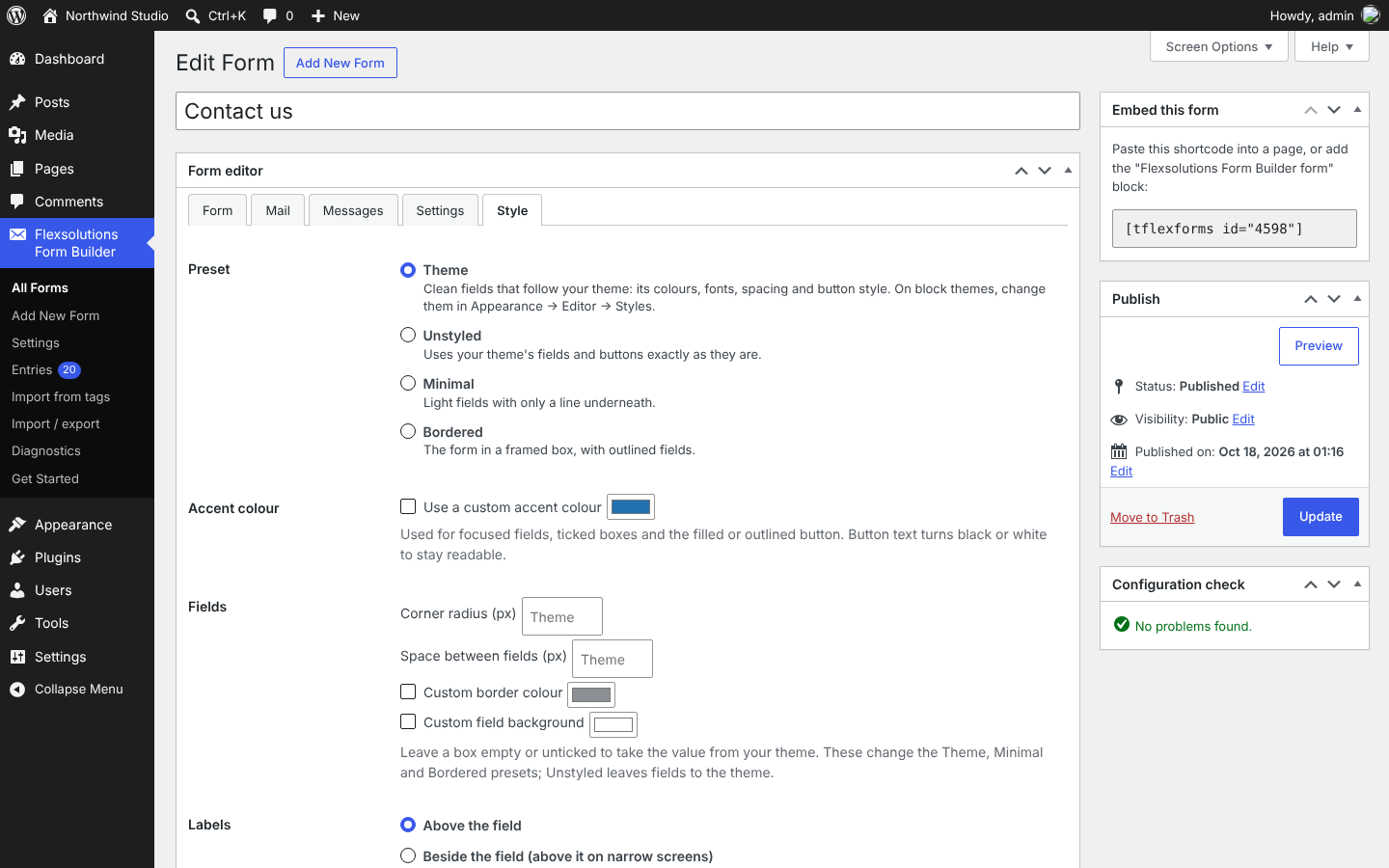
- Style tab on each form: presets (Unstyled keeps your theme’s fields as they are, Minimal, Bordered), an accent colour, labels above or beside the fields (beside from 480px wide), and a theme, filled or outlined button. Filled buttons get black or white text, whichever is readable on the accent.
- Theme preset, the starting look for new forms: clean outlined fields that take the theme’s colours, font, spacing and Global Styles button, so they can be changed in Appearance Editor Styles. Themes can tune it in theme.json under
settings.custom.tflexforms, and each form can override the corner radius, space between fields, field border and field background in its Style tab. Forms saved earlier keep their current look (the old Default preset is now called Unstyled). - Duplicated and imported forms keep their style. To target one form from the site’s Additional CSS, use its
.tflexforms-form-{ID}class. - Preview: a Preview button in the form editor shows the form with your unsaved changes on a page of your theme, at desktop, tablet and phone widths, without saving anything; sending is turned off there. The Forms list gets a Preview link. Leaving the editor with unsaved changes now asks for confirmation.
- Templates: Add New Form now opens a picker with a blank form and eight templates by category: contact, lead capture, event registration, feedback, newsletter signup, job application and support request. Each comes with fields (in columns where it helps), a notification email that lists them and a thank-you message, and passes the configuration check. Template text is translatable. Add-ons can add templates with the
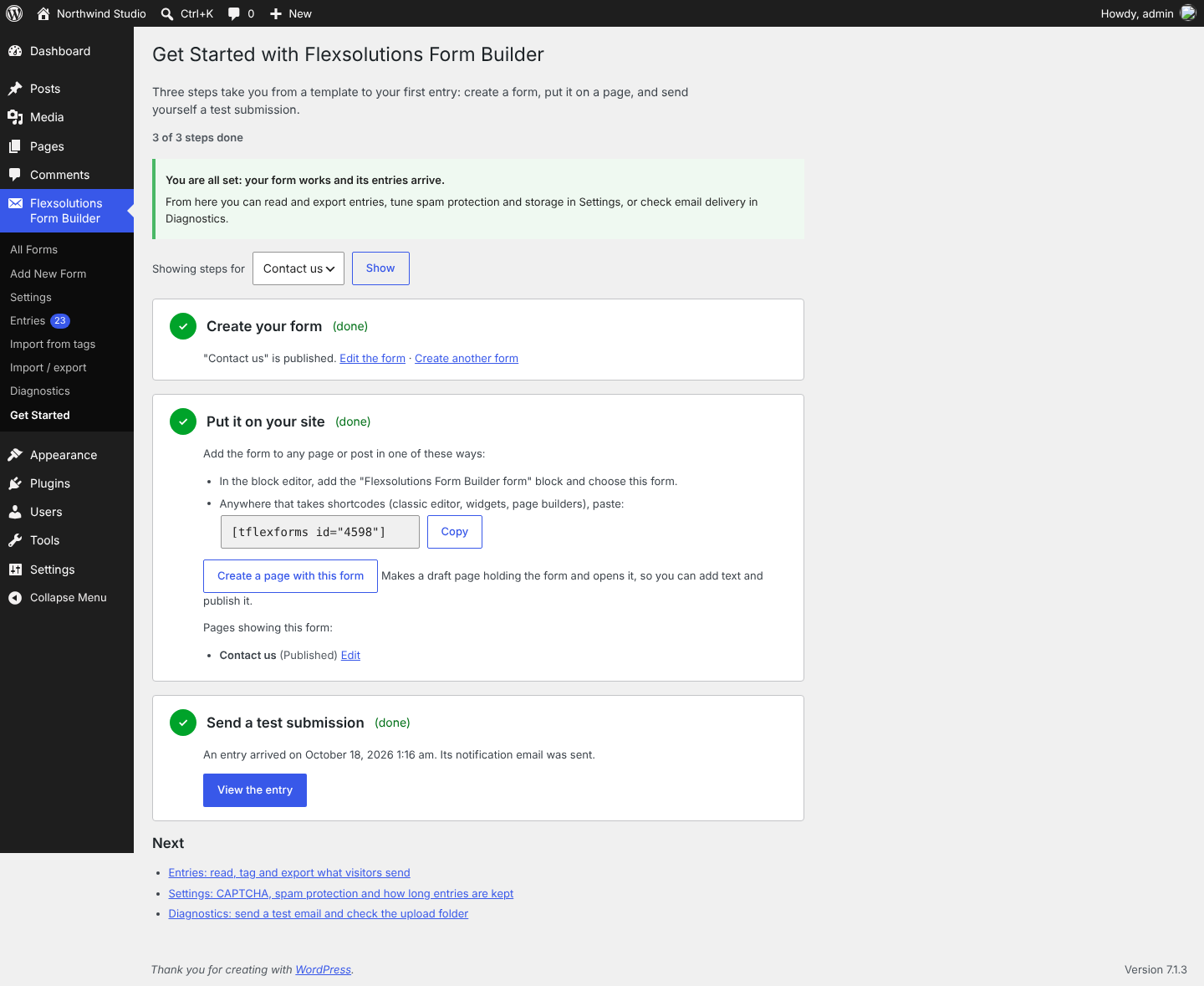
tflexforms_templatesfilter. - Get Started guide (Flexsolutions Form Builder Get Started) for new sites: pick a template, put the form on a page (copy the shortcode, or make a draft page holding the form’s block in one click), and send a test submission. Each step shows as done from what is on the site, the guide shows the first entry and whether its email went out, and points to Diagnostics when it did not. Activating the plugin on a site without forms opens the guide once; a notice on the forms screens names the next step until the first entry arrives or you hide it. The Plugins screen gets a “Get started” link.
- Fix: a plain-text notification body lost placeholders written in angle brackets when saved, such as the sender address in the default “From: [your-name] <[your-email]>” line.
- Diagnostics: new screen Flexsolutions Form Builder Diagnostics with versions, job queue status (overdue and failed jobs, “Run due jobs now”), a test email, an upload folder check that detects a web server serving uploaded files (as nginx does without extra config), a CAPTCHA key check against the provider, and a support report to copy or download with keys and email addresses removed. New
tflexforms_support_reportandtflexforms_support_report_secretsfilters. - Documentation: a Get Started page in the dashboard and a FAQ section in this readme.
- Elementor widget: “Flexsolutions Form Builder form” in the widget panel, with a list of published forms. The editor shows the form but it cannot be used there, Elementor never caches it, and the page keeps the shortcode as its plain content. Needs Elementor 3.5 or later.
- SeedProd: forms in SeedProd’s Shortcode block show and send on landing pages, also in its “no conflict” mode, which skips the usual page head and footer: the form then prints its own stylesheet and script.
- Uninstall: deleting the plugin now keeps your forms, entries, files and settings unless you tick the new “Delete all data when uninstalling” setting (Flexsolutions Form Builder Settings Uninstall, off by default). Earlier versions always deleted everything. On multisite each site follows its own setting. Diagnostics and the support report show the choice.
- Arabic translation of the whole plugin: the builder, every screen, the messages visitors see, the form templates and the block. WordPress installs it as a language pack when the site or the user’s profile language is Arabic.
- Accessibility: help text under a field is now read out with the field; required checkbox groups are announced as required; an error no longer hides a field’s help text or character counter from screen readers; two copies of one form on a page get distinct names. In the admin, the green “No problems found” text and the builder’s field previews now have enough contrast, and deleting a card keeps keyboard focus in the list. Checked with axe-core in the browser tests.
0.7.0
- Reliability: the entry is saved before the notification is sent. If mail fails, the visitor still sees the success message and the entry gets a “Mail failed” badge and a “Resend notification” action. The “mail failed” message is now shown only when entries are not stored.
- Spam flagged by the disallowed-words list or Akismet is stored with the Spam status for review instead of being dropped; it is never emailed. New Spam filter, “Not spam” and “Mark as spam” actions.
- Duplicate protection: each rendered form carries a submission key; a repeat of the same submission within 10 minutes returns the first result without a second entry or email.
- Database schema 2 (new
mail_messagecolumn andtflexforms_submission_keystable), applied automatically on update. - Form schema v1: a form can now be defined by a structured, versioned JSON document (
_tflexforms_schemapost meta) instead of a tag template. It renders, validates, mails and stores exactly like the equivalent template. - Existing forms are converted to the form schema automatically after the update, 50 per request, and render exactly as before (each conversion is checked against the template before it is saved). A form that cannot be converted exactly keeps working from its template and shows a notice explaining why. The template is kept as a backup.
- Right-to-left languages: the form, the builder and the Entries screens now mirror correctly (logical CSS properties; tab arrow keys follow the reading direction).
- Translations: the plugin zip now includes a translation template,
languages/flexsolutions-form-builder.pot, built from the code bybin/make-pot.sh(WP-CLI); the build fails if a string has a translator problem. - New “Requirements and compatibility” section listing the tested PHP, WordPress and database versions.
- Background jobs: a small queue (new
tflexforms_jobstable, run by WP-Cron with the hourly maintenance as a safety net) for work that must not slow down a submission or has to be retried. - A notification that fails is retried automatically three times (after 1, 5 and 15 minutes). Every attempt and the mail server’s error are recorded on the entry and shown on the entry screen. Entry retention clean-up now runs on the queue.
- Database schema 3 (new
mail_logcolumn andtflexforms_jobstable), applied automatically on update. - New screen Flexsolutions Form Builder Import from tags: paste form markup written with form tags (for example from Contact Form 7) to create a new draft form.
- The visual builder now reads and saves the form schema directly. The HTML mode is now the Tags view: the same form shown as tags, which can still be edited and are converted on save. Saving a form without JavaScript leaves its schema untouched unless the tags were changed, and edited tags keep the schema’s notifications, confirmations and settings.
- Add-on API:
tflexforms_register_field_type(),tflexforms_register_settings_panel()andtflexforms_register_action()let add-ons (including Pro) add field types, form editor tabs and after-submission actions without changing core. Newtflexforms_feature_enabled()check andtflexforms_register,tflexforms_action_failed,tflexforms_feature_enabledandtflexforms_tierhooks.
0.6.1
- Fix: forms with required fields inside [if] groups could not be sent without JavaScript (the browser demanded fields of hidden groups). The server and the form script still enforce them when their group is shown.
- Fix: a tampered multi-file upload field is now refused cleanly instead of raising a PHP notice.
- Upload checks now reject bad file names before touching the file.
- Added automated tests: PHPUnit (WordPress test suite) and end-to-end browser tests, with GitHub Actions for PHP 8.2–8.4, WordPress 6.8 and latest, MySQL and MariaDB. Tests are not included in the plugin zip.
0.6.0
- Renamed to Flexsolutions Form Builder (slug flexsolutions-form-builder, prefix tflexforms).
- New drag-and-drop form builder with settings panel, conditional groups and keyboard support.
- Field settings now show only the options that apply to the selected field type.
0.5.0
- File uploads with strict checks, private storage and email attachments.
- Entry storage in custom tables; Entries screen with search, filters, bulk actions, file downloads and CSV export.
- Retention period, optional IP storage, WordPress personal data export/erase integration.
- Conditional fields with [if] … [/if] groups.
0.4.0
- Quiz, range slider and [response] tags.
- Field options: readonly, size, cols, tabindex, label_first, exclusive, free_text, first_as_label.
- Optional fixed From address (fixed address only, with SPF warning).
- Client-side validation mirroring the server rules.
- Help tabs on the form editor.
0.3.0
- CAPTCHA providers: Cloudflare Turnstile, Google reCAPTCHA v3, hCaptcha; settings page with write-only secrets and wp-config constants.
- Akismet and disallowed-words checks.
- Pipes and mail routing, hidden fields, dynamic defaults, character counter.
- HTML mail, CC/BCC, exclude blank lines, 12 new mail placeholders.
0.2.0
- Renamed to Flexsolutions Form Builder.
- AJAX submission with accessible inline errors and DOM events.
- Tabbed editor, tag generator, configuration check, Duplicate action.
- Settings: demo mode, logged-in only, same-site redirect after success.
0.1.0
- First release: forms, tag parser, shortcode, block, validation, mail, REST endpoint, spam protection.