

Description
FindIP Shield reports explainable VPN, proxy, Tor, relay, hosting, datacenter, malicious-IP, and network-service signals for website activity.
The plugin provides:
- Guided setup using a public Shield site key.
- Strict, balanced, and advanced privacy modes.
- Consent-aware initialization with strict or disabled pre-consent behavior.
- Automatic page, session, and form-activity events without reading form values.
- WooCommerce cart, checkout, payment-failure, and order-completion context.
- Compatibility declarations for High-Performance Order Storage and Cart/Checkout Blocks.
- Suggested disclosure text for the WordPress privacy-policy editor.
FindIP Shield provides risk signals, not proof of fraud. Do not automatically block a visitor only because they use a VPN, proxy, Tor, or hosting network. Important decisions should use server verification.
External services
This plugin connects to FindIP Shield, an external service operated by FindIP.
When configured, it downloads a pinned JavaScript SDK from https://cdn.findip.net and sends website events to https://shield.findip.net. The service receives the visitor IP address from the network connection and limited event metadata based on the selected privacy mode. It does not receive form values, passwords, payment details, or message contents.
The service is required for the plugin to provide risk intelligence. No connection is made until an administrator saves a valid public Shield site key.
- Service: https://www.findip.net/shield/overview
- Data collection: https://www.findip.net/docs/shield/data-collection
- Privacy modes: https://www.findip.net/docs/shield/privacy-modes
- Privacy policy: https://www.findip.net/Docs/privacy-policy
- Terms: https://www.findip.net/docs/shield/terms-free-preview
Consent integration
With Require an explicit consent signal enabled, the plugin starts in strict or disabled mode. A consent-management plugin or theme can update Shield by dispatching:
document.dispatchEvent(new CustomEvent('findip:consent', { detail: { granted: true } }));
Send granted: false when consent is withdrawn.
Screenshots
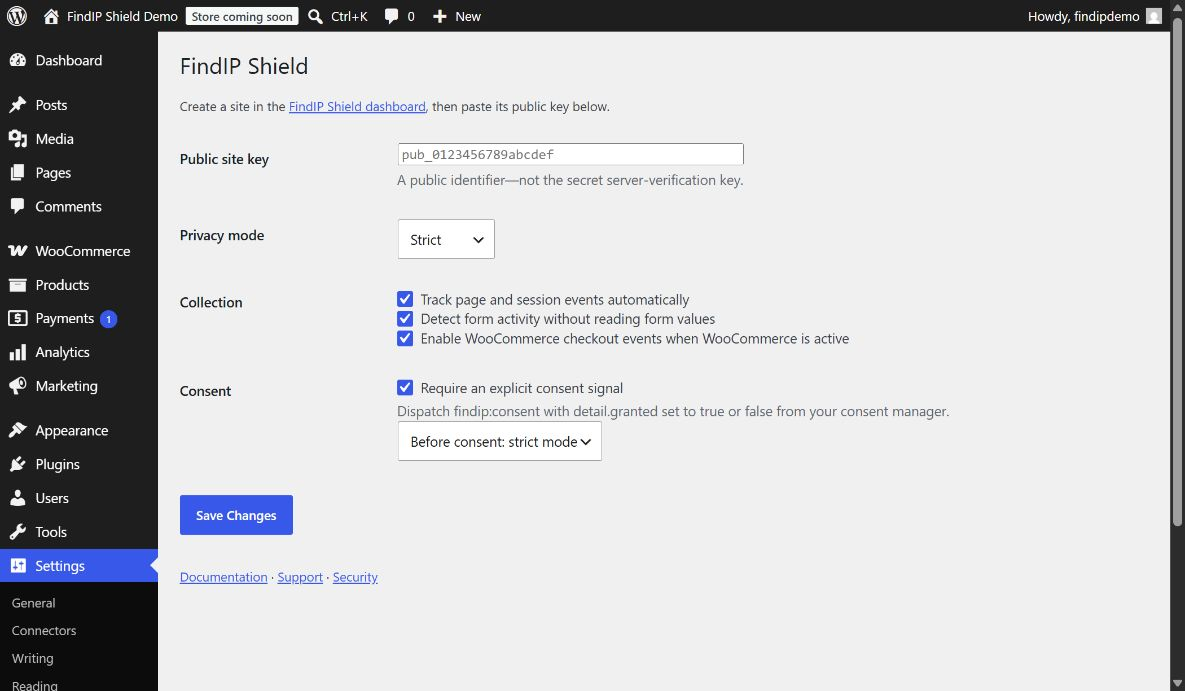
Installation
- Install and activate the plugin.
- Create a site in the FindIP Shield dashboard.
- Open Settings FindIP Shield in WordPress.
- Paste the public site key and choose the privacy and consent settings.
- Save, visit the public site, and confirm the first event in the Shield dashboard.
FAQ
-
Does the plugin collect form values?
-
No. It detects form structure and activity but does not read or transmit passwords, payment details, message contents, or other form values.
-
Does it automatically block visitors?
-
No. The plugin reports signals and recommendations. Browser-side results are not an authorization boundary.
-
Is WooCommerce required?
-
No. The core WordPress integration works without WooCommerce. WooCommerce-specific context is enabled only when WooCommerce is active and the integration setting is selected.
-
Where can I get help?
-
Email info@findip.net. Report security issues privately to security@findip.net.
Reviews
There are no reviews for this plugin.
Contributors & Developers
“FindIP Shield” is open source software. The following people have contributed to this plugin.
Contributors
Translate “FindIP Shield” into your language.
Interested in development?
Browse the code, check out the SVN repository, or subscribe to the development log by RSS.
Changelog
0.1.3
- Normalize localized boolean settings so the automatic-tracking and form-detection toggles and the consent-required flag work; WordPress localizes booleans as strings, which previously made those toggles ineffective.
0.1.2
- Pin FindIP Shield SDK 1.0.8 so events report the WordPress integration instead of Google Tag Manager.
- Pass the wordpress integration identifier to the SDK during initialization.
0.1.1
- Pin FindIP Shield SDK 1.0.7 so automatic session-start events are emitted once per browser session across full page navigation.
- Confirm core plugin compatibility with WordPress 7.1 on a live domain-bound test site.
0.1.0
- Initial release.