

Description
This plugin adds a widget to your sidebar that shows one product a week from the recommended products of the fantasytoys.ro shop.
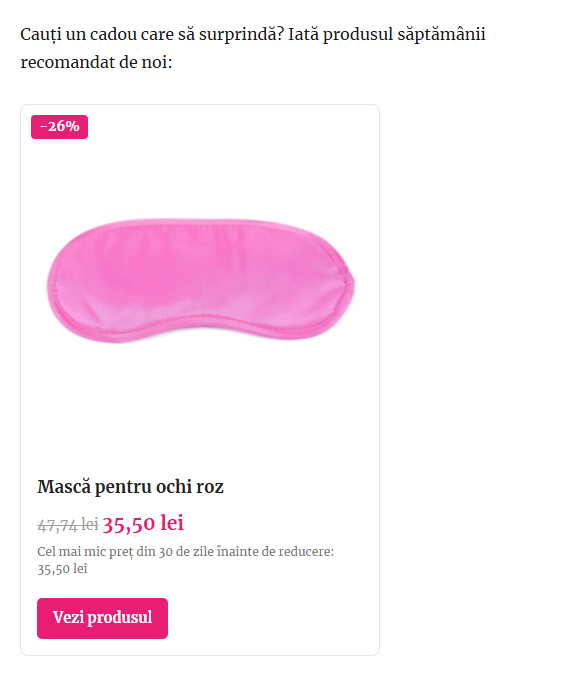
The widget card shows:
- the week number,
- the product photo with the discount badge,
- the product name,
- the regular and the discounted price, with the lowest price from the 30 days before the discount,
- a “View product” button linking to the product page in the shop.
The product is picked automatically from the recommended products on the shop’s home page and stays the same for the whole week (ISO week, site timezone). A new product appears every Monday – no configuration needed.
Features
- Classic widget, also available in the block-based widget editor (Legacy Widget block).
- Shortcode
[fantasytoys_produsul_saptamanii]for posts, pages and block themes without a sidebar. - Image, prices, week number and button can be turned on or off.
- Data is cached (prices refreshed every 6 hours), so the shop is not queried on every page view.
- If the shop is temporarily unavailable, the last successfully loaded product is shown.
- Lightweight: no JavaScript, one small stylesheet loaded only where the widget is displayed.
- Translation ready.
External services
This plugin connects to fantasytoys.ro, the online shop whose products it displays. Without this connection the plugin cannot work.
- What is requested: the public home page of the shop (
https://fantasytoys.ro/), to read the name, link, image and prices of the recommended products. - When: on the server side, when a page containing the widget or shortcode is displayed and the cached data is older than 6 hours, the week has changed, or 10 minutes after a failed request.
- What data is sent: no personal data and no data about your visitors is sent. These are ordinary HTTP GET requests made by your server, containing only the standard WordPress user agent (which includes your site URL).
- Images: the product photo is loaded by the visitor’s browser directly from fantasytoys.ro, so the shop receives the visitor’s IP address and browser information, as with any embedded image. You can disable the image in the widget settings or with
show_image="0"in the shortcode.
The service is provided by the fantasytoys.ro shop: Privacy policy, Terms of service.
Screenshots


Installation
- In the WordPress admin go to Plugins Add New, search for “Fantasytoys Produsul Săptămânii” and click Install Now, then Activate.
- Go to Appearance Widgets and add the “Fantasytoys.ro – product of the week” widget to your sidebar.
- Optionally adjust the title, visible elements and button text.
To display the product inside a post or page, use the shortcode:
[fantasytoys_produsul_saptamanii]
Available attributes (all optional):
[fantasytoys_produsul_saptamanii show_image="1" show_prices="1" show_week="1" button_text="View product" new_tab="1"]
FAQ
-
How often are prices refreshed?
-
Every 6 hours. You can change this with the
ftro_pw_cache_ttlfilter (value in seconds):add_filter( 'ftro_pw_cache_ttl', function () { return HOUR_IN_SECONDS; } ); -
Yes – use the
[fantasytoys_produsul_saptamanii]shortcode, e.g. in a Shortcode block. -
How do I change the colors?
-
The card uses simple CSS classes (
.ftro-pw,.ftro-pw__price,.ftro-pw__button, …). Override them in Appearance Customize Additional CSS. -
Can I display products from another shop?
-
No. The plugin is built specifically for fantasytoys.ro.
Reviews
There are no reviews for this plugin.
Contributors & Developers
“Fantasytoys Produsul Săptămânii” is open source software. The following people have contributed to this plugin.
Contributors
Translate “Fantasytoys Produsul Săptămânii” into your language.
Interested in development?
Browse the code, check out the SVN repository, or subscribe to the development log by RSS.
Changelog
1.0.0
- First release.