
Description
Evergreen Deadline is a lighter alternative to Deadline Funnel for WordPress. It adds a countdown block and shortcodes. Count down to one date for everyone, or give each subscriber their own deadline that starts when they join. When the time is up, the offer content is hidden or the page sends visitors to the address you choose.
Works on its own, no account:
- A countdown to a fixed date and time, as four boxes or one line of text.
[evergreen_deadline_before]content that WordPress leaves out of the page after the date, and[evergreen_deadline_after]content that appears then.- Close a whole page on a date: visitors are sent to the address you choose (set it in the Evergreen Deadline panel of the page editor’s sidebar).
Per-subscriber (evergreen) deadlines, optional:
Connect a free Evergreen Deadline workspace to give every subscriber their own deadline, for example “20% off for 72 hours after you join my list”.
- The deadline belongs to the subscriber’s email address, so their phone and their laptop show the same time.
- Your emails show it as a countdown image, and your sales and checkout pages show the same time left.
- Reloading the page or opening it on another device doesn’t start the clock again.
- When it passes, your pages send the subscriber to the page you pick, such as your full-price page.
- The Deadline content block (or
[evergreen_deadline_before campaign="c_..."],[evergreen_deadline_after campaign="c_..."]and[evergreen_deadline_none campaign="c_..."]) shows content only while a visitor’s deadline is running, only after it has ended, or only to visitors with no deadline. - Count sales: tick “This is a thank-you page” in the Evergreen Deadline panel of the editor sidebar, or add
[evergreen_deadline_sale campaign="c_..." amount="79"], and see in your dashboard how many people bought before their deadline.
The free plan covers 1 campaign and 50 new deadlines a month, and its page timers show a small “Evergreen Deadline” link. Paid plans start at $29 a month and have no link. The plugin’s own fixed-date timers never show it.
External services
This plugin can connect to Evergreen Deadline (https://tofulabs.app/deadlines), run by Tofu Labs, to show per-subscriber deadlines. Nothing is sent to it unless you connect a workspace key or use a campaign ID.
- On the settings page and in the editor, when a workspace key is saved, your site sends the key to the service to list your campaigns and your plan usage.
- On pages that use a campaign, the visitor’s browser loads the script https://tofulabs.app/deadlines/t.js. It sends the campaign ID, the deadline token saved in the visitor’s browser (if any) and, when they arrive from one of your email links, their email address. The service stores a keyed hash of the email (not the address), a masked hint (like j•••@gmail.com) and the deadline times, so it can show the same deadline on any device.
- On a thank-you page set to count sales, the script sends the campaign ID, the visitor’s deadline token or email address, and the sale amount you set.
- Fixed-date timers, before/after content with an end date, and page closing never contact the service.
Terms of use: https://tofulabs.app/deadlines/terms
Privacy policy: https://tofulabs.app/deadlines/privacy
Screenshots


Blocks
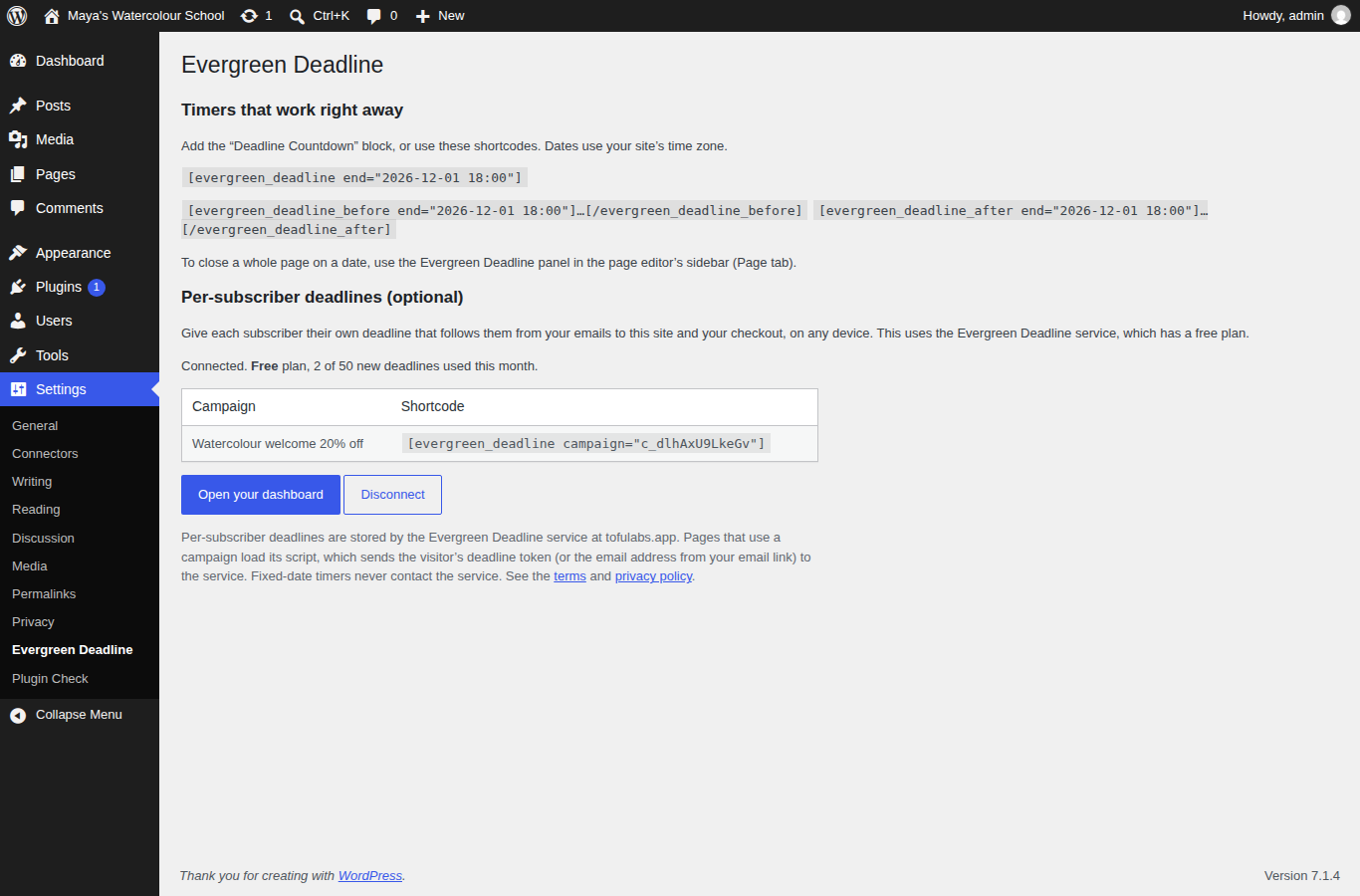
This plugin provides 2 blocks.
- Deadline Countdown A countdown to a fixed date, or to each subscriber’s own deadline.
- Deadline content Content that shows only while a subscriber’s deadline is running, only after it has ended, or only to people with no deadline.
Installation
- Install and activate the plugin.
- Add the Deadline Countdown block to a page, choose “A date”, and pick when the offer ends.
- For per-subscriber deadlines, create a free workspace at https://tofulabs.app/deadlines/app, paste its key in Settings Evergreen Deadline, and choose your campaign in the block or in the Evergreen Deadline panel of the page editor’s sidebar.
FAQ
-
Does the countdown restart when someone reloads the page?
-
No. Fixed-date timers count to the same moment for everyone. Per-subscriber deadlines are stored by the service and don’t restart, even if you change the campaign’s length later.
-
Will it work with page caching?
-
Yes. Timers count down in the browser, and before/after content is also switched in the browser at the deadline, so a cached page still closes on time. For page redirects on a date, the plugin asks for the page not to be cached.
-
Can editors still see a closed page?
-
Yes. Logged-in users who can edit the page are not redirected, so you can still change it.
-
What timezone are dates in?
-
Your site’s time zone, from Settings General.
Reviews
There are no reviews for this plugin.
Contributors & Developers
“Evergreen Deadline by Tofu Labs” is open source software. The following people have contributed to this plugin.
Contributors
Translate “Evergreen Deadline by Tofu Labs” into your language.
Interested in development?
Browse the code, check out the SVN repository, or subscribe to the development log by RSS.
Changelog
1.2.3
- If the service script can’t load (blocked or offline), visitors see only the offer: the “ended” and “no deadline” content stays hidden, and the email address leaves the address bar.
1.2.2
- The closed-page note for editors has a close button.
1.2.1
- A closed page (Close this page on a date) now shows logged-in editors a small note: visitors are redirected, you see the page because you can edit it.
1.2.0
- Copies installed from the zip on tofulabs.app now get updates in the Plugins screen, and you can turn on auto-updates for them.
1.1.1
- After a workspace key is replaced, the settings page says what really stops (the editor’s campaign list), and the plugin recognises the replaced key without relying on the message wording.
- After a failed call to the service, the plugin waits 10 minutes before asking again, so pages never wait on it.
1.1.0
- New: an Evergreen Deadline panel in the page editor’s sidebar for the campaign, bar, redirect and thank-you page settings (the classic editor keeps its box).
- New: the countdown block previews your campaign’s colour, style, heading and labels in the editor.
- A thank-you page with no campaign picked now counts sales for your only campaign, and warns you when you have several.
- Clearer message when your workspace key was replaced in the dashboard.
- The page script now loads with the plugin version, so updates reach returning visitors right away.
1.0.0
- First release.