

Description
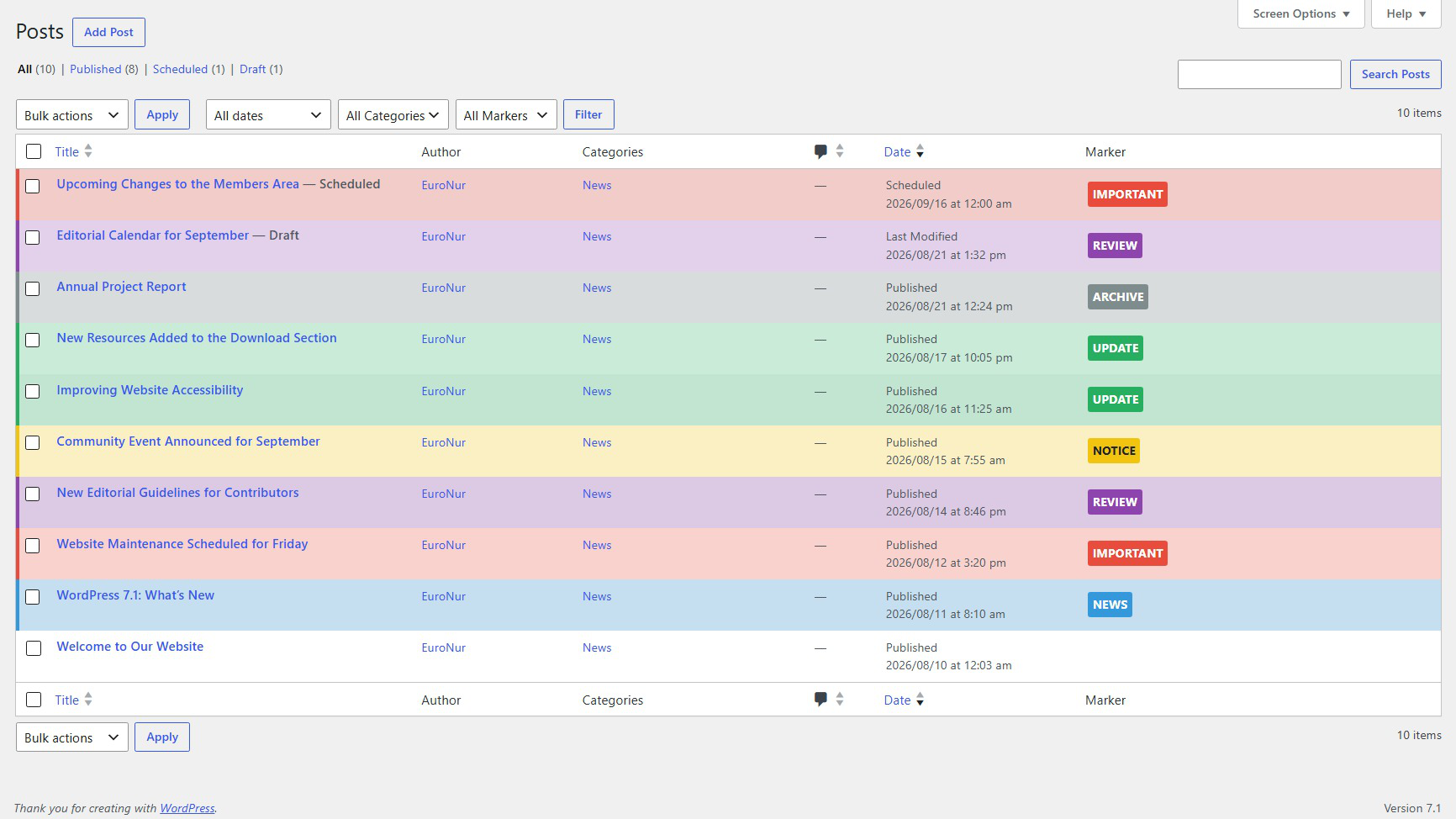
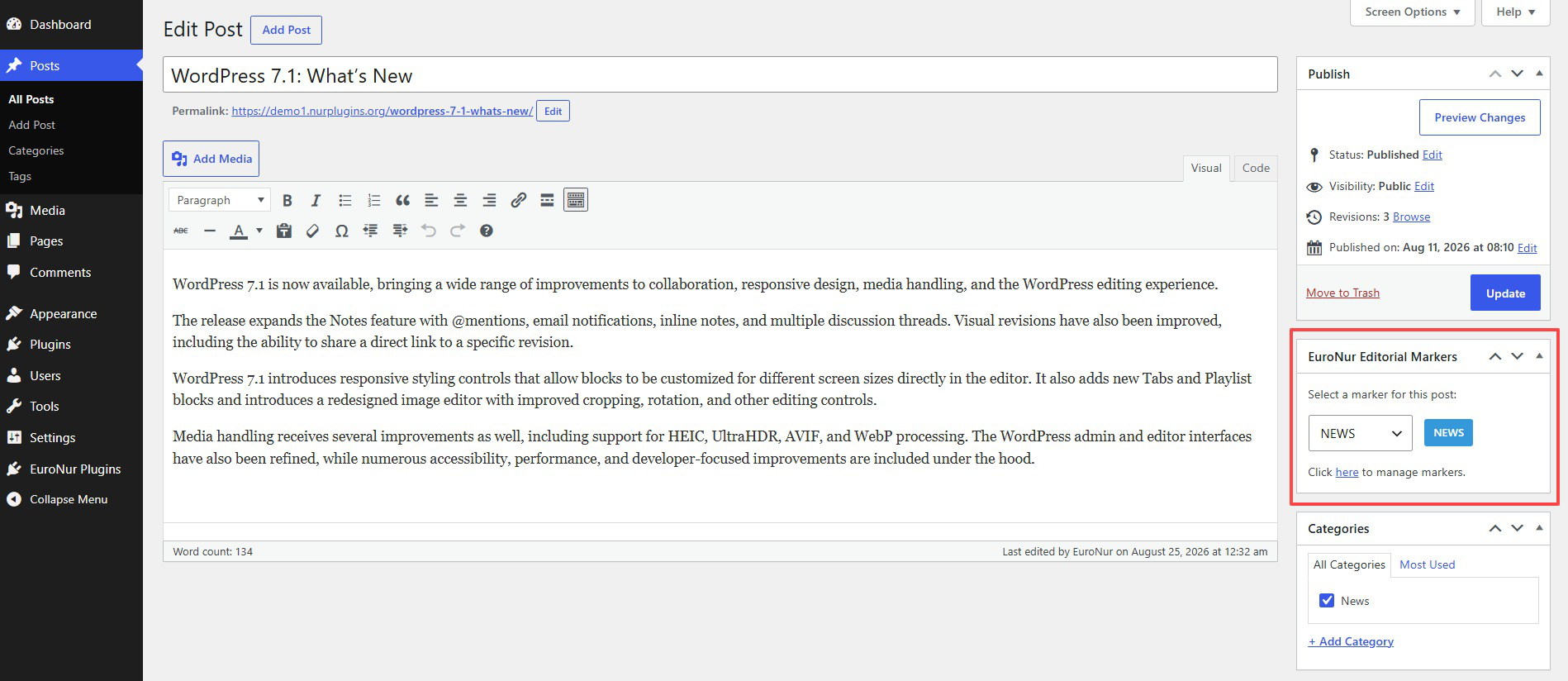
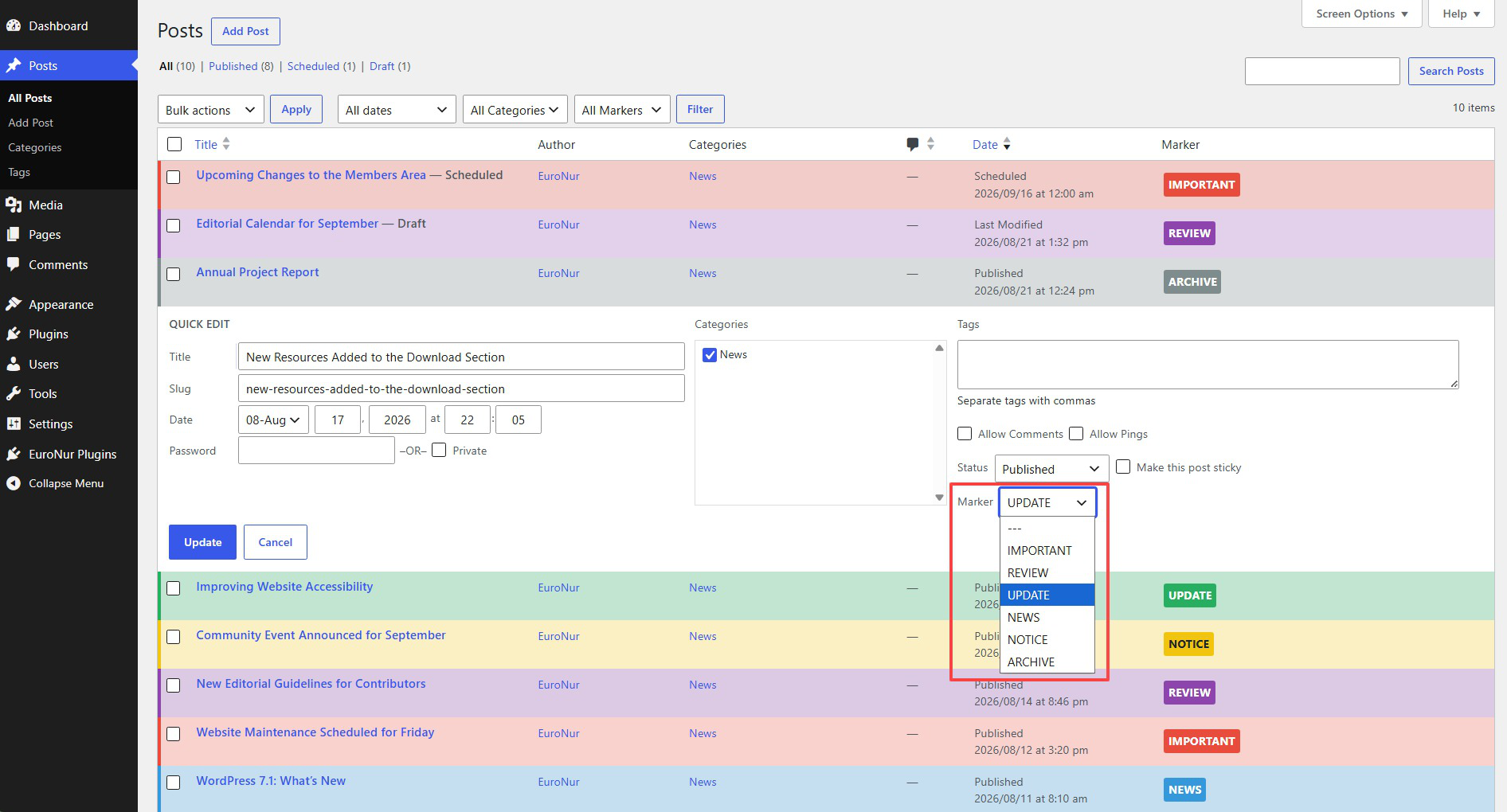
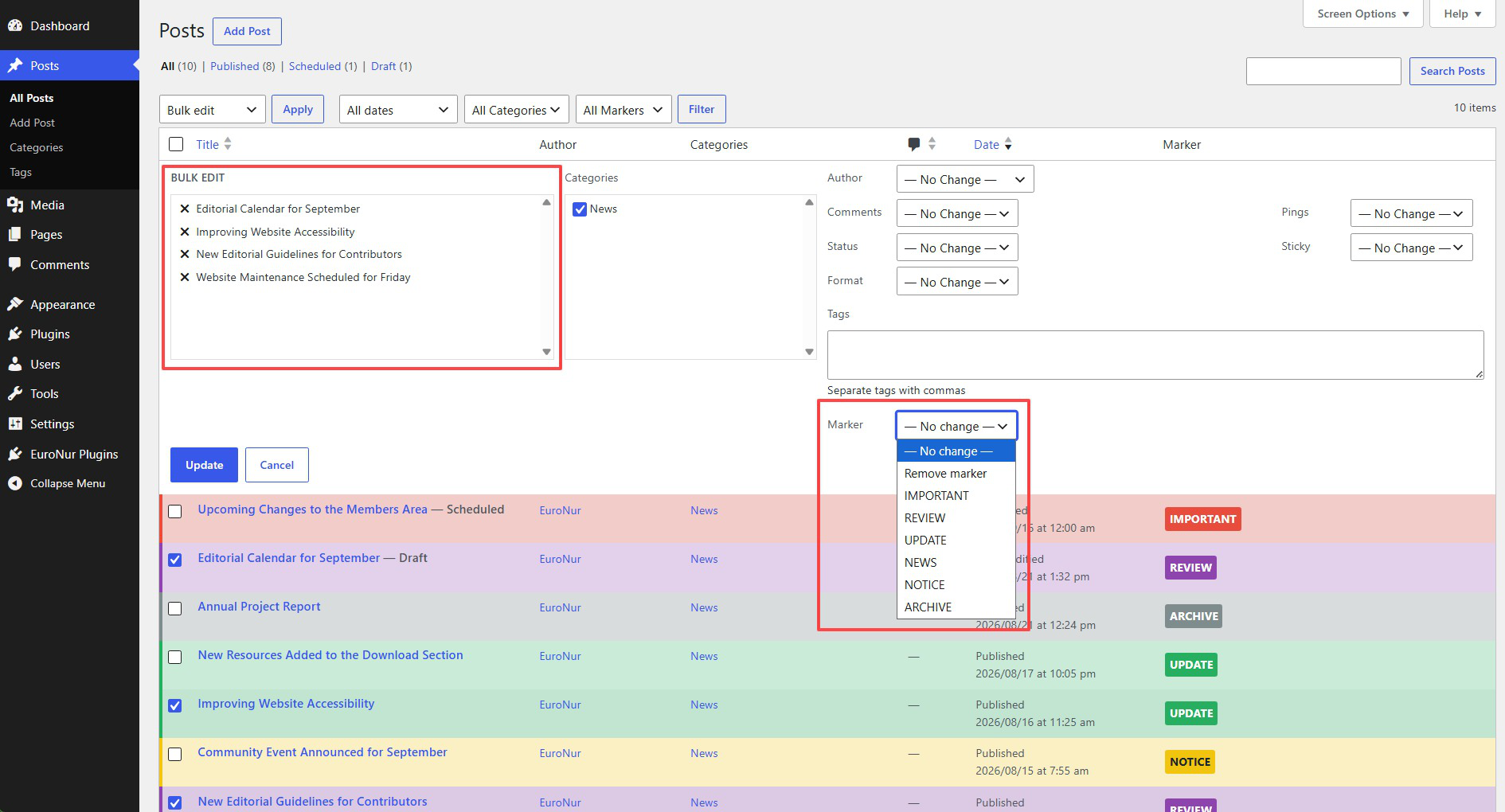
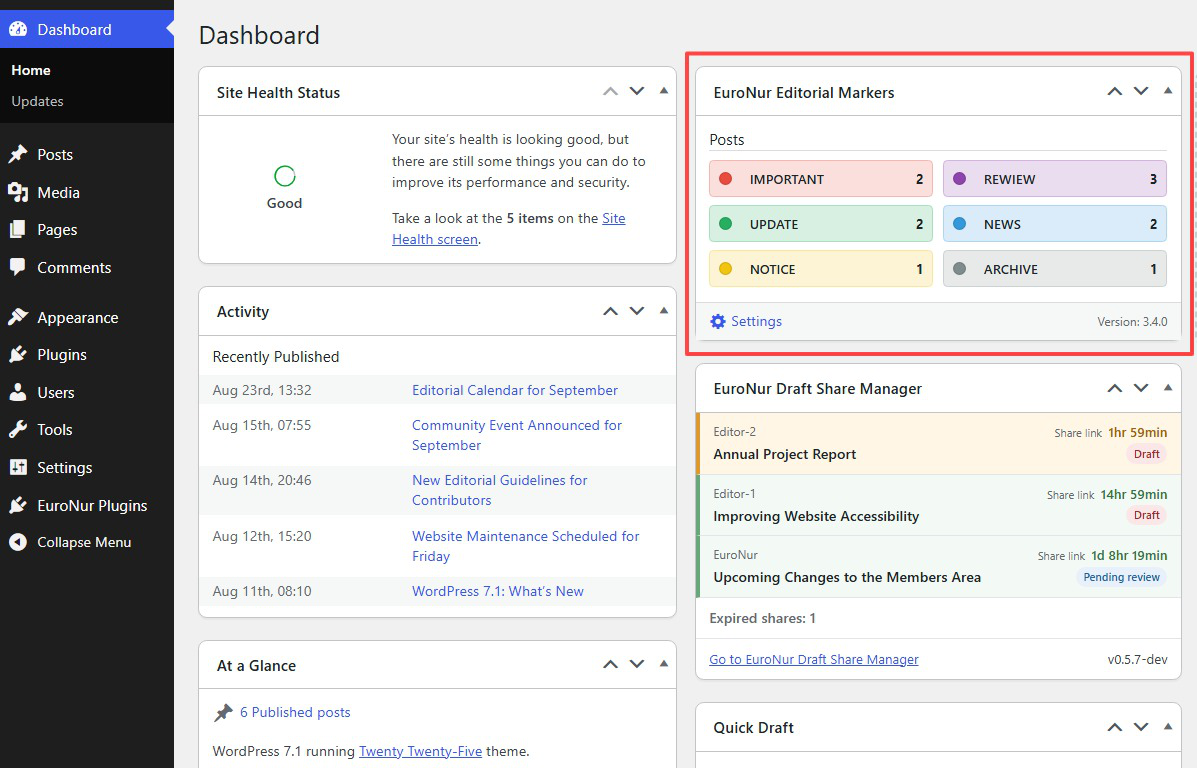
EuroNur Editorial Markers adds color-coded editorial markers to the WordPress administration area. Markers can be assigned to posts, pages, and selected custom post types and are visible in post lists, edit screens, quick edit, bulk edit, and an optional Dashboard widget.
The plugin is a maintained continuation of Mark Posts by Michael Schoenrock and Sven Hofmann. It preserves the established marker workflow while adding modern administration, safety, migration, and recovery features.
Features
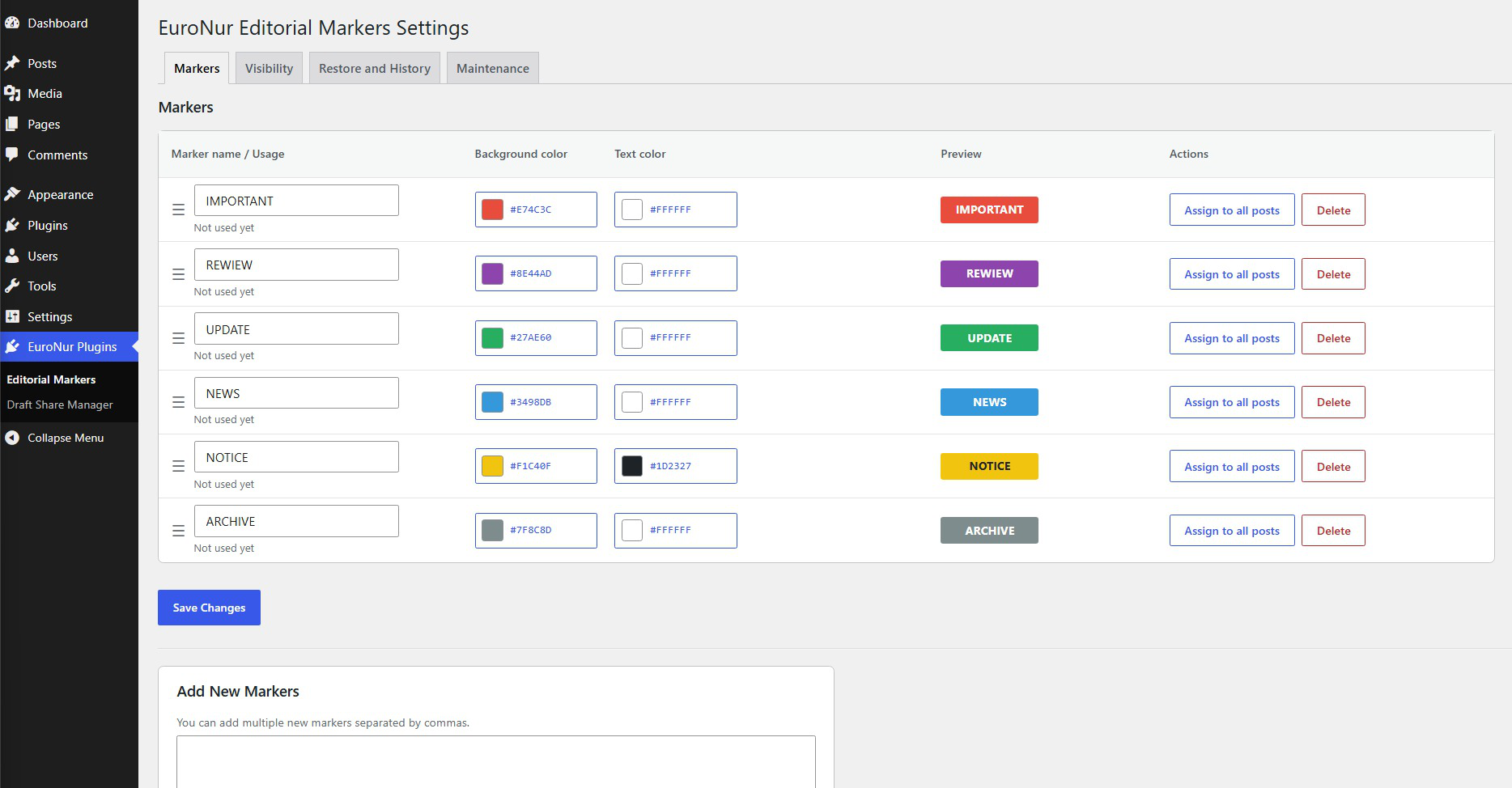
- Create markers with custom background and text colors.
- Reorder markers by drag and drop.
- Assign markers from the editor, quick edit, and bulk edit.
- Enable markers only for selected post types.
- Dashboard widget with compact marker usage counts.
- Control which user roles can view the Dashboard widget.
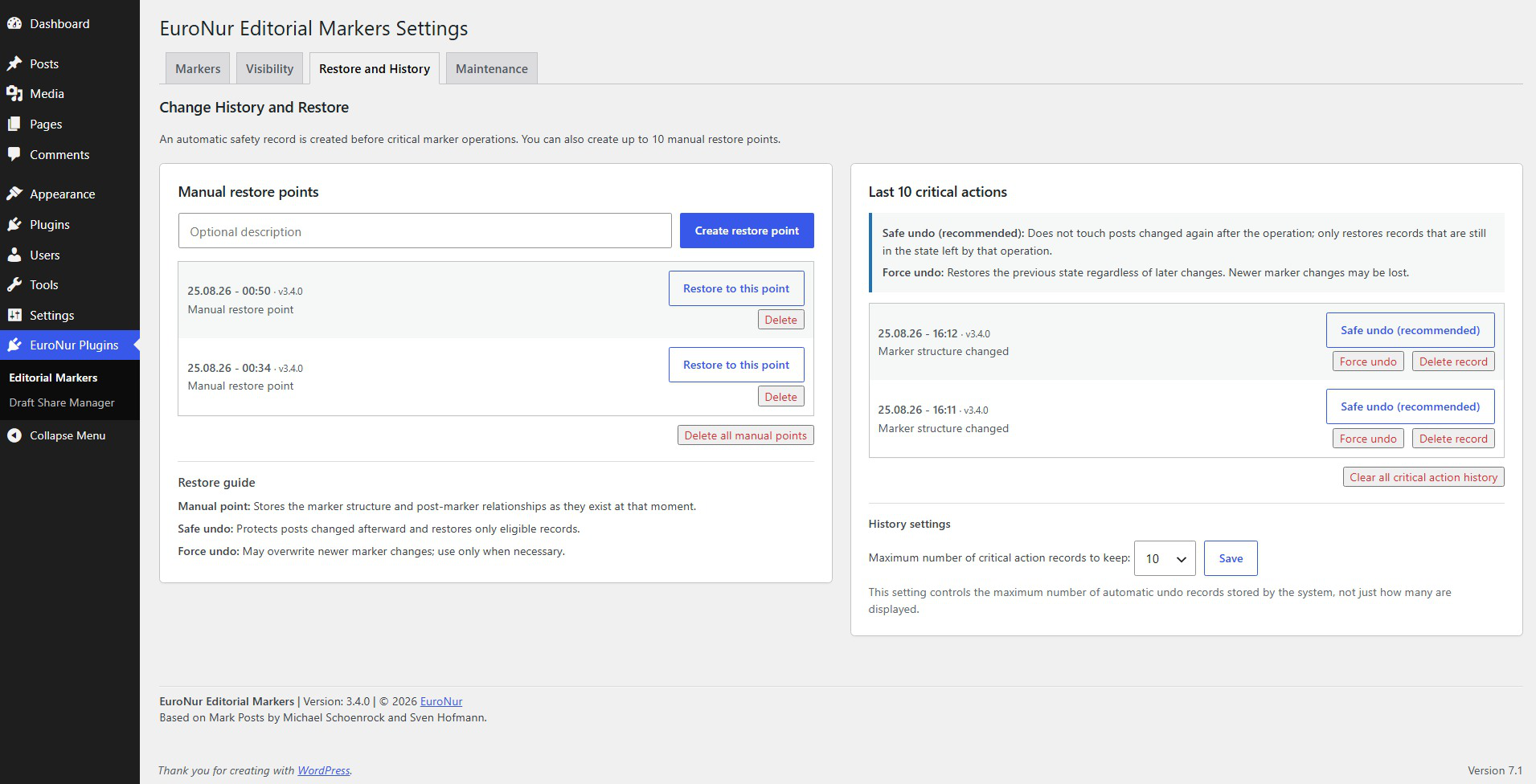
- Manual restore points for marker structures and post-marker relationships.
- Automatic undo history for critical marker operations.
- Safe and forced undo modes with clear warnings.
- Configurable automatic history retention.
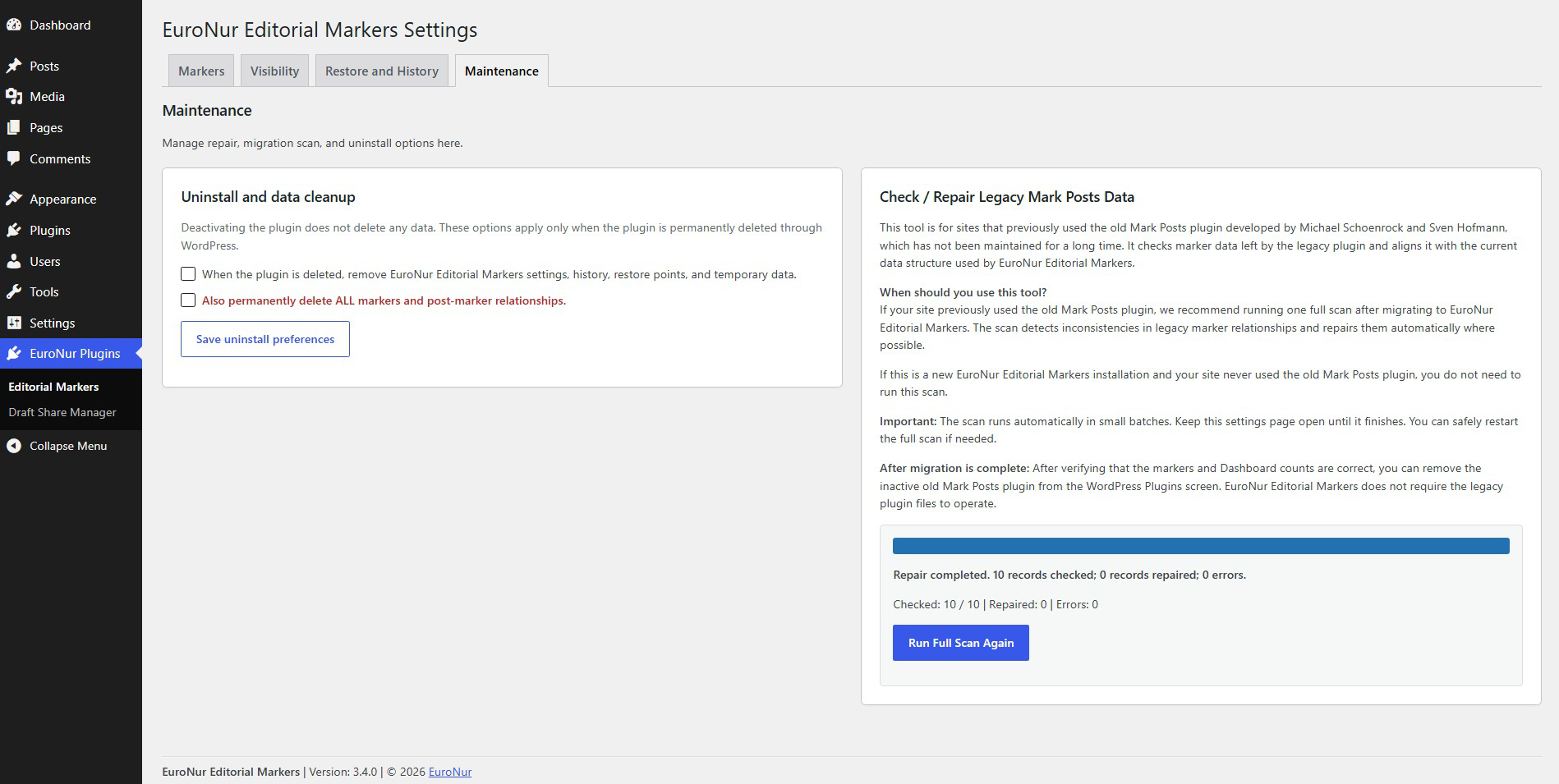
- Repair and migration tool for sites coming from the old Mark Posts plugin.
- Optional cleanup of plugin data when the plugin is permanently deleted.
Migration from the old Mark Posts plugin
If your site currently uses the old Mark Posts plugin, deactivate it first but do not delete it yet. Then activate EuroNur Editorial Markers and run EuroNur Plugins > Editorial Markers > Maintenance > Check / Repair Legacy Mark Posts Data once.
After the scan completes, verify your markers and Dashboard counts. The inactive old Mark Posts plugin can then be removed. EuroNur Editorial Markers does not require the legacy plugin files to operate.
If the site never used the old Mark Posts plugin, the legacy repair scan is not required.
Credits
EuroNur Editorial Markers is maintained by EuroNur and is based on the Mark Posts plugin by Michael Schoenrock and Sven Hofmann. Their copyright and license notices are preserved in the source distribution.
Screenshots
Installation
- Install and activate EuroNur Editorial Markers.
- Open EuroNur Plugins > Editorial Markers.
- Create or adjust your markers under Markers.
- Select the supported post types and Dashboard roles under Visibility.
- If migrating from the old Mark Posts plugin, run the legacy data scan once under Maintenance.
FAQ
-
Is EuroNur Editorial Markers the same plugin as the old Mark Posts?
-
EuroNur Editorial Markers is a maintained continuation of Mark Posts. It keeps compatibility with the established marker workflow while adding new administration, safety, history, restore, and migration features.
-
Do I need the old Mark Posts plugin installed?
-
No. If you are migrating an existing site, keep the old Mark Posts plugin inactive while you run the migration/repair scan and verify the result. You can then remove it.
-
What is the difference between a manual restore point and automatic history?
-
A manual restore point stores the marker structure and post-marker relationships at a moment you choose. Automatic history is created around critical marker operations and is intended for undoing those specific actions.
-
What does Safe Undo do?
-
Safe Undo avoids overwriting posts that were changed again after the recorded action. Force Undo restores the recorded state even when newer marker changes exist, so it should be used only when necessary.
-
Does deactivating the plugin delete my markers?
-
No. Deactivation does not delete plugin data. Permanent cleanup is controlled separately in the Maintenance settings and is applied only when the plugin itself is deleted through WordPress.
-
Where can I find documentation and support?
-
Visit https://www.nurplugins.org/euronur-editorial-markers/ for project information and documentation. WordPress.org support will also be available after the plugin is published in the Plugin Directory.
Reviews
There are no reviews for this plugin.
Contributors & Developers
“EuroNur Editorial Markers” is open source software. The following people have contributed to this plugin.
Contributors
“EuroNur Editorial Markers” has been translated into 1 locale. Thank you to the translators for their contributions.
Translate “EuroNur Editorial Markers” into your language.
Interested in development?
Browse the code, check out the SVN repository, or subscribe to the development log by RSS.
Changelog
3.4.0
- Prepared EuroNur Editorial Markers for public distribution on WordPress.org.
- Converted user-facing source strings to English and standardized the
euronur-editorial-markerstext domain. - Added a new translation template plus Turkish translation catalogs for local testing.
- Internationalized repair/migration progress messages, Dashboard labels, settings screens, and plugin footer text.
- Updated WordPress.org metadata, documentation, FAQ, installation notes, credits, and migration guidance.
- Preserved all marker data, settings, restore points, history, ordering, visibility rules, and migration state during upgrade.
- Isolated EuroNur runtime classes, constants, and helper functions with EuroNur-specific names to prevent PHP symbol collisions during migration from old Mark Posts.
- Added a shared EuroNur Plugins administration menu and removed WordPress’s duplicate mirrored parent submenu entry.
- Added safe paused mode when the old Mark Posts plugin is active, preventing runtime collisions and resuming automatically after it is deactivated.
- Added migration-safe defaults for Dashboard visibility while preserving existing site settings.
- Added live marker preview in the post editor without page reloads or AJAX requests.
- Added a shared contrast fallback so legacy markers without saved text colors remain readable across administration screens.
- Updated administration links and tab routing for the shared EuroNur Plugins menu.
- Updated compatibility metadata for WordPress 7.1.
- Fixed marker delete and assign-all action redirects so completed actions return to the Markers tab with a status message.
- Modernized Multisite new-site initialization to use the current WordPress site-initialization hook.
3.3.1
- Refined public plugin metadata and project documentation.
- Standardized release information and public-facing project references.
- Completed additional packaging and distribution housekeeping.
3.3.0
- Completed a full security-hardening and release review.
- Converted destructive marker actions to POST requests protected by administrator capability checks and dedicated WordPress nonces.
- Added server-side marker existence checks and enforced
mark_posts_marker_limitrestrictions against request tampering. - Fixed a legacy marker-limit array validation bug inherited from the old Mark Posts codebase.
- Hardened marker names and colors against stored XSS with stricter sanitization and output escaping.
- Prevented lower-privilege Dashboard users from receiving administrator aggregate counts through shared cache data.
- Added stricter validation for post types, roles, marker IDs, colors, arrays, repair AJAX requests, and uninstall cleanup.
- Added clear migration guidance explaining when the inactive old Mark Posts plugin can be removed safely.
3.2.9
- Improved marker usage wording, including natural usage counts such as “5,072 posts” and a clear unused-marker state.
- Rewrote the legacy repair tool description to identify it explicitly as a migration/repair utility for the old Mark Posts plugin by Michael Schoenrock and Sven Hofmann.
- Clarified that the legacy migration scan is normally a one-time task and is unnecessary on fresh EuroNur Editorial Markers installations.
3.2.8
- Added compact per-marker usage counts in the marker management screen.
- Added drag-and-drop marker ordering and reused the saved order in Dashboard and marker-selection interfaces.
- Added detailed deletion-impact warnings showing how many items currently use a marker.
- Moved automatic history retention into a clearly explained History settings area.
- Improved alignment of critical-action buttons.
3.2.7
- Moved background/text color labels into table headers and further reduced marker-row height.
- Replaced the old delete checkbox and “assign all” link with explicit action buttons and confirmation prompts.
- Protected destructive marker actions with automatic safety history records.
- Made automatic critical-operation history retention configurable at 10, 15, 20, or 25 records.
- Added single-record deletion and full cleanup of automatic critical-operation history without affecting manual restore points.
3.2.6
- Redesigned the Markers tab as a compact, symmetric row/card interface.
- Aligned marker name, colors, preview, and actions into consistent columns.
- Moved the new-marker form into a separate compact section.
3.2.5
- Simplified Visibility and Maintenance to true two-card desktop layouts and removed redundant full-width summary cards.
- Moved restore guidance into the Manual Restore Points card instead of a third standalone panel.
- Returned post-type and role checkboxes to clean single-column lists.
- Ordered standard WordPress roles by privilege: Administrator, Editor, Author, Contributor, Subscriber; custom roles follow by capability level.
- Kept Administrator permanently enabled for Dashboard widget visibility.
3.2.4
- Centralized the Dashboard widget cache key and invalidated it immediately when marker or visibility settings change.
- Fixed delayed Dashboard updates after enabling/disabling post types.
- Reworked settings layouts from three desktop columns to two columns, with a single-column mobile fallback.
- Reduced large responsive gaps in Visibility, Maintenance, and Restore screens.
3.2.3
- Rebuilt the responsive settings-card layout after the first grid implementation did not apply correctly.
- Fixed malformed CSS that disabled the intended responsive layout.
- Added structured responsive card grids to Visibility, Maintenance, and Restore/History screens.
- Ensured Administrator always remains enabled for Dashboard visibility.
3.2.2
- Introduced the first responsive card/grid layout for the expanded settings screens.
- Added responsive layout helpers for Visibility, History, Maintenance, and uninstall settings.
- Enforced Administrator as an always-enabled Dashboard role in both the UI and saved settings.
3.2.1
- Fixed unreadable light marker text in the new Dashboard cards by using high-contrast text on softly tinted backgrounds.
- Raised the Dashboard-role heading to the same visual hierarchy as other Visibility settings.
- Bumped the Dashboard cache key so corrected card markup appeared immediately after updating.
3.2.0
- Replaced the plain Dashboard marker list with compact, equal-width colored status cards.
- Added a settings shortcut with icon to the Dashboard widget footer.
- Added the running plugin version to the Dashboard widget footer.
3.1.9
- Redesigned the Dashboard widget as a compact two-column status grid.
- Added role-based Dashboard widget visibility controls.
- Kept the Dashboard settings shortcut restricted to administrators.
3.1.8
- Split the administration screen into four tabs: Markers, Visibility, Restore & History, and Maintenance.
- Fixed the Dashboard settings shortcut to point to the correct EuroNur Editorial Markers settings page.
- Prevented settings on inactive tabs from being reset when saving another tab.
3.1.7
- Optimized manual restore comparison by avoiding
get_post()calls for thousands of already-matching records. - Added a separate “Unavailable records” result category so restore report totals remain mathematically complete.
- Added an administrator-only Settings shortcut to the Dashboard widget.
- Reduced a 25-change manual snapshot restore on a large production-size database to roughly one second in testing.
3.1.6
- Changed manual restore points to rewrite only post-marker relationships that actually differ from the saved snapshot.
- Added detailed restore reports showing checked, changed, unchanged, skipped, failed, and elapsed-time values.
- Eliminated unnecessary rewrites of tens of thousands of already-correct relationships.
3.1.5
- Fixed the main small-undo performance bottleneck by skipping unchanged marker-term updates.
- Prevented expensive term-count callbacks when marker name, slug, and colors did not change.
- Removed the temporary performance diagnostics introduced in 3.1.4.
3.1.4
- Added temporary server-side profiling to the undo path to identify the remaining performance bottleneck.
- Measured term synchronization, relationship loading, restore loops, safety/history recording, and total runtime separately.
3.1.3
- Stopped creating full-site safety snapshots for small operation-based undo actions.
- Limited undo safety records to the posts actually restored by the operation.
- Preserved the ability to undo the undo operation itself.
3.1.2
- Changed operation-based undo to process only records that were actually changed by the recorded operation.
- Added a visible “restore in progress” warning so users do not leave the page during restoration.
- Added user-facing explanations for Safe Undo and Force Undo.
- Localized the repair section and added last-scan date/time information.
3.1.1
- Fixed history and restore-point timestamps being shifted twice by the WordPress timezone.
- Stored new history timestamps in UTC and converted them to the configured WordPress site timezone only for display.
- Added a one-time migration for history rows created by 3.1.0.
3.1.0
- Added a dedicated, WordPress-prefix-aware history table for restore and safety data.
- Added automatic undo history for the last 10 critical marker operations.
- Added up to 10 manual restore points with compact site-local timestamps.
- Added Safe Undo, which skips records changed after the original operation, and administrator Force Undo.
- Added automatic safety snapshots before destructive “assign to all” and structural marker changes.
- Added uninstall cleanup preferences, with full marker-data deletion kept as a separate explicit destructive option.
3.0.6
- Fixed the native/custom color picker closing immediately while a color was being selected.
- Kept the native picker open while dragging and updated the marker preview live.
- Deferred palette refresh until native color selection finishes.
3.0.5
- Reworked marker presets for stronger visual distinction, including clear yellow, orange, red, green, blue, purple, brown, gray, and dark tones.
- Expanded text-color presets from grayscale-only choices to a broader set of useful colors.
- Added unrestricted custom colors for both marker backgrounds and marker text.
- Added direct HEX input and larger preset swatches while keeping presets optional.
3.0.4
- Replaced the tiny default WordPress color palette with a large EuroNur-style marker palette.
- Displayed background and text color controls side by side with clear labels.
- Added large preset swatches, visible HEX values, and a live marker preview.
- Preserved existing marker colors until a new selection is explicitly saved.
3.0.3
- Renamed the plugin throughout the administration interface to EuroNur Editorial Markers.
- Added independent marker text-color storage and rendering alongside background colors.
- Added automatic contrast fallback for markers without an explicit text color.
- Added text-color data to marker selection and list rendering.
- Introduced an expanded preset color palette and updated plugin/author metadata for the EuroNur fork.
- Added visible attribution to the Mark Posts authors while identifying EuroNur as the current maintainer.
3.0.2
- Fixed row highlighting so marker colors are reapplied immediately after Quick Edit AJAX saves.
- Skipped empty marker inserts and unnecessary term updates.
- Updated only marker terms whose name, slug, or color actually changed.
- Optimized marker deletion by removing only legacy metadata rows that reference the deleted marker instead of scanning every post.
- Reduced unnecessary term hooks on large WordPress installations.
3.0.1
- Removed automatic legacy-data migration from normal WordPress admin page loads to avoid slowing everyday administration.
- Added an explicit AJAX-based Marker Data Check / Repair tool with automatic batches and progress reporting.
- Made full repair scans restartable and idempotent.
- Used existing
mark_posts_term_idvalues as the migration source of truth and synchronized taxonomy relationships accordingly. - Normalized stale legacy metadata pointing to deleted marker terms.
- Made Dashboard configured markers visible even when their current count is zero.
- Kept Edit, Quick Edit, Bulk Edit, legacy metadata, and marker taxonomy synchronized.
- Preserved markers during Bulk Edit when the marker field is left at “No change”.
- Added reliable marker filtering to supported post-list screens.
3.0.0
- EuroNur development began with Mark Posts 2.2.6 by Michael Schoenrock and Sven Hofmann as its technical foundation.
- Fixed normal editor saves so legacy post metadata and the marker taxonomy stay synchronized.
- Fixed Bulk Edit removing markers while editing unrelated fields.
- Added explicit Bulk Edit choices for “No change” and marker removal.
- Added marker dropdown filtering to supported post-list screens.
- Reworked Dashboard counts to use the canonical marker taxonomy and the same query logic as marker filtering.
- Added gradual legacy-data repair in batches of 250 records to avoid timeouts on large sites.
- Preserved existing marker taxonomy data,
mark_posts_term_idmetadata, colors, and settings for in-place migration. - Required the old Mark Posts plugin to be deactivated before activating EuroNur Editorial Markers because both share legacy classes/data during migration compatibility.
Before 3.0.0
EuroNur Editorial Markers is based on the Mark Posts plugin by Michael Schoenrock and Sven Hofmann. EuroNur development started with version 3.0.0 after the earlier project had become unmaintained. Copyright and license notices from the earlier project remain preserved in the source distribution.