

Description
Estasoft News Distribution turns one publish into the sitemaps, feeds and pushes that news platforms read, and checks each article before you press Publish. It is one free plugin. Every feature is in every install. There are no keys, no add-ons and nothing to buy.
What it does
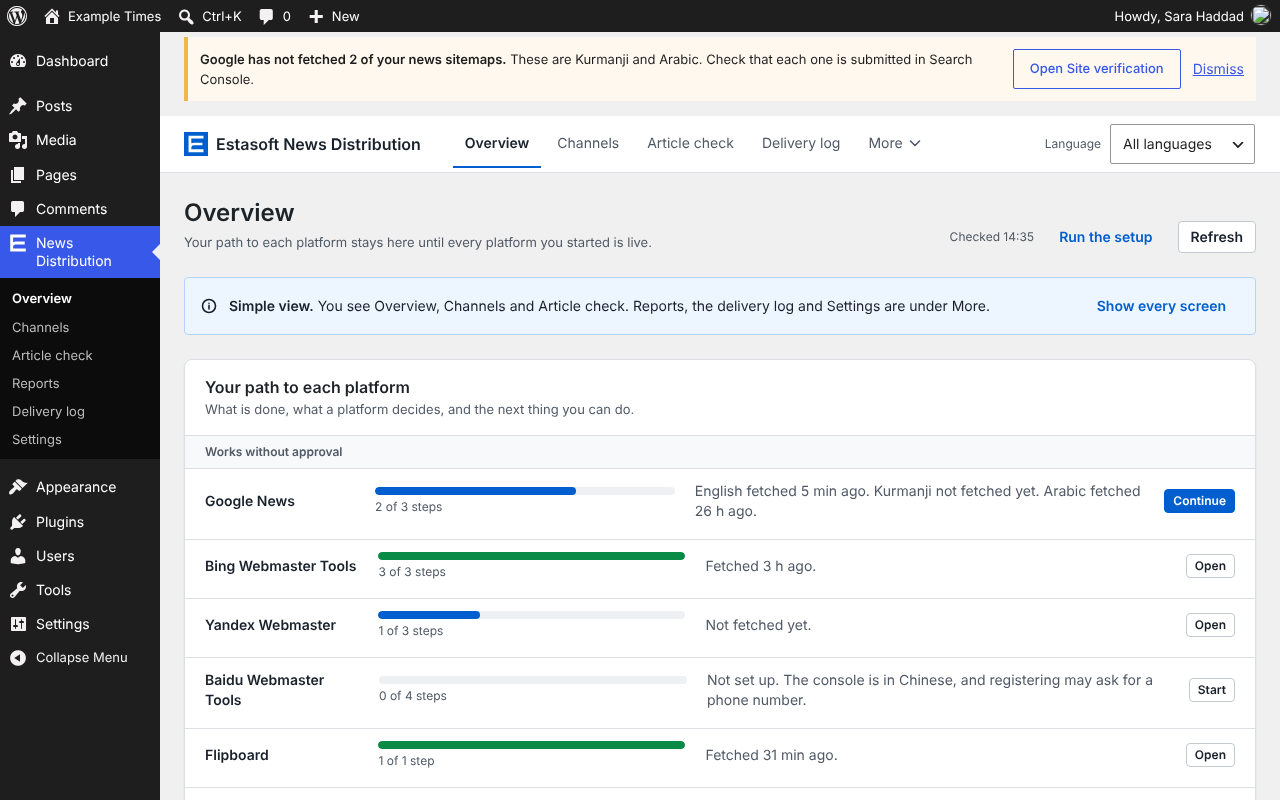
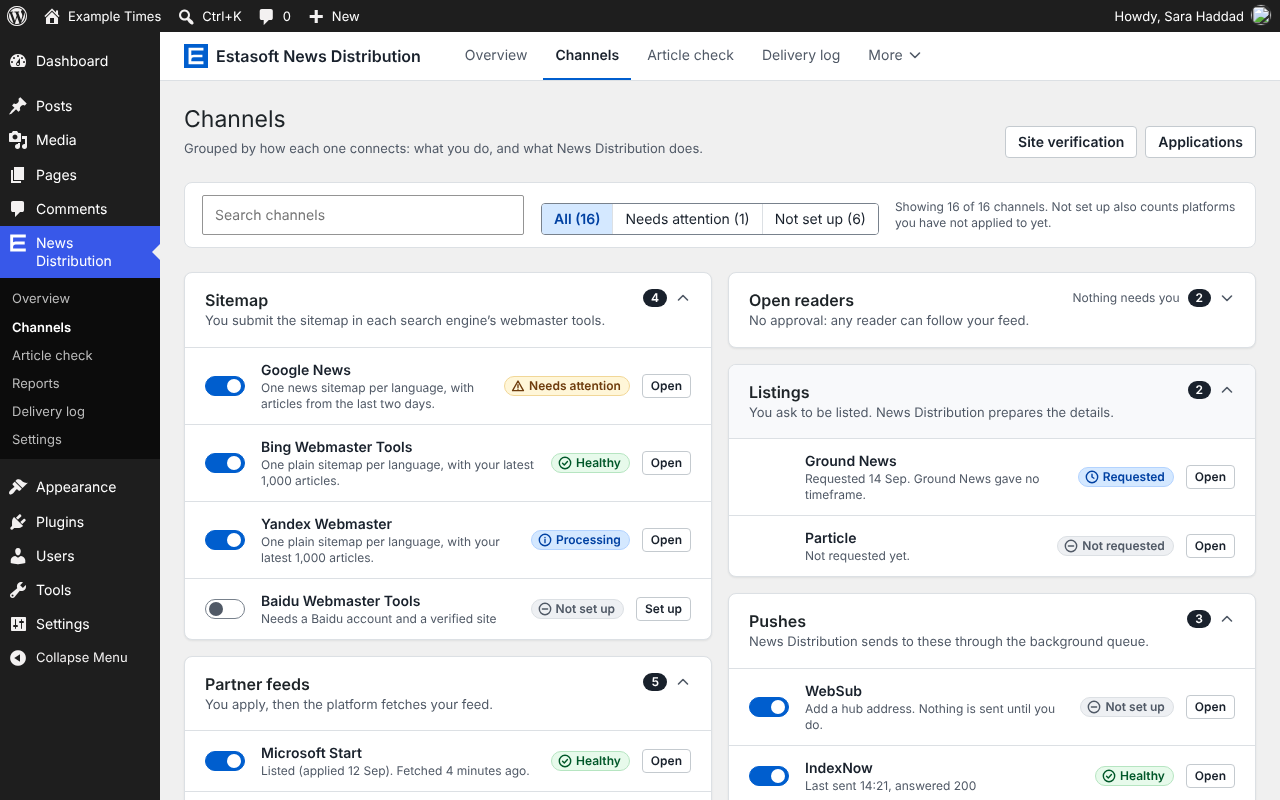
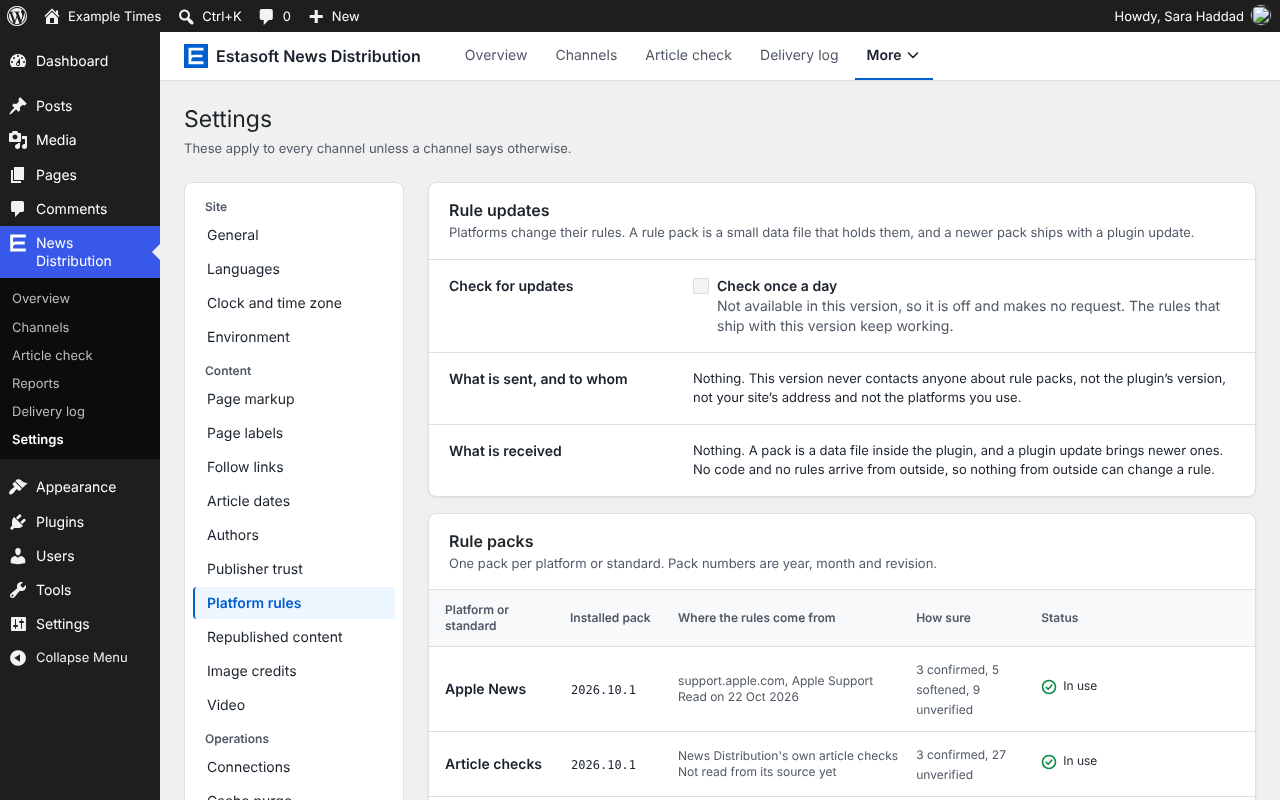
- Sitemaps. A Google News sitemap for each language, and sitemaps for Bing, Yandex and Baidu. They follow each platform’s published rules, which are kept in small data files (rule packs) that you can read.
- Partner feeds. Feeds for Microsoft Start, Yahoo News, Apple News and SmartNews, ready for the day a platform accepts your application. You record the state of each application by hand, because the plugin cannot see it.
- Open readers and listings. A feed for Flipboard and other readers that need no approval, and the details a news aggregator asks for when you ask to be listed.
- Pushes. Tells IndexNow search engines and WebSub hubs when an article is published, changed or removed, and posts to your own outlets: Telegram, Mastodon, Bluesky and webhooks. Pushes run in a background queue with retries and a log.
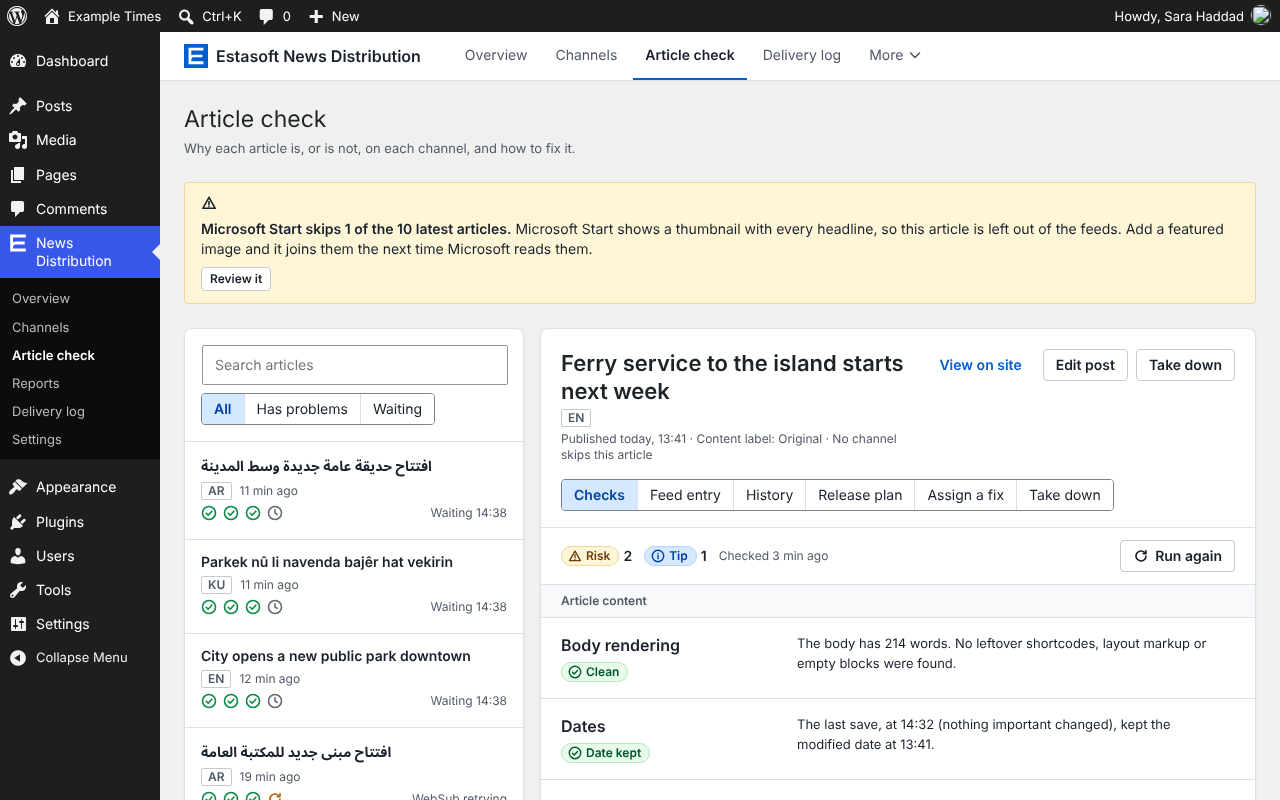
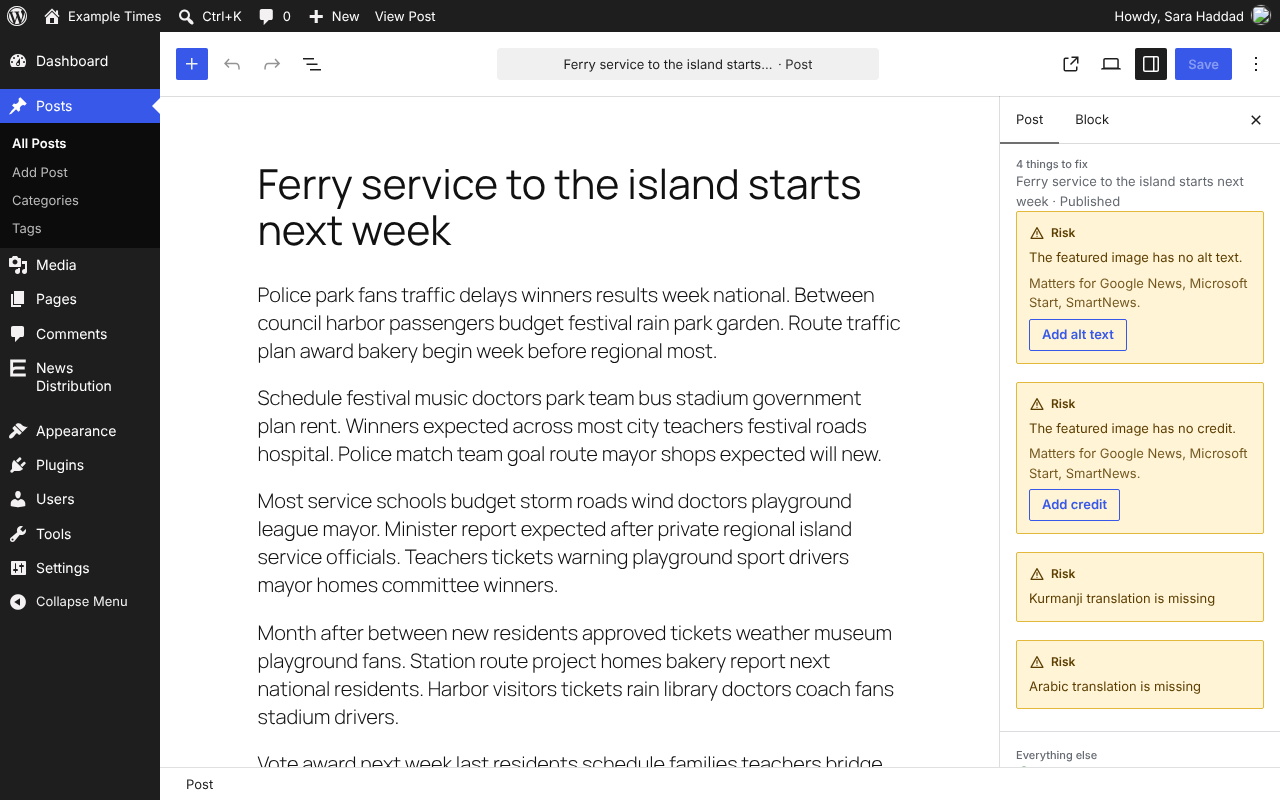
- Article check. Every article is checked against the rules of each channel that is on: title, date, author, body, image, alt text and photo credit. It says in plain words what each platform will do with the article, and how to fix it. The same check shows in the editor before you publish.
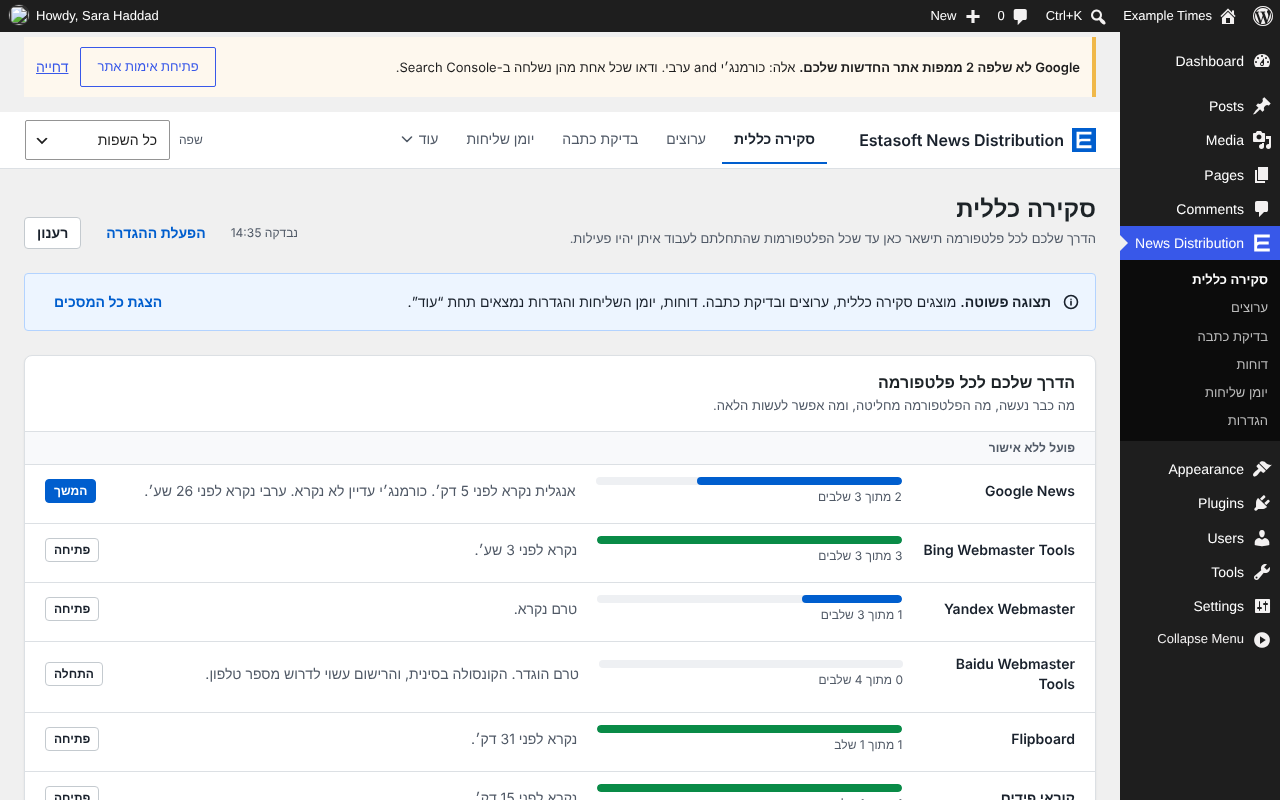
- Watching. A delivery log, a fetch monitor that shows when each platform last read your feeds, alerts by email, Slack or Microsoft Teams, and a weekly summary. An optional referrals report, off by default, counts visits by the platform they came from, without cookies and without storing anything about the visitor.
- Many languages. One sitemap and feed per language, with Polylang and WPML or on a single-language site. The interface is translatable, and right-to-left languages such as Arabic and Hebrew are mirrored.
- Control. Hold an article back, choose per article which channels get it, take an article down from every channel in one step, and, if you wish, stop a publish that fails the checks until a person gives a reason.
- Follow links. A block and a shortcode that link readers to your Google News, Mastodon, Telegram, Bluesky and Apple News pages.
- Safe changes. A restore point of the plugin’s settings before an update, and a demo mode that fills a new site with clearly marked sample articles so you can look around without sending anything.
- Optional AI assistant. Needs WordPress 7.0 or newer. It uses the AI provider you connect in WordPress, only after you turn it on and agree to it, and a person approves every suggestion. The plugin stores no AI keys.
What it cannot do
News Distribution cannot make a platform accept a feed. Google, Microsoft, Yahoo, Apple, SmartNews and the others decide for themselves which publishers they include. The plugin makes your output match what each one publishes, says plainly where a rule could not be confirmed, and tells you when something needs your attention.
Not affiliated with any platform
Estasoft News Distribution is not affiliated with, endorsed by or sponsored by Google, Microsoft, Yahoo, Apple, SmartNews, Flipboard, Yandex, Telegram or any other platform it works with. Their names belong to their owners and are used only to say what the plugin works with.
Bundled software
Action Scheduler, which runs the background queue, is included, unchanged, in the vendor/woocommerce/action-scheduler folder. It is licensed GPL-3.0-or-later. Its source and license text are in that folder, and it is also published at https://github.com/woocommerce/action-scheduler.
External services
This plugin contacts another server only after you turn on the channel or feature that needs it. Publishing sends nothing: deliveries run afterwards in the background queue, or when a person presses a button. Nothing is sent to Estasoft Technologies. A link in the plugin’s screens to another site (Medium, a search engine’s console, a feed reader, Apple’s help pages) only opens that site in your browser: the plugin sends it nothing. The caching plugins it can purge are other plugins on your own site.
AI provider (the one connected in WordPress)
What it is for. The optional AI assistant suggests headlines, summaries, search descriptions, captions and draft translations. It asks WordPress (7.0 or later) to generate text, and WordPress sends the request to the provider the owner connected under Settings, Connectors. Off until the owner turns it on and confirms a screen that says what is sent.
When. When a person presses a button that asks for a suggestion or a test, and, if the owner turned on the local-news rule, from the background queue. Never on page load or on publish.
What is sent. Only what the feature needs, for the one feature a person pressed. For headlines, summaries, search descriptions, captions and local news: the language, the headline and the first 400 to 800 characters of one article. For a draft translation: the headline and the whole body of one article, up to 2,500 words. For Ask the assistant: the question and up to 9,000 characters of facts the plugin collected from its own checks and rules. For the image helper: the picture. For the platform helpers and the weekly paragraph: the facts and figures the plugin counted. Author names only if the owner chose that. No provider key, visitor data or email address.
Terms and privacy. Those of the provider the owner connected.
Bing Webmaster Tools
What it is for. Submits the site’s search sitemap to Bing and reads which sitemaps Bing has.
When. Only when a person presses Connect or Check now in Settings, Connections, with an API key the person pasted. Never on publish or on a schedule.
What is sent. To ssl.bing.com: the API key, the site address and the sitemap address. No article text or visitor data.
Terms and privacy. Bing Webmaster API, Microsoft Services Agreement, Microsoft Privacy Statement.
Bluesky
What it is for. Posts a link card for each published article to a Bluesky account the owner connects with a handle and an app password. Off until the owner presses Turn on.
When. From the background queue after an article is published, and when a person presses Turn on or Send a test post (a Bluesky post is public).
What is sent. To bsky.social, or the server that holds the account: the handle and app password to sign in, then the headline, an optional summary, the article’s address, its language and the featured image. No visitor data.
Terms and privacy. Bluesky Terms of Service, AT Protocol Network Services Privacy Notice.
Google Search Console
What it is for. Submits the site’s sitemaps to Google Search Console and reads their status.
When. Only when a person presses Connect, Sign in with Google, Check now or Disconnect in Settings, Connections. Never on publish or on a schedule. The owner uses a service account key or their own Google Cloud app; the plugin ships no Google app.
What is sent. To accounts.google.com, oauth2.googleapis.com and www.googleapis.com: the sign-in details of the owner’s own app or key, then the access token, the property address and the sitemap address. No article text or visitor data.
Terms and privacy. Search Console API terms, Google Privacy Policy.
IndexNow
What it is for. Tells the search engines that take part in IndexNow (for example Bing and Yandex) that an address was published, changed or removed. Off until the owner turns it on.
When. From the background queue after an article changes (never while it is being saved), and when a person presses Send a test or starts the catch-up.
What is sent. To https://api.indexnow.org/indexnow: the site’s host name, the IndexNow key, the key file’s address and the addresses of changed articles on this site. No article text, author or visitor data.
Terms and privacy. IndexNow Terms of Service (they include a Privacy section). IndexNow is run by Microsoft and Yandex, and each participating search engine’s own policy applies, for example the Microsoft Privacy Statement and the Yandex Privacy Policy.
Mastodon
What it is for. Posts a link to each published article from a Mastodon account the owner connects, on the server the owner names. Off until the owner enters a server address and an access token and presses Turn on.
When. From the background queue after an article is published, and when a person presses Turn on or Send a test post.
What is sent. Only to the owner’s server: the access token, and the post (headline, optional summary, article address, optional hashtags, language, the visibility the owner chose). No visitor data.
Terms and privacy. The terms and privacy policy of the server the owner chose, linked from its About page. Mastodon documentation.
Slack
What it is for. Posts a short alert to a Slack channel the owner chooses, through an incoming webhook address pasted under Settings, Alerts. Off until an address is saved and Slack is ticked for an alert.
When. When a ticked alert happens, when the weekly summary is due, and when a person presses Send test message. Never on page load or while an article is saved.
What is sent. To the saved hooks.slack.com address: the alert’s name, one sentence (it can include the site’s name, a platform’s name, a count and a staff member’s display name) and a link to a screen in this site’s admin. No article text or title, visitor data or email address.
Terms and privacy. Slack API Terms of Service, Privacy Policy.
Microsoft Teams
What it is for. Posts a short alert to a Microsoft Teams channel or chat the owner chooses, through a webhook address from Teams pasted under Settings, Alerts. Off until an address is saved and Teams is ticked for an alert.
When. When a ticked alert happens, when the weekly summary is due, and when a person presses Send test message. Never on page load or while an article is saved.
What is sent. To the saved address (on webhook.office.com, logic.azure.com or powerplatform.com): the alert’s name, one sentence (it can include the site’s name, a platform’s name, a count and a staff member’s display name) and a button to a screen in this site’s admin. No article text or title, visitor data or email address. The message is an Adaptive Card; its $schema field holds the text http://adaptivecards.io/schemas/adaptive-card.json to name that format, and the plugin never requests that address.
Terms and privacy. Microsoft Services Agreement, Privacy Statement.
Telegram
What it is for. Posts a link to each published article in a Telegram channel the owner runs, through a bot made with @BotFather. Off until the owner pastes the bot token, names a channel and presses Turn on.
When. From the background queue after an article is published, and when a person presses Turn on or Send a test message.
What is sent. To api.telegram.org: the bot token (in the address, as Telegram’s API requires), the channel, and a message with the headline, an optional summary and the article’s address. No visitor data.
Terms and privacy. Telegram Terms of Service, Privacy Policy, Terms for bot developers.
Webhooks
What it is for. Sends a signed JSON message about each published, unpublished or deleted article to up to five https addresses the owner chooses, on their own system or a tool they use. Off until the owner adds an address and a signing secret.
When. From the background queue after an article is published, unpublished or deleted, and when a person presses Test or Retry now.
What is sent. To each address: the event, the site’s name and address, and for an article its id, address, title, excerpt, language, author name, image, categories, tags, dates and the owner’s attribution line, with a signature made from the owner’s secret. No visitor data or drafts.
Terms and privacy. Those of the receiving system the owner chose.
WebSub hub
What it is for. Pings a WebSub hub when a feed changes, so subscribers fetch it at once. There is no default hub: nothing is sent until the owner saves a hub address and turns the channel on.
When. From the background queue after an article is published, changed or removed (never while it is being saved), and when a person presses Send a test ping.
What is sent. To the hub: hub.mode=publish and hub.url, the address of the feed. No article text or visitor data.
Terms and privacy. Those of the hub the owner chose. WebSub Recommendation.
Yandex Webmaster
What it is for. Adds the site’s search sitemaps to Yandex Webmaster and reads what Yandex knows about each one.
When. Only when a person presses Connect, Sign in with Yandex, Check now or Disconnect in Settings, Connections. Never on publish or on a schedule. The owner uses an access token or their own Yandex app; the plugin ships no Yandex app.
What is sent. To https://oauth.yandex.com and https://api.webmaster.yandex.net/v4: the access token or the sign-in details of the owner’s own app, the site’s host and the sitemap address. No article text or visitor data.
Terms and privacy. API terms, Privacy Policy.
YouTube and Vimeo
What it is for. Optional (Settings, Video, Look up details; off by default). Asks YouTube or Vimeo once for the title, thumbnail and other details of a video embedded in an article, for the video markup search engines read. Without it, the markup uses the article’s own text.
When. From the background queue after an article with a YouTube or Vimeo video is saved, and when a person presses Look up details now. Never while a page is shown.
What is sent. From the server to www.youtube.com or vimeo.com: the video’s address. No cookie, account or visitor data.
Terms and privacy. YouTube Terms of Service, Google Privacy Policy, Vimeo Terms of Service, Vimeo Privacy Policy.
Screenshots


Blocks
This plugin provides 1 block.
- Follow The ways to follow your publication: a button to the address you choose, your RSS feed in the language of the page, and your Telegram, Apple News, Mastodon and Bluesky accounts.
Installation
- In WordPress, open Plugins > Add New, search for “Estasoft News Distribution”, then press Install Now and Activate. To install from a zip file, open Plugins > Add New > Upload Plugin instead.
- Open News Distribution in the admin menu.
- Enter your publication name, then turn on the channels you use. Each channel’s page says what to do next, such as submitting a sitemap in a search engine’s webmaster tools.
Nothing is sent to any other server until you turn on a channel that needs it.
FAQ
-
Is it really free?
-
Yes. Every feature is in every install. There are no license keys, no add-ons and no locked features, and the plugin sells nothing.
-
Does it send anything when I publish a post?
-
No. Publishing only records that the post changed and puts work in a queue. The queue runs afterwards and contacts a service only if you turned on the channel, or the Slack or Microsoft Teams alert, for it. See External services below for each service, what is sent and when.
-
Will my articles appear in Google News, Microsoft Start or Apple News?
-
Not by itself. Some platforms read a sitemap or a feed without asking. Others, such as Microsoft Start, Yahoo News, Apple News and SmartNews, review each publisher. News Distribution prepares correct output and helps you keep track of your applications. The platform makes the decision.
-
Which translation plugins does it work with?
-
Polylang and WPML. Without one, the site is treated as having a single language. Each language gets its own sitemap and feed.
-
Do I need an AI provider?
-
No. The AI assistant is optional and needs WordPress 7.0 or newer. It is off until you turn it on. The plugin asks WordPress which providers you have connected and stores no keys of its own.
-
What happens to my data when I delete the plugin?
-
Nothing is removed unless you turned on “Delete all News Distribution data when the plugin is deleted” in Settings, Backup and uninstall. When it is on, deleting the plugin removes its settings, tables, article and user data, queued actions and files in the uploads folder.
-
A platform changed its rules. Do I need a new version of the plugin?
-
Often only the rule pack changes. The rules are kept in rule packs, which are small data files inside the plugin. A new pack arrives with a plugin update, and Settings, Rules shows which version each platform uses. The plugin does not download rules on its own.
-
Where do I get help?
-
Use the support forum for this plugin on WordPress.org.
Reviews
There are no reviews for this plugin.
Contributors & Developers
“Estasoft News Distribution” is open source software. The following people have contributed to this plugin.
Contributors
Translate “Estasoft News Distribution” into your language.
Interested in development?
Browse the code, check out the SVN repository, or subscribe to the development log by RSS.
Changelog
1.1.0
- New: Baidu sitemap channel, with a rule pack whose rules are all marked unconfirmed.
- New: Slack and Microsoft Teams alerts, set per alert next to email.
- New: AI suggestions for a feed summary, a search description and image captions, always approved by a person.
- New: follow links for Mastodon, Telegram, Bluesky and Apple News, a shortcode, and an optional block at the end of every article.
- New: per-article channel switches now apply to the pulled feeds and sitemaps too; “address changed” entries in an article’s history; image-copy changes clear cached feeds and images.
- New: demo mode with clearly marked sample articles that sends nothing, and an exit that removes exactly those.
- New: optional referrals report that counts visits by platform without cookies or personal data (off by default).
- New: the publish gate can be enforced on the server (off by default), with a recorded reason to override it.
- New: restore points before a plugin update, and bring-your-own-app sign-in for Google Search Console and Yandex Webmaster.
- New: on a network, the monthly AI budget is enforced and the network admin is emailed at the alert level and when it is used up.
- New: notes for a changed rule pack and a removed AI provider, shown only on the plugin’s own screens, and an optional Dashboard box that is off until you turn it on.
- New: the Outlets channel can be switched off from the REST API.
- New: the interface is ready to be translated on translate.wordpress.org.
- Fixed: a settings error where some channel tick boxes were not read back.
1.0.0
- First release.