

Description
ECS adds what Elementor doesn’t have — without replacing what it does well.
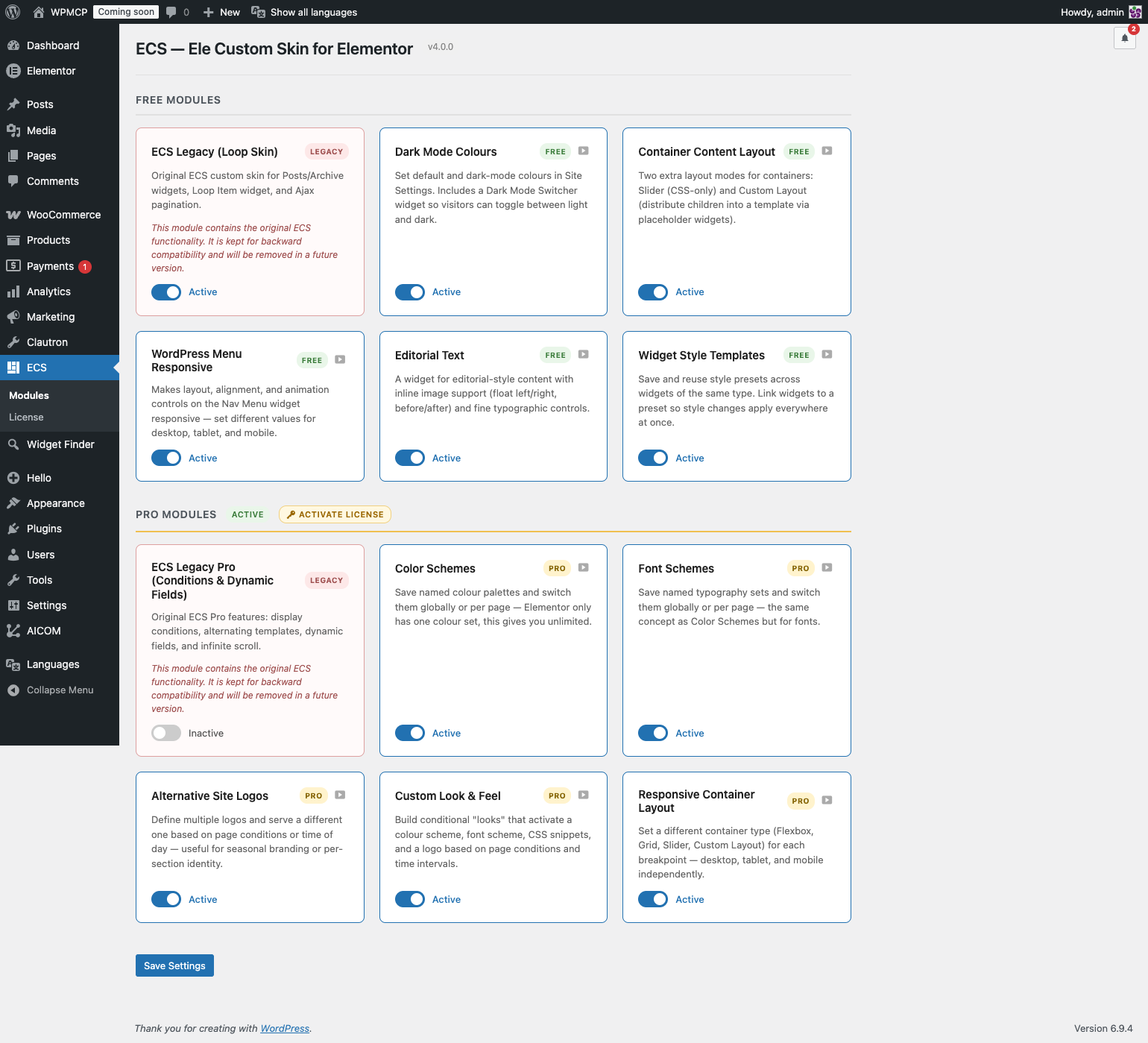
Every feature is a standalone module. Enable only what you need from ECS Modules in the WordPress admin. Unused modules load zero CSS, zero JS, and register no hooks.
🎨 Dark Mode Colours
A Default Colours tab appears inside Elementor’s Site Settings, right next to Global Colors.
- Set a Default and a Dark Mode colour for every global colour slot.
- Dark mode colours are written as CSS variables — no JavaScript swapping, pure CSS, zero flash.
- A fallback swatch shows the default colour when the dark slot is empty.
- The Dark Mode Switcher widget lets visitors toggle between light and dark with full style controls.
📐 Container Layout
Two additional layout modes for Elementor Flex Containers:
Slider Mode — Turn any container into a CSS-only slider. No JS library, no dependencies.
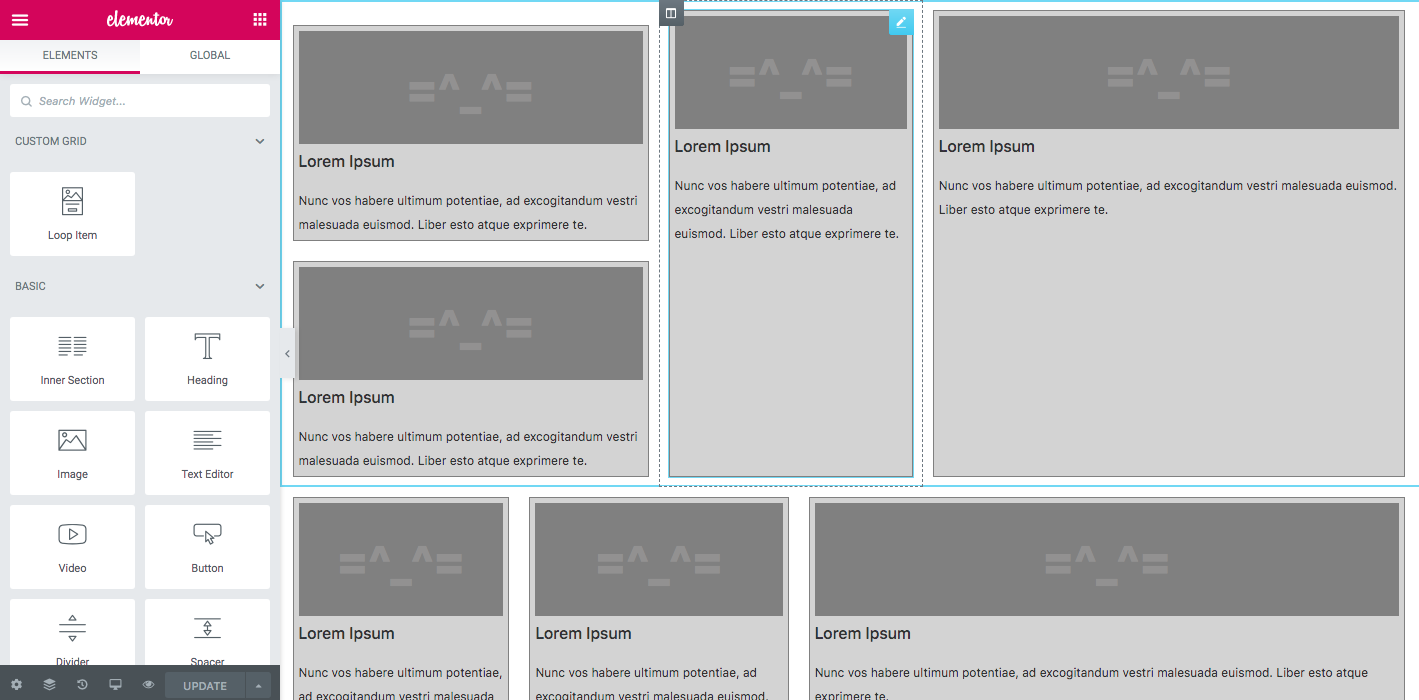
Custom Layout — Pick a Theme Builder template as the layout frame. Place ECS Placeholder widgets inside the template; ECS distributes the container’s children into those slots automatically. Supports cycling and graceful fallback. Works live in the Elementor editor.
🔁 Loop Custom Layout
Arrange Loop Grid items inside a Custom Layout template using ECS Placeholder widgets — powered by Elementor’s native Loop Grid query. Full editorial control over the item grid without leaving Elementor.
📱 Menu Responsive
Turn any Elementor Nav Menu widget into a responsive hamburger menu. Layout, alignment, animation, and breakpoint controls — all from the Elementor panel.
✍️ Editorial Text
Wrap images inside text blocks with float controls and captions. Magazine-style editorial layouts built entirely in Elementor.
🎨 Style Templates
Save any widget’s Style tab settings as a named preset and apply them to other widgets of the same type in one click — across pages, templates, and sites. Export and import your full style library as JSON.
🛠 JSON PowerEdit
Edit any Elementor widget’s raw settings JSON directly from the panel. Raw textarea for paste-and-replace, interactive tree view for surgical edits. Keyboard shortcut: Ctrl/Cmd + Enter to apply.
✅ Legacy (ECS 3.x — backward compatibility)
The original loop skin functionality is preserved in the Legacy module for existing sites built with ECS 3.x. If you’re updating from ECS 3.x, this module activates automatically. For new projects, use Elementor’s native Loop Builder.
Note: This plugin requires Elementor (free). Container Layout (Custom Layout mode) and Style Templates require Elementor Pro.
Screenshots

Installation
- Install and activate Elementor (free).
- Upload and activate ECS – Ele Custom Skin for Elementor through the Plugins screen.
- Go to ECS Modules in the WordPress admin and toggle on only the modules you need.
- Activated modules register their controls, widgets, and assets automatically.
Updating from ECS 3.x? Just update the plugin. The Legacy module activates automatically; all your existing loop skins keep working.
FAQ
-
I’m updating from ECS 3.x. Will my loop skins break?
-
No. ECS detects existing loop templates and activates the Legacy module automatically on update. Everything works exactly as before.
-
Can I disable features I don’t use?
-
Yes. Go to ECS Modules and toggle anything off. Disabled modules load zero CSS, zero JS, and register no hooks on the front end.
-
Does Dark Mode require JavaScript?
-
No JavaScript is needed for the colour switch itself. The CSS variables are written server-side under
[data-ecs-scheme="alt"]. The Dark Mode Switcher widget adds a small script only to set that attribute on<html>when the visitor toggles — a cookie prevents any flash on page load. -
Does Custom Layout work in the Elementor editor?
-
Yes. Layout injection is disabled in the editor so you can edit children normally. A live preview is generated via AJAX when you click away from a child.
-
Does Slider Mode require a JS library?
-
No. It uses CSS scroll-snap — no jQuery plugin, no swipe library.
-
Where do I create a Custom Layout template?
-
Go to Templates Theme Builder in Elementor. You’ll see a new document type called Custom Layout. Build your frame there and place the ECS Placeholder widget wherever you want a child to appear.
-
Do I need Elementor Pro?
-
Dark Mode Colours, Menu Responsive, Editorial Text, Style Templates, JSON PowerEdit, and Loop Custom Layout work with Elementor free. Container Layout (Custom Layout mode) requires Elementor Pro.
Reviews


Contributors & Developers
“ECS – Ele Custom Skin for Elementor” is open source software. The following people have contributed to this plugin.
Contributors
“ECS – Ele Custom Skin for Elementor” has been translated into 13 locales. Thank you to the translators for their contributions.
Translate “ECS – Ele Custom Skin for Elementor” into your language.
Interested in development?
Browse the code, check out the SVN repository, or subscribe to the development log by RSS.
Changelog
4.3.11
- Security: Style Templates and Color Wheel now require a site-level capability to save or delete a template/palette, since both are stored in a single site-wide option shared by every user, instead of trusting edit_posts alone.
- Added: all CSS and JS files are now minified in the release build, cutting file size by roughly 25-30%.
- Verified compatibility with WordPress 7.1 (currently in Release Candidate) — full plugin test suite passing.
4.3.10
- Security: closed a gap in the 4.3.9 fix — the Dynamic Repeater ACF source’s post read check can now no longer be bypassed via the current_post_id fallback. Thanks to Erwan Le Rousseau (WPScan) for the follow-up report.
4.3.9
- Security: Dynamic Repeater Builder’s ACF source now requires read access to the specific post a data source config points at, instead of trusting a post ID from the request. Thanks to Erwan Le Rousseau (WPScan) for the report.
- Security: the ACF source no longer falls back to reading raw post meta for a field name with no registered ACF repeater definition.
4.3.8
- Security: Dynamic Repeater Builder AJAX handlers now require the correct capability and post ownership, instead of only a valid nonce. Thanks to Seongwon LEE for the report.
- Security: Dynamic Repeater Builder now sanitizes values coming from a bound data source before they are written into widget settings, closing a stored XSS path. Thanks to Shivamani Vastrala for the report.
- Security: the AJAX pagination endpoint now requires a valid nonce and only returns content from a document that is publicly viewable, closing a way to read draft or private content anonymously. Thanks to Jashid Sany for the report.
4.3.7
- Fixed: WordPress Menu — the Alignment control (Start/Center/End/Stretch) was ignored once the menu switched into dropdown mode via the native Elementor Breakpoint. Alignment now applies correctly in both states.
4.3.6
- Fixed: WordPress Menu — dropdown panels going off screen on mobile and horizontal scroll breaking after 4.3.5. The layout class fix now uses client-side JavaScript instead of PHP so the correct class is applied per viewport, not locked to the desktop value.
4.3.5
- Fixed: WordPress Menu — pointer animations (underline, frame, background) and dropdown behaviour are now restored when the Mobile Menu module is active. Previously, the module’s responsive layout control replaced the native Elementor layout class, causing all pointer effects to stop working and a ghost frame to appear on hover.
- Added: JSON PowerEdit — Spreadsheet mode. Click “Spreadsheet” in the JSON PowerEdit toolbar to see repeater data as a tab-separated table. Paste directly from Excel or Google Sheets (TSV and CSV are both supported, auto-detected). Complex field values (links, images) are shown as JSON and round-trip cleanly on import.
4.3.4
- Fixed: WordPress Menu — Stretch alignment (Justify) no longer loses equal item widths when the Mobile Menu module is active. Navigation items now grow to fill the full header width again, matching the original Elementor behaviour.
4.3.3
- Added: Dark Mode Logo option in Default Colours (Site Settings). Upload a separate logo image for dark mode; it swaps automatically when dark mode is active and restores when switching back to light.
- Fixed: Legacy module admin cards now show a more specific migration notice.
4.3.2
- Fixed: Container Layout module no longer forces all Elementor containers to render unconditionally. The should_render filter is now conditional, so third-party plugins such as Essential Addons conditional display work correctly on plain flex and grid containers again.
4.3.1
- Improved: Custom admin menu icon for ECS in the WordPress sidebar.
- Tested: Verified compatible with WordPress 7.0.
4.3.0
- NEW: Integrations section in the Modules admin page — shows AICOM, Widget Finder for Elementor, and Ele Conditions with install links and active state detection.
- Fixed: Grid containers no longer reset to Flex layout when opening the container panel with the Container Layout module active. The sync between ecs_container_type and the native container_type now initialises from the native value instead of overwriting it.
4.2.0
- NEW: Color Wheel module — generates color harmonies (Analogous, Complementary, Monochromatic, Triadic, Tetradic) directly inside the Elementor color picker. Works with both classic Pickr and Atomic Widgets color pickers. Click any swatch to apply the color. Save and reuse palettes across your site.
- Improved: Color Wheel — swatches update live as you move the color picker or click Elementor global colors.
- Improved: Color Wheel — panel repositions upward automatically when it would overflow the viewport.
4.1.11
- Fixed: WordPress Menu. The Fill Width (stretch) CSS rule that forces width: 100% and left: 0 on the dropdown panel is now scoped to ECS dropdown layout mode only. Previously it applied to all nav menus with Fill Width enabled, overriding Smartmenus.js positioning calculations on menus using the native Elementor Breakpoint and collapsing the dropdown to the toggle width instead of the full header width.
4.1.10
- Fixed: WordPress Menu — dropdown panel no longer mispositioned when ECS Mobile Menu module is active and the nav menu uses Elementor’s native Breakpoint control. Previously, the CSS toggle-align rules (applied by default to all nav menus) used !important to override position/left/transform, which conflicted with Smartmenus.js position calculations, causing the dropdown to appear clipped or off-screen. The dropdown alignment rules now require the ECS layout to be explicitly set to “dropdown” for at least one breakpoint.
- Fixed: WordPress Menu — nav menu alignment no longer resets to left-aligned when ECS Mobile Menu module is active. Previously, a global CSS rule with a flex-start fallback overrode the user’s existing alignment setting whenever the Elementor CSS cache was stale. Alignment is now applied per-widget via direct Elementor selectors, so it only takes effect when the user has explicitly set a value.
- Fixed: Mobile Menu — resolved PHP warning “Undefined array key inner_tab” in PHP 8.x. Position anchors in the color controls upgrade pointed to tab-type controls that have tabs_wrapper but no inner_tab, causing Elementor’s get_position_info() to access an undefined key.
4.1.9
- Fixed: Legacy module (ECS Loop Skin) — removed redeclaration of $current_permalink property that caused a PHP Fatal error with Elementor Pro 4.x due to a PHP 8.1+ property inheritance rule.
4.1.8
- Fixed: Legacy module — Pro detection now correctly uses ELECSP_VER constant (ECS Pro 4.x) instead of the removed ele_custom_skin_pro() function from 3.x; “Get ECS Pro” notice and locked preview controls no longer appear when ECS Pro is active.
- Added: Dynamic Repeater Builder module card now appears in the modules list with a preview.
- Improved: Pro modules list — Legacy Pro module always displayed last.
4.1.7
- Fixed: Container Layout — containers set as hidden via Elementor’s responsive
visibility controls were still displayed when the module was active.
4.1.6
- Fixed: Container Layout — PHP warnings for undefined variables $cond_arrows and $cond_dots on PHP 8.3.
4.1.5
- Fixed: WordPress Menu — native Elementor mobile/tablet Breakpoint now works
correctly when no responsive layout override is set for that device. - Fixed: Container Layout — Slider navigation arrows and pagination dots now
visible in editor preview in all device modes.
4.1.2
- Fixed: ECS widgets not appearing in Elementor panel — only visible in search.
4.1.1
- Fixed: PHP Fatal error on PHP 8.1+ — typed property $current_permalink incompatible with parent Skin_Base.
4.1.0
- NEW: Style Templates — save and reuse widget style presets across pages and sites.
- NEW: JSON PowerEdit — edit widget settings JSON directly from the panel.
- NEW: Loop Custom Layout — arrange Loop Grid items inside a Custom Layout template.
- Improved: Dark Mode Colours — stability and compatibility improvements.
- Improved: Container Layout — better editor preview, cycling and fallback behaviour.
- Fixed: PHP 8.2 dynamic property deprecation in Legacy module.
- Tested with Elementor 3.35 and WordPress 6.8.
4.0.0
- Rebuilt from the ground up — modular architecture, every feature is a toggleable module.
- NEW: Default Colours tab in Elementor Site Settings with per-colour dark mode support.
- NEW: Dark Mode Switcher widget (toggle / dual / dropdown modes, full style controls).
- NEW: Container Layout module — Custom Layout mode and Slider mode.
- NEW: Menu Responsive module.
- NEW: Editorial Text widget.
- NEW: ECS Modules admin page.
- Legacy (ECS 3.x): loop skin and Ajax Load More preserved in the Legacy module, auto-activated on update.
3.1.7
- Fixed errors with Elementor 3.7.
- Added support for dynamic media breakpoint CSS.
3.1.0
- Ajax Pagination URL change is now optional.
- Experimental reinitialization of Elementor JavaScript after Ajax requests.
2.0.0
- NEW: Custom Grid Template with Loop Item placeholder widget.
1.0.0
- Initial release — Loop skin for Elementor Posts and Archive Posts widgets.