

Description
ecomverify keeps the accounting and VAT returns of online sellers. This plugin connects your WooCommerce store to your ecomverify account:
- Every new or updated order (including refunds) is sent automatically, in the background. Checkout never waits for it.
- Your previous orders can be sent with one click (“Send history”).
- Your store sends the orders, so firewalls and bot protection at your hosting (Cloudflare, Kinsta, Sucuri…) do not block them, and you do not need to create REST API keys.
- If ecomverify cannot be reached, orders wait in a queue and are retried automatically. Nothing is lost.
- Compatible with High-Performance Order Storage (HPOS) and with the Cart and Checkout blocks.
An ecomverify account is required. The plugin does nothing until you connect it with the key from your ecomverify panel.
External services
This plugin connects to the ecomverify service, operated by Verify Solutions, S.L. (Spain), which is its only purpose.
- What is sent: each order as WooCommerce stores it — order number, dates, status, currency, customer billing and shipping details (name, company, address, email, phone, VAT number), products, taxes, shipping, fees, coupons, refunds and totals — plus your store address and the WordPress, WooCommerce and plugin versions.
- When: only after you connect the plugin with your key, whenever an order is created or changes, and when you click “Send history”. Nothing is sent before you connect or after you disconnect.
- Where: https://ecomverify.com/WOOCOMMERCE/conector.php, over HTTPS. Every request is signed with your key.
- Why: to keep the accounting and VAT returns of your business in your ecomverify account.
-
What is received back: to show its dashboard (Sales and Orders sent tabs), the plugin asks ecomverify for figures about your own orders (counts, amounts excluding VAT, VAT, totals, refunds, countries, statuses) and for the list of orders it has received in the last 30 days. Only for the store connected with your key.
-
Terms of use: https://ecomverify.com/en/terms
- Privacy policy: https://ecomverify.com/en/privacy
Screenshots
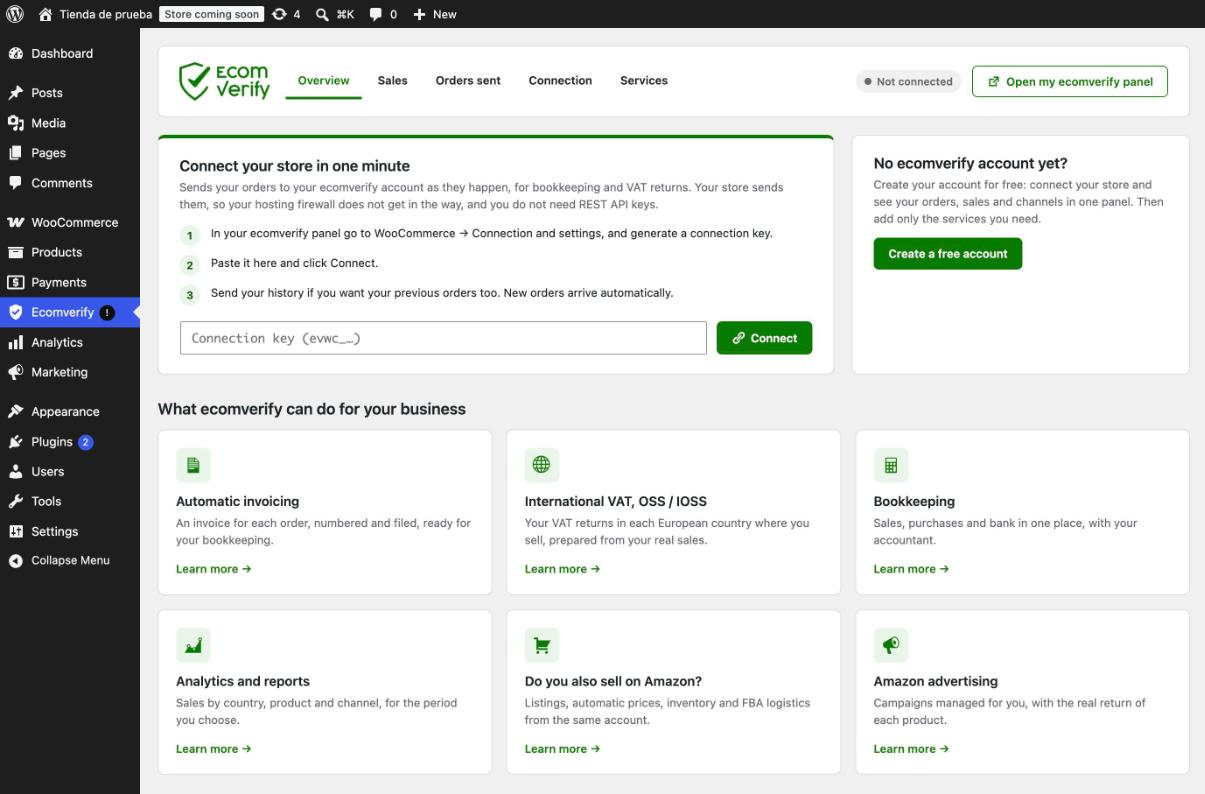


Installation
- Install and activate the plugin (Plugins Add New Upload Plugin, or from the plugin directory).
- In your ecomverify panel, go to WooCommerce Connection and settings and generate a connection key.
- In WordPress, click Ecomverify in the admin menu, paste the key and click Connect.
- Optionally click “Send history” to send your previous orders.
FAQ
-
Does it slow down my checkout?
-
No. Orders are queued and sent in the background with Action Scheduler, which comes with WooCommerce.
-
What happens if ecomverify is down?
-
Orders stay in the queue and are retried automatically (after 1, 2, 4… minutes, up to every 6 hours) until they are delivered.
-
Can I use the same key in two stores?
-
No. A key belongs to one store: the first store that connects with it keeps it. Generate a new key in ecomverify for another store.
-
What is removed when I delete the plugin?
-
The key, the queue, the log of orders sent and the plugin settings. Orders already sent remain in your ecomverify account.
Reviews
There are no reviews for this plugin.
Contributors & Developers
“Ecomverify for WooCommerce” is open source software. The following people have contributed to this plugin.
Contributors
Translate “Ecomverify for WooCommerce” into your language.
Interested in development?
Browse the code, check out the SVN repository, or subscribe to the development log by RSS.
Changelog
1.3.2
- Suggested text for your privacy policy (Settings Privacy), since order details are sent to ecomverify.
- Links to the terms of use and the privacy policy of the service.
1.3.1
- Sales tab: counts the order statuses you chose in ecomverify and applies your accountant’s corrections, so the figures are the same as in your ecomverify panel. Shows which statuses count, with a link to change them.
1.3.0
- New Sales tab: orders, amounts excluding VAT, VAT, total, refunds and net for any period (this month, last quarter, this year or your own dates), by destination country and by order status. Figures computed by ecomverify from the orders it holds; each currency on its own.
1.2.1
- The “Orders sent” log is filled with the orders ecomverify already holds from the last 30 days, so orders sent before the log existed show too.
1.2.0
- New dashboard with tabs: Overview, Orders sent, Connection and Services.
- Orders sent: a log of the last 30 days, day by day, with each order’s status, country, amounts excluding VAT, VAT and total, and whether ecomverify received it.
- Today at a glance: orders received, errors, orders in the queue and the amounts of today’s new orders.
- The page refreshes itself when sending finishes.
1.1.2
- Orders are sent base64-encoded, so other plugins that rewrite outgoing requests (for example, translation plugins rewriting links) can no longer break the signature.
1.1.1
- Gentler on small hosting plans: shorter background runs and a pause between batches, so the store always keeps free PHP workers.
- A batch ecomverify cannot verify no longer stops sending: it is split until the order is isolated and set aside for a later retry.
- The connection key can be changed without disconnecting.
- Choose from which date the history is sent, and stop it at any time.
1.1.0
- New settings panel: connection status, sent orders and live history progress at a glance, and what ecomverify can do for your business.
1.0.1
- Sends many batches per background run, so the history keeps moving on hosts that block WordPress loopback requests (common behind Cloudflare).
- While the settings page is open, it pushes the sending forward itself and shows live progress.
- Own entry in the admin menu, with a warning badge while the store is not connected.
1.0.0
- First version.