
Description
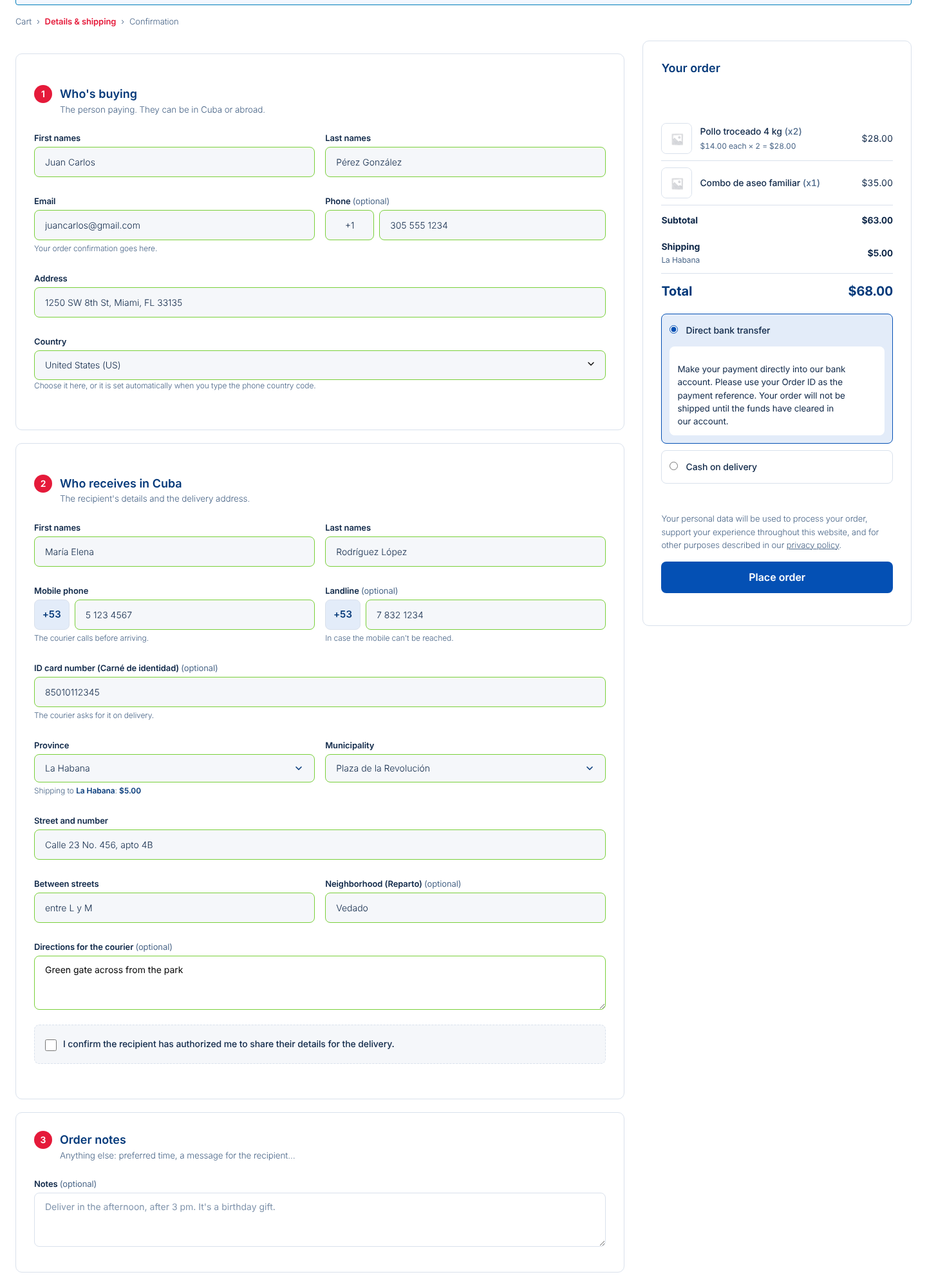
Easy2Cuba for WooCommerce replaces the WooCommerce checkout with one built to sell from anywhere and deliver in Cuba. The buyer can be in Miami, Madrid or Havana; the recipient is in Cuba, and the checkout asks for exactly what the courier needs.
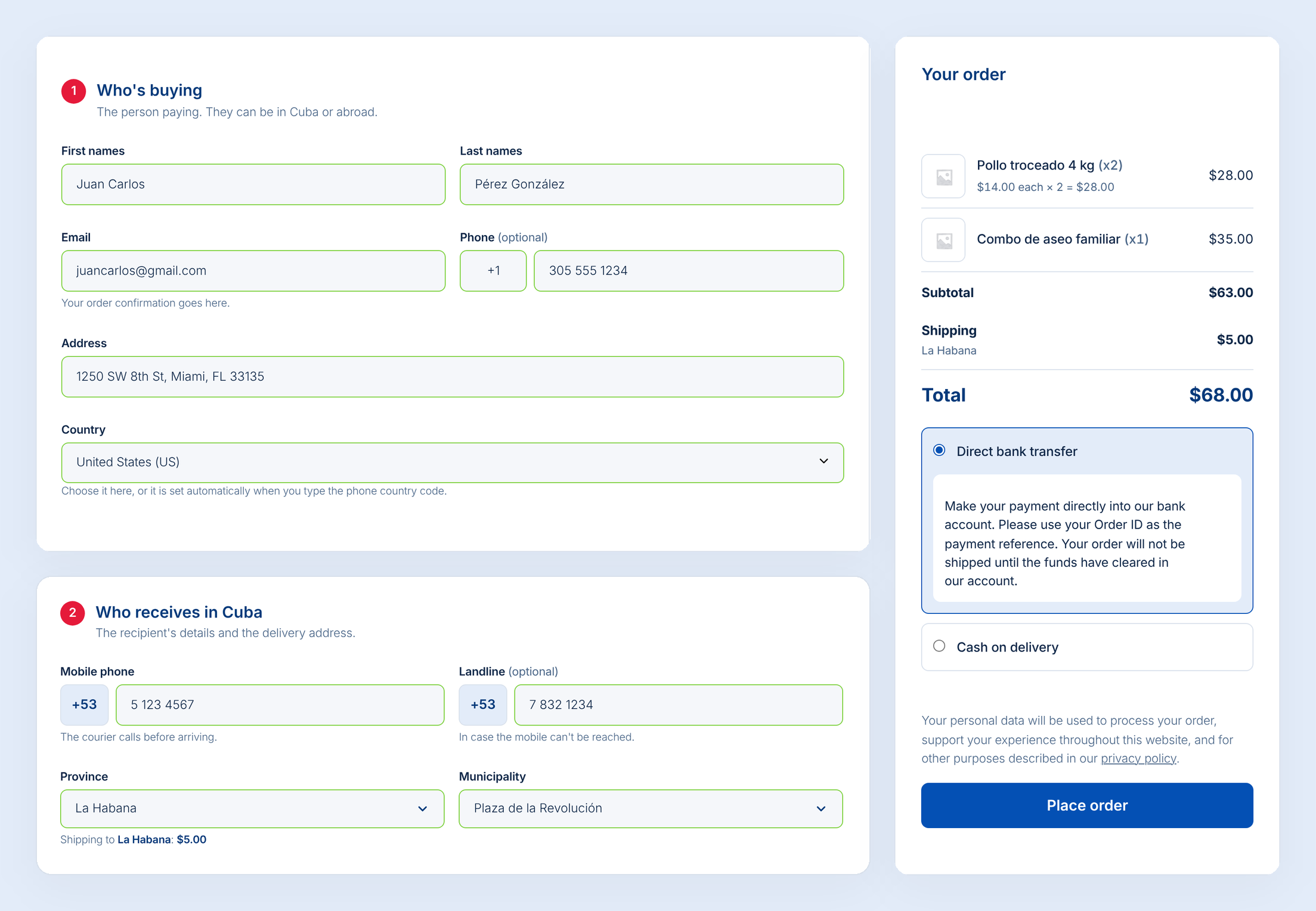
Buyer
- First names, last names and email, where the order confirmation arrives.
- Optional phone with a free prefix.
- Required address and country: the country is picked from the list or set automatically from the phone country code.
Recipient in Cuba
- Recipient’s first and last names.
- Required mobile phone (+53) and optional landline.
- Optional ID card number, to verify the person on delivery.
- All 15 provinces, the special municipality Isla de la Juventud and its 168 municipalities.
- Street and number, cross streets, neighborhood and directions for the courier.
- Recipient consent checkbox (can be turned off).
Shipping by province
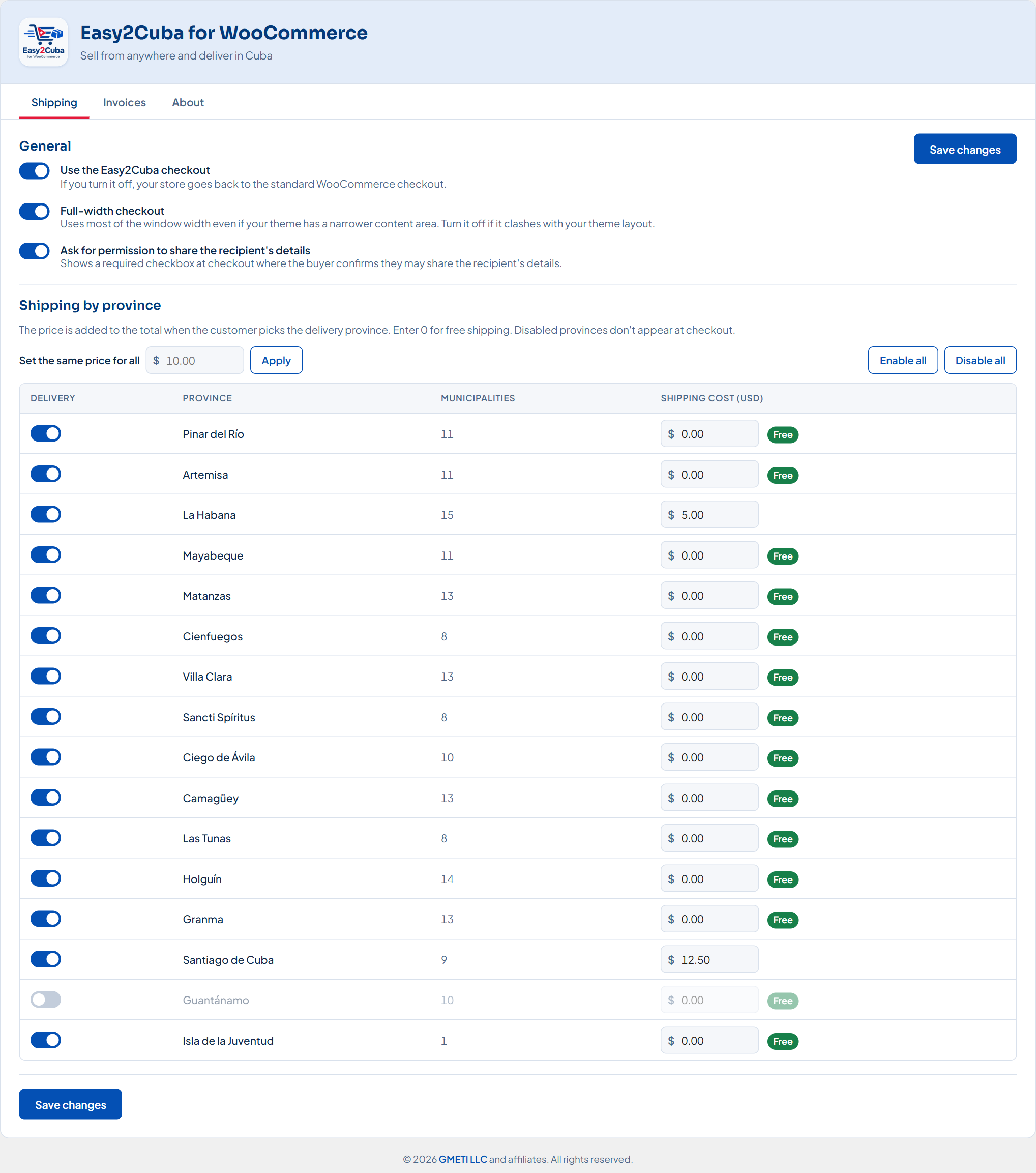
- Set the shipping price for each province in the admin.
- Enable only the provinces you deliver to.
- The cost appears when the province is chosen and is added to the total.
Clear order summary
- Product photo, name and quantity (x2).
- Unit price:
$14.00 each × 2 = $28.00.
Automatic delivery PDF
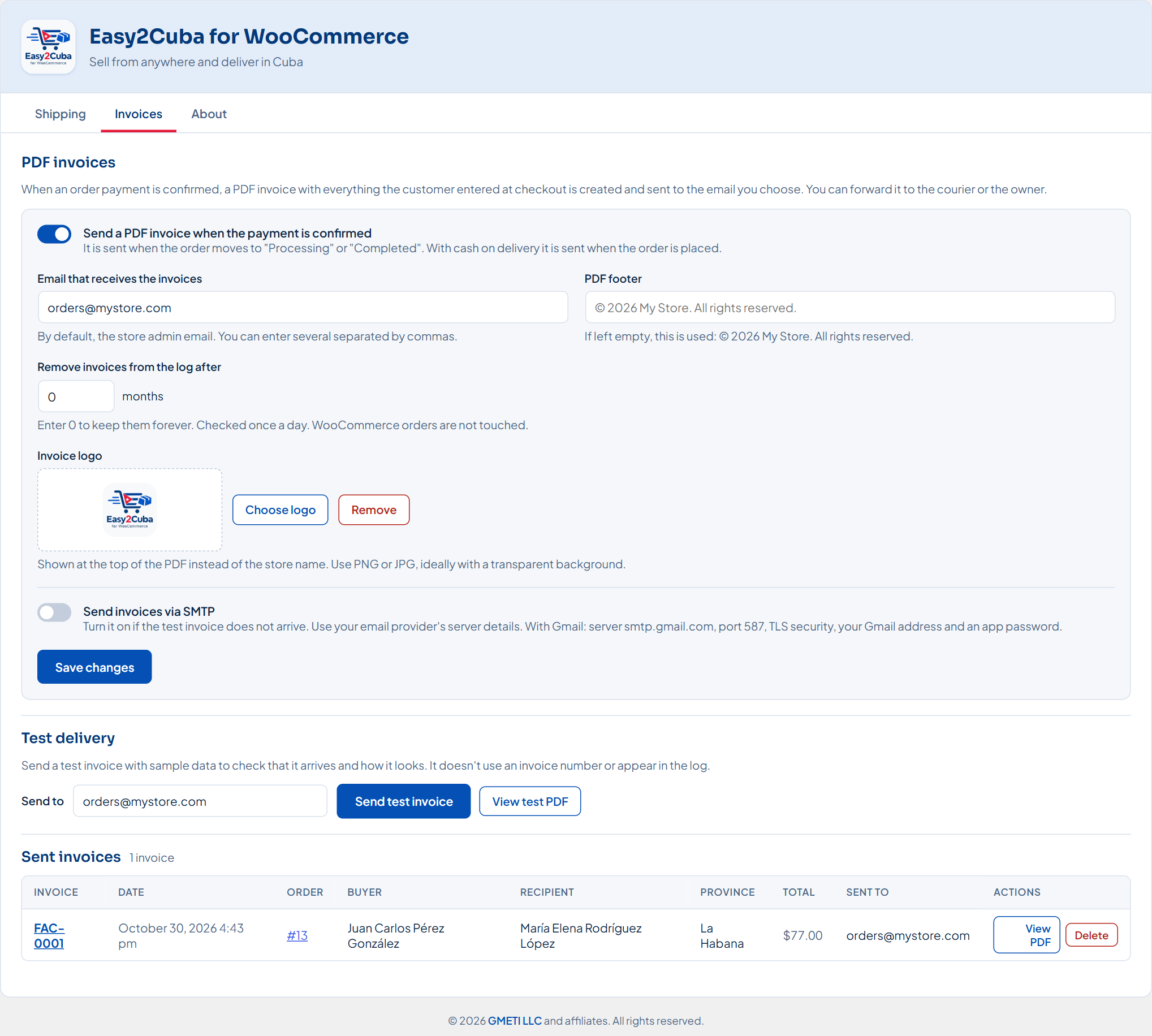
- When the payment is confirmed, an informative PDF (FAC-0001, FAC-0002…) with all the delivery details is emailed, ready to forward to the courier or the owner.
- With your logo, a configurable recipient email and your own footer.
- Log of sent documents: view or delete them whenever you want.
- Test send and optional SMTP, with the exact reason if the email fails.
Compatible
- Any WooCommerce payment gateway: PayPal, Stripe, cards, bank transfers…
- Elementor, multi-currency plugins (WPML/WCML, CURCY) and HPOS orders.
- Ready for translation: Spanish and other languages through translate.wordpress.org.
Privacy
- Integrates with the WordPress personal data export and erase tools.
- Suggests text for your privacy policy.
- Can automatically delete old documents from the log.
Developed by GMETI.
Screenshots

Installation
- Have WooCommerce installed and active. It is required.
- In WordPress go to Plugins › Add New Plugin, search for Easy2Cuba and click Install Now, then Activate.
- Go to Easy2Cuba in the side menu and set the shipping cost for each province.
- In the Invoices tab check the email that will receive the PDFs and send a test.
Requirements: WooCommerce 7.0+ (required: the plugin cannot be activated without WooCommerce active), WordPress 6.0+, PHP 7.4+.
FAQ
-
Do I need WooCommerce?
-
Yes, it is required. Easy2Cuba is a WooCommerce add-on: without WooCommerce installed and active, WordPress will not let you activate it.
-
Is it free?
-
Yes, it is free and open source (GPLv2 or later).
-
Does it work with my payment method?
-
Yes. Easy2Cuba only changes the details asked for at checkout; payment is still handled by the gateway you have installed.
-
Is the PDF a tax invoice?
-
No. It is an informative document that gathers all the order and delivery details on one page.
-
The test email doesn’t arrive, what do I do?
-
Many servers can’t send email on their own. Turn on SMTP in the Invoices tab with your email account details; if it fails, the plugin shows the exact reason.
-
How is it updated?
-
Like any plugin from WordPress.org: when a new version is published, the notice appears in Plugins and it updates with one click (or automatically, if you turn on auto-updates). The plugin itself does not connect to any external service.
-
Where do I get help?
-
In the plugin’s support forum on WordPress.org: https://wordpress.org/support/plugin/easy2cuba-for-woocommerce/
Reviews
There are no reviews for this plugin.
Contributors & Developers
“Easy2Cuba for WooCommerce” is open source software. The following people have contributed to this plugin.
Contributors
Translate “Easy2Cuba for WooCommerce” into your language.
Interested in development?
Browse the code, check out the SVN repository, or subscribe to the development log by RSS.
Changelog
1.8.0
- Checkout: each product in the order summary has a button to remove it from the order without leaving the checkout.
- Support now goes through the plugin’s forum on WordPress.org.
1.7.2
- The test invoice shows the directions for the courier in the site language.
1.7.1
- If you used the version from GitHub (1.6.x), its settings, invoice counter, saved invoices and order details are moved to this version automatically the first time it loads.
1.7.0
- First version on WordPress.org: updates now come from WordPress.org.
- Translations use the WordPress system and come from translate.wordpress.org.
- The Sora and Plus Jakarta Sans fonts are included in the plugin (no requests to Google Fonts).
1.6.8
- The copyright notice in the plugin screen now reads GMETI LLC.
1.6.7
- Tested with WordPress 7.1 and WooCommerce 11.2.
1.6.6
- “Save changes” button also at the top of the Shipping tab.
- The “Checkout page” section is removed: Easy2Cuba already replaces the block checkout on its own.
- New icon in the admin side menu.
- The Information tab no longer shows the author.
- The plugin cannot be activated unless WooCommerce is installed and active (also on WordPress older than 6.5).
1.6.5
- Checkout field borders are always light gray (green when valid, red on error), even if the theme sets others.
1.6.4
- Checkout fields use the theme’s text color and size again; the dropdowns (Country, Province and Municipality) copy the text fields so they look the same.
1.6.3
- Country, Province and Municipality have the same inner spacing, background and font as the other fields, with any theme.
1.6.2
- The Country field looks like the other fields (borders, size and green when valid).
1.6.1
- “Check again” in Dashboard › Updates looks for a new version right away, without waiting 6 hours.
- The “Delivery details in Cuba” box (admin order, thank-you page and WooCommerce emails) follows the same order as the checkout.
1.6.0
- New Country field for the buyer, with every country: choose it from the list or it is set automatically from the phone country code.
- The buyer’s address and country are now required.
- The PDF shows the details in the same order as the checkout.
- Information tab: GMETI link and the plugin page.
1.5.1
- “View details” in Plugins now shows the full description, installation, FAQ, screenshots and what’s new in each version, in Spanish or English.
1.5.0
- Automatic updates from GitHub: when a new version is released, the notice appears in Plugins and it updates with one click.
1.4.2
- Support link in the plugins list.
1.4.1
- The GMETI link in the plugins list is back and opens in a new tab.
1.4.0
- Privacy: Easy2Cuba data is included when exporting and erasing personal data from WordPress/WooCommerce.
- Suggested privacy policy text (Settings › Privacy).
- Optional automatic deletion of old invoices from the log.
- Recipient consent checkbox at checkout (can be turned off).
- Longer plugin description.
1.3.0
- Full-width checkout (can be turned off).
- Province before municipality in the email and the invoice.
- Better compatibility with payment gateways (billing country always present), Elementor and multi-currency plugins.
- New admin menu icon.
1.2.0
- Invoice numbering FAC-0001…
- Optional SMTP for invoices and the error reason when email fails.
- Full-width admin descriptions.
- More space at the end of each checkout section and at the end of the page.
1.1.0
- PDF invoices when the payment is confirmed, with log, logo and test send.
- Tabbed admin: Shipping, Invoices and Information.
- More space in the order summary and the payment section.
- Full-width admin.
1.0.0
- First release.