
Description
This plugin connects your WooCommerce store to ZATCA Tools, a cloud e-invoicing service for Saudi merchants, and issues a compliant tax invoice for every paid order — automatically.
ZATCA Tools is an independent commercial service and the brand of the plugin author (zatcatools.com). It is not affiliated with, endorsed by, or an official product of the Zakat, Tax and Customs Authority (ZATCA). “ZATCA” refers to that authority only as the compliance standard the plugin helps you meet.
When an order is paid, the plugin sends its details to your ZATCA Tools account, which builds the invoice, signs it with your establishment certificate, and reports it to ZATCA (the Fatoora platform for the second phase of e-invoicing). The invoice and its QR code are then available from the order screen, and the buyer can receive a PDF copy by email.
Features
- Automatic tax invoice for every paid order
- Automatic credit notes for refunds
- A VAT field at checkout so business buyers get an invoice in their company name
- Standard (B2B) cleared tax invoices for supplies of SAR 1,000 or more to a VAT-registered buyer
- The tax invoice number and a download link in the order emails, the thank-you page and My Account
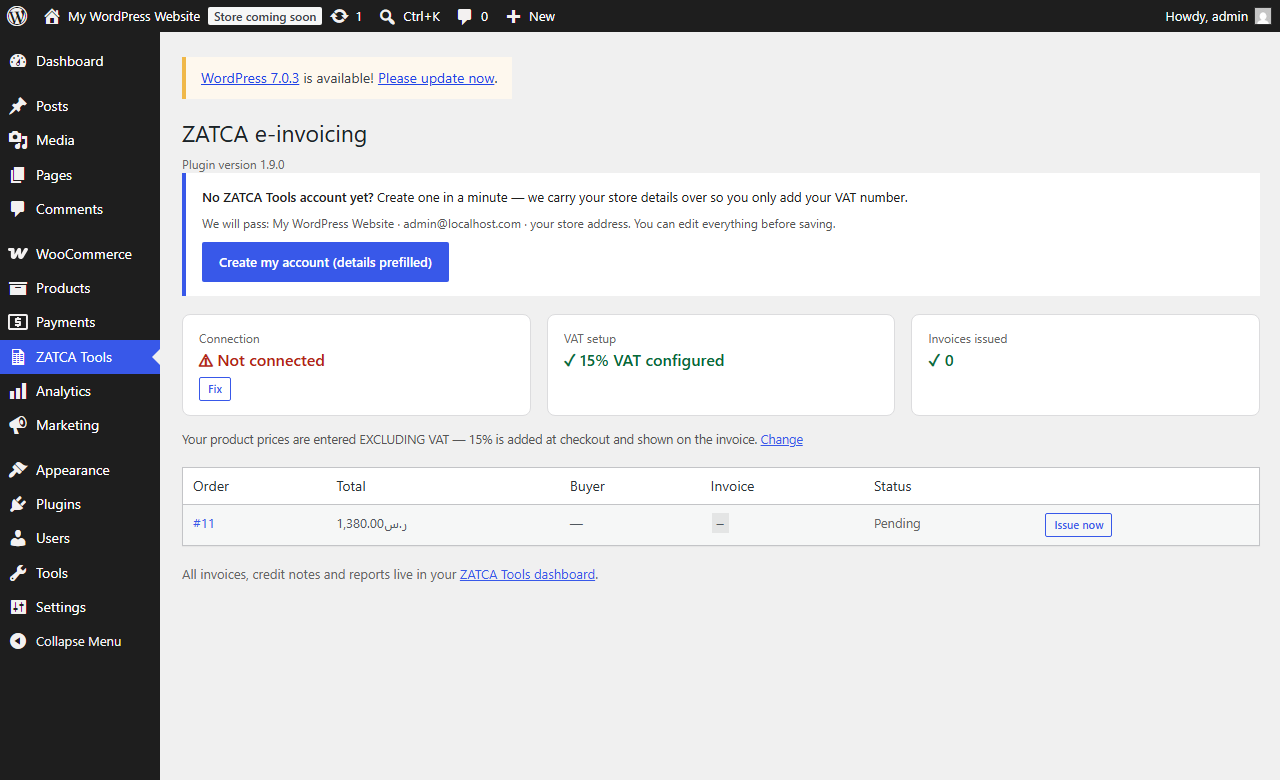
- A dashboard (ZATCA Tools in the admin menu) with a VAT setup check and per-order invoice status
- Refuses to invoice an order that did not actually carry 15% VAT, instead of inventing tax
- Invoice PDF with the official ZATCA QR code
- Runs in the background so checkout is never slowed down
Requirements
- A ZATCA Tools account connected to ZATCA (a free account at zatcatools.com)
- Your store currency set to SAR
- WooCommerce taxes enabled with a 15% rate for Saudi Arabia — without VAT on the order no tax invoice can be issued
- WooCommerce active
External services
This plugin connects to ZATCA Tools, an external e-invoicing service operated by ZATCA Tools, to create and report tax invoices for your orders. This connection is required for the plugin to function, and only happens after you enter your own API key in the plugin settings.
What data is sent, and when
- When you save your API key in the settings screen, the plugin sends the key to the ZATCA Tools API to verify it (an account lookup request).
- When an order is paid, the plugin sends that order’s details — line items, amounts, discounts, shipping, the buyer’s name, and (if present) the buyer’s email, billing address and VAT number — to the ZATCA Tools API so a tax invoice can be issued and reported to ZATCA.
- When an order is refunded, the plugin sends the refund details so a credit note can be issued.
No data is sent to any external service until you enter an API key and enable the plugin.
- Service provider: ZATCA Tools — https://zatcatools.com
- Terms of Use: https://zatcatools.com/terms
- Privacy Policy: https://zatcatools.com/privacy
Screenshots
Installation
- Upload the plugin and activate it, or install it from your WordPress dashboard.
- Create an account and an API key at zatcatools.com (Settings > API).
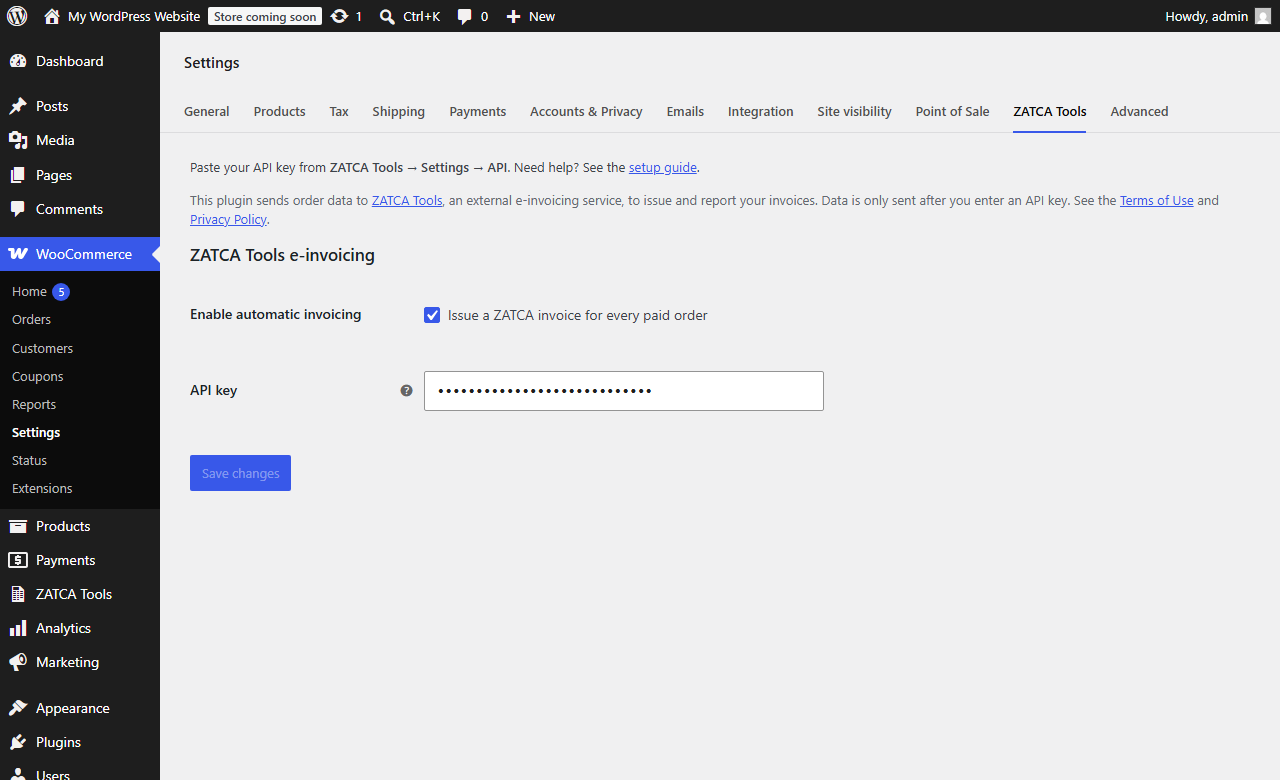
- In WooCommerce > Settings > ZATCA Tools, paste the API key and save.
- A success message confirms the connection. Paid orders are now invoiced automatically.
Full guide: https://zatcatools.com/docs/woocommerce
FAQ
-
Do I need an account with an external service?
-
Yes. This plugin is a connector for the ZATCA Tools e-invoicing service. You create a free account at zatcatools.com and connect it to ZATCA, then paste your API key into the plugin.
-
Do my customers see anything different at checkout?
-
Yes, one optional addition: a “Buying for a business” box where a VAT-registered buyer can enter their VAT number to receive a tax invoice in their company name. Consumers can ignore it. Everything else runs in the background.
-
Why does an order say it was not invoiced?
-
The most common reason is VAT. If WooCommerce taxes are disabled, or the order carried no VAT (or a rate other than 15%), the plugin refuses to issue a tax invoice rather than adding tax the buyer never paid. Open the ZATCA Tools screen in your admin menu — it names exactly what to fix and links to the right settings page.
-
How are business (B2B) invoices handled?
-
Saudi VAT requires a full tax invoice for a supply of SAR 1,000 or more to a VAT-registered buyer. So when an order carries a valid Saudi VAT number (from the checkout field, an existing VAT field, the customer’s profile, or the order note) plus the buyer’s national address, a standard cleared tax invoice is issued. Below SAR 1,000 the invoice stays simplified but still shows the buyer’s VAT number — the regulations permit a simplified invoice there for any buyer.
You can also mark an order (or a customer) as an establishment or an individual in the ZATCA e-invoice panel. Marking it as an establishment means “aim for the tax invoice, and tell me if you could not”: if the total is under SAR 1,000, or a required buyer detail is missing, the simplified invoice is still issued and the panel says exactly why it is not a tax invoice.
-
What about refunds and cancellations?
-
Refunding an order automatically issues a credit note against the original invoice, for the refunded amount.
Cancelling an order that was already invoiced issues a credit note for the invoice’s whole open balance. A tax invoice that ZATCA has accepted cannot be deleted — reversing it with a credit note IS the cancellation. If the order is cancelled before it was ever invoiced, nothing is issued and nothing is reported.
Putting that cancelled order back to a paid status issues a debit note for the same amount, so the invoice is due again. The credit note is not removed: every document reported to ZATCA is permanent, and the pair of them is the audit trail.
Reviews
There are no reviews for this plugin.
Contributors & Developers
“E-Invoicing for Saudi Arabia by ZATCA Tools” is open source software. The following people have contributed to this plugin.
Contributors
Translate “E-Invoicing for Saudi Arabia by ZATCA Tools” into your language.
Interested in development?
Browse the code, check out the SVN repository, or subscribe to the development log by RSS.
Changelog
1.9.0
If you run more than one store on one ZATCA Tools account, update both — this fixes a sale going unreported.
- A second store’s orders could be answered with the first store’s invoices, and never reported at all. Every document was identified to the service by its WooCommerce order id, and order ids are only unique inside a single install — a second store starts again at 1. So both stores asked to invoice “order 60”, the service correctly read the repeat as a retry and handed back the invoice it had already issued, and the second store’s order displayed an invoice belonging to a different sale of a different amount while nothing was reported to ZATCA for it. Each store now has its own private id mixed into every key, so the two can never collide. Orders already invoiced are untouched.
- Added a second line of defence, independent of the above: if the service ever replays a document whose total does not match the order in front of it, the plugin refuses to attach it and says so on the order, instead of quietly recording someone else’s invoice number. An unreported sale is now loud.
1.8.1
- All JavaScript now lives in its own files, registered with
wp_register_script()and enqueued only on the screen that uses it — the checkout, the order screen, and the plugin’s dashboard page. The values each script needs are passed withwp_localize_script(), and the invoice document withwp_add_inline_script(). No script is written into the page any more. - The checkout block is styled from an enqueued stylesheet instead of inline attributes, so a theme can restyle it.
- “Will retry on next status change” is now plainly a label rather than a link that did nothing when clicked.
- Checkout no longer reads “National address (optional) (optional)” — WooCommerce adds its own “(optional)” to every field it does not require, and the labels said it too. The business question itself no longer carries a stray “(optional)” either.
1.8.0
Findings from a full compliance and money-path review. Five real defects, all fixed.
- Invoices were dated in UTC. Saudi Arabia is UTC+3, so every sale made between midnight and 3am was dated to the previous day — and on the first of a month that filed the supply in the previous VAT return period. Invoices are now dated in Saudi civil time, whatever the WordPress timezone is set to.
- The supply date is now the date the order was paid, not the date the invoice happened to be issued. They differ whenever invoicing runs late (a retry, or a queue that drained the next morning), and the supply date is the tax point.
- Tax-inclusive prices lost a halala. A price of 115 for 3 items is 33.3333 net each; rounded down, the invoice came to one halala less than the money taken, and no field could express the difference. The residual is now carried as a rounding discount, so the document reconciles to the charge exactly.
- Refunds on discounted orders credited too much. The credit note used the pre-discount price, so refunding an item bought with a coupon returned more VAT than was ever charged. It now credits what was actually paid — and if you type an extra amount on top of the returned items, that is credited too, so the note always equals the money returned.
- Editing an order after it was invoiced left the invoice wrong. An issued invoice cannot be changed, so the difference is now documented automatically: a debit note when the total goes up, a credit note when it goes down. If the amended order is no longer a uniform 15% order, nothing is invented — you get told to correct it manually.
- Refund credit notes are now recorded on the order like every other document, with a button to view them — previously a refund’s credit note was announced once in the order notes and then untraceable.
- Credit and debit notes now reach the buyer, in the order emails and in My Account. A buyer who was refunded is entitled to the credit note; showing them only the original tax invoice left them holding a document for money they got back.
1.7.1
- The order screen and the dashboard now say “credit note being issued…” (or debit note) the moment you change the status, with a button to issue it immediately. WordPress runs background work off site traffic, so on a quiet store the note could be a minute or two behind — and until now the screen looked as if nothing had happened.
- Fixed reinstating an order that had an earlier partial refund: the debit note now gives back only what the cancellation credited, so a refund is never resurrected — the buyer is not re-charged VAT on goods they returned.
1.7.0
- Putting a cancelled order back to a paid status now issues a debit note, so the invoice is due again. The credit note that reversed it stays — every reported document is permanent — and both are listed on the order with buttons to view either. Cancelling again writes a new credit note.
- Fixed the invoice and note layout when viewed in your dashboard: the issue date and the original-invoice reference were being pushed to the far side of the header, away from their own labels, and the whole document was rendering in the wrong typeface. Both now match the PDF exactly.
1.6.0
- Cancelling an order that was already invoiced now issues a full credit note that reverses it. A tax invoice reported to ZATCA cannot be deleted, so the reversal is the document — and it is shown on the order and in the dashboard with a button to view and print it.
- Cancelled and refunded orders no longer disappear from the dashboard list. They stayed invisible exactly when you needed to find their credit note.
- An order cancelled in the seconds before its background invoicing job ran is no longer invoiced at all — a sale that was undone is never reported.
- Marking an order “Refunded” without recording a refund now also produces the credit note.
1.5.0
- One address field, the one Saudi buyers actually have: the national address (4 letters + 4 digits, e.g. RRRD2929). The street, building number, city and postal code a tax invoice needs are resolved from it by the service — you are never asked for a building number again. It is on the order panel, at checkout, and on the customer’s profile.
- Choosing “Establishment (B2B)” now marks what it requires in red, and every other field says “optional” outright.
- Shorter, clearer wording in the order panel.
1.4.1
- You can now mark an order as being to an establishment (B2B) or to an individual (B2C), in the ZATCA e-invoice panel on the order, together with the buyer’s VAT number, commercial registration and national address. The panel tells you which document will be issued before it goes out.
- The same three details can be saved on a customer’s profile, so a returning business buyer is recognised automatically and nobody retypes anything. An individual order can still override it.
- When an order was in line for a tax invoice but could not have one — the total is under SAR 1,000, where the regulations allow a simplified invoice for any buyer, or a required buyer detail such as the building number is missing — the simplified invoice is still issued and the reason is stated on the order, in the order notes and in the dashboard list. An order is never left uninvoiced over it: a simplified invoice has to reach ZATCA within 24 hours either way.
- Fixed the buyer VAT number always appearing empty on the order screen: a field added the WooCommerce way is saved under one key but displayed from another, so whatever you entered was never shown back to you.
- The dashboard’s order list now shows B2B or B2C per order.
1.3.1
- Fixed the invoice layout when viewed in the dashboard — it is built for the PDF engine, so a browser was substituting a different font and floating the footer over the totals.
- Fixed Print producing a blank page.
1.3.0
- Invoices now open INSIDE your dashboard instead of as a separate file. Some ad blockers and privacy extensions block invoice links on sight — whether they point at us or at your own site — leaving you with a blocked page. Viewing it in the page means there is no file request to block, and Print / Save as PDF still gives you the same document.
- Added “Email it to me” — the invoice is sent by the server, so it always arrives no matter what the browser blocks.
1.2.1
- Fixed a “not allowed to view this invoice” error when opening an invoice from the admin: the WordPress REST API ignores login cookies unless a nonce is sent, so the invoice link now carries the order key itself — the same way WooCommerce authorises its own order links.
1.2.0
- Invoices are now served from YOUR store’s own domain, over a clean REST route (/wp-json/zatca-tools/v1/…). Ad blockers and privacy extensions block third-party document links (ERR_BLOCKED_BY_CLIENT), which left merchants — and buyers — staring at a blocked page. Your store now fetches the PDF securely and serves it itself, so there is nothing left to block.
1.1.1
- Shows the running plugin version on the dashboard (after an update, PHP opcache can keep serving the old files — this makes that obvious).
1.1.0
- Orders waiting in the background queue now say so, with an “Issue now” button instead of looking stuck (WordPress runs background tasks from site traffic, so a quiet store can wait a minute or two).
- Fixed the invoice link: it pointed at the API endpoint, which answers “Invalid or missing API key” when opened in a browser. Existing orders repair themselves.
- Two-way setup help: a new merchant starts registration with their store name, email and address already filled in from WooCommerce, and a store with no VAT configured can switch it on with one click (taxes on + a 15% Saudi rate applied to shipping). A connected store can also pull its establishment address back into an empty shop address. The “prices include tax” setting is never changed silently, because it re-interprets existing prices.
- Refuses to issue a tax invoice for an order without 15% VAT (taxes disabled, zero-rated, or a mixed rate) instead of inventing tax.
- Fixed the order discount being sent tax-inclusive, which made the invoice total disagree with the amount paid.
- New “Buying for a business” VAT (and commercial registration) field at checkout, highlighted for orders of SAR 1,000 or more.
- B2B now follows the SAR 1,000 rule: cleared standard invoice at or above it, simplified with the buyer’s VAT below it.
- New ZATCA Tools admin dashboard: connection and VAT setup checks, invoice count, recent orders with per-order retry.
- The tax invoice number and a download link now appear in the order emails, the thank-you page and My Account.
1.0.0
- Initial release: automatic invoices, credit notes, B2B detection, order-screen invoice panel.