

Description
Duplicate Page and Post provides a simple way to create a clone of pages, posts and custom post types. The duplicate can be created with the post status selected in the plugin settings.
The plugin is lightweight and focused on fast, straightforward content duplication.
Major features of this plugin include
- Create a clone of a particular page.
- Create a clone of a particular post.
- Create a clone of a particular custom post type (CPT).
- Option to select editor (Classic and Gutenberg).
- Option to add a post suffix.
- Option to add custom text for the duplicate link button.
- Option to select the status of duplicated posts.
- Option to select the redirect behavior after duplication.
Like the plugin?
If you find the plugin useful, your feedback is appreciated.
Screenshots
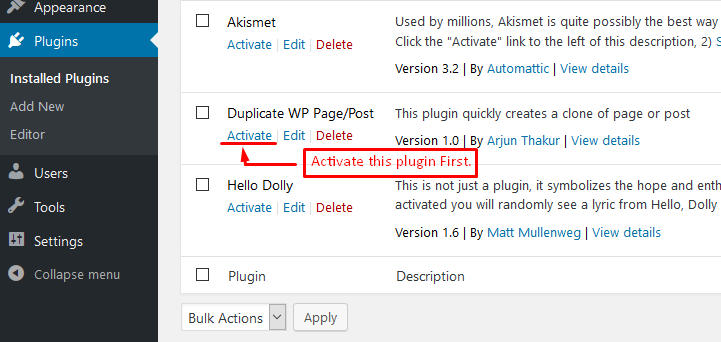
Activate the plugin – The plugin can be activated from the WordPress Plugins page by clicking the Activate button.
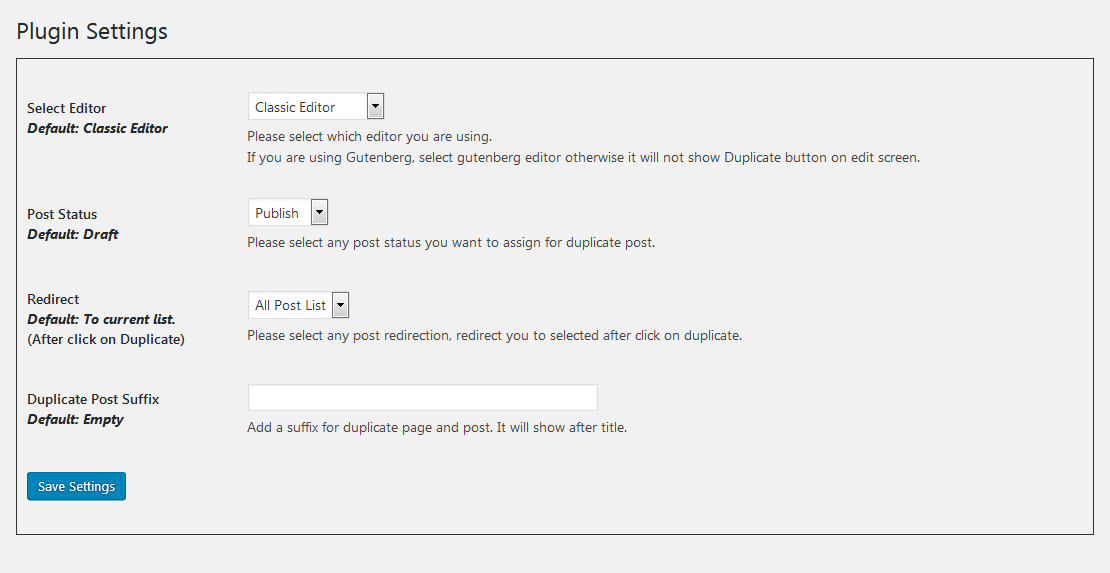
Plugin Settings – Configure the duplicate status, redirect behavior, title suffix, duplicate link text, and other plugin options from the settings page.
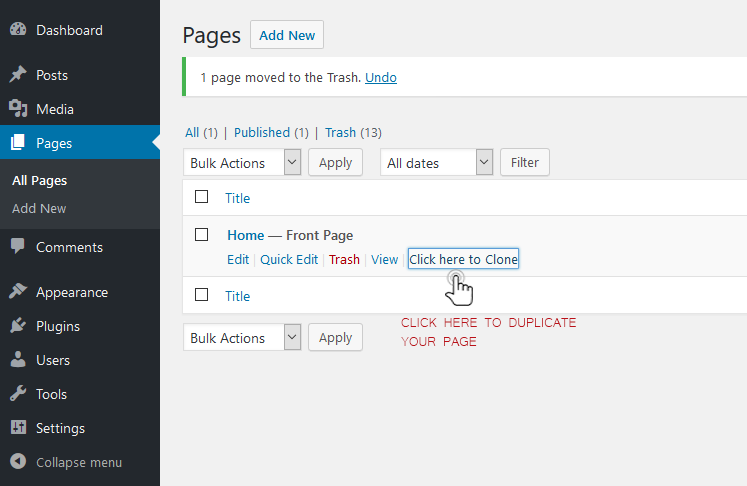
Duplicate pages – The Duplicate option is available directly from the Pages listing, making it easy to clone a page with one click.

Duplicate posts – The Duplicate option is available directly from the Posts listing, making it easy to clone a post with one click.
Installation
The plugin is simple to install:
- Download duplicate-wp-page-post.zip
- Unzip
- Upload the duplicate-wp-page-post directory to your /wp-content/plugins directory
- Go to the Plugins menu in WordPress and activate the plugin
FAQ
-
How to create the duplicate of a page or a post?
-
- Activate the plugin through the ‘Plugins’ menu in WordPress.
- Create a new post/page or use an existing one.
- Go to the All Pages or All Posts screen in your WordPress dashboard.
- Hover over a page, post or supported custom post type. The duplicate link will be displayed when you have permission to edit the source item.
- Click the “Duplicate” link. The duplicate will be created using the status selected in the plugin settings.
- Make any required changes and publish or update the duplicate as appropriate.
- Activate the plugin through the ‘Plugins’ menu in WordPress.
-
What is the benefit of using this plugin?
-
You can easily duplicate pages, posts and custom post types with a single click. This saves time when creating new content based on existing content.
Reviews


Contributors & Developers
“Duplicate Page and Post” is open source software. The following people have contributed to this plugin.
Contributors

Translate “Duplicate Page and Post” into your language.
Interested in development?
Browse the code, check out the SVN repository, or subscribe to the development log by RSS.
Changelog
2.9.7
- Improved security through stronger input validation, nonce verification, and output escaping.
- Improved compatibility with supported WordPress versions.
- Updated the plugin text domain to match the WordPress.org plugin slug.
- Improved internationalization support with translator comments for strings containing placeholders.
2.9.6
- Security fixes for SQL injection vulnerabilities.
- Improved authorization checks when duplicating posts, pages and custom post types.
- Improved input validation and output escaping.
- Fixed an activation warning on fresh installations.
- Preserved existing plugin settings during activation and upgrades.
- Preserved existing option keys and values when saving plugin settings.
- Improved post metadata and taxonomy duplication.
- Added error handling for failed post creation.
- Improved compatibility with current WordPress versions.
- Maintained PHP 5.6-compatible plugin code syntax.