

Description
DT-PM Consent stops third-party scripts and embeds from loading before the
visitor has consented. It shows a banner with equally weighted buttons for
accept and reject, allows a choice per purpose, and records every
configuration change as evidence.
What you get
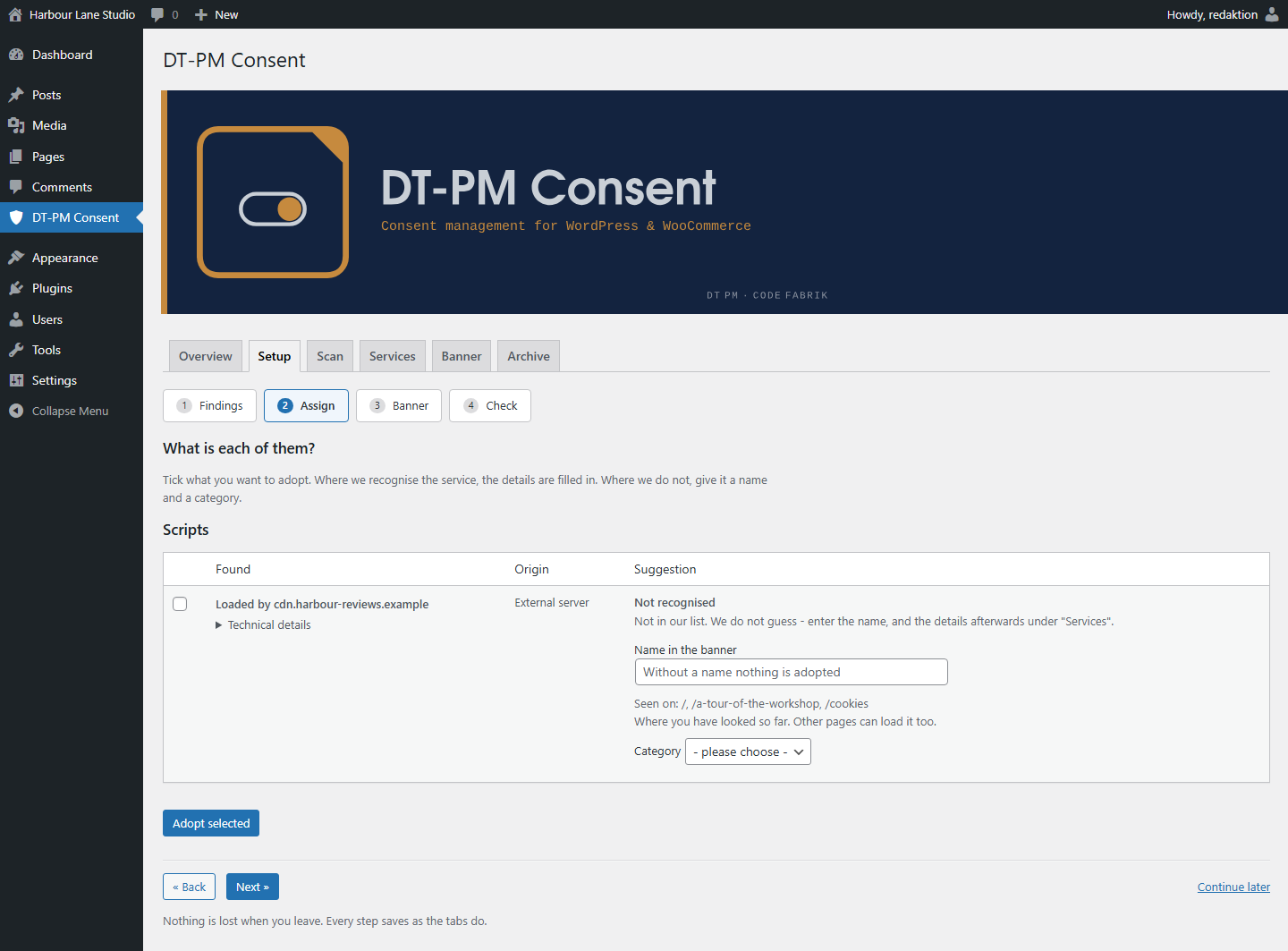
- A guided setup in four steps. It shows what your site loads, proposes an
entry for every service it recognises, and names what is still open before
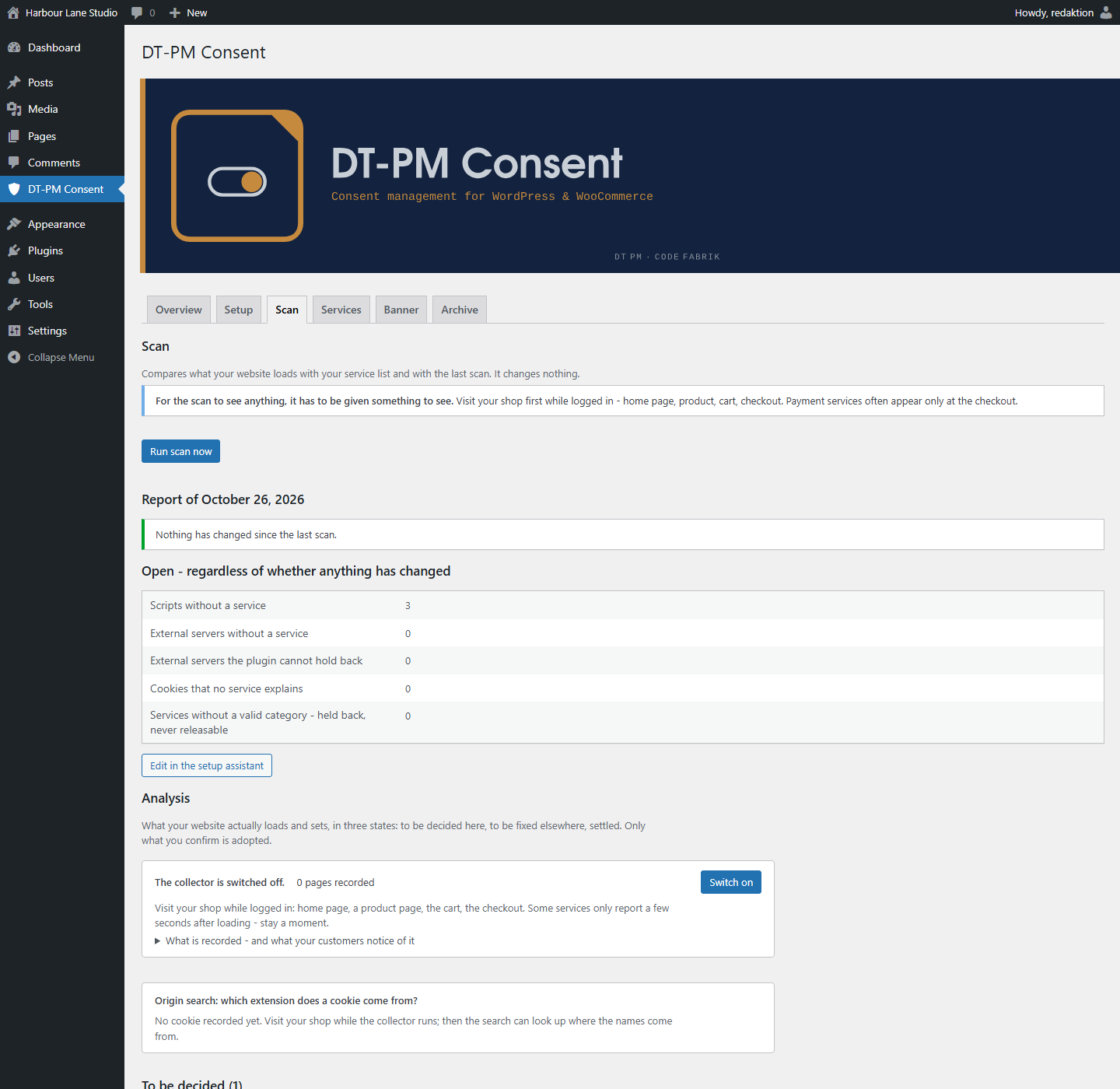
it lets you call the setup finished. - A scanner in two parts, both included. The server side reads the scripts and
stylesheets WordPress knows about; a collector records what actually loads in
your own browser while you are logged in, so a script injected at runtime is
found as well — not only one that sits in a registry. It finds and names;
where it cannot block, it says so instead. - 24 ready-made service templates, each with provider, purpose, storage period
and third-country transfer, and each backed by a source. Where a provider
states nothing, the template says so rather than inventing a value, and for
payment services and tag managers the category is deliberately left to you.
Your own code can add entries through a documented filter. - A cookie declaration for your privacy policy, as a shortcode or a block. It
is built from the same data as the banner and through the same code, so the
two cannot end up saying different things. - An archive of every configuration change, exportable as CSV. It records what
your banner said and when — it is not a log of individual visitors, and the
plugin keeps none. - One consent cookie, carrying a fingerprint of the configuration rather than a
bare counter: when the service or purpose list changes in substance, the
fingerprint no longer matches and the banner asks again. The decision can
optionally be shared across your own subdomains — switched off by default,
and the FAQ below says when to leave it off. - Warnings where an entry would be worthless. A service without a cookie name
cannot have its cookies deleted on withdrawal, and a service with nothing
this plugin can hold back is listed as a defect instead of counting as
configured. - Keyboard operation, stated rather than implied: Escape rejects while no
decision has been made and only closes the dialog once one exists, and the
banner says which of the two applies. The banner passes axe-core against the
WCAG 2.2 AA rule set without a violation (Chromium, Twenty Twenty-Five, at
1280 and 640 pixels and at 200 % text size). No screen reader was used, so
whether the error message is actually announced (4.1.3) is untested, and the
check covered the visitor’s banner, not the admin screens. - German and English included.
- GPLv2 or later. Nothing is held back for a paid version, and the plugin sends
no request to any server of ours — not on a schedule, not at all.
No page-view limit, no domain limit, no seat count, and no switch that trips
once your site grows. There is nothing to count against: the plugin contacts no
server of ours, so no number about your site ever leaves it.
What the plugin does
- Rewrites registered scripts of consent-requiring services into inert
placeholders. The browser neither loads nor executes them. - Blocks the inline snippets WordPress attaches to a script as well — with
analytics integrations, that is usually where the call that sets the cookie
lives. - Replaces embedded iframes of known providers with a placeholder that names
the provider and offers a button to load it. - Names each service and its provider visibly on the first banner level.
Purpose, storage period, third-country transfer and the cookie names sit
next to it, expandable — on the same level, without having to consent first. - Offers a way to withdraw consent from every page. Withdrawing deletes the
affected cookies and reloads the page, so that scripts already running
actually stop. - Compares today’s state against the last scan at the press of a button and
reports what is new. Reminds you when the last scan is more than 30 days
old. - Raises a configuration version whenever the service or purpose list changes
in substance. Existing consents become invalid and the banner appears again.
What the plugin explicitly does NOT do
It blocks nothing on its own. Whatever is not in the service list is not
blocked. The setup helper shows the scripts that loaded and suggests an entry
for the ones it recognises — but it adopts nothing without your confirmation.
That is a deliberate decision: a plugin that decides by itself which scripts
on someone else’s website perform tracking would either block too little (and
pretend safety) or too much (and take the site down).
Detection is not complete. It knows a limited number of common services.
An unrecognised script is marked as unknown and presented with empty fields —
the plugin guesses neither provider nor purpose nor storage period. An empty
row you have to fill in is more honest than a filled-in one that is wrong.
The setup helper puts two cases first: external servers and recognised
services. Everything else — WordPress itself, your theme, plugins on your
own server — sits below, collapsed but complete. That is a display decision
and not a legal assessment: a plugin can live on your server and still set
cookies. Go through the second list instead of relying on the first.
It does not catch scripts written into the markup around the WordPress
API. The collector finds them and tells you they are there — block them
the plugin cannot. You then have to act yourself: remove the integration from
the theme, register it through wp_enqueue_script, or serve the file from
your own server.
It stops nothing that is loaded from inside a stylesheet. An
@import url(‘https://fonts.googleapis.com/…’) or a font in an @font-face
rule keeps loading even when the service is listed as blocked: the plugin can
stop a stylesheet by its ADDRESS, but it does not read what a stylesheet does
inside. Four routes are affected — @import in a <style> block, @import
in an enqueued stylesheet, url() in an @font-face rule, and
background-image.
The setup helper finds and names these cases for every stylesheet enqueued
through WordPress, under “Stylesheets that load from elsewhere”. Acting on
them is up to you: serve the font from your own server, or remove the
reference in the theme. Many themes have a setting for exactly this. A
In detail: blocking applies to scripts registered through
wp_enqueue_script(), to their inline snippets, to snippets entered in the
admin area, and to iframes in post content, text widgets and oEmbed output. A
theme that writes a tracking script directly into a template file is not
covered. Check this after setup with your browser’s developer tools: open the
network tab, load the page without consenting, go through the list.
“Inline snippets” means less than it sounds like, and the difference
matters. It is the snippet WordPress attaches to a registered script — not
any <script> you put into a post. And a script that builds a further script
while the page runs (document.createElement('script')) loads in any case:
the address it assembles exists only in the browser, and the plugin never sees
it. This route is measured and open; it was the same in earlier versions.
It stores no consent of individual visitors. No server-side log, no IP
address, no visitor identifier. The duty to demonstrate consent is met through
the configuration archive: it records which services, purposes and texts were
served at which point in time. The guidance of the German data protection
authorities for providers of digital services states in para. 84 that
demonstrating consent does not require long-lived identifiers.
It is not legal advice. Whether your website meets the requirements with
this plugin depends on which services you use and how you describe them. The
plugin provides the technology; the substantive accuracy of the entries and
the legal assessment remain with you.
Screenshots


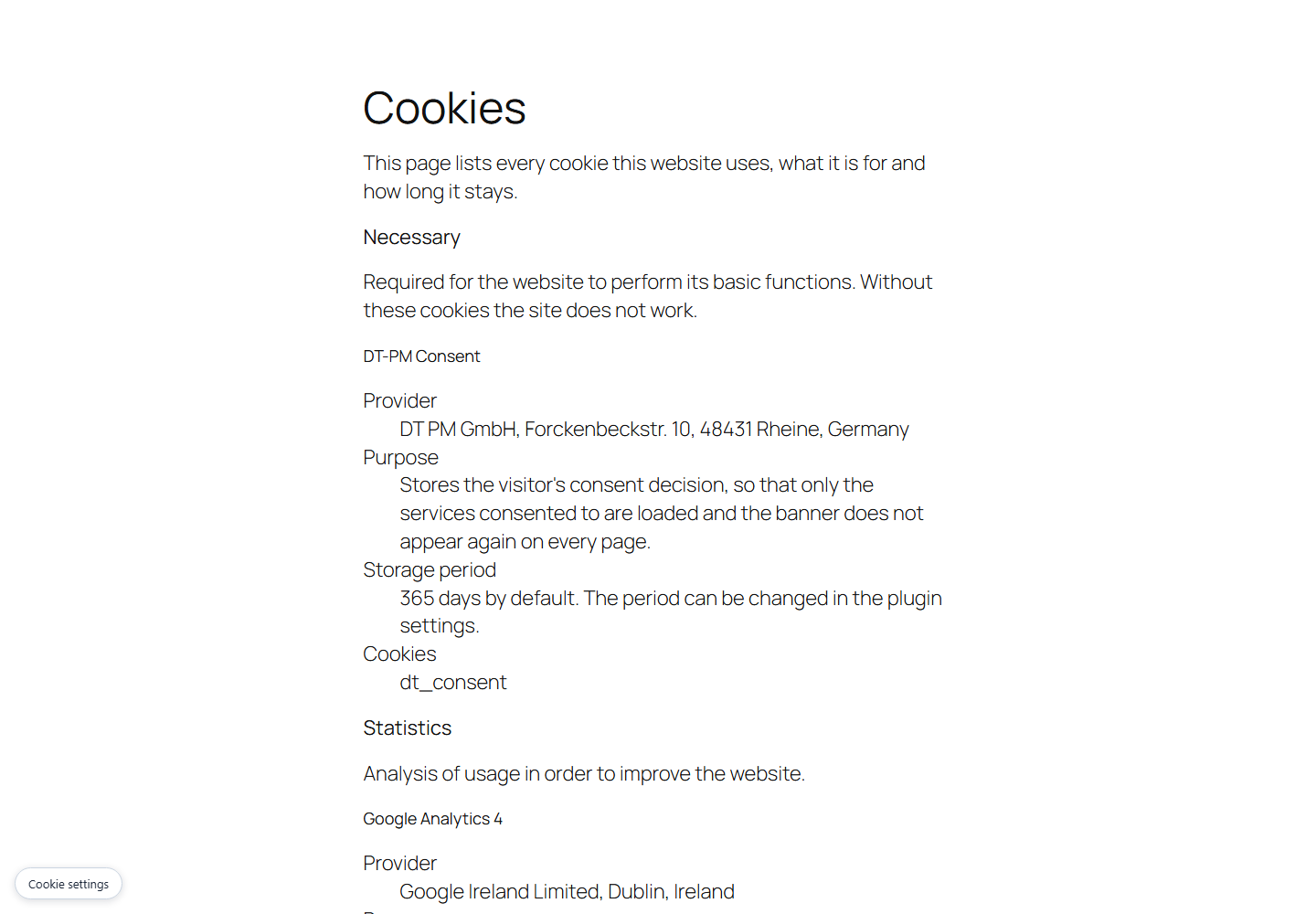
[dt_consent_cookies] shortcode. It is generated from the same service list – there is no second place to maintain.Blocks
This plugin provides 1 block.
- Cookie declaration
Installation
- Copy the
dt-pm-consentdirectory intowp-content/plugins/. - Activate the plugin.
- Under “DT-PM Consent”, enter every service that sets cookies or transfers data to third parties.
- Check the result: open the site in a private window and use the network tab to confirm that no request goes to a third party before consent.
Step 4 is not optional. A consent banner whose blocking does not work is worse than none — it documents that the obligation was known.
FAQ
-
How do I find the script handle of a service?
-
As a rule, no longer by hand: open “DT-PM Consent Setup helper”, visit your
site’s front end while logged in, and come back. The scripts that loaded are
listed there with their handle and source.If you do want to look it up yourself: in the page source the handle sits in
theidof the script tag, with-jsappended. So -
Why does the page reload after a withdrawal?
-
Because a script that has already run cannot be unloaded again. It keeps
listening for events and would immediately set the deleted cookies anew. Only
a fresh page load, in which the scripts are never activated, actually enforces
the withdrawal. -
Why can I not change the label of “Reject all”?
-
Because supervisory authorities regularly object to banners in which the
rejection has been renamed, hidden or removed altogether. The plugin therefore
does not allow that configuration. -
Do I lose the evidence archive when I uninstall?
-
Yes. Deleting the plugin removes all of its data, the archive included. If you
still need it for an ongoing or expected audit, back it up first. -
Only if every subdomain is yours. If you share the parent domain with
other people’s websites — typical for site-builder and hosting offers of the
formyourname.provider.com— please do not switch on “Valid on subdomains”.The reason is a limit that cannot be closed technically: whoever can set
cookies on a neighbouring subdomain can also write a consent cookie for your
site. Since 0.16.0 the plugin reliably detects that a cookie comes from a
DIFFERENT installation and rejects it. That does not help against deliberate
forgery: the check value sits in the source of every page and can be read from
there. Only a server-side check would be forgery-proof — and that cannot be
reconciled with this plugin’s cache compatibility (see the next question).With the setting switched off — the default — the problem does not arise.
-
Possibly, yes — and that is a deliberate decision. Many tracking cookies,
_ga from Google Analytics among them, do not sit on your host but on the
parent domain. Without deleting there, a withdrawal would have no effect.
Whether “the parent domain” is yours alone cannot be decided without a
constantly maintained list of every domain suffix in the world.The trade-off: either the withdrawal fails to delete what it is supposed to
delete, or on a shared domain someone else’s statistics lose a counter. The
first would be a breach of the law, the second an annoyance. Your own consent
cookie has not been affected since 0.16.0 — a neighbour’s decision is no
longer deleted along with it. -
Why do I see an empty area instead of a notice when JavaScript is off?
-
Since 0.19.0 the server only renders a blocked embed harmless; the visible
notice and its button are built by the plugin script in the browser.The reason is the safety of the blocking itself: as long as the server
assembled the placeholder, it carried over the remaining attributes of the
original embed — and two routes arose along which an embed kept loading inside
the placeholder. The server now outputs no foreign attribute at all.Without JavaScript nobody can consent anyway; the button had no effect there
before either. Nothing loads without JavaScript — the blocking does not depend
on the script. -
Why is an embed blocked although no third party appears in it?
-
This concerns embeds that carry their content in the
srcdocattribute. If
there is a<script>inside, the plugin blocks — even when no known provider
is recognisable. A script can load anything when it runs, and the plugin
cannot judge what. In case of doubt it does not allow it.That is the only place where more is blocked on purpose than might be
necessary. Asrcdocwithout outward references is left alone. -
Does the plugin work with caching plugins?
-
Yes, and that is measured rather than merely argued. The HTML served is
identical for every visitor; the decision about consent is made exclusively in
the browser.Tested against a real page cache on Apache: a visitor without consent is
served exactly the page that was previously generated and cached for a
consenting visitor — and still loads no script that requires consent.An upstream proxy cache (Varnish or Cloudflare, say) has not been measured. It
passes on the same HTML, so the statement holds there too — but it is not
demonstrated for it. -
One cookie, named
dt_consent. It stores the visitor’s consent decision – which
categories were accepted – together with a fingerprint of the configuration, so
that only the services consented to are loaded and the banner does not appear
again on every page. When the service or purpose list changes in substance, the
fingerprint no longer matches and the banner appears again.It is kept for 365 days by default; the period can be changed on the “Banner”
tab. The plugin sets it in the visitor’s browser and sends it to no one: there
is no transfer to a third party and none to a third country.DT-PM Consent is provided by DT PM GmbH, Forckenbeckstr. 10, 48431 Rheine, Germany.
-
Can I extend the plugin from my own code?
-
Yes, and without touching its files. Four hooks are documented and will not
change their names:dt_consent_service_catalogue(filter) adds your own service to the built-in
catalogue, so the plugin recognises it like any other.dt_consent_scan_report(action) hands you every finished scan report, for
your own monitoring or ticket system.dt_consent_configuration_archived(action) hands you every configuration
that went into the evidence archive, for your own records.dt_consent_banner_classes(filter) adds a CSS class to the banner, so a
theme can style it without copying markup.
The content of the banner is deliberately not filterable: both buttons, the
purposes and their order are what this software is measured against. -
Add your rules to your theme or to a custom-CSS field. The banner uses the
classesdtc-banner(the overlay),dtc-banner__inner(the box) and
dtc-button (both level-one buttons). The filter
dt_consent_banner_classes adds a class of your own to the banner, so you
can target your site without copying any markup.Since 1.0.10 a plain class is no longer enough. The plugin’s own rules
repeat their class four times, so.dtc-button { background: #123456; }will not take effect. Use the same specificity:
.dtc-button.dtc-button.dtc-button.dtc-button { background: #123456; }The reason is measured, not theoretical: some themes raise the specificity of
their own button rules above a plain class, and on those themes none of this
plugin’s buttons showed the colour the plugin sets – not the two level-one
buttons, not the save button, not the revoke entry that sits on every page.
Repeating the class is what wins against that pattern. It is not a guarantee
against every theme, and a theme using!importantstill wins.Whatever you change, change it for both level-one buttons. “Accept all”
and “Reject all” share one class on purpose. Supervisory authorities treat a
prominent accept button next to a quiet reject button as unlawful influence
(DSK guidance, para. 60), and this plugin is built so that there is no place
where only one of the two can be coloured. A rule that singles one of them
out defeats that, and it is your installation that has to answer for it.The save button (
dtc-button--quiet) is deliberately quieter. It confirms a
selection you have already made; it is not a third alternative to accepting
and rejecting, so the equivalence requirement does not apply to it. -
Because the plugin sets the
dt_consentcookie on your site, and a visitor is
entitled to know who is behind a cookie (Art. 13 GDPR). The cookie declaration
therefore lists DT-PM Consent like any other service, and the provider line names
the company that provides the plugin.This is information about a cookie, not a credit. It is plain text: no link, no
logo, no promotional wording. It appears only where you place the cookie
declaration (the[dt_consent_cookies]shortcode or the block) – never in the
banner, the footer or anywhere else on your pages. It disappears when the
plugin is deactivated, because then the cookie is no longer set.
Reviews
There are no reviews for this plugin.
Contributors & Developers
“DT-PM Consent” is open source software. The following people have contributed to this plugin.
Contributors
Translate “DT-PM Consent” into your language.
Interested in development?
Browse the code, check out the SVN repository, or subscribe to the development log by RSS.
Changelog
1.1.4
Housekeeping after the first round of the WordPress.org review. Nothing you
have configured is touched: your services, texts and record archive stay as
they are.
- A snippet of your own can no longer break the page. Where a necessary
service carries its own snippet, a closing script tag inside it – which
several providers’ installation instructions include – used to end the tag
early, and the rest of it landed in the page as markup, banner included. The
snippet is now written so that cannot happen, on every WordPress version this
plugin supports. - The check for third-party fonts now looks in the right places. Where a
site keeps its plugins or themes outsidewp-content, style files there were
not examined at all, and the check reported nothing found. It now resolves
those directories too. - The page address the collector records is cleaned before it is stored, and
the service fields that take one entry per line – script handles, script and
iframe hosts – now drop an entry that cannot be one instead of storing it. - Two internal names got a longer prefix so they cannot collide with another
plugin’s. One of them is a cache; it refills by itself.
1.1.3
- Housekeeping for the WordPress.org listing. The plugin’s text domain is
nowdt-pm-consent, matching the slug the directory assigned. Nothing about
the plugin’s behaviour changes, and nothing you have configured is touched:
your services, texts and record archive are stored under names that stay as
they are, and the[dt_consent_cookies]shortcode and the cookie
declaration block keep working in the pages you already published.
1.1.2
- The overview no longer sends you to a page where there is nothing to
do. It said “14 findings from the last scan are not assigned to any
service” and offered “Go to setup”; the setup then said “Nothing open:
every finding assigned” – and finishing it led back to the overview with
the same 14. The overview was counting from the scan report, which is
frozen at the moment of the scan, while the setup counts today’s state.
Assigning a finding changes the second and not the first, so the number
only ever cleared by running another scan. Both screens now read the same
source: what is open today. The scan report still says what a scan found –
it no longer says what is still open. - A third party that blocking cannot reach is now named on its own, as a
note. It used to be counted into the number above, which sent you off to
assign it – the one thing that does not help: assigned, it would stand in
the banner as if it were handled and keep loading. It is not a task either,
because the fix is to change how the script is loaded, and that is often
not yours to do. So the overview says it, the scan page lists it per host,
and neither pretends you have something to tick off.
1.1.1
- The destination-country field no longer shows an internal marker. Where
a provider says nothing about transfers, the field was printing
keine-angabe – a German word on an English screen, and a token that means
nothing to a reader. It is empty now, and the placeholder says what belongs
there. The banner and the record export already put it into a sentence; only
this field did not. Nothing about blocking changes, and no entry of yours is
altered. - The same field is wide enough for its own hint now. It stood at the
browser’s default of about twenty characters, so “Destination country, e.g.
USA” was cut off – which nobody saw while the field was never empty.
Older entries of this changelog have moved to changelog.txt in the plugin
folder.