

Description
Dresium is an AI virtual try-on and virtual fitting room for WooCommerce fashion stores. Shoppers upload one photo and instantly see themselves wearing your clothes, dresses and outfits, right on the product page. No app, no account, no setup for your customers.
Let your customers try before they buy: more confidence at checkout, higher conversion rates and fewer returns caused by “it didn’t look like that on me”.
Why fashion stores use Dresium
- Boost conversions — shoppers see the product on their own body, not just on a model
- Cut returns — fewer surprises on fit and look means fewer returned orders
- Free for your customers — the Try-On button works for guest visitors and logged-in users alike, no signup required
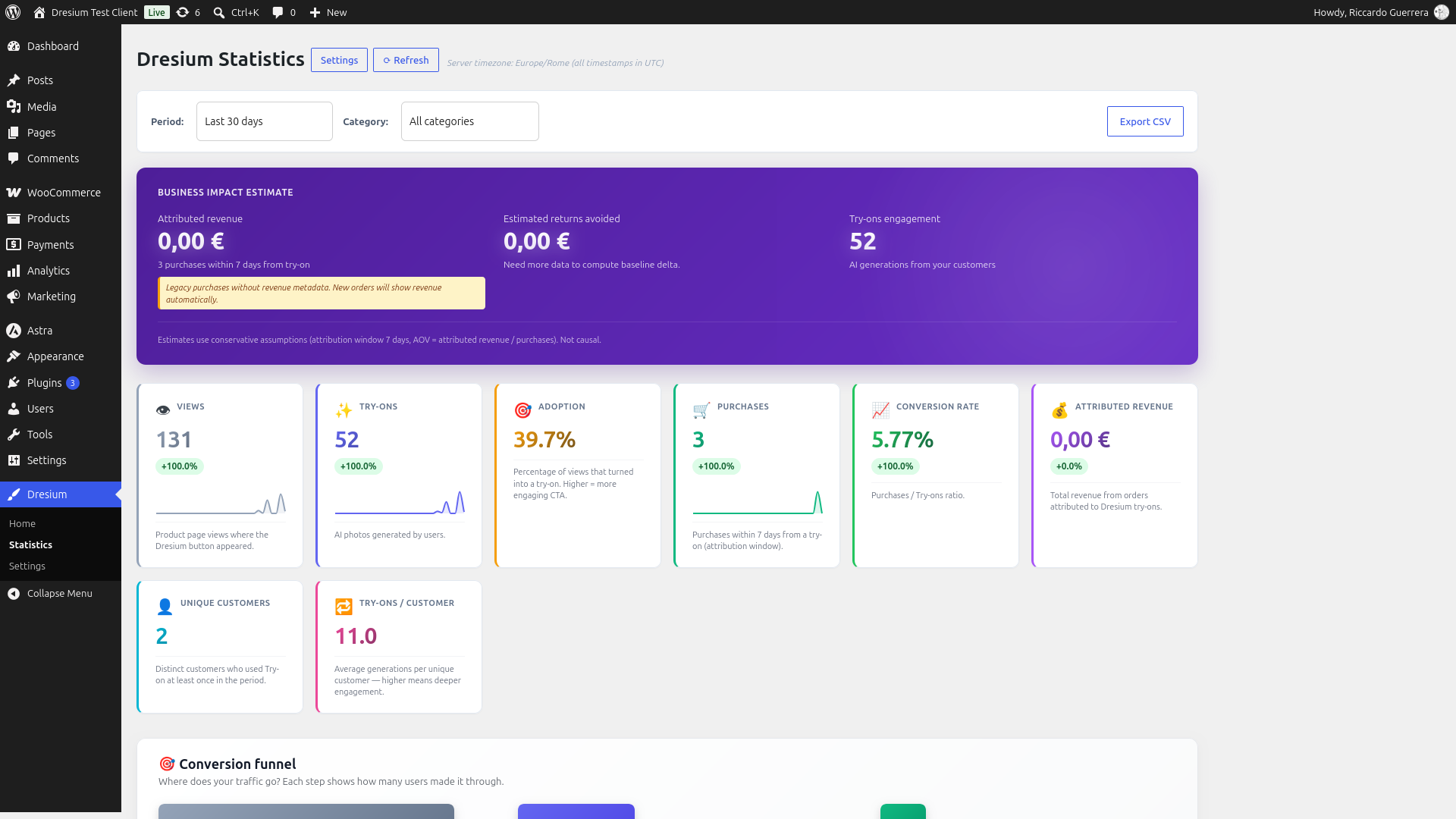
- Measure real impact — built-in analytics show try-ons, purchases, conversion rate and revenue attributed to the virtual try-on
- Pay only for results — you (the merchant) pay per successful try-on generation; failed generations are refunded automatically
How the AI virtual try-on works
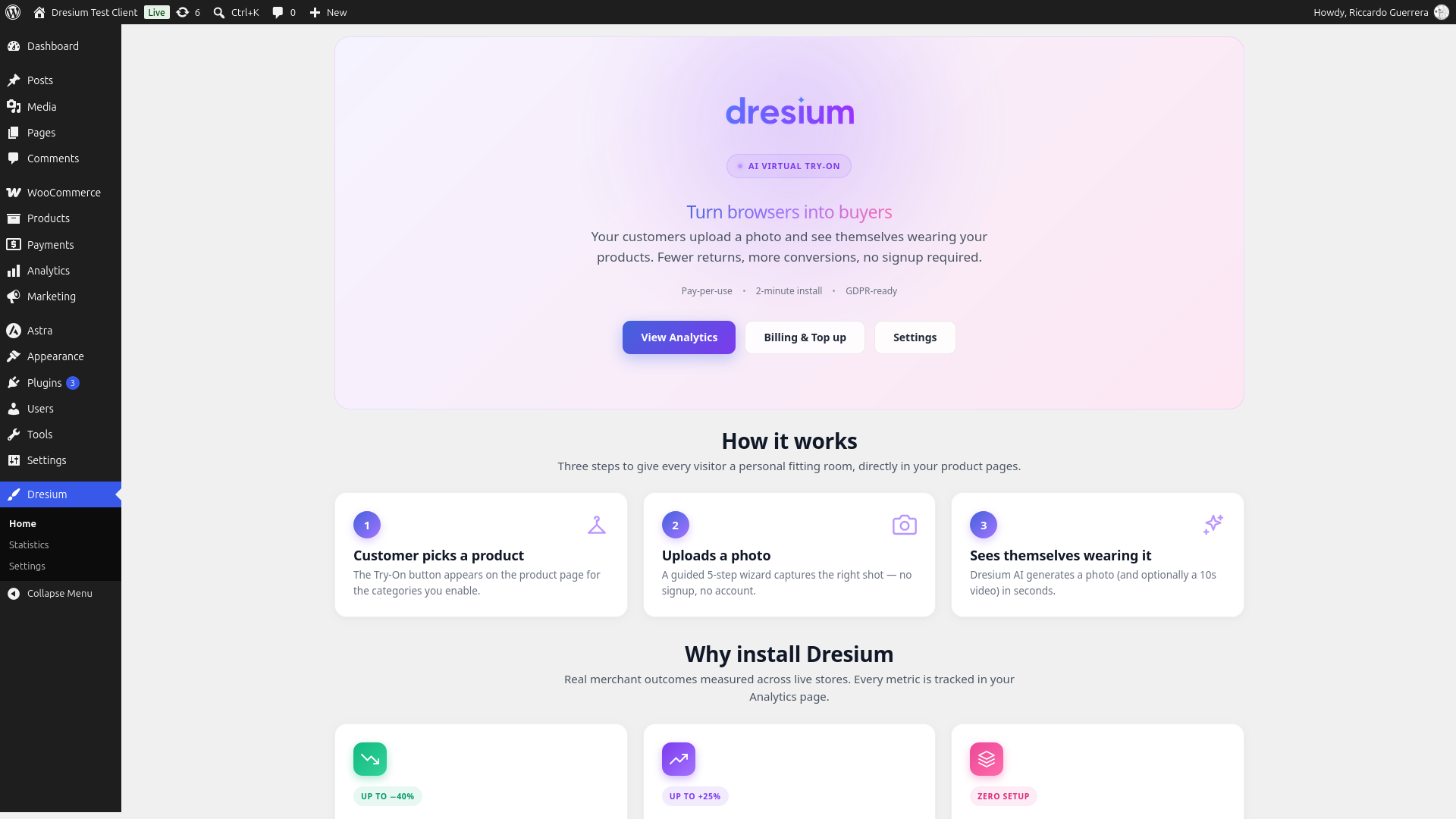
- The shopper clicks “Try it on” on a product page
- They upload a photo, take one with the camera or pick a sample model
- Dresium’s AI generates a realistic image of the shopper wearing that product in seconds
- They can zoom, save the result to their gallery or share it on WhatsApp, then add to cart
Key features
- Zero-setup virtual fitting room — the Try-On button is injected automatically into WooCommerce product pages
- Three integration methods — automatic hook (default), Gutenberg block
Dresium Try-On CTA, or shortcode[dresium_tryon] - Analytics dashboard — real-time views, try-ons, purchases, conversion rate and attributed revenue with 7/30/90-day filters
- Order attribution — automatic tracking of purchases and refunds within a 7-day attribution window from the try-on
- Full appearance customization — button size, color palette presets, custom colors, typography, border radius, CTA text override
- Category gating — show the virtual try-on only on the categories you choose (dresses, shirts, jackets, etc.)
- Whitelabel branding and AI video try-on — unlocked when your credit balance reaches the whitelabel threshold (€100 by default)
- Auto-topup — keeps the service always available with no interruptions
- GDPR-ready — Privacy Policy, Data Processing Agreement (GDPR Article 28) and Terms of Service signature flow inside the WooCommerce settings
- Multi-language storefront — Italian, English, French, German and Spanish out of the box
- Works with your builder and theme — Elementor, Divi, WPBakery, Oxygen, Bricks and themes such as Storefront, Astra, Kadence, Woodmart and Flatsome
- HPOS compatible — full support for WooCommerce High-Performance Order Storage
Pricing
Dresium is free to install. You pay only for the AI generations your customers actually produce (pay-per-use), with credits deposited from the Billing tab. The Billing screen always shows the up-to-date pricing before you top up. See the FAQ for details on pricing and currency.
Getting started
- Install and activate the plugin (WooCommerce must also be active)
- Complete the B2B onboarding form in WooCommerce > Settings > Dresium (registers your store on Dresium and provisions an HMAC-secured API key)
- Sign the legal documents (Privacy, DPA, Terms) from the Legal tab — required before the Try-On button becomes visible to your customers
- Configure appearance, categories and advanced settings
- Deposit credits from the Billing tab (optional auto-topup)
- The virtual try-on button automatically appears on product pages within the enabled categories
Requirements
- WordPress 6.6 or higher
- WooCommerce 9.9 or higher
- PHP 7.4 or higher
- SSL/HTTPS required (Dresium API is HTTPS-only)
Third-Party Services
This plugin relies on the following external services:
Dresium API (Virtual Try-On Service)
- Service Provider: Dresium / EasyAdv S.r.l.
- Purpose: AI-powered virtual try-on image generation
- When data is sent: Each time a customer clicks “Try it on” and uploads a photo
- Data transmitted: Customer photo (for AI processing), product images (for overlay generation), your store domain and merchant ID (for HMAC authentication)
- Data handling: Photos are processed in real-time and not permanently stored unless the customer explicitly saves them to their personal gallery. Photos are never shared with third parties or used for AI training. Dresium acts as data processor and uses the AI services listed below as sub-processors.
- Data Processing Agreement: Merchants must accept a DPA before the Try-On button is exposed to customers, establishing Dresium as data processor under GDPR Article 28. The signature flow is inside the plugin (Legal tab).
- Terms of Service
- Privacy Policy
- Data Processing Agreement
Gemini AI by Google (AI Sub-Processor)
- Service Provider: Google LLC
- Purpose: AI image generation for virtual try-on processing
- When data is sent: When Dresium API processes a virtual try-on request, it may route image generation to Gemini AI
- Data transmitted: Customer photos and product images are transmitted via Dresium servers to Google for AI processing
- Data handling: Data is processed by Google solely for image generation. Dresium maintains data processor responsibilities.
- Gemini API Terms of Service
- Google Privacy Policy
Grok AI by xAI (AI Sub-Processor)
- Service Provider: xAI Corp.
- Purpose: AI image and video generation for virtual try-on processing
- When data is sent: When Dresium API processes a virtual try-on request, it may route image or video generation to Grok AI
- Data transmitted: Customer photos and product images are transmitted via Dresium servers to xAI for AI processing
- Data handling: Data is processed by xAI solely for image and video generation. Dresium maintains data processor responsibilities.
- Terms of Service
- Privacy Policy
Claude AI by Anthropic (AI Sub-Processor)
- Service Provider: Anthropic PBC
- Purpose: AI-powered customer support agent
- When data is sent: When a user interacts with the Dresium support chatbot
- Data transmitted: Chat messages and conversation context are transmitted to Anthropic for response generation
- Data handling: Data is processed by Anthropic solely for customer support purposes. No customer photos are sent to this service.
- Terms of Service
- Privacy Policy
WhatsApp Sharing (Social Sharing Feature)
- Service Provider: WhatsApp LLC (Meta Platforms, Inc.)
- Purpose: Allow users to share their virtual try-on results via WhatsApp
- When data is sent: Only when a user explicitly clicks the “Share on WhatsApp” button
- Data transmitted: A sharing URL is opened via the WhatsApp API (api.whatsapp.com) – no image data is sent directly, only a link to the shared page
- WhatsApp Terms of Service
- WhatsApp Privacy Policy
Screenshots


Blocks
This plugin provides 1 block.
- Dresium Try-On CTA Displays the Dresium AI Try-On call-to-action button on a product page.
Installation
- Go to Plugins > Add New in your WordPress admin
- Search for “Dresium”
- Click “Install Now” and then “Activate”
- Ensure WooCommerce is installed and active
- Go to WooCommerce > Settings > Dresium and complete the onboarding form
- Sign the legal documents in the Legal tab
- Deposit initial credits from the Billing tab (or enable auto-topup)
FAQ
-
How does virtual try-on work in WooCommerce?
-
Dresium adds a “Try it on” button to your product pages. The shopper uploads a photo and the AI generates an image of them wearing the product. Everything happens on your store, with no redirect to external sites.
-
Is it a virtual fitting room for clothes?
-
Yes. Dresium works as an AI virtual fitting room for clothing: t-shirts, shirts, jackets, dresses, pants, hoodies and more. Enable the Try-On button only on your fashion categories from the Categories tab.
-
Do my customers need to register on Dresium?
-
No. Dresium 3.x is a B2B service: you (the merchant) buy credits, your customers use the virtual try-on for free with no signup required. Guest access is enabled by default.
-
How much does a try-on cost?
-
The plugin is free to install. Each successful image generation consumes credits from your Dresium balance, and failed generations are refunded automatically. Pricing is dynamic: the credit price, credits per generation and minimum recharge are configured server-side by Dresium and fetched by the plugin every hour. The Billing tab always shows the current cost per generation that will apply to your next top-up. Existing credits are always spent at the rate contracted at purchase — future pricing changes never invalidate deposits already made.
-
Which currency are credits billed in?
-
Credits are billed in EUR (€) via secure Stripe checkout. Merchants outside the Eurozone see the checkout amount in EUR; the actual charge on your card is in your local currency at your bank’s daily exchange rate (banks typically add a 0–3% FX fee depending on the card issuer; fintech cards such as Revolut, Wise or N26 usually have 0% FX fee).
-
Does virtual try-on really reduce returns?
-
Shoppers see the product on themselves before buying, which removes many “it looked different” returns. The Analytics dashboard tracks purchases and refunds attributed to try-ons, so you can measure the effect on your own store.
-
Does it work with any theme?
-
Dresium is designed to work with most WooCommerce themes. It has been tested with Storefront, Astra, Kadence, Woodmart and Flatsome. The button can be positioned via three integration methods: automatic hook, Gutenberg block, or the
[dresium_tryon]shortcode. -
Themes built with page builders often replace the WooCommerce product page layout with their own, which prevents the automatic hook from firing. In this case, add the button manually where you want it inside the builder:
- Divi: add a “Text” or “Code” module and paste the shortcode
[dresium_tryon] - Elementor: add the “Shortcode” widget and paste
[dresium_tryon] - WPBakery: add a generic shortcode element with
[dresium_tryon] - Gutenberg / Block editor: search for the “Dresium Try-On CTA” block
The shortcode reads the current product from the WooCommerce loop, so no parameters are required. When you use the shortcode or the Gutenberg block, we recommend also disabling the auto-injection in “WooCommerce > Settings > Dresium > Advanced > Auto-injection” to avoid duplicate buttons on themes that partially respect the WooCommerce hooks.
- Divi: add a “Text” or “Code” module and paste the shortcode
-
Can I use Dresium on platforms other than WooCommerce?
-
A dedicated Shopify app is coming soon. For other e-commerce platforms (BigCommerce, Magento, custom systems) a universal JavaScript SDK is on the roadmap. Contact support@dresium.com if you want to be notified when they are released.
-
Is it compatible with HPOS?
-
Yes, Dresium is fully compatible with WooCommerce High-Performance Order Storage (HPOS).
-
How are customer photos handled?
-
Photos are transmitted over HTTPS to Dresium servers for AI processing. They are not permanently stored unless the customer explicitly saves them. Photos are never shared with third parties or used for AI training. See the Data Processing Agreement for full details.
-
Is it GDPR compliant?
-
Yes. Before the Try-On button is exposed to customers, you must sign a Data Processing Agreement inside the Legal tab (GDPR Article 28). If the DPA is not signed, the button stays invisible on the storefront and no data is transmitted. Customers can request deletion of their photos at any time.
-
How does the attribution work?
-
When a customer generates a try-on and purchases the same product within 7 days, the sale is attributed to Dresium in the Analytics dashboard. Refunds within the same window are subtracted from attributed revenue. Guest purchases (no customer_id) are not attributed.
Reviews
There are no reviews for this plugin.
Contributors & Developers
“Dresium – AI Virtual Try-On & Fitting Room for WooCommerce” is open source software. The following people have contributed to this plugin.
Contributors

Translate “Dresium – AI Virtual Try-On & Fitting Room for WooCommerce” into your language.
Interested in development?
Browse the code, check out the SVN repository, or subscribe to the development log by RSS.
Changelog
3.0.14
- Shadow DOM CSS isolation — try-on modals are now fully isolated from your theme’s CSS. Enabled by default on fresh installs, disabled by default on existing installs (opt-in from WooCommerce > Dresium > Advanced, to avoid any visual change without your consent). Solves cross-theme conflicts on themes with aggressive CSS resets (Kadence, Astra, Divi, Bricks, and themes based on normalize.css / html5boilerplate). Includes a JavaScript fallback for page builders that skip WooCommerce hooks (Elementor Pro Product Templates, Divi Theme Builder, Bricks Builder).
- Product category picker — the Advanced tab now shows product categories as a nested tree with strict parent-child logic: enabling a subcategory requires its parent to be enabled too. Much clearer to configure than the previous flat list.
- Fullscreen gallery: video first — when a product image has an associated video, the fullscreen gallery now opens directly on the video instead of the static image.
- Minor bug fixes.
3.0.13
Critical fix: theme compatibility. Some WordPress themes (with CSS resets inherited from normalize.css / html5boilerplate) applied dialog { display: block }, which overrode the browser default dialog:not([open]) { display: none } and caused all Dresium try-on modals to appear as visible blocks at the bottom of product pages when closed. Fixed by restoring the browser default via a targeted rule on Dresium dialogs only.
3.0.12
Minor bug fixes
3.0.11
Minor bug fixes
3.0.10
Minor bug fixes
3.0.9
Minor bug fixes
3.0.8
Minor bug fixes
3.0.7
Post-3.0.3 refinement release. Consolidates fixes and UX improvements from 3.0.4 3.0.7 development iterations. Backwards compatible with 3.0.3 — no data migration, no re-onboarding required.
Admin UX — Appearance tab
- Live preview on the Preview button and on the Button Size tiles (small/medium/large) now reflects all style changes in real time: palette, custom colors, uppercase, show-icon, CTA text, border radius and font family — previously radius and font were applied silently only after saving.
- Border radius is applied live to the Preview button and the Button Size tiles via JavaScript listeners on the slider and the number input.
- Font family is applied live to the Preview button and the Button Size tiles by loading the 12 Google Fonts of the whitelist (Inter, Poppins, Montserrat, Roboto, Open Sans, Lato, Raleway, Nunito, Playfair Display, Merriweather, Lora, DM Sans) directly in the admin page via
<link rel="stylesheet">output inoutput_section_appearance()(bypassingwp_enqueue_stylewhich could HTML-escape the&characters in the CSS2 URL bundle). - Font application uses
document.fonts.readyto re-sync the preview once the Google Fonts WOFF2 files are actually downloaded, avoiding the initial pageload flashing with the system font. - Fallback family per-font-category (serif vs sans-serif) so if a Google Fonts file fails to load, the preview at least maintains the correct typography category.
- Added a yellow disclaimer under the Typography section informing merchants that the font preview is approximate and that the accurate rendering can be verified only by saving and opening a product page in a new tab.
Admin UX — Financials tab (B2B Pricing Configuration)
- Introduced a new pricing input model with 4 primary fields (image total cost in €, credits per image, video total cost in €, credits per video). The credit price is derived automatically from the image_price / image_credits ratio.
- All fields accept EUR values with 2-decimal precision (0.01 step). Backend stores in cents (integer) with
round(eur * 100). Retrocompatibility layer accepts legacy*_centsPOST parameters. - Live preview info box (blue) shows internal derived credit price, example €100 top-up conversion in credits and video intrinsic value with warning if declared video cost diverges from the intrinsic value.
- New backend getters
Dresium_Merchant_Balance::get_image_price_cents()andget_video_price_cents()return the costs saved directly by the admin — no more derivation viacredit_price × creditswhich caused rounding-to-integer-cents artifacts (€0.30 / 20 credits → €0.015was rounded to€0.02making€0.30incorrectly rendered as€0.40after save). - The endpoint
/merchants/selfand/pricing/currentnow exposeimage_price_centsandvideo_price_centsas the source of truth. Frontend (Shopify Remix admin, storefront extension, WooCommerce client plugin) consume these instead of recomputing from credit price. Fallback to legacy calculation for merchants pre-3.0.7 without the new options stored. - Stripe checkout now uses float precision for credit calculation:
credits = floor(topup_cents / (image_price_cents / image_credits))instead ofintdiv(topup_cents, credit_price_cents). Fixes an issue where a €100 top-up produced 5000 credits instead of the expected 6666 (with €0.30/20 credits config). - Hint box in the B2B Pricing Configuration section with concrete example configuration and derived calculations to help merchants understand the credit model.
Storefront — theme compatibility
- Fixed the fullscreen zoom modal close button (X icon) being invisible on Astra theme. Astra’s default button rule applies
padding: 15px 30px !important-equivalentandfont-size: 16pxto anybuttonelement, overriding the Dresium close button’s fixed 40×40 sizing and squishing the SVG X. - Fix: theme-guard now applies explicit
width: 48px,height: 48px,padding: 0,font-size: 0andline-height: 1with!importantto#dresium-tryon-zoom-modal .dresium-zoom-modal__close. The inner SVG has explicitwidth/height: 24pxandcolor: #ffffffwith!important.
Compatibility
- No breaking changes. All previously stored merchant balances, subscriptions and auto-topup configurations continue to work unchanged.
- Zero-config upgrade: existing pricing configuration (10 credits per image, 40 credits per video, €0.10 per credit, €10 minimum recharge, €100 whitelabel threshold) is preserved. Merchants can adopt the new 4-input pricing model at any time from Financials tab.
3.0.3
B2B Dynamic Pricing refactor
- New
Dresium_Pricing_Cacheclient fetches the current B2B pricing (credit price, credits per image try-on, credits per animate video, minimum recharge and whitelabel threshold) from the Dresium server every hour via the public endpointGET /wp-json/dresium/v1/pricing/current. Cached in a WP transient. Fallback to hardcoded defaults if the endpoint is unreachable. - Auto-topup help strings (“1 try-on = 10 credits, 1 video = 40 credits”, “€10 = 100 credits”, “0 = unlimited. No cap…”) converted from static text to
sprintf(__())with placeholders — automatically reflect the current pricing. - Analytics dashboard help item “Each try-on = 10 credits” converted to dynamic plural via
_n(...). - Translation POT + .po/.mo regenerated across DE / EN_GB / EN_US / ES / FR / IT to preserve translation for the new placeholder-based strings.
- Existing credits are always spent at the rate contracted at purchase — the checkout captures a full pricing snapshot in Stripe metadata (
dresium_price_per_cred,dresium_image_credits_at_purchase,dresium_video_credits_at_purchase,dresium_min_topup_at_purchase,dresium_wl_threshold_at_purchase). Future pricing changes never invalidate deposits already made. - Auto-topup minimum recharge now respects the server-side configurable minimum topup (previously hardcoded €10).
readme.txtPricing & currency section rewritten to explicitly explain that the values shown are current defaults and that the Billing screen always shows the up-to-date pricing.
Compatibility
- No breaking changes. All previously stored merchant balances, subscriptions and auto-topup configurations continue to work unchanged.
- Zero-config upgrade: if the merchant has not customised any pricing option on the server, the defaults resolve to the exact same values shipped in 3.0.2 (10 credits per image, 40 credits per video, €0.10 per credit, €10 minimum recharge, €100 whitelabel threshold).
3.0.0
First stable release of the B2B model. Consolidates all fixes and refinements shipped during the beta cycle. Backwards compatible with 3.0.0-beta.1/beta.2 — no data migration, no re-onboarding required. Users upgrading from 2.x should read the 3.0.0-beta.1 changelog for the breaking-change details.
Admin UI
- Admin panel fully translated in Italian, English, French, German and Spanish (fixed mixed-language rendering when WordPress locale differed from the plugin source language).
- Regenerated the translation POT covering 635 strings (was 373); all five .po/.mo files brought to 100% coverage.
- Home landing page: hero, KPI tiles, CTA row, animated bento grid, integration cards for Shopify and WooCommerce, cinematic showcase and final CTA.
- Analytics dashboard: fixed KPI key mismatches (purchases, refunded revenue, conversion rate), corrected order-status attribution windows, retroactive migration for orders already in the database when the plugin was upgraded.
- Appearance tab: fixed palette presets not persisting the actual colors — selecting Sunset/Ocean/Forest now writes the real hex values into the DB, storefront picks them up on next page load.
- Appearance preview: live update of the CTA button preview when changing palette, custom colors or button size, without a page reload.
Storefront button and modals
- CTA button and inner modal primary buttons now consume the merchant’s chosen colors dynamically via CSS custom properties, both on
:rootand on the.dresium-tryon-blockcontainer (fixes theme override on themes with block-scoped defaults like Kadence). - Fixed a class of theme conflicts where
button:hover/focus/activein the parent theme (Kadence, Astra, Woodmart) overrode the Try-On button on click, briefly making the label unreadable. - Kept the gear/settings button neutral gray regardless of the merchant’s palette (design decision: it must remain distinct from the primary CTA).
- All modal corner radii now follow
--dresium-tryon-radius— step badges, close buttons, notice boxes, preview containers, replace-photo button, gallery navigation arrows, gallery scope toggle, loading progress bar and reference images all react to the merchant’s radius setting instead of being hardcoded. - Guest modal, step 1 (Upload/Camera): replaced the four sample reference photos with a new set that alternates female/male subjects (previously all female).
- Guest modal, step 3 (Special occasions): four scene tiles refreshed with production-quality imagery for First Date, Fashion Show, Job Interview and Wedding.
Video generation and lazy loading
- Whitelabel unlock is now evaluated on the current merchant balance (was cumulative lifetime spending) — dropping below the €100 threshold hides the whitelabel bonus again, per contract.
- Video generation flag auto-enabled the moment whitelabel unlocks; auto-disabled when the balance drops below threshold.
Webcam authorization
- User-friendly wording when the browser blocks webcam access: title changed from “Errore” to “Autorizza la webcam” (localized), body rewritten as an actionable instruction that points the user to the lock icon in the address bar. All five languages.
i18n runtime
- Fixed a legacy string that contained a literal
<script>tag in the FAQ content; it broke next-intl’s ICU parser and caused the placeholder key to leak into the rendered page. - Reworked all storefront JS translation lookup paths to guarantee the correct locale is selected on the visitor’s browser, independently of the merchant’s WordPress locale.
Guest flow — WooCommerce parity with Shopify
- Complete port of the guest flow 5-step wizard that shipped on Shopify: photo intake (upload / camera / sample) identity confirmation occasion selection outfit customization generation. Includes daily credit caps per customer, radius cascade to modal primary buttons, per-locale CTA copy.
- Contact form fix on the Brand landing page: the
interestfield was made optional on the backend since the redesigned form no longer collects it. Previously the endpoint returned HTTP 400rest_missing_callback_param.
Deploy and versioning
- Consolidated versioning: internal dev builds from beta.2 through beta.76 have been squashed into this public 3.0.0-beta.2 release. Users upgrading from 3.0.0-beta.1 will jump directly to this consolidated set of fixes.
- No breaking API changes, no HMAC key rotation, no re-onboarding.
3.0.0-beta.1
BUSINESS MODEL CHANGED TO B2B
Full B2B refactor. This is a breaking change from 2.x. Do NOT install on top of an existing 2.x installation without reading the upgrade notice below.
- Business model: you (the merchant) pay for the service, your customers use it for free. No more customer OIDC/Keycloak signup, no more per-user credit balance, no more Stripe checkout inside the storefront.
- HMAC-secured API: the plugin authenticates to Dresium via a per-merchant HMAC secret provisioned at onboarding. The secret never leaves your WordPress server.
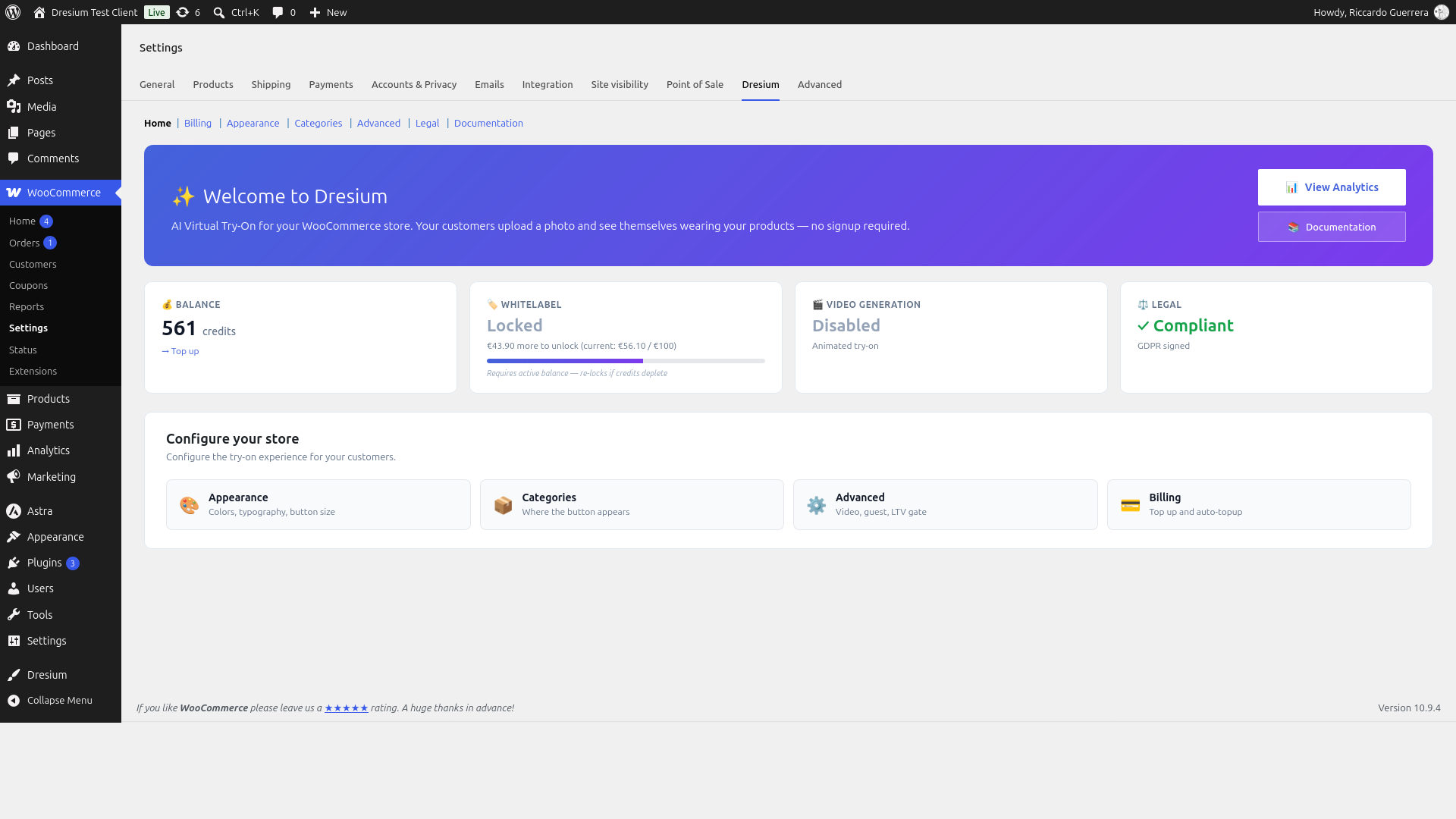
- New admin panel: the WooCommerce > Settings > Dresium tab has 7 sections — Home (KPIs), Billing (credits and auto-topup), Aspetto (appearance customization), Categorie (category gating), Advanced (video, guest access, LTV gate), Legal (Privacy/DPA/Terms), Documentation.
- New analytics dashboard:
Dresium > Statisticheis now a server-rendered dashboard with 7/30/90-day filter, Chart.js daily trend, top products, and CSV export. Fully backed by real merchant analytics from Dresium servers. - Three storefront integration methods: automatic hook on the WooCommerce product page (default), Gutenberg block
Dresium Try-On CTA, and shortcode[dresium_tryon]. - Order attribution: purchases within 7 days from a try-on are attributed to Dresium. Refunds are subtracted from attributed revenue.
- Legal gate built-in: the Try-On button stays hidden on the storefront until the merchant signs Privacy, DPA and Terms from the Legal tab.
- Storefront JS/CSS: full port of the Dresium Shopify storefront extension (~5000 lines of vanilla JS) — 7 modals (setting, upload, crop, loading, result, zoom, confirm), i18n runtime in 5 languages, Cropper.js vendored.
- 10 legacy B2C files removed (~6600 lines): dresium-oidc-registration.php, dresium-openid-connect-generic.php (vendored OIDC library), class-dresium-ajax-handlers.php, class-dresium-shortcodes.php, class-dresium-woocommerce.php, class-dresium-analytics-data.php, class-dresium-order-tracker.php, dresium-enqueue.php, dresium-template-functions.php, class-dresium-admin-settings.php.
- Plugin bootstrap
dresium.phpreduced from 1785 to 340 lines (-80%).class-dresium-api-client.phpreduced from 1475 to 130 lines (only HMAC B2B methods retained).
3.0.0-alpha.1
- Internal alpha for milestone M60.A tracking. Not distributed publicly.
2.1.0
- Removed in-plugin Stripe checkout flow. Credit purchase now happens on the Dresium website; the plugin shows a clean “buy on site” block with a CTA that logs the user out (WordPress + Keycloak) and opens dresium.com in a new tab.
- New Gallery scope toggle “This product” / “All my try-ons” (identical to the Chrome/Firefox extension), with proper server-side filtering.
- Sidebar navigation: active tab is now clearly highlighted and remains highlighted until another tab is selected.
- Sidebar “My Dresium” entry renamed to “Dresium” and now opens dresium.com in a new tab (no more SSO form POST to a legacy /dashboard endpoint).
- i18n rewiring: added translations for Italian (complete), plus AI-assisted French, German and Spanish coverage for critical UI strings. English translations for the new UI strings.
- Buy-on-site CTA: styled with the same purple gradient as the confirm-modal button.
- Removed dead code: Stripe Buy Button web component handler and related constants.
2.0.1
- Fixed admin menu disappearing on sites with many plugins installed
- Added “Settings” link on the Plugins page for quick access
- Fixed welcome notice not appearing on plugin activation
- Fixed DPA acceptance not being registered on the server during first activation
- Fixed recovery code not working due to WooCommerce HTML sanitization
- Fixed Keycloak registration token rotation invalidating recovery codes
- Removed top-left and top-right button positions (only bottom-left and bottom-right supported)
- Automatic migration of button position settings for existing installations
- DPA acceptance is now required before showing registration options
2.0.0
- Initial public release on WordPress.org
- Full WooCommerce integration with product page button
- Secure OAuth2/OpenID Connect authentication
- Support for page builders (Elementor, Divi, WPBakery, Oxygen, Bricks)
- Built-in analytics dashboard for tracking generations and conversions
- HPOS (High-Performance Order Storage) compatibility
- Multi-language support with translations ready
- GDPR-compliant photo handling