Description
Dovetailed FrontDesk Launcher connects your WordPress site to your FrontDesk account. FrontDesk is an external hosted booking service run by Dovetailed Pte Ltd; this plugin is free, and the booking service it connects to is a paid service with a free plan (see “The FrontDesk service” below). Without a FrontDesk account the plugin does nothing.
Once you save your site key it adds, to the head of every page:
- the FrontDesk script, which shows a corner launcher with the ways people can reach or book you (WhatsApp, Telegram, a link to your booking form, and “Ask your own AI”, which hands a question about your business to the visitor’s own AI assistant), and adds schema.org structured data about your business for search engines;
- one link that points AI assistants, which do not run scripts, to a plain page listing your services and how to book.
You choose which doors show, which corner the launcher sits in, and whether to use the full launcher or a single “Chat with AI” button for sites that already run their own chat widget. The addresses behind each door come from your FrontDesk account; the plugin can hide a door, never add one.
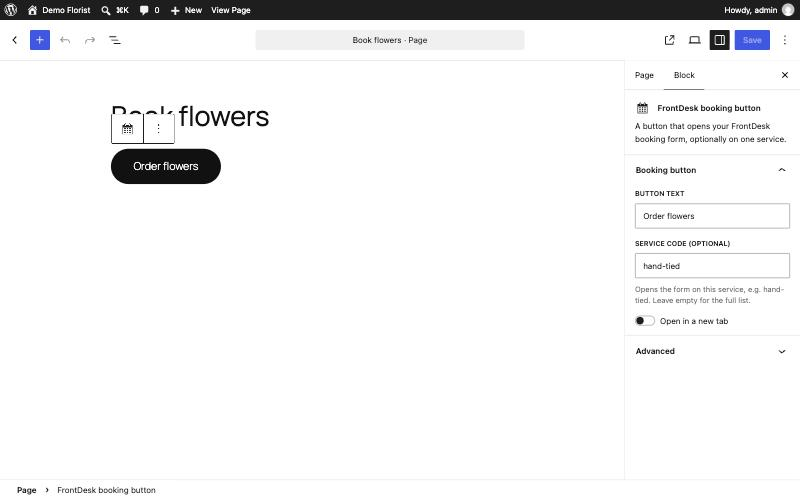
It also gives you a “FrontDesk booking button” block and a [frontdesk_booking] shortcode, which link to your hosted booking form, optionally opened on one service:
[frontdesk_booking text="Book now" service="hand-tied"]
Nothing is added to your pages, and no server is contacted, until you save a site key.
The FrontDesk service
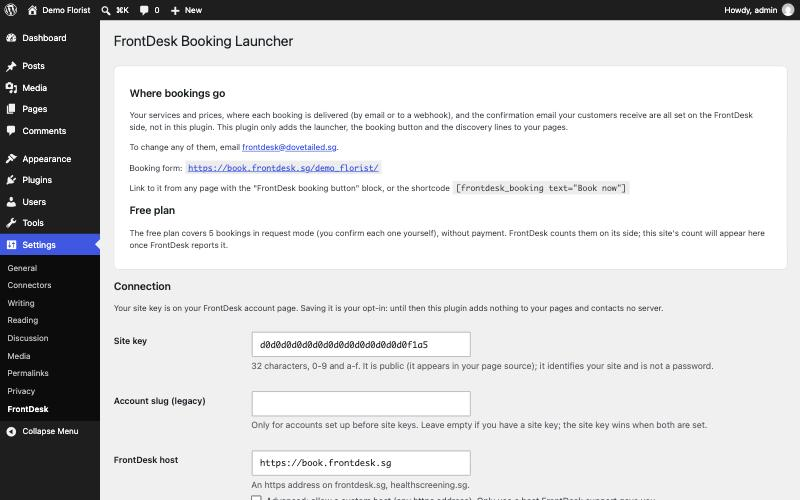
The launcher, the booking form, the AI page and the booking emails are served by FrontDesk, not by this plugin. Your services and prices, where each booking is delivered (by email or to a webhook) and the confirmation email your customers receive are set on the FrontDesk side; email frontdesk@dovetailed.sg to set them up or change them. The free plan covers 5 bookings in request mode (you confirm each one yourself), without payment; beyond that FrontDesk is a paid service. The plugin itself has no locked features and no paid version.
Independence notice
If you turn on the “Ask your own AI” door, you may want to show a notice like this one on your site, for example on your booking or privacy page:
Your AI assistant is not run by us. It reads our public booking pages and can give you a link to our booking form. Nothing is booked until you submit that form yourself, and we confirm by email. It gives no medical, legal or financial advice. For questions about your own situation, contact us directly.
The launcher shows its own short version of this notice inside the AI panel.
WooCommerce
If WooCommerce is active, an optional “Attribution” setting records, on each order, whether the visit arrived through FrontDesk: the FrontDesk entry token, the utm_source and the referring site’s origin, in the order meta fields _frontdesk_entry, _frontdesk_utm_source and _frontdesk_referrer_origin. They are stored in your own store and sent nowhere.
External services
This plugin connects your site to FrontDesk, a hosted booking service run by Dovetailed Pte Ltd (Singapore). It is an external service: the plugin is only the connector.
- What is loaded, and when: only after you save a site key, each page of your site includes one script tag pointing at your FrontDesk host (by default https://book.frontdesk.sg). Your visitors’ browsers load that script, which loads the structured-data script and the launcher from the same host; they fetch your public business details, services and launcher settings from that host (schema.json, launcher.json, and badge.json when the badge is on). The requests carry what any browser request carries (IP address, user agent, the page address as referrer) and no cookies. The scripts set no cookies and add no analytics; they remember a visitor’s own choices (a dismissed greeting or badge, the chosen AI assistant) in that browser’s local storage only.
- When a visitor uses a door: links in the launcher open the services you have set up: your booking form on the FrontDesk host, WhatsApp (wa.me), Telegram (t.me), or, for “Ask your own AI”, ChatGPT (chatgpt.com) or Claude (claude.ai) with a question about your business filled in. Nothing is sent to those services until the visitor clicks.
- Booking button: the block and shortcode are plain links to your booking form on the FrontDesk host. What a visitor enters in that form is sent to FrontDesk, which delivers the booking to you.
- From the WordPress admin: only when an administrator presses “Test connection”, the site reads the public launcher settings (launcher.json) from the FrontDesk host once. It sends no information about your site or visitors beyond the request itself.
- llms.txt pointer (optional, off by default): requests for /llms.txt on your site are redirected to your hosted llms.txt on the FrontDesk host.
Terms of service: https://frontdesk.sg/terms
Privacy notice: https://frontdesk.sg/privacy
Screenshots
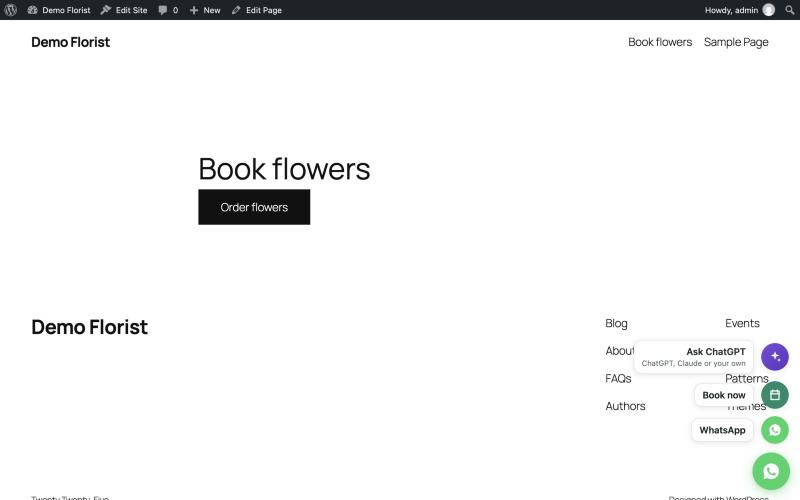
Blocks
This plugin provides 1 block.
- FrontDesk booking button A button that opens your FrontDesk booking form, optionally on one service.
Installation
- Install and activate the plugin.
- Go to Settings, FrontDesk.
- Paste the site key from your FrontDesk account and save.
- Optionally press “Test connection”: it shows your business name as FrontDesk has it.
- View the source of any page on your site: the lines shown under “What your pages get” are in its head.
FAQ
-
What data does this plugin send?
-
None. The plugin itself sends nothing, on activation or at any other time, except the one request an administrator makes by pressing “Test connection”. The only other traffic is your visitors’ browsers loading the hosted FrontDesk script, which you turn on by saving a site key. See “External services” above.
-
Does it work without WooCommerce?
-
Yes. WooCommerce is optional. The Attribution setting only appears when WooCommerce is active.
-
Does it add a “powered by” link to my site?
-
No. The plugin never adds a credit link or mark. The hosted launcher’s “Ask your own AI” panel, once a visitor opens it, shows a small “FrontDesk by Dovetailed” line, which you can switch off in your FrontDesk settings.
-
Do I need an account?
-
Yes. The launcher and the AI page are served by FrontDesk, so you need a FrontDesk site key. Without one the plugin does nothing.
-
My site already has an llms.txt.
-
The llms.txt pointer stays off when the site already has an llms.txt file or another plugin serves one. It never replaces yours.
-
Will it clash with my chat widget?
-
Put the launcher in the other bottom corner, or choose “AI only” mode, which adds one small “Chat with AI” button and leaves your own chat widget alone.
Reviews
There are no reviews for this plugin.
Contributors & Developers
“Dovetailed FrontDesk Launcher” is open source software. The following people have contributed to this plugin.
Contributors
Translate “Dovetailed FrontDesk Launcher” into your language.
Interested in development?
Browse the code, check out the SVN repository, or subscribe to the development log by RSS.
Changelog
0.2.1
- 0.2.1 — renamed to Dovetailed FrontDesk Launcher (slug dovetailed-frontdesk-launcher) at the WordPress.org review’s request; no functional change.
0.2.0
- New: “FrontDesk booking button” block and [frontdesk_booking] shortcode, linking to your hosted booking form, optionally on one service.
- New: “Where bookings go” on the settings page: what is set on the FrontDesk side, and the free plan.
- Fix: the launcher’s left-corner setting now reaches the launcher with a site key, and switching every door off now hides it.
- Fix: with a legacy account slug, the AI page link now points at your own AI page on the FrontDesk host.
- The badge setting applies to legacy account slugs only.
0.1.0
- First version: settings page, head lines (script tag and AI page link), optional llms.txt pointer, optional WooCommerce order attribution, Test connection.