

Description
Digiter Builder Lite provides 36 content and layout modules and 4 bundled templates. Build with sections, columns, headings, text, images, buttons, galleries, tabs, accordions and more. Preview responsive layouts, save drafts and publish explicitly.
Included tools work without payment, a license key, registration or a time limit. Shared styles, reusable components, saved versions and design package import/export are included. AI generation and the commercial updater are not included. Plugin updates use WordPress.org.
External services and privacy
No license or telemetry request is required for authoring. Optional external operations are:
* Font catalogue: an authorized user’s explicit refresh request retrieves font metadata from fonts.google.com and, as a fallback, s.w.org (WordPress.org’s font collection). These providers receive the requested URL, server IP address and normal HTTP metadata. The returned JSON is parsed as font metadata, never executed as code. Browsing the bundled or previously saved catalogue makes no catalogue request. WordPress.org privacy: https://wordpress.org/about/privacy/ . Google terms: https://policies.google.com/terms . Google Fonts privacy: https://developers.google.com/fonts/faq/privacy .
* Font installation: an authorized user explicitly selects a font to download from fonts.googleapis.com and fonts.gstatic.com. Google receives the requested family, font variant, server IP address and normal HTTP metadata. Installed fonts and generated CSS are served locally; visiting a published page does not request Google Fonts. Terms: https://policies.google.com/terms . Privacy: https://developers.google.com/fonts/faq/privacy .
* Sound packs: Kenney supplies optional CC0 audio packs. Only an authorized user’s explicit install request downloads a pack. Kenney receives the requested pack URL, server IP address and normal HTTP connection metadata; audio files are then served locally. No account is required. Terms: https://kenney.nl/terms-of-service . Privacy: https://kenney.nl/privacy-policy .
* Maps: OpenStreetMap supplies embedded maps when an author adds a map module. Loading the map sends the configured coordinates and map bounds, visitor IP address and browser connection metadata to OpenStreetMap. With the module’s consent option enabled, the request occurs only after the visitor selects “Load map from OpenStreetMap”; otherwise it occurs when the embedded map loads. Terms: https://osmfoundation.org/wiki/Terms_of_Use . Privacy: https://osmfoundation.org/wiki/Privacy_Policy .
* Diagnostics are local only. Lite never sends reports to an external server. Administrators can inspect, disable, clear or download a JSON report. The download contains the site URL, software inventory and sanitized technical events. Local records are bounded and retained for up to 14 days (cleanup requires WordPress cron).
* User-authored remote media or design-source URLs: only the URLs you select are requested. Remote media viewers disclose connection metadata to that host. Review the host’s privacy terms before using remote content.
Source and licenses
Original PHP and JavaScript sources are included. Third-party notices are in docs and assets/vendor. Bundled fonts include their OFL licenses. Lottie upstream source: https://github.com/airbnb/lottie-web/tree/bede03d25d232826e0c9dca1733d542d8a7754fb . This is the gitHead recorded by npm for lottie-web 5.13.0; the vendored runtime is assets/vendor/lottie-light-5.13.0.min.js.
Screenshots
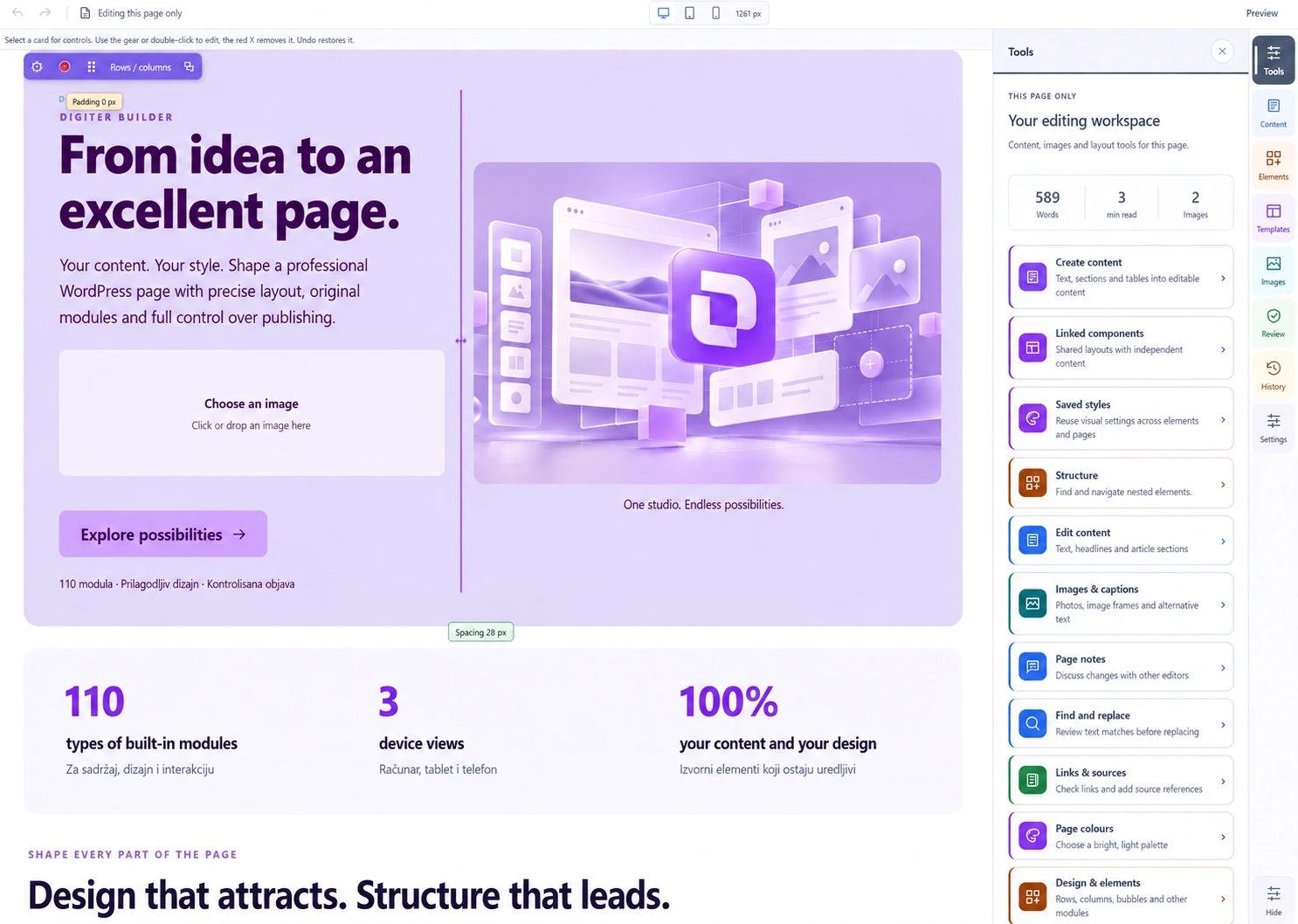
Installation
- Back up and test on staging.
- Deactivate the separate Digiter Builder commercial edition, if installed.
- Upload the ZIP through Plugins > Add New > Upload Plugin and activate it.
- Open Digiter Builder > Open editor. Create, preview, save and publish a page.
Lite 1.0.2 upgrades earlier Lite storage to its own digibl-prefixed names. Back up your site before upgrading. Lite cannot edit documents using modules outside its catalogue. Do not downgrade advanced commercial layouts to Lite or use Lite as an automatic edition switch. Do not run both editions together.
FAQ
-
Is a paid license required?
-
No. All included functionality is free and does not expire.
-
Will deactivation delete pages?
-
No. Layout data is retained. Pages relying on Builder need an active compatible edition to render their layouts.
-
Is AI included?
-
No. The Lite package contains no AI API client.
Reviews
There are no reviews for this plugin.
Contributors & Developers
“Digiter Builder Lite” is open source software. The following people have contributed to this plugin.
Contributors
Translate “Digiter Builder Lite” into your language.
Interested in development?
Browse the code, check out the SVN repository, or subscribe to the development log by RSS.
Changelog
1.0.3
- Preserve the site stylesheet registry while rendering isolated previews and saved content.
- Use WordPress filesystem APIs for local asset installation and cleanup.
- Clarify narrowly scoped static-analysis exceptions for trusted WordPress output and read-only diagnostics.
1.0.2
- Use the unique digibl prefix for PHP APIs, options, hooks and editor requests.
- Upgrade existing Lite storage while preserving layout documents and user CSS.
- Exclude development Python scripts from the distribution.
- Read local audio manifests through the WordPress JSON file helper.
1.0.1
- Use WordPress stylesheet APIs for generated layouts, previews and local fonts.
- Validate client addresses and request URLs; restrict editor cache bypass to authorized requests.
- Harden diagnostic JSON export and remove promotion of filtered content into the document head.
- Document optional external services and correct the Lottie source link.
- Use the digiter_builder_content_changed integration action.
- Keep diagnostics local; remove the unused external reporting client and key settings.
1.0.0
- Initial standalone free edition derived from Digiter Builder 2.0.2.
- Free authoring, a focused module/template catalogue, and WordPress.org updates.