
Description
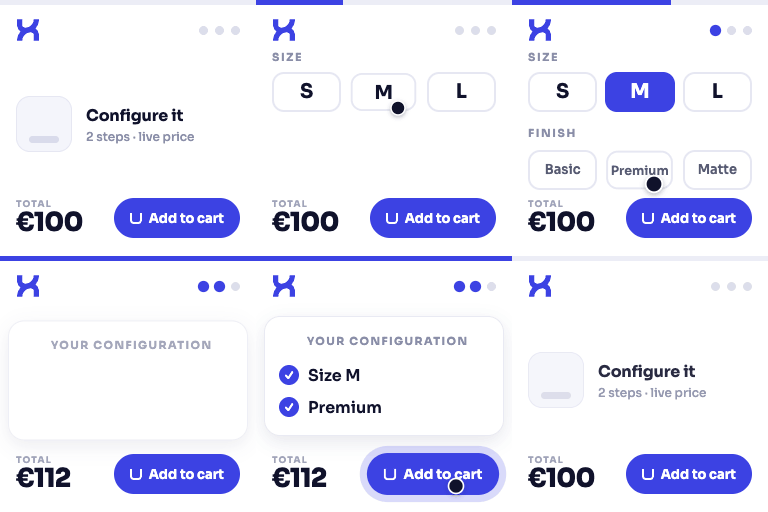
DestinX Product Configurator helps WooCommerce store owners create guided product configuration experiences from reusable templates.
With DestinX Product Configurator you can:
- Create and manage reusable configuration templates
- Organize choices into guided steps and option groups
- Use select, radio, swatch, checkbox, and boolean choices
- Add a simple price adjustment to each option
- Assign templates to WooCommerce products
- Use the WooCommerce product price and standard product quantity
- Display a live recap on the product page
- Store the selected configuration in the cart, checkout, and order
- Start from a bundled example template
The plugin works independently after activation and does not require a license, account, or external service.
All bundled DestinX logos, demo images, and documentation screenshots are original works by Destinx and are distributed under GPLv2 or later with this plugin.
WooCommerce is a trademark of Automattic Inc. This plugin is independent and is not affiliated with, endorsed by, or sponsored by Automattic Inc.
Video Tutorials
Complete setup with the Starter Kit
Build a WooCommerce product configurator from scratch
Screenshots


Installation
- Install and activate WooCommerce.
- Install the plugin from WordPress.org or upload its ZIP from
Plugins > Add New > Upload Plugin. - Activate
DestinX Product Configurator for WooCommerce. - Open
Product Configuratorin the WordPress admin area and create or import a template. - Assign the template to a WooCommerce product and test the product page.
FAQ
-
Does this plugin require WooCommerce?
-
Yes. It extends WooCommerce product pages and requires WooCommerce to be active.
-
Does the plugin work on its own?
-
Yes. Every feature included in this WordPress.org package is available immediately after activation. There are no license checks or locked controls.
-
How is the configured price calculated?
-
The WooCommerce product price is used as the base. Any price adjustments assigned to the selected options are added per product quantity.
-
Does this plugin contact an external service?
-
No. It does not send store data to Destinx for licensing, updates, telemetry, or font loading.
-
What is not included in this package?
-
This package does not include matrix pricing, CSV price imports, conditional field filters, quote/PDF workflows, or production worksheets. There are no locked controls or license checks for these implementations in the WordPress.org package.
Reviews
There are no reviews for this plugin.
Contributors & Developers
“DestinX Product Configurator for WooCommerce” is open source software. The following people have contributed to this plugin.
Contributors
Translate “DestinX Product Configurator for WooCommerce” into your language.
Interested in development?
Browse the code, check out the SVN repository, or subscribe to the development log by RSS.
Changelog
0.9.27.16
- Declared and verified compatibility with WordPress 7.1.
- Fixed page titles for the hidden Template Editor and Getting Started administration screens on WordPress 7.1 and PHP 8.3.
- Restored the original animated product-configurator icon used on the DestinX website.
0.9.27.15
- Added the two official YouTube tutorials to the plugin page, Getting Started screen, and bundled documentation.
- Made every administrative AJAX nonce check explicitly terminate invalid requests before processing input.
- Kept capability checks in place for all protected template-management actions.
0.9.27.14
- Aligned the main plugin filename with the WordPress.org slug.
- Simplified template import/export nonce validation so it occurs before request data is processed.
- Applied late escaping to every settings field name and to AJAX error messages before inserting them into the admin interface.
0.9.27.13
- Added a dedicated KSES policy for interactive configurator markup returned by the shortcode.
- Made admin and frontend nonce validation explicit before request data is processed.
- Sanitized uploaded filenames and nested configurator state at the request boundary.
- Escaped dynamic settings field names and hardened the legacy table migration query.
- Deferred frontend settings access until init to prevent early translation-loading notices.
0.9.27.12
- Migrated the saved product-hero configuration link to the unique DestinXPC anchor.
0.9.27.11
- Completed the unique DestinXPC prefix migration for public CSS, JavaScript, admin pages, shortcodes, and WooCommerce Blocks data.
0.9.27.10
- Added explicit nonce validation to configurator cart and upload requests.
- Hardened inline CSS output and renamed public identifiers to the unique DestinXPC prefix.
- Added a one-time migration that preserves existing settings, templates, and product assignments after the prefix update.
0.9.27.9
- Fixed the Template Builder step-title field so it keeps focus while typing.
- Updated the bundled plugin documentation and its visual references for the current interface.
0.9.27.7
- Rebuilt the bundled English and Italian documentation around the actual WordPress.org feature set.
- Added detailed guidance for Starter Kits, the Template Builder, validation, product assignment, storefront testing, mobile behavior, and troubleshooting.
- Replaced the six placeholder tutorial cards with two complete tutorial video paths.
- Clarified the package boundaries without presenting locked controls or purchase-based activation paths.
0.9.27.6
- Prevented repeated Starter Kit imports from creating duplicate templates.
- Fixed the clipped template actions menu and added a visible loader when opening the builder.
- Clarified template completeness and structural validation in the builder.
- Kept the mobile cart sheet and information dialogs inside the viewport with correct spacing and stacking.
0.9.27.5
- Clarified the compact logo wording to preserve the “for WooCommerce” trademark structure.
- Documented the GPLv2-or-later license for original DestinX logos and bundled demo images.
- Aligned the starter-kit metadata and removed a stale internal CSS comment.
0.9.27.4
- Removed inactive delivery-rule and live shipping-estimate implementation from the WordPress.org package.
- Hardened media-link rendering and improved compatibility when the PHP mbstring extension is unavailable.
- Removed unused WordPress core includes and corrected the WooCommerce product-panel heading.
0.9.27.3
- Added a clear, accessible loading overlay when switching between Options sections.
0.9.27.2
- Removed inactive cleanup and optimization controls and their unused builder assets from the WordPress.org package.
0.9.27.1
- Restored the field-card accordion interaction in the template builder.
- Improved spacing between option ordering and delete actions.
- Added live template overview and contextual quick tips to the builder sidebar.
- Replaced the duplicated builder brand copy with the horizontal DestinX Product Configurator logo.
0.9.27.0
- Removed Quote, PDF, and production worksheet implementation from the WordPress.org package.
- Removed Quote controls from WooCommerce product settings.
- Restored the established template-builder visual design while keeping advanced logic, filters, and matrix pricing out of the package.
- Simplified saved-configuration storage to the core configurator data.
0.9.26.0
- Renamed the plugin to DestinX Product Configurator for WooCommerce.
- Changed the plugin slug and text domain to
destinx-product-configurator-for-woocommerce. - Limited the WordPress.org package to guided steps, standard choices, simple option price adjustments, and standard WooCommerce quantity.
- Removed advanced pricing, conditional product logic, and CSV implementation from the WordPress.org package.
- Added strict configuration normalization for saved and imported templates.
- Strengthened request validation and sanitization.
- Removed remote font loading and retained local system fonts.