

Description
DadsFam Email Marketing lets you send newsletters and email campaigns from your own WordPress site, in plain English, without a monthly bill per subscriber. Your list stays in your own database.
It is made for small businesses and the people who run them: the bakery, the hardware shop, the church, the club. If you can write an email, you can use it.
What you get
- A Home screen that tells you where you stand. One sentence answers the question that matters: are you ready to send, is something sending, or does something need you? A short setup checklist walks you through the few things worth doing once.
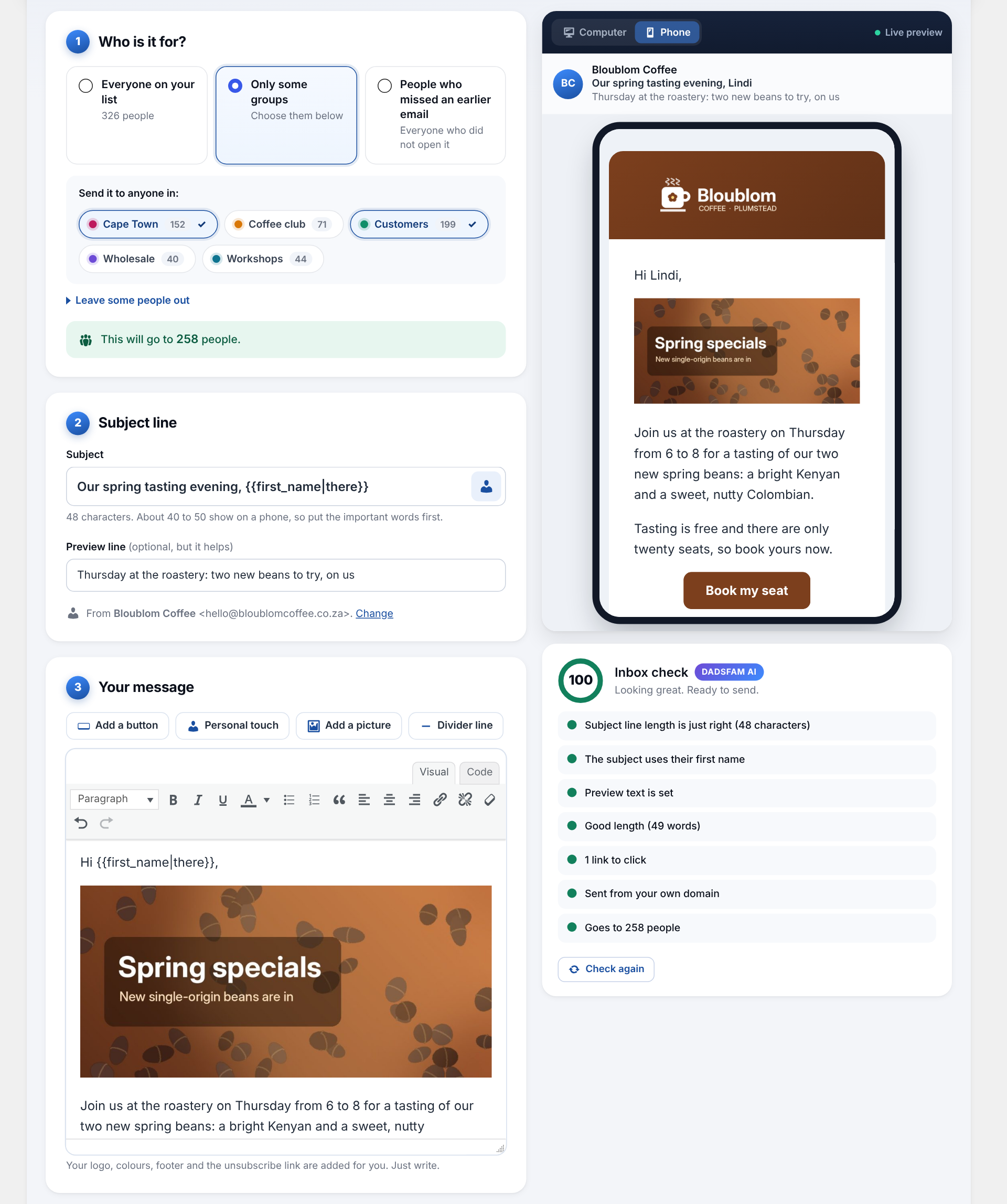
- An editor with a live preview. Write your email and see exactly how it will look, on a computer or on a phone, as you type. Add a button, a picture, a divider or a personal greeting such as “Hi Jane” in one tap. Your work saves itself as you go.
- An inbox check before you send. The built-in check (we call it DadsFam AI) looks for the things that send emails to spam: no subject, a fake “Re:”, shouting capitals, spam-trigger words, link shorteners, a missing preview line, broken personal greetings, pictures without a description and more. It gives the email a score out of 100 and tells you what to fix, in plain words. It runs entirely on your site.
- Safe sending. Campaigns go out in small batches in the background, at a speed your hosting can cope with, and keep going after you close the page. Pause, carry on or stop at any time. If the mail server starts refusing emails, sending pauses itself instead of working through your whole list.
- Send to exactly the right people. Everyone, one or more groups, everyone except some groups, or only the people who did not open an earlier email. Schedule a campaign for later, with a suggested best time learned from when your own readers open their email.
- Your look on every email. Your logo, colour, footer, business address and social links, on a clean design that works in every common inbox and on phones.
- A sign-up form that just works. An “Email sign-up form” block and a
[dadsfam_email_signup]shortcode, with optional confirmation by email (double opt-in), spam protection without puzzles, a welcome email and a note to you when someone joins. It even spots typos such as “gmial.com” and offers the fix. - Easy unsubscribing. Every email has a one-click unsubscribe (the kind Gmail and Yahoo expect from bulk senders) and a link to a preferences page where people can choose which groups they hear about, or leave and tell you why.
- Importing in three steps. Drop in a spreadsheet (CSV from Excel, Google Sheets or another email service) or paste addresses, check the columns it has guessed, done. Mistyped addresses are found and fixed in one tap.
- WooCommerce. Bring in your customers, add a newsletter tick box to the checkout (the classic checkout and the block checkout), or add customers automatically when an order is completed.
- Reports. Every campaign shows who opened it, who clicked, the most popular links and why people left. A Reports screen shows how your list is growing, how your campaigns compare and when your readers open their email, with a list health check that finds people who never open and sign-ups that were never confirmed.
- Remote control, if you want it. Let an AI assistant such as Claude, or another app you trust, write campaigns, look after your list and send for you, from your phone. It uses the WordPress Abilities API and Application Passwords, only administrators can use it, it stays off until you switch it on, deleting and changing settings stay off unless you allow them, sending and deleting ask for a second confirmation by default, and every call is written to a log.
Built to be kind to your inbox reputation
The plugin sends through WordPress’s own mail function, so whatever handles mail on your site handles these emails too. For the best delivery, use an address on your own domain and an SMTP plugin connected to a proper mail service. The Settings screen checks both and tells you in plain words if something needs attention.
Privacy
Everything is stored in your own WordPress database and nothing is sent to us or to anyone else. Open and click counting can be switched off, and IP addresses are not stored unless you choose to keep them. The plugin works with the WordPress privacy tools (Tools, Export and Erase Personal Data) and adds suggested wording to the privacy policy guide.
Coming from version 3?
Version 4 moves your subscribers, groups, campaigns, opens and clicks, settings and remote control switches across by itself the first time it runs. The old data is left untouched as a safety net until you remove it in Settings, Your data. Unsubscribe and tracking links in emails sent with version 3 keep working.
External services
This plugin does not connect to any external service. Everything it does, including the inbox check and the other DadsFam AI helpers, runs on your own site.
- Campaign emails are handed to WordPress’s own wp_mail() function. Where they go next is decided by your site’s mail setup (for example your host’s mail server or an SMTP plugin you have installed), not by this plugin.
- Open and click counting uses addresses on your own site, and the data is stored only in your own database.
- Remote control can add a picture to your media library from a web address. Only when it is asked to (by you, or by an assistant you allowed), it downloads that one file from the address it was given, with WordPress’s own download function, and sends nothing else.
- The Support and “More from DadsFam” screens contain plain links to dadsfam.co.za sites and WordPress.org. Nothing is loaded from or sent to them unless you click a link.
Screenshots



Blocks
This plugin provides 1 block.
- Email sign-up form A form for visitors to join your mailing list.
Installation
- In your WordPress dashboard go to Plugins, Add New, search for “DadsFam Email Marketing” and press Install, then Activate. (Or upload the zip file under Plugins, Add New, Upload Plugin.)
- Open Email Marketing in the menu. The Home screen shows a short setup checklist.
- Check who your emails come from (Settings, Sender) and send yourself a test.
- Add your logo and colour (Settings, Email design).
- Add subscribers: import a spreadsheet, bring in WooCommerce customers, or add the “Email sign-up form” block to a page.
- Press Write a campaign. The inbox check helps you get it right before it goes.
FAQ
-
Do I need an SMTP plugin?
-
Not always, but it helps a lot. Many hosts block or limit the mail that websites send on their own. If your test email does not arrive, or lands in spam, install an SMTP plugin and connect it to a mail service. This plugin then sends through it automatically.
-
How many emails can I send?
-
As many as your hosting or mail service allows. Emails go out in batches at the speed set in Settings, Sending speed (100, 300 or 1,000 an hour, as fast as possible, or your own numbers), so you stay inside your host’s limits.
-
Sending seems slow. Why?
-
WordPress only runs scheduled tasks when someone visits your site, so a quiet site sends slowly. Keeping the campaign’s report open also keeps it moving. For a steady pace, ask your host to run wp-cron.php every five minutes; the Sending speed screen shows the exact line to give them.
-
Will my emails land in spam?
-
The plugin does everything on its side to help: a one-click unsubscribe header, a plain-text version of every email, your business address in the footer, and the inbox check before you send. The rest depends on your domain: send from an address on your own domain, and ask your host to set up SPF, DKIM and DMARC for it.
-
Is it POPIA and GDPR friendly?
-
It gives you the tools: optional double opt-in, an optional consent tick box on the form, a record of how and when each person joined, one-click unsubscribing, a preferences page, and the WordPress privacy export and erase tools. Only email people who agreed to hear from you; the import screen asks you to confirm that.
-
Does it work with WooCommerce?
-
Yes. Import customers from completed or paid orders or from customer accounts, add a newsletter tick box to the checkout (classic or block checkout), or add every customer whose order is completed. It supports WooCommerce’s order storage (HPOS).
-
Is there a paid version?
-
No. Every feature is in this plugin, free.
-
What is DadsFam AI?
-
The name we give the plugin’s built-in helpers: the inbox check, the best time to send, the list health check and the typo spotter. They are rules that run on your own site. Nothing is sent to an AI service.
-
How do I connect an AI assistant?
-
Go to Email Marketing, Remote control, switch it on and choose what it may do. Then make an Application Password on your WordPress profile and give the assistant your site address, your username and that password. You can switch it all off again with one button.
-
Where are my subscribers stored?
-
In your own WordPress database, in the plugin’s own tables. If you ever delete the plugin, your list is kept unless you ticked “Also delete my subscribers, campaigns and settings” in Settings, Your data.
Reviews
There are no reviews for this plugin.
Contributors & Developers
“DadsFam Email Marketing” is open source software. The following people have contributed to this plugin.
Contributors
Translate “DadsFam Email Marketing” into your language.
Interested in development?
Browse the code, check out the SVN repository, or subscribe to the development log by RSS.
Changelog
4.0.3 – 2026-11-07
Works better with cache plugins. Nothing changes in how you use it.
- A page address with a ?dadsfam_em= part the plugin does not recognise is now left alone, so a cache plugin can still keep a fast copy of that page. Only the plugin’s own email links (opens, clicks, unsubscribing, confirming) and the email preferences page are kept out of the cache.
- Open and click links in emails sent by version 3 are now kept out of the cache too, like the newer links, so every open still counts.
- Behind the scenes, every number read from a form or a link is now cleaned the standard WordPress way.
4.0.2 – 2026-10-28
More safety work behind the scenes. Nothing changes in how you use it.
- Every button and form on the plugin’s screens now checks its security key and your permission in the very place it reads what was sent.
- The sign-up form now always carries a security key, also on pages a cache plugin keeps for days: it fetches a fresh one just before it sends.
- The buttons on the email preferences page are now handled at an address of their own, instead of being looked for on every page of your site.
- The WooCommerce checkout tick box is now read by WooCommerce itself, together with the rest of the checkout.
- A link in an email whose address starts with a personal tag (such as {{first_name}}) can now only lead to your own site, so nobody can turn it into a redirect elsewhere by signing up with a web address as their name.
4.0.1 – 2026-10-28
Networks of sites, and safety work behind the scenes.
- WordPress networks (multisite): switching the plugin on for the whole network now sets up every site, however many there are. On a very big network the rest carries on in the background, and a site that has not been reached yet sets itself up the first time it is visited.
- Switching it off for the whole network now stops its background tasks on every site, and deleting a site from the network removes that site’s email tables too.
- The Email Marketing box on the dashboard now has a small style sheet of its own, so the plugin’s full styles only load on its own screens.
- The sign-up form now carries a security key for people who are logged in to your site, and it is checked when they sign up. Visitors who are not logged in see exactly the same form as before, so it still works on cached pages.
- Every form field is now read only after its security check has passed, and everything shown on screen or put into an email is made safe at the moment it is printed.
4.0.0 – 2026-10-25
Version 4 is a complete rebuild. Every screen is new, sending is safer, and every feature is free.
A Home screen that tells you where you stand
- The Home screen answers the question that matters in one sentence: is your email ready to go, sending, or in need of something?
- A short setup checklist walks you through the few things worth doing once, and disappears when you are done.
- Big buttons for the things you do most, a live feed of sign-ups, opens and clicks, and a plain-English “If something goes wrong” guide.
- Works properly on a phone.
Writing a campaign
- A new editor with a live preview of the finished email, on a phone or on a computer, that updates as you type.
- Add a button, a personal greeting such as “Hi Jane” or a picture in one tap.
- Your work saves itself as you go.
- Inbox check by DadsFam AI: before you send, it looks for spam-trigger words, a missing preview line, broken personal greetings, link shorteners, pictures without a description and more, and gives the email a score out of 100.
- Send to one group, several groups, everyone except some groups, or only the people who did not open an earlier email.
- Schedule a campaign for later, with a suggested best time learned from when your own readers open their email.
Sending
- Campaigns send in the background at a speed your hosting can cope with, and keep going after you close the page.
- Pause, carry on or stop a send at any time. If the mail server starts refusing emails, sending pauses itself instead of working through your whole list.
- Every email carries a one-click unsubscribe that big inbox providers such as Gmail and Yahoo look for, plus a plain-text version. Both help emails land in the inbox.
- A cleaner email design with your logo, colour, footer, address and social links.
Subscribers and groups
- A faster list with search, filters and actions that work on thousands of people at once.
- People can now be in more than one group.
- Importing a spreadsheet is three steps: drop the file in, check the columns, done. Mistyped addresses such as gmial.com are spotted for you.
- WooCommerce: import your customers, and add a newsletter tick box to the checkout (the classic checkout and the new block checkout).
- A sign-up form block and shortcode, with an optional confirmation email, built-in spam protection and an optional welcome email.
- A preferences page where subscribers choose which groups they hear about, or leave, with an optional reason.
Reports
- Every campaign has a report: who opened it, who clicked, the most popular links and who left.
- A Reports screen shows how your list is growing and how your campaigns compare.
- A list health check finds people who never open your emails, addresses that look mistyped and sign-ups that were never confirmed.
Remote control
- AI assistants and apps can now find this plugin by themselves on WordPress 6.9 and later. In version 3 they were attached to an older hook name that WordPress itself never calls, so assistants could only reach them through the REST routes.
- New abilities: the inbox check, pausing and resuming a send, adding people to and taking them out of a group, the list health check and the best time to send.
- The REST address is now /wp-json/dadsfam-email-marketing/v1/ (it was /wp-json/dfem/v1/). The ability names are unchanged.
- On a new site, remote control stays off until you switch it on.
Privacy and safety
- Works with the WordPress privacy tools, so you can export or erase everything held about one person.
- A link in an email can only ever lead to an address that was in that email.
- Open and click counting can be switched off, and IP addresses are not kept unless you choose to keep them.
- The email preferences page shows one person’s details, so caching plugins never keep a copy and search engines are asked not to list it.
Coming from version 3
- Everything moves across by itself the first time version 4 runs: subscribers, groups, campaigns, opens and clicks, settings and the remote control switches. The old data is left untouched as a safety net.
- Unsubscribe and tracking links in emails you sent with version 3 keep working.
- Every feature is free now, so the licence key screen is gone.