Description
Custom 404 Pro replaces WordPress’s default 404 behaviour with a proper redirect. Instead of leaving visitors on a dead-end error page, you can send them to any page on your site or an external URL — with the HTTP status code of your choice.
Redirect Modes
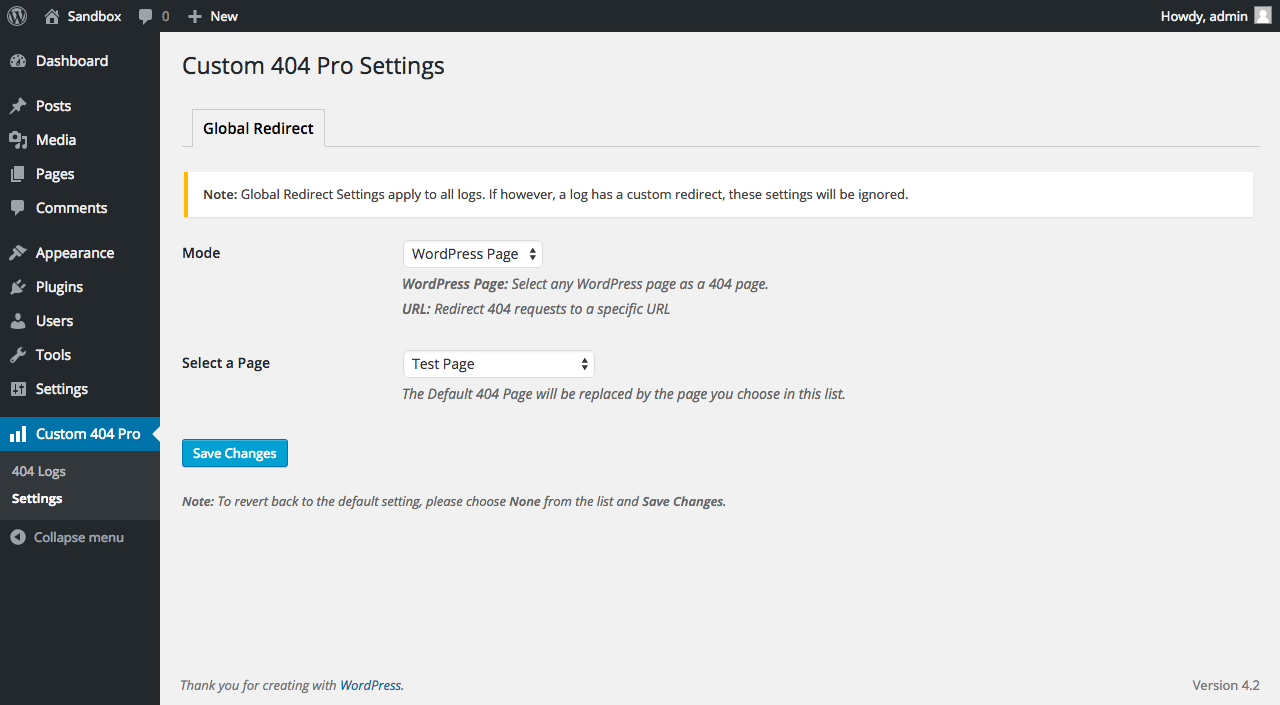
- WordPress Page — pick any published page from a dropdown; the plugin redirects to it automatically.
- Custom URL — enter any absolute URL to redirect 404s off-site or to a specific path.
- HTTP Status Code — choose 301, 302, 307, or 308 to match your SEO or caching requirements.
404 Logging
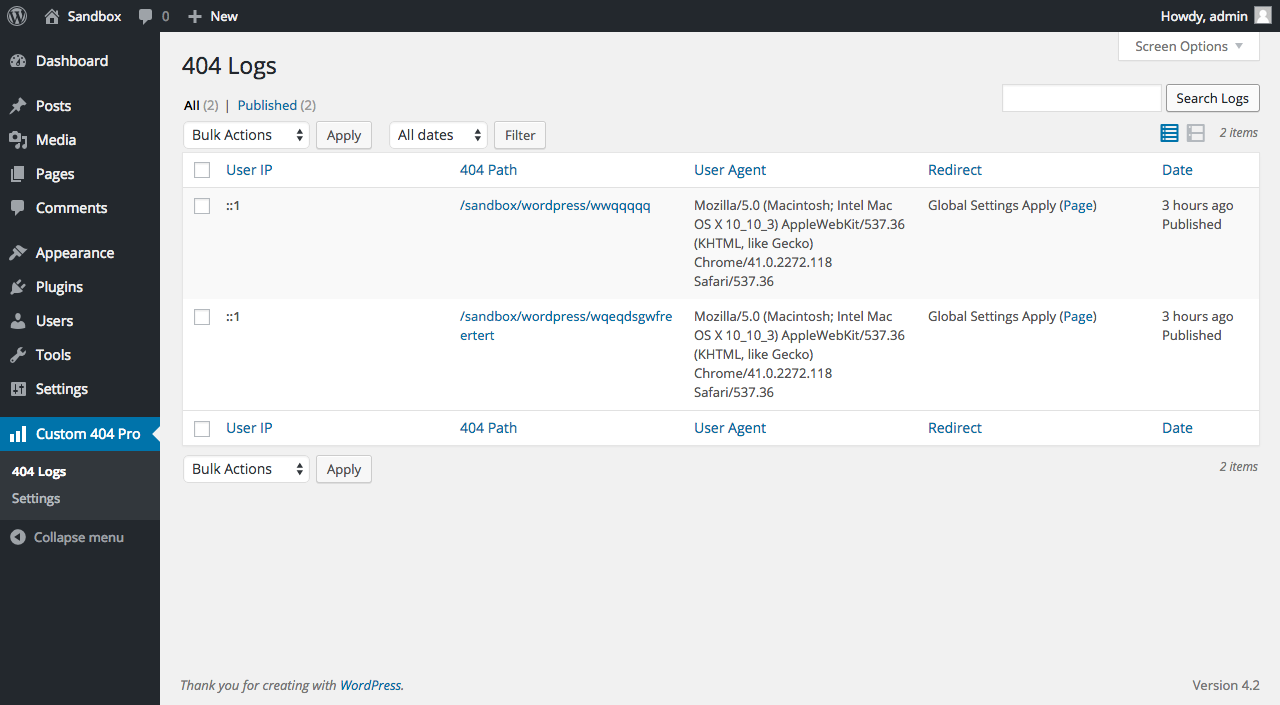
When logging is enabled, the plugin records every 404 hit to a database table so you can see exactly what is broken:
- Request path
- Visitor IP address (can be disabled for privacy/GDPR compliance)
- Referrer URL
- User agent
- Timestamp
Logs are searchable and can be deleted individually, in bulk, or all at once. They can also be exported as a CSV file. A configurable retention policy lets you automatically cap the table by row count, by age, or both — with a daily background cleanup and an on-demand Prune Now button.
Email Notifications
Optionally receive an admin email each time a 404 is logged. Designed for low-traffic monitoring — if you expect high 404 volume, keep this off to avoid inbox flooding.
Multisite Support
Works correctly on WordPress Multisite installations — activation creates the logs table for each site in the network.
Multilingual Support
Compatible with Polylang and WPML. The redirect page is resolved to the correct language variant for the current visitor automatically.
Screenshots
Installation
- Upload the
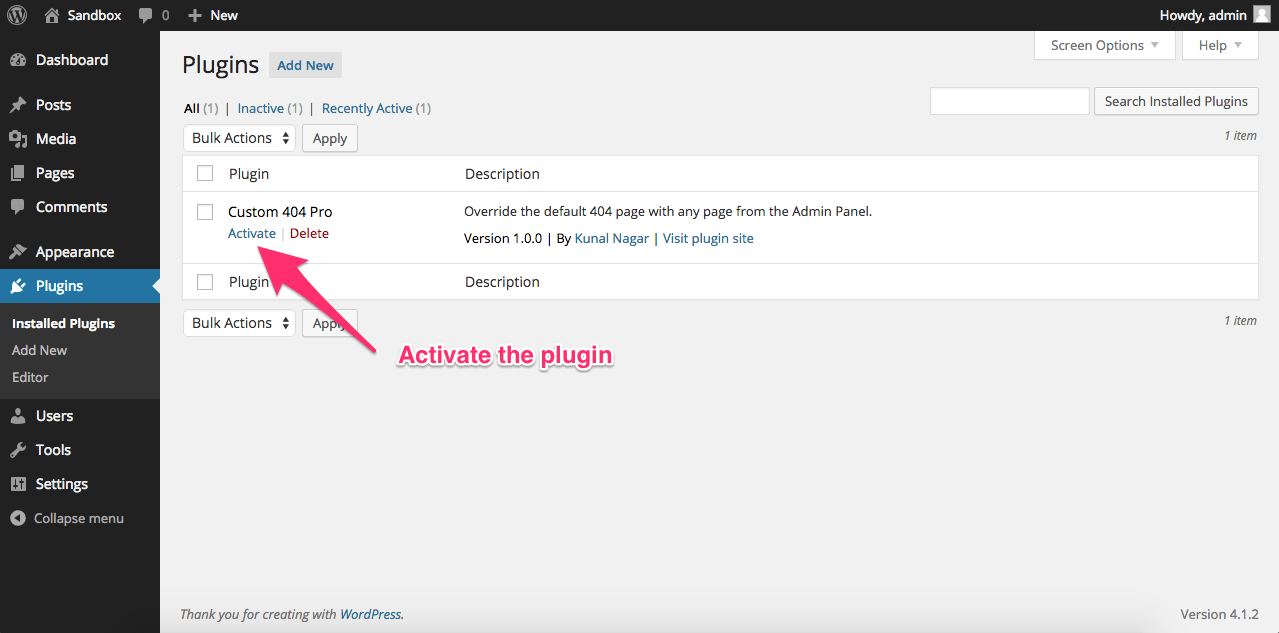
custom-404-profolder to the/wp-content/plugins/directory, or install it directly from the WordPress Plugin Directory. - Activate the plugin from the Plugins screen.
- Go to Custom 404 Pro Settings Global Redirect and choose a redirect mode (WordPress Page or Custom URL).
- Optionally, go to Custom 404 Pro Settings General to enable logging and email notifications.
FAQ
-
Does this plugin work with page caching plugins?
-
Yes, but make sure your caching plugin is not caching 404 responses. If it is, the redirect may not fire. Check your caching plugin’s exclusion settings and add 404 status codes or the affected paths to the exclusion list.
-
Why is the 404 redirect not working with the Divi theme?
-
Some users have reported a conflict with the Divi theme. Try switching to a default WordPress theme to confirm the plugin is working, then disable other plugins one by one to isolate the conflict.
-
Can I disable IP logging for GDPR compliance?
-
Yes. Go to Settings General and uncheck Log IP. All future log entries will record
N/Ainstead of the visitor’s IP address. Existing entries are not modified. -
Why are my settings not saving after a reinstall?
-
Always uninstall the plugin from the Plugins screen (do not delete the folder directly from the server). Deleting the folder bypasses the uninstall hook and leaves orphaned data in the database. Reinstalling over stale data can cause unexpected behaviour.
-
How do I report a bug or request a feature?
-
Please open an issue on GitHub. The WordPress.org support forum is not monitored.
Reviews


Contributors & Developers
“Custom 404 Pro” is open source software. The following people have contributed to this plugin.
Contributors
Translate “Custom 404 Pro” into your language.
Interested in development?
Browse the code, check out the SVN repository, or subscribe to the development log by RSS.
Changelog
3.16.0
- Add an index on the logs table
createdcolumn. The retention policy added in 3.14.0 both sorts and filters on that column, so until now every daily cleanup ran a full table scan. - Widen the logs table
idcolumn from mediumint to bigint. The old column ran out of values at 8,388,607 rows, after which a busy site silently stopped recording new 404s. - Fix schema and cron setup being skipped for anyone who updates the plugin without deactivating it first. Only the activation hook applied them, and that hook does not run on an in-place update, so the daily cleanup event was never scheduled for existing installations.
- Schema changes are applied on the first WordPress admin page load, cron run or WP-CLI command after updating, never on a front-end request, so no site visitor waits on the table rebuild.
- Declare the logs table timestamp columns in lowercase. WordPress 6.4 and earlier compare column types case-sensitively, so the previous uppercase declaration made every upgrade check reapply the same unnecessary ALTER TABLE.
3.15.6
- Fix the admin stylesheet and script being served with a hardcoded cache-busting version of 3.2.0. Because the value never changed, browsers kept serving cached copies of both files across every update since that release. They are now versioned with the current plugin version.
- Accessibility: associate every field on the Settings screens with its label, so screen readers announce each control instead of reading an unlabelled input.
- Remove a leftover console.warn() debug call from the admin JavaScript.
- Remove two unused variables in the settings form handlers.
3.15.5
- Security: neutralize spreadsheet formula injection in the CSV log export. The Referer and User Agent columns are supplied by whoever triggered the 404, and were written to the export unescaped, so a crafted request could plant a formula that executed when an administrator opened the file in Excel, LibreOffice or Google Sheets.
- Security: escape every value interpolated into the 404 notification email. The same attacker-supplied request data was rendering as live markup in the administrator’s mail client.
- The CSV export is now written with proper CSV quoting, so values containing quotes, commas or newlines no longer corrupt the file, and is streamed in batches instead of being assembled in memory.
- The CSV export no longer emits PHP deprecation notices on PHP 8.4 and later, which on sites with debug display enabled were written into the downloaded file itself. Quoting now follows RFC 4180, so backslashes in user agent strings survive the export intact.
3.15.4
- Fix Logs table sorting. The sortable column headers submit
ip,path,refereranduser_agent, but the query builder only recognised the short legacy keysi,p,randu. Unrecognised columns fell through and appended a bare sort direction, producing invalid SQL, so every column except Created returned a database error instead of results. - Fix searching and then sorting the Logs table. The ORDER BY clause was emitted before WHERE, which is invalid SQL, so any search combined with a sort broke the query entirely.
- Fix Logs table pagination reading the whole log table into memory on every page view. It selected every row and then discarded all but the current page in PHP. Pagination is now applied in SQL, so the screen stays responsive on sites with large log tables.
- Fix paging a sort with repeated values showing some entries twice while never showing others. Log timestamps are stored to the second and a burst of 404s shares one value, and rows are only returned in a predictable order when the sort distinguishes every row. Sorting now always ends on the entry ID.
- Sort directions and column names are now resolved against a whitelist rather than interpolated into the query.
- Escape log values rendered in the Logs table and give each row checkbox an accessible label.
3.15.2
- Confirm compatibility with WordPress 7.1
- Declare “Requires at least” (5.0) and “Requires PHP” (7.4) in the plugin header so WordPress can block updates on sites that cannot run the plugin. The readme previously advertised WordPress 3.0.1 support, which the code has not supported for several releases.
3.15.1
- Confirm compatibility with WordPress 7.0
3.15.0
- Add full translation support: all user-facing strings are now wrapped in i18n functions and a .pot template is shipped with the plugin. Includes a CI job to validate .po files contributed by community translators.
3.14.1
- Fix page redirect using stale post GUID instead of current permalink, causing silent redirect failures on sites with changed domains, HTTPHTTPS migrations, or staging-to-production deployments
3.14.0
- Add configurable log retention policy: cap by row count, by age (days), or both. Includes a daily WP-Cron cleanup job and an on-demand Prune Logs Now button on the Logs page.
3.13.0
- Add configurable email notification cooldown to prevent inbox flooding on high 404 traffic (15 min / 30 min / 1 hr / 6 hr / 24 hr)
3.12.9
- Migrate plugin settings from a custom database table to native wp_options for better compatibility and performance
3.12.8
- Fix IP logging toggle not persisting correctly due to positional row access
3.12.7
- Fix WPML/Polylang settings overwriting each other when using per-language domains
3.12.6
- Add load_plugin_textdomain support for translations
3.12.5
- Add Polylang and WPML support for 404 redirect page
3.12.4
- Enforce full WordPress coding standards: PHPDoc comments, input sanitization, file naming convention
3.12.3
- Improve codebase to meet WordPress coding standards
3.12.2
- Fix PHP 8.2+ dynamic property deprecation warnings
3.12.1
- Security: Remediate SQL injection and CSRF vulnerabilities (CVE-2025-9947)
- Update tested up to WordPress 6.9.4
3.12.0
- Support WordPress 6.6
3.11.3
- Remove extra plugin tags (only 5 permitted on WP)
- Update contact info
3.11.2
- Fix vuln in admin notices
3.11.1
- Fix broken Delete logs link
3.11.0
- Support WordPress 6.5
3.10.1
- Fix XSS in Logs page
3.10.0
- Support WordPress 6.4
3.9.0
- Support WordPress 6.3
3.8.2
- Fix logs vuln
3.8.1
- Fix Search vuln
3.8.0
- Support WordPress 6.2
3.7.4
- Fix SQL injection
3.7.3
- Fix vulnerabilities
3.7.2
- Fix CSRF vulnerability in Logs table
3.7.1
- Fix path vulnerability
3.7.0
- Support WordPress 6.1
3.6.0
- Support WordPress 6.0
3.5.0
- Support WordPress 5.9
3.4.0
- Support WordPress 5.8
3.3.0
- Add Multisite Support
3.2.21
- Support WordPress 5.7
3.2.20
- Support WordPress 5.6
3.2.19
- Support WordPress 5.5
3.2.18
- Integrate GitHub actions
3.2.17
- Bump version to support 5.4
3.2.16
- Bump version to support 5.3.2
3.2.15
- Bump version to support 5.3.1
3.2.14
- Update Readme to include FAQ
3.2.13
- Remove upgrader script
3.2.12
- Updates + Remove Migrate & Reset Tabs
3.2.11
- Fix Redirect Bug
3.2.10
- More updates and fixes
3.2.9
- Fix Reflected XSS in other places according to the WordPress Plugin Notice
3.2.8
- Fix Reflected XSS
3.2.7
- Version Bump to support WordPress 5.2
3.2.6
- Follow WordPress Coding Standards
3.2.5
- Update from v2 to v3 for all users
3.2.4
- Error Logging
3.2.3
- [BUGFIX] Migrate logs changed to 500
3.2.2
- [NEW] Migrate Tab: Migrate Logs from Plugin version < 3.0.0 to the new logging system
- [BUGFIX] Typo in Reset Tab when deleting old logs
3.2.1
- [NEW] Bulk Action: Delete All Logs now available
3.2.0
- Exports Logs as CSV
- Better model for showing Admin Notices
- Validating URL (required and structure) when URL mode chosen for redirection
- General cleanup
3.1.1
- Fix Log IP default setting
3.1.0
- Logging IP is now optional
3.0.5
- Fix Upgrader function bug
3.0.4
- Fix Settings not saving Bug
3.0.3
- Fix Uninstall Bug
3.0.2
- Streamlining the upgrade process
3.0.0
- Complete re-write from the ground-up with a new logging mechanism and better base for future development
2.1.1
- Add Referer so users know where the 404 came from
2.1.0
- Cleanup on uninstall
- Email blog title
- Fix unnecessary CSS and JS loading
2.0.3
- Disable logging by default
2.0.2
- Fixed Donate Links
2.0.1
- Small bugfix while clearing logs
2.0.0
- Better feedback while Clearing Logs
- Added 404 Option to Log Type
1.4.0
- Option to Clear Logs
- Option to Stop Logging
1.3.12
- Fixed github issue #3
1.3.10
- Fixed some bugs
1.3.9
- Redefined Log Filters with User Agent API
1.3.8
- Added User Agent Filter
1.3.0
- Changed entire plugin to a Custom Post Type Layout
- More structure to the plugin, better code
1.0.0
- Initial Release