
Description
CumpleConsent is not a translated European plugin. It is built on the wording of Chile’s Law 21.719 on personal data protection and its regulation (D.S. 662), it quotes the law in Chilean Spanish, and it does what that law actually asks of a website.
The plugin screens and the legal texts are in Spanish on purpose: the law, its deadlines and the wording it requires are Chilean. The code is fully translatable (text domain cumpleconsent), so anyone can ship another language.
What it does
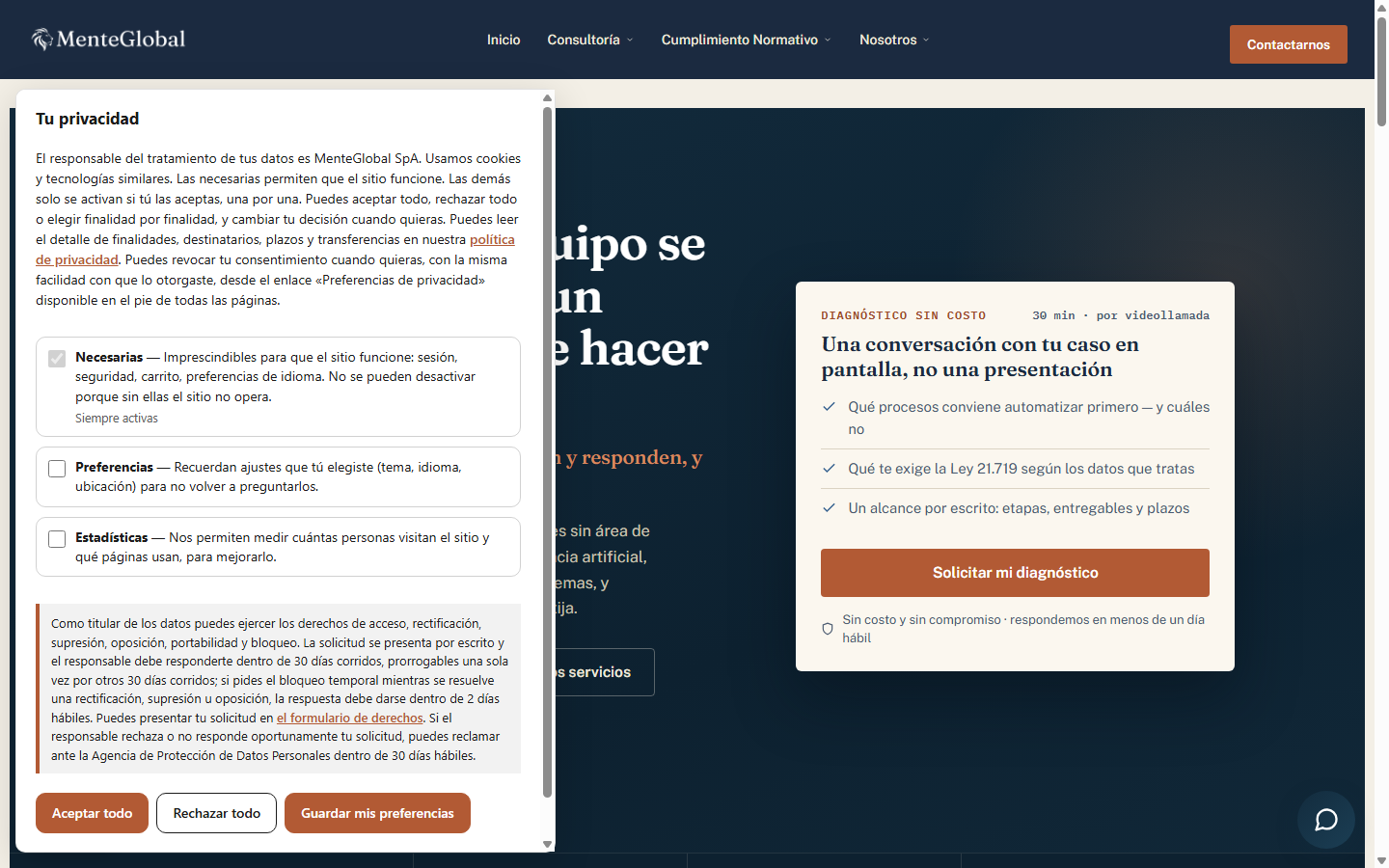
- Privacy notice without dark patterns. Accept, reject and configure carry the same visual weight; nothing is pre-ticked; rejecting takes one click. You can raise the notice version to ask for consent again when purposes change.
- Blocking before consent (art. 14 quáter). Four layers: interoperability with
wp_consent_api, rewriting of enqueued scripts, rewriting of the output HTML for raw and inline scripts, and embedded content (videos, maps, social, chats) replaced by a placeholder until accepted. It works with full-page caching: the HTML is served inert and each visitor’s browser re-activates according to their own decision. - Google Consent Mode v2 with a strict or a balanced strategy (cookieless loading, personalisation on acceptance).
- Proof of consent (art. 12). Every decision is logged with date and time, a pseudonym, the purposes accepted and rejected, a cryptographic fingerprint of the notice that was shown, and an integrity HMAC. No name, no email and no plain IP (only an optional salted hash). Exportable to CSV.
- Privacy policy: generator plus an art. 14 ter checker. Generates a draft covering the twelve mandatory contents (a–l) with the site’s real data, and checks the published policy against them, showing what is missing.
- Data subject rights with a legal clock (art. 11). A public request form that registers the request, computes the 30 calendar days to answer (extendable once by 30 more), the 2 business days for a temporary blocking, stores the full reply as evidence, sends an acknowledgement, and warns when a deadline is near. On refusal it records the ground and the 30-business-day window to complain to the Agency.
- International transfers (art. 14 ter h and art. 27). A table of recipients, country and safeguard, publishable with a shortcode, plus a warning when the diagnostics finds an undeclared third party.
- Record of processing activities, risk matrix and protocols (art. 3 of regulation D.S. 662, letters a, d, e, f and g). Downloads a printable dossier to attach to a compliance programme: characterisation of the operations (eleven items), a matrix graded against the penalties in the law, and the protocols in force.
- Site diagnostics. Which third parties actually load, whether the blocking is working, whether another consent manager is competing, and whether the policy claims something the site does not back up.
- Consent in forms. An unticked checkbox with a declared purpose and traceability of the notice, plus integration with Contact Form 7, WPForms and Gravity Forms.
What it does NOT do (no overpromising)
- It is not a compliance programme and it does not appoint a data protection officer: it provides the website-side documentary elements for letters a), d), e), f) and g) of art. 3 of the regulation.
- It does not certify or replace legal advice. The art. 14 ter checker detects contents that are present or absent; it does not judge legal sufficiency.
- It does not verify visitor age or manage consent for children and adolescents (art. 16 quáter).
- It does not encrypt your database and it is not a security plugin.
The plugin’s own privacy: there is no telemetry, no calls to external servers, and no site data is sent anywhere. Everything is processed inside your own installation.
This plugin is a project by MenteGlobal SpA (https://menteglobal.com), distributed free of charge under GPL-2.0-or-later. The complete source is in the package you installed: you can read it, audit it and change it.
External services
This plugin does not connect to any external service and does not send data to any server other than the site’s own:
- No telemetry, no calls to the author’s servers, no licence checks, no updates served from another domain.
- If the site already uses Google Tag Manager, the plugin passes the visitor’s decision to the browser (
gtag('consent','update')) so that tags respect consent. That happens inside the visitor’s browser and targets the container the site already had installed: the plugin sends nothing to Google on its own. - The consent log, the policy and the rights requests are stored in the site’s own database.
- The diagnostics —and the verification of the privacy policy when the site keeps its text outside the post content (page builders such as Elementor)— make HTTP requests to the site’s own pages (local loopback requests) to read what the site really serves. Those requests never leave the site’s server.
The plugin also ships a list of domains of well-known third-party services (googletagmanager.com, connect.facebook.net, maps.googleapis.com, and similar). That list exists to block those scripts before the visitor consents: the plugin never contacts those services and never sends them anything. It is a blocking list, not a connection.
Third-party services the plugin interacts with: none.
Screenshots

Installation
- Upload the
cumpleconsentfolder to/wp-content/plugins/, or install it from Plugins Add New. - Activate it.
- Go to CumpleConsent Settings and fill in the controller’s identity (legal name, Chilean RUT, legal representative and contact email). Saving it turns the notice on.
- Under Documents, generate the privacy policy and review the art. 14 ter verification.
- Declare your providers under Settings Transfers and enable the rights form.
- Add
[cumpleconsent_preferencias]to your site footer so people can withdraw consent at any time (art. 12).
No server configuration and no theme changes are required.
FAQ
-
Yes, for Chilean sites. It is built on Law 21.719 and its regulation: the Agency, the deadlines of art. 11, the twelve contents of art. 14 ter and the safeguards of art. 27. If you also serve visitors from the European Union you can combine it with a GDPR consent manager, but keep a single tool issuing the notice.
-
Does it work with page caching (WP Rocket, LiteSpeed, Cloudflare)?
-
Yes. Blocking is applied in the served HTML and the decision is resolved in each visitor’s browser, so a cached page never exposes trackers to someone who did not consent. Saving settings purges the caches it knows about; if you use another one, purge it when the notice or its version changes.
-
What does the consent log store?
-
One row per decision: UTC date and time, pseudonym, event (accept all, reject all, customise, withdraw, form), purposes accepted and rejected, notice version, fingerprint of the notice shown, optional IP hash and an integrity HMAC. No name, email or plain IP is stored. It is purged automatically after the retention period you configure, which should match the one declared in your policy.
-
What if my site has no privacy policy?
-
It generates a draft with the twelve contents of art. 14 ter, but review it: the policy is yours and must reflect what you actually do. The checker tells you what is missing.
-
What happens if a visitor rejects?
-
Nothing loads beyond what the site needs to work. Embedded content (videos, maps, social) shows a placeholder and only loads if the visitor accepts that purpose, even after rejecting the rest.
-
How do I ask for the log to be reverted or deleted?
-
Settings Log: you can export everything to CSV or delete the whole log. On uninstall the data is kept by default (it is proof of compliance) unless you explicitly tick “Delete all plugin data on uninstall”.
-
Can it be used on multisite?
-
The plugin works per site. On multisite networks it is activated and configured site by site; there is no shared network setting.
Reviews
There are no reviews for this plugin.
Contributors & Developers
“CumpleConsent” is open source software. The following people have contributed to this plugin.
Contributors
Translate “CumpleConsent” into your language.
Interested in development?
Browse the code, check out the SVN repository, or subscribe to the development log by RSS.
Changelog
1.0.19
- The compliance report no longer contains a hand-written
<style>tag. Its CSS is declared withwp_add_inline_style()on a registered handle and printed by the core withwp_print_styles(). The report stays self-contained —it is archived and printed, sometimes offline— which is why the styles travel inline instead of in an external file. - The public consent endpoint compares the full origin. It now compares scheme, host and port instead of only the host name, so
http://site,https://siteandhttps://site:8443are different origins, as the same-origin policy requires.
1.0.18
- Plugin Check cleanup. Removed an unused helper that read the
wp_mail_fromcore filter, and documented why the one-time migration queries build their table names from$wpdb->prefixand literal suffixes. No behaviour changes.
1.0.17
- The public consent endpoint only accepts same-origin requests. It previously accepted
Sec-Fetch-Site: same-site, which includes a sibling subdomain and would have let one decide consent on behalf of another’s visitor. Now onlysame-originpasses, and without that header the check falls back to the request’s origin/referer host. - The notice’s own files are printed with WordPress functions (
wp_enqueue_style(),wp_enqueue_script(),wp_print_styles(),wp_print_scripts()) instead of hand-written tags, both in the normal path and in the fallback used when a theme prints neither header nor footer. - The diagnostic no longer raises a critical finding in balanced mode. “Detected third parties are not blocked in the served HTML” only applies to the strict strategy, which is the one that leaves markers; in balanced mode a site may rely on Google Consent Mode and have no markers by design.
- The JavaScript configuration object is now
cumpleconsentConfiginstead of the three-letterccnConfig, which could collide with another plugin.
1.0.16
- Internal names and stored data now use the plugin’s own prefix. Constants, options, tables, hooks, cron events, transients and meta keys moved from the short
ccn_prefix tocumpleconsent_, as the directory guidelines require (at least four characters). A one-time migration moves existing options, tables, the log salt, the policy meta key and the scheduled events, so an existing installation keeps its data — and the previous consent cookie is still read so visitors are not asked again. - Visitor-controlled input is validated before use. The consent cookie and the request body are decoded and then reduced to the expected shape: the anonymous identifier must match its format, purposes are cast to booleans, the notice version is stripped of stray characters, and the context must be one of the known values. Anything else is discarded instead of being stored.
- The response text sent by email is sanitized, and the output buffer opened by the script blocker is now explicitly closed on shutdown (only down to its own level, never touching buffers opened by the theme or other plugins).
- The readme now clarifies that the bundled list of third-party domains is a blocking list: the plugin never contacts those services.
1.0.15
- The policy is found on more sites, and only when it really is a policy. Detection now also looks at the usual alternative addresses (
/privacidad/,/aviso-de-privacidad/,/privacy-policy/) and, as a last resort, at published pages with «privacidad» in the title (excluding the cookie policy). A page is only adopted if it actually has a policy inside: an empty placeholder page is no longer linked, which used to report 0 of 12 contents. - Policies built with a page builder are now read. Elementor and similar store the content outside
post_content, so a perfectly good policy scored 0. The text is now read from the builder’s own data, and as a last resort from the page as the site renders it. - The notice is delivered even when the theme does not print the footer. Templates such as “coming soon” pages or builder canvases skip
wp_footer(), and the notice never appeared; it is now injected into the served HTML when the normal hooks did not run.
1.0.14
- A site that already publishes its own privacy policy is no longer reported as having none. The plugin now recognises the policy assigned in its settings, the usual
/politica-de-privacidad/page, or the page WordPress itself marks as the privacy policy, so the admin notice and the policy link work on sites whose policy was written and published by hand. - The art. 14 ter verifier reads the policy, not the page’s stylesheet. It discards the contents of embedded
<style>and<script>blocks before checking: pages built as custom HTML (or Elementor fragments) carry their CSS inside the content, and the verifier was scoring a style sheet. - No coverage score is invented when there is no published policy. It used to fall back to scoring the text the plugin generates, showing 100% for a page the site did not have; now it reports that there is nothing to verify.
1.0.13
- The rights form no longer asks for a postal address or alternative contact. The email the data subject provides is already a means to answer them, which is what art. 11 requires, so the optional field only added friction. Solicitudes received before this version keep their stored value.
1.0.12
- Name and identity document are now two separate fields in the rights form. They are different pieces of data: the form asks for the full name in one field and the RUT (or other identity document) in another, the document is required to process the request (art. 11: the request must identify who files it), it is stored in its own column, it is covered by the integrity hash of the record, and it appears in the admin view, the CSV export and the internal notice.
1.0.11
- Emails sent by the plugin now show the site name as the sender instead of “WordPress”, and carry a Reply-To so the data subject can answer the mailbox that actually handles rights.
- The rights channel can no longer fail silently. The internal notice now goes to the rights mailbox (never to an unrelated fallback), its outcome is stored on the request, a failed delivery is flagged in the requests list, and the admin screen says when the channel is not wired to its own mailbox. New “send a test email” button on the requests screen, which reports the server’s rejection reason when delivery fails.
- The address published for exercising rights is the rights mailbox — in the form, the generated policy and the processing record — while the general contact address is listed separately.
1.0.10
- The privacy policy generator no longer overwrites a policy the plugin didn’t write. If the assigned page already has content of its own — a document the site wrote, reviewed and published — the generated text now goes to a separate draft and the admin explains it, instead of replacing the page content. The page is updated in place only when the plugin wrote it (tracked with a post meta and the stored page id).
- The admin message tells the three outcomes apart: generated, updated, or kept as a separate draft.
1.0.9
- Documents the only Plugin Check warning left: the
litespeed_purge_allhook.
Its name belongs to LiteSpeed Cache, so it cannot be renamed; the plugin calls it
with its exact name and only when LiteSpeed is listening. With that note, Plugin
Check reports zero issues for this plugin.
1.0.8
- Ready for the WordPress directory’s Plugin Check: the readme is now in English (as the directory requires), the readme title matches the plugin name, and the
Domain Pathheader was removed because no translation file is shipped yet. - Internal namespace and hooks renamed to follow the plugin prefix (
CumpleConsent\...classes andcumpleconsent_...hook names) so the prefixing checks pass. Nothing changes for visitors, for stored settings or for the database. - Added translator comments to every string with placeholders, ordered the placeholders in two admin messages, unslashed and sanitised one admin input, and documented as false positives the few remaining Plugin Check warnings: the plugin’s own escaping helpers (
badge()),wp_dropdown_pages()(it escapes its own output), the table name built from$wpdb->prefix, the public consent endpoint (an anonymous visitor cannot carry a nonce) and thelitespeed_purge_allhook, which belongs to LiteSpeed Cache.
1.0.7
- Fixes the site diagnostics appearing not to run. Its result was saved, but the settings sanitizer dropped the internal keys on every save — the diagnostics itself, the last policy date and the install marks — so the panel kept saying it had never run. Those keys are now preserved.
- The admin now shows the outcome of every action (diagnostics run, log purged, policy generated or published, reply saved, deadline extended). A click used to produce no visible signal even when the action had run.
- If the diagnostics cannot read the site’s front page, it says so with the technical reason instead of reporting without having looked.
1.0.6
- Presentation changes for the WordPress directory: the plugin name is now simply “CumpleConsent” (the long title moved into the description), “Tested up to” is 7.1, the tags are down to five, and the short description fits the 150 characters the directory shows under the name.
- States explicitly that the plugin does not connect to any external service (the “External services” section), as the review process asks.
- No behaviour changes: notice, blocking, policy and rights channel work exactly as in 1.0.5.
1.0.5
- The notice no longer depends on the site’s JavaScript optimisers. Cache plugins (LiteSpeed, Autoptimize, WP Rocket and similar) merge the site’s JavaScript into a single bundle loaded after the visitor’s first interaction. The notice fell inside that bundle: on a clean visit it never showed, and once merged it could no longer be excluded per file from the cache settings. The notice script is now marked so it is neither combined nor delayed, and the configuration travels as a data block (
type="application/json"), which no optimiser delays because it is not code to execute. Verified in Chrome reading the configuration from that block only. - With this, the notice works on a site with aggressive caching without touching the cache plugin settings.
- Eight new tests pinning the behaviour: the script marks, that other plugins’ scripts are left alone, and that the data block is valid JSON and cannot close its own tag.
1.0.4
- The notice and its panel no longer inherit the theme styling. The whole appearance (system typeface, colours, buttons, boxes, floating button) is anchored to the plugin’s own containers and shielded, because many themes win the cascade with rules such as
.elementor-kit-12 h2,.elementor-kit-12 buttonor.elementor-kit-12 label. Measured on a real Elementor site: the notice title sat at 1.2:1 contrast (invisible), the four buttons at 2.21:1 with the theme background, the policy link at 1:1, and each purpose label in uppercase and the theme colour. Each one now carries its own styling and a verified contrast (AA 4.5:1 minimum). - The configured accent colour is actually applied. It was saved in the settings and used by nobody: the notice always showed the factory green.
- The rights form and embedded content keep their own typeface and buttons, but keep the site’s text colour where the author places them, so they do not become unreadable on dark backgrounds.
- New tests: anchoring of every selector, shielded identity properties, contrast computed on the real CSS colours, and verification that the configured accent reaches the notice.
- New test bench (
tests/navegador/generar-banco.py): downloads the site CSS and measures the notice in Chrome with it, to catch this kind of leak without relying on anyone’s eyes.
1.0.3
- Important fix: a partial write through the REST API no longer switches off the toggles that are not in the request. The admin form submits the full state — where an unticked checkbox does not travel, so its absence means “off” — but the API may write only what changes. The sanitizer now tells the two cases apart: over the API, what is absent is kept; from the panel, the previous behaviour stands. Without this, configuring the plugin with an application password silently turned off the floating preferences button, the embedded content blocking and the server-side honouring of consent.
- Six new tests pinning that panel/API difference, including that a boolean sent as false over the API is actually applied.
1.0.2
- Settings can now be read and written over the API (
/wp/v2/settings), with the same credential any WordPress client uses: an application password. It requiresmanage_options, the same capability the panel already required, and the option stores no credentials. Useful to leave compliance ready on client sites from a script, without asking for panel keys. - Dedicated provisioning and verification routes (
cumpleconsent/v1/status,/policyand/rights-page): site status with the concrete pending items, policy generation, and creation or reuse of the rights channel page, also without entering the admin. - Generating the policy no longer duplicates the page. If none is assigned and the site already has one with the slug
politica-de-privacidad, that one is updated instead of creating a second (it used to leave a copy with the-2suffix). - Cache purging after saving settings now also happens when the change arrives over the API, not only from the admin form.
- The option is registered on
initinstead ofadmin_init: REST requests do not go throughadmin_init, so exposing it there would never have appeared in the API. - New tests for the provisioning routes, the required capability, the status and the page reuse.
1.0.1
- Important fix for the preferences panel. The panel declares
position: fixed, but only the “centred” position had coordinates: with the default position (bottom bar) the panel had none and was drawn off-screen, so pressing “Configure” looked as if the notice vanished. The coordinates now sit in the panel base rule and no position can be left unanchored. - Closing without deciding no longer leaves the visitor without a notice. Pressing “Close” (or Escape) brings the first-layer notice back while no decision is recorded.
- Accepting does not reload the page. Reloading is kept only for withdrawing an already granted purpose, the one case where it is needed (third-party scripts already loaded cannot be unloaded any other way).
- Added 12 CSS geometry tests and a real-browser test (Chrome over CDP) walking the whole cycle: no decision configure close accept withdraw.
1.0.0
- First public version.
- Notice without dark patterns, with per-purpose choice and permanent withdrawal (art. 12).
- Pre-consent blocking in four layers, compatible with full-page caching and with
wp_consent_api; embedded content under consent (art. 14 quáter). - Google Consent Mode v2 with a strict or balanced strategy.
- Auditable log with the notice fingerprint, optional IP hash, integrity HMAC, CSV export and scheduled purge (art. 12 and art. 14 ter i).
- Privacy policy generator and checker against the twelve contents of art. 14 ter.
- Rights form with legal deadlines, acknowledgement, full reply kept as evidence and alerts (art. 11).
- International transfer register with its safeguard (art. 14 ter h and art. 27).
- Record of processing activities, risk matrix and protocols with a printable dossier (art. 3 of regulation D.S. 662).
- Site diagnostics: third parties detected, effective blocking, conflicts with other consent managers, policy coverage.
- Consent in forms with integration for Contact Form 7, WPForms and Gravity Forms.
- Pseudonyms, minimisation and no telemetry: nothing leaves your installation.