

Description
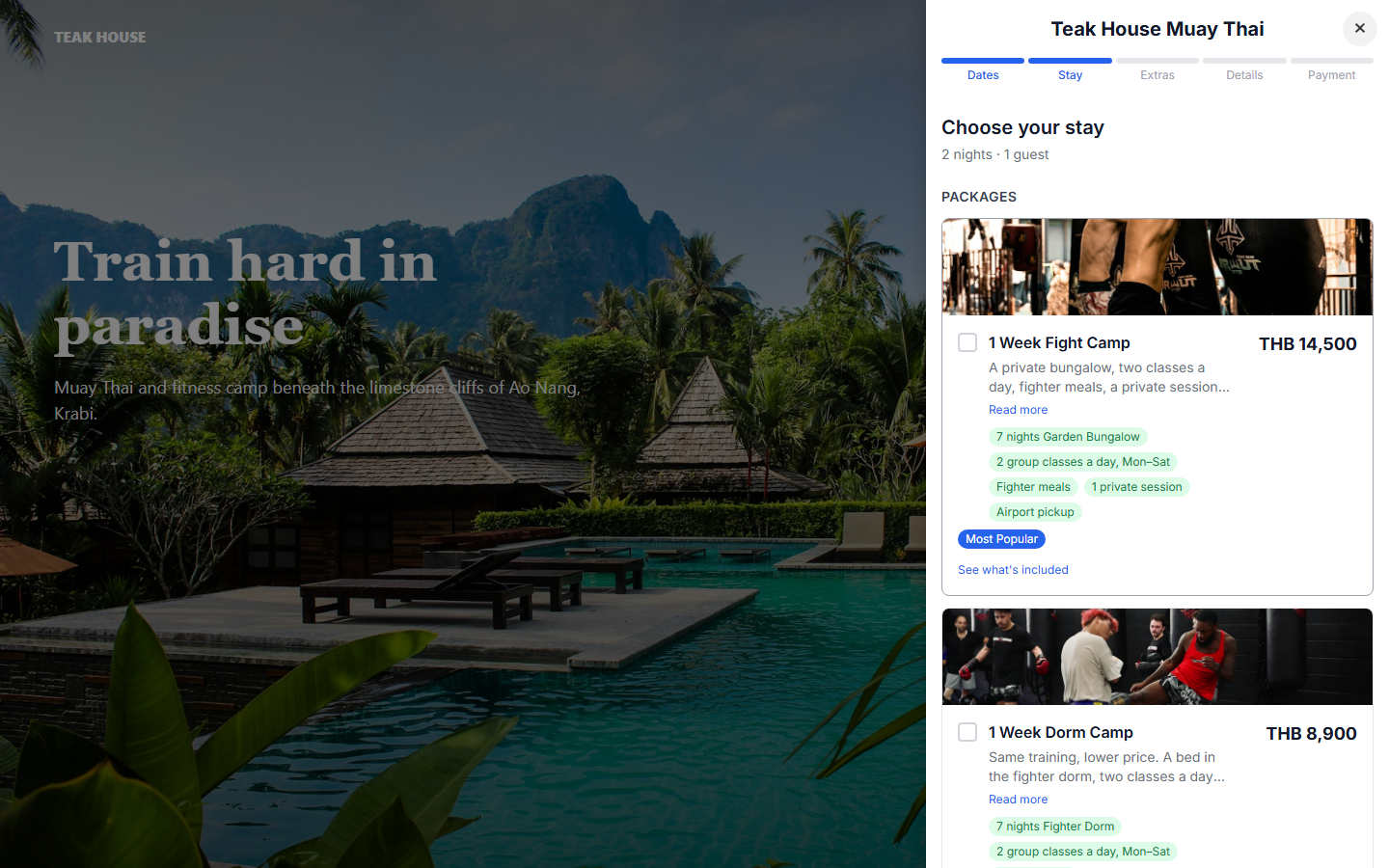
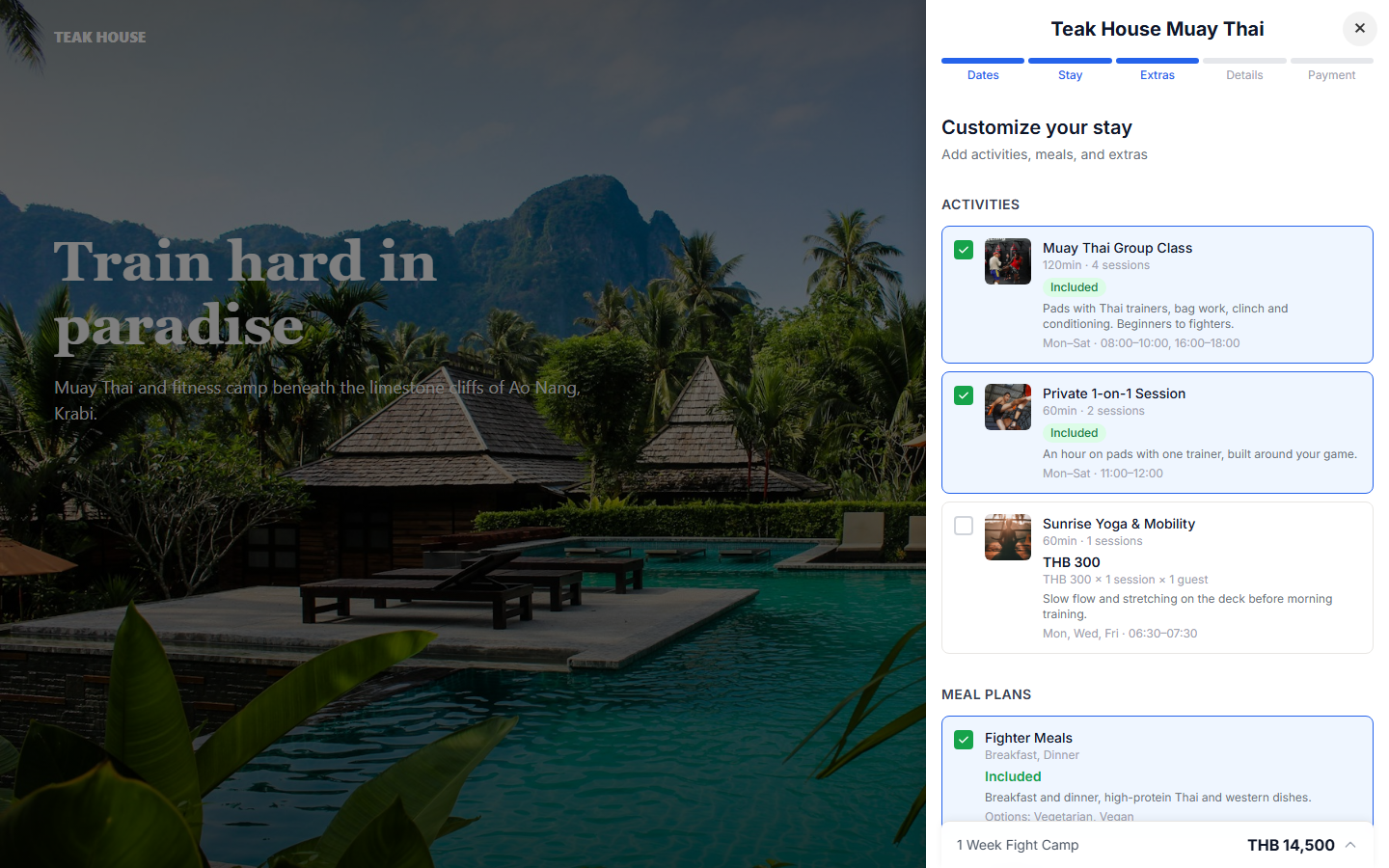
The Crux plugin adds a “Book now” button to your WordPress site. Guests click it, and your Crux booking page slides in without leaving your site. They choose dates, a room or package, add extras like lessons, meals or airport transfers, and pay by card.
Built for surf and dive camps, yoga and wellness retreats, fishing and hunting lodges, and fitness and training camps: places where a stay is more than a room.
What guests get
- Live availability for your rooms, dorm beds and packages
- Packages and à la carte stays, with activities, meal plans and add-ons
- Card payments, Apple Pay and Google Pay, paid straight to your own Stripe account
- Deposits at booking, with the balance payable online later
- A full-screen booking flow on phones
What you get
- A floating “Book now” button on every page, or buttons placed exactly where you want them with the Crux Book Button block or the
[crux_booking_button]shortcode - Buttons that use your theme’s button style
- Bookings, guests and payouts managed in your Crux dashboard
- No monthly fee: Crux charges a flat 5% on completed bookings
You need a Crux account to take bookings. Create one free.
External services
This plugin connects to Crux (https://crux.camp), the booking service it works with. Bookings can’t be made without it.
- In WordPress admin: when you save or view the plugin settings, your site requests
https://crux.camp/api/book/<your property slug>to check that the property exists and show its name. Only the slug is sent. - On your website: visitors’ browsers request the same address to load your brand color. When a visitor clicks a booking button, the booking page
https://crux.camp/book/<your property slug>opens in a frame. Details a guest enters there (dates, name, email, phone, payment) go to Crux and to Stripe, Crux’s payment processor.
Crux Terms of Service · Privacy Policy
Screenshots


Blocks
This plugin provides 1 block.
- Crux Book Button A "Book now" button that opens your Crux booking page.
Installation
- Install and activate the Crux plugin from Plugins Add New.
- Sign up at crux.camp, set up your property and publish it.
- In WordPress, go to Crux in the admin menu and enter your property slug. You’ll find it in your Crux dashboard under Embed Widget. You can also paste your booking link.
- The page confirms “Connected to your property“. The floating button now appears on your site.
- Optional: turn off the floating button and add the Crux Book Button block, or the
[crux_booking_button]shortcode, wherever you want a button.
FAQ
-
Do I need a Crux account?
-
Yes. The plugin shows your Crux booking page on your site. Rooms, rates, availability and payments are set up in Crux. Signing up is free.
-
Does it work with my theme or page builder?
-
Yes. The block works in the block editor and block themes. For Elementor, Divi, Beaver Builder or the classic editor, use the shortcode:
[crux_booking_button text="Book your stay" align="center"]. Any link to#crux-bookopens the booking panel too. -
Where do guests pay?
-
Guests pay by card in the booking panel. Money goes to your own Stripe account, connected in your Crux dashboard.
-
Will it slow down my site?
-
The plugin loads one small script (under 10 KB, no jQuery) with
defer. When the floating button is off, the script loads only on pages that have a booking button. The booking page loads only when a guest clicks. -
Set the button text in the plugin settings, or per button in the block or shortcode. The floating button uses the brand color from your Crux property settings. Inline buttons use your theme’s button style.
Reviews
There are no reviews for this plugin.
Contributors & Developers
“Crux – Direct Booking for Camps, Lodges & Retreats” is open source software. The following people have contributed to this plugin.
Contributors
Translate “Crux – Direct Booking for Camps, Lodges & Retreats” into your language.
Interested in development?
Browse the code, check out the SVN repository, or subscribe to the development log by RSS.
Changelog
1.0.0
- First release: floating button, Crux Book Button block,
[crux_booking_button]shortcode and settings page with a connection check.