

Description
CrawlBrief for LLMs.txt helps site owners curate an AI-readable content map and publish it as llms.txt at the site root.
Instead of treating llms.txt as an unreviewed URL dump, the plugin combines automatic discovery with editorial control. Administrators can define high-priority Start Here links, mark individual resources as featured or excluded, write concise descriptions, suppress selected category sections, choose public post types and add optional trust or policy links.
Optional virtual Markdown mirrors expose clean representations of public posts, pages and other configured public post types at index.html.md endpoints. The plugin serves both formats through WordPress rewrite rules, so it does not create or overwrite physical files.
The plugin does not send site content to an external API and does not add public footer credits or backlinks.
Features
- Publishes /llms.txt automatically.
- Optional Markdown endpoints, such as /example-post/index.html.md.
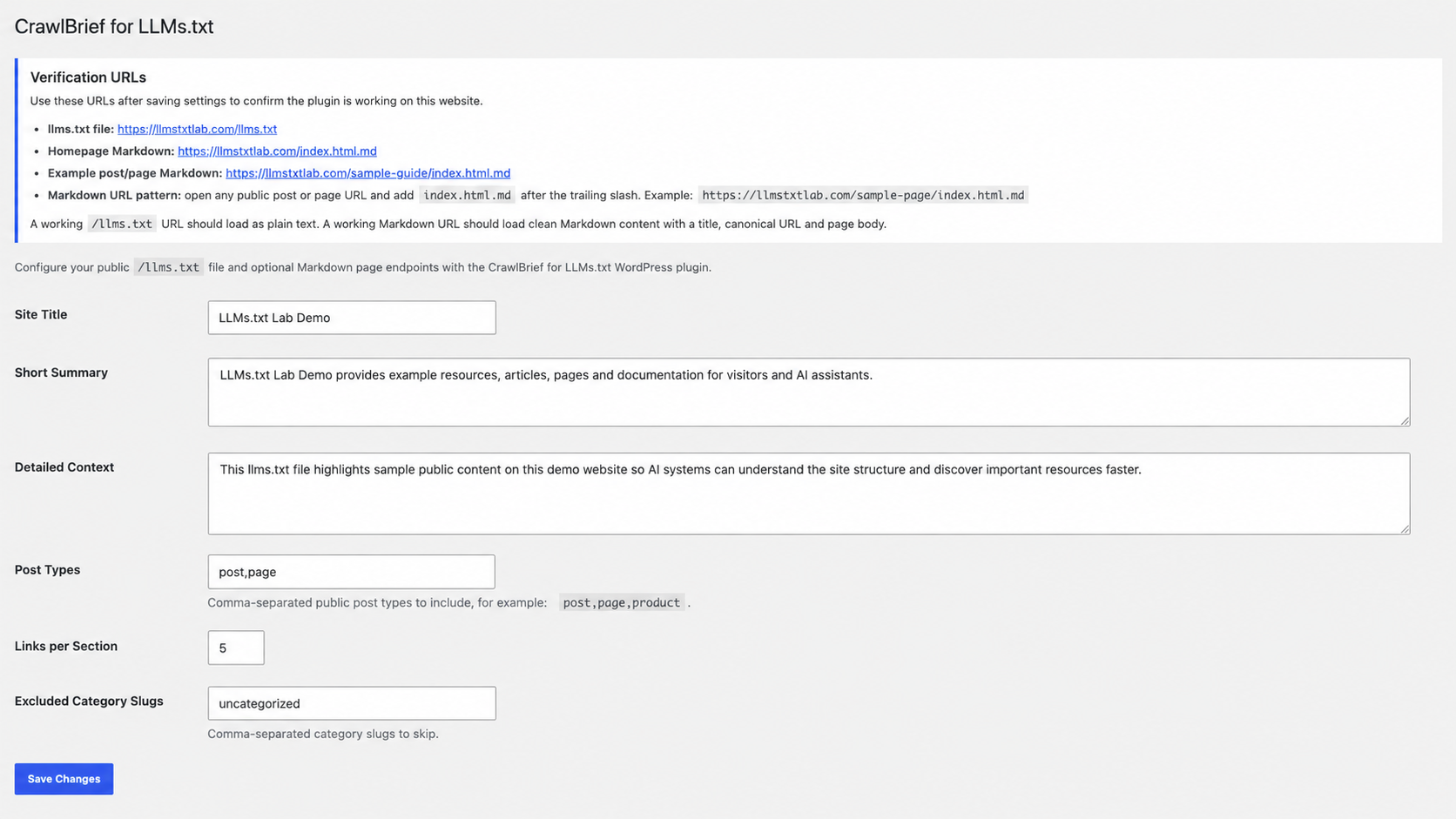
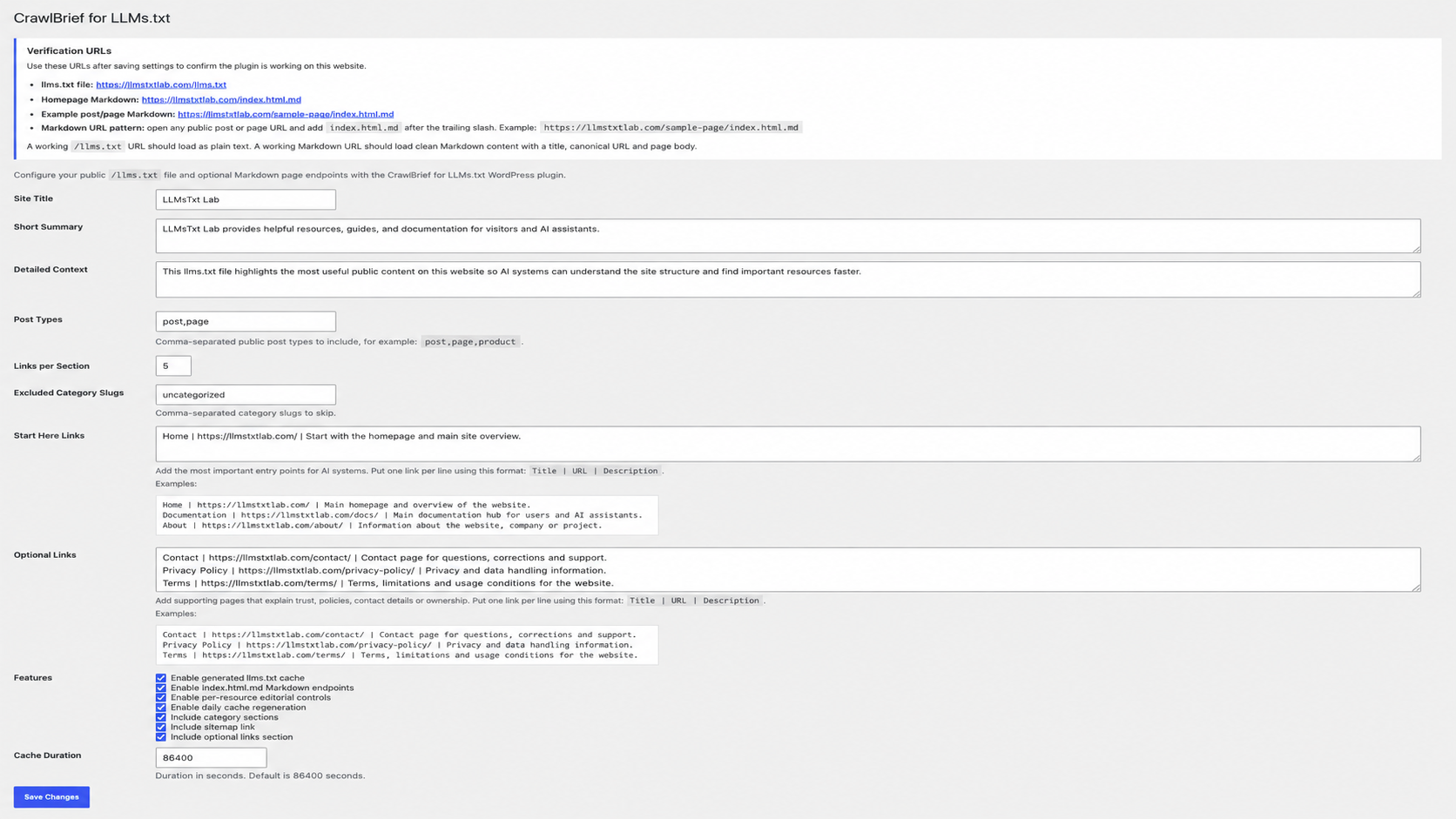
- Focused settings page under Settings > CrawlBrief for LLMs.txt.
- Configurable site title, summary and detailed context.
- Configurable post types.
- Configurable link limit for automatically generated sections.
- Configurable excluded category section slugs.
- Editable Start Here and Optional link sections.
- Per-resource Automatic, Featured and Excluded editorial states.
- Dedicated Featured Resources section for manually prioritized content.
- Optional generated-output caching.
- Daily regeneration option.
- Cache purge integration with common WordPress caching plugins.
- Custom per-post editorial status and llms.txt description meta box.
- Uninstall cleanup for plugin options and generated cache.
LLMs.txt Lab Tools
CrawlBrief generates and manages llms.txt inside WordPress. For additional checks or manual workflows, LLMs.txt Lab provides free browser-based tools for working with llms.txt files.
- Validate llms.txt — check an existing llms.txt file or URL.
- Generate llms.txt — manually create an llms.txt file when needed.
- LLMs.txt Lab — access additional llms.txt tools and resources.
These tools are optional. CrawlBrief does not automatically send site content or generated llms.txt data to LLMs.txt Lab.
How to Verify the Plugin
After activation, open Settings > CrawlBrief for LLMs.txt. The settings page shows verification URLs for your website.
To check the generated llms.txt file, visit:
https://example.com/llms.txt
To check the homepage Markdown endpoint, visit:
https://example.com/index.html.md
To check a post or page Markdown endpoint, open any public post or page URL and add index.html.md after the trailing slash:
https://example.com/example-post/index.html.md
The /llms.txt URL should load as plain text. A post or page Markdown URL should load clean Markdown content with the title, canonical URL, last-updated date, author when available, and page body. The homepage Markdown endpoint contains the available homepage or configured site information.
Cache Compatibility
The plugin clears its internal transient cache when configured content changes. It also attempts to purge common caching plugins when available, including LiteSpeed Cache, WP Rocket, W3 Total Cache, WP Super Cache and SiteGround Optimizer.
Other caching plugins can hook into:
crwbrf_txt_cache_purged
Privacy
This plugin does not collect analytics, track visitors or automatically send generated llms.txt content or site data to a third-party service. All generation happens inside WordPress using public site content and settings saved by the site administrator. Links to optional external tools, including LLMs.txt Lab, are opened only when an administrator chooses to visit them. CrawlBrief does not automatically transmit site content or generated llms.txt data through those links.
Screenshots
Installation
- Upload the crawlbrief-llms-txt folder to /wp-content/plugins/.
- Activate CrawlBrief for LLMs.txt from the WordPress Plugins screen.
- Go to Settings > CrawlBrief for LLMs.txt.
- Configure your site summary, post types, links and feature options.
- Visit https://example.com/llms.txt to confirm the output loads.
FAQ
-
Can I use this on any WordPress website?
-
Yes. The plugin is general and can be configured for blogs, business sites, documentation sites, ecommerce stores, learning sites and other WordPress projects.
-
Does it create a physical llms.txt file?
-
No. It serves /llms.txt through WordPress rewrite rules. This avoids manual file updates when content changes.
-
Do I need Markdown endpoints?
-
No. You can disable index.html.md endpoints in the settings if you only want /llms.txt.
-
How do I access Markdown files for posts and pages?
-
Open a public post or page URL and append index.html.md after the trailing slash. For example, https://example.com/my-post/index.html.md.
-
Should caching be enabled?
-
For most live websites, yes. Enable caching to reduce server work. The plugin clears its cache when relevant content changes.
Reviews
There are no reviews for this plugin.
Contributors & Developers
“CrawlBrief for LLMs.txt” is open source software. The following people have contributed to this plugin.
Contributors
Translate “CrawlBrief for LLMs.txt” into your language.
Interested in development?
Browse the code, check out the SVN repository, or subscribe to the development log by RSS.
Changelog
1.0.7
- Added convenient links to LLMs.txt Lab validation and generation tools from the CrawlBrief settings page.
1.0.6
- Improved sitemap URL discovery using the WordPress sitemap API.
- Improved output escaping for llms.txt and Markdown responses.
- General WordPress.org review compatibility improvements.
1.0.5
- Updated the plugin slug and text domain to crawlbrief-llms-txt.
- Updated the installation folder reference to match the reserved slug request.
- Removed the outdated generic Plugin URI from the plugin header.
1.0.4
- Kept WordPress query filters enabled during the one-time featured-resource migration.
- Resolved the Plugin Check
SuppressFilters_suppress_filterserror.
1.0.3
- Replaced the featured-resource post-meta filter with a maintained featured-post index.
- Added a one-time batched migration for existing featured-resource selections.
- Removed the Plugin Check slow meta query warnings.
1.0.2
- Renamed the plugin to CrawlBrief for LLMs.txt.
- Adopted the unique crwbrf_ prefix across plugin identifiers and stored data.
- Updated the plugin author and website information.
1.0.1
- Renamed the plugin with a distinctive identity and unique internal prefix.
- Removed unrelated branding and promotional links.
- Added featured/excluded editorial controls for individual resources.
- Improved default-link, sitemap, homepage Markdown and cache-header behavior.
1.0.0
- Initial pre-release submission.