

Description
Your best pages are invisible if nothing links to them. CRAI LinkSense reads your whole site, finds every place one page mentions something another page covers, and turns those mentions into internal links — using wording you already wrote, one approval at a time.
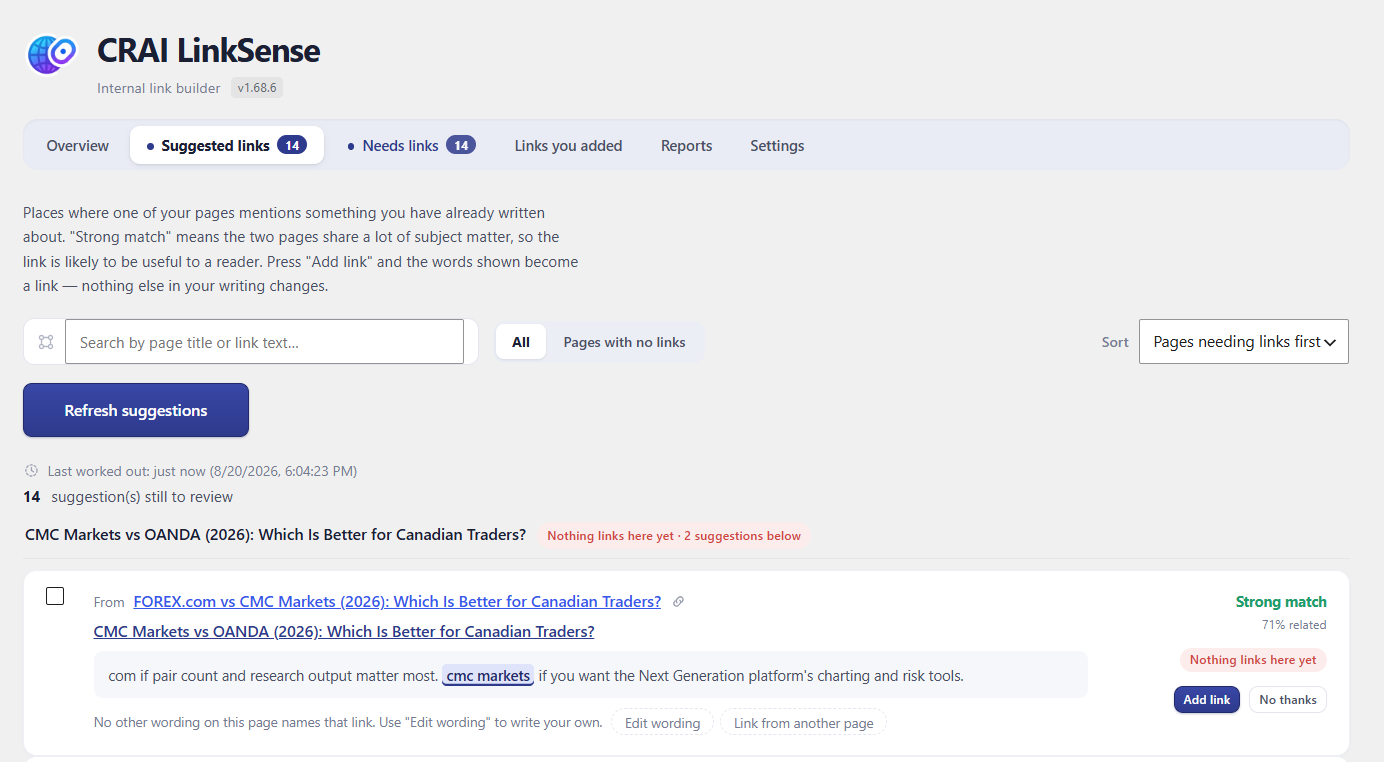
Nothing changes until you press “Add link.” That is the rule the whole plugin is built on. It never edits a post behind your back, never rewrites a sentence, never adds a link you have not seen first. Every suggestion shows you the exact sentence, the exact words that become clickable, and where the link goes — before anything happens.
Your links are yours
On a standard WordPress site, links are written directly into your content. Deactivate this plugin, delete it, switch to something else — every link you approved stays exactly where you put it. They are ordinary links in your own posts, not a rented feature.
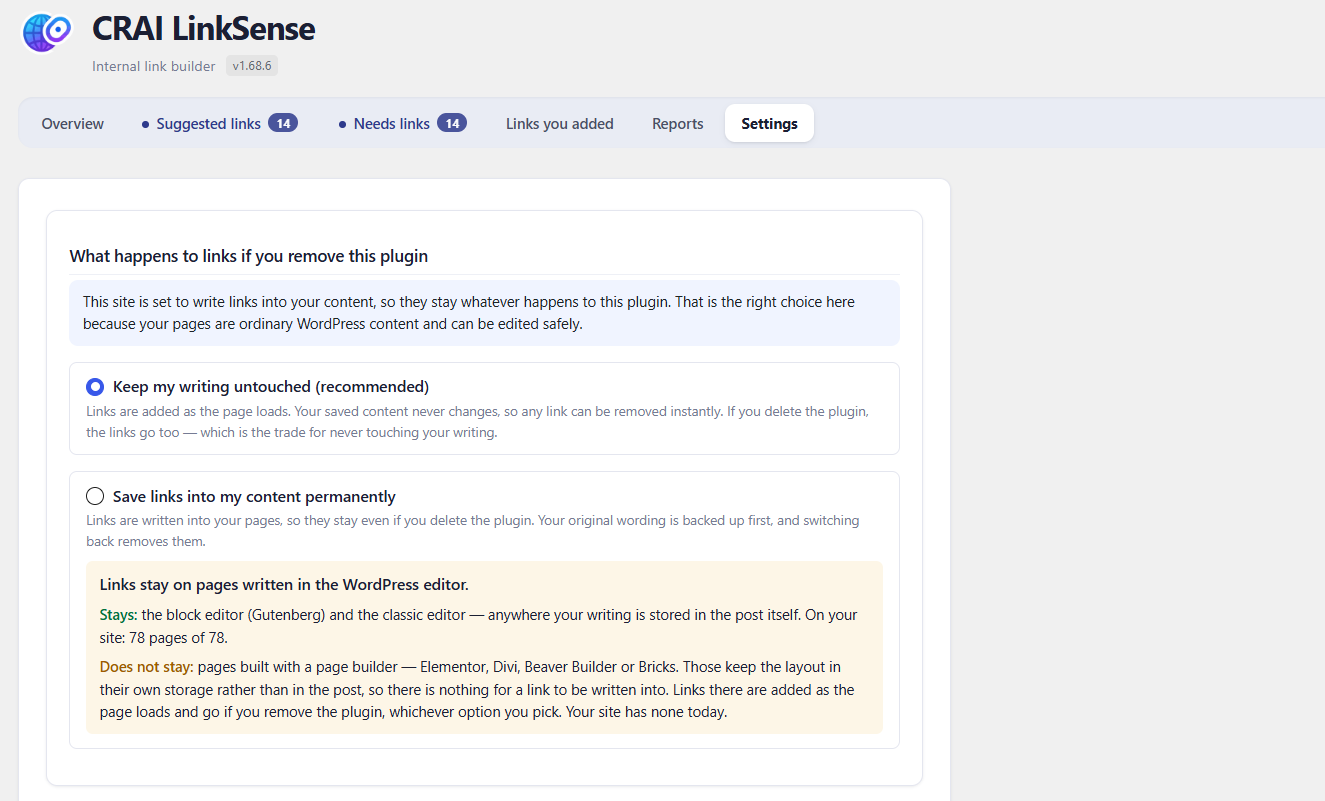
On page-builder sites (Elementor, Divi, Bricks, Beaver Builder and friends), writing into the builder’s data risks your layout — so there the plugin adds links safely as each page loads instead, and tells you plainly that it is doing so. The settings screen states which mode your site uses and why. No surprises in either direction.
What it finds
- Places to link — every sentence on your site that names a topic another of your pages covers, scored by how strongly the two pages belong together.
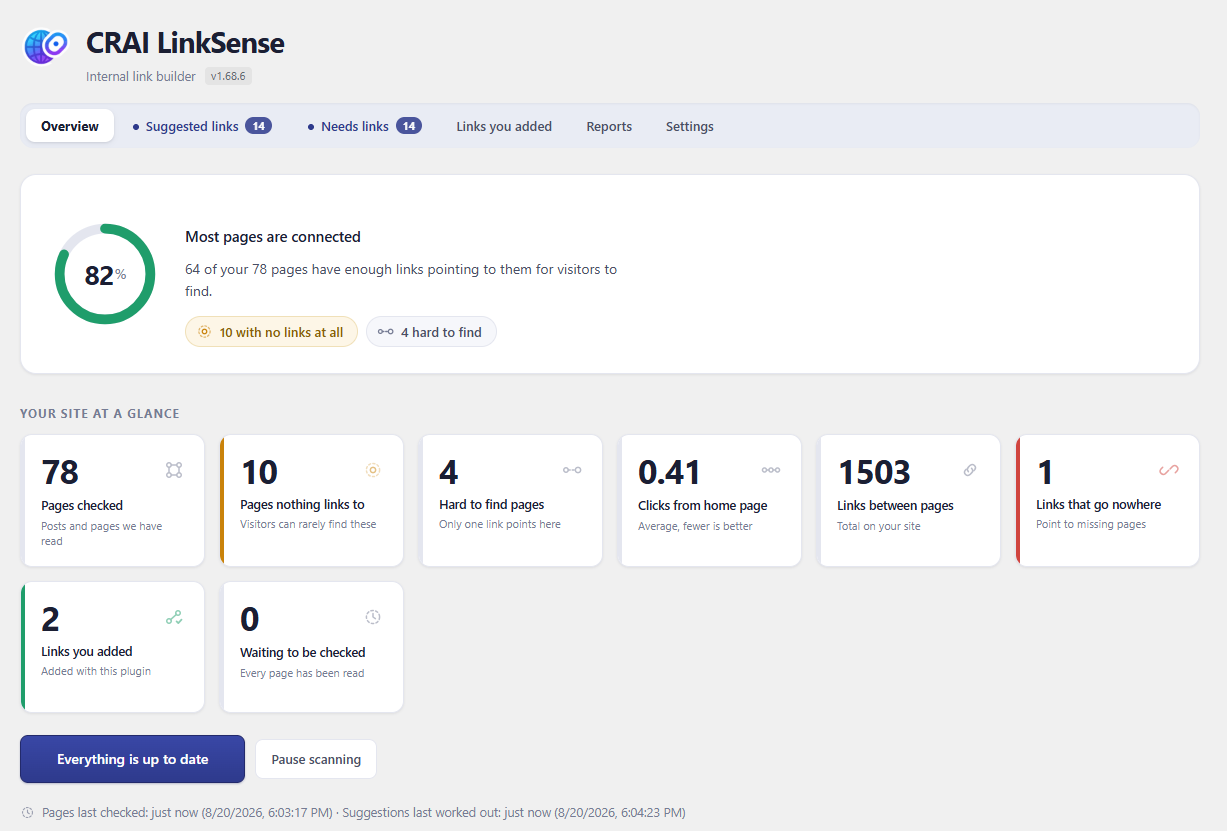
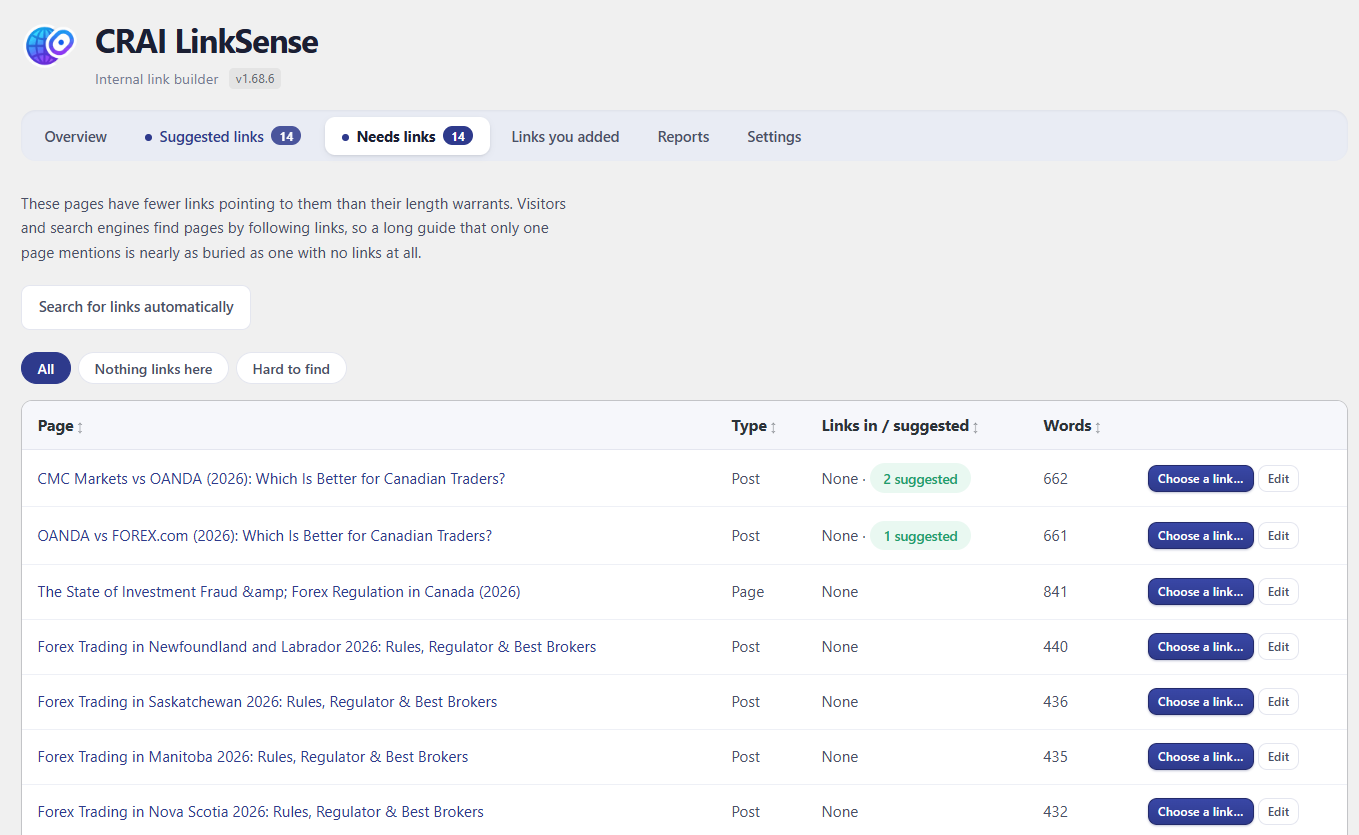
- Orphan pages — pages nothing links to. Visitors and search engines find pages by following links; a page with none is nearly invisible. The “Needs links” tab lists them, and one press hunts for pages that could link to each.
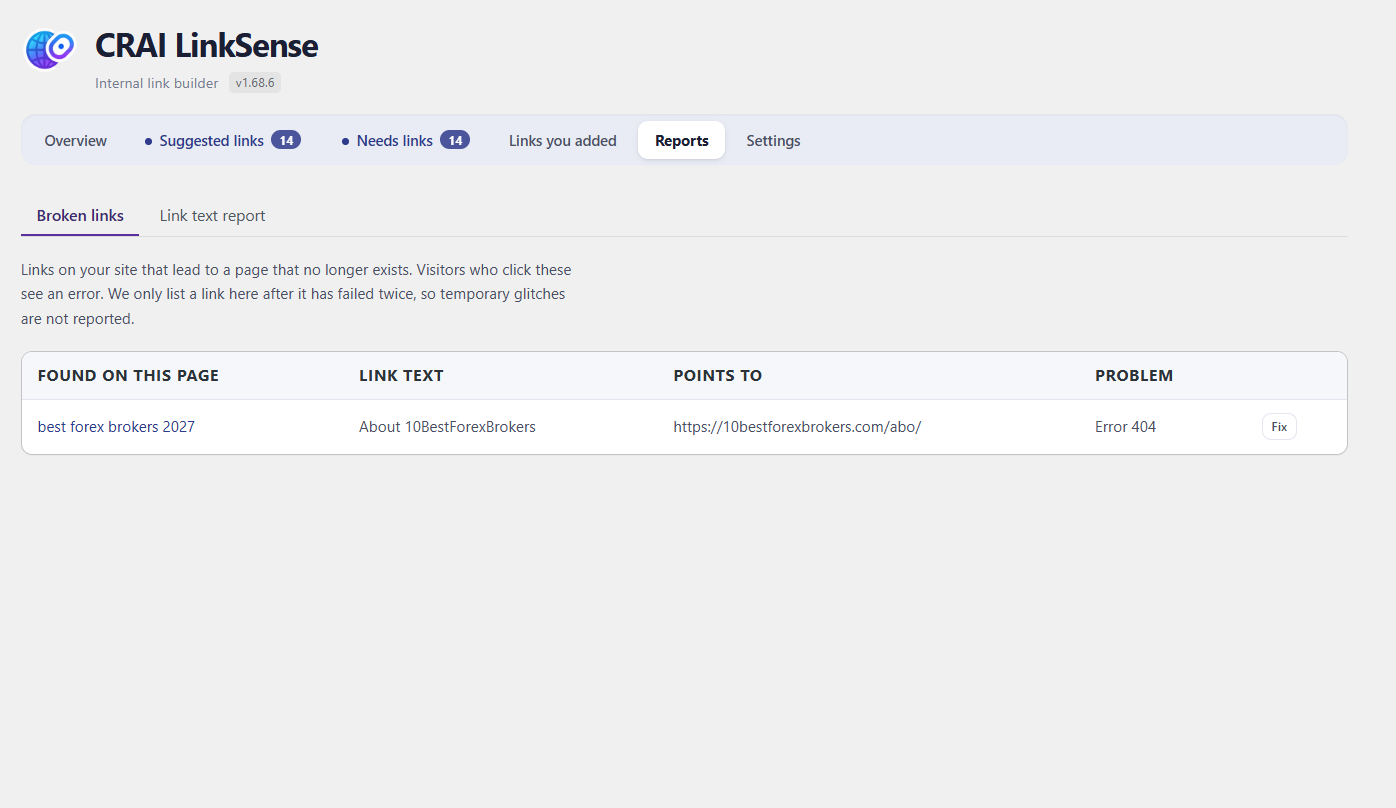
- Broken links — internal and outbound links that no longer resolve, with one-click repair or removal.
- Anchor text patterns — the same clickable words used over and over reads as manipulation to search engines. The link text report shows your distribution.
What it refuses to do
The quality bar is not negotiable. Suggested wording must read as a real phrase — no half-sentences, no “click here”, no wording that describes the wrong page. The plugin rejects its own suggestions rather than show you a bad one, and it tells you the honest reason when a page yields nothing.
Private by design
Your content is analysed on your own server. Nothing is sent to a third party, there is no account to create, no API key to buy, and no page limit. The only outbound requests the free plugin ever makes are the ones you would expect from a link checker: confirming that the links in your own posts still work.
What CRAI LinkSense Pro adds
The free plugin finds links where your existing wording already fits. Pro writes the wording — an AI drafts the sentence or rewrites yours so the right link fits naturally, with every figure and name preserved, checked against the destination page before you ever see it. Pro also maps your site structure into topic groups and suggests the links that bind each group together. The free plugin is complete on its own; Pro is for sites that publish often enough to want the writing done too.
How links are stored
There are two storage modes. The default never touches your content; the other
is opt-in and exists because some site owners want links that survive the
plugin being removed.
Safe mode (the default)
Links are added as the page is rendered, using a WordPress filter. Your posts in
the database are not modified at all. Removing a link, or the whole plugin, puts
everything back exactly as it was, because nothing was ever changed.
Permanent mode (off unless you turn it on)
Links are written into the post content itself, so they remain after the plugin
is deactivated or deleted. This is a real modification of your content, so:
- The original content of every affected post is copied to a backup first, before anything is written.
- “Revert” restores that backup, on one post or across the whole site.
- Only the content column is written, and only for posts with approved links. Nothing else about the post is altered, and no revision is created.
- Page-builder pages always use safe mode, whatever this setting says, because their content is not stored in the post body.
- If you delete the plugin while permanent mode is on, the links stay by design and the backups are kept, so the change is still reversible. Turn the mode off and revert first if you would rather they went.
The setting is in Settings, described there in the same terms, and it defaults to
safe mode on a new install.
External services
This plugin does not use any third party service, API or remote server. Nothing
is sent to the plugin author or to anyone else, no account is required, and no
data about you, your site or your visitors is collected or transmitted.
The plugin does make outbound web requests in one situation, described in full
below so there is no ambiguity.
Checking whether your links still work
To tell you which links on your site are broken, the plugin has to try them. It
requests the web addresses that your own content links to. Where you have linked
to another website, that request goes to that website, exactly as it would if a
visitor clicked the link.
- What is requested: only the web addresses already present in your own posts and pages. The plugin does not choose or add addresses of its own.
- What is sent: a standard web request, identifying itself as “CRAILinkSense” together with your site address, in the same way a search engine crawler or any link checker identifies itself. No personal data, page content, or information about your visitors is included.
- What is kept: only the response status, such as “working” or “not found”, stored in your own database. Nothing is stored anywhere else.
- When: in the background on a schedule, and each link is re-checked at most once every seven days.
- Turning it off: broken link checking runs as part of the background scan, which you can pause at any time from the Overview screen.
Because the addresses requested are the ones you linked to yourself, there is no
single provider to name here, and therefore no terms of use or privacy policy
for this plugin to link to. Any website you link to has its own terms, exactly as
it does for any visitor who follows that link.
All other work, including reading your pages, matching them and suggesting links,
happens entirely on your own server.
Screenshots
Installation
- Upload the plugin folder to
/wp-content/plugins/, or install through Plugins > Add New. - Activate it.
- Open LinkSense in the admin menu. The first scan starts automatically and runs in the background.
- Large sites take a few minutes to index. Use Scan now to speed up the first pass.
FAQ
-
Do my links survive if I delete the plugin?
-
On a standard WordPress site, yes — links are written into your post content, so they remain if the plugin is deactivated or deleted. On page-builder sites the plugin adds links as pages load instead (writing into a builder’s data risks your layout), so those links need the plugin active. The settings screen tells you which mode your site uses and why.
-
Does it change my content without asking?
-
Never. Every link is a suggestion until you approve it, and each suggestion shows the exact sentence and the exact words that become clickable before anything is added. Removing a link puts your original sentence back.
-
Does it send my content anywhere?
-
No. Analysis runs on your own server. The free plugin’s only outbound requests are link checks — confirming the links already in your posts still resolve.
-
Does it work with Elementor, Divi, or other page builders?
-
Yes. The plugin detects builder sites and adds links as pages render rather than editing builder data, which protects your layout. This is chosen automatically on install and stated in the settings.
-
How is the wording chosen?
-
From your own writing. The free plugin only ever links words that already exist in your sentences, and it applies the same quality rules to every suggestion: the wording must read as a real phrase and must describe the page it points to, or it is not offered.
-
Will it slow my site down?
-
Analysis runs in the background in small batches. On the front of your site, stored links are plain HTML in your content; rendered links (builder mode) are added by a lightweight filter at display time.
Reviews
There are no reviews for this plugin.
Contributors & Developers
“CRAI LinkSense – Internal Link Builder” is open source software. The following people have contributed to this plugin.
Contributors
Translate “CRAI LinkSense – Internal Link Builder” into your language.
Interested in development?
Browse the code, check out the SVN repository, or subscribe to the development log by RSS.
Changelog
1.68.6
- Links to an address on your site that has never existed — a typo, a slug that was never published, a path someone invented — are now reported. The check that finds broken internal links only looked at links that pointed at a real page once, which excluded exactly the ones most likely to be broken.
- Such a link is now re-resolved before being called broken, so one that points at a page published since the last scan is recognised rather than reported.
1.68.5
- Confirmed against WordPress 7.1.
1.68.4
- Broken internal links now appear straight after a scan. Link checking was left entirely to an hourly background schedule, and a link had to fail twice before being listed — so deleting a page and rescanning reported that every link was working, sometimes for hours.
- A link to one of your own posts is now settled on the first check. The two-strike rule exists so that a momentary network failure is not reported as a broken link, which is right for an outside address; whether your own post is published is not a network question, and asking twice cannot change the answer.
- Links to outside websites are unchanged: still checked in the background, still reported only after failing twice.
1.68.3
- New “Pages with no links” filter on Suggested links: shows only the suggestions that would give a page its first link. It reads the live link count, so nothing can hide a row from it.
- Removed the “Basic links” filter where there is no AI to contrast it with. Without AI wording it returned the same list as “All” — two names for one list is a control that does nothing.
1.68.2
- The version number now appears beside the plugin name on every screen, and can be selected and copied.
1.68.1
- The two buttons on “Needs links” no longer read as the same thing. “Find links for this” sat beside “Find links for all of these” while doing something quite different — one opens a chooser and waits for you, the other searches every page on its own. They are now “Choose a link…” and “Search for links automatically”.
- Suggested wording is no longer offered with the punctuation it was cut at, or with invisible characters carried over from the page. A phrase ending in a dash, or with unbalanced brackets, is a slice of a sentence rather than a phrase.
- Wording ending in a plain verb — “Manitoba traders sit”, “spreads vary” — is refused. Link text names something; it does not describe what the sentence was doing.
1.68.0
- “Link from another page” now holds the same standard as everything else. It scored the pages it offered and then ignored the score, so it listed pages nine per cent related — including boilerplate such as an affiliate disclosure — beside a box inviting you to link them. Whether two pages belong together is a fact about the pages, not a matter of taste, so weak pairings are no longer offered. Where nothing qualifies it says so.
- The suggested wording in that box is no longer pre-filled with a phrase the plugin would refuse from its own AI. An empty box asks you to think; a box already filled with the wrong answer invites you to press the button.
- Sentences with no usable wording in them are no longer offered as places to put a link.
1.67.2
- Rewrote the plugin listing: description, FAQ, and tags now describe what the plugin actually does and how links are stored.
1.67.1
- Internal development notes are no longer packaged inside the plugin. Four of them had shipped in every build for ten releases.
- Removed the last trace of the Pro plugin’s prefix from the free plugin’s code (a cache group name; no behaviour change).
1.67.0
1.66.0
- New installs now choose how links are stored based on the site. Most sites get links written into their own content, so they stay whatever happens to this plugin — they are your links, in your posts. Sites using a page builder get links added as the page loads instead, because a builder keeps your content in its own format and writing into it risks the layout.
- The settings screen now says which one your site is set to and why, rather than offering two options and leaving you to guess.
- Existing sites are not changed. Switching someone to writing into their posts is not a change of default, it is an edit they did not ask for.
1.65.1
- Switching off the Pro plugin no longer leaves AI-written suggestions in the list. They stayed there, still labelled as AI wording, on a plugin with no code to add a written sentence to a page. They are hidden rather than deleted — that work was paid for, and switching Pro back on brings all of it back.
1.65.0
- “Pages needing links” is now its own tab, called “Needs links”, beside “Suggested links”. It was a section inside Reports, which put the question one level below the answer — you saw a queue of fixes without the problem they were for. It is also the only screen that shows the site getting better, which is the one worth returning to.
- Those two tabs now stand out from the rest, and each carries its own count: suggestions waiting, and pages still short of links.
- On a phone the tab row scrolls sideways instead of wrapping.
1.64.7
1.64.6
1.64.5
1.64.4
1.64.4
1.64.3
- Picking one of the “Or link these words” options now updates the highlighted wording on the card. It changed what “Add link” would insert but left the card showing the original, so you were told one thing and given another — on a card whose whole purpose is judging the wording before adding it.
- AI wording now takes the same reading test as the plugin’s own. It never did, which is how “turn 000 into” reached a reader: that came from “$1,000”, where the thousands separator split the number and the wording kept the second half.
1.64.2
1.64.1
- The “Or link these words” options are now checked before they are offered. They never were, so every card carried a row of half-sentences — “toward investment”, “pips pip value”, “either capital”, “tax time far” — which is the plugin recommending nonsense in its own voice.
- Wording now starts within seconds of a scan instead of several minutes. The pass that finds links for pages nothing links to was running to exhaustion first, so on a 76-page site the list sat empty while it worked. It now runs a few rounds, hands over to the wording, and finishes in the background.
1.64.0
- Link wording starting with a bare number is now refused. “038 regulation” reached a reader: whatever that number was part of, the wording kept the tail of it and dropped the head, and it names nothing. A year is still allowed, at either end.
- Link wording starting with a verb is now refused. “analyse markets” was offered as a description of a broker review — it tells the reader what to do rather than where the link goes. Link text stands in for a page title, and titles are things rather than instructions.
1.63.9
1.63.8
1.63.7
1.63.6
1.63.5
- Pages nothing links to are now reconsidered on every run. The search recorded each page it examined so it would not ask about the same ones repeatedly — but it recorded them whether or not it had managed to find anything, so a page it failed once was excluded from every later run. On a site whose unlinked pages are its newest, that was exactly the wrong set to give up on.
- Suggestions that need AI wording, have been through the AI and got none are no longer listed. They showed as a card with a greyed-out “Needs AI wording” button and nothing the reader could do. They remain in the database for a later retry.
1.63.4
1.63.3
1.63.1
1.63.0
- Fixed the Link text report showing “Nothing to report yet” on every site. The report data grew a health verdict some versions ago and the screen was still reading the old shape, so it always looked empty. The verdict now leads the report.
1.62.1
- With AI wording off, scans behave exactly as before.
1.62.0
1.61.1
1.61.0
- Suggested links now puts pages nothing links to at the top, then the biggest shortfall, then the best match. Previously the shortfall was scaled by length, so a long page with two links outranked a short page with none.
- Fixed most pages that nothing links to never being looked at. The pass that searches for links TO those pages was driven entirely by WP-Cron, and on hosts where cron does not fire it ran once and stopped. The dashboard’s own polling now carries it on, the same way it already did for the main check.
1.60.0
- Upgrading from the free version to Pro now just works. The free version recognised Pro only at one exact folder name, so a folder renamed by hand, by a host’s installer, or unpacked over the top left both editions running at once — which is what produced duplicate links and licensing errors. Each edition now recognises the other by its file name, whatever the folder is called.
- Where Pro’s files have been unpacked into the free version’s own folder, the free version stands aside for it rather than the two fighting over the same site.
- Your suggestions, links and settings carry across untouched — they live in the database, not in the plugin folder.
1.59.2
1.59.1
- Fixed “the plugin could not be activated because it triggered a fatal error” when switching on Pro while the free version was still active. The two are built from one codebase and share the same class names, so a second copy loading into the same request could not be declared. Pro now stands aside for that one request, switches the free version off, and starts normally on the next page load.
1.59.0
1.58.0
1.57.0
- Where the AI’s wording is refused, the plugin’s own suggestion is used instead. On the examples that prompted this, that wording was the better of the two anyway.
1.56.0
- Fixed link text that read as half a sentence. Wording like “brokers accepting”, “using real”, “why traders”, “trade beyond” and “trade 40” was being offered as a description of a page. Link text now has to read as a thing rather than as a span of a sentence with the ends cut off.
1.55.1
- Fixed poor link wording on sites with a lot of suggestions. Wording not already used was being preferred whatever the cost, so once the good phrases for a page were taken, each new suggestion was pushed to a worse one — ending in fragments like “using real” while “using real money” sat unused in the alternatives. Varied wording now has to be nearly as good as the wording it replaces, and a phrase that is simply another one cut short is never chosen.
1.55.0
- No change to the free version.
1.54.0
- The permanent-storage choice now says which pages keep their links, not only which ones do not. Links stay on pages written in the block editor or the classic editor — anywhere your writing is stored in the post itself — and not on pages built with Elementor, Divi, Beaver Builder or Bricks. Both sides are shown with a count for your site.
- Bigger logo on the dashboard heading, and the new logo in the WordPress menu.
1.53.0
- New logo, on the dashboard heading and on the WordPress menu.
1.52.0
- “Keep the links in my content permanently” now says plainly what it cannot cover, and how many of your pages that is. Pages built with a page builder keep their layout outside the post, so links there can never be saved into your content — and on a site built mostly that way the setting applies to very little. That was the last sentence of a paragraph whose previous sentence promised the links stay permanently; it is now set apart, and counted.
- The same limit is stated on the Settings screen whether or not your site has page-builder pages today, since you might start using one later.
1.51.2
1.51.1
1.51.0
- Removed housekeeping belonging to the Pro version from the free one. It cleared settings the free version never creates, so it did nothing here — but it had no business being in this download.
- Uninstalling now also removes any API keys left behind by a previous Pro install, so deleting the plugin does not leave a stored credential in your database.
1.50.7
- Fixed resuming after a pause starting the whole check again from the beginning. A run paused at “18 found, 10 of 76 pages” came back as “0 found, 0 of 121 pages” and everything already done was thrown away. Resuming now carries on from where it stopped.
- Fixed “Pause scanning” only pausing half the work. Reading pages stopped, but finding links carried on to the end behind a screen that said nothing was happening — which is why there was nothing left to resume. Both stop together now.
- While paused, the bar stays on screen showing where the run stopped, instead of disappearing as though it had been abandoned.
1.50.6
- Fixed the AI wording panel breaking the suggestion card. “See the wording options” sat outside the card, and opening it squeezed the suggestion text into a column one word wide. The panel now has a row of its own, directly under the text it belongs to.
1.50.5
- Fixed every screen failing to load with “Could not load suggestions”. A helper added in 1.50.1 ended up calling itself, so the page ran out of stack before it could draw anything. It affected both versions and every tab.
1.50.4
- Fixed the Reports tab opening on an error. It opened on Progress, which is a Pro feature, so the free version asked for something it does not have and showed a failure instead of your reports. Reports now opens on “Pages needing links”.
- Fixed the Progress report in Pro being registered in the wrong place, so it could never be found.
- When something cannot load, the message now says what the server actually reported instead of only that it failed.
1.50.3
- The free version no longer calls itself Pro. It showed a “Pro” badge beside the title on every screen, and listed itself as “LinkSense Pro” in the WordPress sidebar.
1.50.2
- Fixed the suggestion cards on narrow screens, where the tick box could still push the match score and the buttons onto their own row.
- Removed a stylesheet that was never loaded. Its rules were already in the main one, so nothing changes on screen.
1.50.1
- Removed references to AI features from the free version. “Pages needing links” told you to switch on wording options on a tab that does not exist here, and a few other messages did the same. The free version only ever links words already on your pages, so it now says so, and says what to do instead.
- Fixed the suggestion cards putting the match score and the buttons below the tick box instead of beside the text.
- Fixed “3 links added.Undo these 3Keep them” running together with no spaces.
1.50.0
- Adds several links at once. Tick the suggestions you want and add them in one go, with an undo that takes back exactly that batch and nothing you added earlier.
- Link wording now gets a verdict, not just a table: whether your anchor text is healthy, how many phrases are vague, over-used or pointing at more than one page, and which are worst.
- “Find pages that could link here”, in the editor. The sidebar answers what this page should link to, which is the wrong way round just after publishing — a new post has nothing pointing at it. When nothing is found it says why.
- Fixed link wording counts being inflated. An added link is recorded in two places by design, and the report added them together, so a phrase used on three pages was reported as six — enough to flag a site as over-optimised when it was doing nothing wrong.
- Fixed the page breakdown naming a skip reason as an editor: a page with no title was listed as “No_title” alongside “Standard editor”. Skipped pages are now reported separately and in plain words.
- A page that could not take a written link is recorded, rather than the reason being discarded unread.
1.49.0
New
- Add several links at once. Tick the suggestions you want and add them in one go, instead of one click each. Deliberately a selection rather than an “add everything” button — looking at each link before it goes in is the point of this plugin, and a single button that applied two hundred unseen suggestions would throw that away.
- Undo a batch. Adding several offers to take back exactly those links, and the offer survives the list reloading. Undoing never touches links added earlier.
- Link wording now gets a verdict, not just a table. The report opens with whether your anchor text is healthy, how many phrases are vague, over-used, or pointing at more than one page, and which are worst.
- “Find pages that could link here”, in the editor. The suggestions in the sidebar answer what this page should link to, which is the wrong way round just after publishing — a new post has nothing pointing at it and linking out does not fix that. When nothing is found it says why, rather than reporting nothing.
Fixed
- Link wording counts were inflated. An added link is recorded in two places by design, and the report added them together, so a phrase used on three pages was reported as six — enough to flag a site as over-optimised when it was doing nothing wrong.
1.48.4
- Fixed the suggestions list sticking on “Loading…” after a check finished. The screen reloaded itself once the results existed, but a finished job stays finished, so it reloaded on every render and wiped the list before it could appear.
- Fixed “Check my pages” announcing it had finished after a single batch. It watched for figures the progress endpoint does not report, so it read them as nothing left to do and stopped — usually after the first 25 pages. The rest was still worked out in the background, which is why suggestions appeared later with nothing on screen having said so, and why the count on the bar read as none found.
- Suggestion building now continues on hosts where WP-Cron never runs. The job was scheduled and then waited for a cron spawn that, where loopback requests are blocked or cron is disabled, never came — leaving it at “0 of N” indefinitely. The dashboard’s own polling now runs a batch when the scheduled one is overdue.
1.48.3
- “Check my pages” now takes you to Suggested links and shows the work there, instead of leaving you on the Overview watching a counter and then having to notice a badge and click across. Suggestions are the point of pressing it, so that is where it goes.
- While a check is running, an empty suggestions list says so rather than telling you to press the button you have just pressed.
- Removed “Check everything again from scratch”. It read as a more thorough version of the button above it, which it was not — ordinary checking already re-reads every changed page and works the suggestions out again.
- Fixed the editor breakdown naming a skip reason as an editor. A page with no title was reported as “No_title: 1” alongside “Standard editor: 76”, because the reason a page was skipped is recorded in the same place as the editor it was written in. Skipped pages are now listed separately and in plain words.
1.48.2
- The page-builder limit on permanent mode is now stated whether or not your site currently has any such pages. It was only shown once a page-builder page existed, which meant a site with none was told nothing — and the setting could be switched on, a builder installed later, and links on those new pages silently left out of the very thing the setting promises.
1.48.1
- Permanent mode now states plainly, on the setting itself and during first-time setup, that it covers block and classic editor pages only. Pages built with a page builder keep their layout in the builder’s own storage rather than in the post, so links on them can never be written into your content and are removed if the plugin is deleted — whatever this setting says.
- Where a site does have page-builder pages, the count is shown too, so “some of your pages are different” becomes a number you can act on.
- A page that could not take a written link is now recorded, rather than the reason being discarded unread.
- Removed the Tools tab. The content check and the address-replace utility it held were rarely useful, and the choice of what happens to your links if the plugin is removed already lives in Settings.
- “Pages needing links” no longer lists drafts or unpublished pages. The index drops a post when it stops being published, but that relies on the save hook firing — a bulk edit or an import could leave one listed as work outstanding when nobody could act on it.
1.48.0
Fixes
- Links approved but never written into your content. Only four block types were ever written to, so posts built from the classic editor, or from any third-party text block, silently had nothing saved. The links still showed on the page, so the omission was invisible until the plugin was removed.
- Links that disappeared from the page entirely. A post could be flagged as having its links written in when nothing had been written, and that flag is what tells the render-time filter to stand down.
- Link text containing a non-breaking space could not be placed. The link was recorded as added and nothing appeared. This affects any content pasted in or touched by a visual editor.
- Nonsense link text like “Interactive Brokers✓offers”, built from words either side of a table cell or a tick. No such text exists on the page, so accepting one could never have worked.
- Sentences split in half at a line break. WordPress wraps soft newlines in
<br>, and those were being read as the end of a sentence, so wording spanning the break could not be found on a page that plainly contained it. - “Don’t link in the first paragraph” quietly meant “never write links into my content” for anyone who had it switched on.
- Editing a post during the first scan could sideline up to 25 readable pages as unreadable.
- Pressing “Check my pages” while a check was already running restarted it from the beginning. On a site polled while running, it could never finish.
- Adding a link now updates the reports immediately. Previously “Pages needing links” went on listing a page after you had linked it.
- The “Links in / suggested” column never showed the suggested half — every row read “None” however many were waiting.
- Pages showing “0 related pages” while sitting in a library of articles on the same subject. The search used each page’s most distinctive words, which is close to searching for what it shares with nothing; it now widens through ordinary vocabulary until it finds something.
- Suggestion previews cut off mid-sentence. They now show the sentence the link sits in, plus one either side.
Improvements
- Pages nothing links to are now found automatically after each check, instead of needing “Find links for this” pressed once per page.
- Link text is more varied. Wording that already points at a page is passed over in favour of wording that does not, so the same phrase is not repeated across your site where an alternative exists.
- “Pages needing links” now judges a page by its length. A long guide that only one page mentions is still buried; a short note is served by one link.
- New wording rules setting (automatic, standard, or relaxed). Sites built from a title template, or made mostly of headings, were having nearly every candidate rejected — on one 76-page site the standard rules left three suggestions in total. Automatic measures the site and decides.
- Suggestion counts now explain themselves: “created 0” says which check each candidate fell at.
- Extension points added so CRAI LinkSense Pro can run on this engine without a forked copy of it.
- Installing CRAI LinkSense Pro now leaves this plugin dormant rather than running both at once. Your settings, suggestions and links are untouched — Pro reads the same data.
Security
- No change. The endpoint permissions introduced in 1.47.0 are unchanged, and the dashboard still verifies capability on render. The dashboard menu is available to Editors again, as in 1.47.0, but the Settings tab is now hidden from anyone without
manage_options— which is what made 1.47.2 close the whole screen. Those endpoints continue to enforce it independently.
1.47.2
- The LinkSense dashboard now requires
manage_options. In 1.47.0 it was opened toedit_others_posts, but the dashboard also contains the Tools and Settings screens, which are administrator only — an Editor would have seen those tabs and hit permission errors on them. Making the whole screen administrator only keeps it consistent with what it contains. - Added an explicit capability check when rendering the dashboard page, in addition to the menu capability.
- Per-post suggestions in the post editor are unchanged and remain available to authors and contributors for posts they can edit.
1.47.1
- Shortened the 1.47.0 upgrade notice, which exceeded the 300 character limit. Readme only, no functional change. The full detail of the permission changes stays in the 1.47.0 entry below and in the FAQ.
1.47.0
- Security: tightened REST API permissions so each endpoint requires a capability that matches its scope. Site-wide reports (stats, orphans, broken links, applied links, opportunities, link text and rebuild status) now require
edit_others_postsinstead ofedit_posts, because they cover posts the user may not be allowed to edit. Site-wide maintenance actions (bulk suggestion generation and the background rebuild start, pause and stop controls) now requiremanage_options. - Security: the link candidates and post links endpoints now verify
edit_postagainst the specific post requested, matching the checks already used by the other per-post endpoints. - The LinkSense dashboard menu now requires
edit_others_posts, so it is only shown to roles that can actually load the site-wide reports it displays. Per-post suggestions in the editor are unchanged and remain available to authors and contributors for their own posts. - Documented the capability model in the FAQ.
1.46.5
- Resolved the remaining Plugin Check notices on the candidate-selection query. It now uses the same suppression style as the plugin’s two other dynamic-placeholder queries, which pass cleanly. No behaviour change.
1.46.2
- Added a “How links are stored” section explaining both storage modes, what permanent mode writes, and how to reverse it.
- Removed a redundant transient cleanup added in 1.46.1; uninstall already removed them in bulk.
- Corrected a misleading code comment that described a write to the core posts table as a write to one of the plugin’s own tables.
1.46.1
- Resolved all Plugin Check warnings. Database queries that built their placeholder lists dynamically now pass arguments individually so the placeholder count can be verified, and the suppression comments on two Diagnostics queries were attached to the wrong lines and had no effect.
- Uninstall now also removes the unplaced-link record and the plugin’s cached transients.
- Corrected the FAQ, which claimed the plugin makes no outbound requests. Broken link checking has to request the addresses your pages link to, as the “External services” section has always described.
1.46.0
- Fixed approved links that never appeared on the page. Links are never written into figure captions, quotations, or text that is already a link, but the suggestion engine did not know that and would offer wording from those places. Approving one recorded the link as added while the page rendered without it. Those regions are now visible to the engine as unlinkable, so the wording is never offered in the first place. Their words still count towards what a page is about.
- When a link genuinely cannot be placed, it is now recorded and counted in Diagnostics instead of failing silently.
- Existing anchor text on a page can no longer be reused …