

Description
Comments Firewall is a powerful anti-spam plugin that provides enterprise-grade firewall protection for your WordPress comments. It blocks spam before it reaches your database, eliminating the need for manual moderation while maintaining full compatibility with your theme and existing comment system.
Key Features:
- Remove Website Field: Completely eliminates the website field from comment forms to prevent URL submissions
- Smart Link Blocking: Two-mode protection system (Balanced/Strict) blocks HTTP/HTTPS links with advanced pattern detection
- Author Name Protection: Blocks links in commenter names to prevent sophisticated spam attempts
- Submission Control: Granular control over comment submission methods (Form, REST API, XML-RPC)
- Force URL Clearing: Ensures all author URLs are cleared on submission, regardless of input method
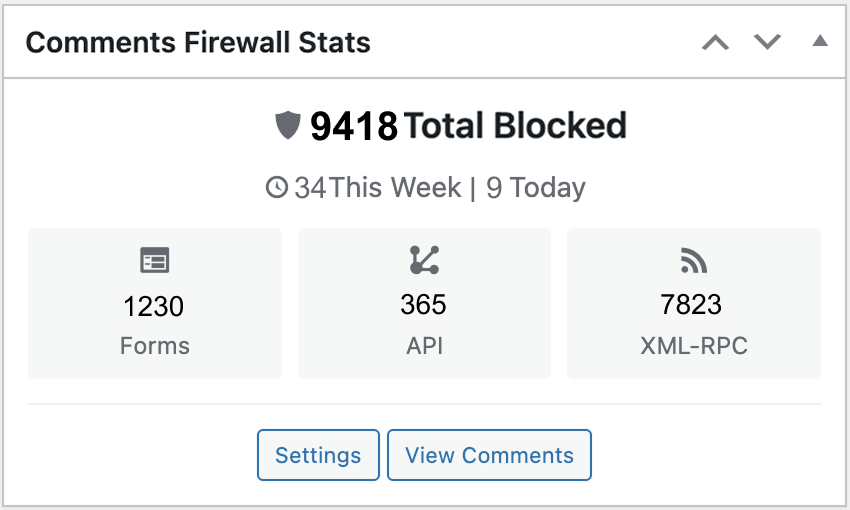
- Statistics Dashboard: Real-time tracking of blocked spam comments with visual dashboard widget
- Multilingual Ready: Full translations in 5 languages (English, Spanish, French, German, Arabic with RTL support)
- Optional Branding Badge: Customizable “Protected by Comments Firewall” badge for your site
- Theme Compatible: Works with any theme using standard WordPress comment hooks
- Lightweight & Secure: Zero performance impact with admin-only security controls
How It Works:
The plugin operates on multiple levels to ensure comprehensive spam protection:
- Form Level: Removes website fields from comment forms via WordPress hooks
- Validation Level: Blocks submissions containing HTTP/HTTPS patterns before they’re saved
- Method Level: Controls which submission methods (form, API, XML-RPC) are allowed
Perfect For:
- Site owners experiencing backlink spam in comments
- Site owners wanting to avoid the hassle of manually managing spam comments
- Sites that want to maintain existing comments while preventing new spam
- Anyone looking for a plugin that blocks all comments containing a link
The plugin maintains full backward compatibility and won’t disrupt your existing comment workflow or database structure.
Screenshots


Installation
- Upload the plugin files to the
/wp-content/plugins/comments-firewalldirectory, or install the plugin through the WordPress plugins screen directly. - Activate the plugin through the ‘Plugins’ screen in WordPress.
- Use the Settings -> Comments Firewall screen to configure the plugin options.
- That’s it! The plugin will start protecting your site immediately with sensible defaults.
FAQ
-
Will this plugin delete my existing comments?
-
No, Comments Firewall never deletes comments. It only prevents new spam comments from being submitted. All existing comments remain untouched in your database.
-
Does this work with my theme?
-
Yes, the plugin is designed to work with any theme that follows WordPress standards. It uses core WordPress hooks and doesn’t require theme-specific modifications.
-
What’s the difference between Balanced and Strict modes?
-
Balanced mode blocks standard HTTP/HTTPS URLs and common spam patterns. Strict mode additionally detects obfuscated links (like hxxp, www without protocol, etc.) and advanced spam tactics. Start with Balanced and switch to Strict if you still see spam getting through.
-
Can I customize the error messages?
-
Absolutely! You can customize the blocked comment message through the settings page. This message is shown to users when their comment is blocked. The message is fully translatable and supports your site’s language.
-
No, Comments Firewall is designed to work alongside other comment protection plugins. It provides an additional layer of security by blocking obvious spam before it even reaches other plugins.
-
Can I disable specific features?
-
Yes, all major features can be toggled on/off through the settings page, including website field removal, HTTP blocking, submission method controls, and the branding badge.
-
Does this support multisite installations?
-
Yes, the plugin works on WordPress multisite installations. Each site in the network needs to be configured separately through its own settings page.
-
How do I track blocked spam comments?
-
The plugin includes a dashboard widget that shows real-time statistics of blocked comments. You can view the total number of blocked attempts directly from your WordPress dashboard.
-
Can I allow legitimate URLs in comments?
-
Currently, the plugin blocks all HTTP/HTTPS URLs to prevent backlink spam.
-
Does this work with REST API and XML-RPC submissions?
-
Yes! The plugin can control comment submissions from forms, REST API, and XML-RPC. You can enable or disable protection for each method independently through the settings page.
-
Is the plugin translated into other languages?
-
Yes, the plugin includes complete translations for English, Spanish (Español), French (Français), German (Deutsch), and Arabic (العربية) with full RTL support. The plugin automatically uses your site’s language setting.
-
Does this plugin slow down my website?
-
No, Comments Firewall is designed for zero performance impact. All blocking happens before comments reach the database, and the code is optimized for speed. There are no external API calls or heavy operations.
-
How do I report bugs or request features?
-
You can report bugs or request features through the WordPress.org plugin support forum or via our support email listed in the plugin settings page.
-
What’s the “Protected by” badge feature?
-
You can optionally display a small “Protected by Comments Firewall” (only String, NO link) badge on your site. This is completely optional and can be customized (text, display position) or disabled entirely through the settings.
Reviews

Contributors & Developers
“Comments Firewall” is open source software. The following people have contributed to this plugin.
Contributors
Translate “Comments Firewall” into your language.
Interested in development?
Browse the code, check out the SVN repository, or subscribe to the development log by RSS.
Changelog
1.0.2 – 2025-10-18
Changes:
* Fixed review link to show all reviews (WordPress.org compliance)
1.0.1 – 2025-10-13
Bug Fixes:
* Fixed inline <style> tags to use proper WordPress enqueue functions (wp_add_inline_style())
* Enhanced WordPress.org coding standards compliance
1.0.0 – 2025-10-01
Initial Public Release
Core Protection Features:
* Remove website field from comment forms via WordPress hooks
* Smart link blocking with two-mode system (Balanced/Strict)
* Advanced pattern detection for obfuscated URLs (hxxp, h**p, etc.)
* Author name validation to block links in commenter names
* Force URL clearing on all submission methods
* Submission method controls (Form/REST API/XML-RPC)
* Customizable error messages with translation support
Dashboard & Statistics:
* Real-time statistics dashboard widget
* Track total blocked comments
* Visual display of protection activity
* Zero-performance-impact tracking system
Internationalization:
* Complete translations in 5 languages
* English, Spanish (Español), French (Français), German (Deutsch), Arabic (العربية)
* Full RTL (Right-to-Left) support for Arabic
* Translation-ready for additional languages
Developer Features:
* Action hooks for form modification tracking
* Validation lifecycle hooks
* Plugin activation/deactivation hooks
* Utility functions for settings and feature checks
* Security helpers for capability checking
* Admin-only security controls
Optional Features:
* Customizable “Protected by” badge
* Toggle features on/off individually
Technical:
* Full WordPress coding standards compliance
* Efficient validation algorithms
* Compatible with any standard WordPress theme
* Works alongside existing comment plugins
* Clean uninstall with option preservation
* Multisite compatible