

Description
CommentMate is a free visual website feedback plugin for WordPress designers, freelancers and agencies. Share a private review link so clients can leave comments on specific parts of a page, provide replacement text and upload images without logging in to WordPress. Client comments can be resolved directly or discussed in threaded replies. Images uploaded by your clients can be compressed and saved directly to your Media Library.
Collect website feedback and client content in one review
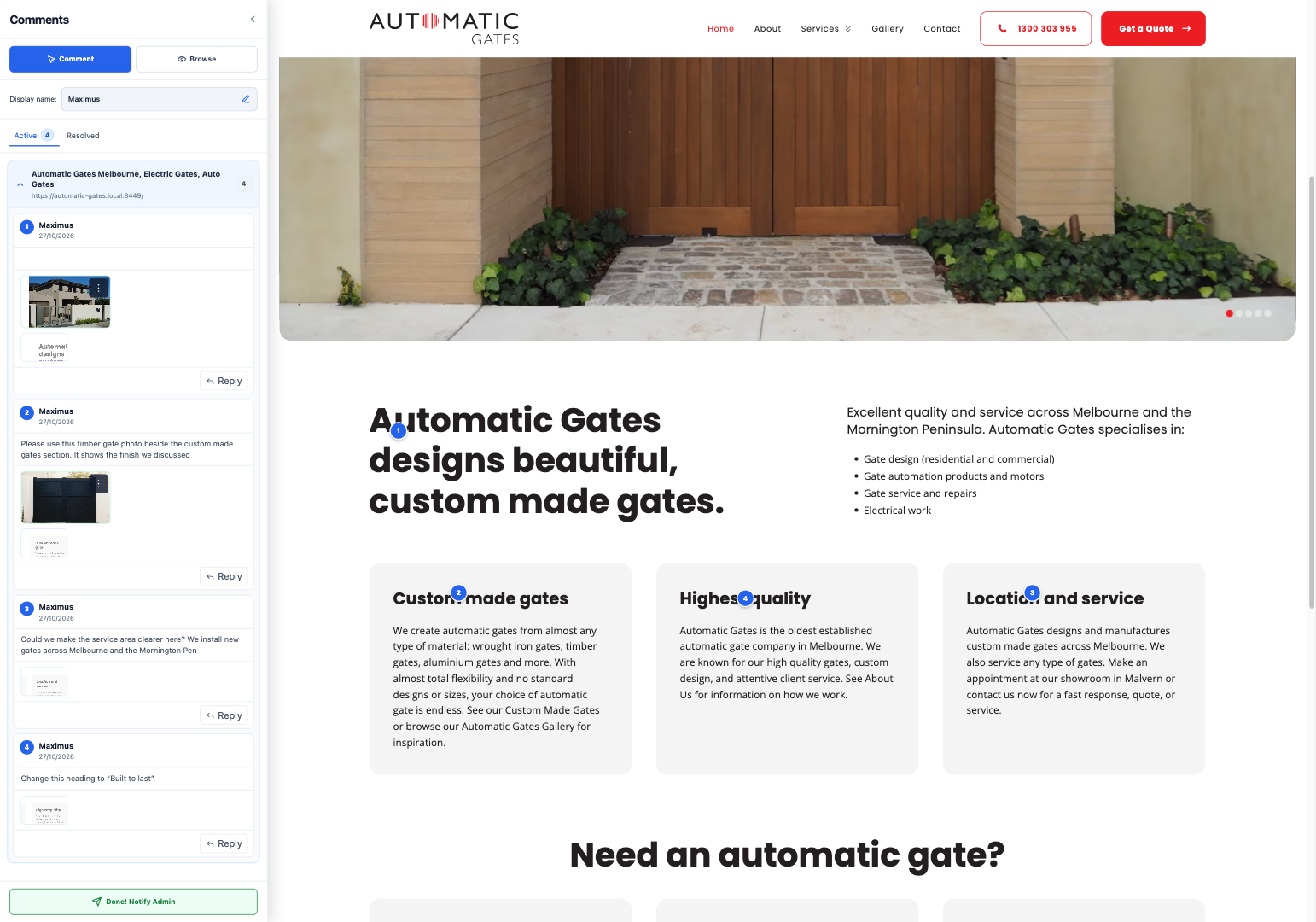
- Pin contextual comments to website pages and collect replacement text, images, PDFs and context screenshots.
- Discuss changes in threaded client and administrator replies, then resolve or reopen comments.
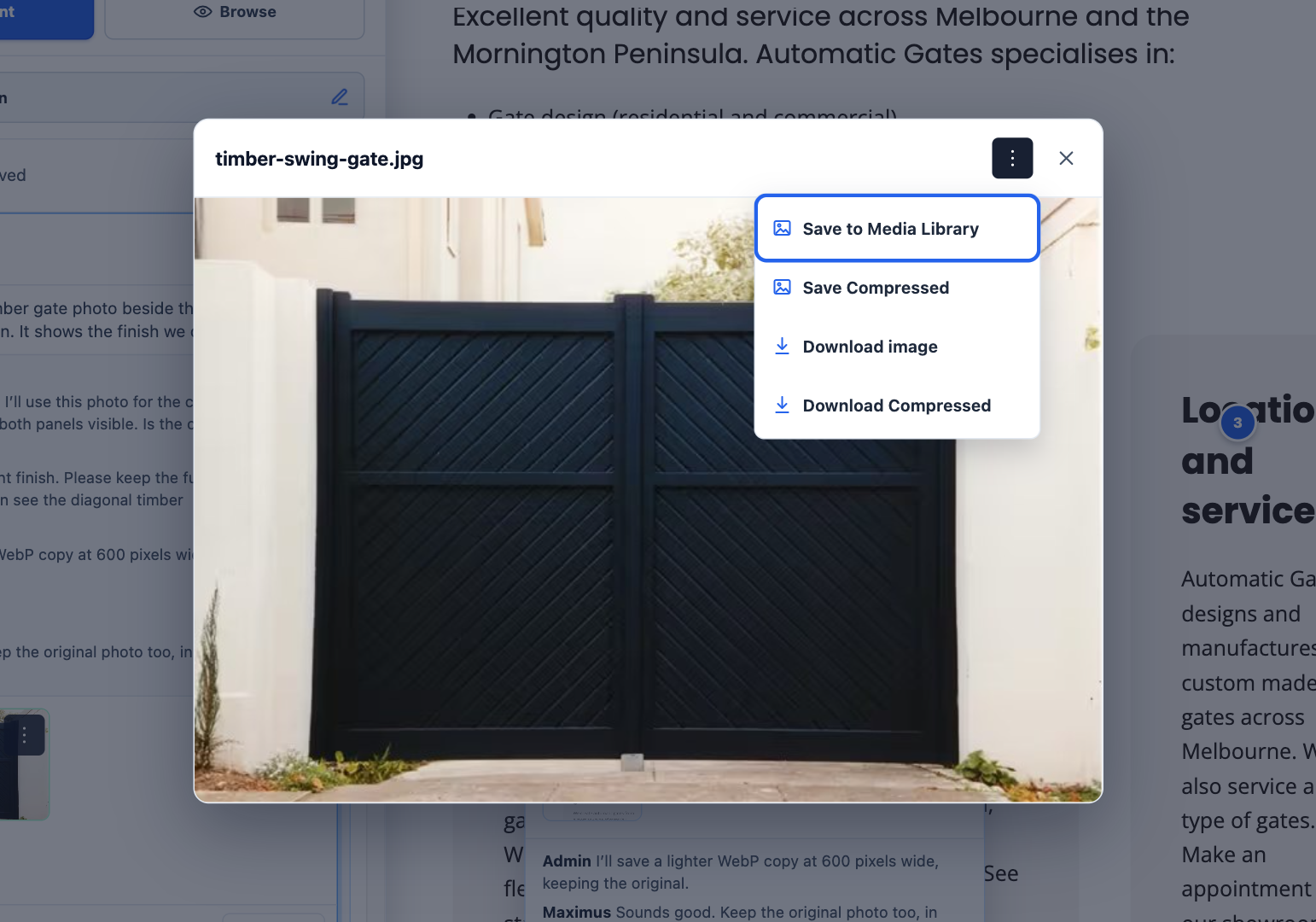
- Preview client images, download originals or save them directly to the WordPress Media Library.
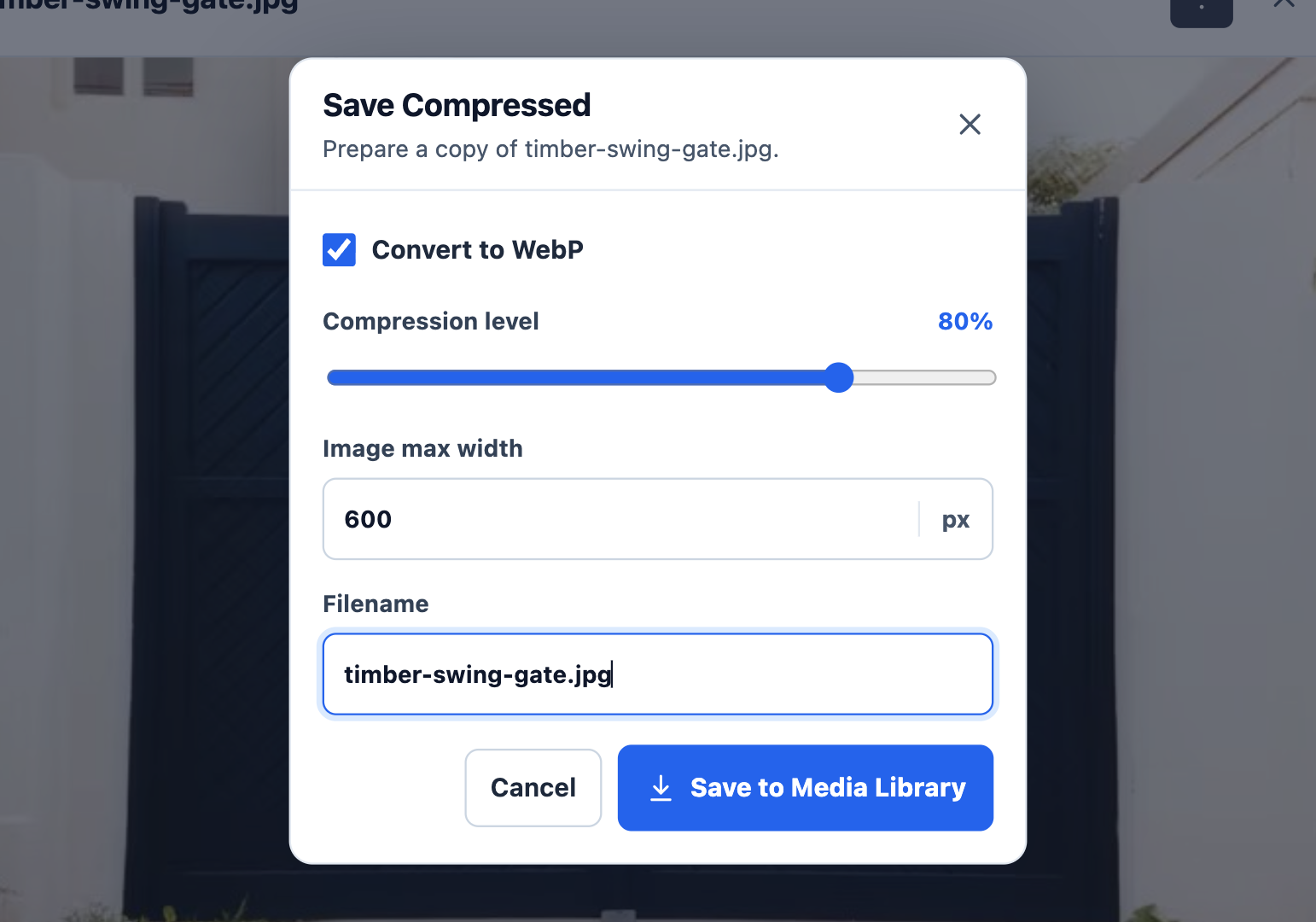
- Create separate compressed image copies with maximum-width, quality and WebP controls. Originals are preserved; identical saved copies are reused.
- Receive Done! Notify Admin completion notifications and optional daily summaries or immediate alerts.
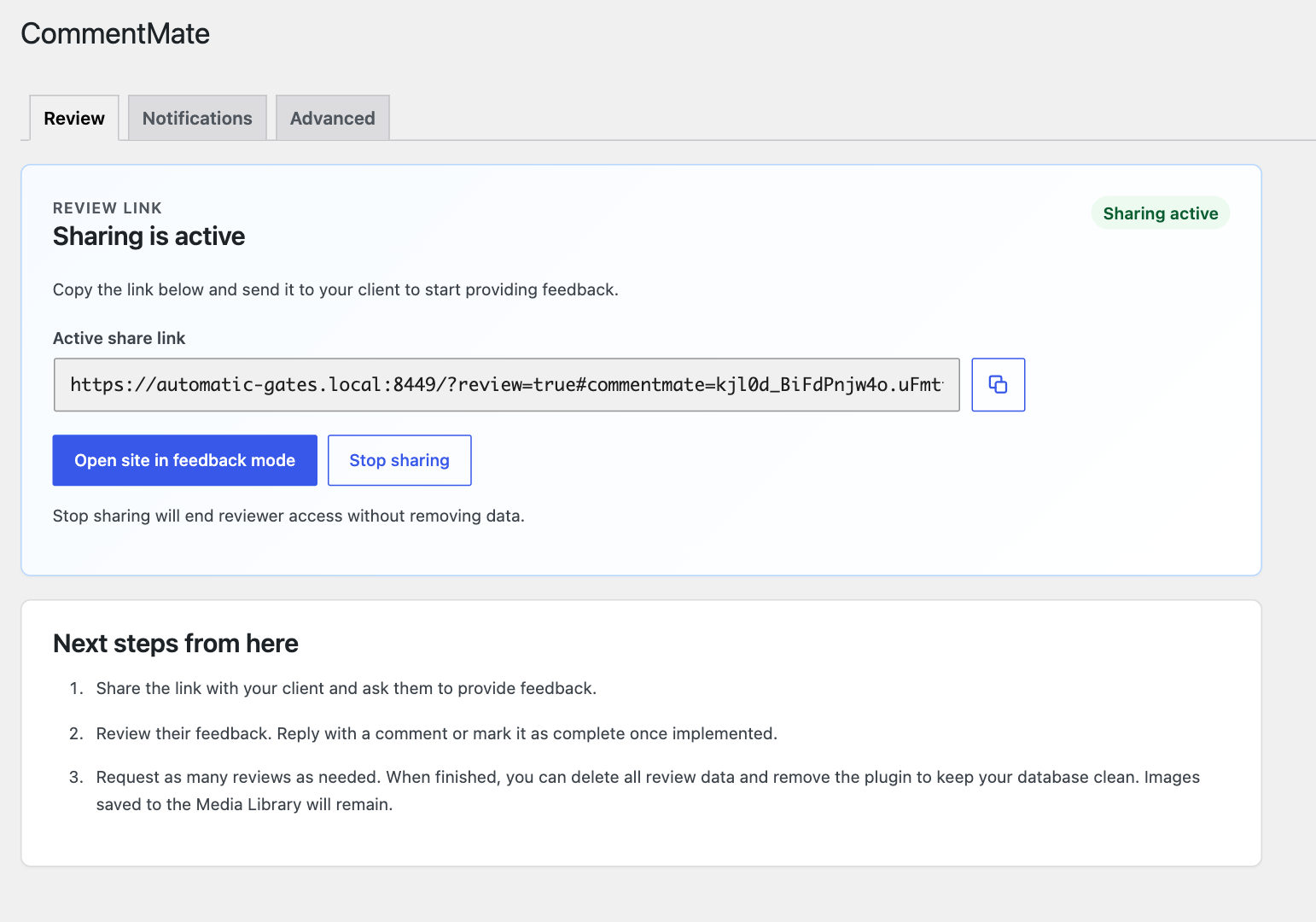
- Stop sharing to revoke the review link and reviewer sessions. Keep the review data or explicitly confirm deletion; saved Media Library images remain.
How CommentMate works
- Install CommentMate and create a private review link as a site administrator.
- Share the link with your client. They choose a display name and leave feedback directly on your website pages.
- Reply to comments, make the page changes in your usual editor and mark feedback as resolved. Save client images to your Media Library when needed.
CommentMate provides one site’s shared review workspace for all site administrators. Every current feature is included free. No PluginHub account, telemetry, external updater or external review service is required. Review data stays on your WordPress site and plugin assets are served locally.
Full review controls are desktop-first. Mobile supports touch comments and replies; desktop remains recommended for full review work. The sidebar is not a responsive-device emulator. The current release was tested on a physical iPhone; Android and some builder/browser combinations remain unverified. Test your intended pages and devices before inviting clients. Multisite is not supported.
Requirements and safeguards
Use WordPress 6.5 or newer, PHP 8.1 or newer, HTTPS, PHP Sodium, InnoDB and writable durable private storage outside all public document roots. PHP 8.1 is the compatibility minimum; supported PHP 8.3 or newer is recommended. GD is required for image attachments and screenshots; WebP needs GD WebP support. PDF validation needs Fileinfo. ZIP review downloads need ZipArchive. Advanced reports hosting checks; it cannot prove inbox delivery or external cache behavior.
Private files default to a 100 MiB storage budget, configurable from 25 to 250 MiB under Advanced Private storage. Individual uploads are limited to 5 MB; a message supports up to three images and one PDF. Feedback has a 25 MiB budget and 2,000 stored-record limit. Comments and their initial messages are separate records; this is not 2,000 standalone comments. Soft-deleted records count until full cleanup. These safeguards apply to everyone and cannot be unlocked by payment.
Unpublished drafts remain only in the open tab; leaving or reloading loses them. Failed saves retain text and failed files can be retried without reposting saved text. An administrator can repair a pin from a placement warning. Mail handoff is not a delivery guarantee.
Privacy and data retention
Review content, names, page URLs, anchors, replies and audit events are stored in this site’s database. Private files and screenshots are encrypted in an install-specific directory outside public web roots. Authentication uses a hashed share secret and hashed reviewer sessions; an encrypted copy of the active share secret lets administrators re-copy the link. Anyone with the active private link can join that site’s review. Treat it as confidential.
Screenshots may capture visible page content. Saving an image to the WordPress Media Library creates an ordinarily public media item, including compressed copies. Stopping sharing revokes access but retains data unless an administrator confirms cleanup. Deactivation retains data. WordPress Delete erases plugin data by default; an administrator can turn off “Erase data when this plugin is deleted” first. Media Library items remain under either choice.
Email uses the site’s configured WordPress mail transport. Completion notifications are enabled on fresh installs to the site administrator; automatic daily/immediate alerts are off. Existing settings are preserved. Reviewers’ names, page references, counts and feedback excerpts may be included in configured notifications. Confirm recipients before sharing.
Back up the database, private storage and the site’s WordPress encryption/authentication material together. A database-only or ordinary wp-content-only backup may be insufficient. See Installation and FAQ before changing hosts or salts.
Documentation, source and support
Read the CommentMate setup and usage guide or visit the CommentMate product page.
Readable frontend source, package-lock.json, Vite configuration and standalone build instructions are included. See building.txt and third-party-notices.txt. PHP is supplied as readable source. No private development account is needed to rebuild.
For help, use the WordPress.org support forum or contact PluginHub. Report security issues privately to info@pluginhub.com.au as described in SECURITY.md; do not post review links or private files publicly.
Screenshots




Installation
- Back up your WordPress site. Confirm Sodium and InnoDB are available. CommentMate can activate on HTTP; enable HTTPS before sharing or using review sessions. Administrators see a setup notice on the Plugins and CommentMate screens until HTTPS is available.
- In WordPress, go to Plugins Add New, search for CommentMate by thepluginhub, then install and activate it. You can also upload the official WordPress.org ZIP. Keep the folder commentmate and main file commentmate.php.
- Open CommentMate as an administrator and create a private review link on Review. All site administrators can manage the same review.
- Check Advanced hosting/storage results and Notifications recipients before inviting reviewers. Exclude ?review=true, CommentMate REST responses and reviewer cookies from every page cache/CDN.
- Copy the private link and share it only with intended reviewers. They choose a display name, select page content and add feedback. Administrators can comment using WordPress authentication and a saved display name (initially Admin).
- Use Stop sharing to revoke access. Keep review data is the default; Delete review data opens a second confirmation. If deletion is interrupted, follow the retry/continue control. Do not remove private files or keys manually.
FAQ
-
Is CommentMate free, and do I need an external account?
-
Yes. Every current feature described here is included free, including threaded replies, image compression and Media Library saving. No PluginHub account or external review service is required. A separate future Pro add-on is planned, but no paid features, price or release date are defined.
-
Do clients need to log in to WordPress?
-
No. Clients open the active private review link and choose a display name. They do not need a WordPress user account. Anyone with the active link can join, so share it only with intended reviewers. Site administrators use their existing WordPress login to manage the review.
-
Can clients suggest replacement text and send images or PDFs?
-
Yes. Clients can leave comments on specific parts of a page, provide replacement text and attach images or a PDF. Context screenshots are also supported. Administrators can copy the suggested text, discuss it in replies and resolve the comment.
-
Does resolving a comment automatically change my website?
-
No. CommentMate collects and tracks feedback. Make page and text changes in your usual WordPress editor or page builder, then resolve the related comments. Saving an image adds it to the Media Library; it does not insert it into a page automatically.
-
Who can reply to, resolve or reopen comments?
-
Clients and administrators can discuss feedback in threaded replies. All site administrators manage the same shared review and can resolve or reopen comments. Reviewers can edit or delete their own comments; they cannot resolve or reopen them.
-
Can I compress client images and save them to the Media Library?
-
Yes. Preview or download the original, or create a separate smaller copy using maximum-width, quality and WebP options. Saving does not overwrite the original upload. WebP requires GD WebP support. A saved Media Library copy is ordinarily publicly accessible and remains after review cleanup or plugin deletion.
-
Where is client feedback stored, and is it private?
-
Review data stays in your WordPress database. Private attachments and screenshots are encrypted in an install-specific directory outside public web roots. No external review backend is required. Access is controlled by the active review link, so keep that link confidential. Media Library copies are ordinarily public.
-
Can clients use CommentMate on a phone or tablet?
-
Mobile supports touch comment creation and threaded replies. Desktop is recommended for full review controls. The current release was tested on a physical iPhone; Android and some browser/builder combinations remain unverified. The sidebar is not a responsive-device emulator. Test your intended device and pages before sharing.
-
Will CommentMate work with my theme or page builder?
-
Compatibility with every theme, builder and dynamic page cannot be guaranteed. Test comment placement and the review workflow on the actual pages your clients will review. Administrators can repair a pin from a placement warning. Keep review sessions and protected endpoints out of page caches as described in Installation.
-
What does my hosting need, and does Multisite work?
-
Use a single-site WordPress 6.5+ installation with PHP 8.1+, HTTPS, Sodium, InnoDB and durable writable private storage outside public web roots. Supported PHP 8.3+ is recommended. GD supports images/screenshots, GD WebP supports WebP, Fileinfo validates PDFs and ZipArchive enables ZIP review downloads. Check Advanced before sharing. Multisite is not supported.
-
Are there upload or feedback limits?
-
Yes. Each file is limited to 5 MB, with up to three images and one PDF per message. Private files have a 100 MiB default budget, configurable from 25 to 250 MiB. Feedback has a 25 MiB and 2,000 stored-record safeguard; comments and initial messages count separately, including soft-deleted records until cleanup. Payment does not remove these safeguards.
-
Can I receive email notifications when clients finish or add feedback?
-
Yes. Done! Notify Admin sends a completion notification. Administrators can also enable daily summaries or immediate alerts. Completion notifications are on for fresh installs; daily/immediate alerts are off by default. Email uses your existing WordPress mail setup, so delivery depends on that setup and cannot be guaranteed.
-
What happens when I stop sharing, deactivate or delete CommentMate?
-
Stop sharing revokes the active link and reviewer sessions. Review data is kept by default; deleting it needs explicit confirmation. Deactivation keeps data. WordPress Delete erases plugin data by default unless you first turn off “Erase data when this plugin is deleted”. Saved Media Library images remain in every case.
-
Can I export feedback, and is that a full backup?
-
Advanced Data management Download review data exports readable comments/replies, structured review data and available private attachments. Media Library copies are referenced rather than included. Protect the download: it contains private feedback and is not a complete recovery backup.
-
How do I keep private files safe when moving or restoring a site?
-
Use a durable, non-public parent directory. If automatic detection cannot establish one, ask your host to define COMMENTMATE_PRIVATE_STORAGE_DIR in wp-config.php before activation. Back up the plugin database tables/options, every registered private-storage directory and wp-config.php authentication salts securely, together with Media Library uploads. Restore them together, preserving install identity, review keys and salts. Verify attachment decryption before discarding the backup.
-
How do I update an older 0.1.13 or 0.1.15 installation?
-
Back up the database, private storage and wp-config.php securely. Deactivate CommentMate without clicking Delete. Replace the existing commentmate folder in place using the latest official CommentMate ZIP, then reactivate. Do not uninstall and reinstall: WordPress Delete may erase review data. Confirm feedback, administrator access, attachments and notifications. The old signed updater must be inactive during replacement. Directory Free uses WordPress.org’s update system.
-
What if deleting review data fails?
-
Sharing stays stopped. CommentMate retains its cleanup checkpoint and encryption key until verification succeeds. Resolve the reported private-storage problem, then retry or use Continue deleting data in Advanced. Do not remove private files or keys manually. Saved Media Library images remain accessible.
Reviews
There are no reviews for this plugin.
Contributors & Developers
“CommentMate – Visual Website Feedback” is open source software. The following people have contributed to this plugin.
Contributors
Translate “CommentMate – Visual Website Feedback” into your language.
Interested in development?
Browse the code, check out the SVN repository, or subscribe to the development log by RSS.
Changelog
1.0.9
- Allow silent activation on HTTP and show scoped HTTPS setup guidance. Sharing and review sessions still require HTTPS.
- Use WordPress directory helpers for private storage, hosting checks and safe uninstall, including relocated public directories.
- Authenticate protected REST routes through explicit permission callbacks while preserving guest and administrator safeguards.
1.0.8
- Show complete replies in scrollable threads and keep mobile comment details beside their numbered pins.
- Improve mobile name editing, sidebar width and swipe gestures, mode selection and scroll containment.
- Refine narrow author names and crowded host headers; strengthen database input/query handling and directory readiness.
1.0.7
- Replace the unfinished-draft reminder with Remove / Publish / Edit, retain the chosen point, and protect draft publication and file recovery.
1.0.6
- Remove redundant new-link instructions. Show deletion completion without the old warning and refresh the admin screen on dismissal.
1.0.5
- Share review management across site administrators and simplify Review/Advanced guidance.
- Allow private-data cleanup to continue after saved images are edited or removed; preserve saved Media Library files.
- Refine collapsible sidebar groups, long-name wrapping and narrow card actions.
- Modernize the add-comment cursor, use its lower-left tail as the click point and mark the chosen spot with a blue dot while typing.
1.0.4
- Add touch creation/replies, keyboard-aware overlays and collapsible page groups; retain desktop-first guidance.
- Add guarded owner placement repair, tab-memory draft recovery and failed file retry without reposting text.
- Add private owner notification failure details and safe retries; lazy-load review modules with WordPress translations.
- Keep stable identifiers and the short CommentMate menu label; expand the display name.
1.0.3
- Add private review downloads, confirmed owner transfer/missing-owner recovery, feedback usage and bounded storage controls.
- Add first-review and full-backup guidance; retain PHP 8.1 compatibility with supported-hosting advice.
- Use WordPress-managed screen assets, correct file-feature requirements, refresh dependencies and prepare all interface text for translations.
1.0.2
- Restrict approval and reopening to the owner; reviewers can edit or delete their own comments from the popup.
- Add inline display-name editing and refine review/notification guidance and completion-button styling.
1.0.1
- Correct the notification introduction to distinguish completion notifications from optional automatic alerts.
- Align Keep review data and Delete review data with consistent spacing and wrapping; retain safe defaults and confirmation.
1.0.0
- Added optional confirmed cleanup after Stop sharing, bound to the stopped review.
- Preserved saved original and compressed Media Library images during cleanup.
- Added public source/build files and directory packaging; removed the external updater.
- Corrected PHP 8.1 return-type compatibility.
0.1.15
- Added owner commenting and improved narrow-sidebar controls and text copying.
0.1.14
- Added compressed image saving/downloads and Done! Notify Admin.
0.1.13
- Improved review setup and exit controls.