
Description
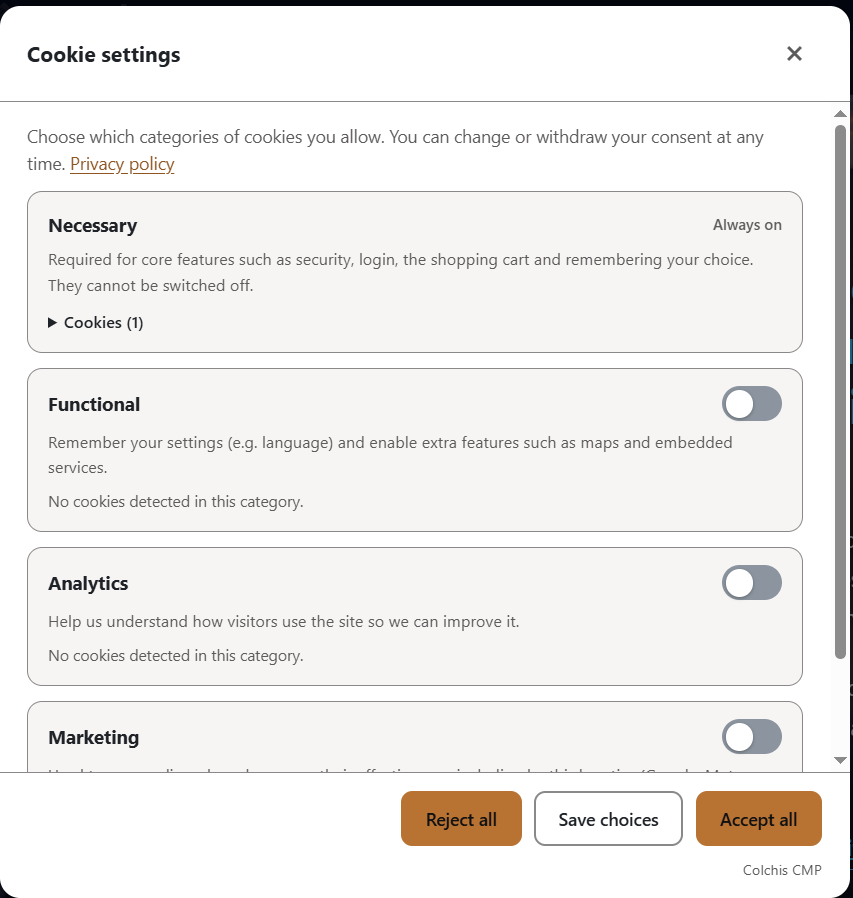
Colchis Cookie Consent shows a cookie banner and blocks analytics, advertising and other trackers until the visitor agrees. It works completely on its own: after you activate it, the plugin does not contact any Colchis server and loads all its files from your own site.
- Automatic blocking of trackers before consent, both on the server (in the page HTML) and in the browser
- Known embeds (YouTube, Google Maps, social widgets) wait for consent too
- Google Consent Mode v2
- The visitor’s choice is remembered in the visitor’s browser, also in Safari for the full period
- Compatible with common caching and optimization plugins (the script is marked so they leave it alone)
- The banner speaks your site’s language by itself — English, Georgian, Russian, German, French, Spanish, Italian, Polish or Dutch
- Any other language too: write the banner texts yourself and they are used as they are
- No account and no subscription: blocking, the banner and Consent Mode are free and stay free
Optional: connect to the Colchis service. If you want to design the banner in a dashboard, keep a log of consents as proof, or run a site in several languages where every page shows the banner in its own language, you can switch on “Connect this site to the Colchis service” on the settings page. The banner on your site then becomes the Colchis service’s own banner, loaded from the service. That is the only thing that sends data to a Colchis server (see “External services” below).
Credit. This plugin never adds a credit or link to your site. On the free plan of the Colchis service, the service’s banner (used only after you connect) shows a small “Powered by ColchisLab” line in its cookie settings window, which a paid plan can remove; the settings page says so next to the connection switch.
External services
This plugin works without any external service. Everything below happens only after the site owner ticks “Connect this site to the Colchis service” under Settings Colchis Cookies. The box is unticked after installation and after every update; with it unticked, neither the plugin nor the visitor’s browser makes any request to the addresses below.
The Colchis service is provided by Colchis lab LLC (ColchisLab), Tbilisi, Georgia, on servers in Germany. Both addresses below are served through Cloudflare.
Terms of service: https://colchislab.com/terms/
Privacy policy: https://colchislab.com/privacy-policy/
Colchis banner (cdn.colchislab.com)
What it is for: on a connected site the cookie banner is the Colchis service’s own banner, so that its design and texts can be managed in the Colchis dashboard (app.colchislab.com) and improvements reach the site without a plugin update.
What is sent and when: on every page view, the visitor’s browser downloads the two banner files from cdn.colchislab.com. Like any web server, the CDN receives the visitor’s IP address, the browser name and the address of the page.
Colchis platform API (api.colchislab.com)
What it is for: applying the banner settings made in the Colchis dashboard, and keeping a log of consents as proof of consent.
What is sent and when:
- When a visitor opens a page (at most once every 10 minutes per visitor): the visitor’s browser requests the banner settings for the site’s domain name. If “Regional rules” are switched on in the dashboard, the browser also asks the service which region the visitor is in (the country is worked out from the IP address and is not stored).
- When a visitor makes a choice (accept, reject or custom): the site’s domain, a random anonymous visitor ID, the choice and its version, the language, the address of the page (without its query part) and the Global Privacy Control signal. The service also records the browser name and a shortened, one-way hashed form of the IP address; the full IP address is not part of the consent record.
- From your WordPress server, when you open the settings page and once a day: the site’s domain name, to check whether the domain is registered.
In every case the service’s server logs keep the IP address for a limited time (at most about five weeks) for security and abuse prevention.
Tracker addresses listed in the plugin
The plugin contains a list of addresses of third-party trackers and embeds, such as connect.facebook.net, googletagmanager.com, google-analytics.com, maps.googleapis.com and youtube.com (in includes/trackers.php and assets/src/cookie-banner.js). These are not services the plugin uses: the plugin never contacts them and sends them nothing. It only uses the list to recognise those trackers in your pages and hold them back until the visitor has agreed.
Source code
The files assets/cookie-banner.min.js and assets/cookie-banner-ui-1.min.js are minified. Their readable source ships with the plugin, in assets/src/ (cookie-banner.js and cookie-banner-ui.js), and nothing else is needed to read or change them.
Each minified file is built from the source next to it with one command, and its first line records the SHA-256 of the exact source it was built from, so the two can always be checked against each other:
npx terser assets/src/cookie-banner.js -c -m --comments false -o assets/cookie-banner.min.js

npx terser assets/src/cookie-banner-ui.js -c -m --comments false -o assets/cookie-banner-ui-1.min.js
Screenshots

Installation
- Upload the plugin and activate it. The banner is on straight away.
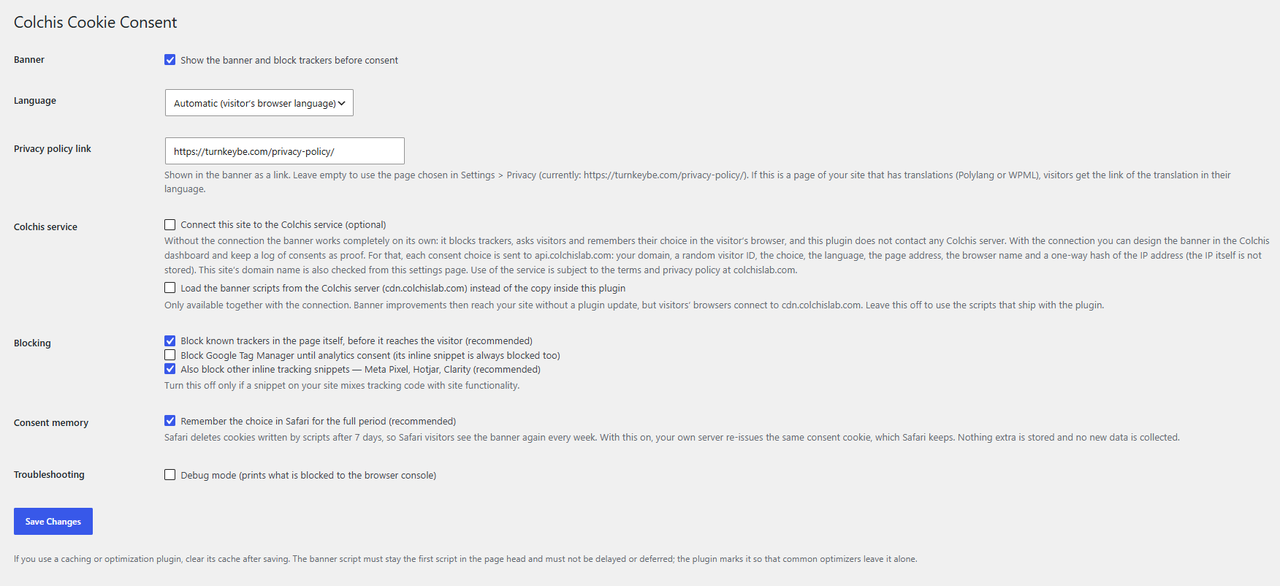
- Open Settings Colchis Cookies to choose the language and blocking options.
- Optional: to design the banner and keep a consent log, tick “Connect this site to the Colchis service” and add your domain in the Colchis dashboard (app.colchislab.com).
- Deactivate any other cookie plugin so visitors do not see two banners.
FAQ
-
Does the plugin send any data to you?
-
Not unless you switch the connection on. See “External services” above for exactly what is sent when you do.
-
Do I need an account?
-
No. The banner works without one. An account is only needed for the dashboard and the consent log.
-
Clear the cache of your caching plugin and Cloudflare. The banner script must stay the first script in the page head and must not be delayed or deferred.
-
It blocks the most common trackers and embeds by address and by their inline snippets. A tracker it does not know can be handed over by adding
type="text/plain"anddata-category="analytics"(ormarketing,preferences) to its script tag. -
Is this legal advice?
-
No. The plugin is a tool; what your site needs to do under GDPR, ePrivacy or other laws depends on your situation.
Reviews
There are no reviews for this plugin.
Contributors & Developers
“Colchis Cookie Consent” is open source software. The following people have contributed to this plugin.
Contributors
Translate “Colchis Cookie Consent” into your language.
Interested in development?
Browse the code, check out the SVN repository, or subscribe to the development log by RSS.
Changelog
0.7.15
- Updating from a version before 0.7.0 no longer switches the Colchis connection on by itself. The connection is on only when the site owner ticks it.
- The plugin no longer contains any credit. The “Credit” setting is gone; a connected site uses the Colchis service’s own banner, loaded from the service, whose free plan shows a small credit line (explained on the settings page).
- A connected site always loads the banner from the Colchis service; the separate “Load the banner scripts from the Colchis server” option is gone.
- Server-side blocking now uses the page output buffer that WordPress itself manages (WordPress 6.9 and newer). On older versions the banner still blocks trackers in the visitor’s browser.
- Translations come from translate.wordpress.org; the bundled Georgian translation files were removed.
- “External services” in this readme is clearer about what is sent, when, and what the tracker address list is for. The consent log text is precise about IP addresses: only a shortened, hashed form is part of the consent record.
0.7.13
- The “Source code” section now gives the exact build command for each minified file, and points at the readable source that ships inside the plugin.
0.7.12
- New section “Banner texts”: write the heading, the text, the buttons and the category descriptions in your own words. Leave a field empty to keep the built-in text.
- This also covers languages the plugin does not carry: a Turkish or Swedish site writes its own texts and the banner speaks that language.
0.7.11
- The banner now takes your site’s language by itself: a German site gets a German banner, a Georgian site a Georgian one, with nothing to set. You can still pick any of the nine languages by hand.
- A site in several languages, where each page shows the banner in that page’s own language, is part of the Colchis service and the setting says so.
0.7.10
- An opt-in “Credit” setting was added (off by default, plain text, never a link). It was removed again in 0.7.15, see below.
0.7.8
- Translations are now left entirely to WordPress, which loads them for this plugin automatically; the manual call is gone.
- Code comments explain why the raw cookie header is read unchanged (it is validated against a strict pattern before use) and why WPML’s own filter name carries no plugin prefix.
0.7.7
- Fix: with Polylang, the privacy policy link on pages in another language now points to the translated page. The page is found by its path instead of through a query that Polylang adjusts to the visitor’s language.
0.7.6
- More reliable lookup of the translation of the privacy policy page (also when the page address cannot be resolved directly, and with the visitor’s language passed to Polylang).
- With the Debug setting on, an HTML comment in the page source shows how the privacy policy link was chosen.
0.7.5
- The privacy policy link: if it points to a page of the site that has a translation (Polylang, WPML), visitors get the translated page.
0.7.4
- New setting “Privacy policy link” (optional). Empty = the page chosen in Settings > Privacy. Developers can change it with the
colchis_cc_policy_urlfilter.
0.7.3
- Fix: the banner shows a link to the site’s Privacy Policy page (the page chosen in Settings > Privacy) when the plugin works without the Colchis service. Previously the link only appeared for connected sites.
0.7.2
- New default banner colours: copper primary colour with grey borders.
- Button text colour is now chosen by real contrast (dark text on mid-tone colours such as copper).
0.7.1
- Fix: in responsive embeds (the WordPress YouTube block, page builders) the placeholder of a blocked video now fills the video’s place instead of appearing below an empty gap.
0.7.0
- The plugin now contains the banner scripts (minified, with readable source in
assets/src) and no longer downloads code from a server. - New option “Connect this site to the Colchis service”: off for new installations. With it off the plugin and the banner contact no Colchis server at all.
- New option to load the scripts from the Colchis CDN instead (only with the connection on).
- Removed: the daily script download, the “Update script now” button and the release notification endpoint (they are not needed any more).
- Sites updating from an older version: the old downloaded copy in the uploads folder is removed after a week. (Until 0.7.15 such sites were also switched to the connection automatically; that no longer happens.)
0.6.1
- The banner script on your site is now updated right after each Colchis release. Until now the local copy was refreshed by a daily WordPress job, which only runs when somebody visits the site, so quiet sites could keep an old copy for days. The Colchis server now asks your site to fetch the newest script (it can only ever download the official script from the Colchis server).
0.6.0
- Faster page loads: the part of the banner that blocks trackers is now a much smaller file, and the banner’s texts, styles and dialogs load in the background instead of holding up the page.
0.5.2
- The settings screen is now translatable and ships with a Georgian translation. Other languages can be added from the included translation template (languages/colchis-cookie-consent.pot).
0.5.1
- Fix: on a site registered with the platform the server wrote the consent cookie with a slightly different scope than the banner, leaving two cookies of the same name. The server now matches the banner and clears the duplicate.
0.5.0
- Safari: the visitor’s choice is now remembered for the full period. Safari deletes cookies written by scripts after 7 days, so Safari visitors used to see the banner again every week. Your own server now re-issues the same consent cookie, which Safari keeps. No new data is collected and the value itself never changes. Can be switched off under “Consent memory”.
0.4.2
- Google Maps: blocks every embed form (google.com/maps?…output=embed as well as /maps/embed) and the Maps JavaScript API (maps.googleapis.com) until consent.
0.4.1
- YouTube: the IFrame Player API (youtube.com/iframe_api and the player files) is now blocked before consent as well. Page builders such as Elementor load it dynamically, so it used to run even though the video iframe itself was blocked.
0.4.0
- Google Tag Manager: when GTM blocking is on, the inline GTM snippet is blocked too (on the server and in the browser), not only the gtm.js file.
- Inline tracking snippets (Meta Pixel, Hotjar, Clarity) are now blocked by default; the setting can still be switched off.
0.3.0
- Server-side blocking: known trackers (scripts and iframes) are marked in the page HTML before it is sent, so they cannot run before consent. Can be switched off in the settings.
0.2.1
- The banner script is now served from your own domain (daily refresh, automatic fallback to the Colchis server).
- New “Update script now” button.
0.1.0
- First version.