

Description
Coffee and Numbers is a private, self-hosted accounting and invoicing plugin that lives inside your WordPress admin dashboard. It’s built for freelancers, creatives and small businesses (photographers, designers, consultants, tradespeople, writers and more) who want clarity on their finances without thinking like an accountant.
Your financial data stays in your own WordPress database. Nobody else holds it.
Core features (free):
- Invoices — unlimited invoices with a PDF for each, showing your logo, business details, bank details and payment terms. Mark them paid with the date they were paid, and see what’s outstanding at a glance
- Other currencies — invoice or quote a client in GBP, USD, EUR, AUD, CAD or ZAR, and record the home-currency equivalent and exchange rate you used, so your totals stay in your own currency
- Quotes and estimates — unlimited, each with a PDF in the same layout as your invoices, numbered separately so they never affect your invoice numbers. Quotes never count towards income, VAT or profit
- Expense tracking — categorise receipts by type, note whether a receipt is held, track VAT on each expense
- Mileage log — log business journeys with automatic claim calculation at the correct rate for your country
- Recurring expenses — set up regular costs once (rent, broadband, software) and they log themselves automatically every month
- Home working calculator — enter your full bills and the tool calculates the claimable business proportion based on your room ratio
- Profit dashboard — live income, expenses, mileage and net profit for the current tax year
- VAT/tax summary — quarterly breakdown with the correct box numbers for your country’s filing form
- CSV export — clean accountant-ready spreadsheet covering all income, expenses, mileage and VAT
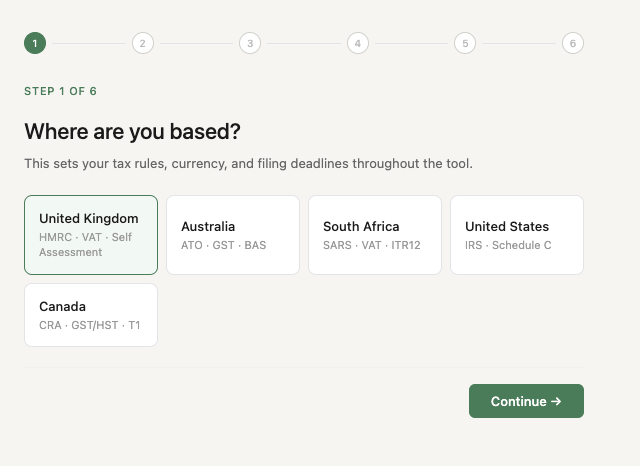
- Multi-country support — UK (HMRC/VAT), Australia (ATO/GST), South Africa (SARS/VAT), United States (IRS/Schedule C), Canada (CRA/GST/HST)
- Filing deadlines — upcoming tax deadlines with countdown and configurable email reminders
- GDPR tools — export all your data as JSON, or delete everything permanently
Everything above is included in this plugin, with no limits.
Coffee and Numbers Pro is a separate, paid version available from coffeeandnumbers.com. It adds:
- Pro forma invoices
- One-click conversion from a quote to an invoice, which takes the next invoice number and keeps a link back to the quote
- Deposits — set a deposit percentage on a quote or pro forma (its PDF shows the deposit due), invoice the deposit, then invoice the balance with the deposit deducted
- AI receipt scanning — photograph a receipt or upload a PDF, and Claude AI extracts the supplier, date, amount and VAT automatically, pre-filling the expense form
- Year-end package for your accountant — summary PDF, CSVs, invoice PDFs and receipt images in one ZIP
External services
Coffee and Numbers keeps everything on your own site and contacts no outside service, with one optional exception:
- Freemius (licensing and updates, https://freemius.com). If you choose to opt in when you activate the plugin, it sends basic information about your site and the plugin (such as the site URL, WordPress and PHP versions, and plugin version) so you can receive notices and manage an upgrade. Nothing is sent if you skip the opt-in. Freemius terms: https://freemius.com/terms/ and privacy policy: https://freemius.com/privacy/
Privacy Policy
Coffee and Numbers stores all financial data in your own WordPress database. It sends nothing to external servers, apart from the optional Freemius opt-in described under External services.
Screenshots



Installation
- Download the coffee-and-numbers.zip file
- In your WordPress admin, go to Plugins Add New Upload Plugin
- Choose the zip file and click Install Now
- Click Activate Plugin
- Click Coffee & Numbers in the left sidebar — the setup wizard runs automatically on first launch
The setup wizard takes approximately three minutes and configures your country, tax registration status, work location, home working method, and recurring expenses.
Upgrading from an earlier version? Simply upload this zip via Plugins Add New Upload Plugin Replace current. Your data is preserved. On first load after upgrading, Coffee and Numbers checks for any database changes needed for this version and applies them automatically.
FAQ
-
Is my financial data secure?
-
Yes. All your data is stored in your own WordPress database on your own hosting. It is never sent to any third party.
-
Do I need to be VAT registered to use Coffee and Numbers?
-
No. During setup you choose whether you are VAT registered or not. If not, all VAT-related features are hidden and the tool works as a straightforward income and expense tracker.
-
Which countries does Coffee and Numbers support?
-
UK (HMRC, VAT, Self Assessment), Australia (ATO, GST, BAS), South Africa (SARS, VAT, ITR12), United States (IRS, Schedule C), and Canada (CRA, GST/HST, T1 Return).
-
Can I invoice a client in another currency?
-
Yes. Choose the currency on the invoice or quote; its line items and PDF are in that currency. Then enter the home-currency equivalent and the exchange rate you used. That equivalent is what counts toward your profit and VAT totals, and the CSV export shows both.
-
How do I generate an invoice PDF?
-
Add your logo, payment terms and bank details in Settings Invoicing, then click the document icon next to any invoice or quote to download its PDF. If you’d like to help others find the plugin, you can choose to add a small “Created with Coffee and Numbers” line to your PDFs in the same settings; it’s off unless you turn it on.
-
How do I take a deposit?
-
Issue a normal invoice for the deposit, and later a second invoice for the rest with a negative “Less deposit” line. Both are ordinary invoices, so your income and VAT land in the right quarters. In the UK, VAT is due on a deposit once you receive it.
-
Not currently. Coffee and Numbers calculates and displays your figures mapped to the correct form fields for your country, which you can then enter into your tax authority’s portal or hand to your accountant. Coffee and Numbers is designed to work alongside dedicated bridging software for Making Tax Digital submission.
-
Will the plugin work with my theme?
-
Yes. Coffee and Numbers lives entirely inside the WordPress admin dashboard and is completely invisible to public visitors. Your theme has no effect on it.
-
Can I use Coffee and Numbers on multiple WordPress sites?
-
Each installation is independent. Your data on one site is entirely separate from any other site.
Reviews
There are no reviews for this plugin.
Contributors & Developers
“Coffee and Numbers” is open source software. The following people have contributed to this plugin.
Contributors

Translate “Coffee and Numbers” into your language.
Interested in development?
Browse the code, check out the SVN repository, or subscribe to the development log by RSS.
Changelog
2.3.6
- Code tidy-up, no changes to how the plugin works
2.3.5
- The plugin’s styles now apply only inside its own page
- Tidier checkboxes and Receipts / Recurring switch on the Expenses tab
2.3.4
- Invoicing in other currencies is now part of the free plugin
- Coffee and Numbers’ notices now appear only on its own page
2.3.3
- PDFs no longer carry a “Created with Coffee and Numbers” line unless you choose it in Settings Invoicing
- Fixed: on MySQL 5.7, creating the plugin’s tables could fail on activation, leaving the ledger without its tables
2.3.2
- Fixed: on the cash basis, credit notes weren’t subtracted from income, so the dashboard, Tax summary, CSV export and year-end package showed income and profit too high. VAT figures were already correct
2.3.1
- Readme: updated the WordPress.org contributor name. No changes to the plugin itself
2.3.0
- First public release.