

Description
Cash on Delivery brings in orders, and it brings in returns. You pack a parcel, pay for the forward leg, pay for the return leg, and the goods come back unsold. CODZap puts one question in front of the customer before any of that happens.
A customer places a COD order. A minute later they get a WhatsApp message:
Hello Rakesh, thank you for your order at Your Store!
Order #1042 — 2 x Classmate Notebook, 1 x Geometry Box
Total: ₹450.00 (Cash on Delivery)
Please confirm you would like us to process this order.
[ Yes, confirm ] [ No, cancel ]
Tap Yes and the order carries on as normal. Tap No and CODZap cancels the order in WooCommerce, puts the stock back, notes the reason on the order, and replies with a friendly “do come again”. You never packed it, and you never paid to ship it.
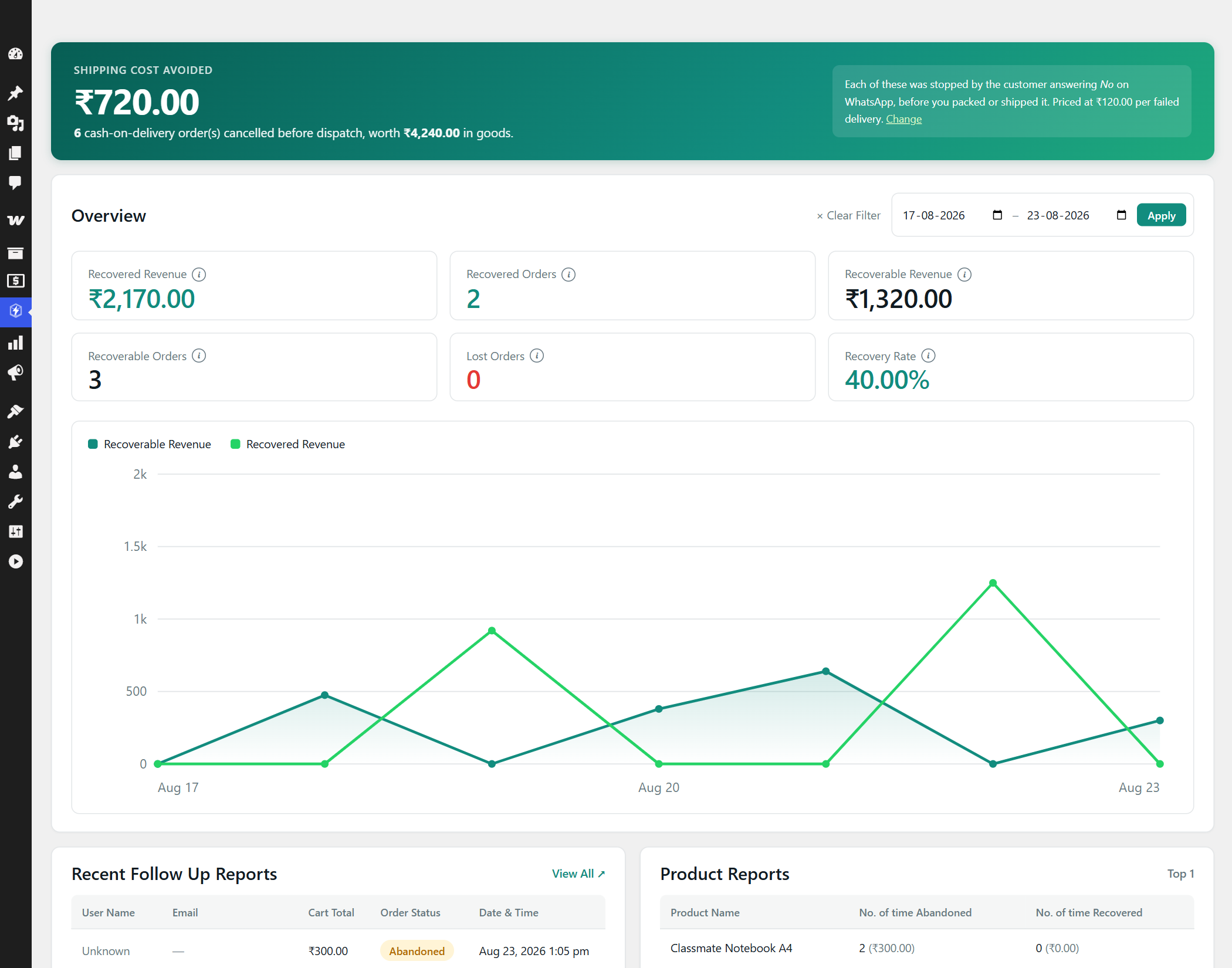
The dashboard then tells you what that was worth: how many orders were stopped before dispatch, and the shipping cost you avoided.
What it does
- COD confirmation on WhatsApp — Yes / No buttons on every Cash-on-Delivery order.
- Automatic cancellation and restock when a customer declines. Nothing to action by hand.
- A deadline on silence — orders nobody ever answers close themselves after however many hours you allow, cancelled and restocked or held for your review.
- Order status updates — Processing, Completed, On hold, Refunded, or any custom status.
- Inbox — every conversation laid out the way the customer sees it in WhatsApp, grouped by number, with WhatsApp’s own sent, delivered and read ticks, and the messages that failed marked in red.
- Follow Up Reports — every abandoned, recovered and lost cart in one searchable list, with filters, a detail view and a CSV export.
- Abandoned cart recovery — a reminder sequence with a one-tap link that puts the customer’s cart back exactly as they left it.
- Owner alerts — a WhatsApp to your own number on new COD orders and on every customer decision.
- RTO savings dashboard — orders stopped before dispatch, and what that saved you in wasted shipping.
- Message preview — see every message, rendered against a real order, before a single one is sent.
- Message log — every message in and out, with Meta’s error codes translated into plain English.
- Backup and restore — download your whole configuration as a file, credentials included if you want them, and put it back in one step.
- Review requests — ask for a review a few days after an order is delivered, with a button that opens the product they actually bought.
- Customer questions on your own phone — whatever a customer writes reaches your personal WhatsApp within seconds, whether or not your own 24-hour window is open.
Setup takes about ten minutes, not an afternoon
Most WhatsApp plugins hand you a list of message templates and tell you to recreate them by hand in Meta’s dashboard. Get one variable count wrong and every message fails at send time with an error code you have never seen.
CODZap has a Templates screen. Paste your credentials, press one button, and it submits every template your enabled features need, then shows you their approval status live. It refuses to submit a template whose variables do not match what the plugin will actually send.
Replies work the way customers expect
Buttons are the happy path, but people type. CODZap understands yes / y / ok / confirm / haan / ji / 1 and no / cancel / nahi / 2, in English, Hinglish and Devanagari. Anything ambiguous gets a polite re-prompt rather than a guessed cancellation — “I want to change my delivery address” will never cancel someone’s order.
Works with your checkout, whichever one it is
Classic shortcode checkout and the newer WooCommerce Checkout block are both supported, including the marketing consent tick box for cart recovery. Compatible with High Performance Order Storage (HPOS).
Honest about consent
Cart reminders are marketing under Meta’s rules, not transactional. CODZap requires the shopper to opt in before it sends any, and treats an unticked box as a refusal rather than as “never asked”. You can turn that requirement off; we would strongly advise against it, because unsolicited marketing is the fastest way to get your business number restricted.
What it costs
The plugin is free. WhatsApp is not free, but it is cheap: Meta charges per 24-hour conversation, and in India a utility conversation is roughly ₹0.12–0.14. Order confirmations and status updates are utility conversations. If a customer messages you first, the following 24 hours cost nothing at all.
You pay Meta directly. CODZap adds no markup and takes no cut, because it never sits between you and WhatsApp — your site talks to Meta’s API using your own credentials.
External services
This plugin connects to the WhatsApp Business Platform (Cloud API), operated by Meta Platforms, Inc. It is required for the plugin to work: sending and receiving WhatsApp messages is the whole purpose of the plugin.
Nothing is sent until you enter your own Meta credentials and switch the plugin on. No data is sent to Curated Tools AI, or to anyone other than Meta.
What the plugin sends to Meta, and when:
- When a Cash-on-Delivery order is placed, or an order changes status: the customer’s phone number, first name, order number, order total and a summary of the items.
- A few days after an order is delivered, if review requests are switched on: the customer’s phone number, first name and order number, and a link to review the product they bought.
- When abandoned cart recovery is switched on and the shopper has agreed to it: the shopper’s phone number, first name, a summary of the cart, its total and a link that restores it.
- Alerts to the shop owner’s own number: for new orders and customer decisions, the customer’s name, phone number and order total. When a customer writes something other than a Yes or No, the words they wrote and their number, so the owner can answer them.
- When a customer’s message arrives: a notice to Meta that it has been read, which is what shows the customer blue ticks.
- When you use the Templates screen: the text of your message templates, for Meta to approve, and a request for their approval status.
- When you use the Connection Check: requests for your WhatsApp number’s details and your account’s webhook subscription, to confirm the setup works.
What Meta sends to your site: the replies customers write, and a delivery receipt — sent, delivered, read or failed — for each message the plugin sends.
- Service: WhatsApp Business Platform — https://whatsappbusiness.com/products/business-platform/
- Terms of Service: https://www.whatsapp.com/legal/business-terms
- Privacy Policy: https://www.whatsapp.com/legal/privacy-policy
- Business Data Processing Terms: https://www.whatsapp.com/legal/business-data-processing-terms
You will need a Meta Business account and a WhatsApp Business Account. A phone number registered to the Cloud API cannot also be used in the normal WhatsApp or WhatsApp Business apps.
Screenshots


Installation
- Install and activate the plugin.
- Create a Meta app with WhatsApp enabled, and register a business phone number. Use a separate number — once a number is on the Cloud API it can no longer be used in the regular WhatsApp app.
- In CODZap Settings, paste your Permanent Access Token, Phone Number ID, WhatsApp Business Account ID and App Secret.
- Copy the webhook URL and verify token shown on that screen into your Meta app under WhatsApp Configuration, and subscribe to the
messagesfield. - Go to CODZap Templates and press Create all missing templates.
- Once they show as Approved, check the wording in CODZap Preview, then tick Enable automation.
Turn on Test mode first if you want a dry run — every message that would have been sent is written to the log, and nothing leaves your server.
FAQ
-
Do I need a WhatsApp Business API account?
-
Yes. CODZap uses the official Meta WhatsApp Cloud API. Creating the account is free; Meta charges per conversation.
-
Can I use my personal WhatsApp number?
-
You can, but you should not. Registering a number to the Cloud API stops it working in the regular WhatsApp and WhatsApp Business apps. Use a separate SIM for the store — it only needs to receive one verification message.
-
Why do I have to get templates approved?
-
Meta requires pre-approved templates for any message a business starts. Replies within 24 hours of a customer messaging you are free-form and need no approval, which is why the thank-you and cancellation messages are not templates. The Templates screen submits the ones you need for you.
-
Will it cancel an order by mistake?
-
Only an explicit “no” cancels anything. Button taps are matched on their payload, never on their visible label, and typed replies are matched strictly — anything ambiguous gets a re-prompt. You can also set declines to move the order to On hold for review instead of cancelling.
-
Does it work with the WooCommerce Checkout block?
-
Yes, including the cart-recovery consent field, which is registered through WooCommerce’s own additional-fields API. The classic shortcode checkout is supported too.
-
Does it work with HPOS?
-
Yes. CODZap declares compatibility with High Performance Order Storage and the cart and checkout blocks.
-
My messages are not sending. How do I find out why?
-
Open CODZap Message Log. Every attempt is recorded with Meta’s error code translated into plain English, along with what to do about it.
-
Does this send messages to customers who did not agree to it?
-
Order confirmations and status updates are transactional messages about an order the customer placed. Abandoned cart reminders are marketing, and are only sent to shoppers who ticked the consent box at checkout.
Reviews
There are no reviews for this plugin.
Contributors & Developers
“CODZap – COD Confirmation & Abandoned Cart Recovery for WooCommerce” is open source software. The following people have contributed to this plugin.
Contributors
Translate “CODZap – COD Confirmation & Abandoned Cart Recovery for WooCommerce” into your language.
Interested in development?
Browse the code, check out the SVN repository, or subscribe to the development log by RSS.
Changelog
1.7.1
- Every database query now goes through
$wpdb->prepare(), including table
names (as%iidentifier placeholders) and lists of values insideIN (...)
clauses. Nothing is pasted into SQL by hand any more. - Requires WordPress 6.2 or newer, which is where
%iplaceholders arrived.
1.7.0
- Every name the plugin declares or stores now starts with
codzap:
functions, classes, constants, options, database tables, order meta,
transients, scheduled actions, hooks, admin pages, REST namespace, script
handles and CSS classes. The oldswaprefix was too short to be unique. - Updating from an earlier version moves existing data across automatically,
once, on the first page load: settings, WhatsApp opt-outs, the message log,
saved carts, order confirmation history and messages already queued. - The webhook URL is now
/wp-json/codzap/v1/webhook. On sites updated from
an earlier version the old URL keeps working until Meta is pointed at the
new one, and a notice on CODZap’s screens says so. - Buttons, recovery links and review links in messages sent before the update
still work, as do WhatsApp templates Meta approved before it. - Developer hooks were renamed to match, e.g.
swa_should_notify_statusis
nowcodzap_should_notify_status. Order meta keys now start_codzap_. - The “WooCommerce is required” notice now shows only on the Plugins screen,
and a duplicated App Secret warning was merged into one.
1.6.1
- The admin screens’ styles and the one script they use now load as proper
files, enqueued only on CODZap’s own screens, rather than being printed
into the page. - The External services section of this readme now lists every data flow to
and from Meta, including forwarded customer messages, review requests,
owner alerts, read notices and delivery receipts. - Declared as tested with WooCommerce 11.1.
1.6.0
- New: delivery and read ticks in the Inbox. A single grey tick when WhatsApp
has the message, two grey when it reaches the phone, two blue when it is
read — with the time on hover. Receipts arrive out of order, so a message
only ever moves forward and a late “delivered” can never undo a “read”. - New: a message that fails after WhatsApp accepted it — Meta’s marketing
limit, for instance — is now marked failed on the message itself, with
Meta’s reason and error code underneath. - Fixed: a failed-delivery notice from Meta was counted as something the
customer had written, so it started conversations of its own in the Inbox
and showed the customer-wrote-last dot. - New: Follow Up Reports. Every cart the plugin has recorded, searchable by
name, email or number and filterable by status and date, with a detail view,
single and bulk delete, and a CSV export of whatever the filters match. The
dashboard’s View All now opens it, instead of the message log, and carries
the dashboard’s date range with it. - Security: the CSV export neutralises cells that a spreadsheet would run as a
formula. Names and emails are typed by shoppers, so an export must never
execute one when it is opened. - Security: admin notices are no longer carried in the URL. Before, a link
crafted by anyone could put their own words inside a genuine notice on the
settings screen; they are now kept on the server, per user, and shown once.
This also clears the one warning from the official Plugin Check. - The message log gains columns for WhatsApp message ids and receipts. The
table upgrades itself the first time an admin page loads after updating.
Messages sent before the update keep a single tick, as their ids were never
kept.
1.5.0
- New: review requests. A few days after an order reaches the status you treat
as delivered, the customer is asked for a review. The button opens the
product they bought, at its reviews section — or one fixed link for
everybody, such as a Google listing, if you prefer. Off until you switch it
on, and skipped if the order has been refunded or moved on in the meantime. - The per-order link is signed, so it cannot be edited into a link for somebody
else’s order. - New: customer messages now reach your own phone even when your 24-hour window
is shut, through a new approved template built to carry their words. Until
now those messages could only arrive by email, because the owner alert
template has fixed order-shaped slots with nowhere to put free text. - Both templates are created for you on the Templates screen, and both appear
on the Preview screen so the wording can be checked before anything is sent. - Fixed: the Preview screen failed to load on any shop that had issued a
refund, because a refund was being offered in the order picker as if it were
an order. - Fixed: “Delete & recreate” on the Templates screen deleted a template at Meta
without asking first; its confirmation dialog never appeared. - The review button address is always https, which Meta requires, even where
the site address in Settings is stored as http.
1.4.1
- Fixed: the Inbox conversation had no scrollbar, so anything past the first
screenful – including the newest messages – could not be read. The panes were
growing to fit their contents and being clipped by the card around them
instead of scrolling inside it. The conversation list had the same fault. - The thread now opens on the newest message reliably, including when the tab
is loaded in the background, and stops trying the moment you scroll yourself.
1.4.0
- New: backup and restore, at the foot of the Settings screen. Download the
whole configuration as a readable JSON file, and put it back in one step. - A Meta access token is shown to you once and never again, so the backup can
include your credentials — with a plain warning that the file is then as
sensitive as the token itself. Untick the box and you get everything except
the two secrets, which is safe to keep anywhere. - Restoring only writes settings this plugin defines, and a value the file
leaves out keeps whatever the site already has. A backup taken without
credentials can never blank the ones you are running on.
1.3.1
- Fixed: the order links in the Message Log went nowhere on stores using
WooCommerce’s High Performance Order Storage, where an order is no longer a
post. Both the log and the Inbox now ask WooCommerce for the address of an
order rather than assembling it themselves. - A log row for an order that has since been deleted shows the number without
a link, instead of a link that leads to an error page.
1.3.0
- New: an Inbox screen. Everything sent and received, grouped by number and
laid out as conversations rather than as log rows. - Approved templates are shown as the customer read them: the wording you had
approved, with that order’s details filled in, and the buttons underneath. - Messages that failed or were held back are marked in the thread with the
reason, so a broken number stops being invisible. - Search across numbers and message text, a link straight to the order each
message was about, and a button that opens the same chat on your own phone
to reply. - Reading only. Nothing can be sent from this screen.
1.2.0
- New: a deadline for orders the customer never answers. Set the hours you are
willing to wait, and choose whether the order is then cancelled and restocked
or put on hold for you to look at. Off until you switch it on. - The clock runs from the last confirmation request sent, so a reminder that
falls back to the template gives the customer the full wait again. - An order that has been answered, or that you have already dealt with by hand,
is never touched by the deadline. - Orders closed this way count towards the return-to-origin savings on the
dashboard, and alert you on WhatsApp like any other decision.
1.1.1
First public release.
- Asks every Cash on Delivery customer to confirm their order on WhatsApp,
with Yes and No buttons. - Cancels and restocks the orders they refuse, before anything is packed.
- Sends an order update on every WooCommerce status change.
- Recovers abandoned baskets with a link that restores the basket, sent only
to shoppers who agreed to it at checkout. - Alerts you on new COD orders and on every customer decision.
- Passes on anything a customer writes that is not a Yes or a No, by WhatsApp
when your service window is open and by email otherwise. - Honours STOP and START, so a customer can unsubscribe themselves.
- Creates your Meta message templates for you, keeping the template variables
and what the plugin sends in step. - Previews every message against a real order before you send anything.
- Connection check that tells you which part of a Cloud API setup is wrong,
rather than leaving you to guess why nothing happened. - Full message log with Meta’s error codes explained in plain English.
- Dashboard reporting on returns avoided and baskets recovered.
- Works with High Performance Order Storage and the block checkout.
- Supports WordPress’s Export and Erase Personal Data tools.
- Fully translatable, with a template in /languages.