
Description
Codem Rewards Engine provides a centralized WooCommerce admin module for:
- Customer tier automation from lifetime spend
- Tier and campaign discounts
- Product/category discount exclusions
- Tier-based purchase restrictions
- Birthday coupon automation
- Audit logging for configuration changes
Admin path:
WooCommerce -> Codem Rewards Engine
Feature Summary
Dashboard
- Overview cards for Total Tiers and Total Campaigns
- Tier Distribution bar chart (customer count per tier)
- Campaign Overview pie chart by status (Live / Scheduled / Ended)
- Click pie slices or use the status filter to filter the campaign table
- Empty state when no campaigns exist
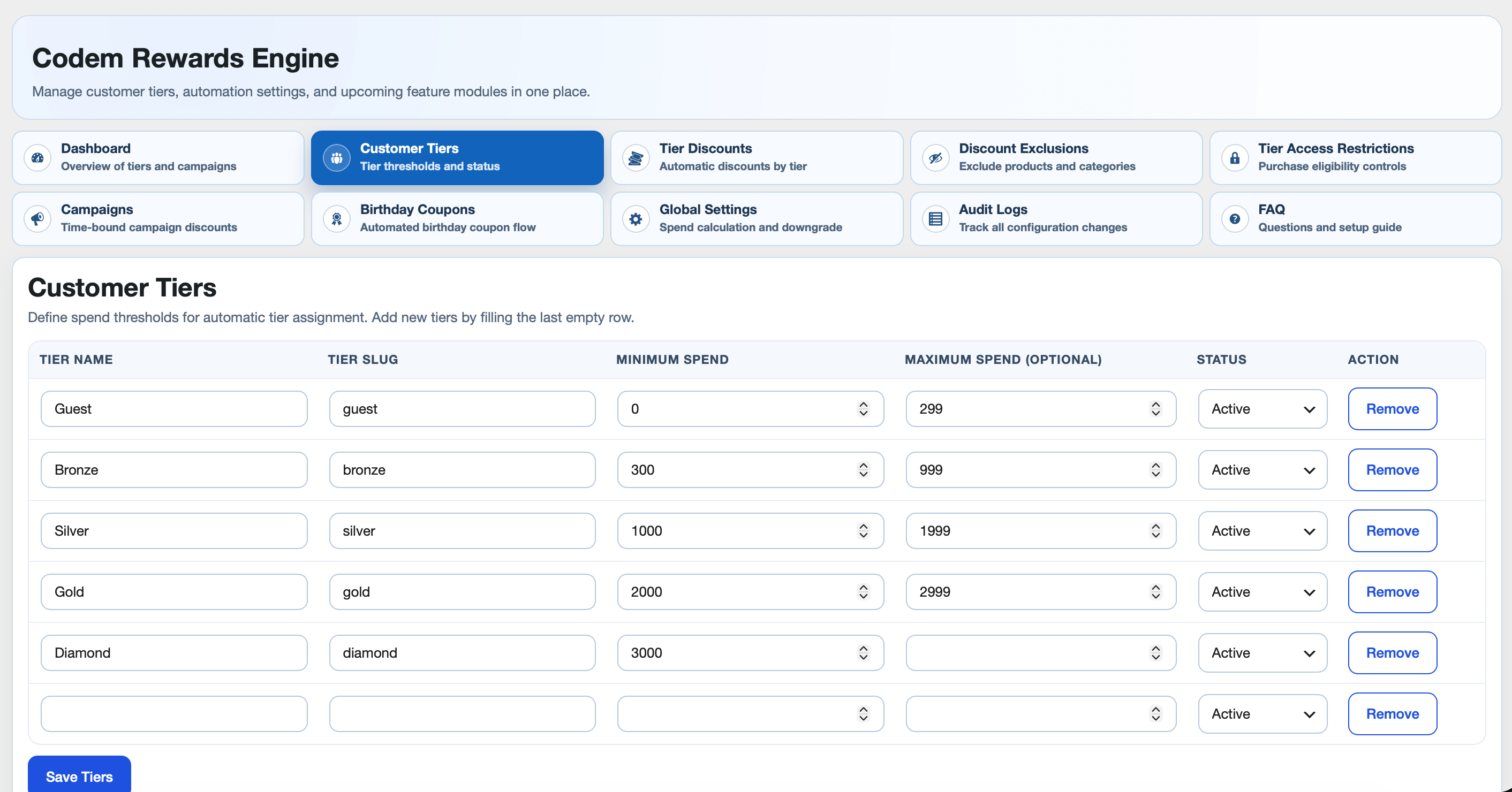
Customer Tiers
- Tier table with Name, Slug, Min Spend, Max Spend, Status
- Active/Inactive support
- Guest tier default support
- New-user tier initialization
- Manual single-customer and all-customer recalculation tools
- Tier status change guard (inactive warning/confirmation)
Lifetime Spend Logic
- Completed orders only
- Refunds deducted
- Include taxes (optional)
- Include shipping and shipping tax (optional)
- Allow downgrade toggle
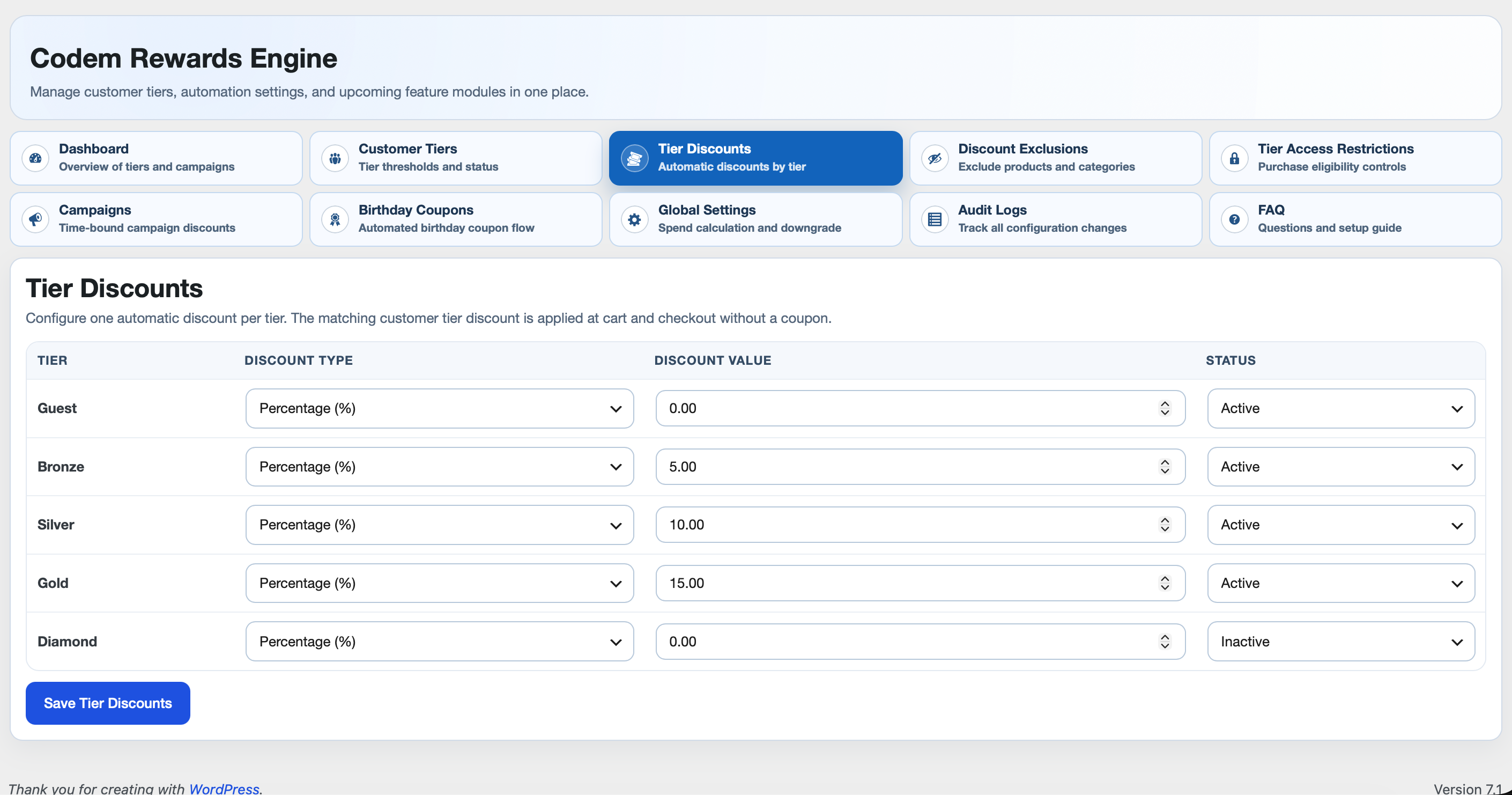
Tier Discounts
- One discount rule per tier
- Percentage or Fixed amount
- Rule status per tier (active/inactive)
- Auto-applied at cart/checkout with no coupon
- Expandable per-product discount breakdown on the Cart/Checkout blocks (caret next to the discount line)
Discount Exclusions
- Exclude specific products from tier discounts
- Exclude specific categories from tier discounts
- Exclude entire tiers from receiving tier discounts
- Exclusions affect discounting only, not product visibility/purchase
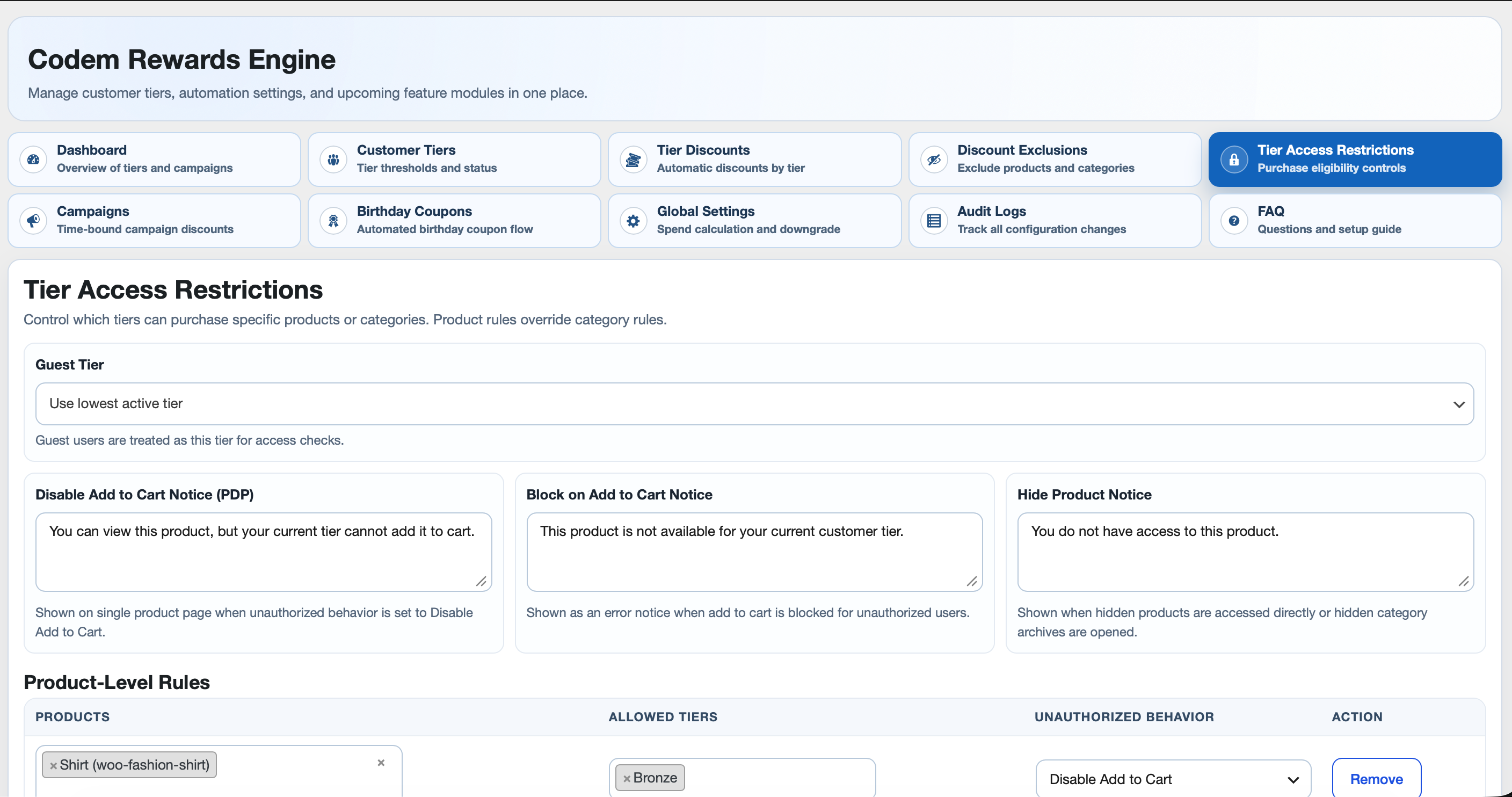
Tier Access Restrictions
- Product-level rules and category-level rules
- Product-level overrides category-level
- Allowed tier selection per rule
- Unauthorized behavior modes:
- Hide Product
- Disable Add to Cart
- Block on Add to Cart
- Configurable notice text for each mode
- Guest tier mapping support
- Server-side validation and cart enforcement
- Category archive restriction notices
- Catalog query filtering so result counts match visible products
Campaigns
- Dedicated Campaigns tab with list + create/edit flow
- Start date/time + end date/time with timezone per campaign
- Tier targeting (optional; empty means all tiers)
- Campaign discount type/value
- Scope toggles:
- Enable product categories + category picker
- Enable products + product picker
- Discount priority mode:
- Auto Apply the one which is Higher Discount
- Multiple Discount
- Top bar style configuration per campaign:
- Background color
- Text color
- Font family (Google Fonts whitelist)
- Font size (px)
- Banner text (max 100 characters)
- Live banner preview in the campaign editor
- Rotating top bar across active campaigns (each message keeps its own style)
- Campaign status badges in table:
- Pending
- Scheduled
- Live
- Ended
- Temporary campaign category (created when campaign becomes live)
- Optional draft product handling:
- Show
(In-Draft)labels in campaign product picker - Auto-publish selected draft products at campaign start
- Optional “send to draft again after campaign is ended”
- Show
Birthday Coupons
- Birthday field in My Account and WP user profile
- Configurable discount type/value/validity/applicable tiers/status
- One-per-user-per-year guard
- Auto-generated customer coupon and email send
- WooCommerce email integration:
- WooCommerce -> Settings -> Emails -> Birthday Coupon
- Editable subject/heading/content/additional content
- Placeholder support in email body:
{customer_name}{coupon_code}{validity_days}{site_title}
Audit Logs
- Tracks settings/actions with field-level old/new values
- Filter by date range (default current month)
- Delete logs in selected filter range
- Export CSV in selected filter range
- Date/time formatting follows WordPress admin format settings
Admin Experience
- Modern compact tabbed UI
- Woo enhanced searchable selectors
- Dynamic add/remove rows for access rules
- FAQ tab grouped by module
Capabilities and Compatibility
- Access capability:
manage_woocommerce - WooCommerce dependency declared in plugin headers
- HPOS compatibility declaration (
custom_order_tables) - Cart/Checkout blocks compatibility declaration (
cart_checkout_blocks)
Admin Tabs
- Customer Tiers
- Tier Discounts
- Discount Exclusions
- Tier Access Restrictions
- Campaigns
- Birthday Coupons
- Global Settings
- Audit Logs
- FAQ
Cron Events
Hooks used by plugin:
wcutp_campaign_sync_five_minutes(campaign lifecycle sync)wcutp_birthday_coupon_daily(birthday coupon processing)
Manual trigger examples (WP-CLI):
wp cron event run wcutp_campaign_sync_five_minuteswp cron event run wcutp_birthday_coupon_daily
External services
Campaign announcement bars, and the font preview on the Campaigns screen, load typefaces from Google Fonts (https://fonts.googleapis.com). The browser requests a stylesheet from Google. That request includes the visitor or administrator IP address and browser User-Agent. Google’s privacy policy is at https://policies.google.com/privacy.
The Dashboard charts use Chart.js 4.6.1. The file shipped in this plugin, assets/chartjs/chart.umd.min.js, is the minified build and is licensed under the MIT license (assets/chartjs/LICENSE.txt). It is not loaded from an external server. Source and releases: https://github.com/chartjs/Chart.js/releases/tag/v4.6.1
Recommended Setup Order
- Customer Tiers
- Global Settings
- Recalculate Lifetime Spend
- Tier Discounts
- Discount Exclusions
- Tier Access Restrictions
- Campaigns
- Birthday Coupons
- Validate using guest + tiered customer test accounts
Deactivation and Cleanup
On plugin deactivation, an admin prompt asks whether to clean plugin data.
- Confirm cleanup: removes plugin-related data
- Cancel cleanup: keeps data for reactivation
Screenshots



Installation
- Upload plugin to
/wp-content/plugins/codem-rewards-engineor install via Plugins screen. - Activate plugin.
- Ensure WooCommerce is active.
- Open WooCommerce -> Codem Rewards Engine.
- Configure tiers and global settings first.
- Run recalculation for existing stores.
FAQ
-
How exactly must an admin configure Customer Tiers for flawless operation?
-
- Lowest tier (Guest/Bronze) must start at Minimum Spend = 0.
- Use continuous, non-overlapping integer ranges (if lower Max = N, next Min must be >= N + 1).
- Intermediate tiers must have a numerical Maximum Spend; only the single highest tier leaves Maximum Spend blank (unlimited).
- All tiers must have unique Names and Slugs.
- Run “Recalculate All Customers” whenever you edit tier ranges or toggle tier status.
-
What happens if I mark a tier as Inactive?
-
Inactive tiers are ignored by runtime logic. Existing users with that tier are not immediately reassigned; run “Recalculate All Customers” to remap them.
-
Why is tier discount not applying?
-
Check: tier status, discount rule status/value, and discount exclusions (products/categories/tiers).
-
Is Block on Add to Cart enforced server-side?
-
Yes. Add-to-cart validation blocks unauthorized requests and cart checks remove unauthorized items.
-
Why does restricted category show no products?
-
Your current tier is unauthorized for that category rule. The plugin shows restriction notice and filters catalog query results.
-
How do campaign discounts interact with tier discounts?
-
Campaign discounts are evaluated separately and then resolved using campaign priority mode (higher-only or multiple).
-
When is temporary campaign category created?
-
It is created by campaign lifecycle sync when campaign becomes live (if product scope is enabled and products are selected).
-
How can I track who changed plugin settings?
-
Use Audit Logs tab. It records user, module, action, field, old value, and new value.
-
Can I customize birthday coupon email content?
-
Yes. Use WooCommerce email settings for “Birthday Coupon” and placeholders in email body.
Reviews
There are no reviews for this plugin.
Contributors & Developers
“Codem Rewards Engine” is open source software. The following people have contributed to this plugin.
Contributors
Translate “Codem Rewards Engine” into your language.
Interested in development?
Browse the code, check out the SVN repository, or subscribe to the development log by RSS.
Changelog
1.0.0
- Initial public release of Customer Tiers, Tier Discounts, Discount Exclusions, Tier Access Restrictions, Campaigns, Birthday Coupons, Global Settings, Audit Logs, and FAQ.
- Added an expandable per-product discount breakdown to the Tier Discount / Campaign Discount lines on the Cart and Checkout blocks.
- Expanded campaign Top Bar Message into a full Top Bar Style Configuration (background/text color, font family, font size, banner text with live preview), with per-message style rotation on the storefront.
- Added a Dashboard tab with Overview cards, Tier Distribution chart, and Campaign Overview pie/table filter.
- Moved birthday coupon delivery to reliable Action Scheduler batches, sending on the first day of the customer’s birthday month with duplicate locking and failure cleanup.
- Enqueued admin and storefront CSS/JS instead of printing script and style tags.
- Upgraded the bundled Chart.js library to 4.6.1.
- Stored audit logs in a protected uploads/codem-rewards-engine directory.