

Description
We love MCP. Strangers see nothing.
We just want your site locked when you’re not around. ClearComet Cloak for MCP is a simple on/off lock for your site’s AI connections, built for MCP security on WordPress.
WordPress sites now have “doors” that AI tools use: the MCP Adapter’s mcp routes, the Abilities API, and MCP servers added by other plugins. Anyone on the internet can find them in your site’s public route list and start knocking.
Cloak hides those doors, so you can hide REST API endpoints for MCP without breaking anything for yourself. Strangers get WordPress’s own ordinary “not found” answer (rest_no_route, 404) and the doors disappear from the public /wp-json index. It works the moment you activate it. There are no keys to set up and nothing to configure. The people and tools you choose still get in:
- You, when logged in: your dashboard and the block editor keep working.
- Apps with your secret key (optional, Advanced): your own apps and scripts send it in the
X-Cloak-Keyheader. - AI assistants and bots by address (optional, Advanced): any AI assistant, bot, server or tool that connects from a fixed IP address or range.
WordPress still checks the app password after the door, so Cloak adds a lock; it never removes one.
Why this matters
People are already scanning the internet for MCP servers:
- A two-week log study of one small web host (one of its sites runs WordPress) saw MCP
initializehandshakes POSTed to/mcpfrom 49 different IP addresses, on a server that runs no MCP at all. SANS Internet Storm Center, diary 33150 - GreyNoise put MCP honeypots online, and every one was found within days. GreyNoise
- Knostic found 1,862 MCP servers exposed to the internet. All 119 it checked by hand listed their tools without any authentication. Knostic
- Bitsight found roughly 1,000 internet-reachable MCP servers with no authorization at all. Bitsight
- On WordPress, CVE-2025-11749 (AI Engine 3.1.3 and earlier, with its “No-Auth URL” option on) leaked an MCP bearer token through the public
/wp-jsonroute list; it is fixed in 3.1.4. Wordfence - A public Metasploit module (also published on Packet Storm) automates that attack against
/wp-json/mcp/v1/. Rapid7 Metasploit, Packet Storm via Vulners
To be honest about it: most of these knocks are reconnaissance, not attacks. GreyNoise saw no MCP-specific exploitation attempts in its honeypots. But being listed is how a site ends up on someone’s target list, and Cloak keeps your MCP doors off that list.
Protected from the first click
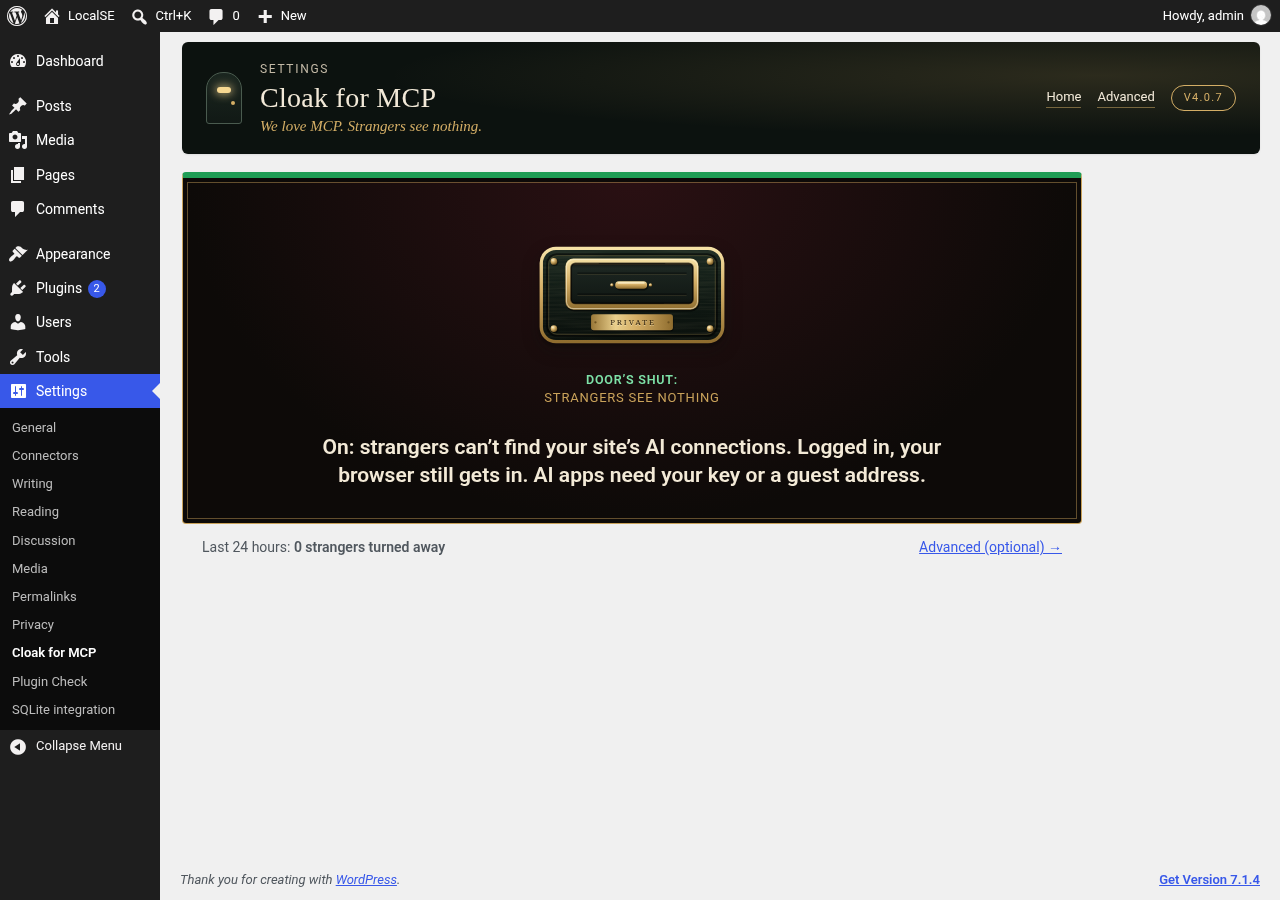
Activate the plugin and protection is on. There’s no wizard and no setup notice. Strangers can’t find your site’s AI connections, and you still get in when you’re logged in.
Everyday use
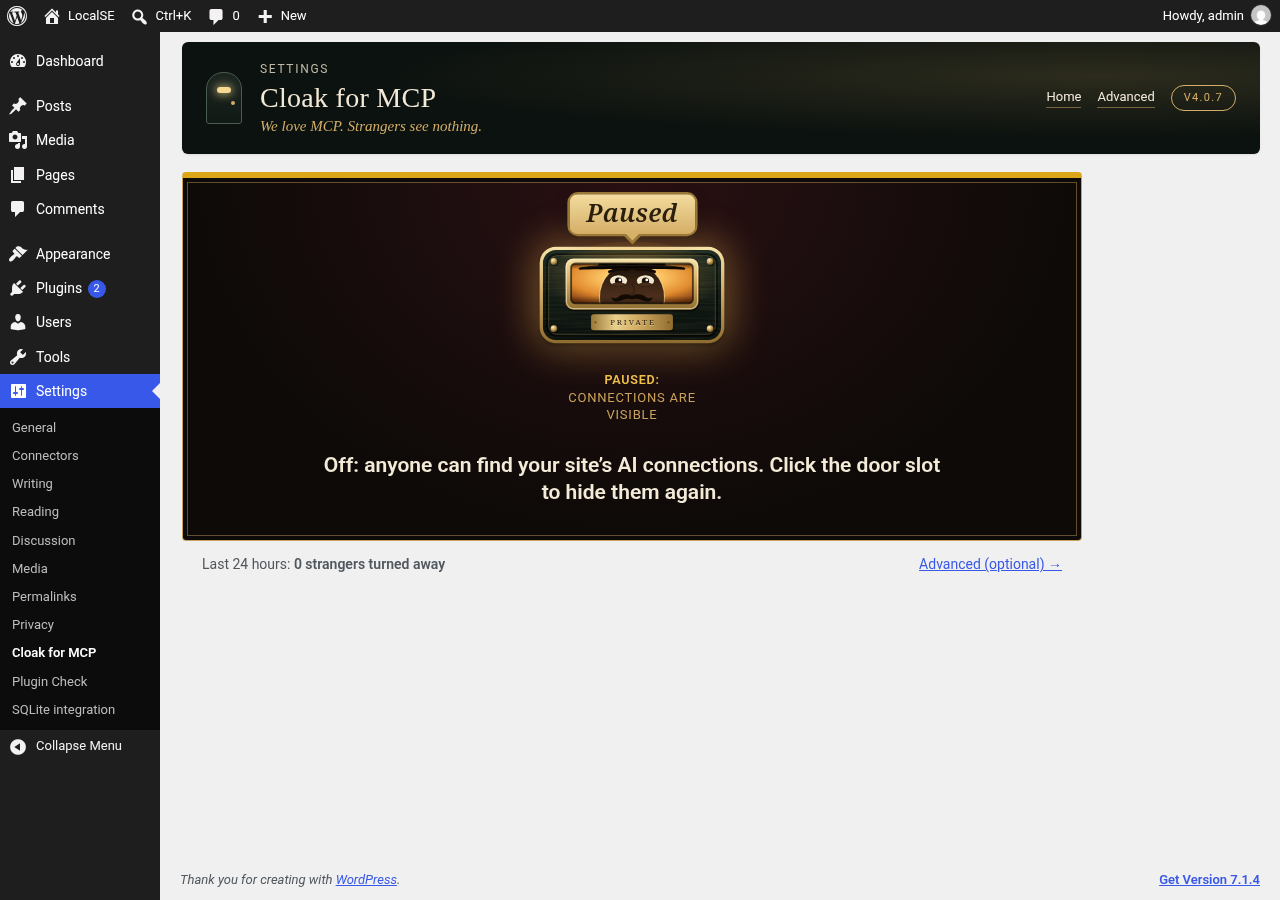
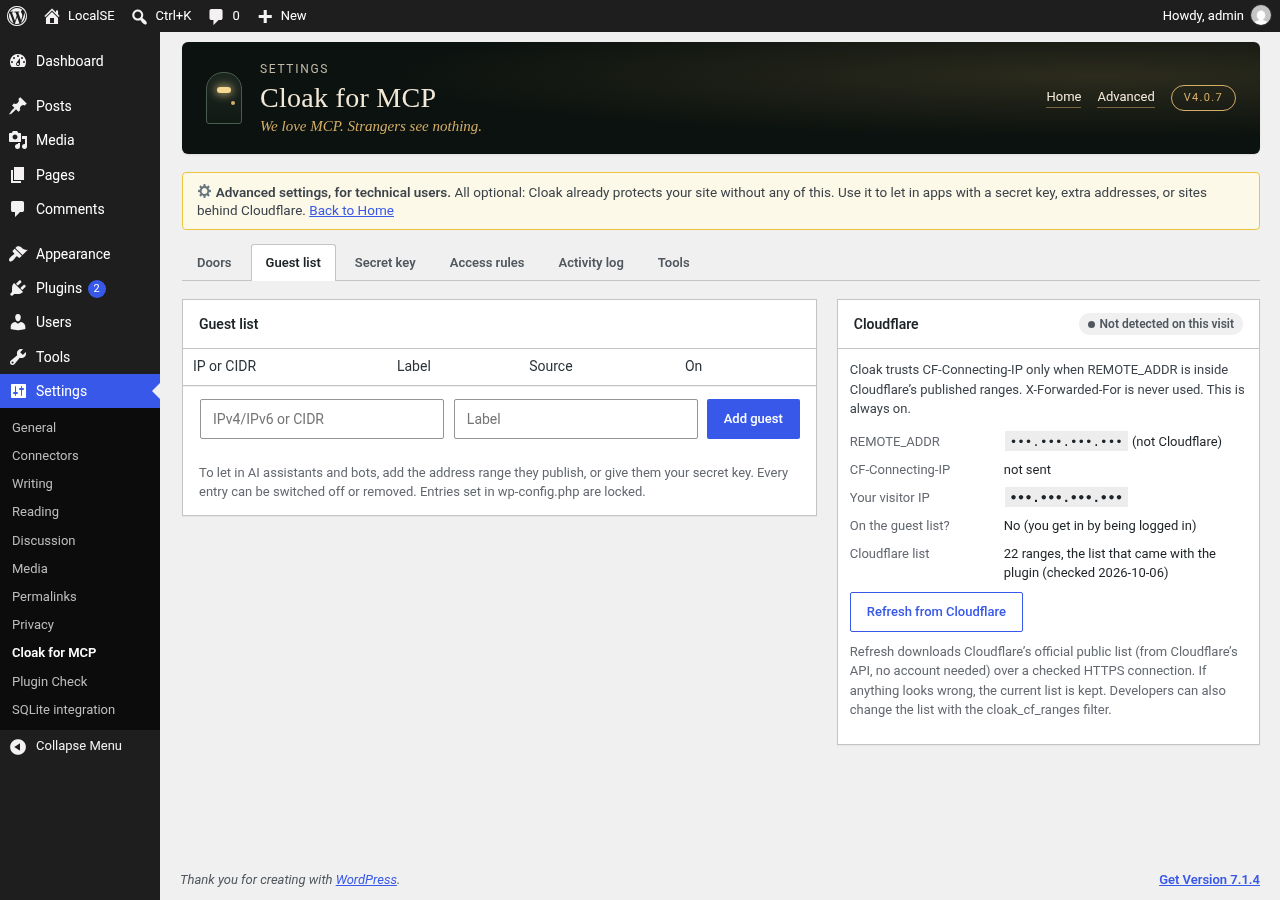
Settings > Cloak for MCP shows one door-slot switch and one line telling you whether you’re protected. Click the slot to pause or resume. Everything else is optional and lives on the Advanced pages: doors, the guest list, a secret key for your own apps, Cloudflare, access rules, an activity log and tools (export/import).
Secret key (optional)
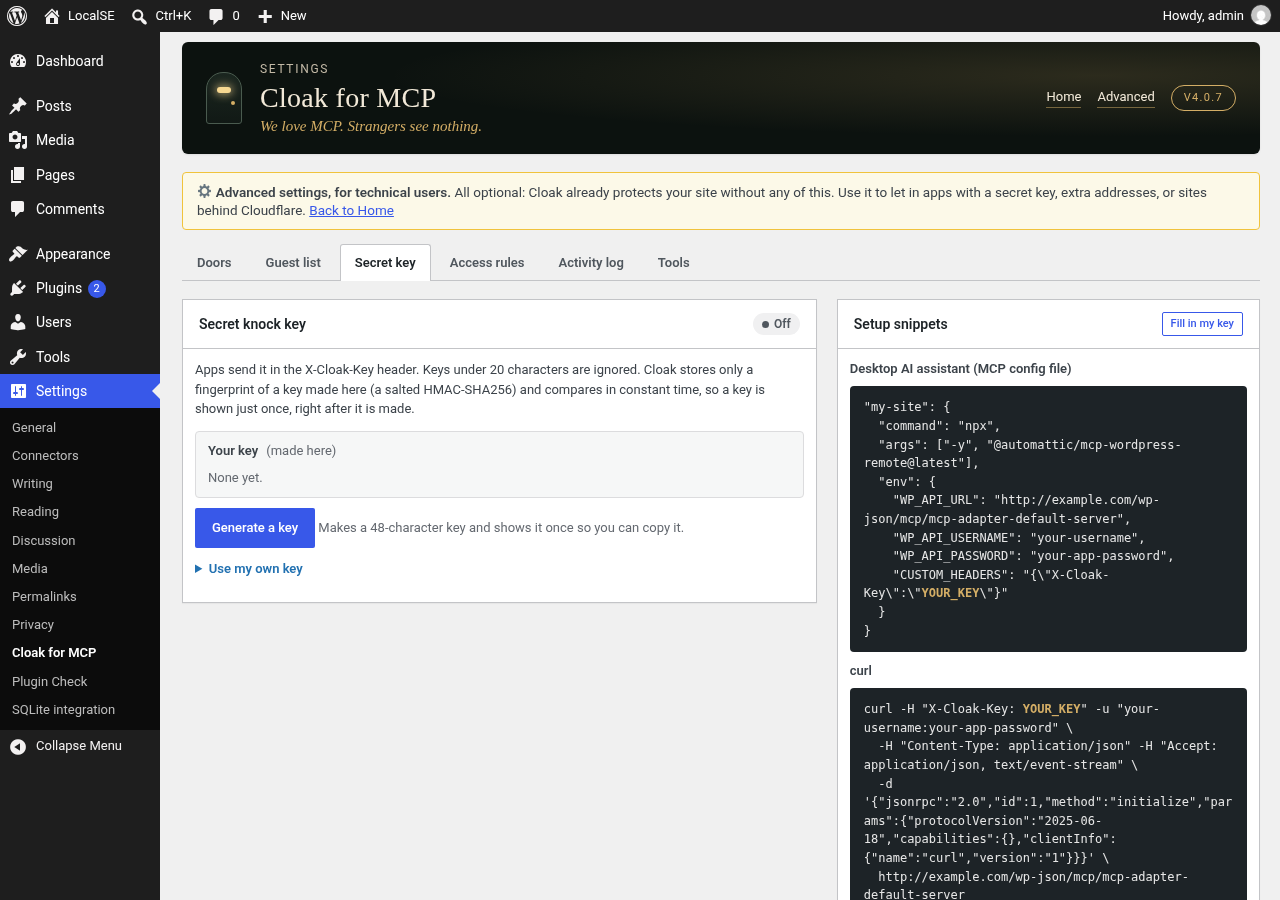
You don’t need a key. It’s only for your own apps or scripts that connect from changing addresses. Generate a key, or paste your own (20+ characters: letters, digits, _ and -). Apps send it in the X-Cloak-Key header. Rotate keeps the old key working for 24 hours so you can update your apps; Turn off stops it. The key page has ready-made snippets for a desktop AI assistant, curl and n8n.
Cloak stores only a fingerprint of the key (a salted HMAC-SHA256), never the key itself, so a new key is shown once, right after it is made. Lost it? Make a new one. Keys are never exported and are compared in constant time.
Cloudflare
Cloak trusts the CF-Connecting-IP header only when the request really comes from one of Cloudflare’s published ranges. X-Forwarded-For is never used. The plugin ships with Cloudflare’s list (checked 2026-10-06); Refresh from Cloudflare on the Guest list page downloads the current official list from Cloudflare’s public API over a checked HTTPS connection, and keeps the old list if anything looks wrong.
Advanced: wp-config.php overrides
These optional constants pin a setting in code. The matching field shows as locked on the settings screen. They apply once protection is on, except CLOAK_DISABLED, which always switches protection off.
define( 'CLOAK_KEY', 'your-long-random-key' ); (20+ characters; works alongside a key made on the screen)
define( 'CLOAK_GUESTS', array( '203.0.113.7', '198.51.100.0/24' ) );
define( 'CLOAK_MODES', array( '/acme/v1' => 'lights_out' ) ); (modes: `open`, `unlisted`, `lights_out`)
define( 'CLOAK_DISABLED', true ); (emergency off switch)
Advanced: filters for developers
cloak_presets: change or add guest presets (for example an address range an AI assistant or bot publishes). Each preset isid => array( 'label' => ..., 'cidr' => ... ).cloak_cf_ranges: change the Cloudflare ranges used to trustCF-Connecting-IP.cloak_client_ip: supply the visitor address yourself if your site sits behind another trusted proxy. It must return a valid IP.
Privacy
Cloak never phones home: no tracking, no analytics, no account, no ads. It makes no outside requests except two optional ones that only run when an administrator clicks a button: the quick check, which asks your own site for one hidden door, and Refresh from Cloudflare (see “External services” below). The activity log keeps the last 200 visits to hidden doors (time, IP address, door, result) on your site only and never records headers or keys. Deleting the plugin deletes all of its data.
Disclaimer
Cloak is one layer of protection, not a guarantee. Keep WordPress, your plugins and your passwords up to date. Cloak is provided as-is, without warranty of any kind, under the GPL (see license.txt).
External services
Cloak connects to one outside service, and only when an administrator asks it to.
Cloudflare IP list (optional, manual). When you click Refresh from Cloudflare on Settings > Cloak for MCP > Guest list, the plugin sends one HTTPS GET request to https://api.cloudflare.com/client/v4/ips to download Cloudflare’s public list of its own server address ranges. The list is used only to decide when the CF-Connecting-IP header can be trusted.
- What is sent: a plain request with no data from your site, no API key and no account. Like any web request, it reveals your server’s IP address and WordPress’s standard user agent (which includes your site address) to Cloudflare.
- When: only when an administrator clicks the button. Never automatically, on a schedule, or on visitor requests.
- If you never click it, the plugin uses the list bundled with it and makes no request.
- Service provider: Cloudflare, Inc. Terms of use and Privacy policy.
The optional quick check sends one request from your site to your own site’s address; nothing goes to a third party.
Screenshots

Installation
- In wp-admin go to Plugins > Add New and search for “ClearComet Cloak for MCP”, or go to Plugins > Add New > Upload Plugin, choose the plugin zip and click Install Now, then Activate.
- That’s it. Protection is on. Settings > Cloak for MCP shows the switch and your status.
FAQ
-
What is MCP?
-
MCP (Model Context Protocol) is the open standard AI assistants and bots use to talk to other software. On WordPress, the MCP Adapter and the Abilities API add web addresses (“doors”) that let an AI assistant read and change your site, if it has a valid login. Those doors are listed publicly by default, so anyone can see they exist and start trying them.
-
What do strangers see?
-
Exactly what they’d see if the door didn’t exist: WordPress’s standard
rest_no_route“not found” (404) answer. The doors are also removed from the public/wp-jsonlist and from per-namespace listings. Your pages, posts, wp-admin and the rest of the REST API are untouched. -
How do I let an AI assistant or bot in?
-
Add the address range your AI assistant or bot publishes on Advanced > Guest list, or give it your secret key (Advanced > Secret key has ready-made snippets). An app running on your own computer can also use the key, or you can add your computer’s address. It still needs its normal login (for example an application password) after the door.
-
What if I lock myself out?
-
“You, when logged in” is on by default, so your dashboard and the block editor keep working. If something still goes wrong, any one of these makes every door visible again:
- Click the door slot on Settings > Cloak for MCP (it pauses protection).
- Add
define( 'CLOAK_DISABLED', true );to wp-config.php. This kill switch works even if you can’t reach wp-admin. - Deactivate the plugin, or rename its folder over FTP.
-
Does it phone home or collect data?
-
No. There is no tracking, telemetry, account or license check. The only outside request is the optional, manual Cloudflare list refresh described under “External services”. The activity log stays in your own database, never records headers or keys, and is deleted with the plugin.
-
I use Cloudflare
-
That works out of the box. Cloak reads the visitor’s real address from
CF-Connecting-IPonly when the request arrives from Cloudflare’s own ranges, so nobody can fake it. If you use a different proxy or load balancer, use the secret key for your apps rather than address-based helpers. -
Why can’t I see my key again?
-
Cloak stores only a salted fingerprint of a key made on the settings screen, so even someone who can read your database can’t use it. That’s why a key is shown once, right after it is made. If you lose it, make a new one (or Rotate under Advanced, which keeps the old key working for 24 hours).
-
How private is my key?
-
- A key made on the settings screen is stored only as a salted HMAC-SHA256 fingerprint and shown once, when it is made.
- Rotate makes a new key and keeps the old one working for 24 hours, so you can update your apps. If a key leaks, rotate it (or turn it off).
- The activity log never records the key or any request headers.
- A key set with
CLOAK_KEYin wp-config.php is plain text in that file. Protect that file as you would your database password. - Cloak doesn’t force HTTPS. A key sent over plain HTTP can be read on the way, so use HTTPS on your site.
Think of Cloak as a curtain in front of MCP, not the lock. It doesn’t replace WordPress login: the MCP endpoint still needs WordPress credentials (for example an application password) after Cloak lets a request through. And an application password alone doesn’t get past Cloak; the request also needs the key, a guest address, or a logged-in browser session.
-
Does this work with the WordPress MCP Adapter?
-
Yes. Cloak hides the MCP Adapter’s
mcproutes and the Abilities API routes, plus MCP servers added by other plugins. The adapter itself keeps working for you and for the AI assistants and bots you allow. -
Will my AI assistant still connect?
-
Yes, if you let it in. You stay in when logged in. Other AI assistants and bots get in with your secret key in the
X-Cloak-Keyheader, or by IP address or range on Advanced > Guest list. They still need their normal WordPress login after that. -
How do I hide /wp-json routes from strangers?
-
Activate Cloak. Strangers asking for a hidden route get WordPress’s normal
rest_no_route404, and the hidden routes are removed from the public/wp-jsonindex. The rest of the REST API is untouched. -
Does it replace app passwords?
-
No. App passwords (or any other authentication) are still checked after the door. Cloak adds a lock; it never removes one.
Reviews
There are no reviews for this plugin.
Contributors & Developers
“ClearComet Cloak for MCP” is open source software. The following people have contributed to this plugin.
Contributors
Translate “ClearComet Cloak for MCP” into your language.
Interested in development?
Browse the code, check out the SVN repository, or subscribe to the development log by RSS.
Changelog
4.0.7
- Developer constants and filters now use the CLOAK_ / cloak_ prefix; old names keep working.
- Apps can send the key in the X-Cloak-Key header. The previous header keeps working.
4.0.6
- New name on WordPress.org: ClearComet Cloak for MCP (folder and text domain
clearcomet-cloak-for-mcp, settings under Settings > Cloak for MCP). - Notices now appear only on the plugin’s own settings screen and can be dismissed. No activation redirect.
- New installs accept only the new key header.
- Small code clean-ups for the plugin directory. No change to how protection works.
4.0.5
- New tagline: “We love MCP. Strangers see nothing.”
- The door slot badge now reads PRIVATE.
- Simpler guest list: add the address range your AI assistant or bot publishes. Guests you already saved keep working.
- Cleaner wording on the settings screens and in the readme.
4.0.4
- Clearer Home status: your logged-in browser gets in; AI apps need your key or a guest address.
- Readme: key privacy FAQ, “Why this matters” with sources, and a disclaimer.
4.0.3
- New installs start with an empty guest list. Add guests on Advanced > Guest list if you need them.
- Upgrades keep every guest they already had.
4.0.2
- Protection is on as soon as you activate. No wizard, no setup notice, and no keys to set up.
- The Home screen is now just the door slot and one plain status line. The key, guest addresses, Cloudflare and the old header moved to the optional Advanced pages.
- Upgrades keep your keys, guests and doors. Sites that were waiting for setup are now protected. A site you paused on purpose stays paused.
4.0.1
- Refresh from Cloudflare now uses Cloudflare’s official public API (
api.cloudflare.com/client/v4/ips); same validation and fallback. - Readme: External services section, plain-language FAQ.
- Added license.txt.
4.0.0
- Every function, option and hook now uses its own unique prefix.
- New knock header and new wp-config.php constant names.
- Security: the secret key is stored as a salted HMAC-SHA256 fingerprint and shown only once, when it is made (“Reveal” is gone).
- Cloudflare ranges can be refreshed from Cloudflare (certificate checked; the bundled list stays as the fallback), and changed with a filter. Presets can be changed with a filter too.
- The quick check’s loopback visit now uses normal certificate checks.
- Directory readiness: removed the
Update URIheader.
3.0.0
- Public release: no hard-wired access of any kind. The plugin folder no longer contains or reads a config file.
- Safe first install: nothing is hidden until the setup wizard is finished or protection is turned on; an admin notice links to the wizard.
- New 3-step wizard: pick doors, choose guests (you when logged in, a secret key made on the spot, a helper by address), then an honest quick check.
- “Use my own key”: paste an existing key (validated).
- wp-config.php constants remain as optional advanced overrides and are documented on the Tools page.
- Upgrading from 2.x keeps the choices made on the settings screen; protection waits until you review them in the wizard.
2.0.0
- Settings screen with the door-slot master switch, plain-language Home, Advanced pages and a setup wizard.
- Per-door modes, extra doors, guest list with Cloudflare panel, secret key with 24-hour rotation grace, access rules, activity log, quick check, export/import.