

Description
The transparency obligations under Art. 50 of the EU AI Act (Regulation
(EU) 2024/1689) apply from 2 August 2026. Clarivo helps website operators
to put these obligations into practice – as a guided process:
Detect Decide Label.
Important first – what Clarivo is NOT: Clarivo is a technical tool and
is no substitute for legal advice. No plugin can make a website
“automatically legally compliant” – the decision about which content gets
labelled always rests with the website operator. Clarivo makes that
decision easier (scan, suggestions, help texts) and makes carrying it out
simple (one click, automatic output).
Features (Free)
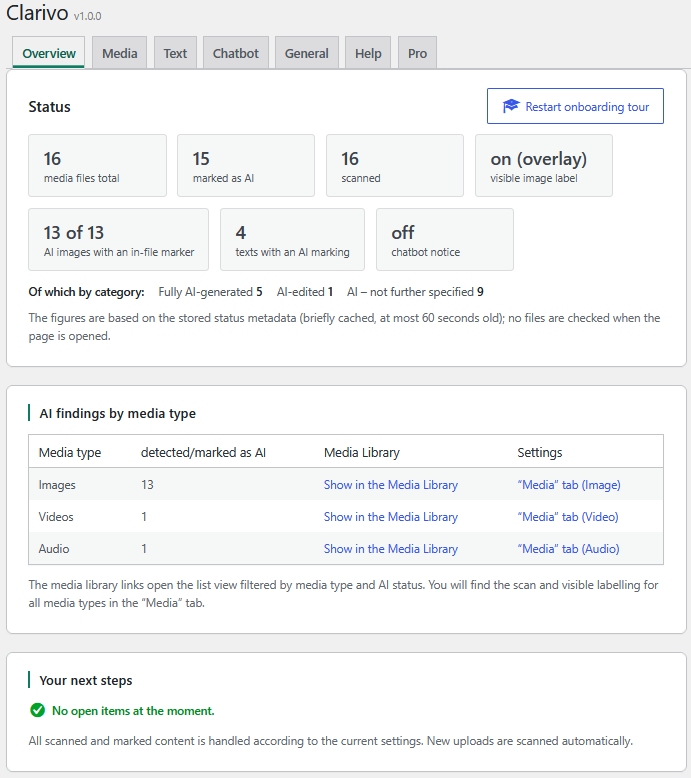
- Media Library scan: Batch scan of all images (JPEG, PNG, WebP, GIF,
AVIF) as well as video (MP4, MOV) and audio files (MP3, M4A) for
provenance metadata: C2PA/Content Credentials, XMP/IPTC
DigitalSourceType, EXIF generator fields, PNG text chunks, AIGC notes
in the ID3 tag. Pausable, even for large media libraries. - Auto-scan on upload: new media files are checked immediately.
- Manual marking: files without metadata (e.g. screenshots) can be
marked as AI-generated in the Media Library’s attachment dialog – the
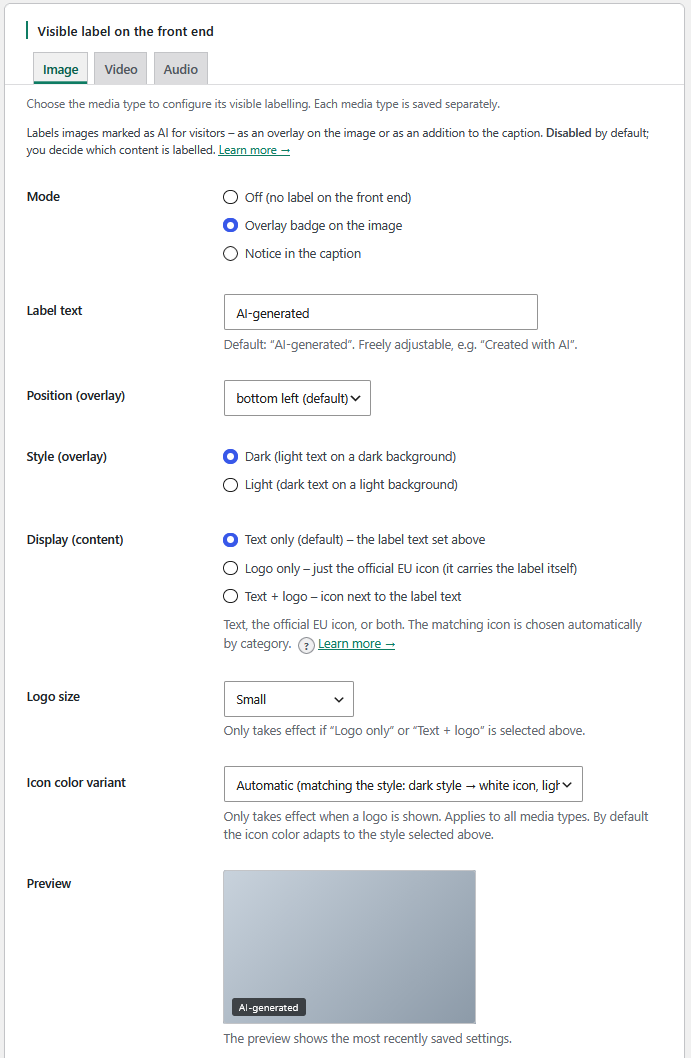
labelling then works exactly the same. - Visible labelling: configurable label for marked media in the frontend –
an overlay badge or caption for images, an overlay badge or notice line for
videos, and a notice line at the player for audio; text, position and style
adjustable. On request, Clarivo supports the official EU labelling icons
(optional, automatically matched to the category: fully AI-generated /
AI-edited / basic). (Labelling of featured images, attachment and
WooCommerce product images is part of the separate, separately distributed
Pro add-on – it is not included in this plugin.) - Machine-readable in-file note (images only, opt-in):
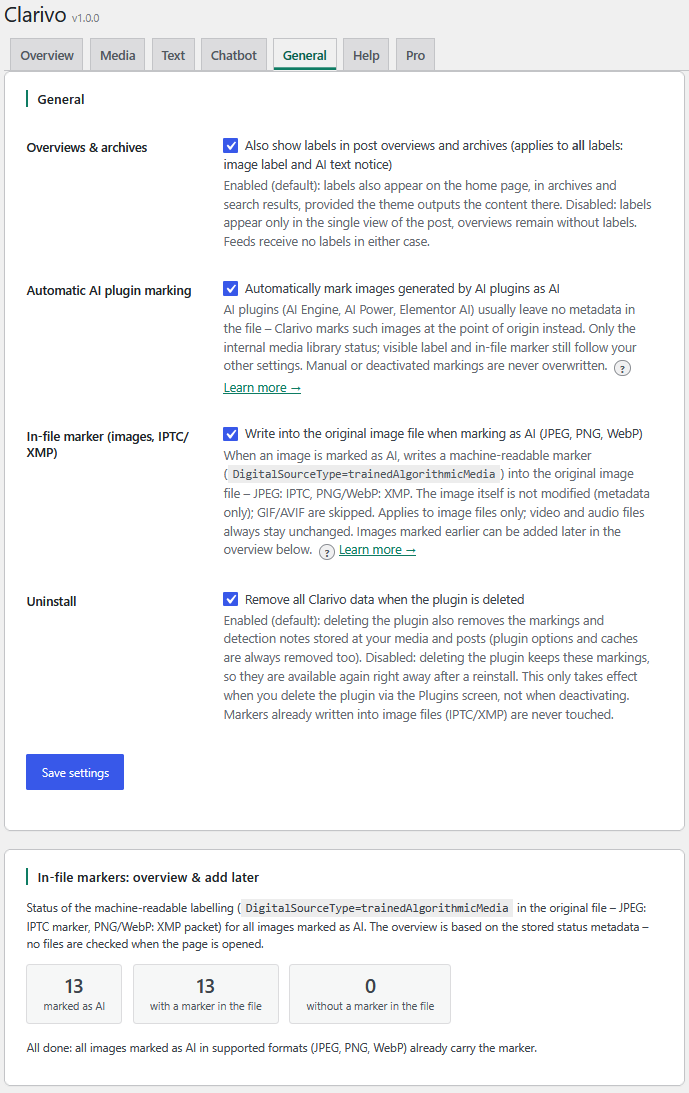
DigitalSourceType=trainedAlgorithmicMedia as an IPTC note (JPEG) or XMP
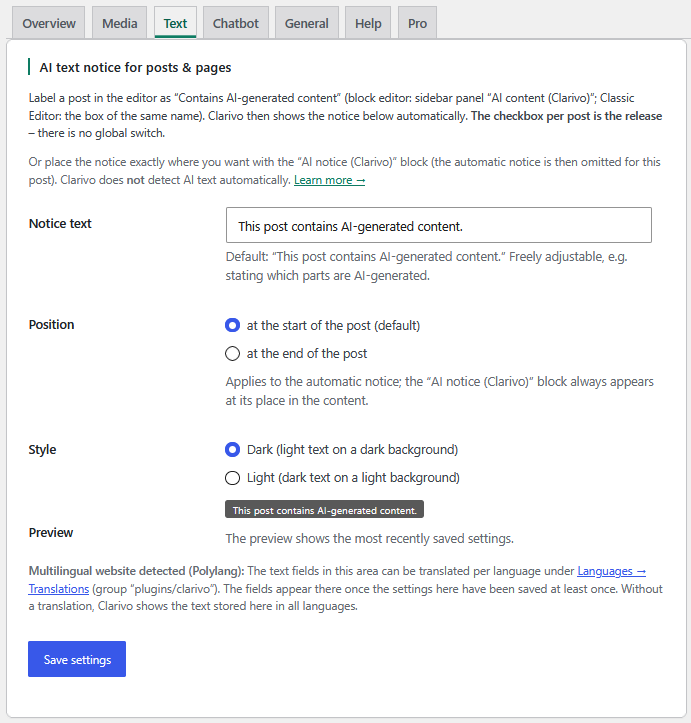
packet (PNG, WebP) in the original file. - AI text disclosure: “Contains AI-generated content” checkbox per
post/page with a configurable note (deliberately NO AI text detection –
that would be technically unreliable). - Chatbot notice: configurable notice banner for pages with a chat
widget, including detection of common chat plugins. - AI plugin integration: images that AI plugins (AI Engine, AI Power,
Elementor AI, the official WordPress AI plugin) create directly in
WordPress are marked at the point of creation; open interface
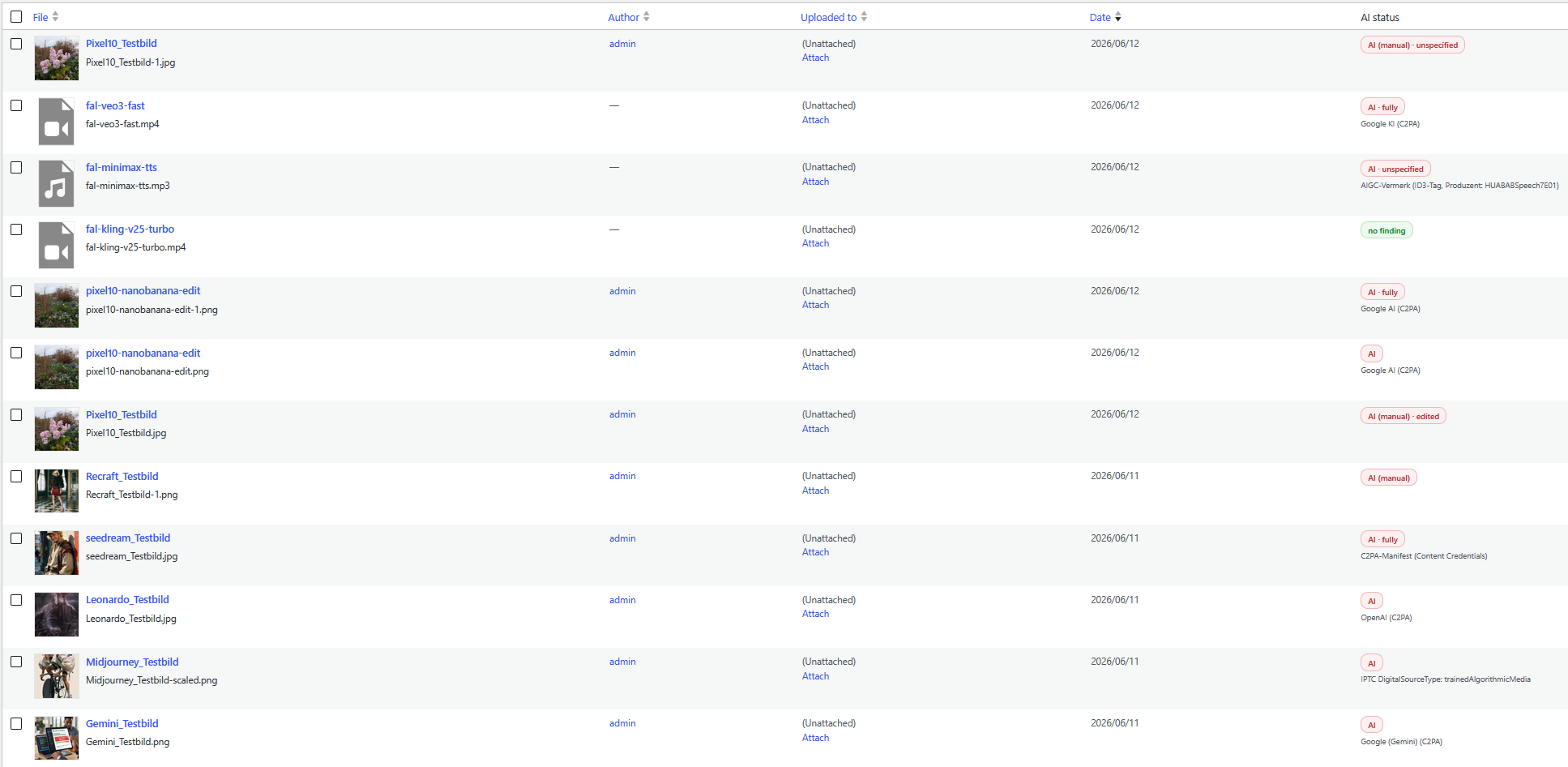
clarivo_mark_ai_generated for further plugins. - Media Library overview: AI status column, filters and dashboard by
media type.
Honest limits
- No automatic detection without metadata. Screenshots, clipboard
copies, messenger exports and files whose metadata was stripped by
editing or optimisation tools cannot be reliably identified as AI by any
scan in the world. Manual marking exists for such cases. - No finding does not mean “no AI” – it only means that no indications
were found in the file. - The full format and generator matrix is in the FAQ and in the plugin’s
Help tab.
Privacy and principles
- No requests to third-party servers: all scans run locally on your
server; no files or data are ever sent to third parties, and the plugin
never phones home. The single outbound HTTP request Clarivo can make is the
optional chatbot check – you trigger it by hand, it runs once, and it fetches
your OWN home page only (home_url()), with no cookies and no data sent
anywhere, to look for an embedded chat widget. - No tracking, no forced account: the plugin works entirely without
registration and collects no usage data. - No changes without your say-so: Clarivo never alters your live
website or your files on its own. Every external effect – visible labels,
in-file notes, banners – requires your explicit approval (opt-in).
The plugin is available in English and German: the interface and the default
label texts follow your WordPress language (English by default, German on German
sites), and every label remains freely editable.
Bundled assets
The 12 AI-labelling icons in assets/eu-icons/ are the official icons
published by the European Commission for labelling AI-generated content
(source: https://digital-strategy.ec.europa.eu/en/policies/eu-icons-labelling-ai-generated-content).
The Commission provides them for everyone to use freely, without the need
for attribution. No other third-party assets are bundled; the plugin loads
no external scripts, fonts or images.
Screenshots
Installation
- In your WordPress admin, go to Plugins Add New, search for “Clarivo”, then click Install Now and Activate. (Alternatively, upload the plugin ZIP under Plugins Add New Upload Plugin.)
- Open Clarivo in the admin menu. A short tour introduces the three steps: Detect Decide Label.
- Detect: on the Media tab, run the one-time Media Library scan. It reads provenance metadata (C2PA, IPTC/XMP, EXIF, PNG, ID3) read-only and never writes into your files. Every new upload afterwards is scanned automatically.
- Decide: review the AI status in the Media Library. Files without metadata (e.g. screenshots) can be marked manually in the attachment dialog.
- Label: turn on visible labelling (overlay badge or caption for images, a notice line for video and audio) and, if you wish, the AI text note per post/page and the chatbot notice. Nothing appears on your site until you enable it – you decide whether and how to label.
Clarivo is a technical tool, not legal advice, and does not make a website “automatically legally compliant” (see the Description and the plugin’s Help tab). Requires WordPress 6.7 or higher and PHP 7.4 or higher.
FAQ
-
Does Clarivo make my website automatically legally compliant?
-
No – and be wary of tools that promise this. Whether a piece of content
falls under the labelling obligations of Art. 50 EU AI Act is a
case-by-case decision for the operator (when in doubt, with legal advice).
Clarivo is a technical tool: it finds indications of AI origin, makes
marking and visible labelling easy, and documents the status in the Media
Library. It cannot and does not want to take over the decision itself or
the legal assessment. -
What do I have to label as a website operator?
-
The EU AI Act splits the transparency obligations across two roles. As a
website operator you must visibly disclose AI or deepfake content for
image, audio and video to your visitors (Art. 50(4), from 2 August 2026).
What is required is the visible disclosure – not that you yourself write a
machine-readable note into the file. That is exactly what Clarivo provides
the visible labelling for, across all media types: badge/overlay on the
image, notice line or overlay on the video and audio player, optionally
with the official EU icons. Note: Clarivo is a technical tool and is no
substitute for legal advice – whether a specific piece of content falls
under the obligation is for you to decide, when in doubt with legal advice. -
Why doesn’t Clarivo write a note into video/audio files?
-
Because machine-readable marking of the file itself is the job of the AI
provider (Art. 50(2)) – that is, the AI system that creates the content
(ChatGPT, Gemini, Veo, ElevenLabs & co.), not the website operator. Your
operator obligation is the visible disclosure (Art. 50(4)), and Clarivo
covers that at the player. Clarivo deliberately does not take on the
provider’s job and therefore does not alter video/audio files. For images,
Clarivo additionally offers the machine-readable IPTC/XMP note as a
voluntary bonus (it also survives downloading the image file) – that is
not an operator obligation either. -
Why doesn’t the scan detect my AI image? (The clipboard trap)
-
Automatic detection reads the file’s metadata. Anyone who takes an image
via “copy image”, through the clipboard or as a screenshot loses ALL
metadata in the process – automatic detection is then no longer possible.
For that reason, always download AI images as the original file
(“Download” or “Save as”) and upload that file to the Media Library. Some
image editors and “optimisation” plugins also strip metadata on save.
Undetected images can be marked manually in the Media Library’s attachment
dialog. -
Which image generators are detected automatically?
-
Tested with freshly created images, each downloaded as the original file
(as of June 2026):- Google Gemini: yes (C2PA manifest, source “Google (Gemini)”).
- ChatGPT / GPT-Image (OpenAI): yes (C2PA manifest).
- Midjourney: yes (XMP note in the PNG file; source attribution
generic, as the file contains no manufacturer name). - Seedream (ByteDance): yes (C2PA manifest, BytePlus ModelArk).
- Recraft: no – the export file contains no metadata; please mark
images manually. - DALL-E (classic), Adobe Firefly, Stable Diffusion, FLUX, Ideogram,
Leonardo AI, Canva AI, Bing/Copilot Designer, Grok: not yet tested.
Many of these providers write C2PA or XMP metadata that the scan detects
generically – but a verified test result is not yet available.
Important: a C2PA manifest alone does not mean “AI” – for example, Pixel 10
smartphones embed C2PA in every normal camera photo. Clarivo therefore
evaluates thedigitalSourceTypeand correctly classifies genuine camera
photos as “no finding” (verified with a test file). Conversely: providers
can change their export behaviour at any time – a missing finding is no
proof that an image is not AI-generated. -
Which file formats are supported? (Format matrix)
-
Principle: the machine-readable in-file note (IPTC or XMP in the original
file) exists exclusively for images. Video and audio files are labelled
visibly only – the media files themselves remain unchanged. Manual marking
and visible labelling work for all media types.- JPEG: scan yes · in-file note yes (IPTC)
- PNG: scan yes · in-file note yes (XMP)
- WebP: scan yes · in-file note yes (XMP)
- GIF: scan yes · in-file note no
- AVIF: scan yes, with a limitation – the scan reads the first 512 KB
of the file; if the metadata of a large AVIF file lies beyond that
(behind the image data), it is not found. Rare in practice; when in
doubt, mark manually. In-file note no. - HEIC/HEIF: WordPress 6.7 and later automatically converts HEIC
uploads to JPEG – the JPEG file is scanned and, where applicable, given
a note. - MP4 / MOV (video): scan yes (C2PA manifest in the container, e.g.
Google Veo 3) · no in-file note - M4A (audio): scan yes (same container as MP4) · no note
- MP3: scan yes (AIGC note in the ID3 tag, e.g. MiniMax; C2PA/XMP in
ID3 provenance frames) · no note - WebM, WAV, OGG, FLAC, MKV, AVI …: no evaluable provenance metadata
standard (as of 06/2026) – the scan honestly returns “no finding”,
manual marking possible at any time.
-
Can Clarivo display the official EU labelling icons?
-
Yes, optionally. In June 2026 the EU Commission published official icons
for labelling AI-generated content together with the voluntary Code of
Practice (three categories: fully AI-generated, AI-edited, basic “AI”).
On the “Images” tab, under “Display” you can choose the “Official EU icon +
text” variant – the free-text badge remains the default. The matching icon
is chosen automatically based on the detected content (overridable per file)
and appears next to the label text; the choice applies to image, video and
audio. The icons are provided by the Commission for free use without
attribution.Important and honest: the visible icon is part of your web page, not of the
media file – it does not travel along when the file is downloaded or shared.
What survives a downloaded image file is solely the optional
machine-readable IPTC/XMP note (images only). Video and audio files receive
no in-file note. And: Clarivo uses the official EU icons – on its own that
does not establish legal compliance and is no substitute for legal advice. -
What can video/audio detection do – and what can’t it?
-
- Read limits: the metadata areas of the container are evaluated
(C2PA/XMP boxes in MP4/MOV/M4A, ID3 tag in MP3). Very large manifests are
only read up to 512 KB; for heavily fragmented streaming MP4s
(fMP4/CMAF) the search ends after 1024 container sections. Not read are
the very old ID3v2.2 format and XMP in the moov/udta atom (older Adobe
pattern). - No detection without metadata: converted or trimmed files lose their
provenance metadata; many AI providers do not supply any in the first
place. - Embedded content (YouTube, Vimeo, Spotify & co.): embeds show content
from external platforms that does not reside in your Media Library –
Clarivo can neither read metadata there nor attach a label to the player.
Alternatively, label the post via the “Contains AI-generated content”
checkbox or place the “AI notice (Clarivo)” block above the embed. - Fullscreen mode: in native fullscreen the browser shows only the
video element itself – the overlay badge cannot be rendered there
technically; in the normal page view it remains visible. - Offload/CDN plugins (S3, Cloudflare R2 & co.): if a plugin serves
Media Library files from an external domain, Clarivo no longer recognises
the player URL of the classic [video]/[audio] shortcode as a Media
Library file – no label appears there. The editor’s video/audio blocks
are not affected. - No in-file note: video/audio files are never written to – the
machine-readable note remains reserved for images.
- Read limits: the metadata areas of the container are evaluated
-
Which AI plugins in WordPress are detected?
-
If an AI plugin creates images directly in WordPress, Clarivo marks them at
the point of creation – even when the file itself carries no metadata:- AI Engine: tested for real. Detected are the image generator and
chatbot images that are saved in the Media Library. NOT detectable is the
editor command “generate image” – it leaves no provenance data. - AI Power: covered on the basis of the plugin source code (all Media
Library saves). - Elementor AI: covered on the basis of the plugin source code – all
images from the Elementor AI dialog, alongside generated ones also
AI-edited images (“remove background”, “expand image”). - WordPress AI plugin (“AI”, wordpress.org): covered on the basis of
the plugin source code, checked with versions 0.9.0 and 1.0.1 – its own
image interfaces record the provenance (ai_generatedmeta) on save. NOT
detectable are images that third-party code delivers directly via the
plugin’s import interface without passing the note along. - WordPress 7.0 core AI (AI Client/Connectors): an honest gap – the
core substructure itself leaves no provenance note on save. Safety nets:
the upload scan catches it if the AI provider embeds metadata in the file,
and third-party plugins can use the open interface.
Existing images from AI Engine, AI Power and the WordPress AI plugin are
also detected after the fact by the Media Library scan based on the plugin
notes in the database; Elementor AI existing stock cannot be re-detected
technically. Other AI plugins can declare images via the open interface
(actionclarivo_mark_ai_generatedwith the attachment ID). - AI Engine: tested for real. Detected are the image generator and
-
How do I also place the AI notice directly in the chat widget?
-
The Clarivo banner sits as its own layer above the page and does not
interfere with third-party widgets. Anyone who also wants to show the
notice INSIDE the widget configures it directly at the provider (labels as
of June 2026, provider interfaces may change):- Tidio: in the Tidio panel, edit the welcome message and add a
sentence such as “You are chatting with an AI assistant”. - Crisp: in the Crisp console, adjust the bot scenario or the welcome
text; additionally you can rename the chatbox title (e.g. “AI assistant”). - Chatbase: extend the agent’s “Initial Messages” with the notice and
choose the display name accordingly. - Other widgets: almost all chat providers have a configurable welcome
message – the AI notice belongs at its start.
The provider’s built-in disclosure is thereby supplemented, not replaced.
- Tidio: in the Tidio panel, edit the welcome message and add a
-
I changed the alt text in the Media Library – why does the post show the old one?
-
That is WordPress behaviour, not a Clarivo feature: the image block stores
the alternative text fixedly in the post when inserting – later changes to
the Media Library alt text have no effect there. Maintain the text for
existing blocks in the block sidebar; featured images, by contrast, always
use the current Media Library alt text. Clarivo’s optional alt-text
addition (“AI-generated image”) is appended at runtime and does not change
the stored alt texts. -
Does the plugin send data to external servers?
-
No files or data are ever sent to a third-party server: all scans run locally
on your server, there is no tracking and no forced account. The one HTTP
request Clarivo can make is the optional chatbot check – you trigger it
manually, it runs exactly once, and it fetches solely your OWN home page
(home_url('/')) to look for an embedded chat widget. No cookies are sent and
nothing leaves your site; it is never automatic and never scheduled. -
What happens on uninstall?
-
When the plugin is deleted, all plugin settings and caches are removed. The
markings on your media and posts (AI status, source, detection method) are
deliberately retained – they are your documentation and are immediately
usable again after a reinstall. Anyone who also wants to remove the
markings completely sets the following in wp-config.php before deleting:
define( ‘CLARIVO_UNINSTALL_PURGE_META’, true );
IPTC/XMP notes already written into image files are not touched on uninstall
(the plugin does not change any files without an explicit instruction); they
can be reverted beforehand per image by removing the marking.
Reviews
There are no reviews for this plugin.
Contributors & Developers
“Clarivo – AI Content Disclosure” is open source software. The following people have contributed to this plugin.
Contributors
Translate “Clarivo – AI Content Disclosure” into your language.
Interested in development?
Browse the code, check out the SVN repository, or subscribe to the development log by RSS.
Changelog
1.1.0
- AI text disclosure now has four levels instead of a single checkbox:
none / AI-assisted / AI-generated / AI-generated, editorially reviewed.
“AI-generated” shows the notice automatically; “AI-assisted” stays off by
default (no over-labelling). A one-time, lossless migration turns the
previous checkbox into the “AI-generated” level. Quick edit and bulk edit
in the post list are supported. - New “Implementation status” card on the overview: an honest 0-100 % view of
how completely you have set up the measures available in Clarivo, with a
“does not apply” option per duty. It is explicitly not a compliance score
and not proof of legal compliance. - Media that cannot be read (for example offloaded to a CDN, or with a missing
file) is now shown honestly as “not checkable” instead of being counted as
“no finding” – such files never turn the status green on their own. - New “Evidence” tab (documenting & proving), placed right after the labelling
tabs: in the free version it holds the “AI literacy (Art. 4)”
self-documentation checklist for your own measures – a dated entry per point
(not proof that the requirements are met). - The “General” tab is now called “Settings”.
- New shortcodes [clarivo_notice] / [clarivo_hinweis] and a clarivo_notice()
template function to place the AI notice anywhere themes/page builders
reach (output fully escaped; placing it is your deliberate release). - Optional plain-text notice for RSS/Atom feeds and raw excerpts, following
each post’s disclosure level (all off by default). - Chatbot detection reworked: a leading question, local signature detection
in active plugins and theme files, plus an optional one-click check of your
own home page (home_url() only, on click, never automatically; no requests to
third-party servers, signatures bundled locally). - Editor and settings polish: a live preview of the label settings, clearer
expectation setting, and an honest empty state after a scan with no findings. - The overview page was streamlined to two blocks: the implementation status
(open items first, completed items collapsed) and “Your AI content”, which
brings the inventory figures and the per-media-type findings together.
1.0.1
- The plugin now ships with zero licence logic and no inactive code paths:
the previously dormant labelling code for featured/attachment/WooCommerce
images was removed entirely (it lives exclusively in the separate,
separately distributed Pro add-on; nothing changes functionally for this
plugin – it never labelled those images). - All output escaping is now applied visibly at the point of output
(wp_kses with explicit allow-lists) instead of relying on suppressed
linter findings. - The add-on hint on the settings pages was reduced to a single unobtrusive
text line; the full feature comparison lives only on the “Pro” tab. - Removed the explicit load_plugin_textdomain() call – WordPress loads the
bundled translation itself. “Requires at least” was raised to 6.7
accordingly: core auto-loads bundled plugin translations from 6.7 on, so
this is the oldest version on which the German UI works out of the box.
1.0.0
- First public release on wordpress.org.
- Media area reworked for all license tiers: a single Media tab with image,
video and audio sub-panels, a shared Media Library scan that collapses to a
compact summary after the first full run, and clearer label settings. - Audio labelling is now a notice line at the player (the audio overlay option
was removed); the image and video overlay/caption options are unchanged. - The “contains AI-generated content” text note now sits directly below the
post title consistently across themes (spacing fix). - Internal housekeeping: removed unused code so the plugin ships lean.
0.9.2
- Fix: on narrow images (smaller than the content column) the visible overlay
badge now anchors to the image edge instead of the content column, so it no
longer floats in the empty space beside the image (most visible on themes
that centre images). Full-width images, as well as video, audio and
caption-mode labels, are unchanged.
0.9.1
- Internal: the development/testing licence override no longer ships in the
free plugin’s source – it now lives in the self-hosted Pro add-on. No
functional change for normal use (the free plugin has no licence code and
makes no external requests). - Pro overview updated to the final plan line-up (Pro / Studio / Agency) and
pricing; the upgrade box on the settings pages now sits right next to the
content on wide screens instead of far to the right. - Onboarding tour reworked into a guided, multi-step tour that walks through
the tabs (Overview, Media, Text, Chatbot, General, Help) and resumes across
pages; fragile spots (the media dialog, the editor checkbox) are shown as a
short path instead of being opened automatically.
0.9.0
- Help tab rewritten: shorter, consistently from the website operator’s
perspective and with less jargon – the single place for the duties, the
detection limits, the format matrix and the EU-icon notes. - Pro upgrade information in the free version: a dedicated “Pro” tab plus a
discreet upgrade box beside the settings (no external requests – it only
opens the pricing page when you click it). - Attachment dialog: the automatic scan result is now shown as a clear
result block (“Scan result”), separated from the marking controls. - Detection hardening: removed metadata substring traps that could cause
false positives (e.g. an “ImageNumber” XMP field is no longer mistaken for
“Google Imagen”); added the current IPTC non-AI source-type values. - Behaviour change – please note: the option “Remove all Clarivo data
when the plugin is deleted” is now ON by default (previously off). Only if
you switch it off are the markings kept across a reinstall. This takes
effect only when you actually delete the plugin (never on deactivation);
markers already written into image files (IPTC/XMP) are never touched.
0.8.0
- Admin redesign: Clarivo now has its own top-level menu; the former
Images/Video/Audio tabs are merged into one “Media” tab with a media-type
switcher; a new “General” tab bundles the global options. Onboarding tour
on first activation, restartable from the overview.
0.7.0
- Support for the official EU labelling icons (optional): “Official EU icon
- text” display variant for image, video and audio; the matching icon
(fully AI-generated / AI-edited / basic) is chosen automatically based on
the detected category, overridable per file in the attachment dialog,
with adjustable colour variant. The free-text badge remains the default.
The machine-readable IPTC/XMP in-file note is now written true to category
(AI-edited images receivecompositeWithTrainedAlgorithmicMedia).
- text” display variant for image, video and audio; the matching icon
0.6.1
- Preparation for the directory submission: readme.txt and clean uninstall
(uninstall.php – settings are removed, markings are retained; full
deletion via opt-in constant).
0.6.0
- Video and audio support: detection (C2PA/XMP in MP4/MOV/M4A, AIGC/ID3 in
MP3), dedicated admin tabs, visible labelling at the player; media files
remain unchanged.
0.5.0
- Free completion: XMP note for PNG/WebP, digitalSourceType evaluation
(camera C2PA ≠ AI), alt-text addition, multilingual label texts
(WPML/Polylang), AI plugin integration (AI Engine, AI Power, Elementor AI)
with an open interface.
0.1.0 – 0.4.x
- Internal development versions (scan engine, marking, visible labelling,
text disclosure, chatbot notice, tab UI).