

Description
CICO Media improves the native WordPress Media Library instead of replacing it with another media manager.
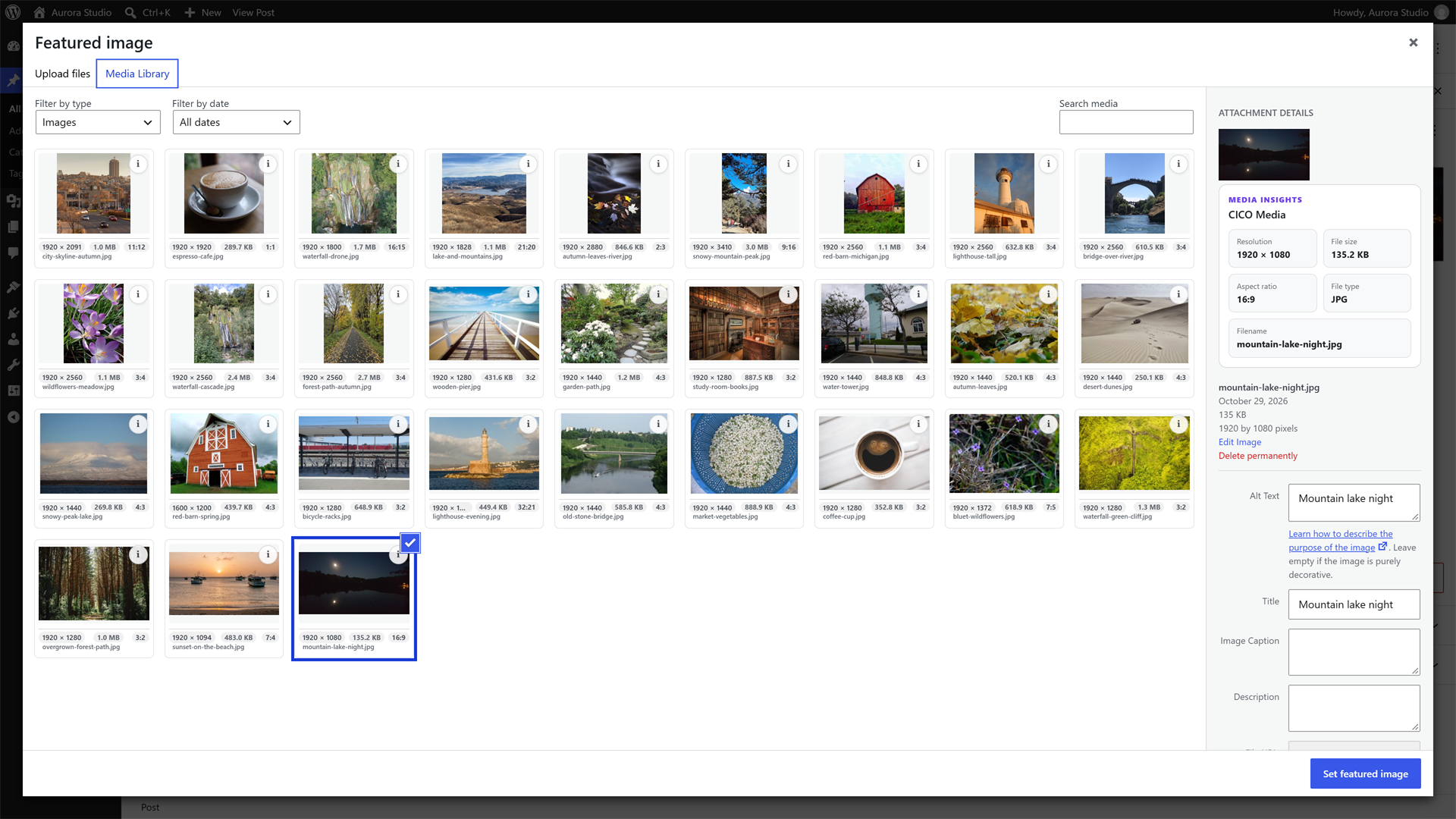
See portrait, landscape and square images in their real proportions, view image dimensions and aspect ratios at a glance, keep filenames visible, and inspect useful media details without leaving the familiar WordPress interface.
Current Free features:
- Real image proportions in the native Media Library grid.
- Image dimensions / resolution directly on media cards.
- Aspect ratio such as 16:9, 4:5 or 1:1.
- Filename visibility with clean truncation for long names.
- Quick Info popovers for faster media inspection.
- Native attachment-details enhancements.
- Optional enhancements for the WordPress Media Picker used by posts, pages and compatible builders.
- Adjustable card sizes without making the native WordPress grid denser.
CICO Media does not delete, compress or modify your media files.
CICO Media Pro is one optional extension for advanced media usage intelligence, Where Used tools and deeper integrations. Individual features will not require separate add-on plugins. Learn more at https://cicomediawp.com.
External services
CICO Media works without contacting any external service. It does not track you or send usage data.
Two features are optional and only run when you use them:
- Licensing for CICO Media Pro (Freemius). If you choose to activate a CICO Media Pro license, the bundled Freemius SDK connects to Freemius (https://freemius.com) to validate the license. It sends your license key, your site URL, the WordPress and PHP versions and the email address you confirm. Nothing is sent unless you start the activation. The “Try Pro free for 14 days” button only opens the Freemius checkout in a new tab; nothing is sent until you submit the form there. Terms: https://freemius.com/terms/ Privacy policy: https://freemius.com/privacy/
- Send feedback. The feedback form in the plugin settings sends the message and optional attachments you write to the CICO Media developers by email through your site’s mail system (wp_mail). It runs only when you press send.
Screenshots



Installation
- Install CICO Media from WordPress or upload the plugin ZIP.
- Activate CICO Media.
- Open Media > Library in Grid view.
- Configure optional enhancements under Media > CICO Media.
FAQ
-
Does CICO Media replace the WordPress Media Library?
-
No. It improves the native Media Library and the native Media Picker. Your media, folders, URLs and workflow stay exactly as WordPress provides them.
-
Does it change, move, compress or delete my files?
-
No. CICO Media never modifies media files or attachment URLs. It only changes how media is presented and adds read-only details.
-
Does it work in the media picker of the block editor and page builders?
-
Yes. It enhances the native WordPress media picker (featured image, “Add media”, and builders that use it) with the same cards, without adding requests when the picker opens.
-
Do I need CICO Media Pro?
-
No. CICO Media works on its own. CICO Media Pro is an optional extension that adds usage intelligence (where each media is used), Media Tags and smart filters. You can find out more at https://cicomediawp.com.
-
Where are the settings?
-
Under Media > CICO Media. You can choose which details appear on the cards and the card size.
-
What happens to my data if I delete the plugin?
-
Deactivating keeps your settings. Deleting the plugin removes the options created by CICO Media only; your media library is never touched.
-
Which versions of WordPress and PHP are supported?
-
WordPress 6.4 or later and PHP 7.4 or later.
Reviews
There are no reviews for this plugin.
Contributors & Developers
“CICO Media” is open source software. The following people have contributed to this plugin.
Contributors
Translate “CICO Media” into your language.
Interested in development?
Browse the code, check out the SVN repository, or subscribe to the development log by RSS.
Changelog
1.0.1
- New 14-day free trial of CICO Media Pro, with no credit card. Start it from the Pro section of the plugin Overview.
1.0.0
- Initial public release.
- Real image proportions, dimensions, aspect ratio and filename on every card in the native Media Library.
- Quick Info and attachment-details enhancements.
- Enhanced native Media Picker with no extra requests when it opens.
- Adjustable card sizes and per-detail display settings.