Description
ChatSell Payment Gateway with Moneris for WooCommerce connects your store to the modern Moneris payment platform (api.moneris.io). Card details are entered in a Moneris-hosted tokenization iframe and are exchanged for single-use tokens, so raw card numbers never reach your server — keeping you in the lightest PCI scope (SAQ A-EP).
Features
- Hosted tokenization iframe on both classic and Cart/Checkout Blocks checkout.
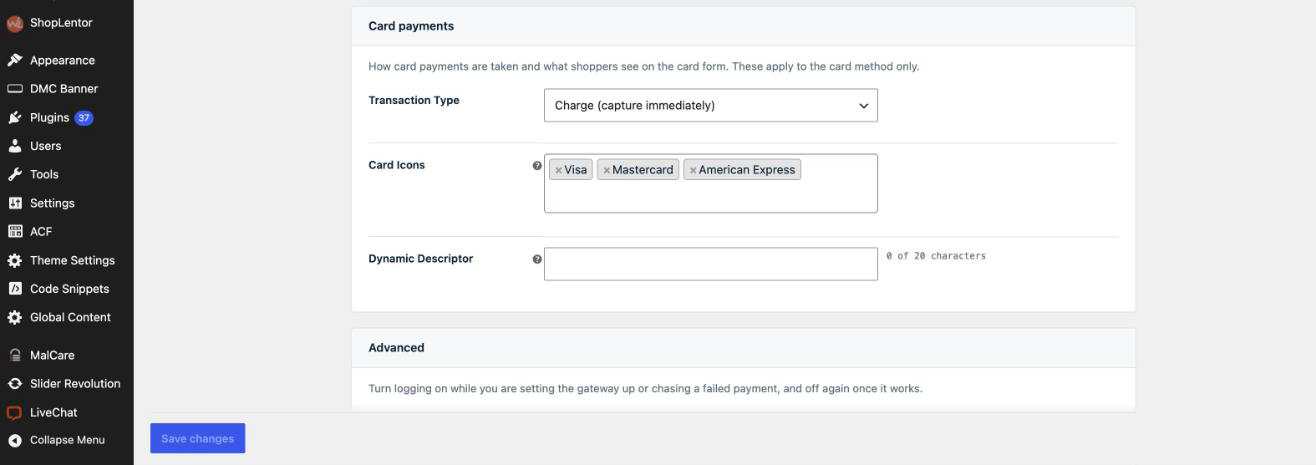
- Charge (capture immediately) or authorize-only, with capture and void from the order screen.
- Full and partial refunds from the WooCommerce order screen.
- Sandbox and production credential groups with a one-click connection test.
- Two authentication methods: static API key (
X-API-Key) or OAuth2 client credentials with short-lived bearer tokens. - Optional dynamic descriptor and a debug log with all sensitive data redacted.
- Credentials can be pinned in
wp-config.phpconstants and kept out of the database.
Need more? The paid ChatSell Moneris Gateway Pro add-on installs alongside this plugin and adds saved cards, 3-D Secure 2, Apple Pay and Google Pay on both checkouts, with a 30-day free trial.
This plugin is not affiliated with or endorsed by Moneris Solutions Corporation. “Moneris” is a trademark of its respective owner.
Third-party services
This plugin sends data to the following services as part of taking a payment. Enable it only if these terms are acceptable for your store.
- Moneris API (
api.moneris.io, sandboxapi.sb.moneris.io) — receives the order amount, currency, billing details, single-use card tokens or wallet tokens, and your merchant credentials to create payments, captures, voids, refunds and stored payment methods. Moneris terms · Moneris privacy. - Moneris hosted tokenization (
www3.moneris.com, sandboxesqa.moneris.com) — the card entry iframe shown to shoppers. Card numbers are typed into this Moneris page and never reach your server.
No data is sent to the plugin author.
Screenshots
Installation
- Upload the plugin to
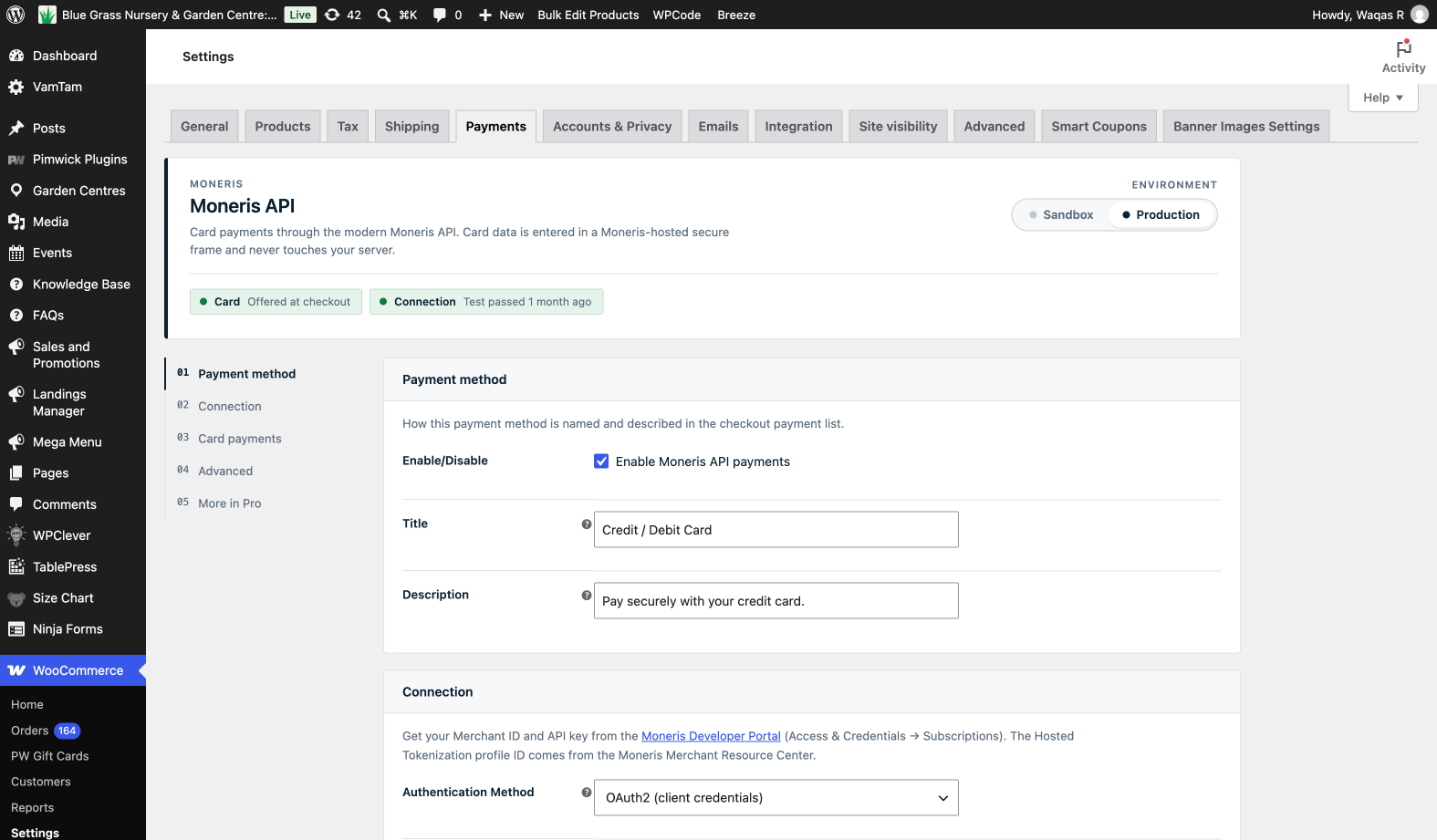
/wp-content/plugins/and activate it, or install it from the Plugins screen. - Go to WooCommerce Settings Payments Moneris API.
- Choose your environment (Sandbox or Production) and enter the Merchant ID and API key (or OAuth application ID and client secret) from the Moneris Developer Portal.
- Create a Hosted Tokenization profile in the Moneris Merchant Resource Center and paste its profile ID.
- Click Test connection, then enable the gateway.
Optional: pin credentials in wp-config.php
Define any of these constants to supply a value from wp-config.php instead of the database; the matching setting field is then locked:
MONERIS_API_WC_SANDBOX_API_KEY, `MONERIS_API_WC_PRODUCTION_API_KEY`, `MONERIS_API_WC_SANDBOX_MERCHANT_ID`, `MONERIS_API_WC_PRODUCTION_MERCHANT_ID`, `MONERIS_API_WC_SANDBOX_CLIENT_ID`, `MONERIS_API_WC_PRODUCTION_CLIENT_ID`, `MONERIS_API_WC_SANDBOX_CLIENT_SECRET`, `MONERIS_API_WC_PRODUCTION_CLIENT_SECRET`, `MONERIS_API_WC_SANDBOX_HT_PROFILE_ID`, `MONERIS_API_WC_PRODUCTION_HT_PROFILE_ID`.
FAQ
-
Is it free?
-
Yes. Everything in this plugin is free and fully functional. Saved cards, 3-D Secure 2, Apple Pay and Google Pay are sold separately as the ChatSell Moneris Gateway Pro add-on, which installs alongside this plugin and has a 30-day free trial.
-
Does card data touch my server?
-
No. Cards are entered in a Moneris-hosted iframe and exchanged for single-use tokens. Your server only ever handles tokens and stored payment-method references.
-
Does it support the Cart and Checkout blocks?
-
Yes. The gateway renders in both the classic checkout and the WooCommerce Cart/Checkout blocks.
-
API key or OAuth2 — which should I use?
-
Either works. OAuth2 client credentials are recommended for production because the token sent on each request is short-lived; the long-lived secret is only exchanged with the token endpoint.
-
Is 3-D Secure supported?
-
With the Pro add-on, yes: EMV 3DS 2 with frictionless and challenge flows on both classic and Blocks checkout, and a configurable policy for when authentication fails or is unavailable. 3-D Secure must also be enabled on your Moneris account.
-
Which Moneris account do I need?
-
A Moneris merchant account with access to the Moneris API (Developer Portal credentials: Merchant ID plus API key or OAuth client) and a Hosted Tokenization profile from the Merchant Resource Center. Apple Pay and Google Pay additionally use your Merchant Resource Center store ID. This is the newer
api.moneris.ioplatform, not the legacy Moneris Gateway (mpg) API. -
Does it work with High-Performance Order Storage (HPOS)?
-
Yes. The plugin declares HPOS compatibility and stores all order data through the WooCommerce order API.
-
Which currencies are supported?
-
Whatever your Moneris merchant account is set up to process; Canadian merchants typically process CAD. The amount and currency of the order are sent as-is.
-
Does it work outside Canada, for example a US store?
-
Moneris only provides merchant accounts to businesses based in Canada, so the store needs a Canadian Moneris account. Your shoppers can be anywhere: cards from the US and elsewhere are accepted like any other, and if your Moneris account has USD settlement the store can charge in USD. A business based outside Canada cannot open a Moneris account and would need a different processor.
-
What happens to my data if I uninstall?
-
Deleting the plugin removes its settings and cached credentials. Order meta (Moneris payment IDs, capture and refund records) is kept so past orders remain reconcilable.
Reviews
There are no reviews for this plugin.
Contributors & Developers
“ChatSell Payment Gateway with Moneris for WooCommerce” is open source software. The following people have contributed to this plugin.
Contributors

Translate “ChatSell Payment Gateway with Moneris for WooCommerce” into your language.
Interested in development?
Browse the code, check out the SVN repository, or subscribe to the development log by RSS.
Changelog
1.1.1 – 2026-10-18
- Tweak: clearer wording about who can use the plugin. Moneris accounts are for Canadian businesses; shoppers’ cards can come from anywhere, including the US. New FAQ entry on the same point.
1.1.0 – 2026-10-13
- Renamed to ChatSell Payment Gateway with Moneris for WooCommerce. Settings, credentials, order data and the
moneris_apipayment method id are unchanged, so an existing install keeps working after the update. - Apple Pay, Google Pay, 3-D Secure 2 and saved cards now live in the separate ChatSell Moneris Gateway Pro add-on (30-day free trial). Install it alongside this plugin to keep them; this plugin ships card payments only.
- New: hook points an add-on uses to extend the card method (settings fields and sections, checkout scripts, Blocks data, capturable methods, credential constants).
- Tweak: Plugin Check clean-up — translations are loaded by WordPress, inputs use core sanitizers, readme trimmed to five tags and a 150-character summary.
1.0.0 – 2026-09-11
- Tested with WooCommerce 11.1 and WordPress 7.1; WooCommerce 9.0 or newer and WordPress 6.6 or newer required.
- Added changelog.txt; uninstall now also clears cached OAuth tokens and wallet ticket locks.
- Fix: Google Pay now asks Google to encrypt the card for Moneris as a participating payment gateway, identified by your Merchant Resource Center store ID, instead of publishing the Resource Center’s Web Merchant Key as a
DIRECTpublic key. That key is not a Google public key, so every sheet ran to the end and then failed with Google’s “This merchant is having trouble accepting your payment” (OR_BIBED_11). New per-environment Google Pay Store ID settings, which fall back to the Apple Pay store ID; the Web Merchant Key settings are gone (a previously saved value is left in the database, unused). The protocol version is now sent to Moneris asEC_V1/EC_V2rather than Google’sECv1/ECv2spelling, which Moneris refuses with a generic error. Verified in the Moneris sandbox with a real Google Pay test-card token: SUCCEEDED. - New: wallet payments are now checked against the amount the shopper actually approved. The store issues the figure an Apple Pay or Google Pay sheet may open on and remembers it, and the payment is refused — with nothing charged and a plain explanation — unless that issued figure, the amount the sheet reports having displayed, and the order total all agree to the cent. Each issued figure answers one payment and is then spent, so it cannot be reused for a second order. Card payments are unaffected: they have no separate approval step, and the amount charged has always been the order total the shopper submitted.
- Fix: on Cart/Checkout Blocks, the Apple Pay and Google Pay buttons now wait for the server to confirm the order total before a sheet can open, as the classic checkout buttons already did.
- Fix: on classic checkout, the Apple Pay sheet now opens on the current order total after a shipping or coupon change (for example switching to in-store pickup), instead of the amount from when the page first loaded.
- Fix: a late reply from Moneris’ merchant-validation SDK arriving after the shopper closed the Apple Pay sheet no longer logs a console error.
- Fix: Apple Pay merchant validation now presents the preload ticket Moneris requires under Simple Setup. Without it Moneris refused every session with a bare “900” and Safari ended the sheet with “Payment not completed”, even with the domain registered and verified. The ticket is minted on your server with the new per-environment Merchant Resource Center API Token setting (the store’s API Token under Admin Store Settings — its general legacy-API token, not an Apple Pay one), which is also pinnable via
MONERIS_API_WC_SANDBOX_MRC_API_TOKEN/MONERIS_API_WC_PRODUCTION_MRC_API_TOKEN. Apple Pay stays hidden at checkout until the token is filled in. - New: the gateway settings screen is now split into cards with a section rail, so Connection, Card payments, Apple Pay, Google Pay and Advanced are each one click away instead of one long scroll. A status console at the top carries the environment as a switch and says, for the card method and each wallet, whether it will appear at checkout and what is still missing. Save changes stays within reach at the foot of the screen.
- New: settings that do not apply are hidden — the environment you are not editing, the authentication method you are not using, the 3-D Secure fallback until 3-D Secure is on, and a wallet’s credentials until that wallet is switched on. Nothing hidden is discarded when you save.
- New: credentials are shown in a monospaced face so a transposed digit is visible, secrets can be revealed to check them against their source, and the Apple Pay verification URL has a copy button. The connection test and domain-file check now report a labelled result with the reason, and the console remembers when the connection test last passed.
- Fix: checkout now shows a spinner and a caption (“Verifying your card with your bank…”, “Placing your order…”) while it tokenizes, runs 3-D Secure and places the order, instead of only dimming the page — several themes hide WooCommerce’s own overlay spinner, which left those waits looking like a dead “Place order” button.
- Fix: the 3-D Secure challenge window shows “Connecting to your bank…” while the issuer’s page loads and “Confirming your verification…” after the shopper submits their code, so the frame is never blank with nothing happening.
- New: Google Pay at checkout, on both classic and Cart/Checkout Blocks, as its own payment method. Uses
DIRECTtokenization against the Web Merchant Key from the Merchant Resource Center, so Moneris decrypts the card and nothing has to be uploaded to your server. The button is drawn by Google and appears only to shoppers whose browser and device support it; on classic checkout it waits until the checkout is complete and the order total has been confirmed by the server, so the sheet never shows a stale amount. - New: Google Pay declares the payment as authenticated only for device-bound cards that return an issuer cryptogram, so a card stored in a shopper’s Google account is not described to Moneris as something it is not.
- New: Apple Pay at checkout, on both classic and Cart/Checkout Blocks, as its own payment method. Uses Moneris’ Simple Setup, so no Apple developer account or certificates are needed. Turn it on with the “Offer Apple Pay at checkout” setting once your domain is registered in the Merchant Resource Center; the button appears only to shoppers whose browser and device support it.
- Fix: Apple Pay now completes its version 3 session with the real WooCommerce charge result on both classic and Blocks checkout, instead of reporting success as soon as Apple returns a token.
- Fix: Apple Pay now initializes Moneris’ merchant-validation channel when its SDK is loaded after the page is ready, preventing Safari from incorrectly reporting that it could not verify the store.
- Fix: classic checkout keeps Apple Pay behind its field and total gates while address-driven totals are stale, and validates malformed checkout fields before opening the sheet.
- Fix: Apple Pay is no longer offered on the unsupported pay-for-order form.
- New: card brand icons (Visa, Mastercard, American Express, Discover, Diners Club, JCB, UnionPay) beside the payment method at checkout, so shoppers can see which cards you take before entering one. Choose which brands appear with the “Card Icons” setting; Visa, Mastercard and American Express are shown by default.
- New: the Apple Pay domain association file is served by the plugin, so registering your domain in the Merchant Resource Center no longer requires uploading a file to your server.
- New: “Check domain file” button in the gateway settings reports what is actually being served at the verification URL, and names the cause when something else is (redirects, subdirectory installs, nginx rules, another provider’s file).
- New: “Domain Association File” setting — paste the file downloaded from the Merchant Resource Center, and paste a replacement here if Moneris ever reissues it. A file already present at /.well-known/ on your server still takes precedence over what you paste.
0.4.0
- New: 3-D Secure 2 (EMV 3DS) authentication at checkout — frictionless and challenge (verification prompt) flows on both classic and Blocks checkout.
- New: “If 3-D Secure fails” policy setting — block the payment (default) or proceed without 3-D Secure protection.
- Authenticated payments carry the 3DS cryptogram to Moneris and record the authentication ID and indicator on the order.
0.3.2
- Fix: on checkouts with a pre-filled address (logged-in customers), the card form could stay hidden because a field read empty while the page was still initialising. The form is now re-checked after load and AJAX refreshes so it reliably appears.
0.3.1
- Fix: the card form could stay hidden on some classic checkouts. It now shows by default and only hides while required fields are still incomplete, so it can never get stuck.
0.3.0
- Defer the card form on classic checkout until the required contact, billing and shipping fields are complete.
- Polish the card UI: card-style container, clearer field styling, a secure-payment note, and friendlier error styling.
0.2.3
- Log the hosted-tokenization response code to the browser console when a card fails to tokenize, to aid checkout debugging (no card data is logged).
0.2.2
- Settings: show only the credential fields for the selected environment and authentication method.
0.2.1
- Show shoppers a specific decline reason (expired card, insufficient funds, over limit, contact bank, temporary error) mapped from the Moneris response code; keep the raw reason on the order note for staff.
0.2.0
- Add WooCommerce Cart/Checkout Blocks support (hosted iframe, saved cards, save-card option).
- Add OAuth2 client-credentials authentication as an alternative to the static API key.
- Support pinning credentials via
wp-config.phpconstants (setting fields lock when defined). - Add a translation template (.pot) and readme.
0.1.1
- Fix a silent tokenization stall when the checkout refreshed mid-tokenize.
0.1.0
- Initial release: hosted tokenization, purchase/authorize, capture/void, refunds, saved cards, classic checkout.