

Description
AntiSpam Wizard is spam protection for WordPress comments and Contact Form 7 submissions that runs entirely on your own server. There is no external API, no account and no API key: nothing about your visitors leaves your site, the plugin keeps working offline, and it adds no third-party dependency to your privacy policy.
What sets it apart from the cloud-based and the rule-only antispam plugins:
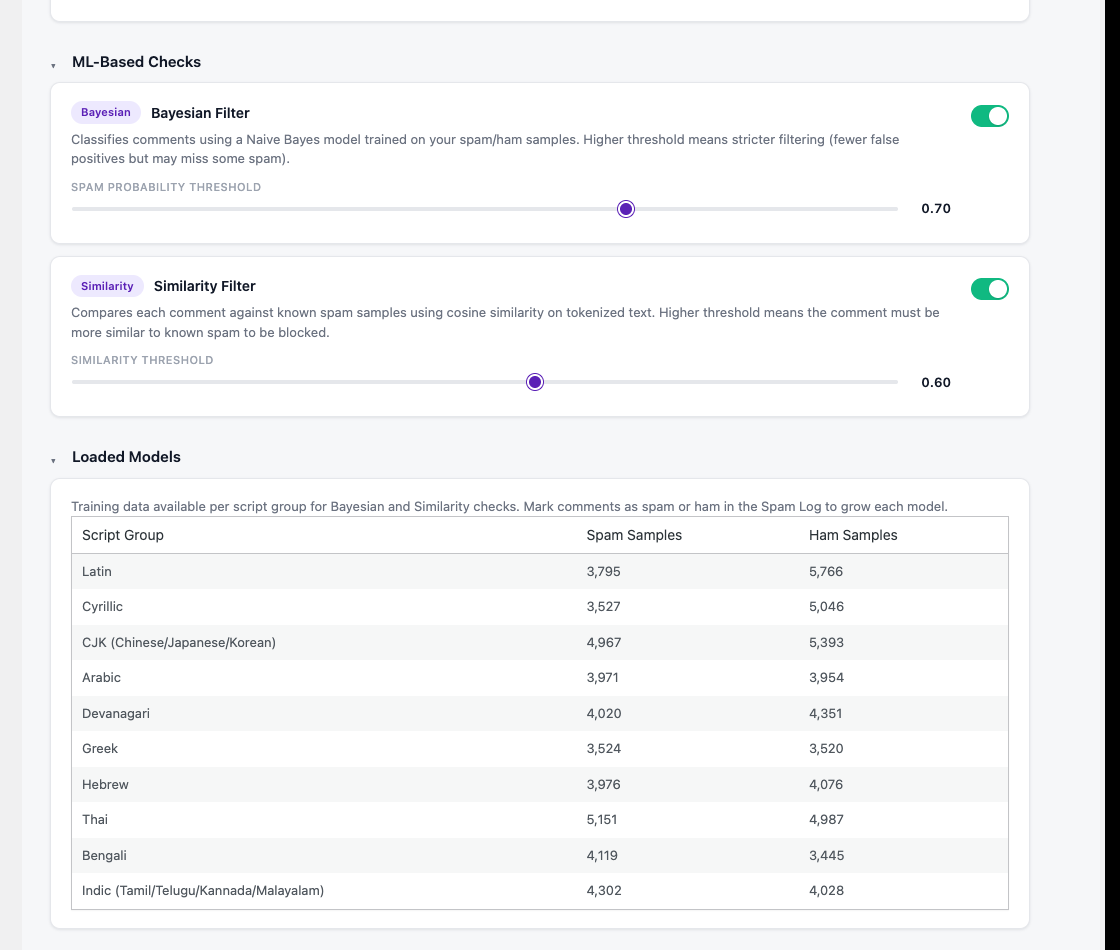
- A classifier that learns from your own moderation. A Naive Bayes model and a cosine-similarity check ship with a seed corpus for ten writing systems (Latin, Cyrillic, CJK, Arabic, Devanagari, Greek, Hebrew, Thai, Bengali, Indic), so a non-English site starts with a working filter, and every Spam / Not Spam decision made anywhere in WordPress trains it further on your site’s own spam.
- A flagged comment stays visible to its author as “awaiting moderation”, and to nobody else, so a real visitor caught by mistake does not post it again.
- Privacy by construction. Raw IP addresses and emails are never stored, only salted hashes; everything the plugin keeps, including training samples, is exportable and erasable per person through the WordPress Privacy tools and removed on uninstall.
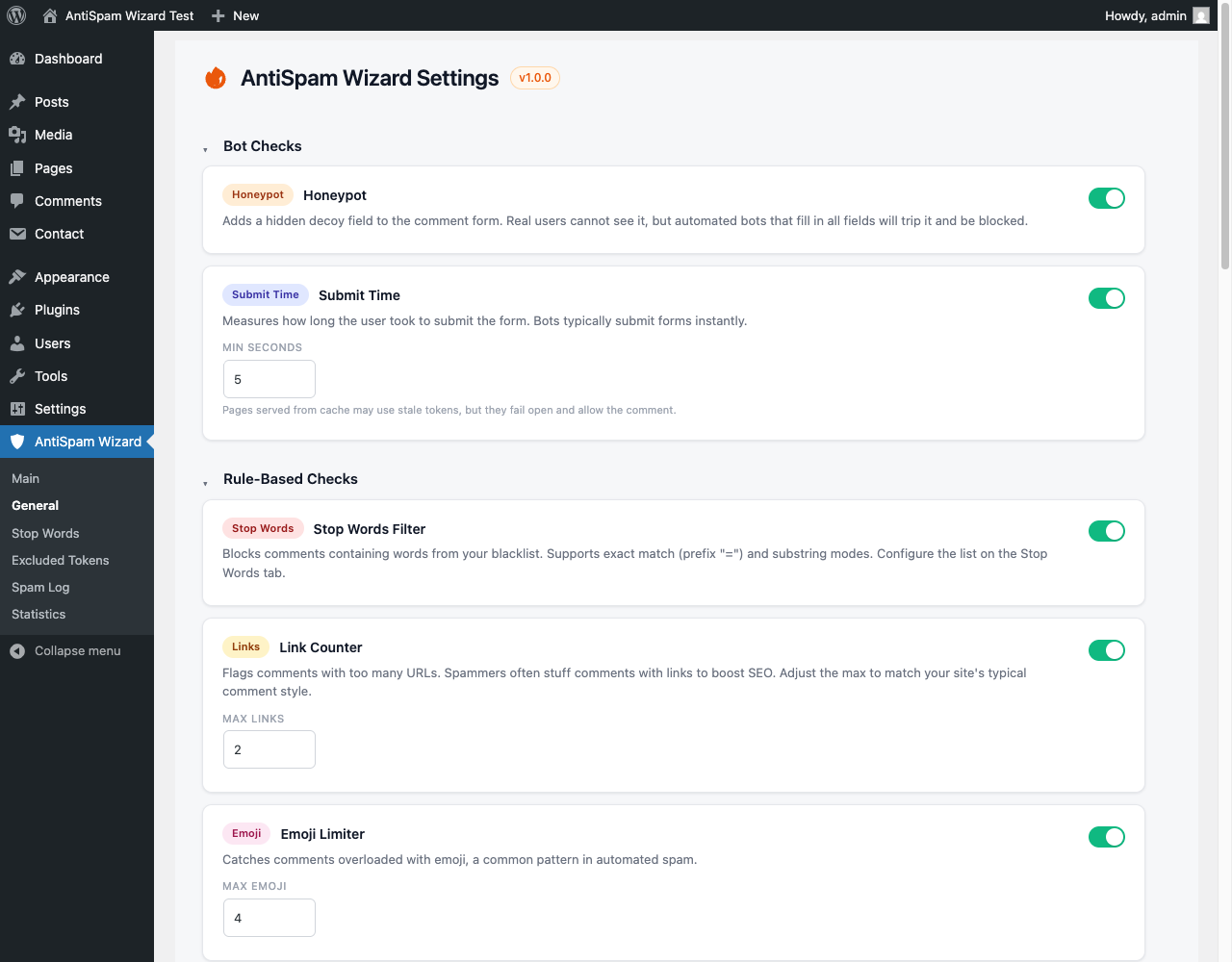
- Ten independent checks, each with its own toggle and thresholds, ordered so the cheap bot checks short-circuit first and a typical comment costs a few milliseconds.
Detection checks include:
- Honeypot field for automated bots
- Submit-time validation (too fast)
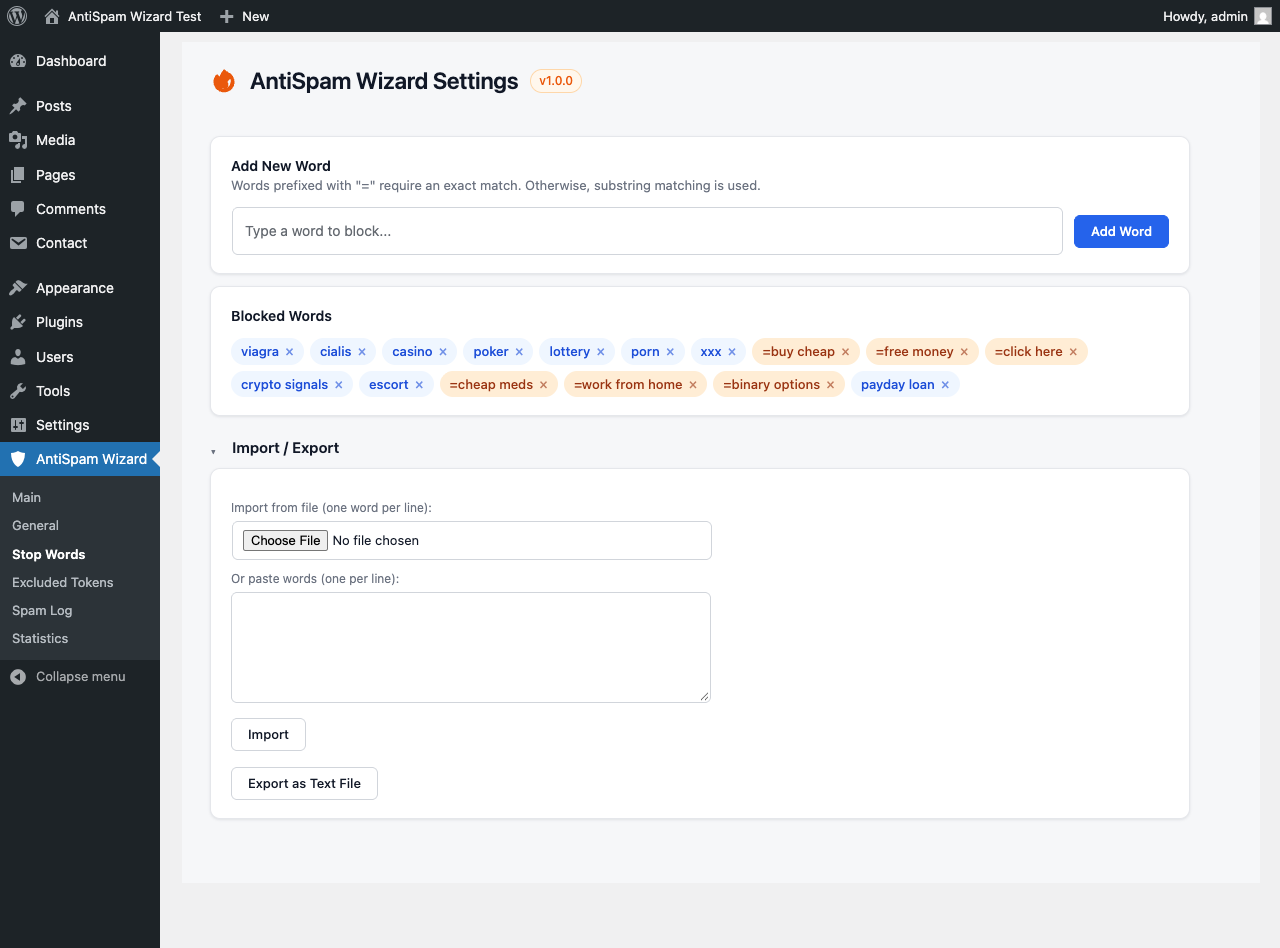
- Stop words filtering
- Excessive links detection
- Emoji abuse detection
- Unusual spacing patterns
- Multi-language mixing detection
- Duplicate comment detection
- Naive Bayes spam classification with dynamic learning
- Cosine similarity spam detection against known spam samples
- Excluded tokens management to fine-tune text analysis
- Configurable minimum message length to skip heavy checks on very short comments (10 characters by default)
- Contact Form 7 protection — when the Contact Form 7 plugin is active, all enabled checks also run on CF7 submissions via the
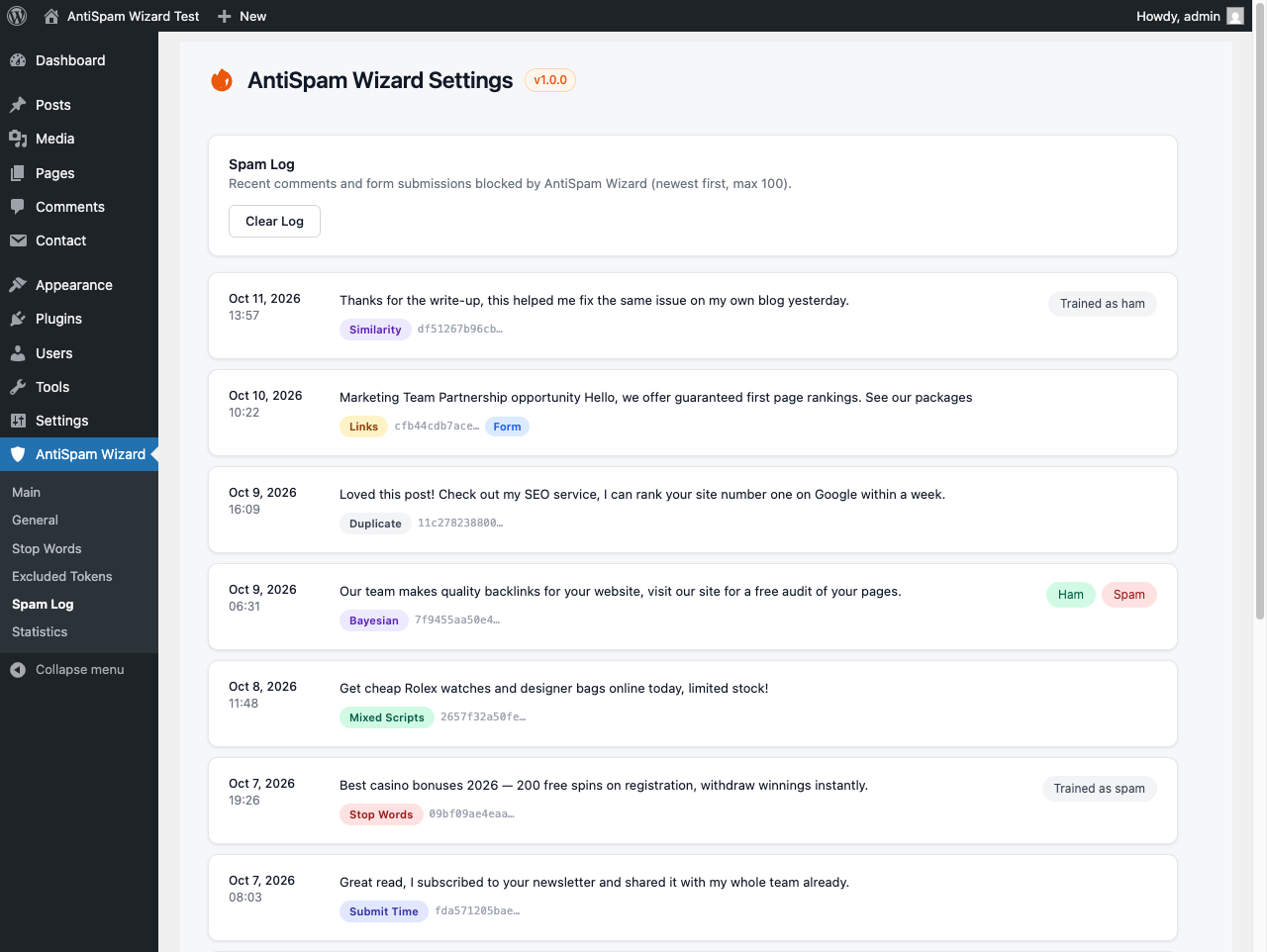
wpcf7_spamfilter; flagged submissions are blocked through CF7’s native spam handling and logged with a form marker (no new storage location) - Learning from moderation — every Spam / Not Spam decision made anywhere in WordPress (a Comments-screen row action, a bulk action, another antispam plugin, or the plugin’s own Spam Log) trains the classifier automatically
- “Mark as spam” link under each comment on the site for administrators — remove the comment and teach the classifier in one click, from the page where you saw the spam, with no JavaScript
- Flagged comments stay visible to their author — a comment the plugin flags is shown only to the person who wrote it, marked “awaiting moderation” as WordPress does for held comments, so a visitor caught by mistake does not post it again; nobody else sees it, and “Show flagged comments to their author” on the General tab turns it off
All checks are configurable from the WordPress admin panel with collapsible inline help for each setting.
Links
- Website: https://antispamwizard.com/
- Source code and issue tracker: https://github.com/HawkeyePierce89/antispam-wizard
The seed corpus is comment spam and is expected to transfer reasonably to Contact Form 7 submissions, but this is unmeasured; a form-specific corpus is explicit future work.
Translations
AntiSpam Wizard is fully translated into the following languages:
- English (default)
- Spanish (es_ES)
- German (de_DE)
- French (fr_FR)
- Portuguese – Brazil (pt_BR)
- Italian (it_IT)
- Japanese (ja)
- Russian (ru_RU)
- Dutch (nl_NL)
- Turkish (tr_TR)
Privacy
When a comment or Contact Form 7 submission is flagged as spam — by one of the checks, or by you marking a comment as spam while moderating — the plugin stores a short text fragment of the submission, a SHA-256 hash of the submitter’s IP address, and — for Contact Form 7 submissions — a salted SHA-256 hash of the submitter’s email address (never the raw IP or email). The reason the submission was flagged and the checks that triggered are also stored, keyed by comment ID for comments and by email hash for forms. When a comment is used to train the spam filter — from the Spam Log’s Spam / Ham pills, or by any Spam / Not Spam moderation decision made elsewhere in WordPress — the full text of that comment is stored as a training sample, keyed by both the comment ID and a salted SHA-256 hash of the commenter’s email address (never the raw email), until it is erased through a personal-data erasure request or the plugin is uninstalled. The email hash is what keeps a training sample reachable by an export or erasure request after the comment it was trained from has been deleted. This data — including training samples — is exportable and erasable per data subject via WordPress’s Privacy tools (Tools Export/Erase Personal Data). Suggested privacy-policy text covering both comments and form submissions is available under Settings Privacy in the WordPress admin.
No new storage location is introduced for Contact Form 7; form entries live in the existing spam log option and are removed on uninstall alongside all other plugin data.
Screenshots


Installation
- Upload the
char-oday-antispam-wizardfolder to the/wp-content/plugins/directory - Activate the plugin through the ‘Plugins’ menu in WordPress
- Configure detection settings under the AntiSpam Wizard menu in the admin sidebar
FAQ
-
Does the plugin send my data to external servers?
-
No. All spam detection runs entirely on your own server — there are no external API calls, no accounts, no API keys, and nothing leaves your site. This also means the plugin keeps working offline and adds no third-party dependency to your privacy policy.
-
What personal data does it store?
-
When a submission is flagged as spam, whether by a check or by your own moderation decision, the plugin stores a short text fragment, a SHA-256 hash of the IP address, and — for Contact Form 7 submissions — a salted SHA-256 hash of the email address. Raw IPs and emails are never stored. If the spam filter is trained on a comment — from the Spam Log, or by any Spam / Not Spam moderation decision — the full text of that comment is also stored as a training sample, keyed by the comment ID and by a salted SHA-256 hash of the commenter’s email address. All of it is exportable and erasable via the built-in WordPress Privacy tools, and removed completely on uninstall.
-
Does it work with contact forms?
-
Yes — with Contact Form 7. When CF7 is active, all enabled checks (including the honeypot and submit-time bot checks) run on form submissions and flagged ones are blocked through CF7’s native spam handling. No configuration is needed beyond a single toggle; without CF7 the plugin simply protects comments as usual.
-
Does it require JavaScript?
-
No. All checks, including the bot checks, work with JavaScript disabled, and the bot checks are designed to fail open: a cached page or a stripped form field can never cause a legitimate visitor to be flagged.
The honeypot and submit-time checks are fail-open heuristics intended to filter unsophisticated automated submissions. Missing or stale fields never cause blocking, so a cached page or a stripped form field cannot flag a legitimate visitor; a bot written for your specific site can bypass these two checks and is then evaluated by the remaining content-based checks, which, like any heuristic filter, catch most but not all targeted spam.
-
Will it slow down my site?
-
No. On regular page views the plugin only renders two hidden form fields and enqueues one small stylesheet; for a visitor who has commented before, it adds one condition to the comment query WordPress already runs, so their own flagged comments show as held — no detection runs, no extra query is made, and nothing from the training data is loaded. The full check pipeline runs only when a comment or form is actually submitted, and in the normal case only the models for the writing system that comment is actually written in are loaded: a Cyrillic comment loads the Cyrillic models and none of the other nine. On a warm cache that is a few milliseconds and a few megabytes; the first submission after the cache is cleared rebuilds that one writing system’s models, which takes a few tens of milliseconds for most writing systems and up to about a fifth of a second for Chinese, Japanese, Korean and Thai. Two cases fall back to the larger all-scripts model instead, which costs a fraction of a second to rebuild: a submission with no identifiable writing system — a bare phone number, say — and one written in a script that has too little training data of its own. When your site runs a persistent object cache, the models are stored compressed there, which is what keeps them small enough for it to hold; that costs a little extra on a rebuild and a little on each warm read, and buys far more than it costs. Without such a cache they are kept in the database instead, uncompressed, where there is no size limit to fit under. Models are cached for a day and rebuilt when that writing system’s training data changes, or when you edit the Excluded Tokens list, which changes how every model is built. They stay under the 1 MB per-item limit that persistent object caches such as Memcached impose — including as your own moderating adds to them, because the similarity model keeps the most recently learned spam within a fixed budget and, before a model is stored, it is weighed and the rarest words are dropped from its vocabulary until it fits — so such a cache stores it rather than refusing it, however long your site has been learning. Because everything runs locally, there is also no blocking round-trip to an external API on every comment, unlike cloud-based services.
-
Can it learn from my site’s spam?
-
Yes, and it learns from the moderating you already do. Every Spam / Not Spam decision made anywhere in WordPress trains the classifier — the Spam / Not Spam row action on the Comments screen, a bulk action, a decision made by another antispam plugin, or the Spam / Ham pills in the plugin’s own Spam Log. Administrators also get a “Mark as spam” link under each comment on the site itself, so a comment that slipped through can be removed and learned from in one click, from the page where you saw it. Each comment is learned from once per category, so the same decision made twice stores one sample, and changing your mind replaces the sample rather than keeping both. It ships with a seed corpus across 10 writing systems (Latin, Cyrillic, CJK, Arabic, and more) that covers the common comment-spam genres — classified ads with a phone number, “great post, visit my site”, loans, casino, crypto, dating, pharmacy — so non-English sites have a working starting point. Phone-number-like digit sequences are recognised as one signal regardless of the digits. The corpus is a starting point, not a spam database: the classifier gets good at your site’s spam from the comments you mark.
-
Why does a commenter still see a comment you flagged?
-
So that a real visitor caught by mistake does not post it again. When the plugin flags a comment, the person who wrote it still sees it in its place in the thread, marked “Your comment is awaiting moderation.” — exactly as WordPress shows any comment held for moderation — instead of watching it vanish. Only the author sees it: other visitors, feeds and comment counts show nothing, and in the admin the comment stays in your spam queue. The only thing stored for this is one number in your site’s options: the ID of the first comment flagged after you installed this version, so that older flags are left alone. Once you approve a flagged comment, it no longer counts as flagged: if you later mark it as spam yourself, its author does not see it, like any other comment you mark as spam. Comments flagged before you installed this version are never shown, because the plugin cannot tell which of them you already reviewed. The author is recognised the way WordPress recognises them for held comments: by their login, by the comment cookie their browser saved when they ticked the “Save my name, email” box, or, for ten minutes after posting, by the link WordPress sends them back to, even if they did not tick the box. As with WordPress’s own held comments, anyone given that link during those ten minutes sees the same view. You can turn it off with “Show flagged comments to their author” on the General tab.
-
Does it block all spam?
-
No. No spam filter catches everything, and no filter is free of false positives. AntiSpam Wizard is provided as is, without warranty of any kind, under the GPL-2.0-or-later licence — use it at your own risk and keep an eye on your Spam Log and moderation queue.
Reviews
There are no reviews for this plugin.
Contributors & Developers
“Char O’Day – AntiSpam Wizard” is open source software. The following people have contributed to this plugin.
Contributors
“Char O’Day – AntiSpam Wizard” has been translated into 1 locale. Thank you to the translators for their contributions.
Translate “Char O’Day – AntiSpam Wizard” into your language.
Interested in development?
Browse the code, check out the SVN repository, or subscribe to the development log by RSS.
Changelog
1.0.0
- Initial release
- Honeypot, submit-time, stop words, links, emoji, spacing, multi-language, and duplicate comment checks
- Naive Bayes spam classifier with configurable threshold
- Dynamic learning: mark comments as spam/ham from the admin panel
- Learning from moderation: every Spam / Not Spam comment status change in WordPress trains the classifier, wherever the decision was made
- “Mark as spam” link under each comment on the site for administrators, with a per-comment nonce and no JavaScript
- A comment the plugin flags is shown to its own author as awaiting moderation, so a false positive is not posted again; nobody else sees it, and a General tab setting turns it off
- An author who did not tick the “Save my name, email” box still sees their flagged comment as awaiting moderation for ten minutes after posting, through the same link WordPress uses for its own held comments
- Cosine similarity check comparing comments against known spam samples
- Excluded tokens tab for managing tokens ignored by Bayesian and Similarity checks
- Configurable minimum message length to skip heavy checks on short comments
- Collapsible help descriptions for all General tab settings
- Admin settings page
- Spam logging and statistics
- Contact Form 7 integration — when CF7 is active, all enabled checks run on form submissions via
wpcf7_spam; flagged submissions are blocked through CF7’s native spam handling and logged with a Form marker - Personal data export and erasure via the WordPress Privacy API, covering comments, Contact Form 7 submissions (form entries matched by salted email hash) and training samples added from a person’s comments (matched by comment ID and by salted email hash)
- Fully translated into 9 languages: Spanish, German, French, Brazilian Portuguese, Italian, Japanese, Russian, Dutch, Turkish