Description
Stop answering “how do I…?” emails. Hintwise gives the people who run a website a handbook right inside the WordPress dashboard. It starts with ready-made guides for this exact site, puts the right help on the right screen, and shows your contact details wherever someone gets stuck.
Built for agencies and freelancers who hand sites over to clients, and for any team that shares one website.
Moving from WP Help?
WP Help has not been updated since April 2024. Hintwise imports its documents in one click (titles, content, drafts, order, sections and the links between documents) and can keep the menu name your team already knows. WP Help itself is left untouched until you deactivate it.
A handbook that writes its first draft for you
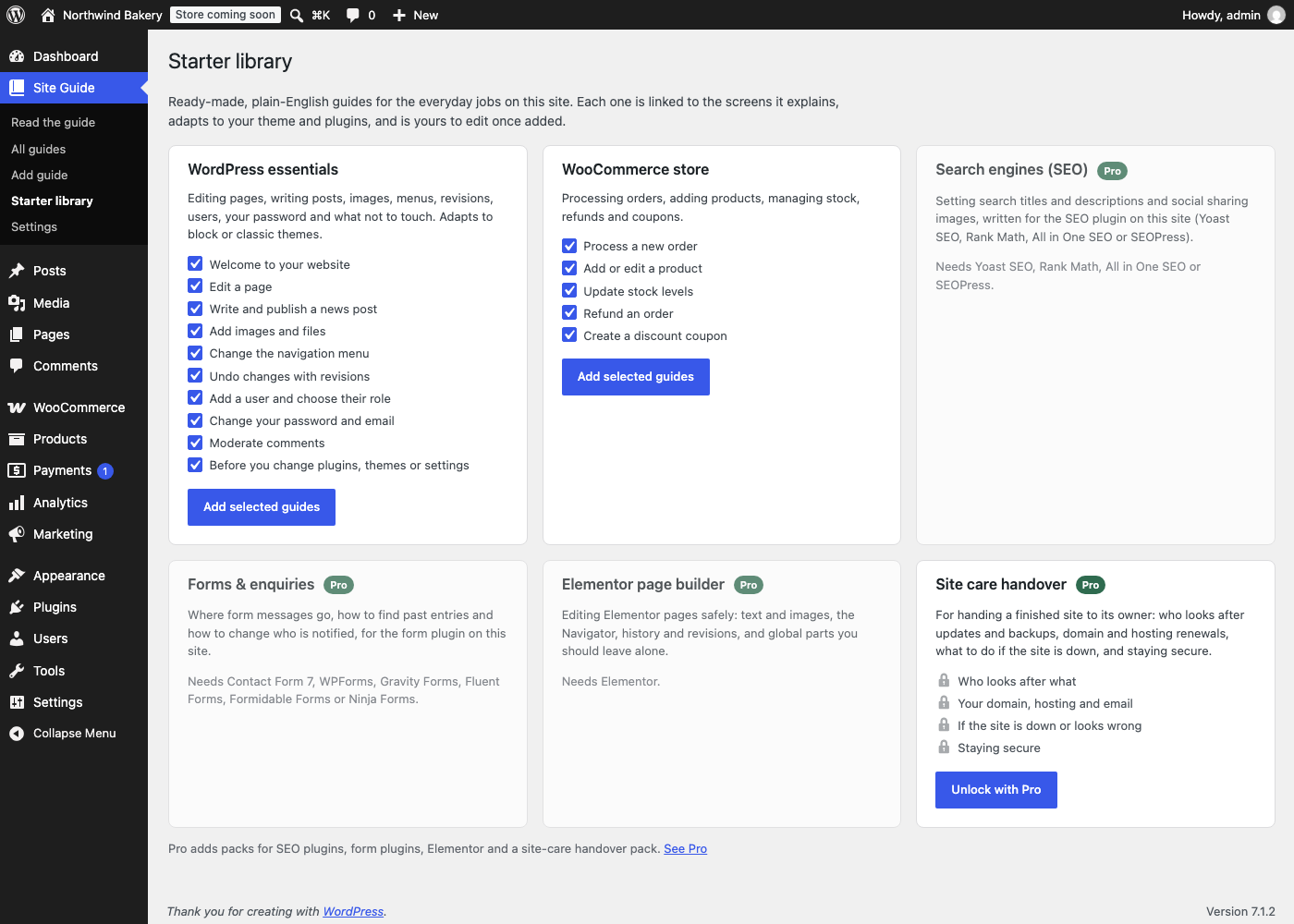
Most documentation plugins give you an empty page. Hintwise comes with a starter library of plain-English guides for the jobs clients actually do, and adds them in one click:
- Editing a page with the block editor, publishing a news post, scheduling, drafts
- Uploading images and files, alt text, replacing a PDF
- Changing the navigation menu (the right steps for block themes or classic themes)
- Undoing changes with revisions, moderating comments
- Adding users and choosing roles, changing a password
- “Before you change plugins, themes or settings”, for clients with admin access
- WooCommerce: processing orders (with the right link for HPOS or classic order storage), adding products, updating stock, refunds and coupons
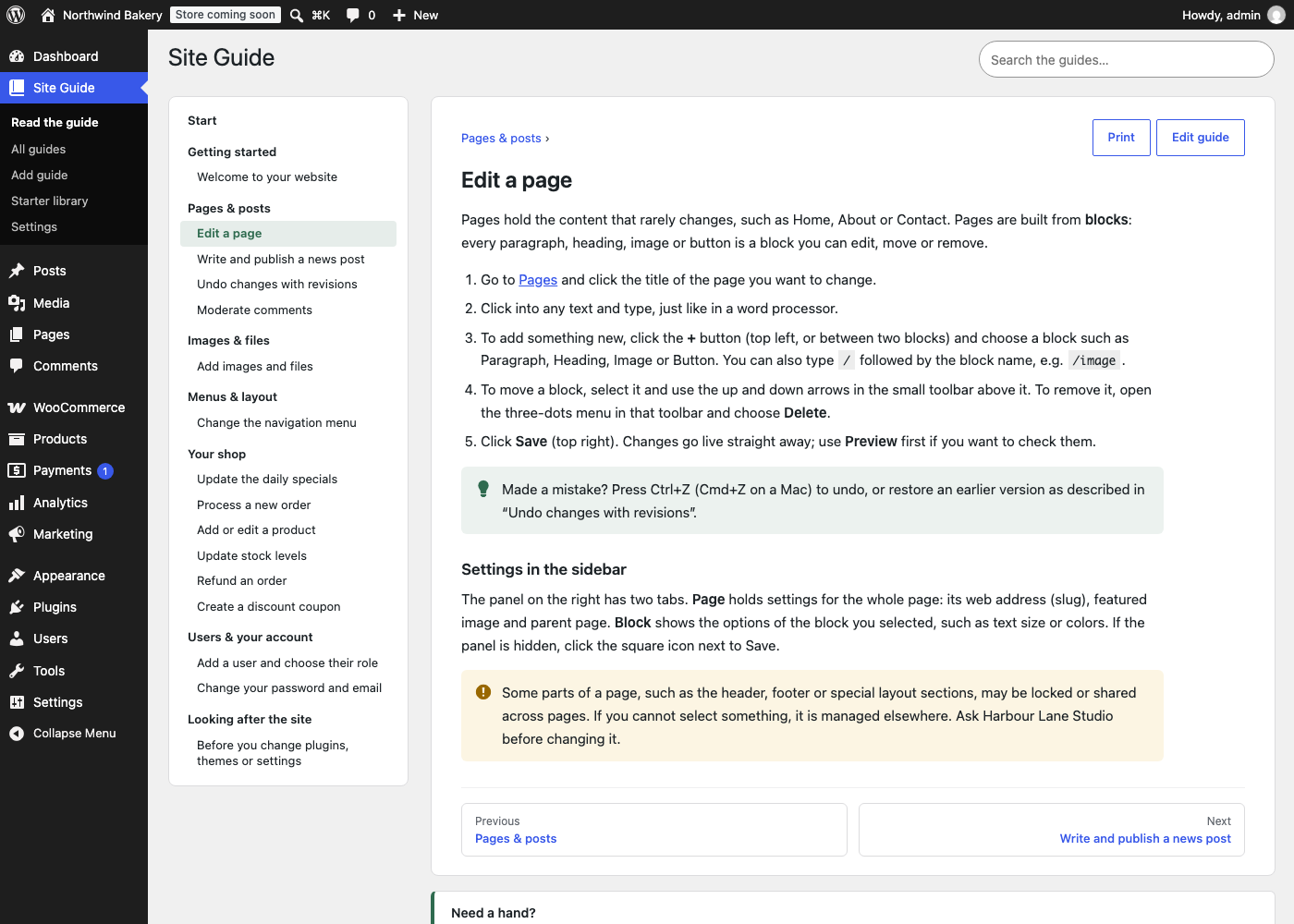
Guides link straight to the screens they describe, use your site name and contact details, and are yours to edit afterwards.
Help on the exact screen
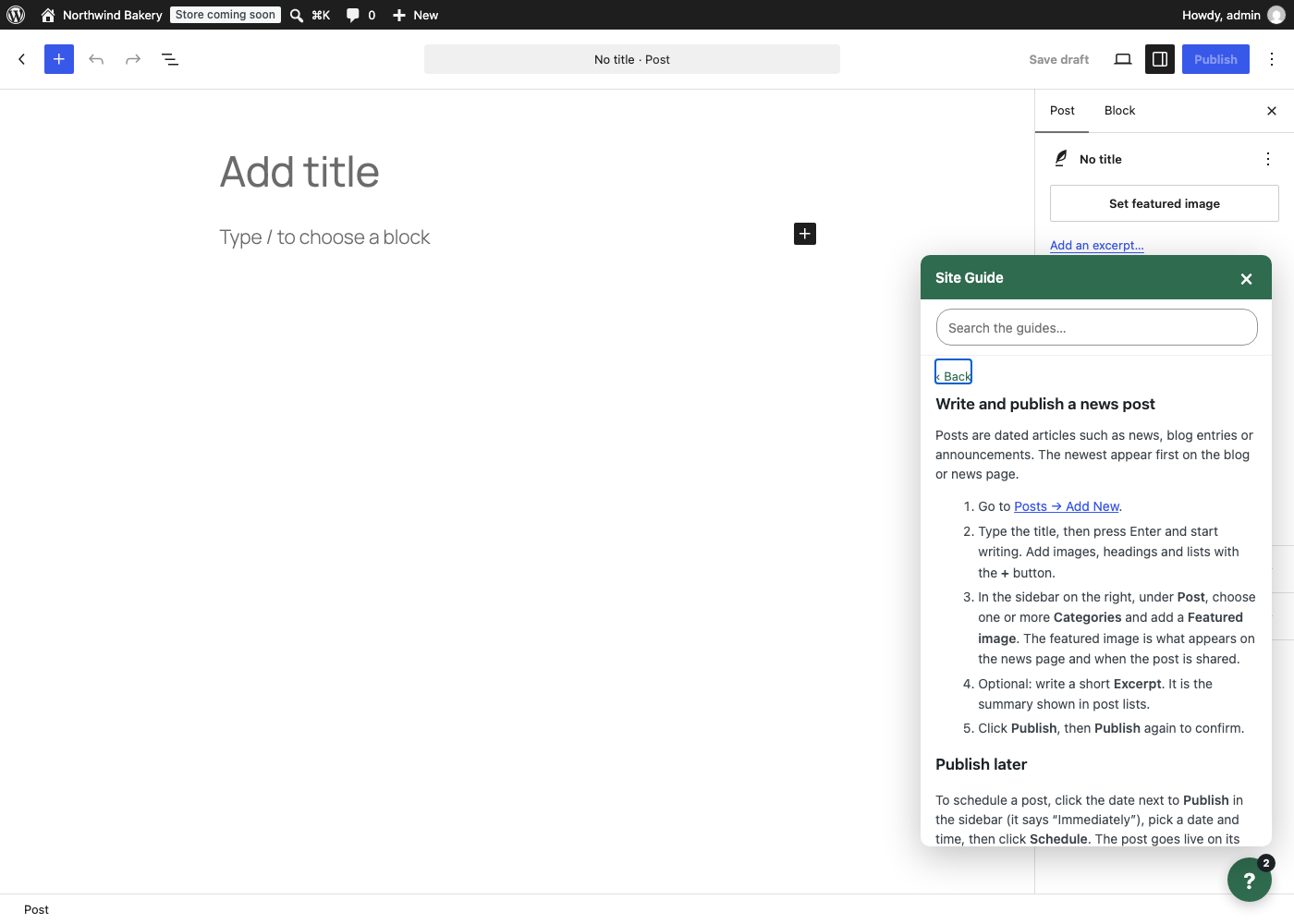
Pin any guide to the screens it belongs to, such as the Pages list, the post editor, WooCommerce orders or any other admin page. A small help button in the corner shows the guides for that screen, works in the block editor too, and lets people search the whole handbook without leaving what they are doing. Pinned guides are also added to the classic Help tab.
Everything in one place
- Site Guide menu (rename it to “Help”, “How-to” or your agency’s name) with a table of contents, instant search, sections, next / previous links and printing
- Write guides with the block editor: headings, lists, images, videos (YouTube, Vimeo, Loom and other embeds), tips and warnings
- Who sees what: limit a guide to certain roles, such as shop managers or administrators
- Dashboard widget with your welcome message, the key guides and your contact details
- Your contact card (name, email, phone, support link, opening hours) under every guide and in the help panel
- Placeholders:
{{site}},{{contact}},{{email}},{{phone}}and{{admin:edit.php}}links that keep working after a site is moved - Import / export your handbook as a file to reuse it on every client site
- Switching from WP Help? Import its documents in one click, with their order, sections and links
- WP-CLI:
wp hintwise library,wp hintwise export,wp hintwise import,wp hintwise import-wp-help - Guides stay private: they are never public pages, never in sitemaps, and the REST API only serves them to people who can edit them
Hintwise Pro
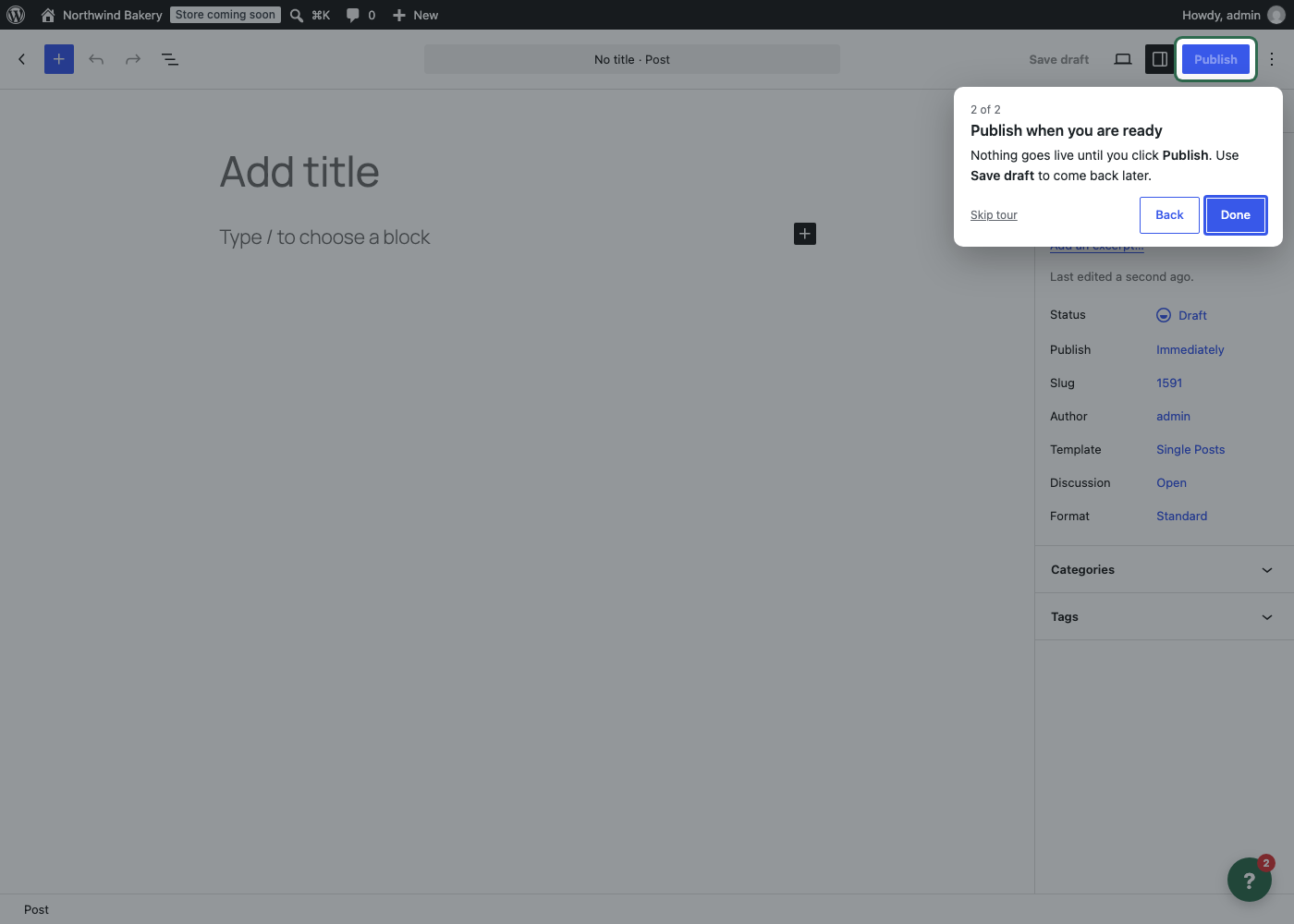
- Guided tours: click-through walkthroughs that point at the real buttons and fields on any admin screen. Pick the elements with your mouse, no code. Tours can start by themselves the first time someone opens a screen, once per user.
- Library sync: keep one master handbook on your own site and have every client site update from it automatically, twice a day. Guides written on the client site are never touched.
- Handover pack: the whole handbook as a printable / PDF document with a cover page, contents, site facts (theme, plugins, versions, users) and your contact details.
- Required reading: mark guides as required, show new users a checklist on the Dashboard, and see who has read what in the reading report.
- Your branding: logo, accent color and menu icon, and no Hintwise credit.
- More starter packs: SEO (written for Yoast SEO, Rank Math, All in One SEO or SEOPress, whichever the site uses), forms (Contact Form 7, WPForms, Gravity Forms, Fluent Forms, Formidable, Ninja Forms), Elementor, and a site-care handover pack (who looks after what, domain and hosting, what to do if the site is down, staying secure).
Pro has a 14-day free trial, no card needed.
Privacy
Hintwise stores guides and settings in your own WordPress database and does not send them anywhere. Library sync (Pro) only talks to the site you enter, using the key you enter. Upgrades and licensing are handled by Freemius: the plugin only shares basic site data (URL, versions) if you opt in on first use or activate a license. See the Freemius privacy policy.
Screenshots
Installation
- Install and activate Hintwise from Plugins Add New.
- Go to Site Guide Starter library and add the guides you want.
- Go to Site Guide Settings and add your contact details (and, if you like, rename the menu).
- Adjust the guides under Site Guide All guides. In the “Where and for whom” box of each guide, choose the screens it appears on and who can read it.
FAQ
-
Who can read the handbook?
-
Everyone who works on the site (contributors, authors, editors, shop managers and administrators) can read guides that are not limited to certain roles. Limit a guide to roles to show it only to them. Subscribers and customers only see guides you open to their role. Drafts are only visible to people who can edit guides.
-
Who can write guides?
-
Administrators. Developers can change this with the
hintwise_manage_capabilityfilter (for example to let editors write guides). -
Are guides visible on the front end of the site?
-
No. Guides are not public pages, have no front-end URL and are left out of sitemaps and search. The REST API only returns them to people who can edit guides.
-
Can I reuse my guides on other sites?
-
Yes. Export them from Site Guide Settings and import the file on the other site. With Pro, library sync keeps every client site up to date with your master copy automatically.
-
I use WP Help. Can I move my documents?
-
Yes. When Hintwise finds WP Help documents on the site, the Starter library screen offers to import them in one click: titles, content, drafts, order, sections and the links between documents all come across, and you can keep the menu name your team knows. WP Help itself is not changed, so you can compare both and deactivate it when you are ready. Running the import again only adds documents written since.
-
Do the starter guides match my site?
-
They adapt to what is installed: the menu guide explains the Site Editor on block themes and Appearance Menus on classic themes, the WooCommerce guides only appear when WooCommerce is active, and links point to this site’s admin screens. After adding them, edit anything you like.
-
Yes. It sits in the corner of every admin screen, including the block editor and the Site Editor. You can move it to the left, or turn it off, in the settings.
-
Can I add videos?
-
Yes. Paste a YouTube, Vimeo or Loom link into a guide (or use an Embed or Video block) and it plays inside the handbook and the help panel.
-
What happens if I uninstall the plugin?
-
Settings and per-user data are removed. Your guides are kept, so reinstalling brings the handbook back, unless you tick “Delete all guides when the plugin is uninstalled” in the settings.
Reviews
There are no reviews for this plugin.
Contributors & Developers
“Cedar Hintwise – Client Handbook & Admin Help” is open source software. The following people have contributed to this plugin.
Contributors
Translate “Cedar Hintwise – Client Handbook & Admin Help” into your language.
Interested in development?
Browse the code, check out the SVN repository, or subscribe to the development log by RSS.
Changelog
1.1.0
- New: one-click import from WP Help (documents, drafts, order, sections and links between documents), on the Starter library and Settings screens, and as
wp hintwise import-wp-help.
1.0.0
- First release.