
Description
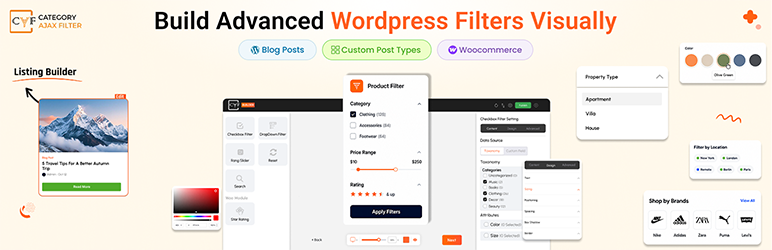
THE COMPLETE FILTER SOLUTION: POSTS, CUSTOM POST TYPES & WOOCOMMERCE PRODUCTS. DRAG & DROP BUILDER INCLUDED.
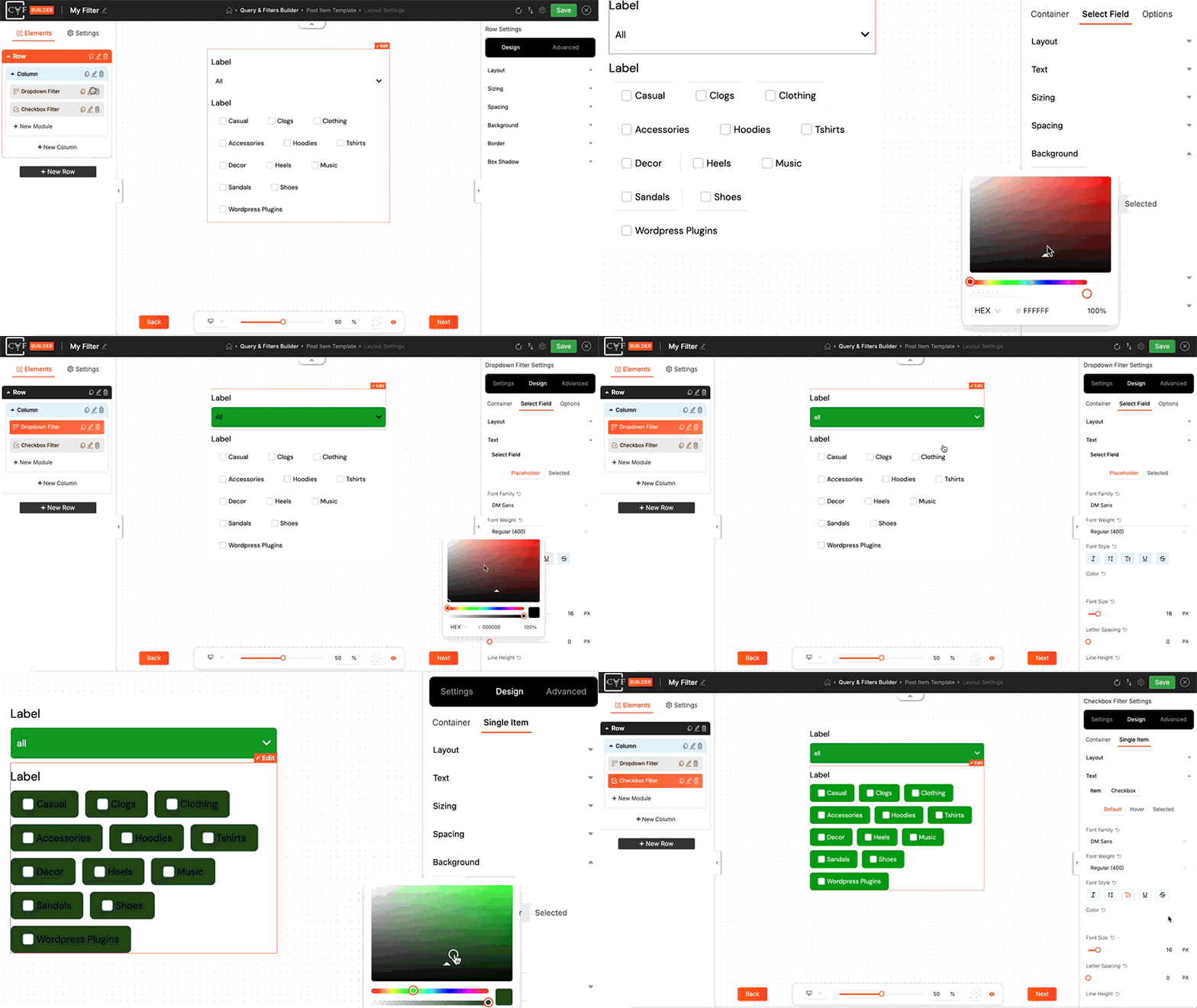
Category AJAX Filter (CAF) is a free filter plugin for WordPress posts, custom post types and WooCommerce products. Visitors filter by category, tag, taxonomy, attribute or price instantly, with no page reload. Build it visually with the drag & drop CAF Builder, where every element is a module: search box, dropdown, checkbox, range slider and more, all styled and placed however you want, with no coding and separate settings for desktop, tablet and mobile. Add it anywhere with a shortcode. The filter works with your existing layout in Elementor, Divi, WooCommerce shop pages and all major themes or you can create your own listing with drag & drop. Category AJAX Filter Pro adds AI search, analytics, SEO controls, custom field filtering, attribute swatches, product badges and more.
⭐ Key Features
CAF includes the core features you need to create professional, fully customized post or woocommerce product filters. From instant AJAX filtering to pre-built templates, everything is designed for simplicity and power.
-
AJAX-Powered Instant Filtering: Filters use AJAX to update results instantly without page reload. Visitors see filtered posts and products in real-time as they select categories, tags or search anything across your content.
-
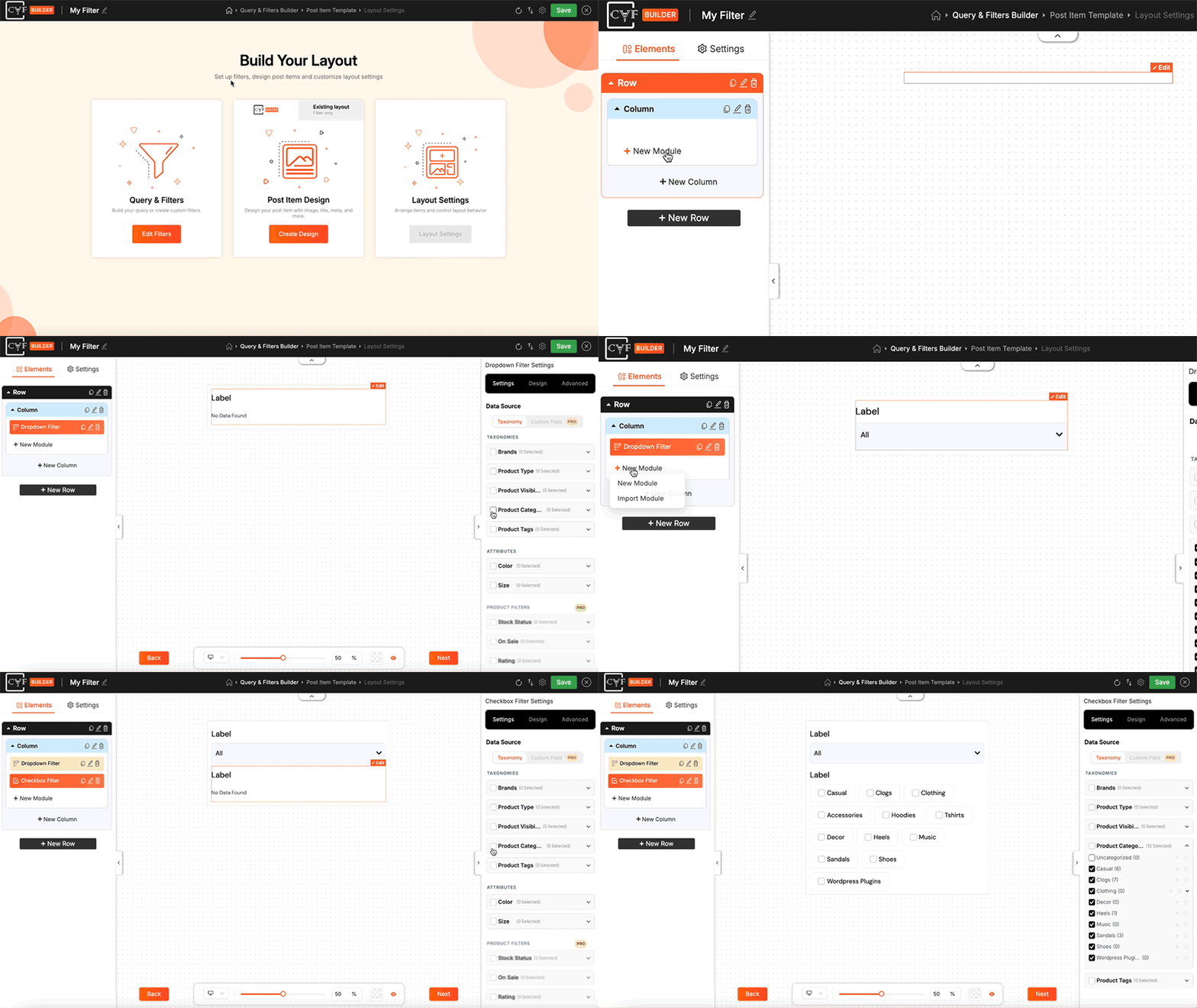
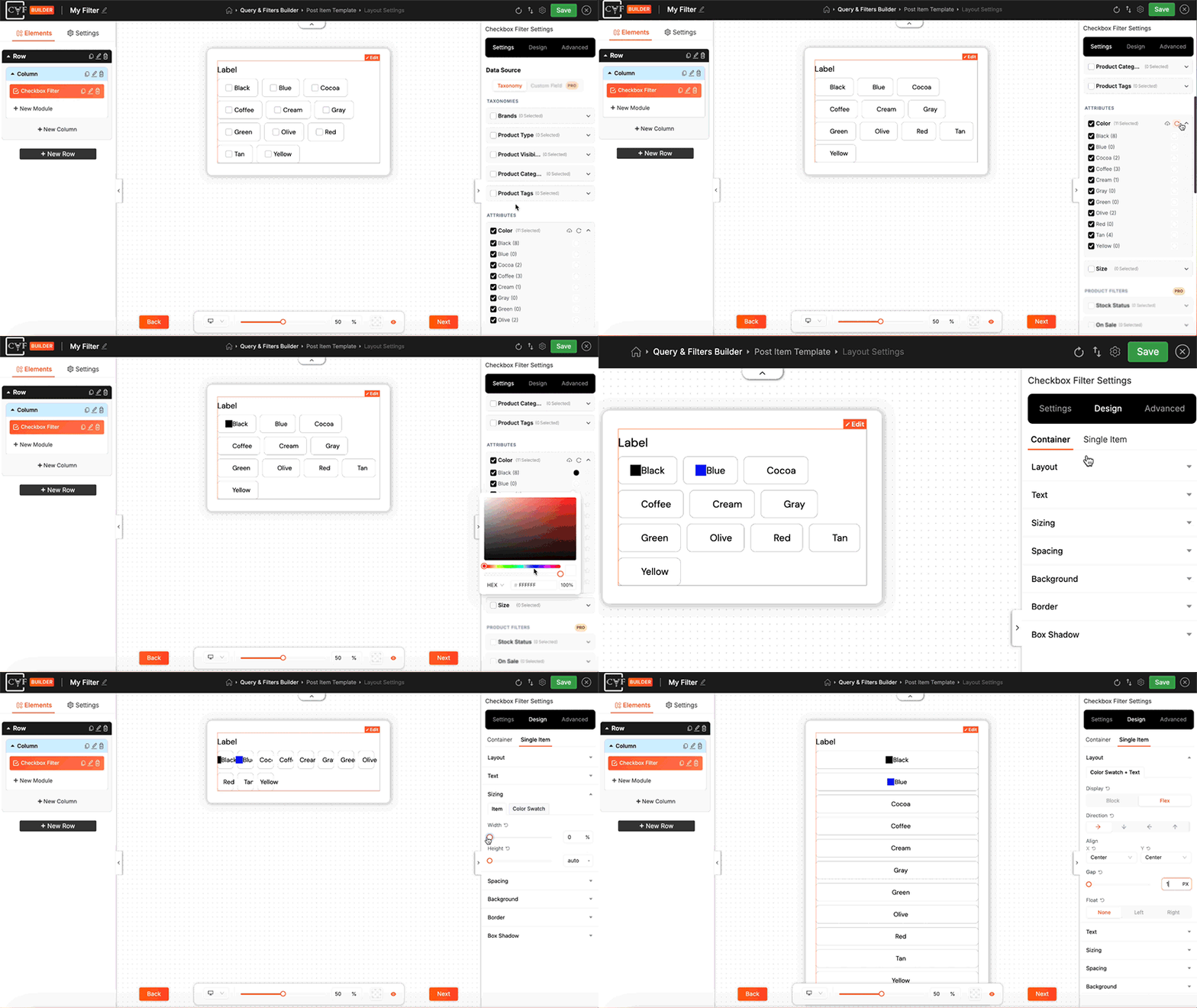
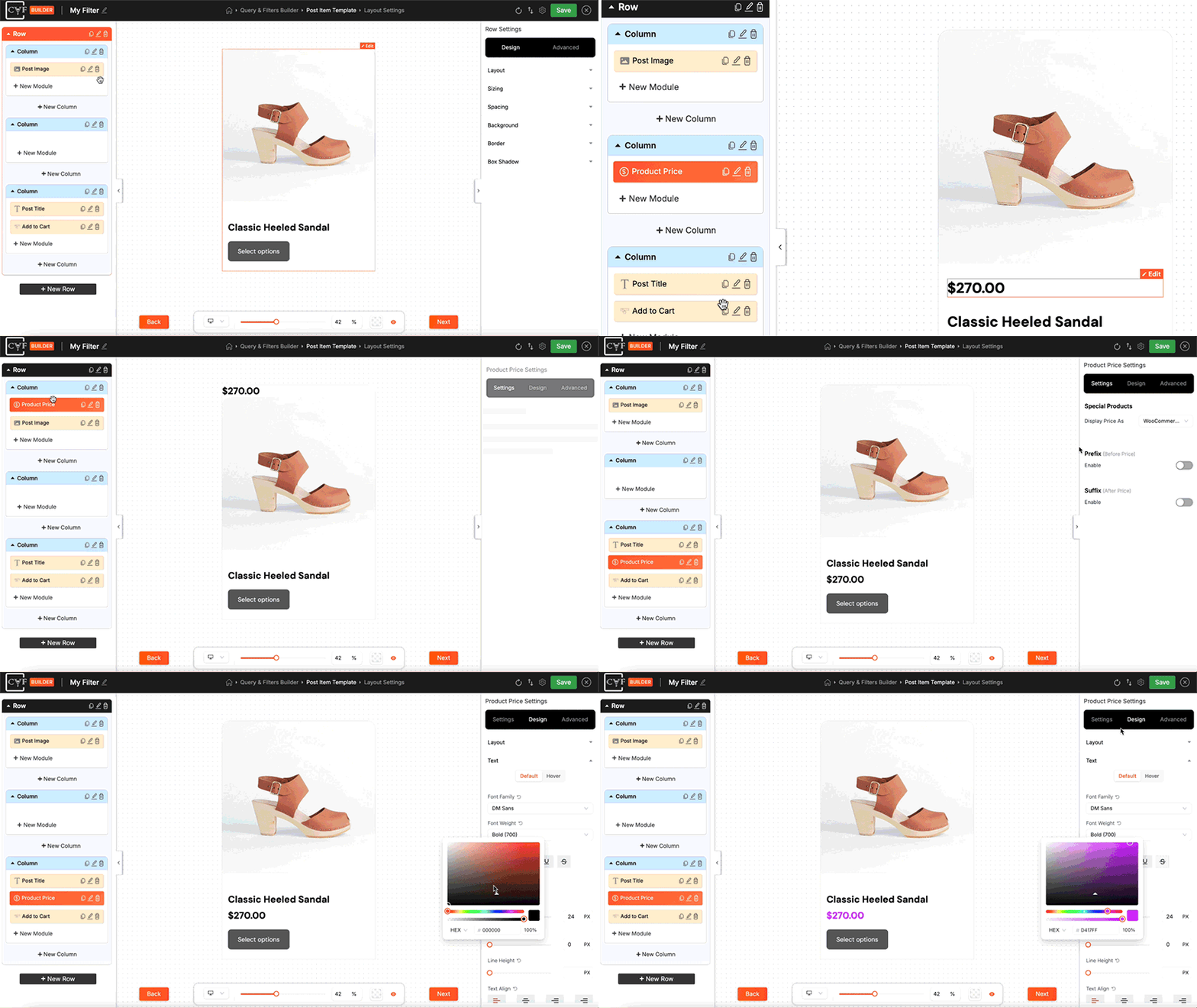
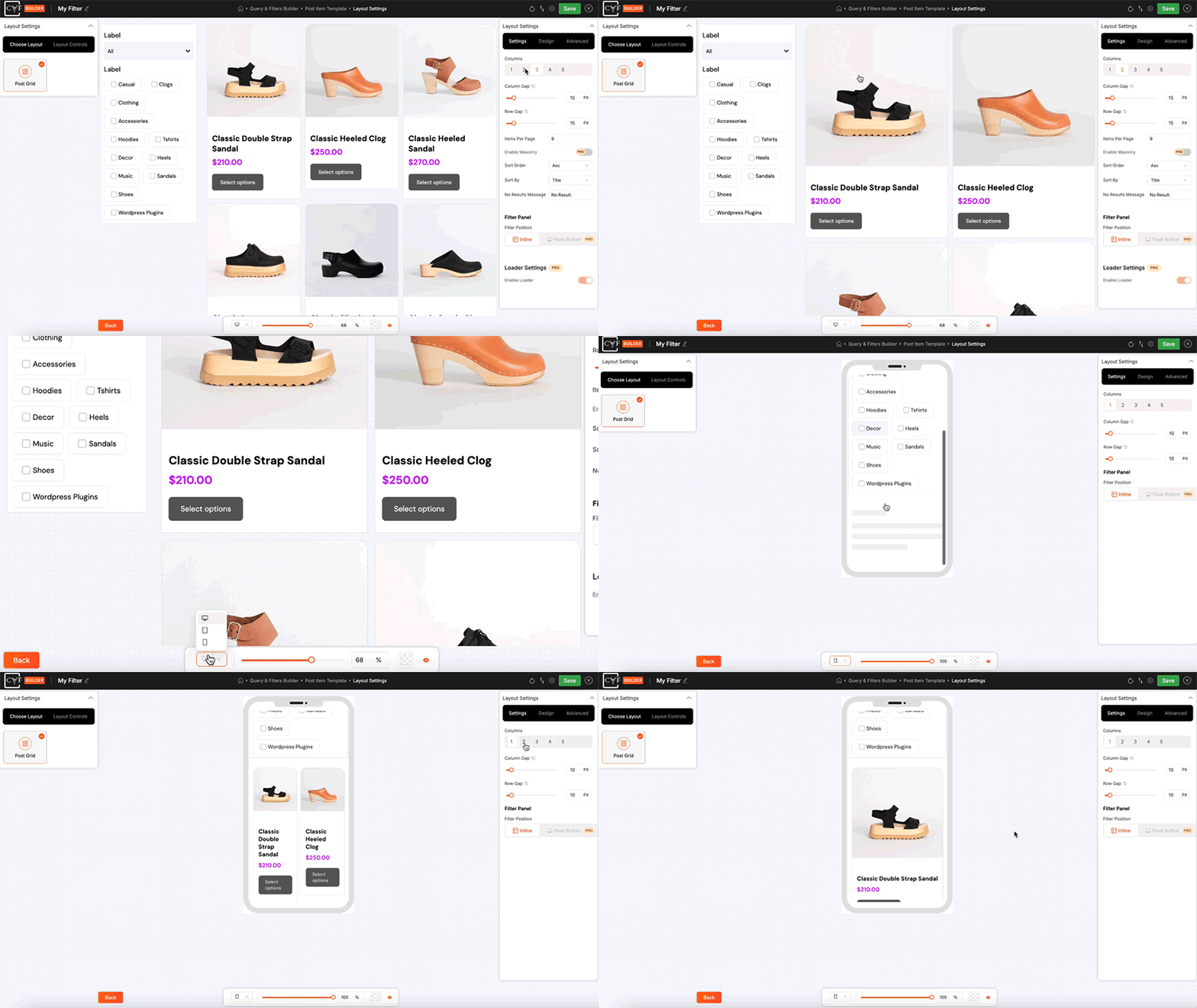
Drag & Drop 3-Step Builder: The visual CAF Builder simplifies filter creation into three steps: Query & Filters to set filtering logic, Post Item Template to design post and product cards, Layout Settings to control columns, posts per page, gaps, sort order, filter position and pagination.
-
Works with Any Post Type: Blog posts, any custom post type and WooCommerce products – one filter for all your content.
-
Pre-Built Template Library: Start with ready-made filter layouts and post item designs. Export your work as JSON to reuse across sites or import templates from other filters you’ve built.
🔗 Supported Post Types & Compatibility
Post types & taxonomies
Filter WordPress posts, any custom post type registered on your site or WooCommerce products – by category, tag, brand, attribute, price or any custom taxonomy you’ve created, using Search, Dropdown, Checkbox and Range Slider modules.
WooCommerce
Full support for simple, variable and grouped products. Connect the filter to your existing shop layout or build a complete product listing with Product Image, Product Price, Add to Cart, Badges modules and more.
Page builder & plugin compatibility
Works with all major page builders including Elementor, Divi and WP Bakery. Compatible with popular custom post type and custom field plugins like ACF, CPT UI and Meta Box. Elementor Loop Builder support is available.
🎬 Free Live Demos
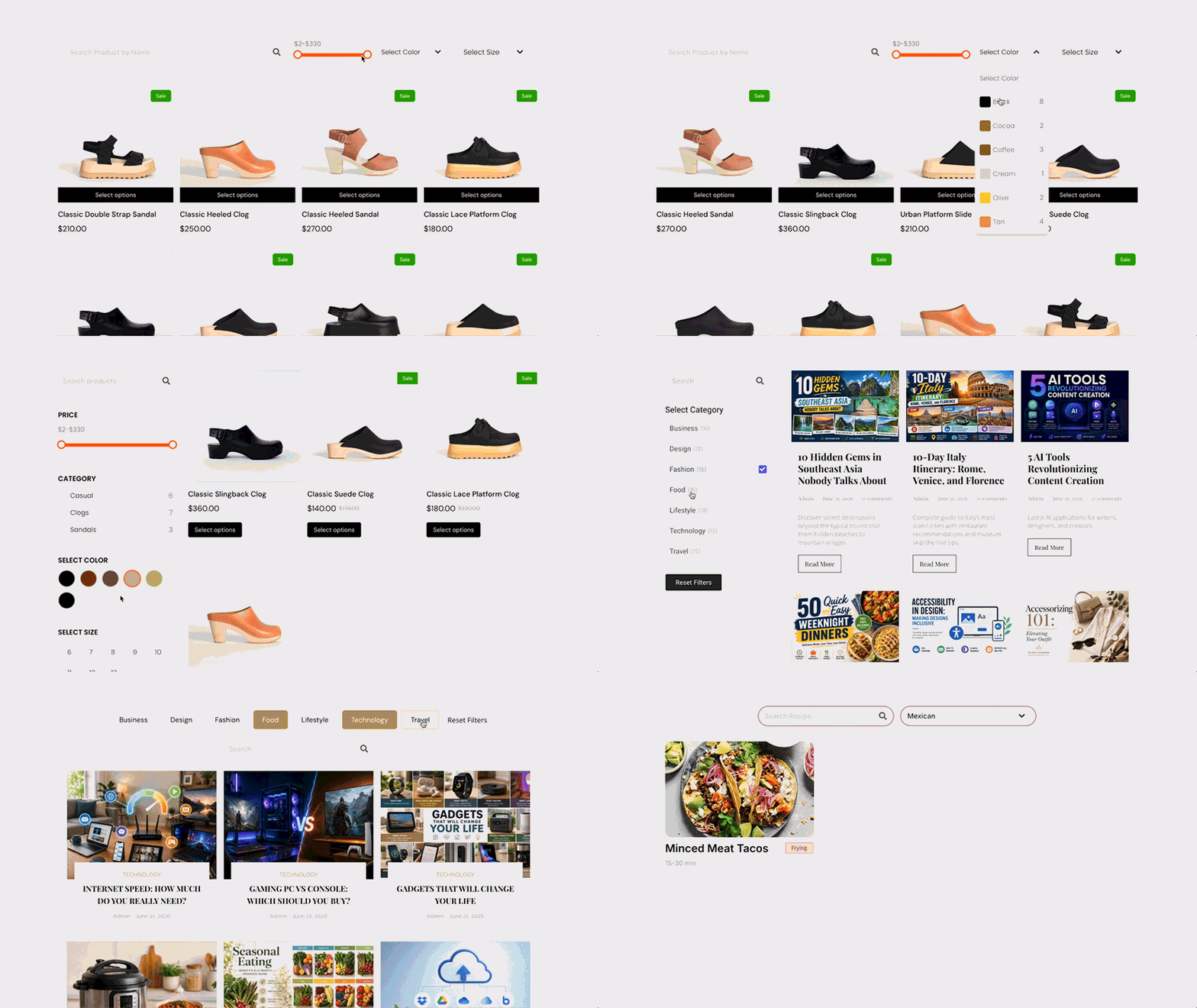
Explore CAF in action across WordPress posts, custom post types and WooCommerce products — every demo runs the free version, filtering instantly with no page reload.
- Products Top Bar Filter – WooCommerce
- Products Sidebar Filter — WooCommerce
- Full Width with Search Demo — WordPress Posts
- Side Image & Description Demo — WordPress Posts
- Glossy Look Demo — WordPress Posts
- Simple Blogs Sidebar Demo — WordPress Posts
- Boxed Title Layout — WordPress Posts
- Top Dropdown Filter Demo — WordPress Posts
- Job Board Filter Demo — Custom Post Type
- Recipe Filter Demo — Custom Post Type
👑 Category AJAX Filter Pro
Take your filters to the next level with Category AJAX Filter Pro plugin. It adds advanced filtering, deeper customization and extra integrations. From AI-powered search to WooCommerce swatches and smart badges, Pro gives you the tools to build filtering experiences that match your exact vision.
-
AI Search: A visitor types “red shoes under 50” and gets the right products. AI Search understands what people mean, matching intent against your content, taxonomy terms, brands, attributes and price – not just exact keywords. Works on posts, custom post types and WooCommerce products. See the live AI Search demo.
-
Custom Fields in Filters: Extend filtering beyond taxonomies by letting visitors filter with custom fields, including all WooCommerce product custom fields, using Checkbox, Dropdown, Range Slider or Search modules, with the ability to target the search box to specific custom fields for more focused searching.
-
Sort Filter Terms: Manually reorder categories, taxonomies, brands, attributes or custom field terms in Checkbox and Dropdown filters using drag & drop, instead of relying on alphabetical or count-based ordering.
-
Icons & Images on Filters: Add an icon or image to any filter term alongside the label or in place of it. Use brand logos, colour swatches or category icons on checkbox and dropdown filters and on custom field terms.
-
Voice Search: Let visitors search hands-free using voice input, with a customizable microphone icon you can position left or right and control the listening state feedback they see while speaking, making filtering more accessible and convenient.
-
SEO Controls: Keep filtered pages crawlable and indexable with Filter With URL support and schema markup, so search engines understand your filtered content.
-
Advanced Layout Controls: Place advanced pagination options like Load More, Infinite Scroll, sorting dropdowns, selected filters and result counts exactly where you want them across four flexible positions: above filters, below filters, above the post grid or below the post grid, with drag & drop control that lets you arrange them however you need, even stacking multiple modules in the same position.
-
Analytics: Get detailed insights into how visitors use your filters, including total filter clicks across categories, attributes, brands and selected price ranges, which filter combinations return zero results, clicks broken down by device type and a complete list of search keywords visitors used, all viewable across custom time periods to identify trends and gaps in your content and store.
-
Prefix and Suffix Options: In listing add custom text or icons before and after data throughout your layout in key modules like Post Title, Custom Field, Post Button, Product Price, Add to Cart and Badges, as well as result counts in your layout controls, so every piece of information displays exactly how you want it with complete customization over presentation.
-
Float Button: Take full control of how your filter appears on every device. Keep it inline or in a sidebar on desktop and show the same filter as a floating button on mobile and tablet, with full customization of the button text, icon, panel animation direction and overlay color.
-
Product Attribute Swatches: In listing show product attributes as selectable text, color or image swatches directly on product cards, each fully styleable. Shoppers pick their size or color and add the exact variation to cart without opening the product page, turning your filtered grid into a fast, one-stop shopping experience.
-
Smart Product Badges: In listing go beyond the standard Sale badge with New, Best Seller, stock status, stock quantity and discount badges. Each badge comes with its own conditional logic, set a Low Stock Threshold to trigger a badge when inventory runs low, show discounts as an exact value or a percentage off and combine these options to build flexible badges that appear exactly when they should.
More Pro features:
Dynamic Term Counts, Category / Term Page Mode, Extended revision history, Custom fonts upload, Global font settings, include/exclude posts/products, Icon library, Icons/images for terms & custom fields, Masonry layout, Loader styles, Elementor Loop Builder support, Quick backend navigation.
🎯 Pro Demos
Explore CAF Pro in action with our live demo sites, showcasing advanced features, custom fields, WooCommerce product filtering and Pro-exclusive functionality:
- Sidebar Products Filter — WooCommerce
- Right Sidebar Products Filter — WooCommerce
- Employee Filter — Custom Post Type
- Cars Filter — Custom Post Type
- Multiple Taxonomy Filter — Custom Post Type
- Multiple Taxonomy Horizontal Dropdown Filter (Modern) — Custom Post Type
- Alphabetical Navigation Filter — WordPress Posts
- Full Width Timeline — WordPress Posts
- Gradient Border — WordPress Posts
- Masonry With Description — WordPress Posts
- Carousel Slider — Custom Post Type
- Simple Timeline — WordPress Posts
📚 Quick Import Library
Skip the design process and import professional, ready-made filter layouts in seconds:
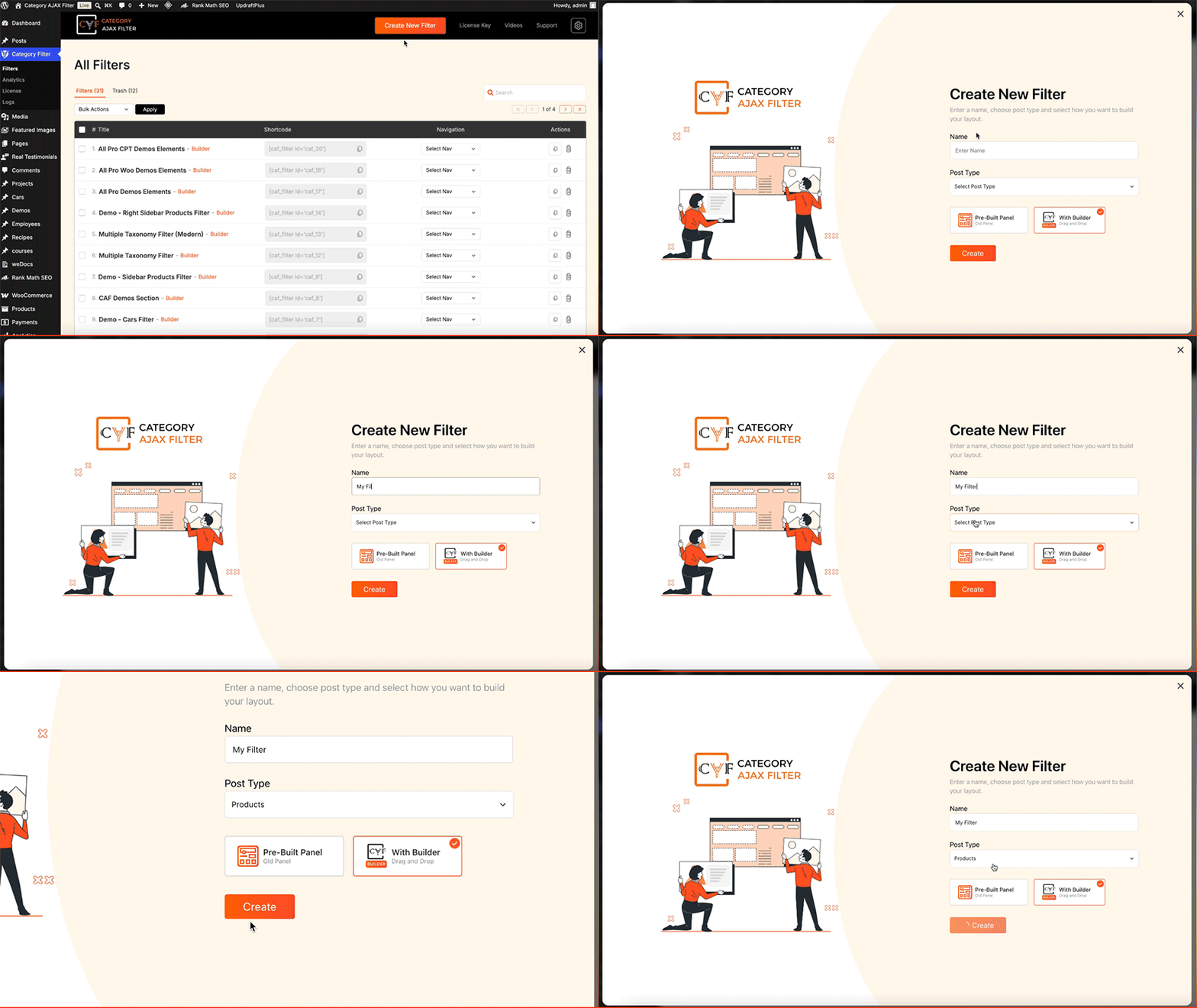
- Create a new filter and select your post type or products.
- Click the Import/Export icon at the top right of the builder and open the Import tab.
- Click Import From Library and pick a category — Full Filter Layout, Filter, Single Post Item or Layout Settings. Under Filter you can also import a single type, like a checkbox or a dropdown.
- Select any template and click Import — the complete design with all modules and styling loads instantly.
Source Code
This plugin ships minified JavaScript for the admin filter builder. Per WordPress plugin guideline #4, human-readable source code and build tools are publicly maintained here:
- React builder source (admin UI): https://github.com/trustyplugins/category-ajax-filter/tree/3.0/react-builder/src
- Build tools: https://github.com/trustyplugins/category-ajax-filter/tree/3.0/react-builder (
package.json,webpack.config.js,scripts/) — seereact-builder/BUILD.md - PHP plugin source: https://github.com/trustyplugins/category-ajax-filter/tree/3.0
To rebuild the admin builder JavaScript:
git clone -b 3.0 https://github.com/trustyplugins/category-ajax-filter.git
cd category-ajax-filter/react-builder
npm install
npx cross-env CAF_BUILD_FREE=1 npx wp-scripts build
The production plugin zip contains only the compiled files under react-builder/build/.
Screenshots
Installation
Automatic installation
- Log in to your WordPress dashboard, go to Plugins > Add New.
- Search for “Category AJAX Filter”.
- Click Install Now, then Activate.
Manual installation
- Download the plugin zip file.
- Upload the plugin files to the
wp-content/plugins/directory or install the zip through Plugins > Add New > Upload Plugin. - Activate the plugin through the Plugins screen in WordPress.
After activation
- Go to the Category Filter menu in your dashboard.
- Choose the CAF Builder for the guided 3-step visual setup or the Classic Panel for the original settings screens.
- Configure your Query & Filters, Post Item Template and Layout Settings.
- Place your finished filter on any page or section using the provided shortcode.
FAQ
-
Does it work with WooCommerce?
-
Yes, fully. Filter products by categories, tags, brands, attributes and price. Connect the filter to your existing shop layout or build a complete custom product listing with the builder’s product modules. Simple, variable and grouped products are all supported. Star-rating filters are available in the separate Pro plugin.
-
Does this work with custom post types?
-
Yes. You can target any registered post type, not just default WordPress posts, including WooCommerce products.
-
Will it work with my existing layout?
-
Yes. Just create your filter in step 1 and place the shortcode with your existing listing – no need to rebuild it.
-
Does this work with Divi, Elementor and their product grid modules?
-
Yes. CAF filters work with Divi and Elementor shop modules, so you can filter the product grids built with their widgets. You can also paste the CAF shortcode anywhere in any page builder.
-
Can I add multiple filters on the same page?
-
Yes. You can add multiple filters to the same page using their shortcodes.
-
Will this slow down my site?
-
Filtering happens via AJAX, so only the results update, the page itself doesn’t reload. The plugin is built to run efficiently on standard WordPress hosting.
-
Can I reuse a filter or layout on another site?
-
Yes. Use the export/import tools to move a full layout, a single filter, a module, a post item template or just layout settings between sites.
-
What does AI Search actually do?
-
AI Search (Pro) uses semantic, NLP-based matching so results reflect what a visitor means, not just literal keyword matches. See the live AI Search demo.
Reviews


Contributors & Developers
“Category AJAX Filter – Posts, Custom Post Types & Product Filter” is open source software. The following people have contributed to this plugin.
Contributors
“Category AJAX Filter – Posts, Custom Post Types & Product Filter” has been translated into 1 locale. Thank you to the translators for their contributions.
Translate “Category AJAX Filter – Posts, Custom Post Types & Product Filter” into your language.
Interested in development?
Browse the code, check out the SVN repository, or subscribe to the development log by RSS.
Changelog
3.1.1
(29/09/2026)
* Filter Custom Text now runs shortcodes on the frontend. The builder preview still shows the text as typed.
* Prefixed unscoped PHP helpers with caf_ so they no longer collide with other plugins. Public AJAX action names are unchanged.
3.1
(23/09/2026)
* Locked Category / Term Page Mode and Query Restriction now appear in Misc Settings (same placement as Pro; features remain Pro-only).
* Checkbox and Dropdown taxonomy pickers paginate roots, support search, and load more instead of fetching the full tree.
* Clearing a term icon no longer re-applies the default tag icon.
* Builder lists no longer show bullet markers.
3.0.5
(16/09/2026)
* Dropdown Color Swatch label control is now Show/Hide only (Tooltip tab removed). The closed select always shows the term name; Hide still applies to the open list.
* Multiple CAF filter shortcodes can now render on the same page (the one-shortcode Free limit is removed).
* Fixed a false “only one CAF filter shortcode is allowed per page” message when SureRank generated meta from page content.
* Fixed Classic Panel new-filter screens not auto-filling Title and Post Type from the layout URL.
* Added locked Category / Term Page Mode controls in Filter Settings.
* Fixed range slider decimal values (including WooCommerce price) being truncated to whole numbers. Typed values like 0.540 stay as typed in labels.
* Fixed Divi shortcodes stripping Description module text in the builder preview and frontend.
* Fixed the range slider not dragging on mobile and tablet (touch support).
* Fixed Classic Panel layouts when more than one CAF filter shortcode is on the same page.
* Query Restriction locked UI now matches Pro’s section layout (feature remains Pro-only).
* Fixed Query Only Taxonomy / Custom Field source boxes stretching out of alignment.
* Fixed Add to Cart Button Behaviour so the Pro lock covers Ajax Add to Cart only.
3.0.4
(08/09/2026)
* Fixed Sort By and Sort Order on filter and pagination AJAX so results match the layout settings instead of falling back to date.
* Fixed the closed dropdown showing term counts in the builder preview. Counts still appear in the open list when Show count is on.
3.0.3
(07/09/2026)
* Fixed uninstall deleting all CAF filters and builder layouts when removing the Free plugin. User-created filter data is now preserved (including filters built with Pro).
* Updated the Pro features banner icons on the All Filters screen.
* Fixed blank Pro badge panels on Reset and Custom Text icon settings so Free shows proper locked chrome.
3.0.2
(01/09/2026)
* Fixed a false “only one CAF filter shortcode is allowed per page” message when SEO plugins (including Slim SEO) or excerpts ran the shortcode while generating meta text.
3.0.1
(21/08/2026)
* Restored the Pro lock overlay on prefix/suffix settings for post modules (title, author, date, comment count, button, and badges).
* Builder list header: Support now opens the Trusty Plugins support page; Videos is hidden until the tutorial URL is ready.
* Added a Pro badge on the header settings icon for custom global fonts.
3.0.0
(20/08/2026)
* Major update — introduces the visual CAF Builder for designing AJAX filters and post layouts from the admin.
* Added visual drag-and-drop filter builder in the admin.
* New React-based builder UI for filter and post layout design.
* Free tier includes core builder layouts, modules, and tier limits.
* WordPress Plugin Check and coding standards improvements.
* Security and escaping fixes for export and template output.
2.9.1
(17/08/2026)
* Tested up to WordPress 7.1.
* Fixed category/terms meta saving (term IDs are now sanitized as integers instead of CSS class strings).
* Fixed broken conditional stylesheet URLs caused by accidental quote characters in asset paths.
2.9.0
(06/08/2026)
* Fixed frontend AJAX failures (-1 / “Posts found: error”) on sites using page cache by refreshing the nonce via an uncached request.
* Frontend filter AJAX nonce is always verified (Security Enable/Disable option removed).
* Hardened frontend filter AJAX to use trusted filter settings from post meta.
* Admin taxonomy/terms AJAX is no longer available to logged-out users.
* Improved filter meta save capability checks.
* Readme and version updated.
2.8.5.2
(24/07/2026)
* Nonce/sanitization functions updated.
* Readme updated.
2.8.5.1
(08/06/2026)
* Admin CSS fixed.
* readme Updated
2.8.5
(25/05/2026)
* Updated admin design compatible with WordPress 7.0.
* Admin CSS fixed.
2.8.4.1
(10/03/2026)
* Readme updated.
2.8.4
(08/07/2025)
* CSS conflict issue fixed [for RankMath, WooCommerce]
2.8.3
(07/11/2024)
* Sorting feature added at the admin settings panel.
* Vulnerability fixed mentioned by Wordfence.
2.8.2
(20/05/2024)
* Plugin scanned with ‘plugin-check’ and fixed all security warnings.
2.8.1
(11/04/2024)
* ‘Read More’ and ‘All’ string translation compatibility.
2.8
(26/02/2024)
* Enhancement [PRO version (8.8) will be removed as addon]
* If using CAF PRO 8.8, user can deactivate the free version.
2.7.2.3
(19/02/2024)
* Bug fixes [Duplicate declaration error of static variable]
2.7.2.2
(15/02/2024)
* Fixed license error [compatibility with PRO]
* Bug fixes.
* Hooks added [compatibility with PRO]
2.7.2.1
(20/06/2023)
* Fixed styling and responsive issues.
2.7.2
(17/05/2023)
* Added support for WooCommerce.
2.7.1
(17/05/2023)
* Post title new tab link open [fix]
* Post description font syncing with PRO.
2.7
(02/05/2023)
* Bug fixed.
* Special CSS add class issue fixed.
2.6.7
(18/01/2023)
* New pagination added in PRO [Compatible to 8.6.5]
2.6.6
(06/01/2023)
* WordPress dashboard icon changed.
2.6.5
(23/12/2022)
* Bug fixed [Fixed function conflict – get_image_sizes]
2.6.4
(27/07/2022)
* Bug fixed [#parse error, #PRO version error]
2.6.3
(27/07/2022)
* Bug fixed [#parse error, #PRO version error]
2.6.2
(27/07/2022)
* Bug fixed [Parse Error – Due to template conflict (date.php, author.php)]
2.6
(26/07/2022)
* Restrict ABSPATH function added to files.
* Templates directory added with all used modules.
* Many developer hooks added.
* Compatible with CAF PRO [8.6]
2.5.2
(01/07/2022)
2.5.1
(01/07/2022)
* Category issue fixed when using PRO with free layouts.
2.5
(25/05/2022)
* Default filter layout’s more button hook added [text change]
* Inherit added in transform [Typography]
2.4
(01/04/2022)
* Filter layout dropdown changed [Admin Panel]
* PRO compatible version [8.4]
2.3
(15/03/2022)
* Double slash in source file bug fixed.
2.2
(09/03/2022)
* Bug fixed of parse error [of 2.1]
* PRO compatible changes [8.2]
2.1
(08/03/2022)
* PRO compatible changes [8.2]
2.0
(03/03/2022)
* Fixed isset image warning for all post layouts.
* Added dynamic CSS for all post layouts and filter layouts.
* PRO compatible [8.0]
1.9.8
(02/03/2022)
* Update patch to fix 1.9.7.
1.9.7
(02/03/2022)
* Fixed isset image warning for all post layouts.
* Added dynamic CSS for all post layouts and filter layouts.
* PRO compatible [7.7]
1.9.6
(24/02/2022)
* Missing string translation functions added (Loco Translate)
* PRO compatible version (7.6)
1.9.5
(08/02/2022)
* Fixed console error.
1.9.4
(05/02/2022)
* Fixed (Posts found: parsererror), new setting option added to enable/disable Nonce from plugin settings under ‘Advanced Tab’ (advanced->security).
1.9.3
(04/02/2022)
* Conflict fixed (jQuery is not defined)
* Language translation file added (Russian: RU)
1.9.2
(24/01/2022)
* Compatible with WordPress 5.9.
1.9.1
(12/01/2022)
* Whitespace fixed (Header information)
1.9
(12/01/2022)
* Compatible with Loco Translate.
* Admin area translatable.
* Localization and internationalization done.
* Securing (escaping) output.
1.8.9
(26/11/2021)
* Compatible version with PRO (Analytics Feature)
1.8.8
(04/09/2021)
* Bugs fixed, Font Awesome compatible version with PRO.
1.8.7
(28/08/2021)
* Meta fields show/hide functionality in PRO version [Compatible]
1.8.6
(05/08/2021)
* Fixed shortcode generator error (Dashboard shortcode fixes)
1.8.5
(30/07/2021)
* jQuery not defined error fixed.
1.8.4
(26/07/2021)
* Fixes.
1.8.3
(20/07/2021)
* Default color combination set / user experience.
1.8.2
(09/07/2021)
* Category bug fixed for post layouts.
1.8.1
(09/07/2021)
* Enable/disable scroll to div [PRO Compatible]
1.8
- Multiple taxonomy selection feature in PRO [PRO Compatible]
This version is compatible with PRO that has the feature of multiple taxonomy selection. We added one more new filter layout in PRO version. Now you can select multiple taxonomy for all the filters.
1.7.1
- Select default category [PRO Compatible]
1.7
- W3C compatible fixes.
1.6.9
- Read More button translation compatible [PRO Compatible]
1.6.8
- W3C compatible, bug fixed [PRO Compatible]
1.6.7
- Multiple checkbox filter bug fixed [PRO Compatible]
1.6.6
- Translation settings for default strings [PRO Compatible]
- Font bug fixed for Glossy Layout.
1.6.5
- Search field added for all filter layouts [PRO Compatible]
1.6
- Search field bug fixed [PRO Compatible]
1.5.6
- Search field added to search through posts [PRO Compatible]
1.5.5
- One click demo import (PRO Compatible)
1.5.4
- More button added in filter layout 1 (PRO Compatible)
1.5.3
- Make PRO compatible for animation effects.
1.5.2
- CSS bug fix for Post Layout 1.
1.5.1
- Bug fix for Avada Builder.
1.5
- Readme updated, demo site updated.
1.4.9
- Bug fixed, readme updated.
1.4.8
- Glossy Layout, Simple Blogs Layout bug fixed.
1.4.7
- Layout bug fixed.
1.4.6
- Layout bug fixed.
1.4.5
- Supported for PRO version.
- Many more hooks added.
1.4.3
- Added three more filters.
1.4.2
- Added one more filter to change the order of posts (Asc, Desc).
1.4.1
- Post excerpt supports (bug fixed).
1.4
- Backend tab fixes (now plugin saves the user’s last clicked tab)
- Shortcode tag splitter on post content.
- Post excerpt supports.
1.3
- Added some filters to sort the posts/filter categories by specific order.
1.2
- Added a filter function to order by ID for filter categories.
1.0.0
- First version of plugin.