
Description
Calculation. True.
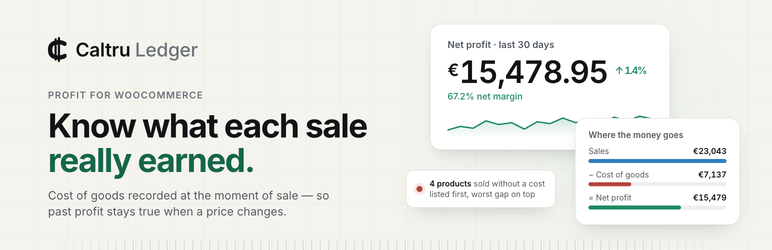
That is what the name stands for, and it is the whole promise. Every profit
figure here is a calculation you can follow back to the order it came from,
and it stays true after the fact.
WooCommerce tells you what you sold. Caltru Ledger tells you what you kept,
after the cost of the goods, the parcel and the payment fee, so you can decide
what to push, what to reprice and what to stop selling on numbers that hold.
What it is worth to your shop
- Put money behind what earns. Profit and margin for every product and category show which ones pay for the shop and which only add to turnover.
- Change prices knowing the margin. Cost, margin and the last 90 days of profit sit on the product list you already use, next to the price you are about to change.
- Price free delivery. Net profit counts what the carrier and the gateway actually charged you, and shows separately what the orders you shipped for free cost you.
- Close a month once. A sale’s cost is recorded when it happens and a refund lands on its own date, so last month reads the same next year, whatever your supplier charges by then.
- Never act on a guess by mistake. A product with no cost is reported as a gap, ranked by how much profit it overstates, not counted as pure profit.
- Keep costs up to date in minutes. Bulk Edit by amount or percentage, or a spreadsheet you download, edit and upload, with every change shown before it is made.
Calculation: every figure can be checked
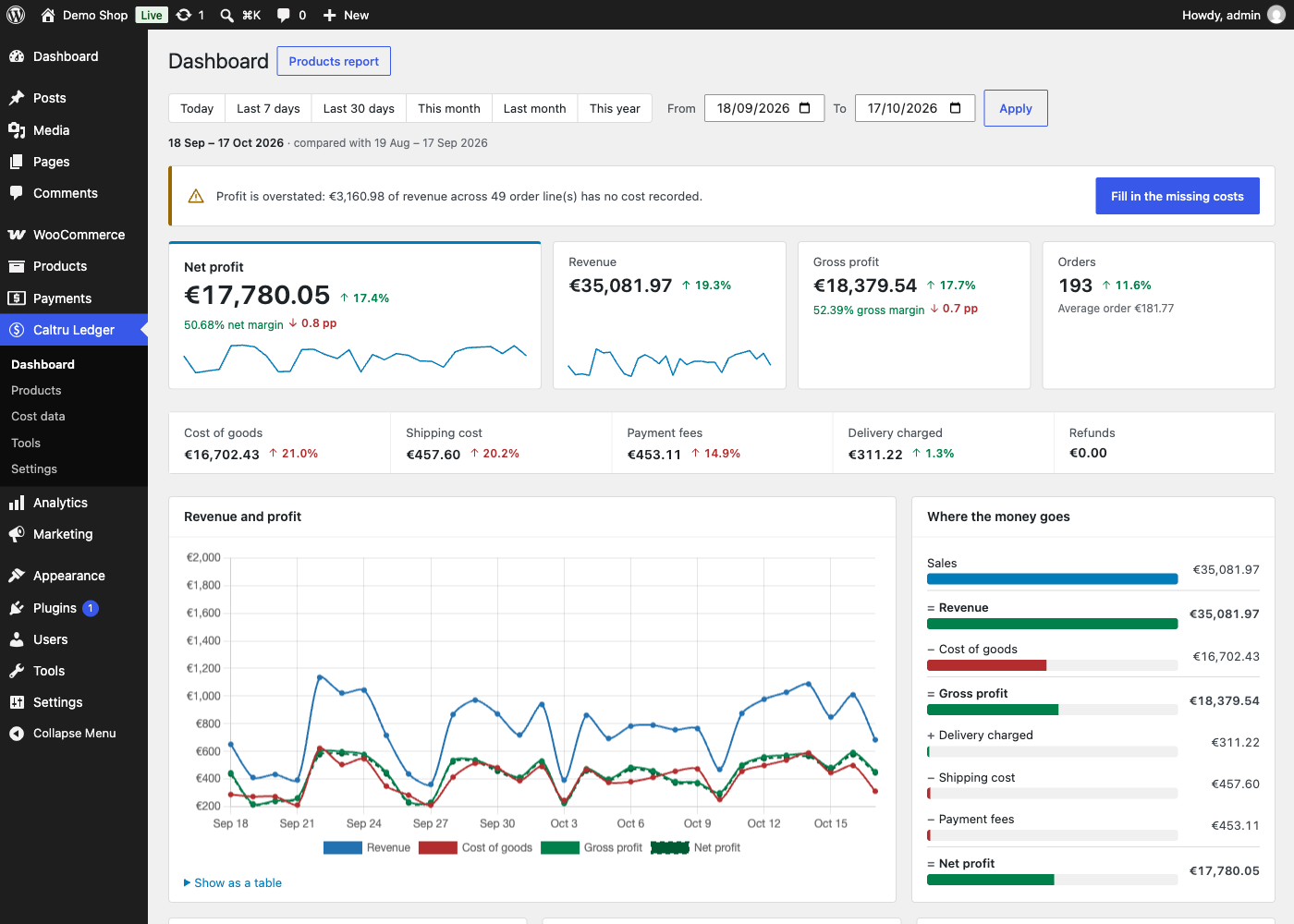
- A profit dashboard: revenue, cost of goods, gross profit and margin, by day or by month, each figure compared with the period before.
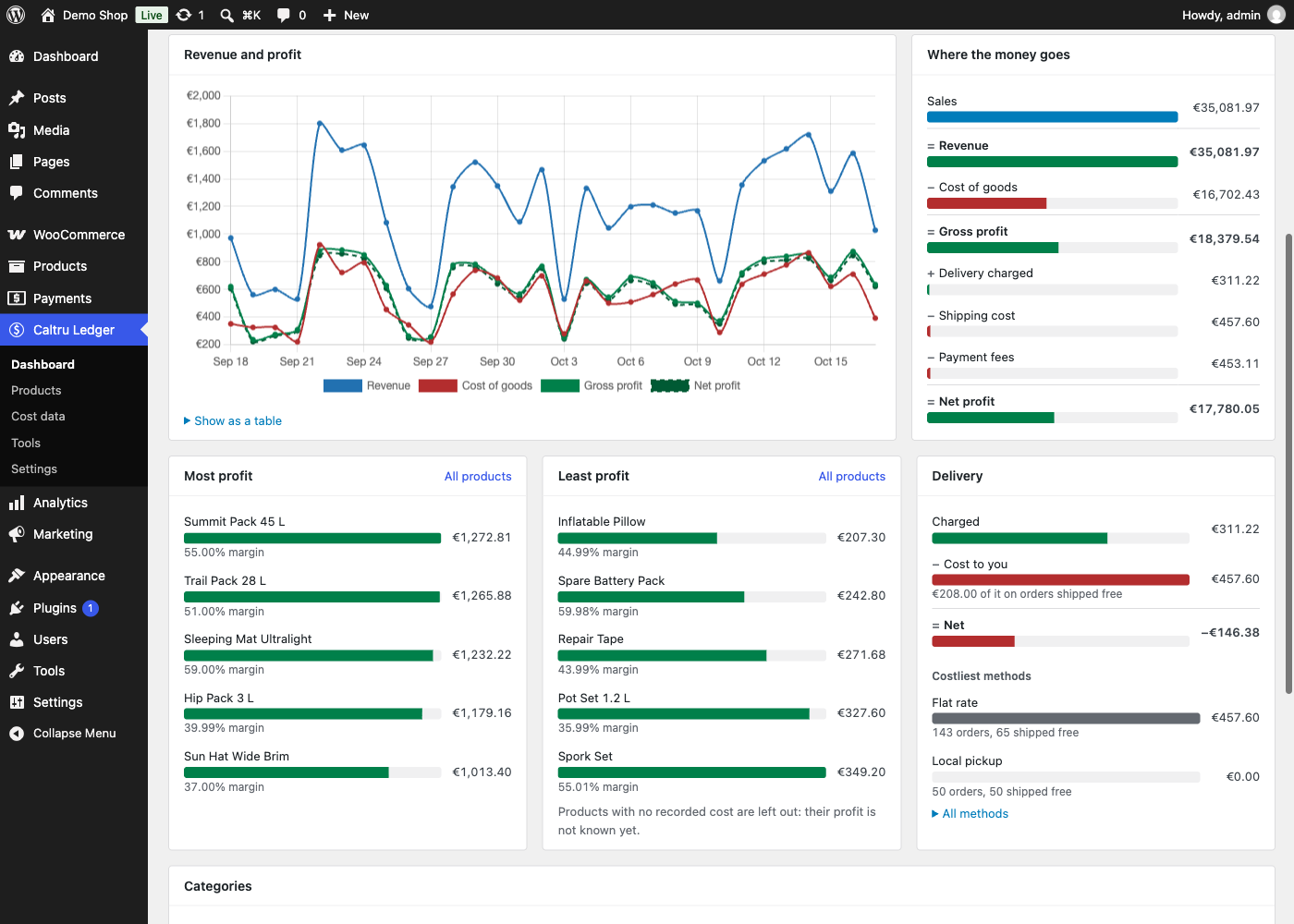
- Where the money goes, step by step from sales to net profit: gross profit less what shipping and the payment gateway cost you, with a breakdown per delivery method.
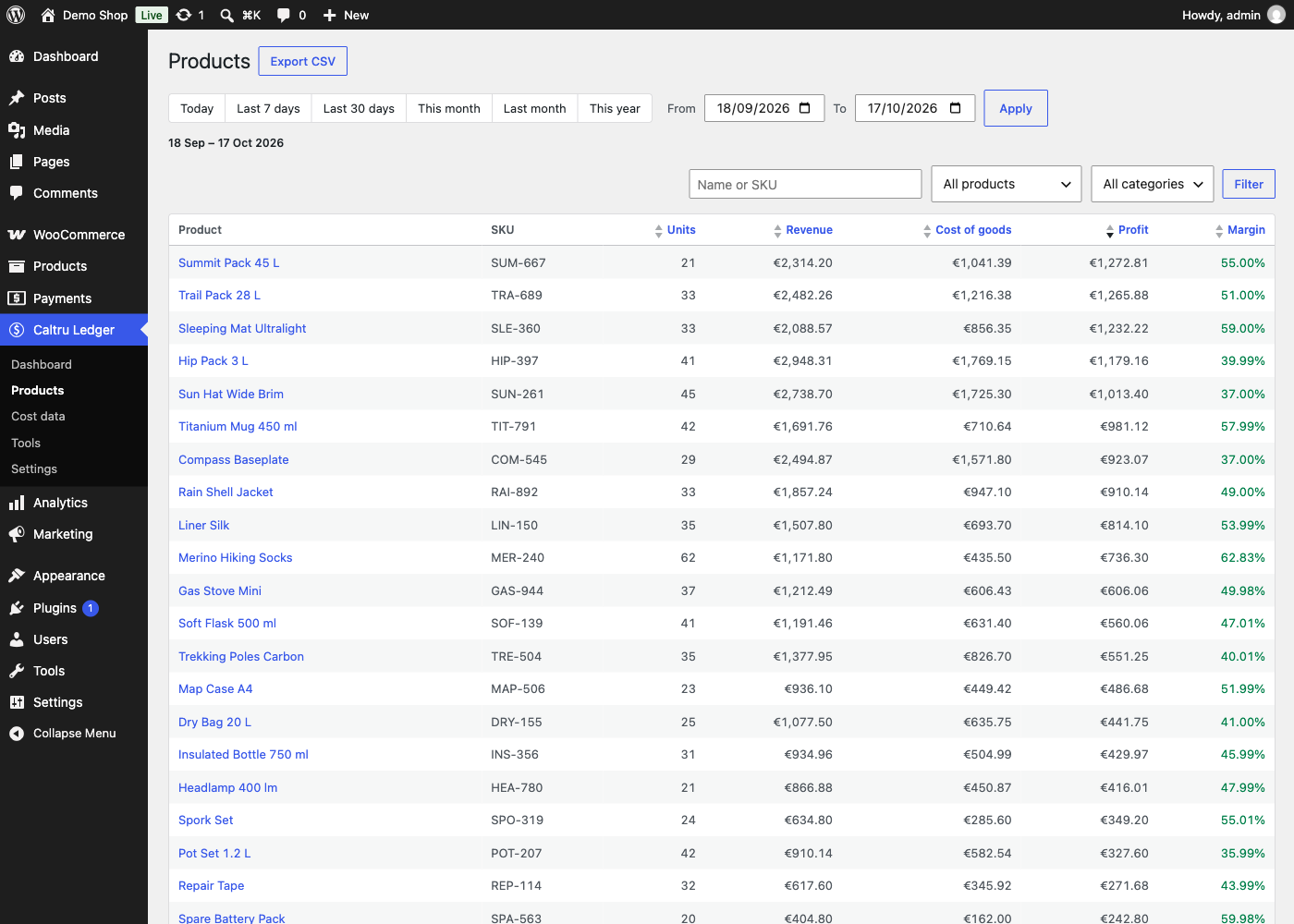
- Per-product and per-category reports, searchable, sortable and exportable.
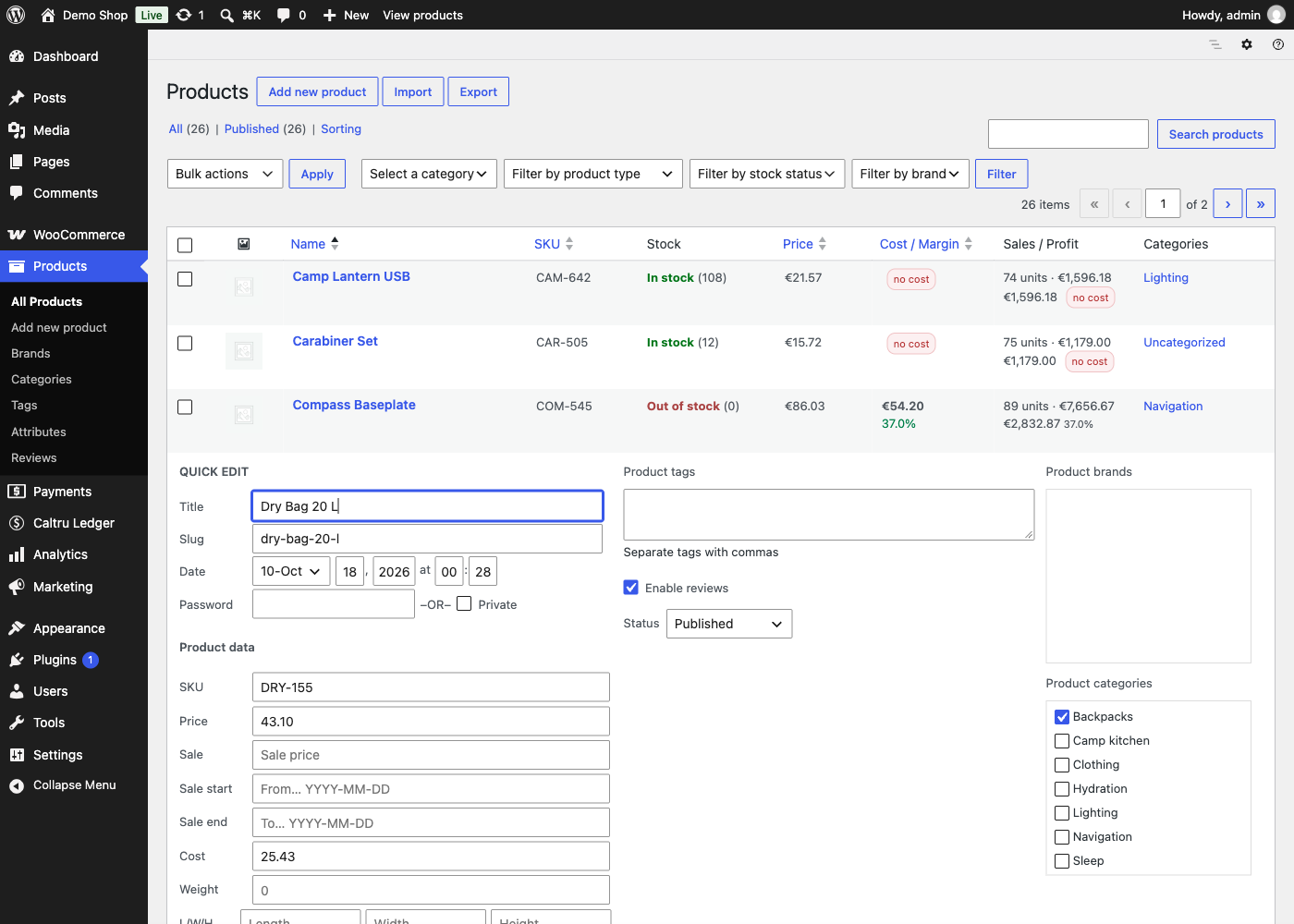
- Cost and margin, and the last 90 days of sales and profit, on your product list: three database queries for the whole page, however long it is.
- Quick Edit and Bulk Edit for costs, with six bulk modes: change to, increase by or decrease by, each as an amount or a percentage.
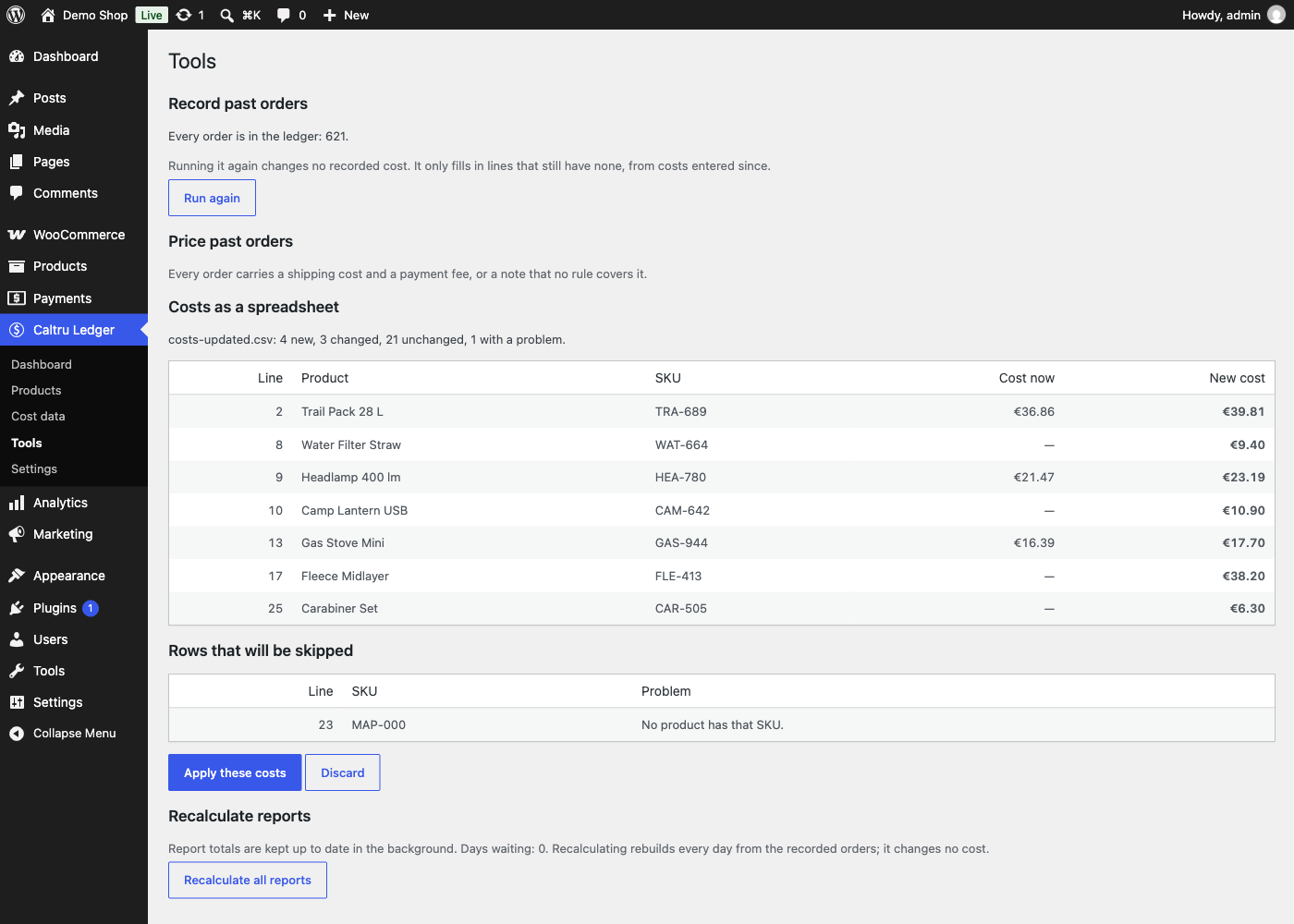
- Costs as a spreadsheet: download, edit, upload, and see exactly what the file would do before any of it happens.
- Variations, and multilingual shops where a product and its translations are one product.
True: what it records stays recorded
The cost of every order line is written down at the moment of the sale.
Change a supplier price tomorrow and last month’s profit does not move. That
is the thing a spreadsheet cannot do for you, and it is what WooCommerce
itself does not do: it works an order’s cost out again from today’s product
cost whenever the order is recalculated.
Refunds work the same way. The sale stays on its date, the refund lands on
the refund’s date, so a closed month never changes underneath you.
What an order cost to deliver is written once too, on the day it was sold.
Your carrier can put its prices up tomorrow without moving last month.
True: it says when it does not know
A profit figure built on missing costs is worse than no figure, so this
plugin never quietly invents one. Revenue with no cost behind it is reported
as its own number and flagged on every product it affects. Costs filled in
after a sale are marked as estimates, and you can exclude them entirely.
The Cost data screen lists the gaps in the order of how much profit each one
is overstating, with a box to type the answer into.
Delivery is treated the same way. WooCommerce does not record what the
carrier charged you, and most gateways never write their fee onto the order.
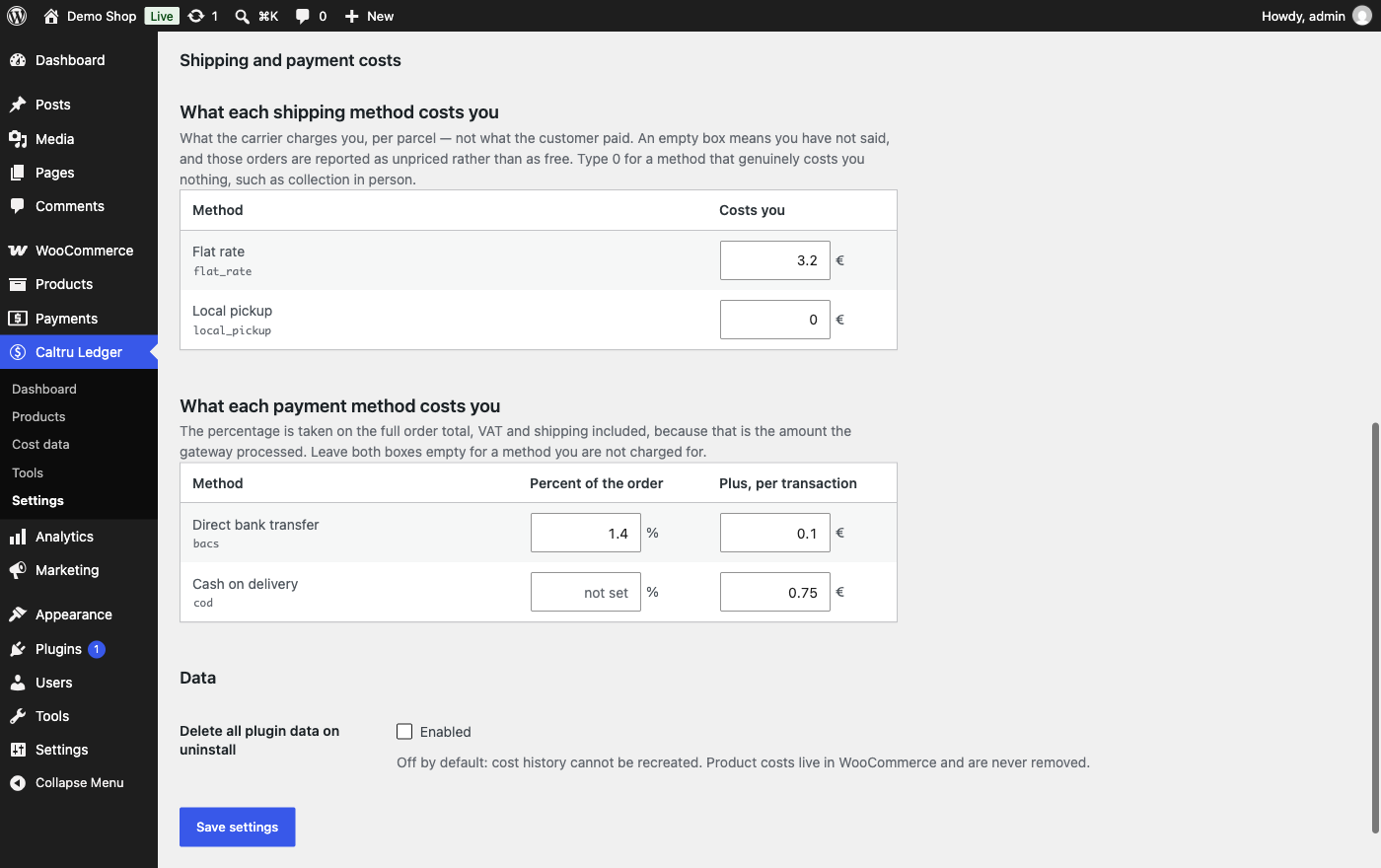
So you tell it once what each shipping method and payment method costs you.
A method you have not priced is reported as not priced, never as free: a
shop giving away delivery on a third of its orders would otherwise read
every one of them as costing nothing, and believe a margin it does not have.
Typing 0 says something different, and is recorded as 0.
Built on WooCommerce’s own cost field
Since 9.5 WooCommerce has a Cost of Goods Sold field of its own. This plugin
writes to that field rather than keeping a private copy, so your costs stay
with your products whatever you do next. It also hands WooCommerce back the
historical figure, so the core order screens show what the order actually
cost, not what the product costs today.
Coming from another plugin
Costs from WPFactory’s Cost of Goods, SkyVerge’s Cost of Goods and ATUM can be
imported, including — where those plugins recorded it — what each past order
cost at the time. That is better evidence than today’s price, and it is
preferred over it.
Nothing here is locked
Every feature described above is in this plugin, with no time limit, history
limit or licence key, and it stays that way: nothing published free here will
ever move to a paid version.
Caltru Ledger Pro
A separate add-on for shops that want the work done for them. It adds new
screens, columns and reports; it unlocks nothing in this plugin.
- Stock replenishment — what to reorder, how many, and what the order will cost.
- Profit on the orders list — cost, profit and margin beside every order, with loss-making orders flagged (coming soon).
- Fixed costs and true net profit — rent, salaries, advertising and software, spread over the period, with your break-even point (coming soon).
- A weekly email report and alerts — the week’s profit against the last, best and worst products, what to reorder, and an alert when margin drops (coming soon).
- Inventory value — what your stock is worth at cost, month by month (coming soon).
Third-party code
Charts are drawn with Chart.js 4.5.1 (MIT licence, https://www.chartjs.org),
bundled unmodified in assets/vendor.
Screenshots

Installation
- Install and activate WooCommerce 10.4 or later.
- Install Caltru Ledger from Plugins Add New, or upload the zip, and activate it.
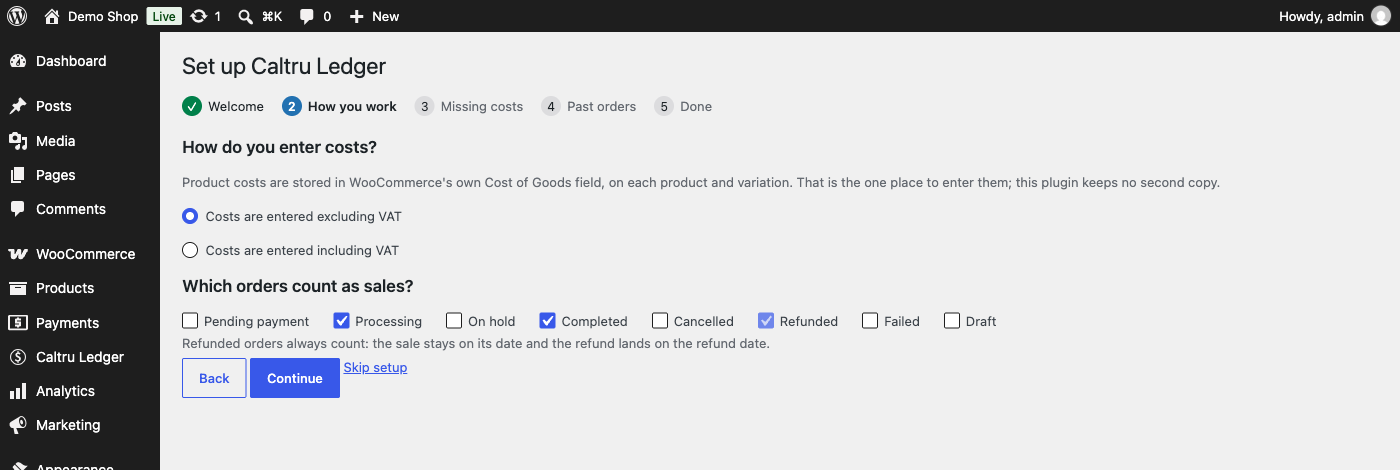
- Open Caltru Ledger Dashboard. A short setup asks how you enter costs and which order statuses count as sales, offers to import costs another plugin already holds, and can record your past orders.
- Enter what each shipping method and payment method costs you under Caltru Ledger Settings to see net profit as well as gross.
Activating the plugin switches on WooCommerce’s own Cost of Goods Sold feature (WooCommerce Settings Advanced Features), because costs are stored there.
FAQ
-
Will changing a product’s cost change my past profit?
-
No. That is the one thing this plugin exists to prevent. The cost is recorded
against the order line when the order is placed, and nothing later rewrites
it. -
I installed this today. What about my existing orders?
-
Tools Record past orders will go through them. They are costed at the
prices you have entered now, and marked as estimates so you can tell them
apart from figures recorded at the time of sale. Anything another cost plugin
recorded back then is used instead, and preferred. -
Why do my figures differ from WooCommerce Analytics?
-
Two reasons, both deliberate. Analytics counts an order on the date it was
paid and leaves out orders that are not paid yet; this plugin can count those
on their creation date instead, which suits shops taking bank transfers. And
refunds here land on the refund’s own date rather than the original order’s. -
Why was WooCommerce’s Cost of Goods Sold feature switched on?
-
This plugin stores costs in WooCommerce’s own field rather than a copy of its
own, and WooCommerce ignores that field while the feature is off. So activation
turns it on, once. Costs you enter stay with your products if you ever remove
this plugin. -
Does it work with High-Performance Order Storage?
-
Yes. The whole test suite runs against both order storages.
-
How do I calculate net profit in WooCommerce?
-
WooCommerce reports sales, not profit. Net profit is what is left of revenue
after refunds, the cost of the goods, what the carrier charged you and what
the payment gateway took — plus whatever customers paid you for delivery.
This plugin records each of those per order, at the time of the sale, and
adds them up per day: enter your product costs, and under Settings what each
delivery method and payment method costs you, and the dashboard shows net
profit beside gross. -
How is this different from WooCommerce’s own Cost of Goods?
-
It uses it. Since 9.5 WooCommerce can store a cost on each product, and this
plugin keeps costs there and nowhere else, so you enter a cost once. What
WooCommerce does not do is remember: it works an order’s cost out again from
today’s product cost whenever the order is recalculated, and it has no
profit reports. This plugin records the cost at the moment of each sale,
hands that historical figure back to WooCommerce, and builds the reports,
net profit and the gap-finding around it. -
How do I enter shipping costs?
-
Under Caltru Ledger Settings Shipping and payment costs, enter what the
carrier charges you per parcel for each delivery method (LP Express, Omniva,
DPD, Venipak and others are recognised by name), and what each payment
method takes. Leave a box empty for “not known” — those orders are reported
as unpriced, never as free — and type 0 for a method that genuinely costs you
nothing. New orders are priced as they are placed; Tools Price past orders
applies the same costs to orders placed before, marked as estimates. -
Do I lose my data if I remove the plugin?
-
Not unless you ask to. Product costs live in WooCommerce and are never
removed. The recorded history — what each past sale cost — is kept on
uninstall too, unless you switch on Settings Data “Delete all plugin data
on uninstall” first. Deactivating the plugin removes nothing. -
Does it send anything anywhere?
-
No. There is no telemetry, no licence check and no outbound request of any
kind. There is a test asserting that.
Reviews
There are no reviews for this plugin.
Contributors & Developers
“Caltru Ledger – Profit & Cost of Goods for WooCommerce” is open source software. The following people have contributed to this plugin.
Contributors
Translate “Caltru Ledger – Profit & Cost of Goods for WooCommerce” into your language.
Interested in development?
Browse the code, check out the SVN repository, or subscribe to the development log by RSS.
Changelog
1.1.2
- The setup reminder appears only on the Plugins screen and Caltru Ledger’s own pages, and the “needs WooCommerce” message only on the Plugins screen.
- Chart.js updated to 4.5.1.
- Translations come from translate.wordpress.org: the plugin no longer loads its own or ships compiled translation files.
1.1.1
- Fixed: on WooCommerce 11.2, Bulk Edit showed only Price and Sale — tax, weight, stock, shipping class and the cost modes are back.
1.1.0
- New: delivery and payment providers (LP Express, Omniva, DPD, Venipak, InPost, Lietuvos paštas, Neopay, Paysera, Montonio, Stripe, PayPal, Przelewy24) are named and grouped on Settings.
- New: a few quiet, dismissible mentions of Caltru Ledger Pro on this plugin’s own screens; none once Pro is active.
- New: a one-time review request after two weeks of use.
- Settings and setup say plainly that costs live in WooCommerce’s own Cost of Goods field.
1.0.1
- Fix: “Price past orders” now shows in net profit straight away; the nightly check also catches any day missing a shipping cost or payment fee.
- Fix: with estimated costs left out of reports, the nightly check no longer rebuilds the same days every night.
- Fix: orders that recorded no delivery method and no gateway are no longer offered for pricing, and applied rules are not offered again.
- Fix: setup counts as finished once its last page is reached.
- Fix: a cost typed on the Cost data screen is saved once, not twice.
- Fix: the setup screen has a title.
- Requires WordPress 6.8; tested up to WooCommerce 11.2.
1.0.0
- First release on WordPress.org.
The full history is in CHANGELOG.md, inside the plugin.