
Description
Caching Out keeps a ready-made copy of each page and serves it before
WordPress loads, writes browser caching and compression rules into your server
configuration, loads images, iframes and video as they are needed rather than
all at once, and can minify your CSS and JavaScript. It rebuilds the copies
when your content changes. It is designed to improve LCP, INP and CLS.
Performance results vary depending on hosting, theme, plugins and traffic.
We check before we touch anything
Page caching needs one file, wp-content/advanced-cache.php, and browser caching
needs a block of rules in your server configuration. Either of them may already
belong to another plugin.
Caching Out records a fingerprint of the drop-in file it writes and compares it
before every write, overwrite or delete. If the file on disk is not the one it
wrote, it leaves that file alone, does not switch page caching on, and shows a
notice naming the plugin the file belongs to. The rest of the plugin keeps
working.
The same rule covers your .htaccess. A marker block belonging to another plugin
is never written into and never removed. Before Caching Out writes its own
block it checks the result, then replaces the file in one step; if the file
cannot be written, nothing is written at all, so a half-written server
configuration is never left behind, and no copy of your .htaccess or
wp-config.php is ever left on disk. Deactivation never edits .htaccess or
wp-config.php.
Caching Out never reads, writes or removes object-cache.php.
What is on the moment you activate
- Page caching, with the drop-in installed and WP_CACHE set
- Purging when your content changes
- Browser caching: Expires headers, GZIP and Brotli, written through the
checked writer described above - Lazy loading for images, iframes and video, and missing width and height
attributes added - Hero-image priority for the image most likely to be the largest one on
screen - The Filesystem Check notice and the Page Audit of your key pages
- Your own exclusions: URLs, cookies and user agents that must never be
cached, on the Cache tab
What stays off until you choose it
Anything that can change how a page looks is off until you switch it on:
- Minify CSS
- Minify JavaScript
- Defer JavaScript
- Lazy loading of CSS background images
- Database cleanup, which is manual and shows you the row counts first
The safety layer
These rules are fixed. They have no settings, they cannot be switched off, and
they are the same in the free plugin and in Caching Out Pro:
- A logged-in visitor is never served a cached page
- A request carrying a session, authentication or cart cookie – including
PHPSESSID – is never served from the cache and is never cached - A response that sets a session or authentication cookie is never stored
- Cart, checkout and account pages, in WooCommerce and Easy Digital Downloads,
are excluded with no configuration - wp-admin and wp-login.php are never cached
- Only ordinary page views (GET requests) that returned 200 are cached
- Cache files are written to a temporary file and renamed into place, so a
visitor never receives a half-written page - The drop-in ownership guard described above
- define( ‘CACHINGOUT_DISABLE_CACHE’, true ); in wp-config.php disables all
cache reading and writing, in every version - Deleting the plugin removes its options, its scheduled tasks, its cache
directory, the drop-in, WP_CACHE and its .htaccess block
What the free plugin does
- Page caching served from the drop-in, before WordPress and its plugins
load. Cache lifespan in hours, optional separate cache files for mobile. - Purging when a post or page is saved, trashed or restored, when a term,
menu, theme, widget or customizer setting changes, when a comment is
approved, and from the Purge button in the admin bar. Archives and the pages
that list a changed post are purged with it. - Browser caching: Expires headers, GZIP and Brotli for Apache through the
.htaccess writer. On NGINX the documentation carries the equivalent snippet
to paste into your server configuration. - Lazy loading for images, iframes and self-hosted video, with an
exclusion list, an above-the-fold allowance, missing width and height
attributes added to reduce layout shift, and optional lazy loading of CSS
background images. - Hero-image priority: the image most likely to be the largest one on
screen is marked high priority and preloaded, with an exclusion list. - Minify CSS and JavaScript, and defer JavaScript, each off until you
switch it on, each with its own per-file inclusion and exclusion controls.
Minified copies are written to disk; the original tag keeps its attributes
and only the URL changes. Already-minified files are left alone. - Database cleanup by hand: revisions, auto-drafts, trashed posts, spam and
trashed comments, and transients, with the number of rows shown before
anything is deleted. Nothing is scheduled and nothing runs unattended. - Heartbeat control and DNS prefetch for the domains you list.
- Compatibility handling for WooCommerce, Easy Digital Downloads, WPML,
Polylang and page builders, which register their exclusions into the one
place that decides whether a page may be cached.
Page Audit and Filesystem Check
Both are included in full, and neither needs an API key.
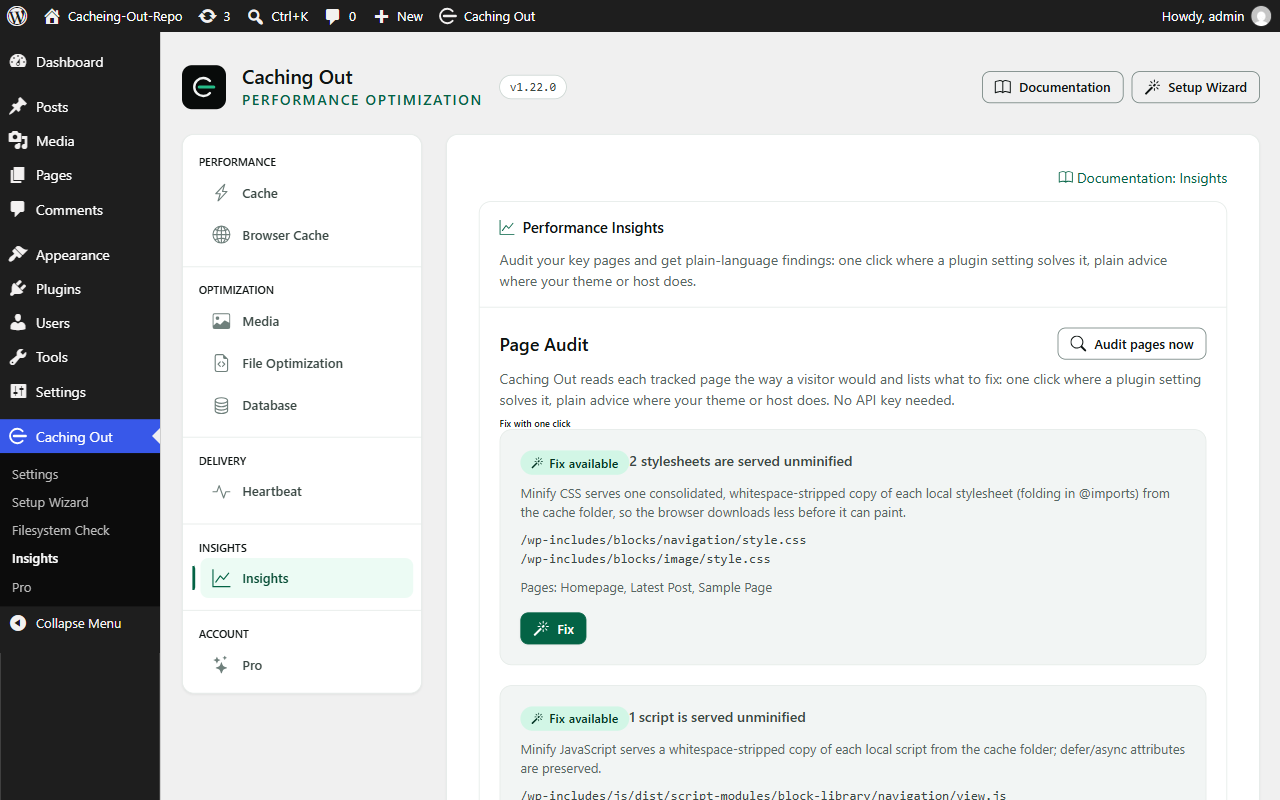
The Page Audit reads your tracked pages the way a visitor would – over a
loopback request to your own site – and lists what it found. Where a plugin
setting answers the finding, there is a button that changes that setting. Where
your theme or your host has to change something, it says so in plain words.
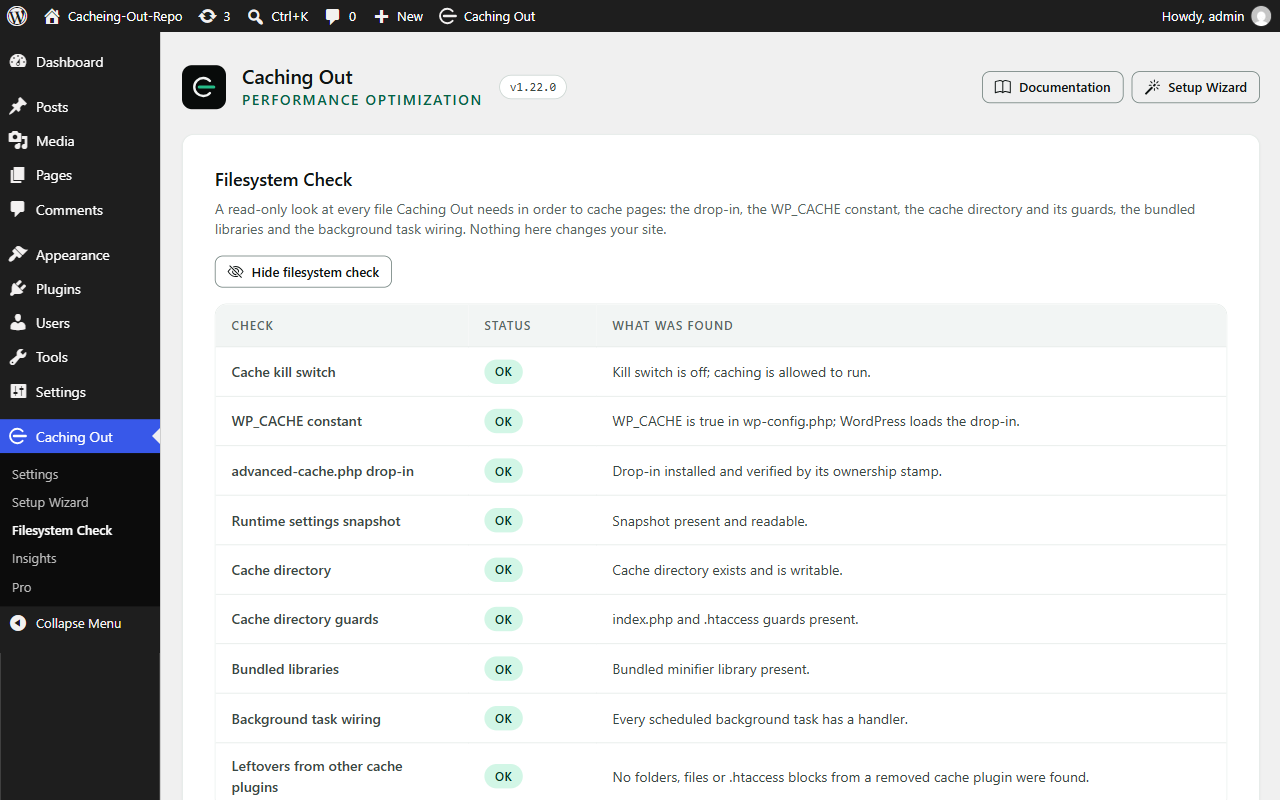
The Filesystem Check verifies every file the plugin needs: the drop-in, the
WP_CACHE constant, the cache directory, the settings snapshot the drop-in reads
and the scheduled tasks. Each row says what state it is in and what to do about
it.
Caching Out Pro
The free plugin above is complete on its own and stays free. Caching Out Pro is
a separate add-on, installed alongside it, that adds:
- Optimize CSS delivery, combine CSS and JS, delay JS, Google Fonts (combine
and self-host), WebP serving where WebP copies already exist, and YouTube
click-to-load - Unused CSS/JS: stops named plugin files loading on pages that do not need
them, with a scan, a preview, a dependency check, a never-unload list,
suggested rules from a built-in catalogue and an optional weekly scan - Activity: a record of every change the plugin makes, with one-click revert
- Performance Insights: a PageSpeed dial, a baseline, re-tests and history
- Cache preloading, a step you switch on
- Database: scheduled cleanup, orphaned metadata and table optimisation
- CDN rewriting, and purge add-ons for Cloudflare, Varnish and Sucuri
- WP-CLI commands, settings export and import, and Multisite Network Admin
- Email support from the team who built it – plus an assistant that already
knows your setup. It knows which plugins you run, which settings you have on
and what the Page Audit found, so you never have to explain your site before
asking a question. Every answer points at the documentation or the rule it
came from.
The assistant is scoped to Caching Out and your site’s configuration: 50
questions a day and 300 a month per licence. It is not a general-purpose
chatbot; answers are AI-generated and can be wrong, so check anything
consequential against the linked source.
Every feature in every paid plan; the paid plans differ in the number of sites
and the length of support, never in what the plugin does. In both editions,
anything that can change how a page looks stays off until you switch it on.
Details: https://cachingout.com/pricing/
Privacy
The free plugin does not need a licence, never contacts our servers, and makes
no outbound request of its own.
The one exception is the Page Audit and the Filesystem Check, which fetch pages
from your own site over a loopback request when you run them or when the
tracked-page schedule runs. Nothing is sent anywhere else and nothing leaves
your server.
The free plugin sends no usage data. Telemetry belongs to Caching Out Pro,
where it is opt-in with the box unticked, sends aggregate figures only – never
page content and never personal data – and is disabled outright by
define( ‘CACHINGOUT_DISABLE_TELEMETRY’, true );.
The free plugin sets no cookies of its own. It reads cookie names on the
request, because it must – a visitor carrying a session, authentication or cart
cookie is never served a cached page – but no cookie value is stored, logged or
sent anywhere.
Third-party libraries
The admin screens use Bootstrap 5.3.8 (https://github.com/twbs/bootstrap) and
Bootstrap Icons 1.13.2 (https://github.com/twbs/icons), both under the MIT
licence, shipped as the unmodified minified files from their upstream
releases. The human-readable source is in those repositories at the matching
version tag. Minify CSS and Minify JavaScript use matthiasmullie/minify
(https://github.com/matthiasmullie/minify, MIT), shipped unminified in
vendor/. assets/THIRD-PARTY-LICENSES.txt in the plugin folder names each
bundled file, its version and its licence.
The plugin’s own three front-end scripts (the lazy loading helpers) are printed
inline from assets/js/*.min.js; their readable source is in assets/js/src/.
Screenshots

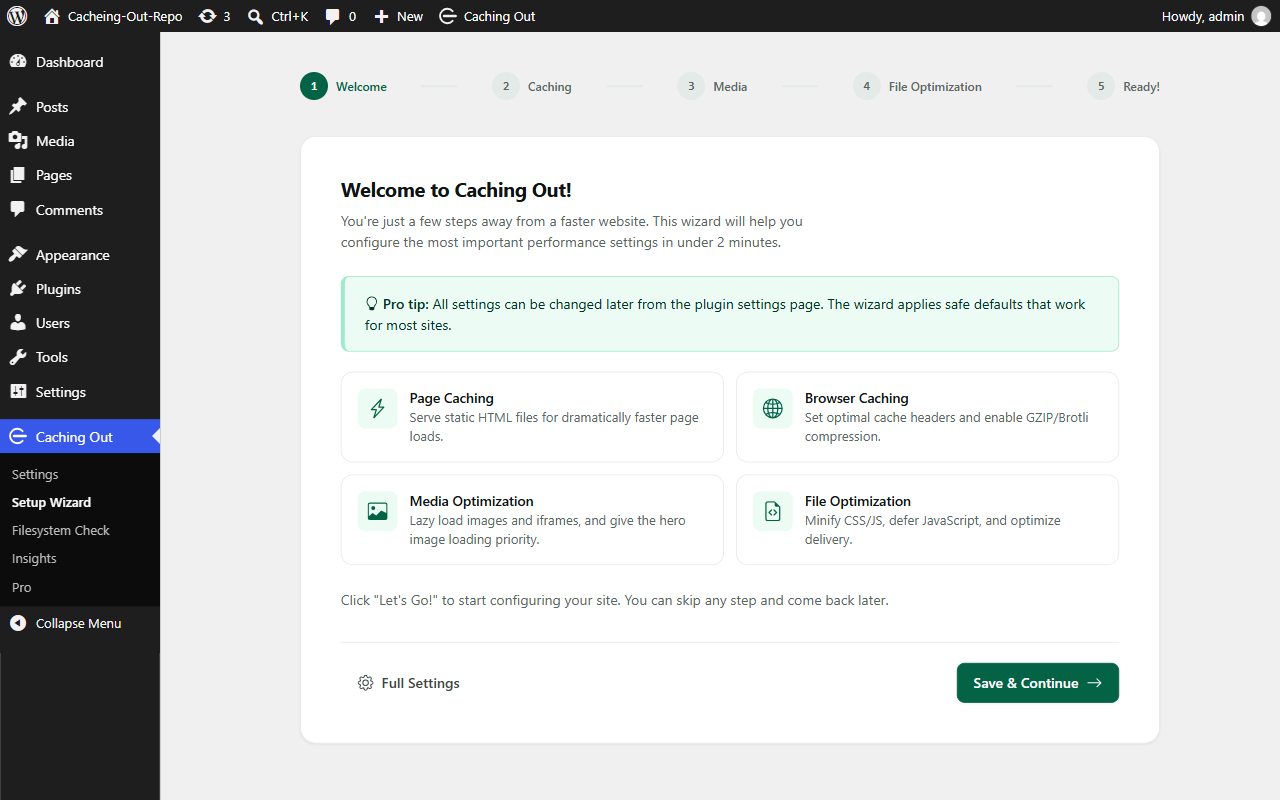
Installation
- Upload the plugin to
/wp-content/plugins/cachingout, or install it from the Plugins screen in WordPress. - Activate it. Page caching, browser caching, compression and lazy loading are on from that moment; nothing else has to be configured.
- Open Caching Out in the admin sidebar to change anything, and read the Filesystem Check if a notice appears.
FAQ
-
Do I need a licence key?
-
No. The free plugin is a complete product. It never asks for a key and never
contacts our servers. -
How do I disable caching quickly?
-
Add
define( 'CACHINGOUT_DISABLE_CACHE', true );towp-config.php. This
disables all cache reading and writing in every version, and it is the
documented way out of a bad release. -
Are logged-in users served cached pages?
-
No. Logged-in visitors always bypass the page cache; only anonymous visitors
are served a cached page. This is a fixed rule with no setting, so private
content is never served to the wrong person. -
What happens if another caching plugin is already installed?
-
Caching Out checks whether it owns
wp-content/advanced-cache.phpbefore it
writes anything. If another plugin owns it, page caching stays off, the file is
left exactly as it is, and a notice names the plugin the file belongs to. The
same applies to a marker block in.htaccess. Every other part of the plugin
keeps working. -
Does it work with WooCommerce?
-
Yes. Cart, checkout and account pages are excluded on activation with no
configuration, and any visitor carrying a cart or session cookie bypasses the
cache entirely. The equivalent Easy Digital Downloads pages are excluded the
same way. -
Will it change how my site looks?
-
Not on activation. Page caching, browser caching, compression and lazy loading
do not change your markup’s appearance. Everything that can – minification,
deferring JavaScript, lazy loading of CSS background images – is off until you
switch it on. -
Does it work on NGINX?
-
Page caching does, unchanged. The browser caching and compression rules are
written into.htaccess, which is Apache and LiteSpeed only; on NGINX the
documentation carries the equivalent snippet to paste into your server
configuration by hand. -
What happens when I delete it?
-
Deleting the plugin removes its options, its scheduled tasks, its cache
directory, the drop-in, theWP_CACHEconstant and its.htaccessblock.
Deactivating removes the drop-in and the scheduled tasks only; it never edits
.htaccess orwp-config.php. -
What is the difference between this plugin and Caching Out Pro?
-
This plugin is free, permanent and complete on its own. Pro is a separate
add-on you install alongside it, listed in the description above. Removing Pro
leaves this plugin running exactly as before. -
Where do I get support?
-
Community support for the free plugin is in the WordPress.org support forum for
this plugin.
Reviews
There are no reviews for this plugin.
Contributors & Developers
“Caching Out” is open source software. The following people have contributed to this plugin.
Contributors
Translate “Caching Out” into your language.
Interested in development?
Browse the code, check out the SVN repository, or subscribe to the development log by RSS.
Changelog
1.22.0
- Changed: the plugin’s settings screens have a new look, built in-house on
the Caching Out brand colours. Bootstrap, Bootstrap Icons and the
Bootstrap JavaScript bundle are no longer shipped or loaded in wp-admin
(about 440 KB less on every plugin screen; nothing loads from a
third-party host). Icons are inline SVG. Every setting, tab and button
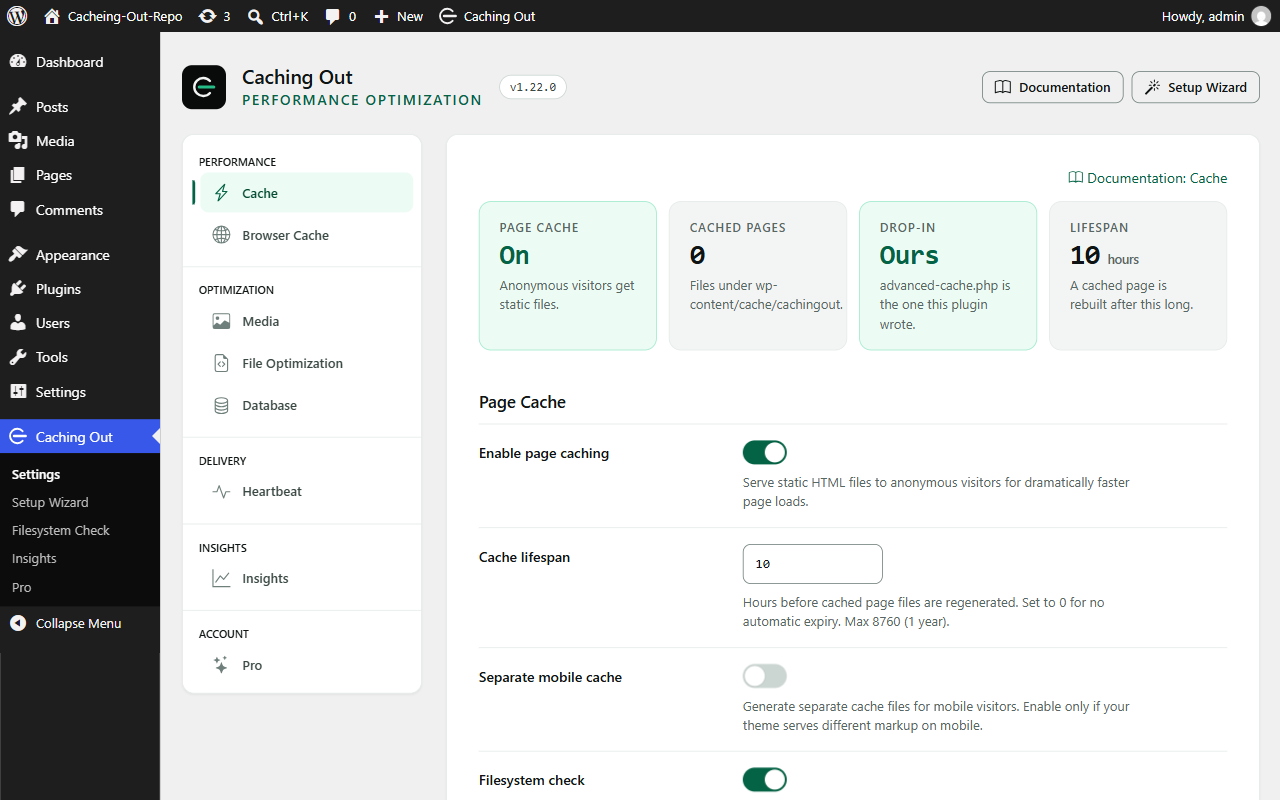
is where it was; no setting changes value on update. - New: the Cache tab opens with a status strip: whether page caching is on,
how many pages are cached right now, whether the advanced-cache.php
drop-in is ours and in place, and the cache lifespan. - Changed: the settings screens meet WCAG 2.1 AA (contrast, visible focus
rings, 44 px touch targets on icon-only controls) and respect
prefers-reduced-motion. Phone widths down to 320 px scroll in one
direction only. - Changed: the activation report notice and the setup wizard use the same
look; the “Save Changes” buttons are the plugin’s own. - New: saving a tab now shows a “Settings saved.” confirmation at the top
of the tab (before, the page simply reloaded). - If you use Caching Out Pro, update it to 1.22.0 as well: Pro 1.22.0 draws
its screens with this version’s stylesheet and needs Caching Out 1.22.0
or later (it shows one notice and loads nothing until the free plugin is
updated).
1.21.17
- Fixed: visitors arriving from Facebook, Instagram, Google Ads, TikTok or
a campaign link were never served from the page cache, because the URL
carried a tracking parameter (fbclid, igsh, gclid, utm_…) and the
“Ignored query parameters” list was empty by default. The list now ships
prefilled with the parameters the browser-side pixels read and the
server never does: fbclid, igshid, igsh, gclid, gbraid, wbraid, dclid,
ttclid, msclkid, twclid, yclid, li_fat_id, mc_cid, mc_eid, ga, _gl,
_hsenc, _hsmi, utm*. A request whose parameters are all on the list is
served the plain page’s cached copy and writes no file of its own; the
browser URL is untouched. One parameter off the list still bypasses the
whole request. On update, a site whose list was empty gets the defaults;
a site that had filled the list keeps it. - New: a trailing * in the list matches a name prefix (utm_*); utm without
the star matches only utm. The Cache tab shows the list, editable, with
a “Restore default parameters” link that adds back removed defaults and
keeps your own names. - New: the cachingout_ignored_query_strings filter lets another plugin add
the parameter names it puts on its own links. The names reach the
advanced-cache.php drop-in through the runtime snapshot, which is now
also refreshed when any plugin is activated or deactivated. - If you use Caching Out Pro, update it to 1.21.17 as well.
1.21.16
- New: custom exclusions are part of the free plugin. Keep any URL, cookie
or user agent out of the cache from the Cache tab (Never Cache). The
built-in safety exclusions are unchanged and still apply first. - Changed: one front-end output buffer instead of three. Lazy loading and
hero-image priority run inside the optimisation pipeline’s buffer, which
the plugin closes itself; on WordPress 6.9 and later it uses WordPress’s
own template output buffer. The advanced-cache.php drop-in closes its
buffer the same way (the drop-in is refreshed on update). - Changed: wp-config.php and .htaccess are updated by replacing the file in
one step. No backup copy of either file is written to disk any more; if a
write fails the file is left as it was and the notice says what to add or
remove by hand. - Changed: the drop-in finds the plugin from the directory recorded at
activation, so a renamed plugin folder or a custom plugins directory
works. The companion style for injected image dimensions is enqueued
rather than written into the page. - Changed: Bootstrap 5.3.8 and Bootstrap Icons 1.13.2 on the admin screens.
- Changed: the partner-code disclosure sentence on the Pro tab can be
changed through thecachingout_partner_code_disclosurefilter and is
translatable. The drop-in locates the plugin only from the directory
recorded at activation (or WP_PLUGIN_DIR when wp-config.php defines
it); it no longer guesses wp-content/plugins/cachingout. - Also carries the Partner Engine integration hooks (DONOTCACHEPAGE is
honoured, the cachingout_derived_never_cache_prefixes and
cachingout_response_is_cacheable filters). - If you use Caching Out Pro, update it to 1.21.16 as well.
1.21.15
- No changes to the free plugin; the version moves with Caching Out Pro
1.21.15 so the two are released as a pair. (The 1.21.14 package submitted
to WordPress.org carried one header correction, the plugin’s own page as
its Plugin URI; it is in this version too.)
1.21.14
- No changes to the free plugin; the version moves with Caching Out Pro
1.21.14 so the two are released as a pair.
1.21.13
- Changed: the code was brought in line with the WordPress.org plugin
guidelines. The database cleanup queries use WordPress’s standard prepared
form, temporary and backup files are removed with WordPress’s own functions,
and the two small scripts the admin screens printed inline are loaded
through the script API. - Changed: table optimisation and orphaned-metadata cleanup, which belong to
Caching Out Pro, are no longer part of this plugin’s code; the add-on
carries them. The seven cleanup operations of this plugin are unchanged. - Changed: the bundled third-party libraries are listed in
assets/THIRD-PARTY-LICENSES.txt. - No setting changes, and no change to what is cached or when. If you use
Caching Out Pro, update it to 1.21.13 as well.
1.21.12
- No change to this plugin. Released together with Caching Out Pro 1.21.12,
which works with this version and with 1.21.10 or later.
1.21.11
- No change to this plugin. Released together with Caching Out Pro 1.21.11,
which works with this version and with 1.21.10.
1.21.10
- Fixed: the “See Pro on cachingout.com” link on the Pro tab, and the
details link in this readme, pointed at a page that does not exist. They
go to https://cachingout.com/pricing/. - No change to caching or optimization. Caching Out Pro 1.21.10 requires
this version.
1.21.9
- Fixed: with WooCommerce active, saving a product whose stock changed – and
an order reducing stock – stopped with a PHP error (“purge_post():
Argument #1 must be of type int”), which could leave a half-saved product.
The plugin listened to two WooCommerce stock events that pass the product
itself, not its ID. - Fixed: Minify CSS, Minify JS and Defer JS (and every Caching Out Pro file
optimization) no longer run on the WooCommerce cart, checkout and account
pages, or on any page holding the cart or checkout block. The page cache
already left those pages alone; file optimization did not, and the block
checkout could fail to load. With debugging on, those pages answer
“X-CachingOut-Optimization: skipped; woocommerce-checkout” (or -cart,
-account). - New for developers: the
cachingout_skip_optimizationfilter. Return a
short reason to keep file optimization off a request; return an empty
string to leave it on. - Caching Out Pro 1.21.9 requires this version.
1.21.8
- Changed: on the Database tab, each row’s Run button is locked until that
row has been previewed and shows how many rows it will remove, and locks
again after a run until the next preview. “Run All Previewed” now runs
only the rows you have previewed. Nothing is deleted without the count
being shown first, which was always the intent. - Fixed: the orphaned-metadata cleanup (a Caching Out Pro operation that
lives in this plugin’s cleanup engine) now also removes term metadata
whose term no longer exists. - Changed: the settings reference and the knowledge base now state that
Minify CSS and Minify JS do not consult SCRIPT_DEBUG – the switch alone
decides. No behaviour change. - Changed: the compatibility matrix in the documentation is rewritten for
1.21.8 and WordPress 7.1. - Tests: the deactivation tests now exercise the real deactivator and its
real contract (the drop-in and our cron events are removed; WP_CACHE and
the .htaccess block are left for uninstall). - Caching Out Pro 1.21.8 requires this version.
1.21.7
- Fixed: automatic image dimensions could resize an image the theme sizes
with CSS, most visibly a logo scaled down to fit a header bar. The
plugin now pairs every width/height it adds with a “height: auto” rule
in a CSS cascade layer, which cannot override your theme but does stop
an added height from becoming the image’s real height. Reserved space,
and so the protection against layout shift, is unchanged. - Fixed: excluding an image from LazyLoad (the no-lazy or skip-lazy class,
data-no-lazy, or the Media exclusion list) now also stops width and
height being added to it. Previously the exclusion was applied after the
attributes had already been injected. - Changed: dimensions are read from the media library record for the exact
file in the tag, falling back to measuring the file only for images
WordPress does not know. An image outside the media library that offers
several files through srcset is left alone rather than guessed at. - New: every image the plugin measures is marked data-cachingout-dim=”1″
in the page source, so you can see what was changed. - Fixed: changing an image now clears the page cache. Optimisation plugins
such as Imagify, ShortPixel, Smush and EWWW re-encode files without
saving a post, so cached pages kept describing the previous file. A bulk
run clears the cache once per batch, not once per image. - Caching Out Pro 1.21.7 requires this version.
1.21.6
- Changed: the Caching Out mark replaces the rocket icon in the plugin
header, the admin menu and the admin bar. - New: a Documentation button in the header and a “Documentation: ”
link at the top of every settings tab, pointing at the online guides. - Fixed: two “Constant already defined” PHP warnings were logged on every
page load when the page-cache drop-in had already defined them. - Fixed: Defer JavaScript exclusions now also match a script’s id, so a
script Minify JS has renamed can still be excluded by name. - Caching Out Pro 1.21.6 requires this version.
1.21.5
- Changed: the version moves with the Pro add-on’s 1.21.5 so the two are
released as a pair. The free plugin’s behaviour is unchanged; it carries
the small hooks the add-on’s new features hang on (two gating-table
rows, one pipeline position, a Page Audit registration filter), and the
debug timing header is now formatted the same way in every server
locale. Caching Out Pro 1.21.5 requires this version.
1.21.4
- No change to the free plugin’s behaviour; the version moves with the Pro
add-on’s 1.21.4 (a fix in Optimize CSS delivery there) so the two are
released as a pair.
1.21.3
- Fixed: with Minify CSS on, Optimize CSS delivery (a Pro feature) no longer
loses track of which stylesheet is the theme’s, a slider’s, or one on your
Excluded CSS list. Minified copies carry a hashed name; the plugin now
remembers where each copy came from, so those stylesheets stay
render-blocking as intended. Before, switching both features on could
leave the header or menu unstyled until the deferred stylesheet arrived. - Fixed: the Unused CSS/JS suggestions and the Page Audit no longer treat a
WooCommerce selector inside an inline style block, or the bare word
“woocommerce”, as a sign that a page uses WooCommerce. Sites where a
theme styled shop elements from the customizer saw “Nothing to suggest”
on every page. WooCommerce’s front-end scripts and the Testimonial
Slider and Showcase plugin are now catalogued too.
1.21.2
- Fixed: on a multilingual site whose languages live at different URLs (a
Polylang directory, subdomain or domain setup; a WPML directory or domain
setup), the language cookie those plugins set no longer stops pages being
served from cache. Before, any visitor who had once received the cookie
was never served from cache again. Sites that serve every language at the
same URL are unchanged: the cookie still bypasses the cache there, because
the cached copy could be the wrong language. - Changed: switching the language URL mode in Polylang or WPML now refreshes
the plugin’s runtime settings and clears the page cache.
1.21.1
- Fixed: deactivating the plugin no longer forgets the drop-in’s ownership
record when advanced-cache.php could not be deleted (for example a
read-only wp-content directory). The next activation and the uninstaller
still recognise the file as this plugin’s; before, they would have treated
it as another plugin’s drop-in and left it in place for good.
1.21.0
- Changed: Caching Out is now two plugins. This one is the free edition on
WordPress.org: page caching before WordPress loads, purging on content
change, browser caching with GZIP and Brotli, lazy loading with dimensions
and hero-image priority, minify and defer with their per-file controls, the
manual database cleanup, the full Page Audit, the full Filesystem Check, and
the complete safety layer. It needs no licence and never contacts our
servers. - Changed: Optimize CSS delivery, combine CSS and JS, delay JS, Google Fonts,
WebP serving, YouTube click-to-load, Unused CSS/JS, the Activity record,
Performance Insights, cache preloading, custom exclusion rules, scheduled
database cleanup, CDN rewriting, the Cloudflare, Varnish and Sucuri purge
add-ons, WP-CLI, settings export and import and Multisite Network Admin are
now in Caching Out Pro, a separate add-on installed alongside this plugin. - Changed: every setting keeps its value across the upgrade, including the
settings of features that moved. Nothing is switched on or off by the
upgrade. If you have a licence, install Caching Out Pro alongside this
plugin and your settings apply again the moment it is switched on; removing
Pro later leaves this plugin running with no data loss. - Changed: the safety layer is identical in both editions and is never gated.
Earlier versions
- Versions before 1.21.0 were private pre-release builds and were never
published.