Description
Your shipping rates are only as good as your product dimensions.
Carriers charge by parcel size and weight, but WooCommerce only knows the size of each product, and only if someone entered it. Measuring hundreds of products by hand never happens, so rates are calculated on blanks and defaults. Some orders are undercharged and you pay the surcharges. Others are overcharged and the customer leaves the cart.
BoxIntellect fills in the missing data with AI, then works out exactly which boxes every order ships in.
See it in action (under 6 minutes): setting up your boxes, filling in missing dimensions with AI, and the parcels of every order.
You can also watch the video in higher quality on our website.
How it works
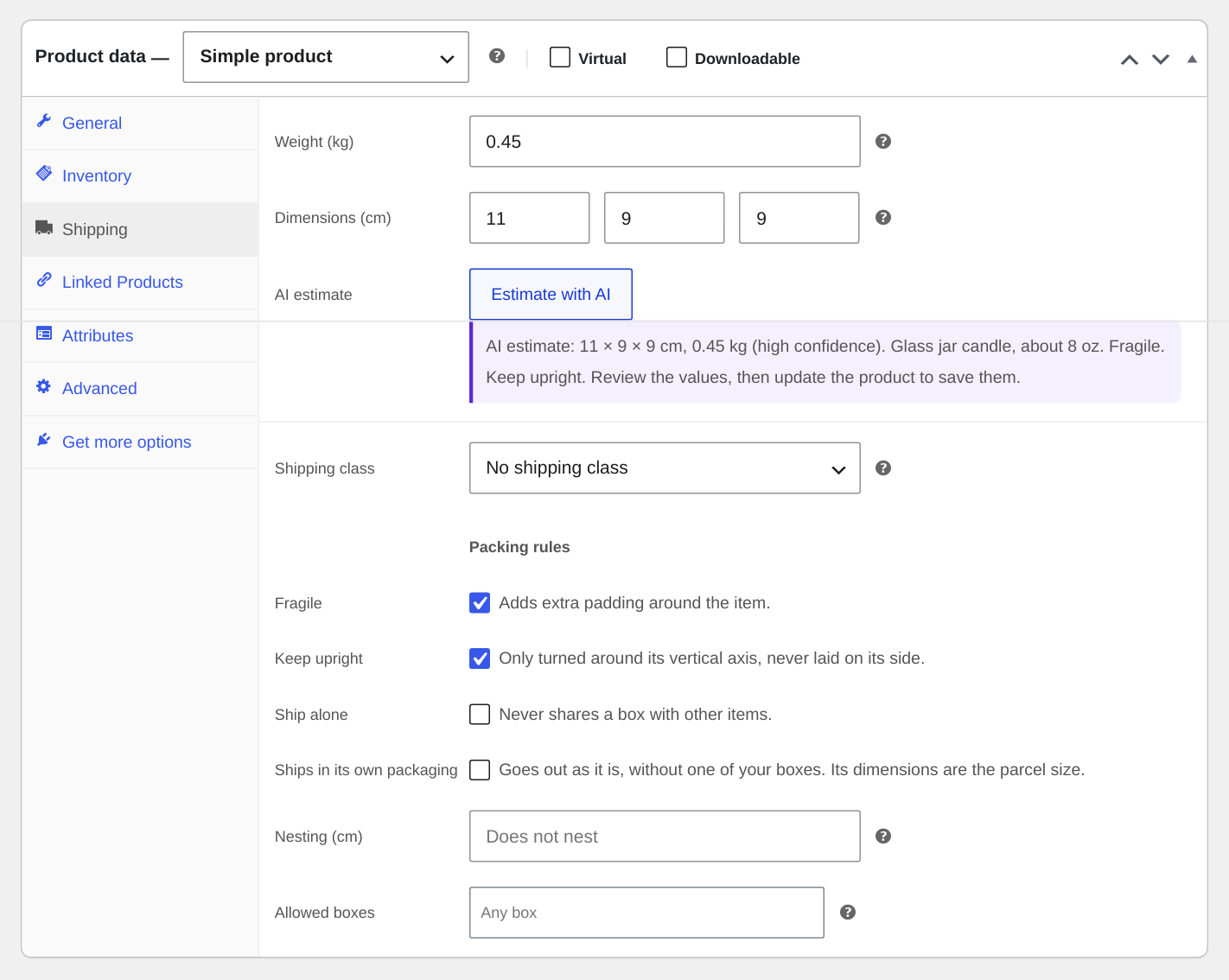
- AI fills in what’s missing. Click “Estimate with AI” on a product. BoxIntellect reads the product name, description, attributes and photo, and suggests the shipping size and weight of one unit, with a confidence level and a short note. You check the values before they are saved.
- Every order is packed into your real boxes. A 3D packing algorithm places each item in your boxes, turning items to make them fit and respecting weight limits, then picks the smallest boxes that hold everything. It runs on your server in milliseconds and gives the same answer every time. No AI is involved in packing.
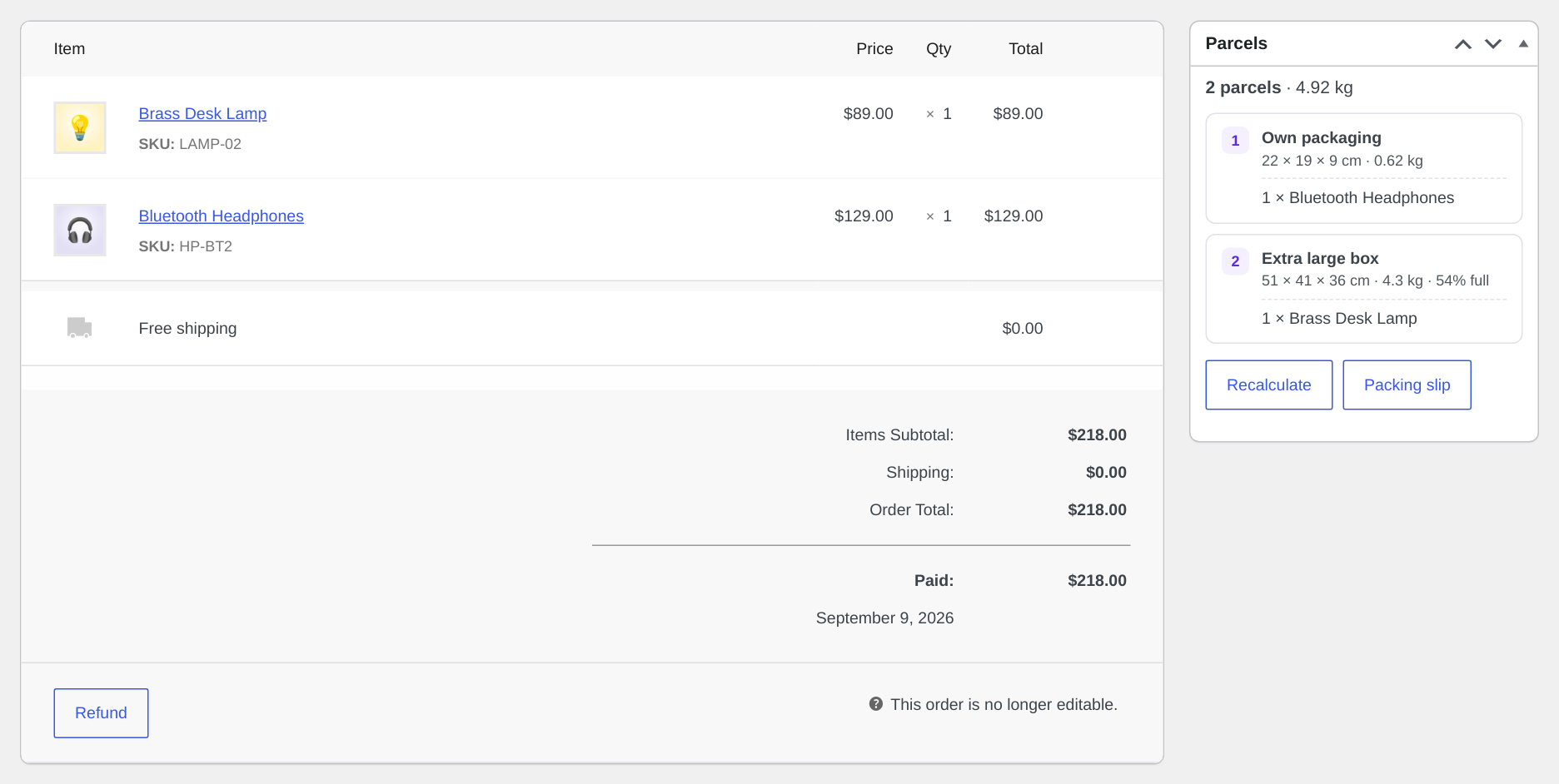
- Shipping gets the real parcels. Each order shows its parcels: which box, how many, outer size and gross weight. ShipStation receives the real box size automatically, and label tools that import CSV files can use a parcel export.
Why BoxIntellect
- Packing plus the data it needs. Box packing only works if your dimensions are right. BoxIntellect fills them in first.
- Your AI, your keys, no middleman. It uses the AI provider you connected in WordPress (OpenAI, Anthropic, Google or any other provider plugin). No credits to buy, and product data goes straight to your provider.
- Customer data never leaves your site. Packing runs on your server. No orders or addresses are sent to us or to the AI.
- Works with any carrier. It is not tied to a single carrier.
Features
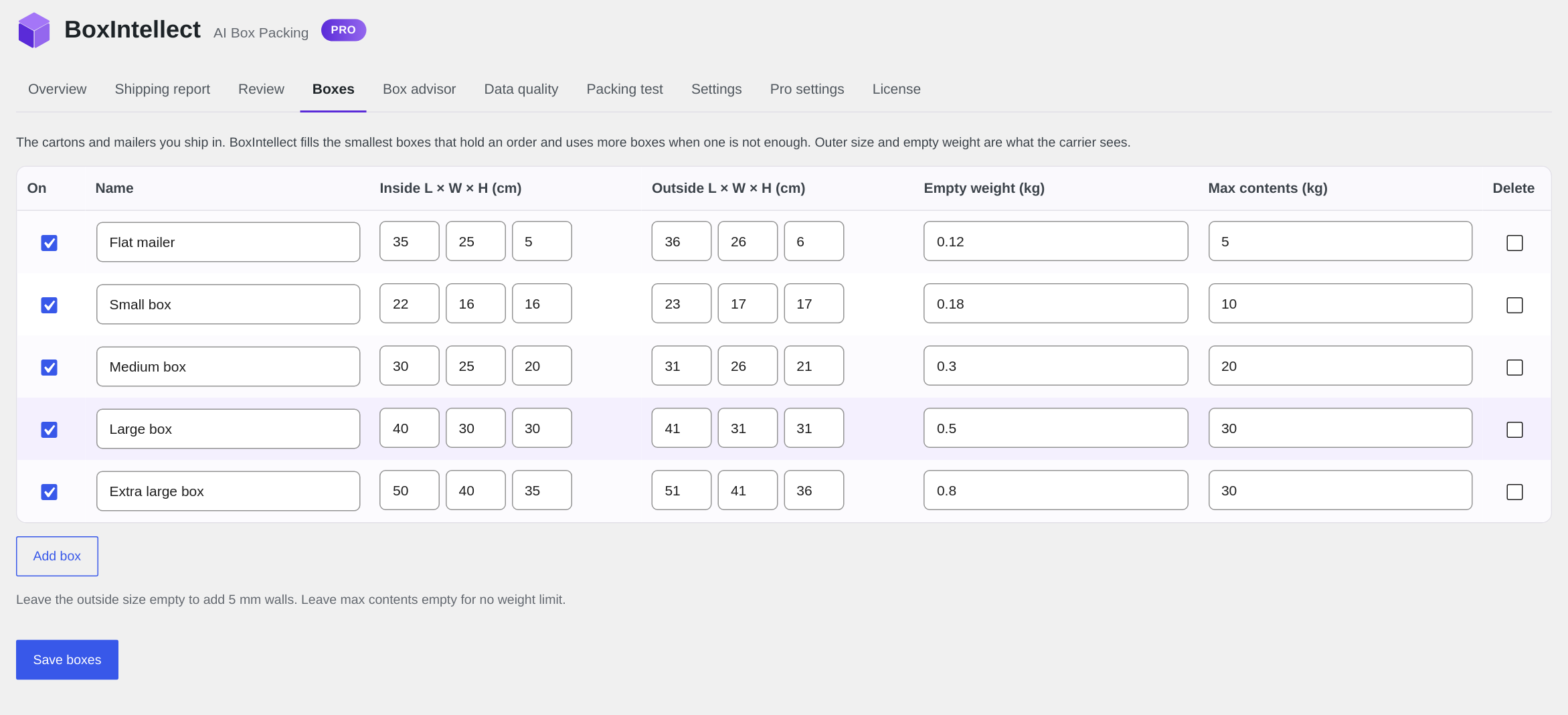
- Your boxes: inside and outside sizes, empty weight and maximum contents. A starter set of common carton sizes is added on activation.
- Parcels of every new order calculated at checkout and shown on the order screen (with a Recalculate button) and in the order list.
- Parcels added to the cart’s shipping packages (
$package['boxintellect_parcels']) so shipping methods and carrier plugins can use them. - ShipStation: with the ShipStation for WooCommerce plugin, orders that ship in one parcel reach ShipStation with the outer size of their box, and every order gets a parcel summary in a custom field.
- Parcel CSV export: select orders in the order list and choose “Export parcels (CSV)”: one row per parcel with the shipping address, box, outer size and weight, ready to import into label tools that let you map CSV columns.
- Parcels in the WooCommerce REST API order response (
boxintellect_parcels), for services that read your orders through the API. - “Estimate with AI” button in the product Shipping tab; a Package column in the product list showing which products are missing dimensions.
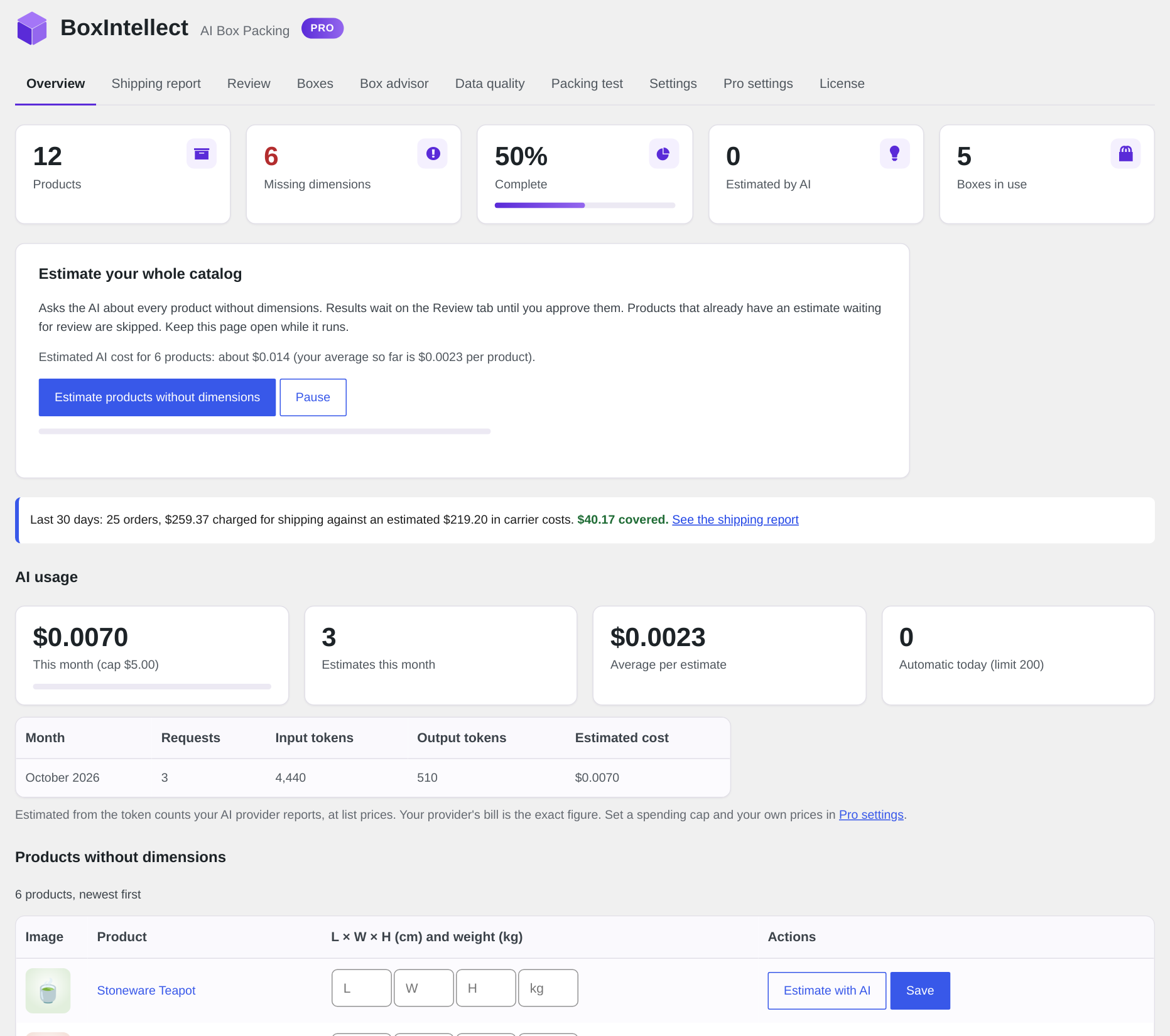
- Overview with catalog completeness and inline AI estimates for the products that still need dimensions, page by page (you choose how many per page).
- Check before shipping: flag high-value orders, orders with fragile items and orders packed with estimated or missing data. Flagged orders get a notice in the Parcels box with “Mark as checked” (which adds an order note), a Check badge and filter in the order list, and an optional email.
- Poly mailers: add bags next to your cartons. Clothing and other soft goods go in the mailer when they fit, and the parcel is sent as the size of its contents. Fragile and keep-upright products always go in a box.
- Packing rules per product: fragile (extra padding), keep upright, ship alone, ships in its own packaging, never in a mailer, nesting items (cups, bowls), allowed boxes. The AI can suggest them with each estimate.
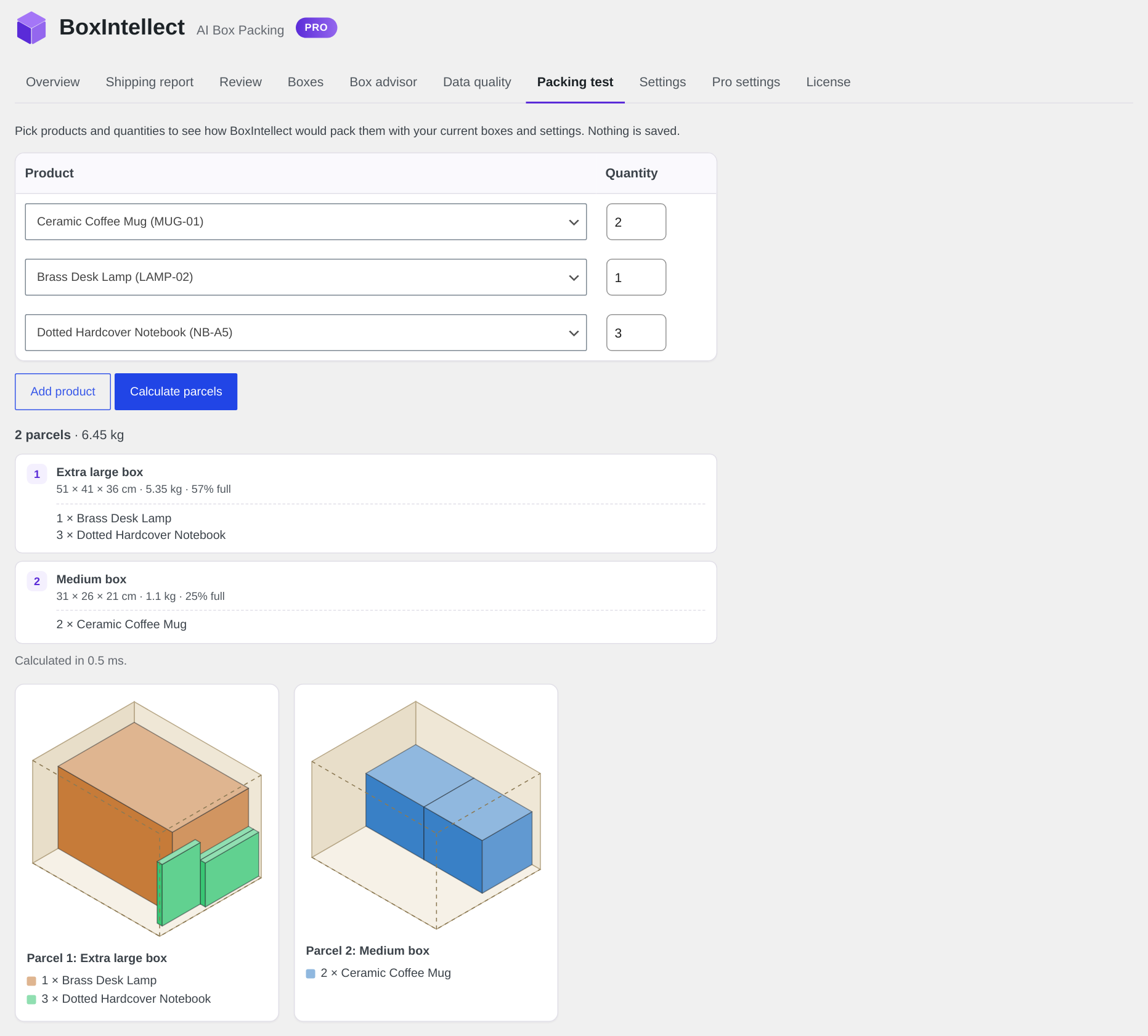
- Packing test: pick products and quantities to see how they would be packed.
- Padding for bubble wrap, fallback size for products without dimensions, fast volume estimate for very large orders.
- Works in your store units (cm, mm, m, in, yd; kg, g, lbs, oz). Compatible with HPOS and the block checkout.
- Packing works without AI. Connect an AI provider only if you want the estimates.
Stop guessing parcel sizes. Fill in your catalog and ship every order in the right box.
Pro add-on
The free plugin estimates one product at a time. BoxIntellect Pro puts AI catalog data, box packing and per-parcel shipping rates in one plugin:
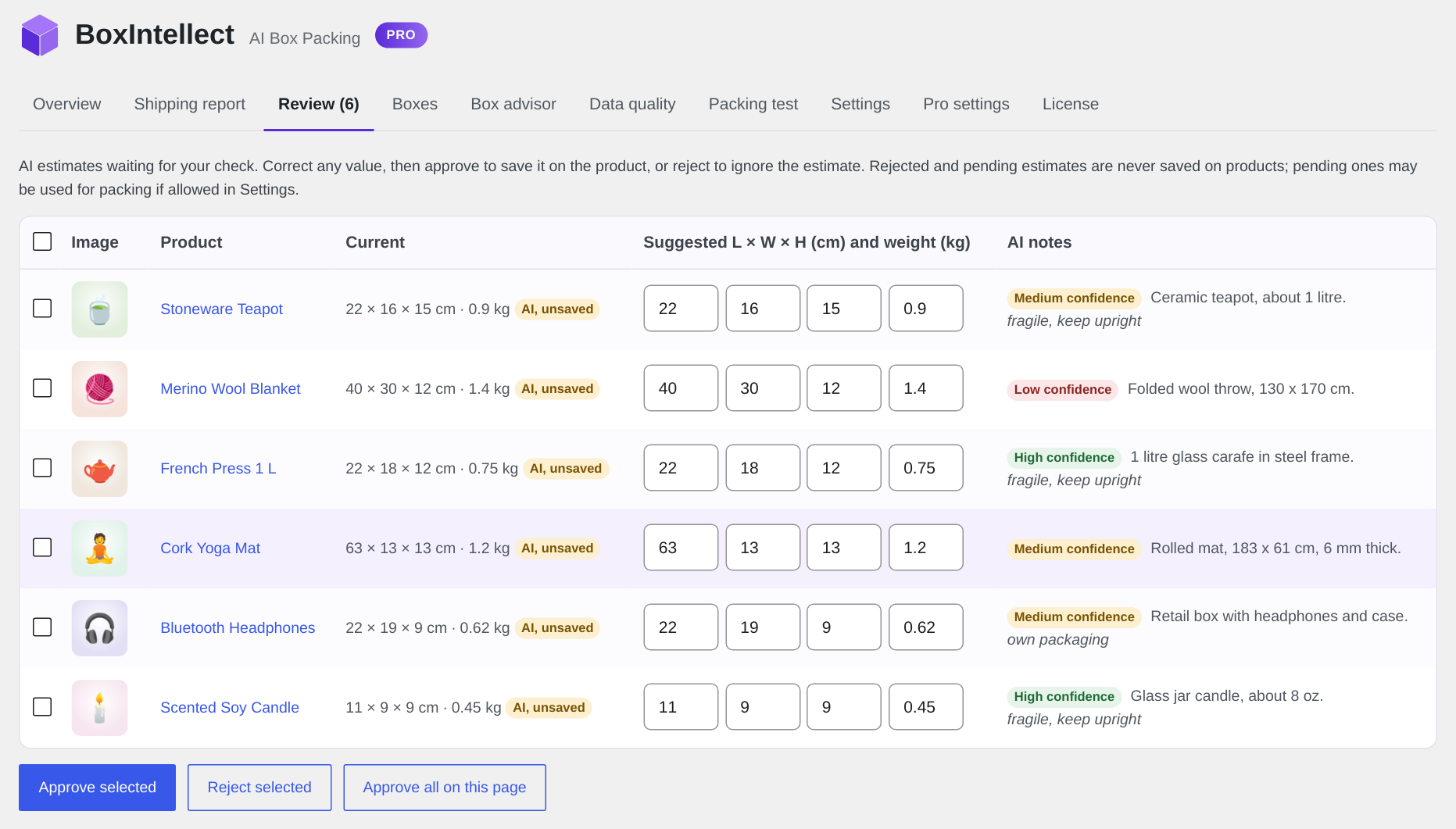
- Bulk AI estimates for your whole catalog, held for your review before anything is saved
- AI that learns from your corrections: shows how accurate the estimates were per category, and tells new estimates how you corrected similar products
- Automatic estimates for new products
- Shipping method with per-parcel rates and dimensional weight
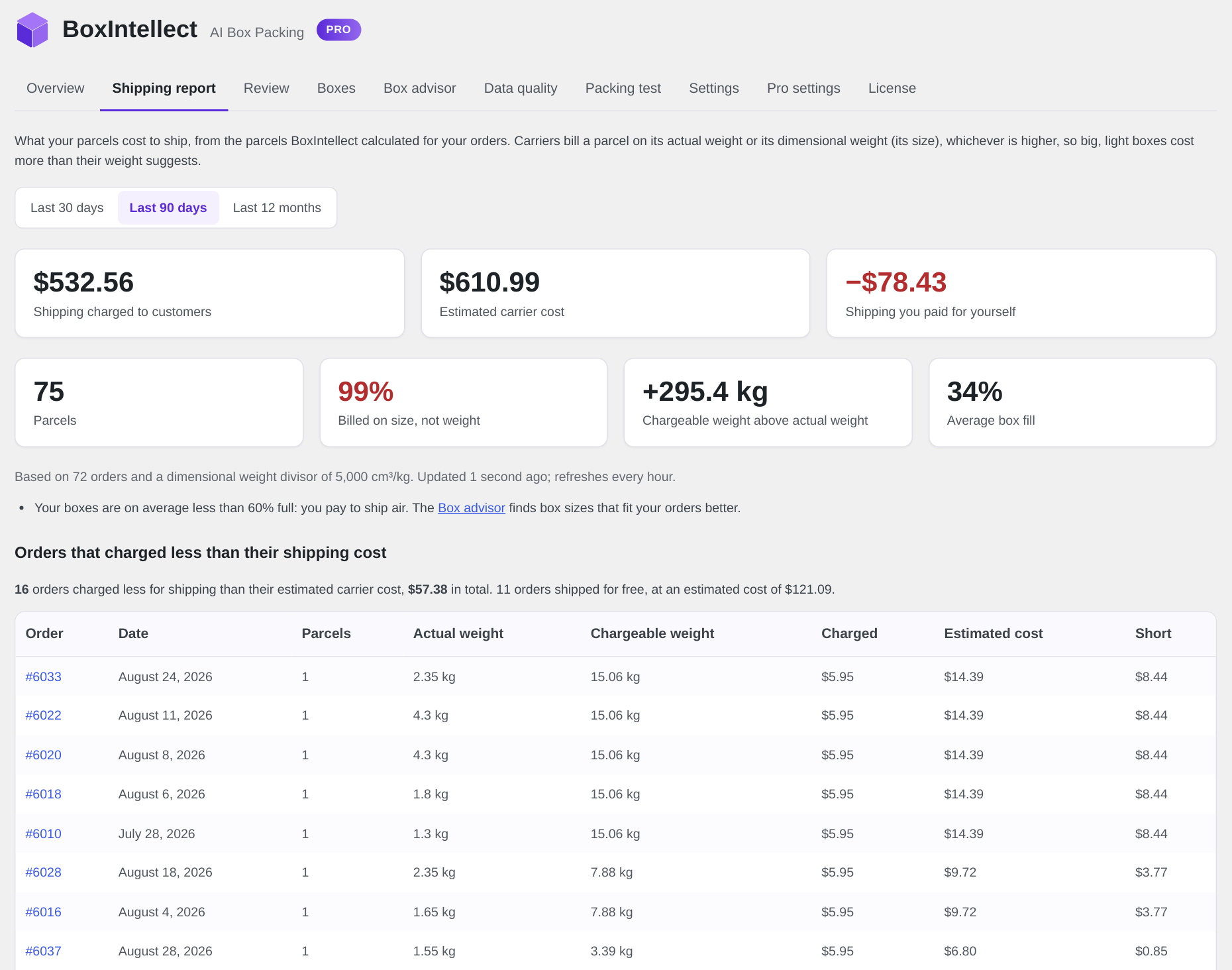
- Shipping report: what your parcels cost to ship compared with what customers paid, and which orders lost money on shipping
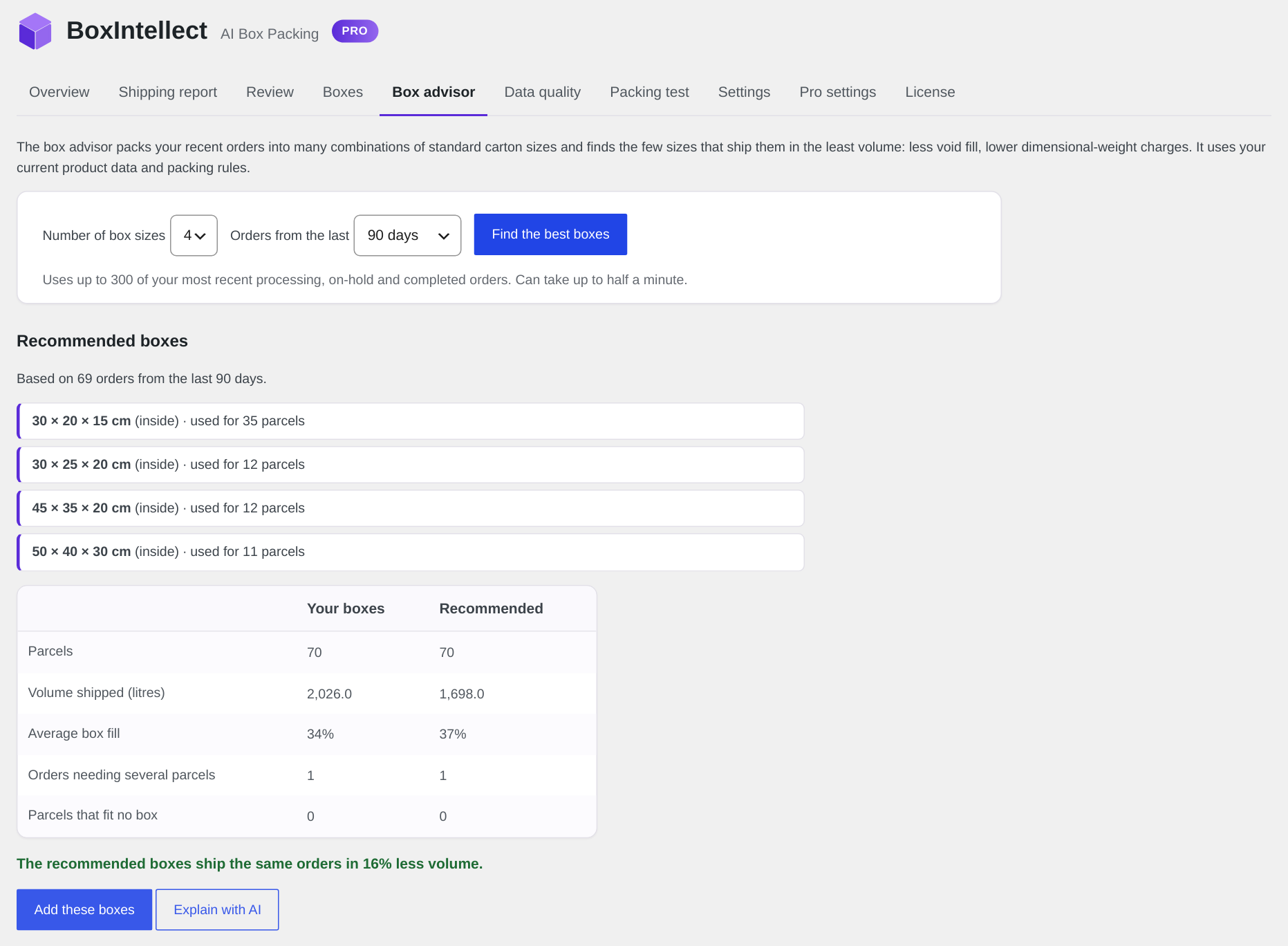
- Box advisor: finds the box sizes that fit your real orders best, and AI explains why
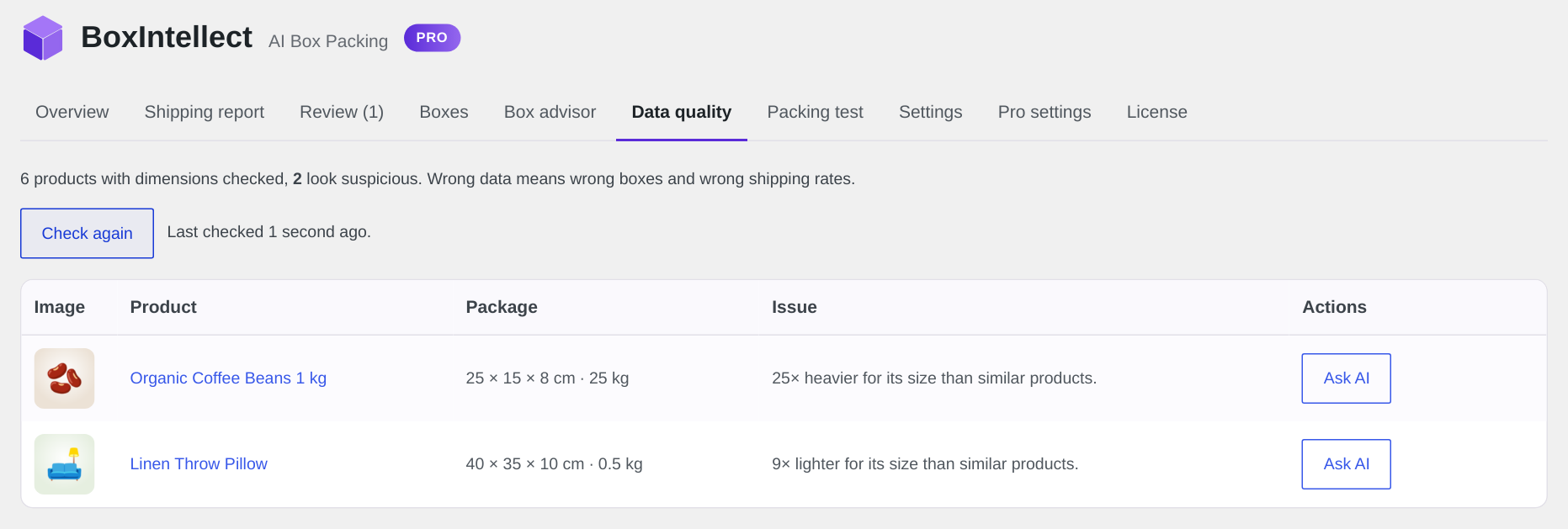
- Data quality check: flags suspicious dimensions and weights, such as a 40 kg T-shirt
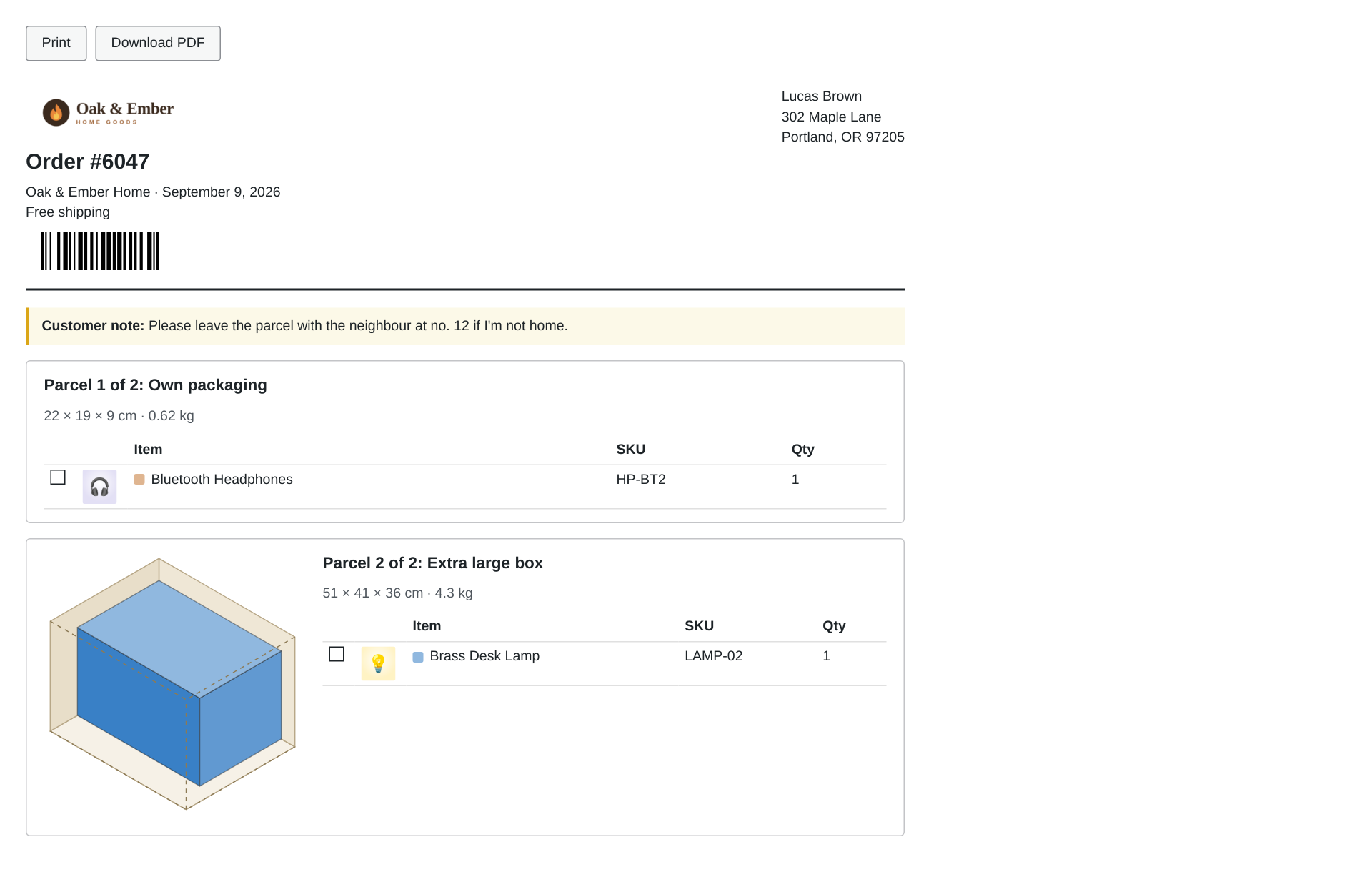
- Packing slips with a 3D diagram, your logo, a scannable order barcode and a combined pick list, to print or download as PDF, so your packers know what goes where
- AI usage and spending caps: what your estimates cost, a monthly cap, a daily limit for automatic estimates, and the cost of a bulk run before you start it
- REST API and WP-CLI
Staging and local sites are free.
External services
The packing calculation runs on your server and sends nothing anywhere.
AI estimates use the WordPress AI Client (built into WordPress 7.0+), which sends requests to the AI provider the site owner connected in Settings → Connectors. Nothing is sent until a provider is connected and you click “Estimate with AI” (or a Pro automation you turn on runs).
For each estimate the product name, SKU, GTIN, categories, attributes, short description and description (shortened), any dimensions already entered, and, unless turned off in the settings, a resized copy of the product image are sent to the connected provider, for example:
- OpenAI (api.openai.com): Terms of use, Privacy policy
- Anthropic (api.anthropic.com): Commercial terms, Privacy policy
- Google Gemini (generativelanguage.googleapis.com): Gemini API terms, Privacy policy
No customer or order data is ever sent to an AI provider.
BoxIntellect news (optional, off by default). If an administrator turns on “News and tips” in WooCommerce BoxIntellect Settings, the plugin downloads a short list of messages from https://boxintellect.pro/wp-json/amazimg/v1/notices at most about twice a day, when the BoxIntellect overview is opened. The request sends only the plugin’s name and version; like any web request, it also reveals the site’s IP address to the server. Nothing is requested while the option is off. Terms of service, Privacy policy
Screenshots
Installation
- Install and activate WooCommerce, then this plugin.
- Go to WooCommerce BoxIntellect Boxes and enter the boxes you ship in (a starter set is already there).
- For AI estimates (WordPress 7.0+): go to Settings Connectors, install a provider plugin (OpenAI, Anthropic or Google) and add its API key.
- Open WooCommerce BoxIntellect to see which products are missing dimensions and estimate them.
Developers
BoxIntellect can be extended with PHP hooks and a small PHP API. Shipping methods and carrier plugins can read the parcels of every cart and order. The Pro add-on also adds a per-parcel shipping method, a REST API and WP-CLI commands.
All lengths are in centimetres and all weights in kilograms, whatever units the store uses. Convert with BoxIntellect_Units::from_cm() / from_kg() (to store units) and to_cm() / to_kg() (from store units).
Parcels in the cart
Every WooCommerce shipping package gets two extra keys before shipping rates are calculated, so any shipping method can use them in calculate_shipping( $package ):
$package['boxintellect_parcels']: the list of parcels (see “Parcel” below).$package['boxintellect_totals']:count(parcels),weight(kg, boxes included) andvolume(cm³, outer size).
If packing fails for any reason, the keys are left out and the cart keeps working. Call BoxIntellect_Cart::for_package( $package ) to pack a package yourself (cached for the request).
Parcels of an order
When “Calculate the parcels of every new order” is on (the default), the packing result of each new order is stored in the order meta _boxintellect_parcels (HPOS compatible). Read it with BoxIntellect_Order::get( $order ), which returns the packing result or null. BoxIntellect_Order::calculate( $order ) recalculates and stores it, like the Recalculate button on the order screen.
Packing result
BoxIntellect_Items::pack(), the order meta and the REST API return the same array:
parcels: list of parcels.totals:count,weight(kg) andvolume(cm³).approximate: true when the order had more items than the “Large orders” setting and was packed by volume instead of item by item.notes: product names by data source:missing(no dimensions),estimate(unsaved AI estimate used),default(fallback size used),no_weight.time: Unix timestamp of the calculation.review(orders only): why the order should be checked before shipping, from the “Check before shipping” settings:value(order total),fragileanddata(product names),oversize(number of parcels that fit no box). Empty when there is nothing to check. Order meta_boxintellect_needs_checkisyeswhile the order waits for a check;_boxintellect_checkedholds who checked it and when.
Parcel
type:box(packed in one of your boxes or mailers),own(ships in its own packaging) oroversize(fits no box and ships as it is).mailer: true when the box is a poly mailer. Itslength,widthandheightare then the size of the contents, andinneris the room the bag had at that thickness.box_id,box_name: the box used (empty unlesstypeisbox).length,width,height: outer size in cm, the size the carrier measures.inner: inner length, width and height in cm.weight: gross weight in kg (items plus the empty box).items_weight: items only.fill: share of the box volume used, from 0 to 1.items: list ofproduct_id,nameandqty.placements: position of each unit in the box (x,y,z,l,w,hin cm), used for the 3D diagrams. Empty for approximate parcels.approximate: true for parcels packed by volume.
Parcels in the WooCommerce REST API
The WooCommerce REST API order response (/wp-json/wc/v3/orders and /wp-json/wc/v3/orders/{id}) has a read-only boxintellect_parcels field with the stored packing result (see “Packing result” above), or null when the order has none. Nothing is calculated on a GET.
ShipStation
With the ShipStation for WooCommerce plugin active, BoxIntellect adds to the orders ShipStation imports:
- Orders without parcels are packed first.
- XML export: when an order ships in one parcel, its
Dimensionsare the outer size of the parcel (in inches, as the ShipStation plugin sends them). ShipStation takes one package per order, so orders with several parcels keep what the ShipStation plugin sent. ShipStation adds up the item weights itself, so the weight of the empty box isn’t included. - Custom field 3 (XML and REST exports) gets a parcel summary, such as
2 parcels: Medium box 31 × 26 × 21 cm, 1.4 kg (1 × Mug); …. Choose field 2 or turn it off with theboxintellect_shipstation_custom_fieldfilter. A field another plugin already uses is never taken.
Parcel CSV export
The bulk action “Export parcels (CSV)” in the order list downloads one row per parcel (up to 500 orders), with these columns: order_number, order_id, parcel, parcels, name, company, address_1, address_2, city, state, postcode, country, phone, email, shipping_method, box, length, width, height, dimension_unit, weight, weight_unit, contents. Sizes and weights are in the store’s units with a point as the decimal mark. Orders without parcels are packed first. Change the rows with the boxintellect_csv_rows filter.
Box
BoxIntellect_Boxes::all() returns every box and `BoxIntellect_Boxes::enabled()` the boxes used for packing. Each box has `id`, `name`, `enabled`, `inner_length`, `inner_width`, `inner_height`, `outer_length`, `outer_width`, `outer_height`, `empty_weight`, `max_weight` (maximum content weight in kg, 0 for no limit) and `type` (`box` or `mailer`). For a mailer, the inner length and width are the lay-flat size and the inner height is the thickest it can be filled. `BoxIntellect_Boxes::make( $name, $length, $width, $height, $empty_weight, $max_weight, $type )` builds a box from its inner size, with outer sizes 1 cm larger (the same size for mailers).
Packer item
BoxIntellect_Items::from_product( $product, $qty ) turns a product into a packer item. Variations use their parent's values when they have none of their own.
product_id,name,qty.length,width,height(cm) andweight(kg).source: where the dimensions came from:product,ai(saved from an AI estimate),estimate(unsaved estimate),default(fallback size) ormissing.weight_source:product,estimate,defaultormissing.padding: added once to each of length, width and height (cm, both sides together), from the Padding setting plus the fragile padding for fragile products.Packing rules:
upright,separate(ship alone),own_packaging,no_mailer(never in a mailer; also true for fragile and keep-upright products),nest(height in cm that each extra unit adds to a stack) andboxes(allowed box ids, empty for any box).BoxIntellect_Items::from_order( $order ) and
BoxIntellect_Items::from_package( $package )return the items of an order (refunds removed, virtual products skipped) or a cart package.
Products
BoxIntellect_Items::product_dimensions( $product ): the size and weight used for packing, with their sources.BoxIntellect_Rules::get( $product ): the product’s packing rules:fragile,upright,separate,own_packaging,no_mailer,nestandboxes.BoxIntellect_Estimator::estimate( $product ): asks the connected AI provider for an estimate and stores it. Returns the estimate or aWP_Error.BoxIntellect_Estimator::stored( $product ): the stored estimate, or null.BoxIntellect_Estimator::apply( $product, $estimate, $only_empty = false ): saves an estimate as the product’s dimensions and weight.
An estimate has length, width, height (cm), weight (kg), confidence (high, medium or low), fragile, upright, own_packaging and notes. Stored estimates also have model, time and status (pending, applied or rejected).
Product meta: _boxintellect_estimate (the stored estimate), _boxintellect_dims_source (ai when the saved dimensions came from an AI estimate), and the packing rules _boxintellect_fragile, _boxintellect_upright, _boxintellect_separate, _boxintellect_own_packaging, _boxintellect_no_mailer (yes or no), _boxintellect_nest (cm) and _boxintellect_boxes (box ids). Prefer the methods above to reading the meta directly.
Filters
boxintellect_item( $item, $product, $qty ): change a packer item, for example its size, padding or packing rules.boxintellect_boxes( $boxes ): change the boxes used for packing.boxintellect_packing_result( $result, $items ): change a packing result before it is used or stored.boxintellect_estimate_prompt( $prompt, $product ): change the prompt sent to the AI.boxintellect_ai_prompt_builder( $builder, $product, $prompt ): adjust the WordPress AI Client request before it is sent.boxintellect_max_tokens( $max_tokens ): change the output limit (default 1024). Reasoning models count their thinking too.boxintellect_pre_estimate( $error, $product, $args ): return aWP_Errorto stop an AI estimate before it is sent ($args['source']ismanual,bulk,auto,cliorrest). The Pro add-on uses it for spending caps.boxintellect_admin_tabs( $tabs ): add tabs to WooCommerce BoxIntellect (id => array( label, capability )). Render a tab with theboxintellect_admin_tab_{id}action.boxintellect_test_result_html( $html, $result, $items ): change the output of the Packing test tab.boxintellect_csv_rows( $rows, $order, $result ): change the parcel CSV rows of an order (one per parcel, in the column order above).boxintellect_shipstation_custom_field( $field ): ShipStation custom field for the parcel summary: 3 (default), 2, or 0 for none.boxintellect_order_review( $reasons, $order, $items, $result ): why an order should be checked before shipping. Return an empty array for no check.
Actions
boxintellect_loaded: the plugin is loaded (WooCommerce is active).boxintellect_order_packed( $result, $order ): the parcels of an order were calculated and stored.boxintellect_order_flagged( $reasons, $order ): an order started needing a check before shipping.boxintellect_order_checked( $order ): someone marked an order as checked.boxintellect_boxes_saved( $boxes ): the boxes were changed.boxintellect_estimated( $estimate, $product ): an AI estimate was made and stored.boxintellect_estimate_applied( $product, $estimate ): an estimate was saved as the product’s dimensions.boxintellect_usage( $provider, $model, $input_tokens, $output_tokens ): reports the AI usage of each request.boxintellect_overview_after_stats( $counts ): output below the statistics on the BoxIntellect overview.boxintellect_overview_after_table: output at the bottom of the BoxIntellect overview.boxintellect_order_box_actions( $order ): output next to the Recalculate button in the order’s Parcels box.
Error codes
BoxIntellect_Estimator::estimate() returns a `WP_Error` with one of these codes:
boxintellect_no_ai: no AI provider is connected in Settings Connectors.boxintellect_http_429: the AI provider is rate-limiting requests. Retry later.boxintellect_http_5xx(for exampleboxintellect_http_503): the AI provider is temporarily unavailable. Retry later.boxintellect_http_error: network error reaching the AI provider. Retry later.boxintellect_ai_error: any other AI request failure, for example an invalid API key. Don’t retry.boxintellect_parse: the AI reply could not be read or had no usable dimensions.
Examples
Charge for each parcel in your own shipping method:
public function calculate_shipping( $package = array() ) {
    $parcels = isset( $package['boxintellect_parcels'] ) ? $package['boxintellect_parcels'] : array();
    $cost    = 0;
    foreach ( $parcels as $parcel ) {
        // Dimensional weight with a divisor of 5000 (cm³ per kg).
        $chargeable = max( $parcel['weight'], $parcel['length'] * $parcel['width'] * $parcel['height'] / 5000 );
        $cost      += 4.5 + 0.8 * $chargeable;
    }
    $this->add_rate( array( 'label' => $this->title, 'cost' => $cost ) );
}
Ship every product of the “Furniture” category alone:
add_filter( 'boxintellect_item', function ( $item, $product ) {
    $id = $product->get_parent_id() ? $product->get_parent_id() : $product->get_id();
    if ( has_term( 'furniture', 'product_cat', $id ) ) {
        $item['separate'] = true;
    }
    return $item;
}, 10, 2 );
Use a large box only in December:
add_filter( 'boxintellect_boxes', function ( $boxes ) {
    if ( '12' === gmdate( 'm' ) ) {
        $boxes[] = BoxIntellect_Boxes::make( 'Holiday box', 60, 40, 40, 0.9, 25 );
    }
    return $boxes;
} );
Send the parcels of each new order to a warehouse system:
add_action( 'boxintellect_order_packed', function ( $result, $order ) {
    foreach ( $result['parcels'] as $parcel ) {
        my_warehouse_add_parcel( $order->get_id(), $parcel['box_name'], $parcel['length'], $parcel['width'], $parcel['height'], $parcel['weight'] );
    }
}, 10, 2 );
Pack products without a cart, for example for a quote:
$items = array(
    BoxIntellect_Items::from_product( wc_get_product( 12 ), 3 ),
    BoxIntellect_Items::from_product( wc_get_product( 34 ), 1 ),
);
$result = BoxIntellect_Items::pack( $items );
printf( '%d parcels, %.2f kg', $result['totals']['count'], $result['totals']['weight'] );
Shipping method (Pro)
The Pro add-on adds the shipping method “BoxIntellect per-parcel rates” (method id boxintellect_rates). It charges a cost per order, a cost per parcel and a cost per weight unit of chargeable weight (the higher of the actual and dimensional weight of each parcel). Each rate carries the meta data “Parcels” and “Chargeable weight”. BXIP_Shipping_Method::chargeable_weight( $parcel, $divisor ) returns the chargeable weight of a parcel in kg.
REST API (Pro)
The Pro add-on adds routes under /wp-json/boxintellect/v1. To call them from outside WordPress, sign in with an application password (Users Profile Application Passwords) using HTTP Basic auth. Lengths are in cm and weights in kg.
GET /orders/{id}/parcels: the stored packing result of an order, calculated first if there is none. Needs theedit_shop_orderscapability.POST /orders/{id}/parcels: recalculates and stores the parcels of an order. Needsedit_shop_orders.POST /pack: packs products without an order, for example for quotes. Body:{"items":[{"product_id":12,"qty":3},{"product_id":34,"qty":1}]}. Products that don’t need shipping are skipped; returns 400 when none are left. Needsmanage_woocommerce.POST /products/{id}/estimate: asks the AI for an estimate of one product. Addsave=trueto save it as the product’s dimensions. Returns 429 when the provider is rate-limiting, 503 when no provider is connected and 502 for other AI errors. Needs permission to edit the product.GET /boxes: all boxes. Needsmanage_woocommerce.curl -u ‘admin:xxxx xxxx xxxx xxxx’ -X POST \ -H ‘Content-Type: application/json’ \ -d ‘{“items”:[{“product_id”:12,”qty”:3}]}’ \ ‘https://example.com/wp-json/boxintellect/v1/pack’
WP-CLI (Pro)
wp boxintellect pack 1234 1235
wp boxintellect pack 1234 --format=json
wp boxintellect estimate 42 43
wp boxintellect estimate --missing --limit=500 --save
wp boxintellect quality --format=csv
wp boxintellect advise --boxes=4 --days=90 --add
pack: calculates and stores the parcels of orders.estimate: estimates products with AI. Without--savethe estimates wait on the Review tab; with--savethey fill empty fields only.quality: lists products whose dimensions or weight look wrong.advise: finds the box sizes that fit your recent orders best;--addadds them to your boxes.
Run wp help boxintellect for the full reference.
Pro hooks
bxip_advisor_catalog( $boxes ): change the standard carton sizes the box advisor chooses from (cm / kg).
FAQ
-
Does the AI decide how orders are packed?
-
No. Packing is a geometry problem, and a packing algorithm solves it exactly and consistently. The AI is only used to estimate the size and weight of products that don’t have them, and you review those values.
-
How accurate are the AI estimates?
-
Good enough to replace “no dimensions at all”, especially when the description or photo shows the product clearly. Each estimate comes with a confidence level and a short note. For products you ship often, measure them once and enter the real values.
-
Do I need an AI provider?
-
No. Packing, the parcels of every order, ShipStation and the CSV export all work without AI, and you can enter product dimensions by hand. You only need a provider for “Estimate with AI”.
-
Which WordPress version do I need?
-
WordPress 6.2 or newer and WooCommerce 8.0 or newer for packing. AI estimates use the WordPress AI Client, which is built into WordPress 7.0, so they need 7.0 or newer. Everything else works the same on older versions.
-
Does it work with High-Performance Order Storage (HPOS)?
-
Yes. BoxIntellect declares HPOS compatibility and works with orders stored in either the new order tables or the classic posts table, with or without compatibility mode (sync) turned on. Parcels are saved through the WooCommerce order API, and the Parcels column, order box and bulk actions appear on both order screens.
-
Where do I enter my API key?
-
In Settings Connectors (WordPress 7.0+). The plugin never stores API keys.
-
Can my shipping plugin use the parcels?
-
Each cart shipping package gets
boxintellect_parcels(a list of parcels withlength,width,heightin cm,weightin kg, the box and the items) andboxintellect_totals. Parcels of an order are stored in the_boxintellect_parcelsorder meta and included in the WooCommerce REST API order response. BoxIntellect Pro includes a shipping method that charges per parcel.Most shipping and label plugins don’t read these by themselves. They usually add up product weights or use their own box list.
-
Can I print shipping labels with the right parcel sizes?
-
BoxIntellect doesn’t print labels, but it gives your label tool the parcels:
- ShipStation (with the ShipStation for WooCommerce plugin): orders that ship in one parcel arrive with the outer size of their box, and every order shows a parcel summary in custom field 3.
- Other label tools: select orders in the order list, choose “Export parcels (CSV)” and import the file into any tool that lets you map CSV columns. Each parcel is one row, with the address, outer size and weight.
-
What happens with very large orders?
-
Above 120 items (adjustable) boxes are filled by volume instead of item by item, so checkout stays fast.
Reviews
There are no reviews for this plugin.
Contributors & Developers
“BoxIntellect – AI Box Packing & Package Dimensions for WooCommerce” is open source software. The following people have contributed to this plugin.
Contributors
Translate “BoxIntellect – AI Box Packing & Package Dimensions for WooCommerce” into your language.
Interested in development?
Browse the code, check out the SVN repository, or subscribe to the development log by RSS.
Changelog
1.0.2
- Clearer padding settings: padding is added to the length, width and height in total (both sides together), with an example for cushioning fragile items.
1.0.1
- New: “Check before shipping” (Settings). Flag high-value orders, orders with fragile items and orders packed with estimated or missing data. Flagged orders show a notice in the Parcels box with “Mark as checked”, a Check badge and filter in the order list, and can send an email.
- New: hooks
boxintellect_order_review,boxintellect_order_flaggedandboxintellect_order_checked.
1.0.0
- First release.