
Description
In the age of AI, your valuable website content is a prime target for data crawlers from large tech companies. Bot Traffic Shield is your first line of defense against content theft and unauthorized scraping.
This lightweight yet powerful plugin identifies and blocks a wide range of AI bots and data scrapers before they can access and harvest your content, protecting your intellectual property while reducing unnecessary server load.
🛡️ Why You Need Bot Traffic Shield
- Protect Your Content – Stop AI companies from training their models on your hard work
- Reduce Server Load – Block unwanted traffic that wastes your bandwidth and resources
- SEO-Safe Blocking – 35+ legitimate search engines and social media indexers are automatically whitelisted and will NEVER be blocked
- Granular Control – Enable or disable protection against each AI provider individually (OpenAI, Anthropic, Google, Meta, Apple, ByteDance, and more)
- Real-Time Analytics – Beautiful interactive charts showing blocked traffic trends and bot breakdowns
- Take Control – Decide exactly who can and cannot access your valuable content
✨ Key Features
Interactive Analytics Dashboard (NEW in v1.0.5)
* Real-time Chart.js powered trend graphs and doughnut charts
* Switchable timeframes: 7-day, 14-day, and 30-day views
* KPI summary cards showing total blocks, today’s blocks, active rules, and top scraper
* Bot traffic breakdown showing which AI crawlers hit your site the most
Granular AI Crawler Toggles (NEW in v1.0.5)
* Individual on/off switches for each AI provider
* Covers OpenAI (GPTBot, ChatGPT-User), Anthropic (ClaudeBot), Google (Gemini/Extended), Perplexity, Meta (FacebookBot), Apple (Applebot-Extended), ByteDance (Bytespider), Common Crawl, Cohere, Amazon, Diffbot, You.com, and more
* Select All / Deselect All bulk actions for quick configuration
* Each toggle shows provider name, description, and exact User-Agent strings
SEO Safety & Search Engine Whitelist (NEW in v1.0.5)
* 35+ whitelisted search engines and social media indexers that are NEVER blocked
* Includes Googlebot, Bingbot, DuckDuckBot, Baiduspider, YandexBot, Twitterbot, LinkedInBot, Facebook, WhatsApp, Slack, Discord, and more
* Explicit Allow: / rules added to robots.txt for all whitelisted bots
* Developer-friendly btsld_search_engine_whitelist filter hook for custom additions
* Standard Applebot (Siri/Spotlight) is whitelisted while Applebot-Extended (AI training) remains blockable
Real-Time Bot Blocking
* Actively blocks bots by their User-Agent on every page request
* Immediate protection with zero configuration needed
* Returns proper 403 Forbidden headers with no-cache directives
Comprehensive Default Blocklist
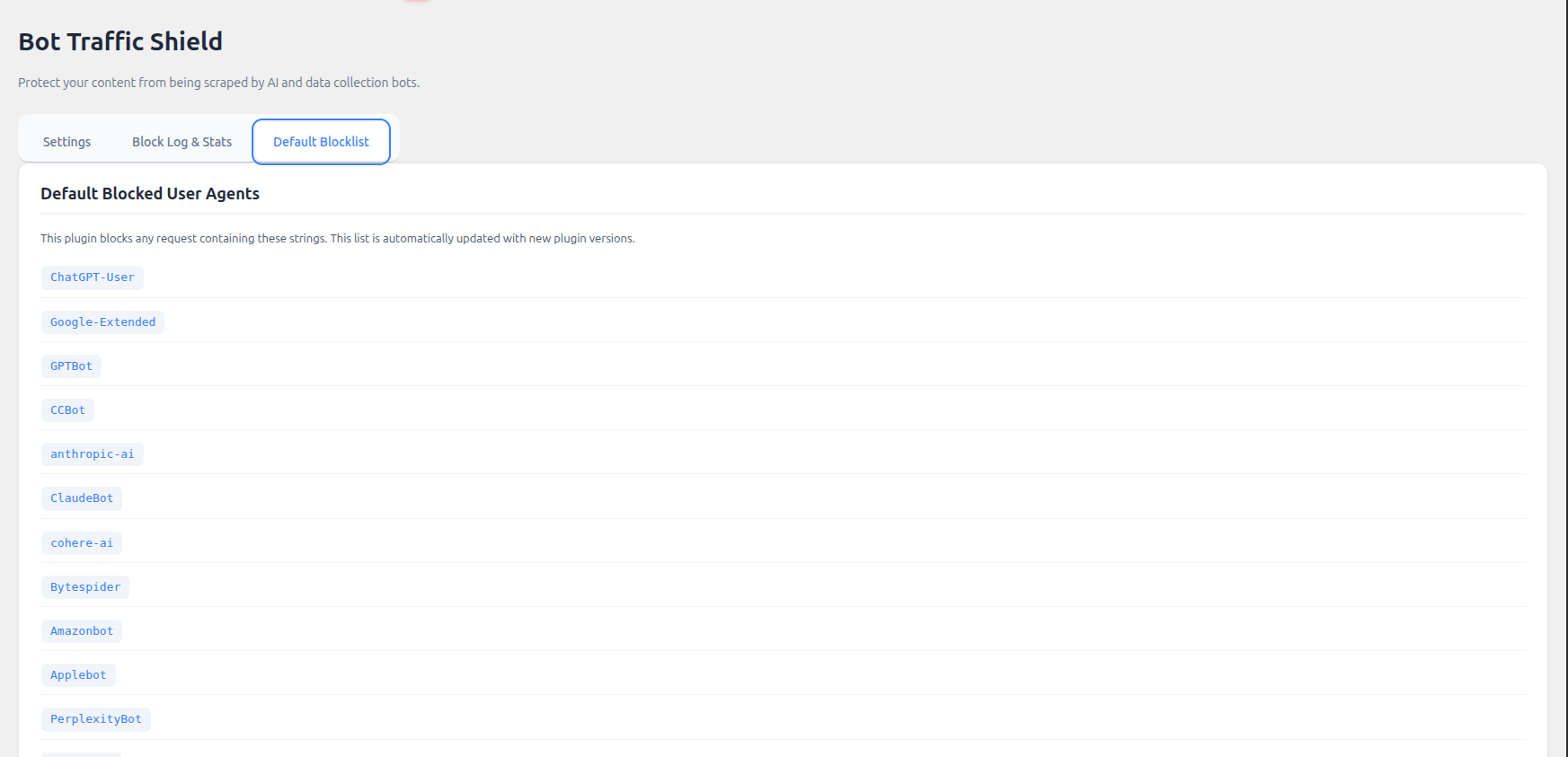
* Pre-configured list of 15+ AI crawler groups covering 20+ User-Agent signatures
* Includes GPTBot, ChatGPT-User, ClaudeBot, Google-Extended, PerplexityBot, Bytespider, FacebookBot, Meta-ExternalAgent, Applebot-Extended, CCBot, Amazonbot, and more
* Regularly updated with new bot signatures in each plugin version
Advanced Logging & Analytics
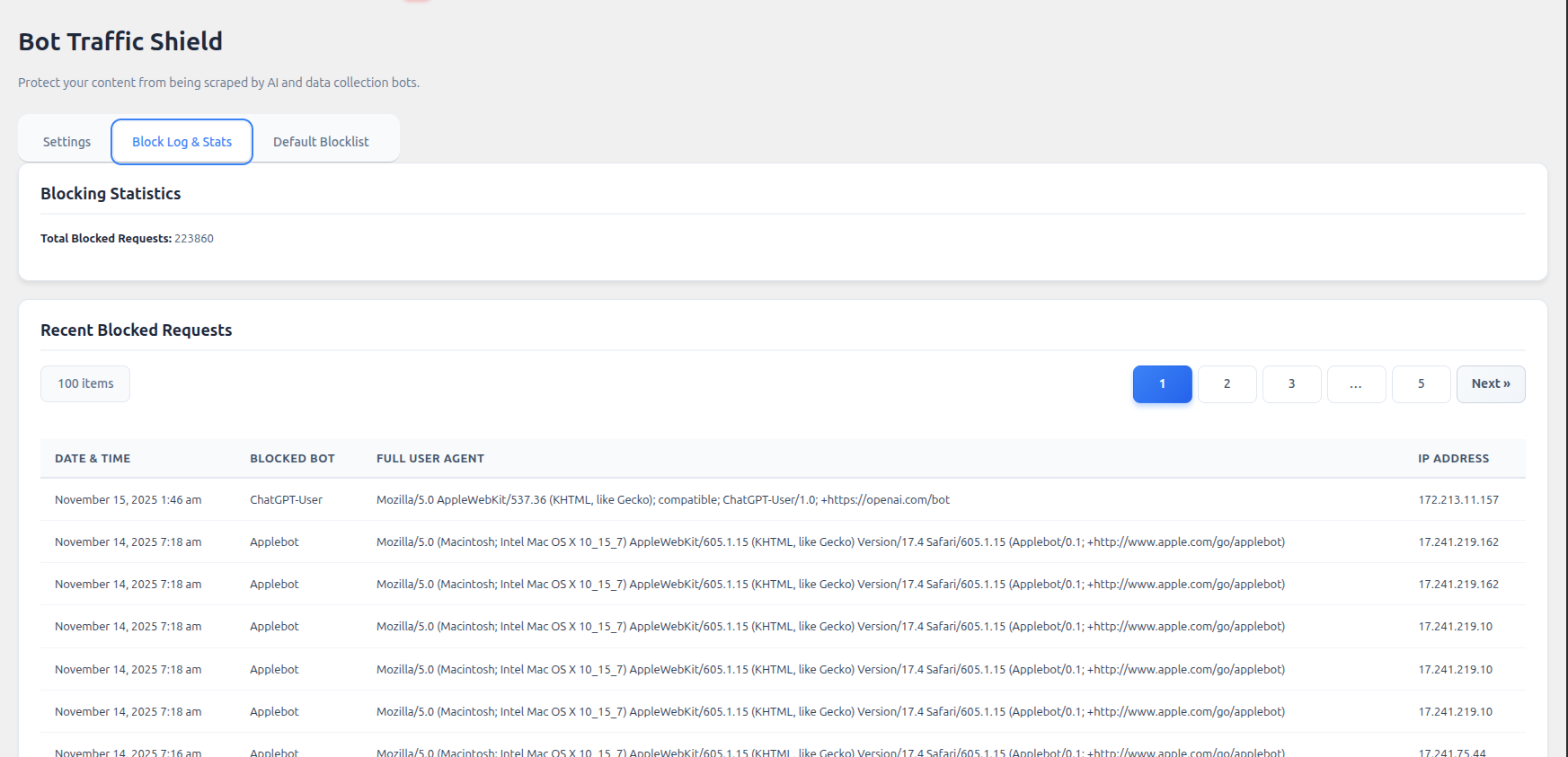
* Track every blocked bot attempt with detailed logs
* View bot name, IP address, user agent, and timestamp
* Pagination system – Browse through logs easily (20 entries per page)
* Daily aggregated statistics powering the dashboard charts
* Running statistics showing total and daily blocked requests
CSV Export Capability
* Export your block logs to CSV format with UTF-8 BOM for Excel compatibility
* Filter exports by date range (7 days, 14 days, 30 days, or all time)
* Includes timestamp, date, bot name, IP address, and full User-Agent
robots.txt Integration
* Automatically adds Disallow rules for blocked AI bots
* Automatically adds Allow rules for whitelisted search engines
* Provides dual-layer protection for both compliant and aggressive bots
Admin Toolbar Widget
* Real-time “Blocked Today” counter in the WordPress admin bar
* Quick-access dropdown links to Dashboard, AI Rules, Activity Log, and Settings
* Lifetime blocked count display
Fully Customizable
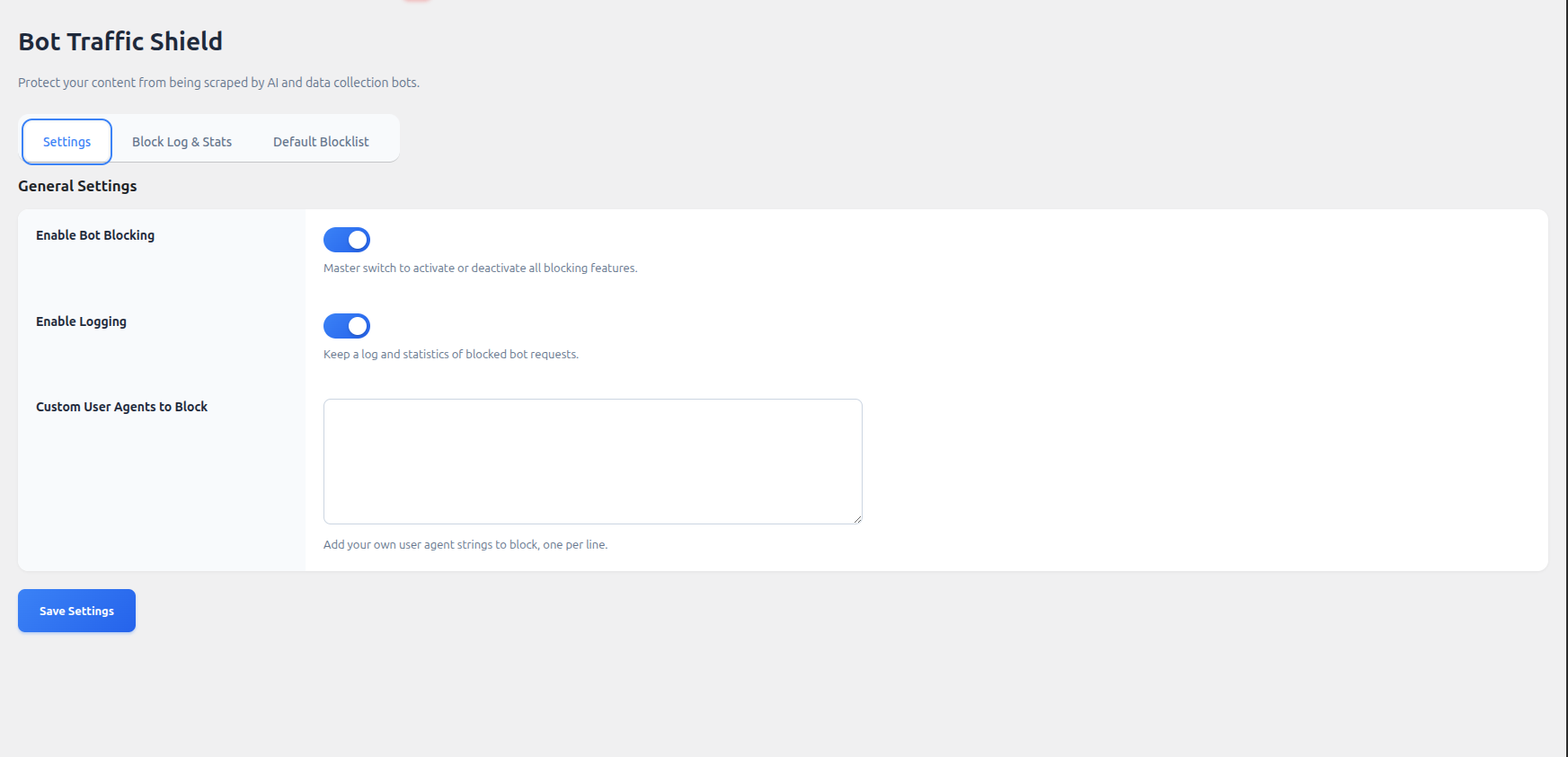
* Add your own custom User-Agent strings to block
* Simple textarea interface – one bot per line
* Enable/disable logging with a single toggle
* Master on/off switch for all blocking features
Modern, Intuitive Interface
* Beautiful 4-tab admin dashboard: Analytics, AI Rules, Settings, Activity Log
* Interactive Chart.js visualizations with smooth animations
* Card-based KPI metrics grid
* Modern toggle switches and responsive grid layouts
* Mobile-responsive admin panel
* No learning curve – start protecting immediately
Lightweight & Performance-Optimized
* Minimal impact on site speed
* Efficient code that runs before page load
* O(1) daily stats lookup for admin bar (no log iteration)
* No external API calls on frontend
* 60-day automatic stats pruning to keep database lean
🎯 Who Is This Plugin For?
- Content Creators – Protect your articles, tutorials, and creative work
- Bloggers – Keep your unique content from being scraped
- News Sites – Prevent unauthorized content aggregation
- E-commerce – Protect product descriptions and pricing data
- Publishers – Safeguard premium content from AI training datasets
- Any WordPress Site – That values their content and server resources
🚀 How It Works
- Install and activate the plugin
- Bot Traffic Shield immediately starts blocking known AI bots
- Visit the Dashboard & Charts tab to monitor blocked traffic visually
- Fine-tune protection in the AI Crawler Rules tab by toggling individual providers
- Check the Activity Log tab for detailed block records
- Export logs for analysis or record-keeping
No complicated setup. No API keys. No subscriptions.
🔒 Privacy & Security
- All data stays on your server
- No external services or third-party dependencies on frontend
- GDPR compliant – you control all logged data
- Logs can be cleared at any time with a single click
- Chart.js loaded locally for WordPress.org compliance
📊 Perfect For
✅ Reducing bandwidth costs
✅ Protecting original content from AI training
✅ Improving server performance
✅ Maintaining competitive advantage
✅ Monitoring AI scraper activity with visual charts
✅ Preventing unauthorized data harvesting
Stop letting AI companies profit from your hard work. Install Bot Traffic Shield and take back control of your content today!
Privacy Policy
Bot Traffic Shield logs the following information when a bot is blocked (if logging is enabled):
* User-Agent string
* IP address
* Request timestamp
* Bot identifier
All data is stored locally in your WordPress database. No information is sent to external servers. You can disable logging or clear logs at any time from the plugin settings. Daily statistics are automatically pruned after 60 days to minimize database usage.
Support
For support, feature requests, or bug reports:
* Visit our website: https://monarchwp.com/
* Email: info@monarchwp.com
Credits
Developed by MonarchWP
Screenshots
Installation
Automatic Installation
- Log in to your WordPress admin dashboard
- Navigate to Plugins > Add New
- Search for “Bot Traffic Shield”
- Click Install Now and then Activate
- Go to Settings > Bot Traffic Shield to view your dashboard
Manual Installation
- Download the plugin zip file
- Upload the
bot-traffic-shieldfolder to/wp-content/plugins/ - Activate the plugin through the Plugins menu in WordPress
- Navigate to Settings > Bot Traffic Shield to view your dashboard
Post-Installation
- Blocking is enabled by default upon activation
- All AI crawler toggles are enabled by default for maximum protection
- Logging is enabled by default to power the analytics dashboard
- Visit the AI Crawler Rules tab to customize which AI providers to block
- Check the Dashboard & Charts tab to see real-time blocking analytics
FAQ
-
Will this affect my SEO or normal search engines?
-
Absolutely not. Bot Traffic Shield includes a built-in whitelist of 35+ legitimate search engines and social media indexers (Googlebot, Bingbot, DuckDuckBot, Baiduspider, YandexBot, Twitterbot, LinkedInBot, and many more). These whitelisted bots are checked first before any blocking logic runs, guaranteeing they are never blocked — even if a custom rule would otherwise match them. Your search rankings will remain completely unaffected.
-
What’s new in version 1.0.5?
-
Version 1.0.5 is a major feature update:
* Interactive Analytics Dashboard with Chart.js trend graphs and doughnut charts
* Granular AI Crawler Toggles to enable/disable each AI provider individually
* SEO Safety Whitelist protecting 35+ search engines from accidental blocking
* KPI Summary Cards showing total blocks, daily blocks, active rules, and top scraper
* Admin Bar Widget with real-time blocked count and quick navigation
* 7/14/30-day timeframe switcher for chart analytics -
Which bots does it block by default?
-
The plugin includes a comprehensive blocklist organized by AI provider:
- OpenAI: GPTBot, ChatGPT-User
- Anthropic: ClaudeBot, anthropic-ai, Claude-Web
- Google: Google-Extended (Gemini AI training)
- Perplexity AI: PerplexityBot
- ByteDance: Bytespider
- Meta: FacebookBot, Meta-ExternalAgent
- Apple: Applebot-Extended (AI training only — standard Applebot is whitelisted)
- Common Crawl: CCBot
- Cohere: cohere-ai
- Amazon: Amazonbot
- Diffbot: Diffbot
- Webhose: Omgilibot
- You.com: YouBot
- Timpi: Timpibot
You can enable or disable each provider individually in the AI Crawler Rules tab.
-
How do I enable or disable specific AI crawlers?
-
- Go to Settings > Bot Traffic Shield
- Click on the AI Crawler Rules tab
- You’ll see a grid of AI provider cards with toggle switches
- Turn off any AI crawler you want to allow
- Use Select All or Deselect All for quick bulk changes
- Click Save AI Crawler Rules
-
How do I add a custom bot to the blocklist?
-
- Go to Settings > Bot Traffic Shield
- Click on the General Settings tab
- Scroll to Custom User Agents to Block
- Enter the User-Agent string (one per line)
- Click Save General Settings
Example: If you want to block “BadBot/1.0”, simply add that line to the textarea.
-
How do I read the analytics charts?
-
The Dashboard & Charts tab shows two interactive charts:
- Blocked Requests Trend (line chart): Shows daily blocked bot counts over time. Use the 7/14/30-day buttons to change the timeframe.
- Bot Traffic Breakdown (doughnut chart): Shows which AI crawlers are hitting your site most frequently.
The KPI cards at the top show your total blocks, today’s blocks, number of active AI rules, and the most active scraper bot.
-
How do I export my block logs?
-
- Go to Settings > Bot Traffic Shield
- Click on the Activity Log tab
- Scroll to the Export Log to CSV section
- Choose your date range (7 days, 14 days, 30 days, or all time)
- Click Download CSV Export
The CSV file will download automatically with all blocked bot details, including timestamps, bot names, IP addresses, and User-Agent strings.
-
Can I see which bots have been blocked?
-
Yes! The Activity Log tab shows:
* Date and time of each block (UTC)
* Bot name / identifier
* IP address
* Full User-Agent string
* Total count of blocked requestsLogs are paginated for easy browsing (20 entries per page).
-
What’s the difference between User-Agent blocking and robots.txt?
-
- robots.txt – A polite request that well-behaved bots follow (but can be ignored)
- User-Agent blocking – A hard block that forcibly denies access with a 403 Forbidden response
This plugin uses both methods for maximum protection. The robots.txt is for compliant bots, while User-Agent blocking stops aggressive or malicious bots that ignore robots.txt.
-
Does this plugin slow down my website?
-
No. Bot Traffic Shield is designed to be extremely lightweight:
* Runs early in the WordPress load process (priority 1 oninit)
* Minimal database queries
* No external API calls on frontend
* O(1) stats lookup for the admin bar widget
* Automatic 60-day stats pruningIn fact, by blocking unwanted bots, you’ll likely see improved server performance.
-
Can I temporarily disable blocking?
-
Yes. Simply toggle the Shield Status switch to OFF in the General Settings tab. You can re-enable it at any time without losing your custom configuration or AI crawler toggles.
-
Will I lose my logs if I disable logging?
-
Disabling logging will stop recording new blocks. To clear existing logs, use the Clear All Logs button in the Activity Log tab. If you want to keep your logs, export them to CSV before clearing.
-
Is this plugin compatible with caching plugins?
-
Yes. Bot Traffic Shield works at a very early stage of WordPress, before most caching plugins, ensuring bots are blocked regardless of cache status.
-
Can I use this with other security plugins?
-
Yes. Bot Traffic Shield focuses specifically on AI bot blocking and works seamlessly alongside other security plugins like Wordfence, Sucuri, iThemes Security, or Cloudflare.
-
Can developers customize the search engine whitelist?
-
Yes. Developers can add or remove whitelisted bots using the
btsld_search_engine_whitelistfilter in their theme’sfunctions.php:add_filter( 'btsld_search_engine_whitelist', function( $whitelist ) { $whitelist['MyCustomBot'] = 'My Custom Search Engine'; return $whitelist; } );
Reviews


Contributors & Developers
“Bot Traffic Shield – Block Bad Bots and Stop AI Bots Crawlers” is open source software. The following people have contributed to this plugin.
Contributors


Translate “Bot Traffic Shield – Block Bad Bots and Stop AI Bots Crawlers” into your language.
Interested in development?
Browse the code, check out the SVN repository, or subscribe to the development log by RSS.
Changelog
1.0.5 (2026-08-23)
- New: Interactive analytics dashboard powered by Chart.js with trend line and doughnut charts
- New: Switchable chart timeframes (7-day, 14-day, 30-day views)
- New: KPI summary cards (Total Blocked, Blocked Today, Active AI Rules, Top Scraper)
- New: Granular AI crawler toggle system — enable/disable each AI provider individually
- New: 15 AI provider groups covering 20+ User-Agent signatures (OpenAI, Anthropic, Google, Meta, Apple, ByteDance, Perplexity, Common Crawl, Cohere, Amazon, Diffbot, You.com, and more)
- New: Select All / Deselect All bulk actions for AI crawler rules
- New: SEO Safety Whitelist protecting 35+ legitimate search engines and social media indexers from accidental blocking
- New: Explicit
Allow: /robots.txt rules for all whitelisted search engines - New:
btsld_search_engine_whitelistdeveloper filter hook - New: Admin toolbar widget with real-time “Blocked Today” counter and quick navigation
- New: Daily aggregated statistics engine with 60-day auto-pruning
- Improved: Complete admin UI redesign with 4-tab layout (Dashboard, AI Rules, Settings, Log)
- Improved: Modern card-based design with responsive grid layouts
- Improved: O(1) performance for admin bar stats lookup
- Improved: Enhanced CSV export with 14-day option and UTF-8 BOM for Excel
- Improved: WordPress 6.8 compatibility verified
- Fixed: Singleton pattern hardened against cloning and unserialization
- Fixed: Proper handling of empty chart states when no bots have been blocked
1.0.4 (2025-11-26)
- New: Clear Log button with AJAX handler
- Improved: Modern, redesigned admin interface
1.0.3 (2025-11-05)
- New: Pagination system for block logs (20 entries per page)
- New: CSV export with date range filtering (7 days, 30 days, all time)
- Improved: Modern, redesigned admin interface
- Improved: Better mobile responsiveness
- Enhanced: Code optimization and performance improvements
- Fixed: WordPress coding standards compliance
- Fixed: Proper escaping and sanitization throughout
1.0.2 (2025-10-25)
- New: Modern admin interface design
- New: Enhanced logging capabilities
- Improved: Overall performance optimizations
- Fixed: Various bug fixes
1.0.1 (2025-10-23)
- Fixed: Bug fixes
- Improved: Performance updates
1.0.0 (2025-10-15)
- Initial release
- Real-time bot blocking
- robots.txt integration
- Default blocklist of 20+ bots
- Logging and statistics
- Custom User-Agent blocking