

Description
Bookance is an appointment booking system for businesses that take bookings on their own WordPress site — salons, clinics, consultants, coaches, tutors, studios. It is built around three things.
1. It works in your page builder, natively.
The same booking form is a real Gutenberg block, a real Elementor widget (with its own category and style controls), a real Beaver Builder module and a real Breakdance / Oxygen 6 element — plus a shortcode for everything else. No iframes, no “paste this shortcode” workaround. Four layouts: step by step, single page, calendar first, or a button that opens a popup.
2. Zero double bookings, guaranteed.
Every reservation is committed inside a database transaction with a per-staff lock and a unique slot key. Two people can click “Confirm” at the same second; exactly one gets the slot and the other is offered the next free times. Chosen times are held for the visitor while they fill in their details.
3. Reminders that actually send.
Emails and reminders run through a bundled background scheduler (Action Scheduler) instead of WP-Cron alone, with retries and a log that shows every message, when it went out, and the real error when it did not. Built-in SMTP settings let you send through your own mail provider.
Everything in the free plugin
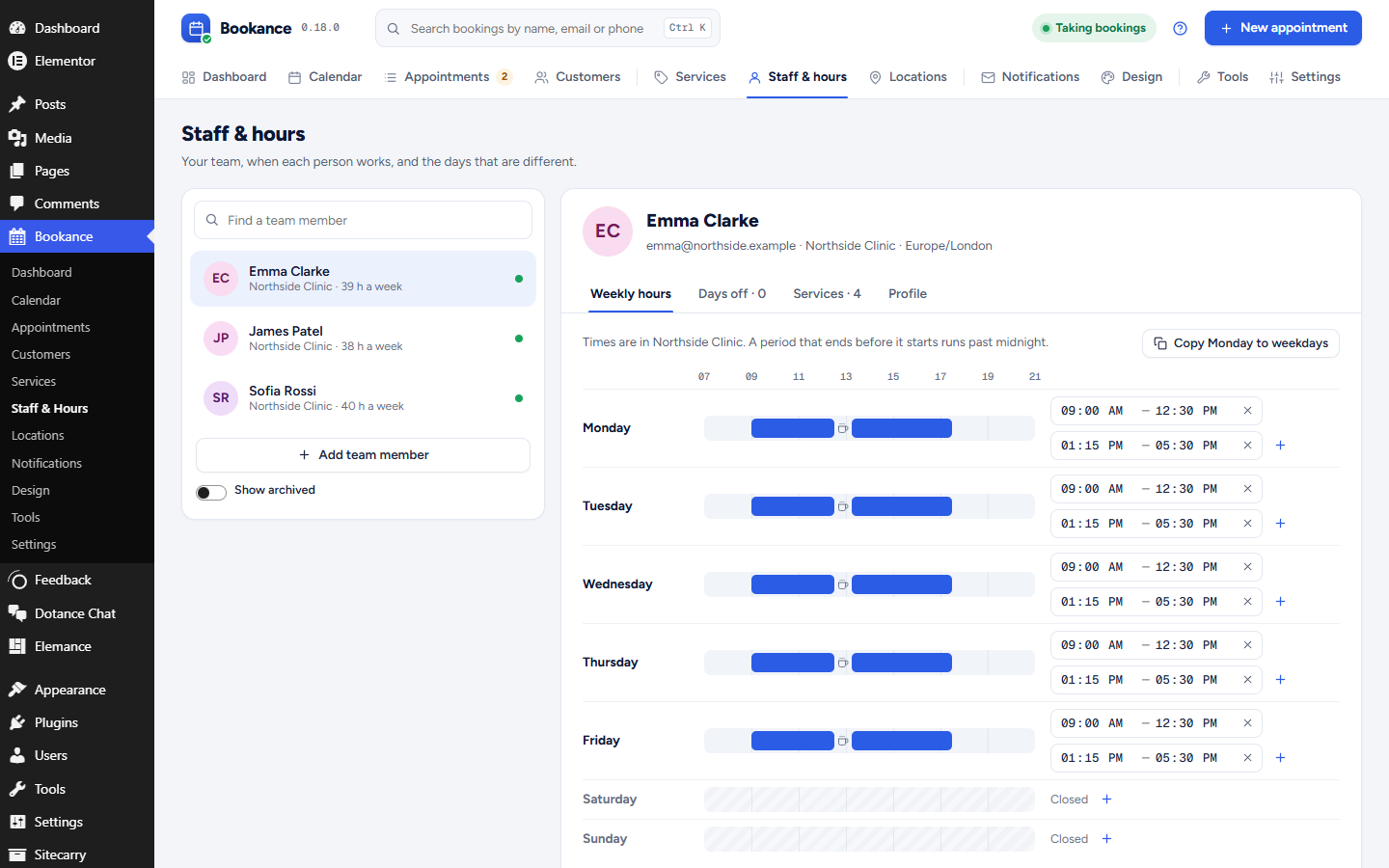
- Unlimited services, staff, appointments and customers — weekly hours, breaks and date overrides per staff member
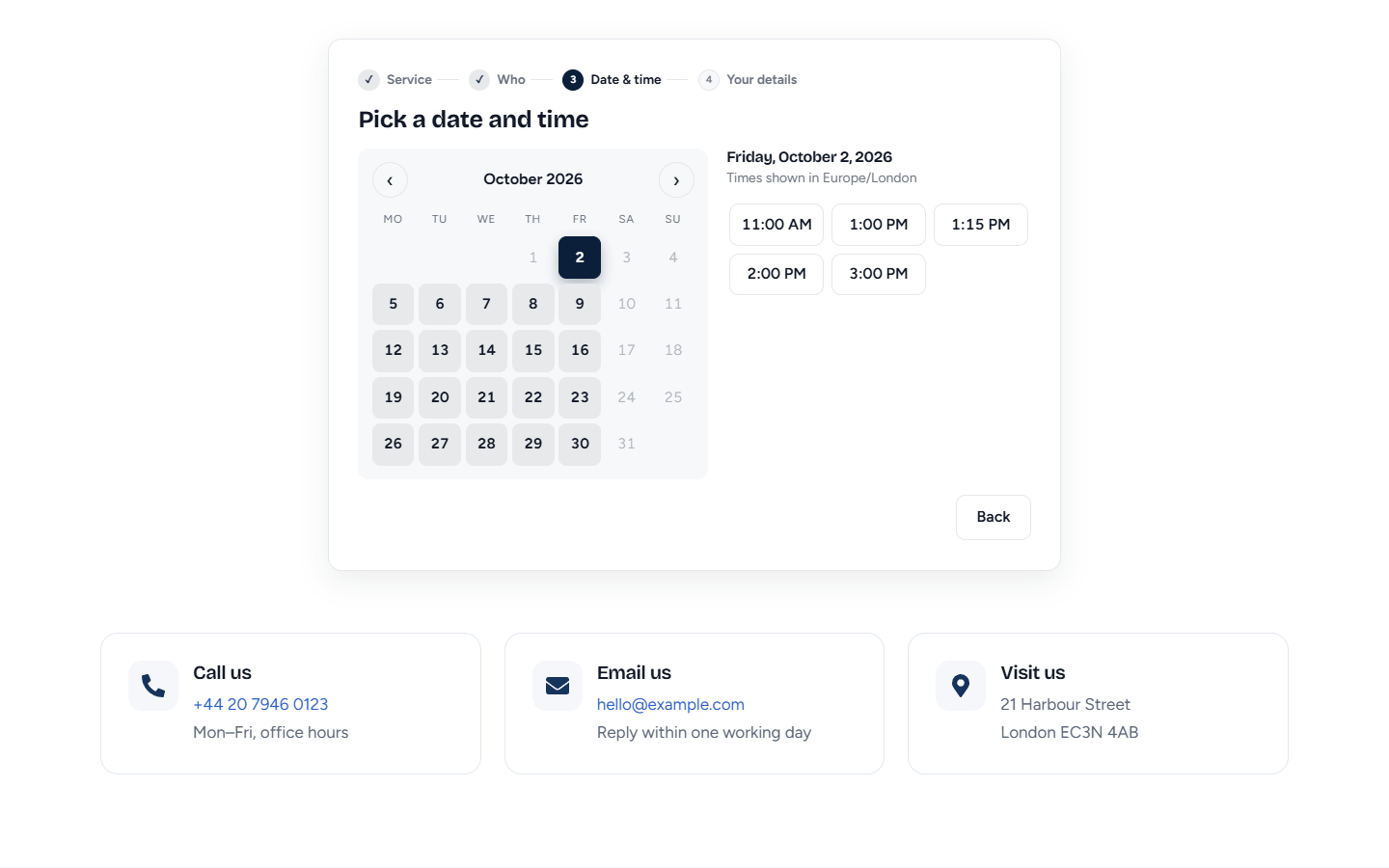
- Step-by-step booking form: service staff date & time details confirmation, with keyboard-accessible calendar, RTL support and theme-matching design tokens (
--bkc-*) - Timezone done right: in-person services show venue time, online services show the visitor’s time; daylight saving handled automatically
- Buffers before/after, minimum notice, booking window, slot step, group capacity
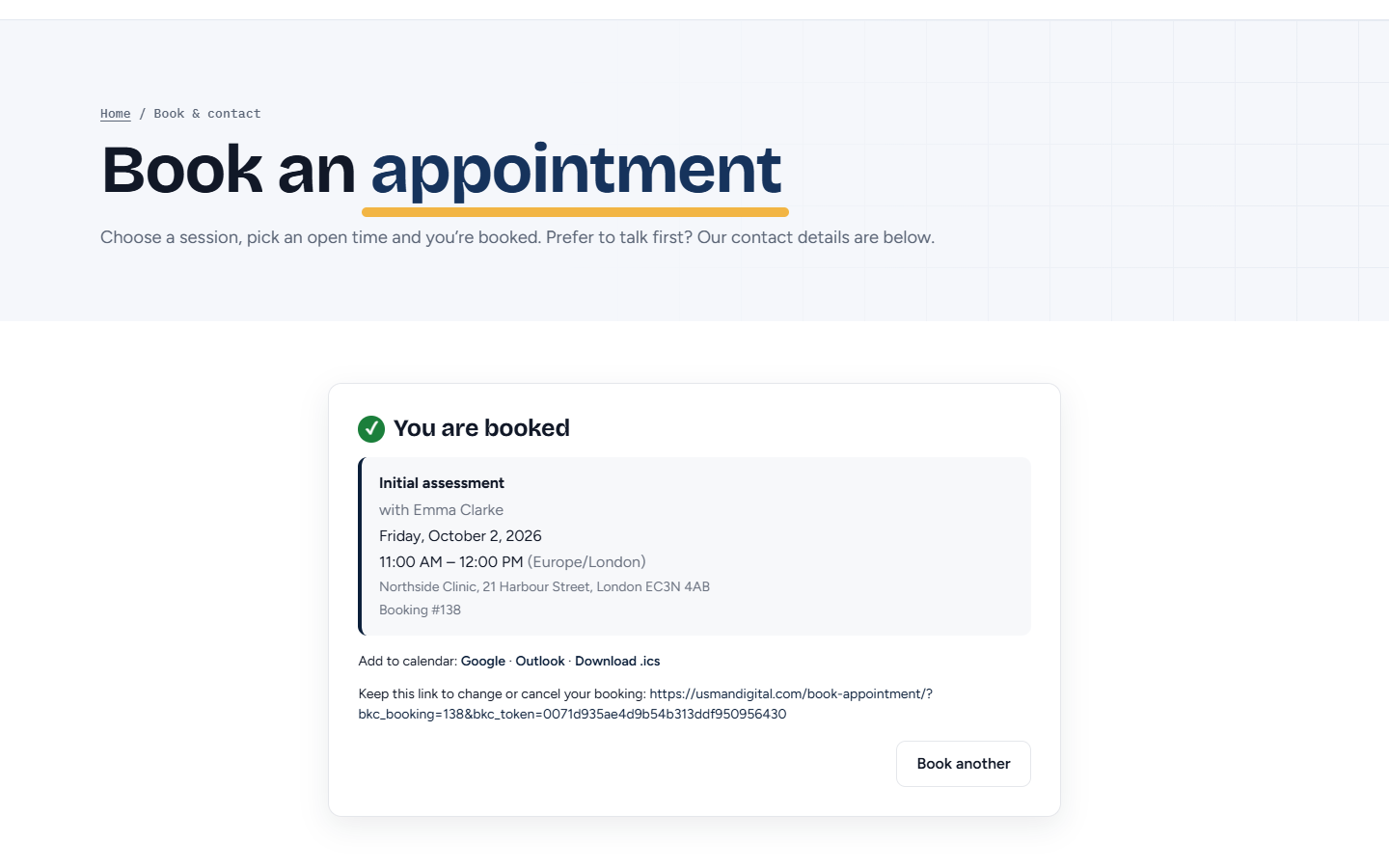
- Customer self-service link to reschedule or cancel; “Add to calendar” for Google, Outlook and .ics
- Google Calendar push: every booking lands in your own Google Calendar (connect with your own Google Cloud client — no third-party middleman)
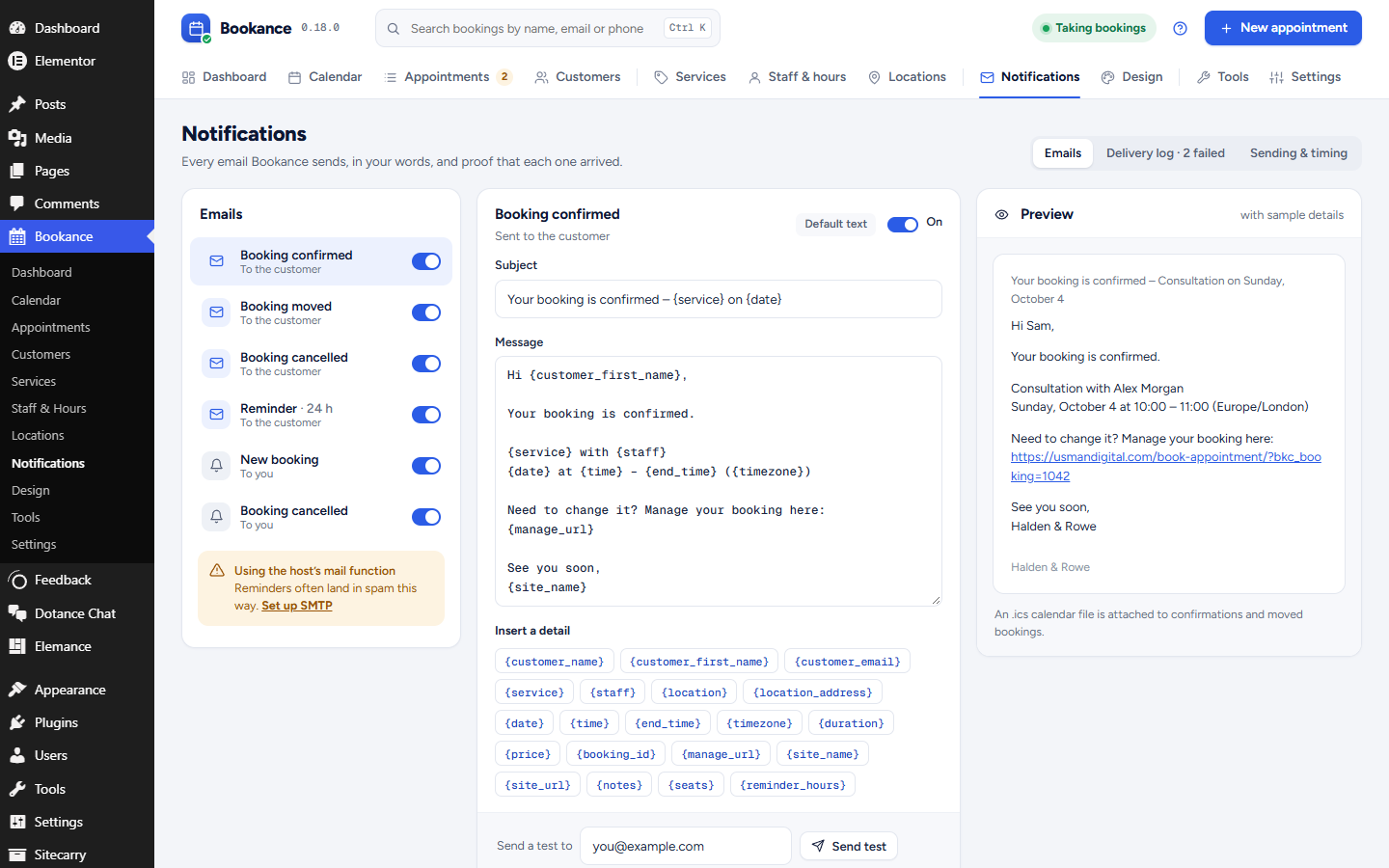
- Email notifications with merge tags for confirmation, reschedule, cancellation, reminders and admin alerts — with a send log, resend and test-send
- Built-in SMTP delivery (your own mail provider) so confirmations and reminders actually arrive; a test button shows the server’s real error if not
- Elementor Style tab with 45+ controls: every colour, font, radius and spacing of the form, per widget
- Locations with their own timezone and address; staff belong to a location and a form can be placed for one branch only
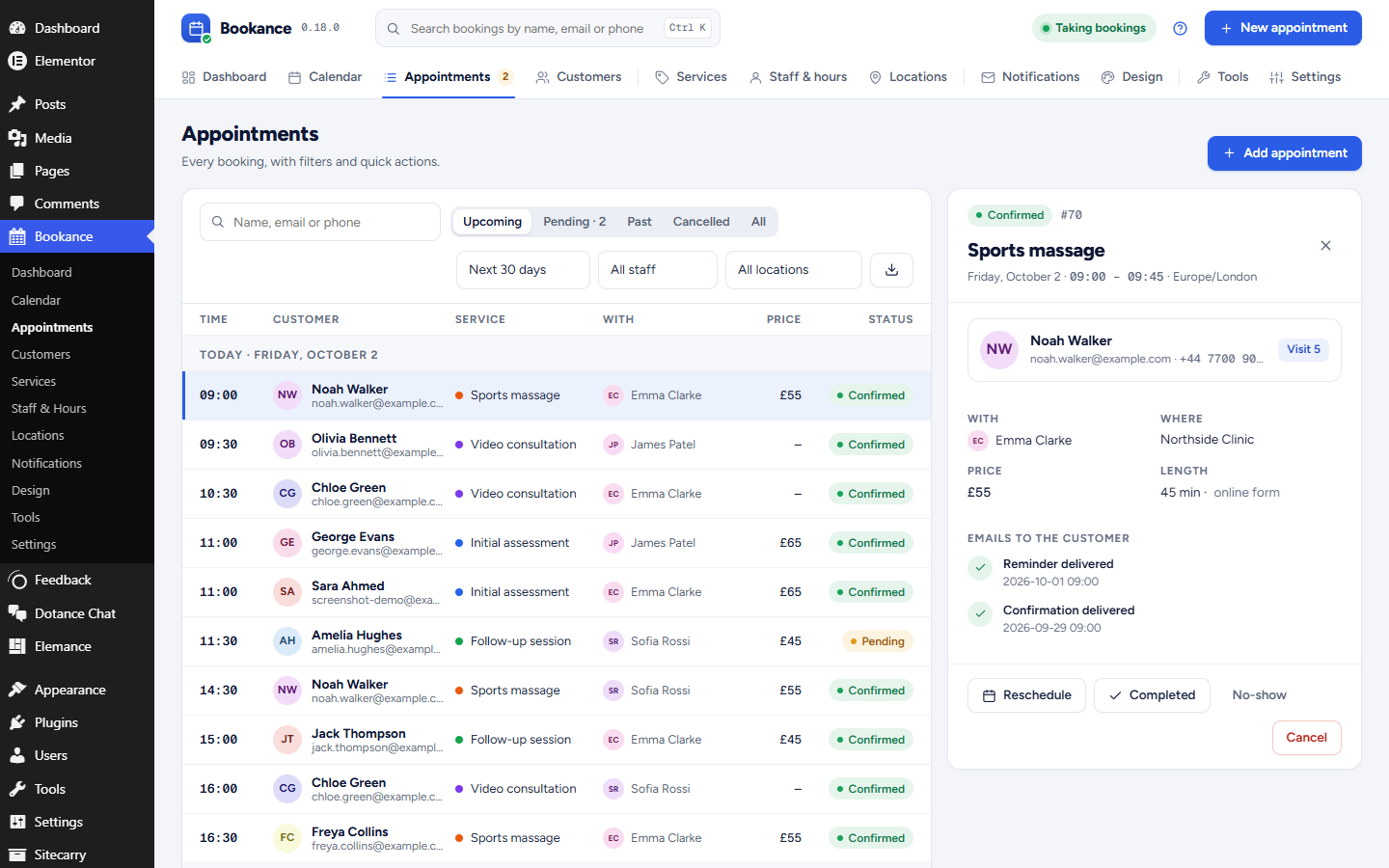
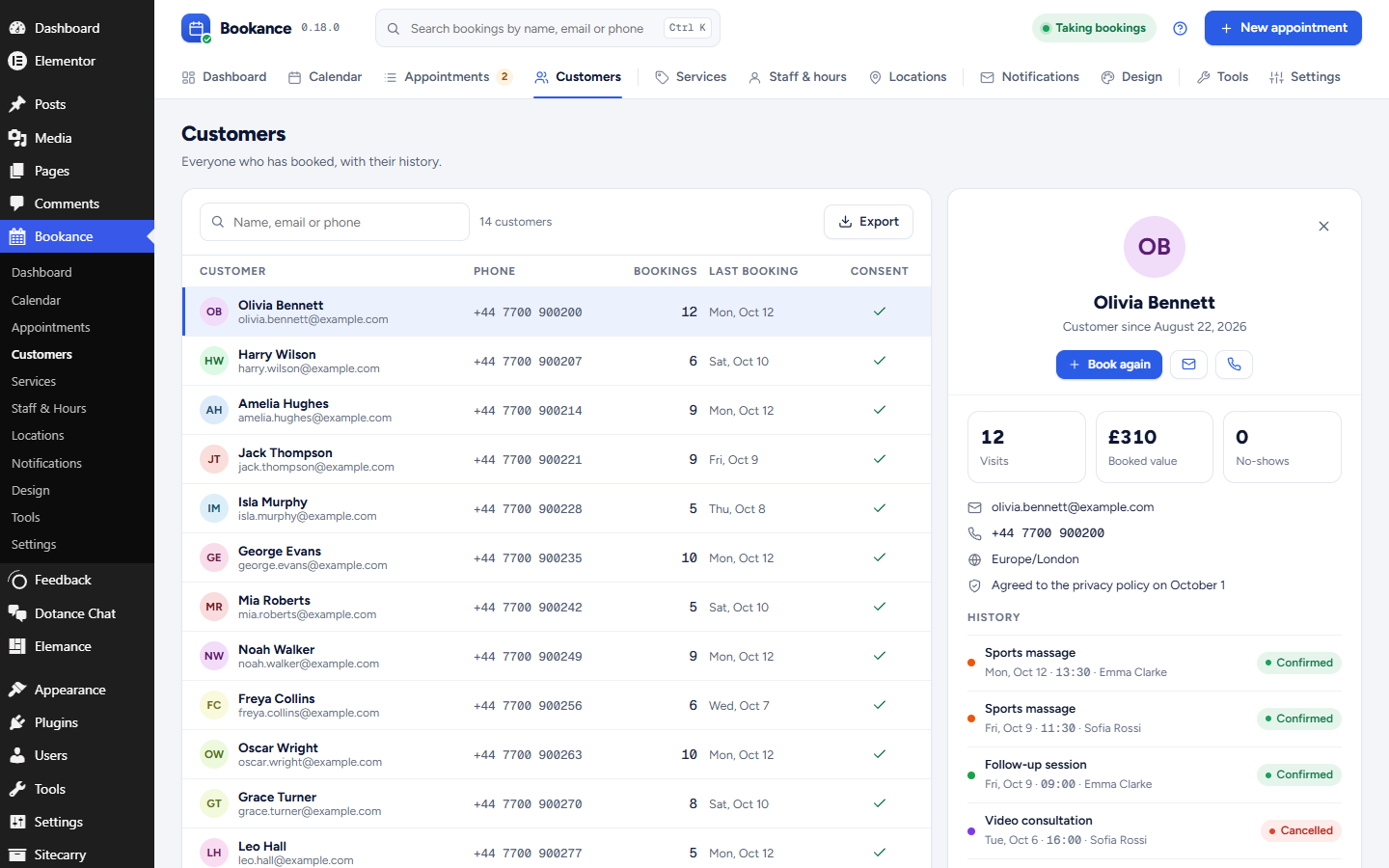
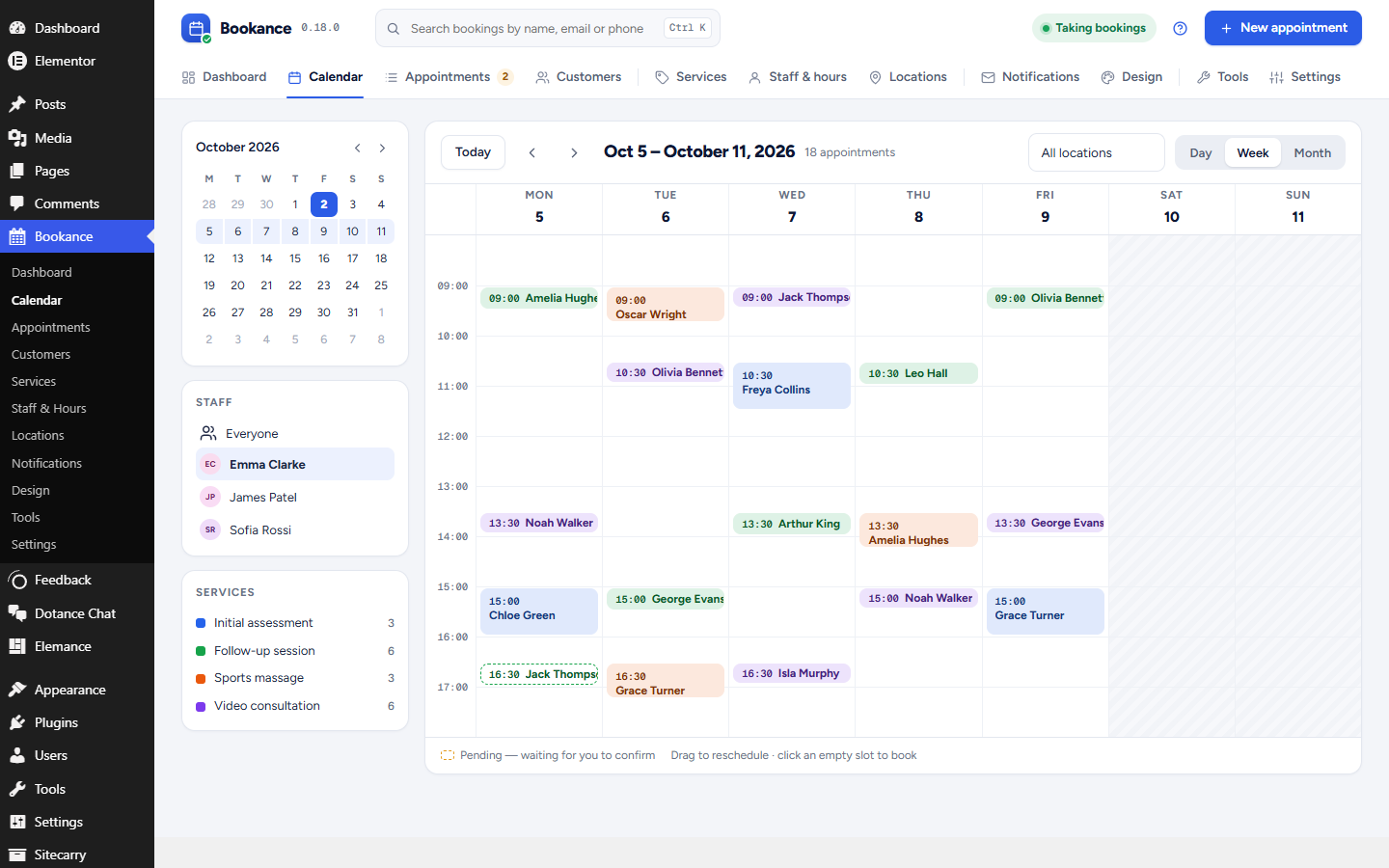
- Admin screens: dashboard, calendar (day/week/month with drag-to-reschedule), appointments (filters, manual booking, status changes), customers, services, staff & hours, locations, notifications, design, tools, settings
- Importers for BookingPress, Bookly and Amelia, plus CSV import for everything else
- CSV export of services, staff, customers and appointments, in the same columns the CSV import reads
- Privacy: WordPress personal-data export and erasure support, optional automatic anonymisation of inactive customers, clean uninstall option
- WP-CLI commands for status, seeding, availability, booking, notifications and imports
Coming in Bookance Pro
Online payments (Stripe, PayPal), deposits and coupons, two-way Google/Outlook calendar sync, SMS and WhatsApp reminders, packages, waitlists, round-robin staff assignment, webhooks and white-label. Pro is a separate plugin; nothing in this free plugin is locked.
Developers
The public REST API lives under bookance/v1. Every builder integration is a thin adapter over one PHP renderer, so adding another builder is one class. Compiled JavaScript ships with its readable source in assets/js/src. Action Scheduler is bundled unmodified under libraries/action-scheduler (GPL, the same library WooCommerce ships).
External services
By default the plugin does not send data to any third-party service. Emails are sent through WordPress’ own wp_mail(). The “Add to calendar” links (calendar.google.com, outlook.live.com) only open in the visitor’s browser when clicked.
SMTP (optional, off until you configure it). Under Bookance Settings Email delivery you can enter the SMTP server of your own email provider. When enabled, booking emails (or, if you choose, all WordPress email) are handed to that server instead of the host’s mail function. The credentials are stored only in your site’s database and nothing is sent anywhere other than the server you entered.
Google Calendar (optional, off until you connect it). Under Bookance Settings you can connect your own Google account through an OAuth client that you create in your own Google Cloud project. Once connected, the plugin calls the Google Calendar API (www.googleapis.com/calendar/v3, tokens from oauth2.googleapis.com) from your server to create, update and delete events for bookings: the service name, staff name, start and end time, booking number, the customer’s name, email, phone and notes, and the manage-booking link are sent. If “Invite the customer” is on, the customer’s email address is added as an event attendee and Google emails them an invitation. Tokens are stored only in your site’s database. Google’s terms: https://policies.google.com/terms — privacy policy: https://policies.google.com/privacy — Calendar API terms: https://developers.google.com/terms
Screenshots
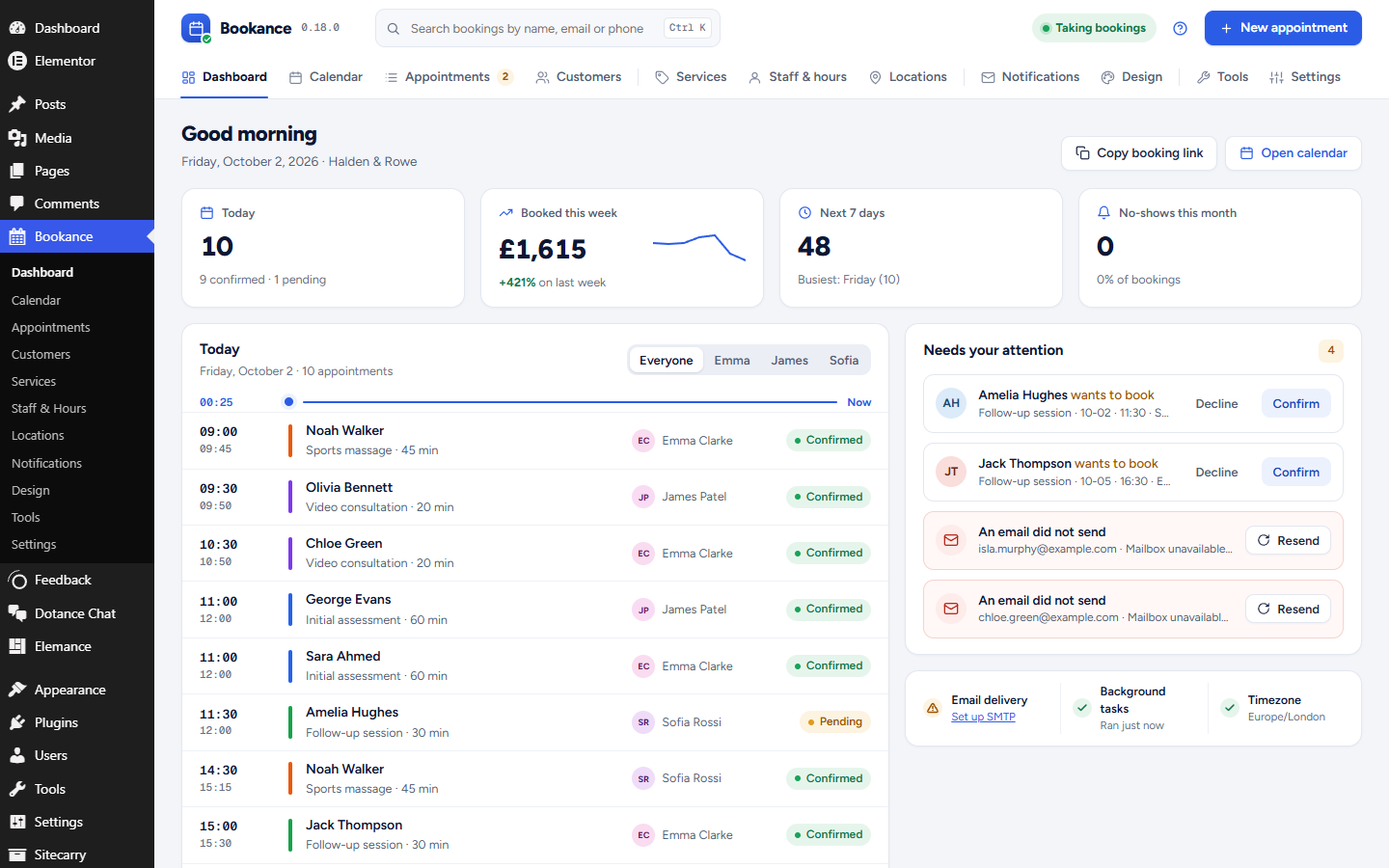
Blocks
This plugin provides 1 block.
- Booking Form Let visitors book an appointment. Pick a service and staff member, or let the visitor choose.
Installation
- Install and activate Bookance from Plugins Add New (or upload the ZIP).
- Go to Bookance Services and add a service; then Bookance Staff & Hours and add yourself with working hours.
- Put the booking form on a page: the “Booking Form” block, the Elementor widget under the “Bookance” category, the Beaver Builder module, the Breakdance / Oxygen element, or the
[bookance]shortcode. - Pick that page under Bookance Settings so emails link to it.
FAQ
-
Does it work with my theme?
-
Yes. The form inherits your theme’s font and text colour and exposes CSS variables (
--bkc-accent,--bkc-radius, …) for fine-tuning. Elementor users get colour and radius controls in the widget’s Style tab. -
Does it send reminders if my site has little traffic?
-
Bookance uses Action Scheduler for background work. On a very quiet site you should point a real cron job at
wp-cron.php(the Notifications screen warns you when tasks are stalling). -
Can I take payments?
-
Not in the free plugin yet. Bookings are confirmed with payment on arrival. Stripe and PayPal are part of Bookance Pro.
-
How do I move from BookingPress, Bookly or Amelia?
-
Keep the old plugin installed (it can be deactivated), open Bookance Tools and run the importer. Dry-run first; re-running is safe because imported rows are remembered. BookingPress (free) has no staff, so its services, working hours and breaks are brought in under one staff member named after your site; rename it afterwards.
-
Can I export my bookings?
-
Yes. Bookance Tools Export to CSV downloads services, staff, customers or appointments as a spreadsheet. The columns are the ones the CSV import reads, so the same file can be imported into Bookance on another site.
-
Which shortcode attributes exist?
-
[bookance service=”2″ staff=”any” location=”0″ layout=”wizard” show_price=”1″] —
staffaccepts a staff ID orany;locationlimits the form to one location’s staff;layoutiswizard,single,calendar-firstorbutton(addbutton_label="Book a table"for the button). -
Where can I see what is inside before installing?
-
Screenshots, what is inside, the release history and answers to setup questions are on the Bookance page at dotance.com.
Reviews
There are no reviews for this plugin.
Contributors & Developers
“Bookance Appointment Booking – Booking Calendar, Staff Scheduling & Email Reminders” is open source software. The following people have contributed to this plugin.
Contributors
Interested in development?
Browse the code, check out the SVN repository, or subscribe to the development log by RSS.
Changelog
0.18.2
- New animated Bookance icon in the admin header and setup wizard, and a new menu icon.
0.18.1
- Calendar: completed and no-show visits now stay on past days (shown muted, no-shows struck through) instead of disappearing; cancelled bookings still leave the calendar. Visits that are done can no longer be dragged.
0.18.0
- New look for every admin screen: a Bookance header with search (Ctrl K), a “Taking bookings” status and a New appointment button on every screen, and tabs grouped by job.
- Dashboard: today as a timeline with a “now” line, this week’s booked value against last week, bookings waiting for you to confirm, emails that failed, and the health of email delivery and background tasks.
- Appointments: grouped by day with a detail panel (customer, note, every email sent for the booking) and confirm, reschedule, complete, no-show and cancel in one place. Pending bookings brought in by an importer can now be confirmed.
- Calendar, customers, services, staff and hours, locations, notifications (with a preview of the email), design (preview in every layout and on a phone), tools and settings redesigned to match.
- Booking form: named steps, free days filled in on the calendar, a strip of days and three columns of times on phones, and the calendar-first layout now shows services, the calendar and the times side by side.
- Fonts for the admin screens (Figtree, Geist Mono, SIL Open Font License) ship with the plugin; nothing is loaded from outside.
0.17.1
- Imported appointments that are still ahead now get their reminder emails. Importing still sends no confirmation or admin emails, so customers are not told again about bookings they already made.
- New action for developers: bookance_appointment_imported, fired once for each appointment an importer brings in.
0.17.0
- New: BookingPress importer (Tools Import from BookingPress). Services, customers, working hours with breaks, and appointments with their status, price and paid amount; dry run first, safe to re-run.
- New: CSV export of services, staff, customers and appointments (Tools Export to CSV). Cells a spreadsheet would run as a formula are escaped, and the CSV import reads them back unchanged.
0.16.6
- Accessibility: the calendar day buttons used aria-pressed, which screen readers do not accept on a grid cell; the chosen day is now reported with aria-selected.
0.16.5
- The setup wizard no longer opens by itself after activation; start it from Bookance Dashboard Run setup wizard.
- Removed the Custom CSS box from the Design screen. Use Appearance Customize Additional CSS instead; the form’s design tokens (
--bkc-*) can be set there. - Booking management links (view, cancel, reschedule, .ics) now check the booking’s token in the REST permission callback.
0.16.4
- The plugin no longer creates a payments table it never used. Sites that have one from an earlier version lose it on uninstall, like the other tables.
- The plugin description no longer mentions payments, which this plugin does not take.
0.16.3
- Security: a booking sent straight to the API can no longer name a team member the service is not assigned to. The booking form never offered those combinations; now the API agrees.
- Security: a slot can no longer be held against an archived service or an inactive team member, which was a way to make a calendar look fully booked without booking anything.
- The availability endpoints are rate limited like the booking ones.
- Booking with an email address already on file returns the name you just typed instead of the one stored, so the form cannot be used to check whether an address is a customer.
- Searching bookings treats % and _ as characters you typed, not as wildcards.
- Calendar attachments are written with an unpredictable name in WordPress own temp location.
- Every query now passes its table name through $wpdb->prepare() with %i.
0.16.2
- Accessibility: the service and staff choices no longer carry list roles that screen readers reject on buttons.
- A booking form placed in a page no longer takes keyboard focus when the page loads, so the page does not jump to the form. Focus still moves to each step heading as the visitor goes through the steps, and into the popup when it opens.
0.16.1
- Admin design pass: a Bookance brand bar with screen navigation on every screen, page subtitles, redesigned cards, stat tiles, tables with initials avatars, badges, filters, tabs, modals and form controls; the dashboard gains a setup / quick-actions column. Notifications is now a template list with an editor beside it — click a merge tag to insert it at the cursor, see which templates are customised, test-send from the editor.
0.15.0
- Elementor: a full Style tab on the Booking Form widget — card, typography, buttons, calendar and time slots, service/staff cards, form fields, summary and alerts, spacing (45+ controls, all responsive where it matters). Anything left empty follows Bookance Design.
- SMTP: Settings Email delivery can send through your own SMTP server (host, port, TLS/SSL, authentication, From), for Bookance’s emails only or for all WordPress email, with a “Send test email” button that reports the mail server’s real error.
0.14.0
- Breakdance and Oxygen 6: a native “Booking Form” element (Bookance category) with service, staff, location, layout, button label and price controls, server-side rendered so the real form shows inside the builder. The setup wizard now recognises Breakdance/Oxygen.
0.13.0
- Locations: a Bookance Locations screen (name, address, phone, timezone), staff assigned to a location, the location’s timezone used for staff without one of their own, location filters on Appointments and Calendar,
{location}/{location_address}merge tags, the venue shown in the booking summary, and a Location control on the block, Elementor widget, Beaver module and shortcode (location="2") so a form can be placed for one branch only.
0.12.0
- Four booking-form layouts, in every builder and the shortcode: Step by step (wizard), Single page (one scrolling card with “Change” rows), Calendar first (Calendly-style: calendar up front, service and staff as dropdowns) and Button (a button that opens the form in an accessible popup, custom label).
0.11.0
- Calendar view: day / week / month, staff filter, colour per service, drag an appointment to reschedule (validated by the booking engine), click an empty slot to add an appointment, click an event for details and status actions.
0.10.0
- Phase 8: Google Calendar push (1-way) with your own OAuth client — connect in Settings, choose a calendar, optionally invite the customer; events created, updated and removed on booking, reschedule and cancel via background jobs;
wp bookance google.
0.9.0
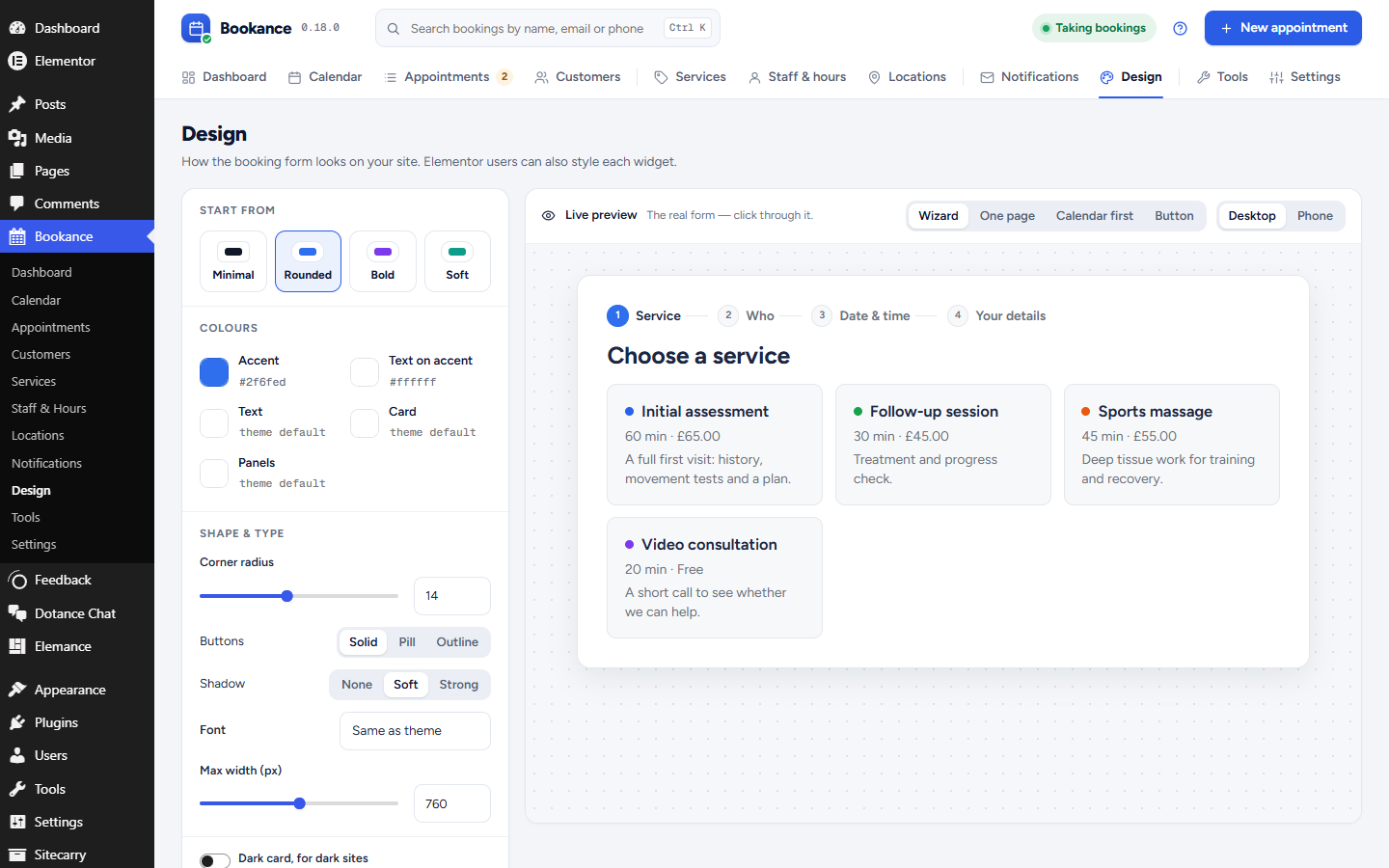
- Design pass: refreshed booking-form design (progress indicator, card, calendar, slots, buttons, motion) and a new Bookance Design screen with presets (Minimal, Rounded, Bold, Soft), colours, radius, font, button style, shadow, dark card, width, custom CSS and a live preview of the real form.
0.8.0
- Phase 3b: onboarding wizard — opens once after activation; timezone/currency/alerts, first service, you & hours, auto-created “Book online” page; re-run from the dashboard.
0.7.0
- Phase 6: importers (Bookly, Amelia, CSV) with dry run + idempotent re-runs, Tools screen, GDPR personal-data exporter and eraser (anonymise), privacy-policy text, retention setting with daily anonymisation,
wp bookance import. - WordPress.org prep: readme, translators comments, minimum WordPress 6.4.
0.6.0
- Phase 5: page-builder adapters — Gutenberg block (bookance/form), Elementor widget (Bookance category, accent/radius style controls), Beaver Builder module; “Add to calendar” links (Google, Outlook, .ics) on the booking confirmation.
0.5.0
- Phase 4: notifications — email templates with merge tags (confirmed, moved, cancelled, reminder, admin new/cancelled), reminders and retries via Action Scheduler (bundled), notification log with resend, .ics attachment + Google/Outlook links, Notifications admin screen,
wp bookance notify.
0.4.0
- Phase 3a: admin UI — Dashboard, Appointments (filters, close, manual booking), Customers, Services, Staff & Hours (weekly hours, date overrides), Settings; authenticated admin REST;
manage_bookancecapability.
0.3.0
- Phase 2: REST API
bookance/v1(catalog, availability, holds, bookings create/get/cancel/reschedule), customer find-or-create,[bookance]shortcode + renderer, Preact booking widget (wizard layout, manage mode, holds, alternatives on slot_taken, dark mode, RTL, keyboard calendar).
0.2.0
- Phase 1: booking engine — Period/Schedule/Availability (slot generation with buffers, capacity, min notice, DST-safe), atomic reservation with per-staff lock + unique slot_key, holds, reschedule/cancel,
wp bookanceCLI (status, seed, slots, reserve, hold, cancel, reschedule, reset).
0.1.1
- Fix: meta table was not created (index prefix longer than column). Caught by first real-site activation.
0.1.0
- Phase 0: bootstrap, autoloader, database schema (12 tables), versioned migrator, timezone engine, admin status screen, uninstall.