

Description
Blueprint Digital Image Optimizer is the media standard Blueprint Digital uses on the WordPress sites it builds. It converts, verifies, and keeps bulk conversions reversible. Three things set it apart from the rest of the category: every result is verified (size and PSNR) before the source is touched, bulk conversions can be undone for 30 days from the Media Library, and old image URLs keep answering with a 301.
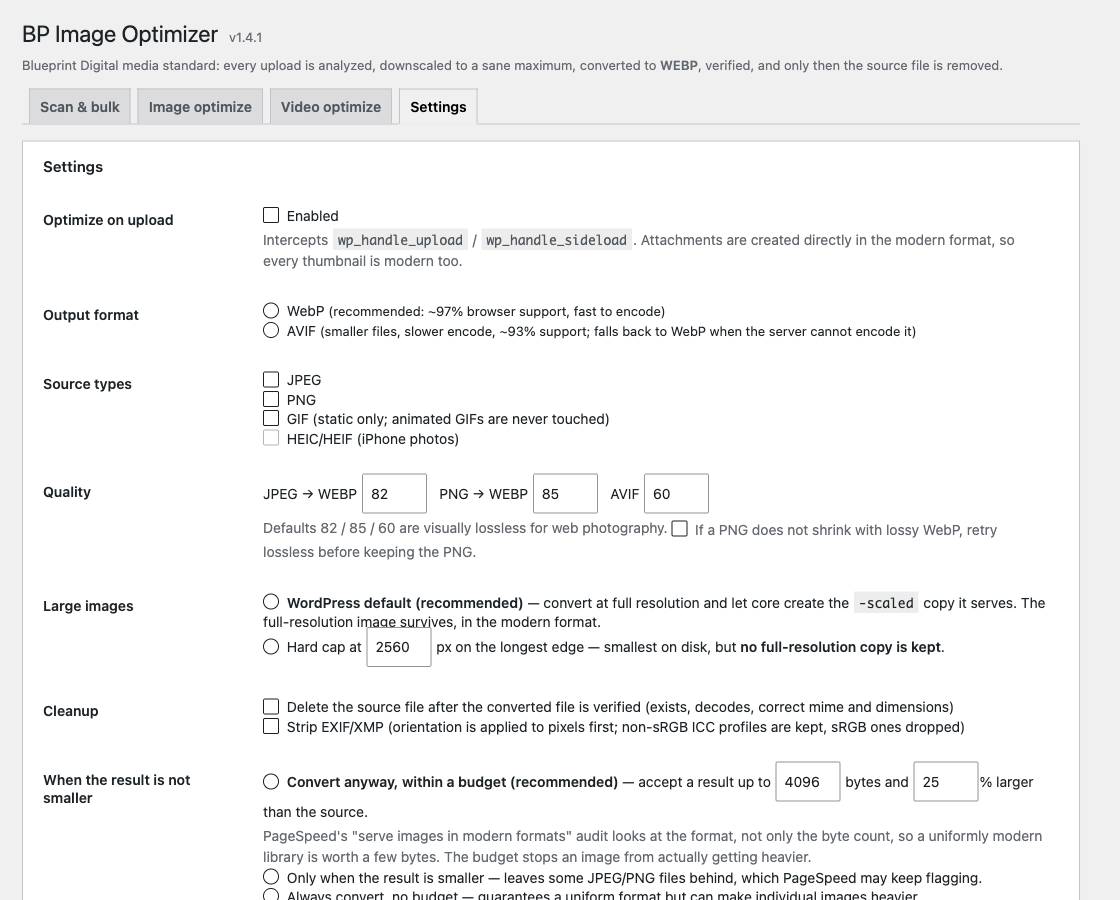
On upload. Every JPEG, PNG or HEIC is downscaled to a sane maximum (2560 px by default), converted to WebP (or AVIF where the server supports it), verified, and only then is the source removed. Upload-time conversions are final: the attachment is created already in the modern format, so there is no original to go back to. Keep your own copy if you need the source file.
In bulk. An existing library is converted in small batches from the admin, with a dry run first. Every reference in posts, post meta and options is rewritten to the new file. The original is set aside in a quarantine folder for 30 days (configurable), and the Media Library shows a Revert link on each converted image while it is there. Nothing is deleted the moment it is converted.
Verified, not assumed. A conversion is kept only when the result is smaller and still looks like the source (PSNR check). JPEGs that a previous optimizer already compressed hard are left alone instead of being degraded.
Old URLs keep working. A request for the old .jpg or .png path answers a 301 to the converted file.
Delivery. Hand-written <img> tags that point at an old file are served the converted one, and heavy videos are kept from preloading until someone presses play.
Video. The Video tab lists the heaviest videos, tells which ones lack a faststart index (they download almost entirely before the first frame), and gives a recipe for compressing them on your own machine; wp bpio video-replace swaps the file in with the same reversible quarantine. This plugin never runs ffmpeg on your server.
WP-CLI. wp bpio status, wp bpio optimize, wp bpio revert <id>, wp bpio trash, wp bpio video.
What it needs
- PHP 8.0 or newer with GD or Imagick that can write WebP (
wp bpio statustells you). - Enough free disk space for the quarantine: for 30 days the site holds both the original and the converted file of everything converted in bulk.
What it does not do
- It does not call any external service. Conversion happens on your server.
- It does not run any shell command. Video is analysed in PHP and replaced only by a file you compressed yourself.
Screenshots



Installation
- Upload the plugin folder to
/wp-content/plugins/or install it from Plugins Add New. - Activate it. New uploads are converted from this moment on.
- Open Media BP Image Optimizer. The Scan tab shows what the server supports and how many images are still in the old format.
- Run a dry run, then convert in batches. Keep the tab open while a run is in progress.
FAQ
-
Can I undo a conversion?
-
Bulk conversions, yes, for 30 days (the retention is a setting): Media Library Revert on the image, or
wp bpio revert <id>. Upload-time conversions, no: the original is removed before the attachment exists, so keep your own copy of anything you may need in its original format. -
Where are the originals kept?
-
In a folder under
wp-content/uploads/with an unguessable name, protected by anindex.phpand an.htaccess. After the retention window they are removed by a daily cron, or bywp bpio trash --purge. -
Why was an image left in the old format?
-
Because the WebP would not have been smaller without visibly degrading it. Those images are marked “kept” and can be forced from the Image optimize tab.
-
Does it work with other image optimizers?
-
Deactivate the other one first. Two plugins converting the same upload produce orphaned
.webpfiles by the thousand. -
Does the plugin phone home?
-
No. The plugin makes no request to any server other than your own site.
Reviews
There are no reviews for this plugin.
Contributors & Developers
“Blueprint Digital Image Optimizer” is open source software. The following people have contributed to this plugin.
Contributors
Translate “Blueprint Digital Image Optimizer” into your language.
Interested in development?
Browse the code, check out the SVN repository, or subscribe to the development log by RSS.
Changelog
1.5.2
- First directory review round: no shell command in this build (video is analysed in PHP and replaced from a file you compress yourself), the dismiss script of the notice is enqueued, time limits apply only to requests that encode, readme consistent about what can be undone.
1.5.1
- The heavy-video notice no longer promises a fix on servers that cannot re-encode video; it points to the list and the recipe instead.
1.5.0
- WordPress.org build: the quarantine stays inside wp-content/uploads, updates come from the directory.
- Escaping, sanitization and nonce annotations throughout the admin, as flagged by Plugin Check.
1.4.1
- Fixed: the quarantine record repair rewrote every record on hosts that expose the uploads directory under two names.
1.4.0
- Quarantine moved out of the web root on hosts that allow it; uploads are no longer quarantined.
- Cache purge once per request, on bulk end and on single conversions.
- Quarantine records corrupted by the reference rewrite are repaired automatically after upgrade.
1.3.1
- Files shared by two attachments are converted once and both attachments follow.
1.3.0
- Old image URLs answer a 301 to the converted file.
1.2.0
- Delivery layer for hand-written image tags; video preload control.
1.1.0
- Quarantine and revert.
1.0.0
- First release: convert on upload and in bulk, with verification.